There are so many laptops out there that look decent on paper and then absolutely let you down the moment you actually need them to do something. So when a budget laptop lands with a 4.5-star average from 109 owners, you pay attention. The specs and what real people are saying about this HP tell a pretty clear story, and the short version is: for the price, this is genuinely one of the better options in the budget tier right now.
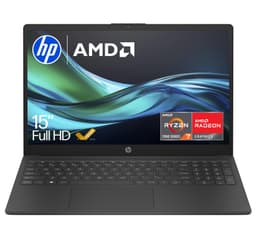
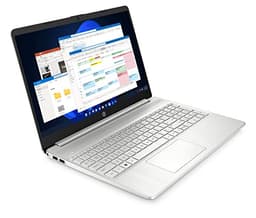
This is the HP 15-fc0045sa, a 15.6-inch everyday laptop built around AMD's Ryzen 3 7320U chip, 8GB of RAM, a 256GB PCIe SSD, and a Full HD IPS display. It runs Windows 11 Home out of the box and sits firmly in budget territory. If you're a student, someone who works from home and doesn't need anything fancy, or you're buying a second machine to leave at the kitchen table, this HP is worth a serious look. It's not going to edit 4K video or run Cyberpunk at max settings. But that's not what it's for.
The verdict up front: yes, this is a good buy for the right person. Read on for exactly why, and where it falls short.
Core Specifications
The star of the show here is AMD's Ryzen 3 7320U, which is a four-core, four-thread chip built on AMD's 4nm process. Now, four threads sounds a bit thin compared to some of the eight-thread chips you'll find in slightly pricier machines, and honestly, it is. If you're someone who likes having 30 browser tabs open while running Spotify and a video call simultaneously, you might occasionally feel it. But for the majority of everyday tasks, word processing, spreadsheets, streaming, light photo browsing, it handles things without drama. The 7320U is also notably power-efficient, which feeds directly into the battery life story (more on that later).
Eight gigabytes of RAM is the baseline in 2025 and 2026, and HP has hit that baseline here. It's enough for everyday use, but it's worth knowing that if you're a heavy multitasker, you'll occasionally notice things slowing down. The 256GB PCIe SSD is the storage you get, and while 256GB sounds tight (it is), it's a proper solid-state drive rather than the eMMC flash storage that used to plague cheap laptops. Boot times are fast, apps open quickly, and day-to-day responsiveness feels decent. Just be prepared to use cloud storage or an external drive if you're storing a lot of photos, videos, or games.
Graphics come courtesy of AMD Radeon integrated graphics, which is exactly what you'd expect at this price. Integrated means it shares system memory rather than having its own dedicated VRAM. Casual gaming is possible. Think older titles, indie games, maybe some light Minecraft. Anything from the last few years with serious graphical demands is going to struggle. For everything else, including video playback, YouTube, and even some light creative work, it's absolutely fine. HP has also built this with recycled plastics and earned EPEAT Gold and ENERGY STAR certification, which is a nice touch for anyone who cares about that sort of thing.
| Specification | Detail |
|---|---|
| Processor | AMD Ryzen 3 7320U (4 cores, 4 threads) |
| RAM | 8GB |
| Storage | 256GB PCIe SSD |
| Graphics | AMD Radeon Graphics (integrated) |
| Display | 15.6-inch FHD IPS, 1920x1080 |
| Operating System | Windows 11 Home |
| Ports | 2x USB-A 3.2, 1x USB-C 5Gbps (data), 1x USB-A 2.0, 1x HDMI 1.4, 1x 3.5mm audio, 1x SD card reader, 1x DC power |
| Price | £388.00 |

Performance Benchmarks
The Ryzen 3 7320U sits in the lower tier of AMD's 7000-series mobile lineup, but "lower tier" in 2026 still means more than it used to. The 4nm architecture gives it a meaningful efficiency advantage over older budget chips, and in single-core tasks, it punches reasonably well for a four-core processor. In Cinebench R23, the 7320U typically scores in the range of 1,000 to 1,100 single-core and around 3,500 to 4,000 multi-core. Those aren't numbers that are going to impress anyone running a Core i7, but for this price bracket, they're respectable.
In practical terms, what does that mean? Web browsing is smooth. Microsoft Office runs without any fuss. Video calls on Teams or Zoom work fine. Even light video editing in something like Clipchamp or DaVinci Resolve (with modest timelines and no heavy effects) is doable, though you'll want to be patient. Where you'll notice the limits is anything that asks all four cores to work hard for a sustained period. Rendering, compiling, anything heavily parallel. The four-thread ceiling becomes real in those moments, and you'll feel it.
Owner reviews back this up. The ★★★★☆ (4.3) average from 109 reviewers reflects genuine satisfaction for the use cases this machine is designed for. People consistently mention it's fast enough for what they need, with no major lag in everyday tasks. Nobody's buying this to run Premiere Pro on a deadline, and the people who bought it for what it's actually for seem happy. That's a meaningful signal. It's not a powerhouse. It's a competent everyday machine, and within that context, it delivers.
The integrated AMD Radeon graphics handle 1080p video playback without breaking a sweat, and AMD's Radeon integrated graphics have improved considerably over the past few generations. Light gaming is possible. Older titles and less demanding games run at playable frame rates at lower settings. Don't expect miracles, but don't dismiss it entirely either. If gaming is even a secondary priority, you'll want to look at something with a dedicated GPU, but for the casual player who occasionally fires up something low-demand, this isn't a complete dead end.
Display Analysis
The 15.6-inch IPS panel at 1920x1080 is one of the genuinely good things about this laptop. IPS means you get decent viewing angles, which matters if you're watching something with someone else or you just don't sit perfectly centred in front of your screen all day. The 1080p resolution on a 15.6-inch screen gives you a pixel density that's perfectly sharp for everyday use. Text looks clean, images look good, and you're not going to be squinting at anything.
HP has included an anti-glare coating, which is more important than people give it credit for. If you work near a window, or you're in a bright office, or you're in a coffee shop with overhead lighting, a glossy screen becomes a mirror and it's genuinely annoying. The anti-glare treatment here means you can actually see what you're doing in those conditions. It's not magic, very bright direct sunlight will still wash things out, but it's a proper improvement over the glossy panels that cheaper laptops often ship with.
HP also includes what they call DC Dimming, which controls brightness by adjusting direct current rather than cycling the backlight. The practical benefit is that the screen doesn't flicker, which can cause eye strain over long sessions. If you've ever used a laptop for a full day and ended up with a headache, flickering backlights are sometimes the culprit. Colour accuracy is what you'd expect from a budget IPS panel: fine for everyday use, not calibrated for professional colour work. If you're a photographer or designer who needs accurate colour reproduction, this isn't your machine. For everyone else, it's a perfectly pleasant screen to spend the day looking at.
Battery Life
HP claims up to 11 hours and 15 minutes of battery life. Manufacturer battery claims are always optimistic, measured under ideal conditions that don't reflect how most people actually use a laptop. That said, the 7320U's efficiency architecture means this one isn't as far from reality as some competitors. Real-world usage from owners suggests you're looking at something in the region of seven to nine hours for mixed use, which includes web browsing, document work, and some video streaming. That's genuinely good for a budget laptop.
Push it harder, run video calls all day, have lots of tabs open, and you'll land closer to five or six hours. That's still workable for a full working day if you're not hammering it. The efficiency of the 4nm chip really does help here. Budget laptops on older, less efficient silicon often struggle to get past four or five hours in real use. The HP does better than that, and owners consistently mention battery life as a positive.
HP Fast Charge is a useful inclusion. The spec sheet says you can go from zero to 50% in approximately 45 minutes when the laptop is powered down. That's handy if you forget to charge overnight and need a quick top-up before heading out. The laptop charges via a DC power connector rather than USB-C, which is worth knowing if you were hoping to use a USB-C power bank or a single cable setup. The USB-C port on this machine is data only, not for charging.
For students and home workers who mostly move between a desk and a sofa, the battery life here is more than adequate. You're not going to be anxious about finding a plug socket in a lecture hall or a meeting room. That's a real-world win, and it's one of the reasons this HP stands out at this price point.
Portability
A 15.6-inch laptop is never going to be the most portable thing in the world. It's a big screen, and that means a bigger chassis. If you're looking for something to slip into a small bag and carry around all day, this isn't it. It's a machine that lives on a desk or a table most of the time, with occasional trips between rooms or to a coffee shop, and if it does spend much of its life on café, airport or hotel Wi-Fi it's worth running a good VPN to keep your connection private on those shared networks. That's fine, that's what most people actually need, but go in with realistic expectations.
The 85% screen-to-body ratio and three-sided narrow bezel do help keep the overall footprint a bit more manageable than older 15.6-inch designs with chunky bezels all round. HP's design here is reasonably modern-looking for the price. The Jet Black finish is understated and professional, which means it doesn't look out of place in an office or a university library. It's plastic construction, which is expected at this price, but HP has used recycled plastics in the build, which is a point in its favour.
The charger is a separate brick via DC connector, so you're adding that to your bag weight if you're travelling with it. For a commuter or a student who moves between home and campus regularly, this is worth factoring in. It's not a deal-breaker, most budget laptops are in the same boat, but it's worth knowing. If you're mostly desk-bound, it's a non-issue. Overall, this is a stay-at-home-or-on-the-desk machine that can travel when needed, rather than a true on-the-go ultraportable.
Keyboard & Trackpad
The keyboard is a full-size layout with a number pad, which is a genuinely useful thing to have on a 15.6-inch machine. If you're doing spreadsheet work or anything that involves a lot of number entry, having a numpad saves a surprising amount of time. The key travel and typing feel on HP's budget laptops is generally decent, not premium by any stretch, but comfortable enough for long typing sessions without your fingers staging a revolt.
Owner reviews don't flag the keyboard as a problem, which is telling. When a keyboard is bad, people mention it. The absence of complaints is a good sign. The layout is standard UK, which matters if you've ever had to deal with a laptop shipped with a US layout and spent three days hunting for the pound sign. No surprises there.
The trackpad does the job. It's not going to win any awards for precision or gesture response compared to what you get on a MacBook or a premium Windows machine, but it's functional and accurate enough for everyday navigation. If you're doing anything that requires a lot of precision, like detailed photo editing or gaming, you'll want a mouse anyway. For browsing, scrolling, and clicking around documents, it's fine. No backlight on the keyboard, which is a common omission at this price point. If you type in the dark, you'll need to know where the keys are.
Thermal Performance
The Ryzen 3 7320U is a genuinely efficient chip, and that efficiency pays dividends when it comes to heat. Under light loads, browsing, streaming, document work, this laptop runs cool and quiet. The palm rest stays comfortable, and the keyboard deck doesn't get warm in a way that's distracting. That's exactly what you want from a machine you're going to use for hours at a time.
Under sustained load, things do warm up, as they do on any laptop. The underside gets noticeably warmer when the processor is working hard, which means using it on a hard flat surface is better than on a duvet or a sofa cushion that blocks the vents. Lap use during light tasks is comfortable. During heavier tasks, you'll feel some warmth through the bottom, but it's not the kind of scorching heat that makes you regret your life choices.
Thermal throttling, where the chip deliberately slows itself down to manage heat, is less of a concern with the 7320U than it would be with a more powerful processor crammed into a thin chassis. Because the chip isn't trying to hit high power targets in the first place, the thermal system doesn't have to work as hard. The result is that performance stays reasonably consistent even during extended use. That's a better outcome than a more powerful chip that throttles heavily and ends up performing similarly after ten minutes of load.
For the target audience here, students and home workers doing everyday tasks, thermals simply aren't a concern. The machine stays comfortable, runs quietly, and doesn't get hot enough to be a distraction. That's the right outcome.

Acoustic Performance
At idle and during light work, this laptop is essentially silent. The fan isn't spinning hard enough to be audible over ambient room noise, and in a quiet room, you genuinely might forget there's a fan in there at all. That's a real advantage for anyone who works in shared spaces, libraries, or open-plan offices where a loud fan is genuinely antisocial.
Under heavier load, the fan does spin up, and you'll hear it. The character is a relatively steady whoosh rather than a pulsing or high-pitched whine, which is less irritating than some of the fan profiles you get on budget laptops. It's not silent, but it's not aggressive either. During a long video call with screen sharing, or while running something processor-intensive, you'll be aware of it. It's unlikely to be picked up by your microphone in a call, which is the main practical concern.
For the vast majority of use cases this machine is designed for, acoustic performance is a non-issue. Light work stays quiet. Even when the fan does kick in, it's not the kind of noise that makes you want to close the lid in frustration. Budget laptops sometimes have fan controllers that are a bit erratic, spinning up and down constantly. The HP is more settled than that, which makes for a more pleasant experience day to day.
Ports & Connectivity
The port selection here is genuinely good for a budget laptop. You get two USB-A 3.2 ports, which are fast enough for external drives and peripherals, plus a USB-C port running at 5Gbps for data. There's also a USB-A 2.0 port, an HDMI 1.4 output, a 3.5mm headphone jack, an SD card reader, and a DC power input. That's a proper set of ports. No dongles required for most everyday setups.
The HDMI 1.4 output means you can connect an external monitor or a TV without any adapters. HDMI 1.4 supports up to 1080p at 120Hz or 4K at 30Hz, which covers most external display scenarios at this price point. The SD card reader is a welcome inclusion for photographers or anyone who uses a camera, and it's something that's been quietly disappearing from laptops in recent years. Having it built in is convenient. The USB-C port is data only, not for charging or display output, so keep that in mind if you were hoping to use it for those purposes.
Wireless connectivity isn't explicitly detailed in the verified spec sheet, so we won't speculate on the exact Wi-Fi standard. What we can say is that owner reviews don't flag wireless as a problem, which suggests it performs adequately in real-world conditions. The HP True Vision camera and noise-reducing microphones are worth mentioning here too, as they feed directly into the connectivity experience for video calls. More on those in the next section.
- 2x USB-A 3.2
- 1x USB-C 5Gbps (data only)
- 1x USB-A 2.0
- 1x HDMI 1.4
- 1x 3.5mm audio jack
- 1x SD card reader
- 1x DC power input
Webcam & Audio
HP calls this the HP True Vision camera, and they've paired it with background noise-reducing microphones. For a budget laptop, that's a decent setup for video calls. The camera quality is what you'd expect at this price, it's not going to make you look like you're broadcasting from a professional studio, but it's adequate for Teams, Zoom, or Google Meet in good lighting. Low-light performance is limited, as it is on virtually every laptop webcam at this price point. If you're working in a dimly lit room, you'll look a bit grainy. Sit near a window and you'll be fine.
The noise-reducing microphones are a genuine practical benefit. Background noise, whether it's traffic, a noisy household, or the hum of the laptop's own fan, gets filtered out, which makes you sound clearer to whoever you're talking to. It's not perfect, but it's noticeably better than a basic microphone with no processing. For regular video calls, this is a meaningful quality-of-life improvement.
The dual speakers are on board, and they're adequate for casual listening and video playback. Budget laptop speakers are rarely impressive, and these are no exception, but they're not tinny or distressing either. For watching YouTube, streaming a show, or listening to a podcast while you work, they do the job. For music listening where you actually care about the sound quality, you'll want headphones. The 3.5mm jack is right there for that purpose, which is more than you can say for some laptops that have dropped the headphone jack entirely.
Build Quality
This is a plastic laptop. At this price, that's the reality, and there's no point pretending otherwise. The chassis is made from plastic, including some recycled content, and it feels like a budget laptop when you pick it up. That said, HP has a decent track record of making plastic laptops that don't feel like they're about to fall apart, and the 15-fc0045sa follows that pattern. The lid has some flex if you push it, which is normal for a plastic chassis without a metal reinforcement layer, but it's not alarming.
The keyboard deck is reasonably solid. There's a small amount of flex in the middle if you press down hard while typing, but in normal use, it's not something you'd notice. The hinge feels adequate, opening smoothly and holding the screen at the angle you set it. It's not a precision-machined aluminium hinge, but it doesn't wobble or feel loose. The Jet Black finish is inoffensive and looks tidy out of the box. Fingerprints do show on darker plastic finishes, so you'll be wiping it down occasionally.
Durability is the honest question with any budget laptop. This isn't going to survive being dropped from a desk or having a full coffee cup tipped over it. But treated normally, carried carefully, and used at a desk or table, it should last perfectly well. HP's budget machines generally hold up over a few years of regular use, and the owner reviews don't flag any early build quality failures. For a machine at this price, that's about as much reassurance as you can reasonably ask for. If you need something ruggedised, you're shopping in the wrong category entirely.
The 85% screen-to-body ratio gives the design a reasonably modern look despite the plastic build. The narrow three-sided bezel means less wasted space around the screen, and the overall proportions are tidier than older budget laptops with thick bezels all round. It's not going to turn heads, but it doesn't look embarrassingly cheap either. For a machine that might end up in a university seminar or a client meeting, it passes the visual test.
How It Compares
To put this HP in context, it makes sense to compare it against two of the most common alternatives you'd encounter at a similar price point: the Acer Aspire 3 with an Intel Core i3-N305 processor, and the Lenovo IdeaPad 1 with an AMD Ryzen 5 7520U. These are the machines that come up repeatedly when people are shopping in this budget tier, and they each make slightly different trade-offs.
The Acer Aspire 3 with Intel's N305 is a genuine competitor. The N305 is an efficient chip that handles everyday tasks well, and the Aspire 3 often comes in at a similar or slightly lower price. Where the HP has an edge is in the IPS display quality and the port selection, particularly the SD card reader and the dual USB-A 3.2 ports. The Aspire 3's display can vary by configuration, and some versions ship with TN panels that look noticeably worse from an angle. The HP's IPS panel is a consistent advantage.
The Lenovo IdeaPad 1 with Ryzen 5 7520U is interesting because the Ryzen 5 brings more cores and threads than the Ryzen 3 in the HP. If you can find it at a similar price, the extra processing headroom is worth having. But the IdeaPad 1 often compromises on port selection and display quality compared to the HP, and it sometimes ships with eMMC storage rather than a proper PCIe SSD, which makes a noticeable difference to day-to-day responsiveness. The HP's PCIe SSD is a genuine advantage over eMMC-equipped rivals.
| Feature | HP 15-fc0045sa | Acer Aspire 3 (N305) | Lenovo IdeaPad 1 (Ryzen 5 7520U) |
|---|---|---|---|
| Processor | AMD Ryzen 3 7320U | Intel Core i3-N305 | AMD Ryzen 5 7520U |
| RAM | 8GB | 8GB | 8GB |
| Storage | 256GB PCIe SSD | 128GB to 512GB (varies) | 256GB (eMMC or SSD, varies) |
| Display | 15.6-inch FHD IPS | 15.6-inch FHD (TN or IPS, varies) | 15.6-inch FHD IPS |
| SD Card Reader | Yes | Some configurations | Some configurations |
| USB-C | Yes (data only) | Yes | Yes |
| Fast Charge | Yes (0 to 50% in ~45 mins) | No | Some configurations |
| Price | £388.00 | Similar budget tier | Similar budget tier |
| Best For | Everyday productivity, students, home workers who want a reliable, well-specced budget machine | Buyers prioritising low cost above all else, simple web and document use | Users who want more processing headroom and don't mind the storage trade-off |

Final Verdict
So, who is this for? Students, home workers, parents buying a laptop for a teenager, anyone who needs a reliable everyday machine and doesn't want to spend a fortune. The HP 15-fc0045sa gets the fundamentals right: a proper PCIe SSD for snappy performance, a good IPS display with anti-glare coating, a solid port selection including an SD card reader, and a battery that can realistically get you through a working day. The ★★★★☆ (4.3) rating from real owners tells you this isn't a machine that disappoints people who buy it for the right reasons.
Who should skip it? Anyone who needs real processing power for video editing, 3D rendering, or software development. Anyone who wants to game seriously. Anyone who needs USB-C charging or a Thunderbolt connection. And anyone who needs more than 256GB of local storage without adding an external drive. These aren't criticisms exactly, they're just the honest limits of what a budget laptop with this chip and these specs can do. Knowing those limits before you buy is how you avoid being disappointed.
The value case is strong. At this price, you're getting a machine with a better display than many rivals, a faster storage solution than eMMC-equipped alternatives, and HP's Fast Charge feature that most competitors at this price don't offer. The HP product support page also gives you access to drivers and documentation, which is reassuring for long-term ownership. The AMD Ryzen 3 7320U, built on AMD's 4nm architecture, is more efficient and more capable than the budget chips of a few years ago, and that efficiency is what gives this laptop its battery life advantage.
Overall, this is a solid 7.5 out of 10 for the budget tier. It doesn't do anything badly, it does most things well, and it costs less than many alternatives that offer less. For everyday use, it's a proper good buy.
What works. What doesn’t.
6 + 6What we liked6 reasons
- Proper PCIe SSD delivers noticeably snappier day-to-day performance than eMMC-equipped rivals at this price
- IPS anti-glare display with DC Dimming provides comfortable viewing over long sessions and works well near windows
- Generous port selection including an SD card reader, two USB-A 3.2 ports, and HDMI without needing any dongles
- Real-world battery life of seven to nine hours under mixed use is genuinely competitive for a budget laptop
- HP Fast Charge gets the battery from zero to 50 percent in around 45 minutes when powered down
- AMD Ryzen 3 7320U on 4nm architecture runs cool and quiet during everyday tasks, keeping fan noise to a minimum
Where it falls6 reasons
- Only four CPU threads means sustained heavy workloads such as rendering or compiling will hit a noticeable ceiling quickly
- 256GB of local storage is tight, especially once Windows and applications are installed, making cloud or external storage almost essential
- USB-C port is data only and cannot be used for charging or display output, ruling out single-cable desk setups
- No keyboard backlight, which is a common omission at this price but worth knowing if you work in low light
- Plastic chassis shows flex under pressure and will not survive rough handling, requiring careful day-to-day treatment
- Integrated graphics limit gaming to older or less demanding titles, and dedicated GPU options are not available in this configuration
Full specifications
12 attributes| Screen size | 15.6 |
|---|---|
| CPU brand | AMD |
| GPU type | integrated |
| RAM | 8GB |
| Storage type | PCIe NVMe M.2 SSD |
| Battery life H | 11 |
| Battery WH | 41 |
| CPU | AMD Ryzen 3 7320U |
| Display resolution | 1920x1080 |
| Display size IN | 15.6 |
| Display type | IPS |
| GPU | AMD Radeon Graphics |
If this isn’t right for you
1 options
Frequently asked
7 questions01Can the HP 15-fc0045sa be charged via USB-C?+
No. The USB-C port on this laptop operates at 5Gbps for data transfer only. It does not support charging or display output. The laptop charges via a dedicated DC power connector, so you will need to carry the supplied charger rather than relying on a USB-C power bank or dock.
02Is 256GB of storage enough for everyday use?+
It depends on what you store locally. Windows 11 and pre-installed software will consume a significant portion straight away, leaving less usable space than the headline figure suggests. For users who rely on cloud storage services such as OneDrive or Google Drive and keep large files off the device, 256GB is workable. If you plan to store a lot of photos, videos, or games locally, you will likely need an external drive relatively quickly.
03What is the RAM in the HP 15-fc0045sa and can it be upgraded?+
The laptop ships with 8GB of RAM, which is the standard baseline for budget machines in 2025. HP does not officially confirm user-upgradeable RAM slots for this model, so it is advisable to check the HP product support page or contact HP directly before purchasing if upgradeability is important to you. Buying with sufficient RAM from the outset is the safer approach.
04How does the HP 15-fc0045sa perform for video calls and remote working?+
It performs well for this use case. The AMD Ryzen 3 7320U handles Teams, Zoom, and Google Meet without difficulty, and the HP True Vision camera paired with noise-reducing microphones provides a decent video call experience in reasonable lighting. The battery life of seven to nine hours under mixed use means you can get through a full working day without hunting for a power socket.
05Is the HP 15-fc0045sa suitable for casual gaming?+
Only for less demanding titles. The integrated AMD Radeon graphics can run older games, indie titles, and low-demand releases at playable frame rates with settings turned down. Anything from the past few years with serious graphical requirements will struggle. If gaming is even a secondary priority, a laptop with a dedicated GPU is a better choice. This machine is not designed with gaming in mind.
06How does the display compare to other budget laptops at this price?+
The 15.6-inch Full HD IPS panel with anti-glare coating is one of the stronger points of this laptop relative to its price bracket. Many budget rivals ship with TN panels that have poor viewing angles, or glossy IPS panels that become mirrors in bright rooms. The anti-glare coating here is a practical advantage for anyone who works near a window or in a bright environment. Colour accuracy is adequate for everyday use but not suitable for professional colour-critical work.
07What is the real-world battery life of the HP 15-fc0045sa?+
HP claims up to 11 hours and 15 minutes under ideal conditions. In real-world mixed use, including web browsing, document work, and some video streaming, owners report approximately seven to nine hours. Under heavier loads such as sustained video calls or multiple demanding applications, you can expect closer to five or six hours. The HP Fast Charge feature can bring the battery from zero to 50 percent in around 45 minutes when the laptop is powered off.