VIVID·REPAIRS/THE FIELD GUIDE/LAPTOPUpdated 27 September 2026Prices live from Amazon UK
Best of · UK · Field of 7
Best Lightweight Laptops Under £1000
By the Vivid Repairs deskUpdated 27 September 20267 ranked picks5,545 owner ratings read
As an Amazon Associate we may earn from qualifying purchases. We have not handled these products. Everything below is judged on published specifications, the owner ratings on the UK listings and our own product reviews, and the ranking stays independent of what any of them pay.
As an Amazon Associate, we may earn from qualifying purchases. Our ranking is independent.
Apple 2025 MacBook Air 13-inch Laptop with M4 chip: Built for Apple Intelligence, 13.6-inch Liquid Retina Display, 16GB Unified Memory, 256GB SSD Storage, 12MP Center Stage Camera, Touch ID; Midnight
Amazon confirms the live price, seller, stock and delivery. Prices here are read from the live listing through the day; a pick Amazon cannot supply is marked as such, and where the list has one in stock it is offered.
vividrepairs.co.uk / best-lightweight-laptops-under-1000Updated 27 September 2026 · Prices from the live Amazon UK listing
§ The field
Seven picks, on one page
Ranked on fit for the job in the title, not on raw specification. Tap any one to jump to the argument for it. Prices are the live Amazon UK figure, read today; a pick with no figure is out of stock and says so in its entry.
Class-leading battery life that holds up well in real-world mixed use, well beyond most competing thin-and-light Windows laptops
Completely fanless design means absolute silence under light to moderate loads, with no fan noise ever
M4 chip delivers exceptional performance-per-watt, beating current Intel Core Ultra 7 laptops in single-core benchmarks with no active cooling
Where it gives up
256GB base storage fills up quickly under macOS Sequoia, particularly for anyone in the Apple ecosystem with photos, apps, and media. Only two Thunderbolt USB 4 ports and no SD card slot, HDMI, or USB-A means a hub is essential for users with more than minimal peripherals.
Rated 4.7 by 837 owners. Our review scores it 8.0.
Snapdragon X Plus efficiency delivers credible all-day battery life that outpaces most Intel rivals at this price
2560x1600 IPS panel at 214 ppi produces sharp, detailed visuals with wide viewing angles and good colour for everyday use
Generous port selection including two USB 4 Type-C, two USB 3.2 Type-A, and full-size HDMI 2.1 reduces dongle dependence
Where it gives up
Integrated Adreno GPU rules out gaming beyond light or older titles and limits GPU-accelerated creative work. RAM is almost certainly soldered, making 16GB a hard ceiling with no upgrade path.
AMD Ryzen 7 8840HS delivers genuinely strong multi-threaded CPU performance, outpacing most Intel Core Ultra 5 competitors at this price
AMD Radeon 780M integrated graphics handles light creative work and casual gaming better than Intel Iris Xe alternatives
Solid aluminium build with a reliable 360-degree hinge, good keyboard feel, and a large precision trackpad
Where it gives upIPS display at around 300 nits struggles in direct sunlight and cannot match the contrast or colour depth of OLED rivals. RAM is likely soldered and cannot be upgraded, so 16GB is your permanent ceiling.
16:10 FHD+ WVA display gives more vertical space than most rivals at this price
Ryzen 7 7730U handles heavy multitasking without complaint
16GB LPDDR4x RAM is the right amount for modern productivity
Where it gives upRyzen 7 7730U is Zen 3, not the latest AMD architecture. Integrated graphics only - not suitable for serious gaming or GPU-intensive creative work.
Live price, checked today. Amazon confirms stock and delivery.
§ Method
How we chose
The rules this ranking ran under, in plain sight: what we read, what we weighed and what no merchant can move.
How we picked
Our editors evaluated 7 Laptop options against the criteria readers actually weigh up: price, real-world performance, build quality, warranty, and UK availability. Picks lean toward what we'd recommend to a friend buying today, not specs-on-paper winners.
Editorial contextEditor notes from individual reviews, not press releases.
Live UK pricingRefreshed from Amazon UK twice daily.
No paid placementsAffiliate commission doesn't change what wins.
The full guideEverything behind the shortlist above: the spec sheet, the write-ups in full, our method and the verdict.
§ Editorial · The full guide · five proofs, nothing hidden
The Doubt Index.
The shortlist told you what we picked; this zone shows the working. Come in through whichever doubt you’re carrying, or read straight down; we’d rather you checked us than trusted us.
Here’s the sheet the desk works from, kept deliberately factual. Every row is written to be checked against the retailer’s current listing, and you should check. The table scrolls sideways inside its own frame; the page underneath stays still.
Scroll sideways →8 rows · 5 columns · Prices swap to the live figure at render
You can, and you should. What follows is the part a sheet can’t do: the working between what these products have and what your desk actually needs, kept word for word.
Buying a light laptop used to mean paying a premium and giving up ports, speed or battery to shave off a few hundred grams. Not any more. The Best Lightweight Laptops Under £1000 now cover fanless Apple machines, ARM-powered Windows ultraportables, Ryzen 2-in-1s and even a genuinely premium Chromebook, most of them landing between 1.17kg and 1.4kg. We compared eight of them on the things that actually matter when a laptop lives in a bag: weight on record, battery figures, panel type, port count and what you give up to hit the price. Some carry real compromises. We say so. Here's how they rank, and who each one is for.
Buying Guide: What to Look For
Weight comes first, since that's why you're here. Anything on record between 1.17kg and 1.4kg qualifies as easy to carry daily. The Samsung Chromebook Plus is the featherweight at 1.17kg; the HP Envy x360 is the heaviest with a figure at 1.39kg, and it earns the extra grams by being a full touchscreen 2-in-1.
Battery. Marketed hours are best-case. Apple rates both Airs at up to 18 hours and ASUS rates the Vivobook at up to 20, and those three lead on efficiency because the M-series and Snapdragon chips sip power. Real mixed use is always lower. The HP Envy's marketed 14h 45m, per our review, falls well short in practice, so weight the battery claim against the chip type, not the number alone.
Panel. This splits the field. AMOLED on the Samsung Galaxy Book3 and Chromebook Plus gives true blacks and punchy colour. IPS on the MacBook Airs and HP Envy is sharp but flatter in contrast. The Dell's WVA and the Lenovo's TN are the weakest here for colour and angles, fine for text, less so for photos.
RAM and storage. On every laptop here the RAM is soldered, so what you buy is what you keep. 8GB (M1 Air, Chromebook, Lenovo) is fine for light work; 16GB (M4 Air, ASUS, Samsung, HP, Dell) gives real headroom for tabs and media. For storage, 1TB on the ASUS and HP dwarfs the 256GB base on the Airs, which fills fast.
Ports. The biggest daily annoyance. Both MacBook Airs give you two USB-C and nothing else, so budget for a hub. The ASUS, HP, Dell and Lenovo all include USB-A and HDMI, which saves the dongle bag. Decide whether macOS is worth carrying an adapter for.
Mistake to avoid: buying on marketed battery hours alone. Pair the claim with the chip and the panel, and you'll get a machine that lasts the way you expected.
Seven write-ups, none folded away. We don’t lab-test, so every line below sticks to what can be defended: the published sheet, the owner ratings on the UK listings and our own reviews.
Start with the thing that decides this machine: it has no fan. The M4's 10-core CPU (four performance cores, six efficiency) sits under a fanless lid, so it makes zero noise under light to moderate loads. For a laptop that spends its life open on a train tray or a shared desk, silence is a real feature, not a spec-sheet footnote. Our review lists class-leading battery life that holds up in mixed use, backed by Apple's 18-hour rating and a 53Wh cell. That's the reason this one leads the eight.
The 16GB of LPDDR5 unified memory is the other quiet win. Our review notes it punches above equivalent DDR5 setups in comparable Windows machines, which matters because the RAM is fixed. You cannot add more later. The 13.6-inch Liquid Retina panel runs at 2560x1664 and Apple rates it at 500 nits, fine indoors but, as our review notes, it can fall short in direct sunlight and lacks the true blacks of the AMOLED screens on the Samsung Galaxy Book3 and the Chromebook Plus lower down this list.
The 12MP Center Stage webcam is a genuine step up. Our review calls it a clear improvement on the 1080p cameras fitted to most Windows laptops at this price, so if video calls are a daily thing, this beats the 720p unit on the M1 Air below. The keyboard and Force Touch trackpad are, per our review, among the best on any laptop at any price.
Now the honest part. The 256GB base storage fills fast under macOS Sequoia, especially if you're already deep in the Apple ecosystem with photos and apps synced across devices. And with only two Thunderbolt 4 ports plus a headphone jack, there's no USB-A, no HDMI and no SD slot, so a hub becomes essential the moment you plug in more than a charger. The ASUS Vivobook next on the list solves that with a full-size HDMI and two USB-A ports for less money, if ports matter more to you than macOS. But for outright polish, battery and silence in a 13.6-inch body, nothing here matches it. Amazon UK owners rate it 4.7 stars from 812 ratings. See our full Apple MacBook Air M4 review for the detail.
Pros
Fanless design means literal silence under everyday loads
Apple rates 18 hours from the 53Wh battery
16GB unified memory as standard, not an upgrade
MagSafe 3 charging keeps both USB-C ports free
Supports up to two external displays
Cons
256GB fills quickly and storage is not upgradeable
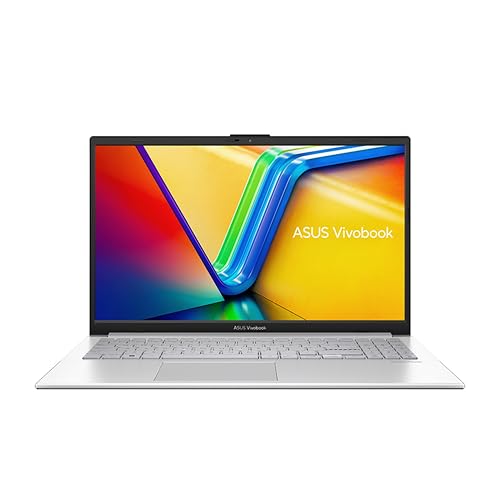
This is the Windows answer to the MacBook Air's battery lead. The Snapdragon X Plus X1P-42-100 is an ARM chip, and its efficiency is the whole point: ASUS quotes up to 20 hours from the 70Wh cell, and our review lists battery life that outpaces most Intel rivals at this price. For anyone who travels and hates carrying a charger, that's the headline.
Where it pulls ahead of the M4 Air is connectivity. You get two USB 4 Type-C, two USB 3.2 Type-A and a full-size HDMI 2.1 output. No dongle bag. That alone will decide it for people who plug into projectors, external drives and monitors daily. The 14-inch 2560x1600 panel sits at 214 ppi, and our review notes sharp, detailed visuals with wide viewing angles. One point of caution: the listing markets the screen as 2.8K and our specs on record show a 2560x1600 IPS panel, so treat the exact resolution as the verified figure and check the listing before you buy.
The 1TB PCIe Gen 4 SSD is four times the storage of the M4 Air's base drive, which for the money is strong. But the RAM is almost certainly soldered, so 16GB is a hard ceiling. And ARM Windows still carries occasional compatibility risk with older or niche x86 apps, per our review, so if you rely on a specific legacy program, check it runs first. The integrated Adreno GPU rules out gaming beyond light titles. Amazon UK owners give it 4.4 stars from 38 ratings. See our full ASUS Vivobook S 14 review.
Pros
Full-size HDMI 2.1 plus two USB-A ports, no hub needed
1TB PCIe Gen 4 SSD as standard
ASUS rates up to 20 hours from a 70Wh battery
Near-silent under light and moderate workloads
Cons
ARM Windows can trip on legacy x86 apps
16GB RAM is soldered and fixed
No SD card slot for photographers
Adreno graphics limit gaming and GPU creative work
The reason to pick this over the other 13-inch machines here is the S Pen in the box paired with a 360-degree AMOLED touchscreen. If you handwrite notes, mark up documents or sketch, none of the clamshells on this list do that. The 13.3-inch panel is Full HD (1920x1080) AMOLED, so you get the deep blacks and vivid colour the IPS MacBook Airs cannot match, on a smaller body than the 15.6-inch Chromebook Plus further down.
Inside is an Intel Core i7-1360P with 16GB of RAM and a 512GB SSD, so it sits between the Air M4 and the ASUS on storage. Samsung's listing claims a wide port set including HDMI, USB-A, a microSD slot and a Thunderbolt 4 port, which if accurate covers far more than the two-port MacBook Airs without a hub. It also lists Wi-Fi 6E and a 1080p webcam, so video calls should look sharper than the M1 Air's dated camera.
We hold no published review score for this one, so treat the assessment as spec-led. The trade-offs are the 1920x1080 resolution on a 13.3-inch touch panel, lower than the ASUS or either Air, and the tight integration Samsung pitches at Galaxy phone and tablet owners is where it makes most sense. Buy it if inking and AMOLED matter; skip it for the HP Envy x360 below if you want a bigger 14-inch convertible with 1TB. Amazon UK owners rate it 4.4 stars from 59 ratings.
Pros
S Pen included with a 360-degree touch hinge
13.3-inch AMOLED gives true blacks the IPS Airs lack
Listing claims HDMI, USB-A, microSD and Thunderbolt 4
Wi-Fi 6E and a 1080p webcam on the listing
Cons
1920x1080 is lower resolution than the ASUS or Airs
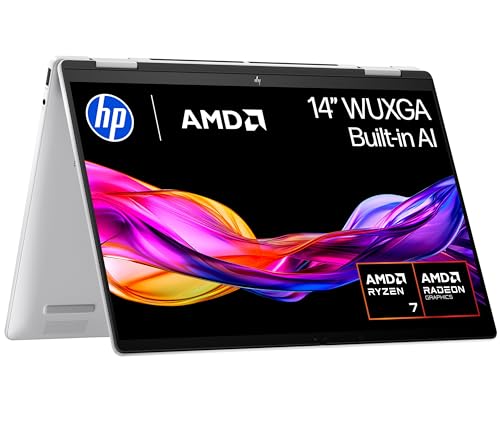
If you want a convertible with more grunt than the Samsung Galaxy Book3, this is it. The Ryzen 7 8840HS delivers strong multi-threaded performance, and our review notes it outpaces most Intel Core Ultra 5 competitors at this price. The Radeon 780M integrated graphics also handle light creative work and casual gaming better than Intel Iris Xe, so of the Windows machines here this is the one to lean on for occasional Photoshop or a low-detail game.
It weighs 1.39kg, the heaviest with a figure on record, but it's a full 14-inch touchscreen 2-in-1 in a solid aluminium chassis with a 360-degree hinge. The 5MP IR webcam is above average for the tier per our review, and USB-C charging with Power Delivery means no proprietary brick, handy alongside the two USB-C and two USB-A ports plus HDMI 2.1.
Two honest limits. The IPS panel sits around 300 nits and, per our review, struggles in direct sunlight and can't match OLED contrast. And real mixed-use battery falls well short of the marketed 14 hours 45 minutes, so don't expect the ASUS Vivobook's endurance. RAM is likely soldered at 16GB. Amazon UK owners rate it 4.3 stars from 59 ratings. See our full HP Envy x360 14 review.
Pros
Ryzen 7 8840HS leads the Windows CPUs here
Radeon 780M beats Iris Xe for light gaming
USB-C Power Delivery charging, no proprietary brick
The 16:10 panel is what earns this one its spot. At 1920x1200 it gives more vertical space than the 16:9 screens, and for spreadsheets, long documents and code that extra height means less scrolling. Our review calls the display a standout at this price. The backlit UK QWERTY keyboard is well-regarded for extended typing, so if your days are mostly text, this is a comfortable machine to work on.
The Ryzen 7 7730U handles heavy multitasking without complaint, per our review, and 16GB of LPDDR4x is the right amount for productivity. The catch is architecture: the 7730U is Zen 3, not AMD's latest, so it trails the Ryzen 7 8840HS in the HP Envy above on newer workloads. Graphics are integrated only, so serious gaming or GPU creative work is out.
The WVA panel won't satisfy colour professionals, and some connectivity details aren't confirmed in our verified specs, so check the listing. It scores 7.5 in our review. Pick it over the Lenovo IdeaPad below for the sharper 16:10 screen and stronger CPU. Amazon UK owners rate it 4.2 stars from 41 ratings. See our full Dell Inspiron 14 5435 review.
Pros
Tall 16:10 FHD+ panel suits document work
16GB LPDDR4x handles heavy multitasking
Backlit UK QWERTY keyboard built for typing
USB-C, two USB-A and HDMI on board
Cons
Ryzen 7 7730U is older Zen 3 silicon
Integrated graphics only, no gaming headroom
WVA panel falls short for colour work
Some connectivity specs unconfirmed, check listing
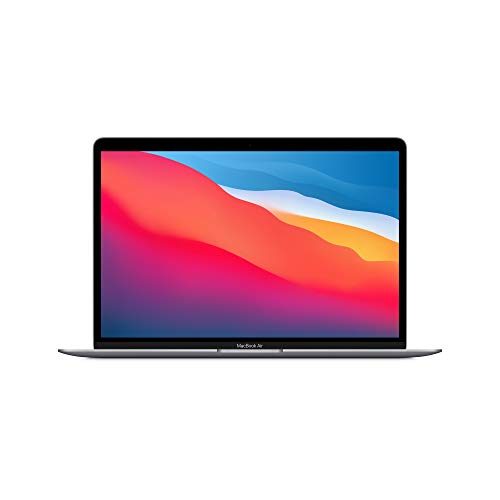
Still one of the best-value light laptops going. The M1 is fanless and silent, weighs 1.29kg, and our review lists 12 to 14 hours of real battery in mixed use, more than most Windows rivals here manage. The 2560x1600 Retina display is sharper than the Dell or Lenovo panels below. Owners rate it 4.8 stars from 4,360 ratings, the highest count on this page.
The limits are age and ports: 8GB RAM, 256GB storage, two USB-C only and a dated 720p webcam. If you make lots of video calls, the M4 Air's 12MP camera is the upgrade. See our full MacBook Air M1 review.
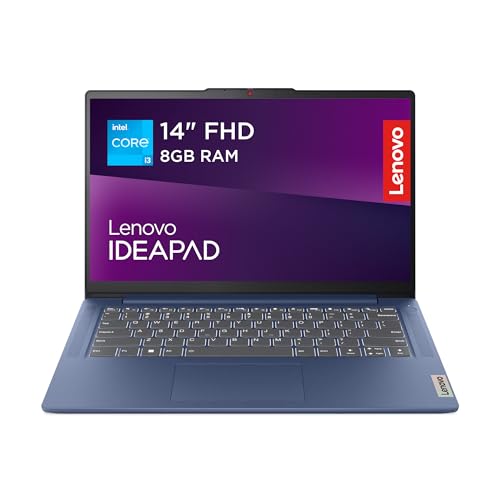
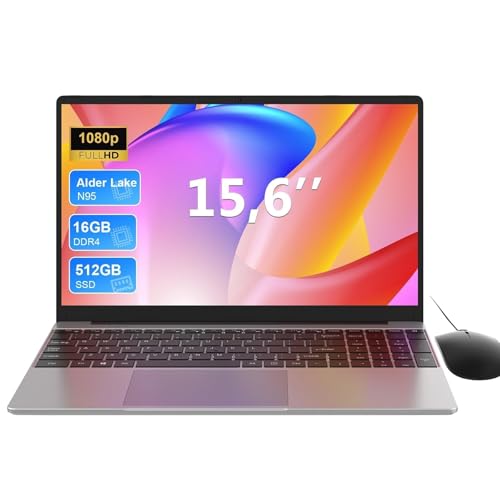
The entry point. At 1.31kg with a 512GB M.2 PCIe 4.0 NVMe SSD, it gives you double the storage of the base MacBook Airs and a proper fast drive for the price. The Core i3-N305 suits browsing, email and documents. The listing mentions a camera privacy shutter and Rapid Charge Boost.
The compromise is the TN panel, which trails the IPS and AMOLED screens above on colour and viewing angles, and the 8GB RAM is soldered. Buy it over the Chromebook if you need Windows on a budget. We hold no published score, so this is spec-led. Amazon UK owners rate it 4.2 stars from 150 ratings.
This page carries affiliate links; they never set the order. We don’t lab-test: rankings come from published specifications, the owner ratings on the UK listings and our own reviews.
How We Compared These
We ranked these eight on published specifications, our own research-led review scores where we hold them, and verified Amazon UK owner star ratings and counts. We weighted weight on record, battery ratings against chip efficiency, panel type, port selection and storage against price bracket. Where a listing claim and the specs on record disagreed, such as the ASUS resolution marketing, we flagged it and used the verified figure. Nobody here has handled these laptops, so we make no measured claims: every performance point is drawn from our published reviews, the manufacturer's stated figures or owner rating data, and we say which is which throughout.
A crown that can’t be argued with isn’t proof of quality; it’s proof nobody checked. So rather than restate the winner’s virtues, we defend the crown against the strongest cases to take it.
Apple 2025 MacBook Air 13-inch Laptop with M4 chip: Built
Cross-examination · Three challengers, taken seriously
The owners’ argumentASUS Vivobook S 14 S3407QA Laptop
Owners rate it 4.5 from 38 ratings. Our review scores it 8.0 against the winner’s 8.0. The crown holds on the ranking rules: the order above was set before any link was attached, and its case is argued in full in the write-up above.
The owners’ argumentSamsung Galaxy Book3 (360) Laptop with S Pen
Owners rate it 4.4 from 60 ratings. The crown holds on the ranking rules: the order above was set before any link was attached, and its case is argued in full in the write-up above.
The owners’ argumentHP Envy x360 14" 2in1 Laptop
It’s £899.99 on the live listing today. Owners rate it 4.3 from 60 ratings. Our review scores it 8.0 against the winner’s 8.0. The crown holds on the ranking rules: the order above was set before any link was attached, and its case is argued in full in the write-up above.
Final Verdict: Best Lightweight Laptops Under £1000
The Apple MacBook Air M4 takes the top spot for the cleanest mix of fanless silence, an 18-hour battery rating and a keyboard and trackpad nothing else here matches, as long as you accept two USB-C ports and a 256GB drive. For less outlay, the Lenovo IdeaPad Slim 3 is our budget pick, a genuine Windows laptop with a fast 512GB NVMe drive at 1.31kg, provided the TN panel and 8GB of soldered RAM suit your needs. If you want long battery with full ports, the ASUS Vivobook S 14 is the traveller's choice; if you handwrite notes, the Samsung Galaxy Book3 and its S Pen make the case. Buy the M4 Air if you want the best overall; drop to the Lenovo if price leads the decision.
Under about 1.5kg is easy to carry every day, and every laptop on this page with a weight on record sits between 1.17kg and 1.4kg. Between 1.5kg and 1.8kg is fine for occasional carrying; above 2kg most people stop taking the laptop out of the house.
8GB RAM handles office productivity, email, web browsing and single creative applications competently. However, 16GB provides genuine breathing room for multitasking, video editing, and future software demands. For £50 to £100 additional investment, upgrading to 16GB delivers measurable real-world benefits and better future-proofing than saving the difference.
For browsing, email, documents and streaming, the chips on this page are all comfortable. The differences show under heavier work: the Core i3-N305 in the Lenovo is built for light tasks, while the Ryzen 7 chips in the HP and Dell and Apple's M-series handle photo editing and heavy multitasking far better. Gaming and 3D work need a dedicated graphics card, which no laptop here has.
Treat them as a best case. Makers measure battery life under light, controlled conditions such as local video playback at reduced brightness, so everyday use with a brighter screen, video calls and many browser tabs gives noticeably less. The chip matters more than the number: the Apple M-series and Snapdragon machines here are the most efficient, so their real figures stay closest to the claim.
Windows machines offer superior software compatibility and upgrade options, though MacBooks provide refined experiences within the Apple ecosystem. Windows suits users requiring specific professional software or maximum flexibility, whilst macOS benefits those already owning iPhones or iPads. Neither platform delivers significant budget advantage, so existing device ownership often determines the sensible choice.
That’s the field: seven lightweight laptops under £1000, ranked for the job in the title and nothing else. We read the published specifications, the owner ratings and our own reviews; we haven’t handled these products, and no maker moves the order. Figures checked against the live Amazon UK listings, page updated 27 September 2026.
The Vivid Repairs desk
1Our top pickApple 2025 MacBook Air 13-inch Laptop with M4 chip: Built for Apple Intelligence, 13.6-inch Liquid Retina Display, 16GB Unified Memory, 256GB SSD Storage, 12MP Center Stage Camera, Touch ID; MidnightScored 8.0/10Compare all →Buy on Amazon →