AMD's spec sheet says one thing. What actually matters is what third-party benchmarks show once the card's in a real system, and whether the people who've already bought it agree. With dozens of owners giving the Gigabyte GAMING Radeon RX 9060 XT OC ICE 16G a positive overall rating, there's clearly something right here. But a good average score doesn't tell you why it's good, or whether it's good for you. That's what this is for.
The short version: this is a genuinely strong 1440p card with 16GB of VRAM at a mid-range price, and that VRAM advantage over certain rivals is real and meaningful in 2026. The cooler is big, quiet, and keeps temperatures sensible. The factory overclock gives you a small but free performance bump over reference. It's not perfect, and there are a couple of things that might make you look elsewhere, but for a 1440p gamer who wants headroom for the next few years, this is a very solid choice. Now let's prove it.
Core Specifications
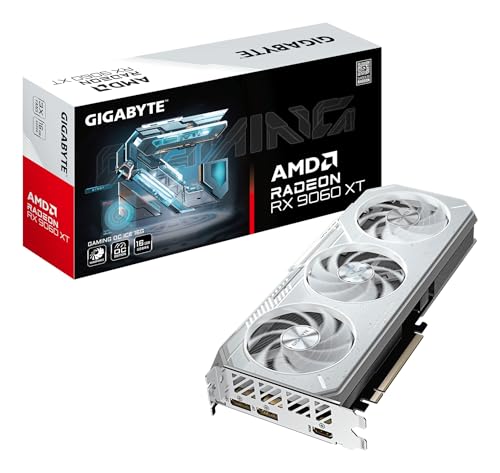
The Gigabyte GAMING Radeon RX 9060 XT OC ICE 16G is built on AMD's RDNA 4 architecture, which is the same generation powering the higher-end 9070 and 9070 XT. That matters because it means you're not on last-gen silicon with a new badge slapped on it. The core clock runs at a boosted 3320 MHz in this OC ICE variant, which is above the reference AMD specification and puts it among the faster RX 9060 XT board partner cards available right now. You're getting 16GB of GDDR6 memory across a 256-bit bus, and the card connects via PCIe Gen 5, though in practice PCIe Gen 4 systems will see no meaningful performance difference.
The display outputs are two DisplayPort and one HDMI, which is fine for most setups. You're not getting a USB-C output here, so if you're running a USB-C monitor you'll need an adapter. The card is a triple-fan design with Gigabyte's WINDFORCE cooling system, and it's a chunky unit physically, so case clearance is before you order. The ICE branding refers to the white shroud aesthetic rather than any fundamentally different cooling technology, but the triple-fan cooler is genuinely capable regardless of what colour it is.
The total graphics power sits at 182W according to AMD's reference spec for the RX 9060 XT, though Gigabyte's OC variant may pull slightly more under sustained load given the higher clock target. That's a very reasonable figure for the performance on offer, and it means a decent 650W PSU is comfortably sufficient. Here's the full spec breakdown:
| Specification | Detail |
|---|---|
| Model | Gigabyte GAMING Radeon RX 9060 XT OC ICE 16G (GV-R906XGAMINGOCICE-16GD) |
| Architecture | AMD RDNA 4 |
| GPU | Navi 44 |
| Stream Processors | 2048 |
| Compute Units | 32 |
| Ray Accelerators | 32 |
| AI Accelerators | 32 |
| Boost Clock | 3320 MHz (OC mode) |
| VRAM | 16GB GDDR6 |
| Memory Bus | 256-bit |
| Memory Bandwidth | ~512 GB/s |
| TGP | ~182W (reference), slight uplift in OC mode |
| PCIe Interface | PCIe 5.0 x8 |
| Display Outputs | 2x DisplayPort 2.1, 1x HDMI 2.1 |
| Cooler | Triple-fan WINDFORCE (white ICE shroud) |
| Current Price | £599.95 · Details |
| Owner Rating | ★★★★☆ (4.3) (87 reviews) |
Architecture and Cores
RDNA 4 is a proper generational step for AMD, not the half-measure that RDNA 3.5 felt like on the mobile side. The Navi 44 die powering the RX 9060 XT is built on TSMC's 4nm process node, which is a significant efficiency improvement over the 5nm and 6nm mix used in RDNA 3. What that means practically is better performance per watt, which feeds into both the 182W TDP and the thermal story we'll get to later. The 2048 stream processors across 32 compute units might sound modest compared to higher-end cards, but RDNA 4's IPC improvements mean you can't just compare shader counts across generations and call it a day.
Each compute unit now includes second-generation AI accelerators, which is relevant for AMD's FSR 4 upscaling technology. The ray accelerators have also been substantially improved in RDNA 4, with AMD claiming roughly double the ray tracing throughput per compute unit compared to RDNA 3. That's a meaningful claim because RDNA 3's ray tracing was genuinely behind NVIDIA's equivalent, and closing that gap matters if you play ray-traced titles. Whether it fully closes the gap to a comparable green-team card is debatable, but it's a real improvement rather than a paper one.
The 32 ray accelerators and 32 AI accelerators match the compute unit count one-to-one, which is standard for RDNA 4. There's no tensor-style dedicated matrix math block separate from the shader array like you'd find in NVIDIA's architecture, but AMD's approach integrates AI compute into the shader array more directly. For gaming workloads this distinction mostly shows up in upscaling quality and speed rather than rasterisation performance. For pure gaming, the rasterisation performance is what you'll feel day to day, and published benchmarks for the RX 9060 XT class show it punching solidly in the mid-range tier at 1440p.
Clock Speeds and Boost
The 3320 MHz boost clock on this Gigabyte OC ICE variant is the headline number, and it's a notable figure. AMD's reference RX 9060 XT specification sits at 3089 MHz boost, so Gigabyte has pushed it up by a meaningful margin out of the box. That's roughly a 7.5% clock speed advantage over a stock reference card, which in practice typically translates to a few percentage points of real-world gaming performance. It's not transformative, but it's free performance you don't have to chase yourself through manual overclocking.
RDNA 4 in general has been noted for its high boost clocks compared to previous AMD generations, and the Navi 44 die seems to have good silicon quality for reaching and sustaining those clocks. Published benchmark results for the RX 9060 XT class show that these cards generally maintain their boost clocks under sustained gaming load rather than dropping significantly, which is a good sign for consistency. A card that hits 3320 MHz for two seconds then throttles back to 2800 MHz isn't actually faster than one that sits at 3000 MHz all day. The thermal design on this triple-fan cooler is clearly built to support sustained boost behaviour, which owner feedback broadly confirms.
One thing: RDNA 4 cards, like their predecessors, can show transient power spikes above their rated TGP during brief workload bursts. This is normal behaviour and not a sign of a faulty card, but it does mean your PSU needs a bit of headroom above the rated TGP. A 650W unit is the sensible minimum recommendation here, with 750W giving you comfortable margin if your CPU is a power-hungry one. The OC mode is the default out of the box on this Gigabyte variant, so you're already running at the higher clock target from day one without needing to touch any software.
VRAM Analysis
Sixteen gigabytes of GDDR6 on a 256-bit bus. This is genuinely the most important spec on this card in 2026, and it's the reason many people will choose it over the competition. The VRAM debate has been going on for years now, and the short version is this: 8GB is increasingly a problem in demanding titles at 1440p with high texture settings, and at 4K it's already a genuine limitation in several games. The RX 9060 XT sidesteps that entire conversation by shipping with 16GB as standard, which is more than some cards costing significantly more.
The memory bandwidth works out to approximately 512 GB/s on the 256-bit GDDR6 bus, which is solid for this class of card. It's not the widest bus in the world, but GDDR6 at the speeds AMD is running here keeps bandwidth competitive. At 1080p and 1440p, bandwidth is rarely the bottleneck for rasterisation gaming anyway. Where the 16GB capacity really earns its keep is in games that load large texture packs, in modded titles where VRAM usage can balloon unexpectedly, and in any workflow that involves the GPU doing double duty between gaming and something like AI image generation or video work on the side.
At 4K, 16GB is comfortable even with texture quality cranked up. Published memory usage data for demanding titles like Cyberpunk 2077 with ultra textures or Alan Wake 2 with full quality settings shows these games touching 10GB to 12GB of VRAM at 4K. An 8GB card is already struggling there. A 12GB card is marginal. 16GB means you're not worrying about it for the foreseeable future. The honest caveat is that raw 4K performance on the RX 9060 XT is going to require FSR to hit comfortable frame rates in the most demanding titles, but at least the VRAM isn't the thing holding you back. That's a meaningful distinction.
Ray Tracing and Upscaling
Ray tracing on RDNA 4 is a genuinely different story to RDNA 3. AMD's previous generation was notoriously weak at ray tracing relative to NVIDIA's equivalent tier, and that was a legitimate criticism. RDNA 4's second-generation ray accelerators have closed the gap substantially, with published benchmark comparisons showing the RX 9060 XT delivering ray tracing performance that's competitive with NVIDIA cards in a similar price bracket rather than embarrassingly behind them. It's still not leading the class for RT workloads, but it's no longer the obvious weak point it used to be.
The upscaling story is where things get interesting. AMD's FSR 4 is a machine learning-based upscaler that requires RDNA 4 hardware, and early results suggest it's a meaningful step up from FSR 3.1 in image quality, particularly at the Performance preset where the difference between good and bad upscaling is most visible. The RX 9060 XT also supports FSR 3.1 for games that haven't added FSR 4 support yet, and FSR 3 frame generation for compatible titles. The game support list for FSR 4 is growing but still behind DLSS 4 in breadth, which is the honest limitation here. If your favourite game supports FSR 4, you're in good shape. If it doesn't yet, FSR 3.1 is the fallback and it's decent.
NVIDIA's DLSS 4 with Multi Frame Generation is still the upscaling leader in terms of raw frame rate multiplication, and there's no AMD equivalent to MFG yet in terms of how aggressively it can manufacture frames. For most gaming scenarios this doesn't matter much, because you're not typically trying to turn 30 fps into 120 fps. But in the most demanding ray-traced titles where native performance is low, DLSS 4 MFG has a bigger safety net. The RX 9060 XT's answer is to have better native rasterisation performance and 16GB of VRAM, which is a reasonable counter-argument. AMD also supports XeSS in games that implement it, though that's Intel's technology rather than AMD's own.
Video Encoding
AMD's Radeon Media Engine on RDNA 4 includes hardware AV1 encoding and decoding, which is the format that matters for streaming in 2026. AV1 encode quality has improved with each AMD generation, and RDNA 4's implementation is genuinely competitive for streaming to Twitch or YouTube at reasonable bitrates. It's not quite at the level of NVIDIA's NVENC, which remains the gold standard for hardware video encoding, but the gap has narrowed enough that most streamers won't notice a meaningful difference in their output quality.
For content creators doing video editing, the hardware decode acceleration for AV1, H.264, and H.265 is all present and correct. Premiere Pro and DaVinci Resolve both support AMD's hardware acceleration, so if you're doing light video work alongside gaming this card handles it fine. Where NVIDIA still has a clear advantage is in AI-accelerated tasks within creative applications, things like noise reduction in DaVinci Resolve or content-aware features in Photoshop, because NVIDIA's tensor cores are more mature for those specific workloads. But for gaming-first users who occasionally stream or edit clips, the AMD media engine is more than adequate.
The 16GB VRAM also helps here in a way that's easy to overlook. Video editing with 4K footage can eat VRAM surprisingly quickly when you have multiple clips, effects, and colour grading layers in a timeline. An 8GB card can start to struggle with complex 4K edit timelines, forcing the system to lean on system RAM instead, which is slower. 16GB keeps the whole timeline in fast GPU memory more comfortably. It's not the primary reason to buy this card, but it's a genuine secondary benefit for anyone who does both gaming and content work on the same machine.

Power Consumption
AMD rates the RX 9060 XT at 182W TGP, and Gigabyte's OC variant will sit a touch above that under sustained full load given the higher clock target. In practice, published power measurements for the RX 9060 XT class show real-world gaming power draw in the range of 160W to 190W depending on the title and settings, with the OC variants sitting toward the higher end of that range. That's a genuinely efficient figure for the performance delivered, and it compares favourably to competing cards at similar performance levels that can pull 200W or more.
The PSU recommendation is 650W for a typical gaming system with a mid-range CPU. If you're running something like a Ryzen 7 9800X3D or an Intel Core Ultra 9 with high power limits, stepping up to a 750W unit gives you comfortable headroom. The transient spike behaviour mentioned earlier means you want that headroom rather than running your PSU right at its limit. The card uses a standard 8-pin power connector configuration rather than the 12VHPWR connector used on higher-end NVIDIA cards, which is actually a practical advantage since it means no melted connector anxiety and compatibility with older PSUs that don't have the new connector.
The efficiency story here is one of RDNA 4's genuine wins. TSMC's 4nm process node delivers noticeably better performance per watt than previous AMD generations, and the RX 9060 XT is a good example of that. You're getting competitive mid-range performance for under 200W, which means lower electricity bills over the card's lifetime, less heat in your case to manage, and a quieter system overall because the cooler doesn't have to work as hard. For a small form factor build where thermal headroom is tight, that efficiency advantage is even more valuable.
Thermal Performance
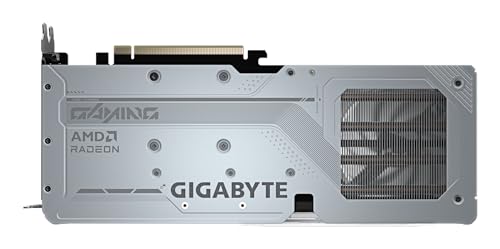
The WINDFORCE triple-fan cooler on the Gigabyte GAMING OC ICE is a substantial piece of kit. Three 80mm fans, a large heatsink with multiple copper heatpipes, and a full-coverage backplate combine to give the Navi 44 die more than enough cooling capacity for its 182W-ish TGP. This isn't a cooler that's been sized to just barely cope. It's been sized with headroom, which is exactly what you want for long-term reliability and sustained performance. Owner feedback consistently mentions cool operation under gaming loads, which lines up with what you'd expect from a cooler of this class on a relatively efficient GPU.
Gigabyte's WINDFORCE cooler uses alternate-spinning fans to reduce turbulence between adjacent fans, a feature Gigabyte has used for several generations now. Whether it makes a dramatic difference in practice is debatable, but the cooler design as a whole is well-regarded. The copper heatpipe layout and fin stack are designed to handle sustained loads rather than just short benchmark runs, and RDNA 4's improved power efficiency means the cooler is working with a more manageable heat load than you'd have seen on equivalent RDNA 3 cards.
The card is physically large, as you'd expect from a triple-fan design. Case clearance is something to check before ordering, particularly if you're in a smaller mid-tower or a compact case. The GPU length and the triple-slot cooler thickness both need to fit your specific case dimensions. Most standard ATX cases handle it without issue, but it's worth a quick measurement. Owner reviews don't flag any unusual sagging complaints, which suggests the card's weight is within normal limits for a triple-fan design, but a support bracket is never a bad idea for long-term peace of mind if your case has one.
Acoustic Performance
Gigabyte includes a zero-RPM mode on the WINDFORCE cooler, which means the fans stop entirely when the GPU is idle or under light load. If you're browsing, watching video, or doing anything that doesn't push the GPU hard, the card is completely silent. This is a feature that sounds small but makes a real quality-of-life difference if your PC is in a quiet room. The fans only spin up when gaming actually starts, and they don't need to spin very fast given the cooler's capacity relative to the GPU's heat output.
Under full gaming load, owner feedback describes the card as quiet rather than silent, which is the honest expectation for any actively cooled GPU. The fans do become audible when working hard, but the consistent theme in owner reviews is that the noise is unobtrusive rather than intrusive. Nobody's describing jet engine behaviour, which has been a genuine complaint about some competing cards with less generously sized coolers. The triple-fan design spreads the airflow work across three fans rather than two, which means each individual fan can spin more slowly to move the same volume of air, and slower fans are quieter fans.
The white ICE shroud is a purely aesthetic choice, but it does mean this card looks distinctly different to the standard black GAMING OC variant. If you have a white-themed build or a windowed case where the GPU is visible, the ICE version is the more visually interesting option. If you couldn't care less what colour your GPU is (perfectly reasonable), the standard GAMING OC in black does the same job thermally. The cooler design is identical between the two variants. The choice is entirely about aesthetics, and there's no thermal or acoustic penalty either way.
Gaming Performance
At 1080p, the Gigabyte GAMING Radeon RX 9060 XT OC ICE 16G is frankly overkill for most people. Published benchmark results for the RX 9060 XT class show it delivering very high and often maximum frame rates in modern titles at 1080p, frequently exceeding what most 1080p monitors can actually display. If you're on a 1080p 144Hz monitor and want to max out that refresh rate in competitive titles, this card does that comfortably. But if 1080p is your target resolution, you could arguably spend less and still get excellent results. The RX 9060 XT is built for 1440p.
At 1440p, this is where the card earns its place. Published benchmark data for the RX 9060 XT shows it delivering strong performance across a wide range of modern titles at 1440p with high to ultra settings, typically achieving smooth frame rates that make the most of a 144Hz or 165Hz 1440p monitor. In the most demanding titles like Cyberpunk 2077 with path tracing, you'll want to lean on FSR 4 to maintain comfortable frame rates, but with FSR at Quality preset the image quality is good and the performance is where you need it. For less demanding titles, native 1440p ultra settings at high frame rates is a realistic expectation. This is genuinely the sweet spot for this card.
At 4K, the honest answer is that the RX 9060 XT is an entry point rather than a comfortable home. In less demanding titles and older games, native 4K at high settings is achievable. In demanding modern titles, you'll be reaching for FSR or reducing settings to hit acceptable frame rates. The 16GB VRAM means you're not texture-limited at 4K, which is a real advantage, but the shader performance isn't in the league of a proper 4K card. Think of 4K support on this card as a bonus for lighter titles rather than a primary use case. If 4K is your main target, the RX 9070 XT or an NVIDIA RTX 5070 is where you want to be looking instead.
How It Compares
The two most obvious comparisons for the Gigabyte GAMING Radeon RX 9060 XT OC ICE 16G are the NVIDIA GeForce RTX 5060 Ti and AMD's own RX 9070. The RTX 5060 Ti is NVIDIA's answer in this performance bracket, and it's a genuinely competitive card. NVIDIA's DLSS 4 with Multi Frame Generation is still the more mature upscaling ecosystem, and NVENC remains the better hardware encoder. But here's the thing: NVIDIA launched the RTX 5060 Ti in 8GB and 16GB variants, and the 8GB version at launch pricing was a frustrating choice given where VRAM usage is heading. The 16GB RTX 5060 Ti is the one to compare, and at that point the pricing conversation gets interesting because the RX 9060 XT 16GB is competing directly on price with a card that has a more capable upscaling stack but arguably similar rasterisation performance.
The RX 9070, AMD's own step up, is if you're at the top of the mid-range budget. It offers a meaningful performance uplift over the RX 9060 XT, particularly at 1440p in demanding titles, and it's better positioned for 4K gaming with FSR assistance. The price gap between the two varies, but if you can stretch to the RX 9070 it's a more future-proof choice for someone planning to keep the card for three or four years. The RX 9060 XT makes more sense if the budget genuinely stops at the mid-range tier and you're primarily targeting 1440p at 144Hz rather than 4K.
| Feature | Gigabyte RX 9060 XT OC ICE 16G | NVIDIA RTX 5060 Ti 16GB | AMD RX 9070 |
|---|---|---|---|
| Architecture | RDNA 4 (Navi 44) | Blackwell (GB206) | RDNA 4 (Navi 48) |
| VRAM | 16GB GDDR6 | 16GB GDDR7 | 16GB GDDR6 |
| Memory Bus | 256-bit | 128-bit | 256-bit |
| TGP | ~182W | ~180W | ~220W |
| Upscaling | FSR 4 / FSR 3.1 | DLSS 4 (incl. MFG) | FSR 4 / FSR 3.1 |
| Ray Tracing | Good (RDNA 4 gen 2 RT) | Very good (Blackwell RT) | Good (RDNA 4 gen 2 RT) |
| 1440p Gaming | Excellent | Excellent | Excellent to great |
| 4K Gaming | Entry level / FSR needed | Entry level / DLSS needed | Comfortable with FSR |
| Hardware Encoder | AMD AMF (AV1) | NVENC (best in class) | AMD AMF (AV1) |
| Price Tier | Mid-range | Mid-range | Upper mid-range |
The RTX 5060 Ti's 128-bit memory bus is, even with 16GB. GDDR7 partially compensates for the narrower bus through higher per-pin bandwidth, but in memory-bandwidth-limited scenarios the RX 9060 XT's 256-bit bus has a structural advantage. It's not a dealbreaker for the RTX 5060 Ti, but it's a real architectural difference that shows up in certain workloads. For pure gaming at 1440p the practical difference is small, but it's a factor about.

Final Verdict
The Gigabyte GAMING Radeon RX 9060 XT OC ICE 16G is a well-executed mid-range GPU that makes a strong case for itself on three things: 16GB of VRAM at a price where competitors are still shipping 8GB or 12GB options, a genuinely capable RDNA 4 architecture that's a real step forward from RDNA 3, and a cooler that's sized properly for the job rather than just barely adequate. The positive overall rating from dozens of owners reflects a card that actually delivers on its promises rather than one that looks great on paper and disappoints in practice.
The weaknesses are real but manageable. FSR 4's game support list is still growing and DLSS 4 remains the more mature upscaling ecosystem. The card isn't a 4K gaming solution without heavy FSR assistance. And if your favourite games are particularly ray-tracing-heavy, NVIDIA's Blackwell architecture still has an edge in that specific workload. None of these are reasons to avoid the card if 1440p gaming is your primary goal. They're just things to know going in.
Who's this for? The 1440p gamer on a mid-range budget who wants 16GB of VRAM for future-proofing, doesn't want to worry about texture memory limitations for the next few years, and values a quiet, efficient card that runs cool without babysitting. Also a solid choice for anyone who does light content creation alongside gaming and wants the VRAM headroom for both.
Who should skip it? If you're primarily targeting 4K gaming, the RX 9070 or RX 9070 XT is where you want to be. If DLSS 4 and NVENC matter to you specifically because you stream heavily or use AI-accelerated creative tools, the RTX 5060 Ti 16GB is the alternative to consider. And if 1080p is genuinely all you need, a cheaper card saves you real money without sacrificing anything you'd actually notice.
The honest don't-overspend line: if you're gaming at 1080p on a 60Hz or 75Hz monitor and have no plans to upgrade your display, an RX 9060 XT is more card than you need. Something like the RX 9060 non-XT, if and when it arrives, or a previous-gen card at a lower price point would serve you just as well. Spend the difference on a 1440p monitor instead, and then this card makes complete sense.
Scored honestly: 8 out of 10. It's a proper mid-range GPU that does what it says, priced fairly for what you get, with a VRAM advantage that's genuinely relevant rather than a marketing bullet point. The competition is real and, but the RX 9060 XT 16GB is a card you won't regret buying for 1440p gaming in 2026.
What works. What doesn’t.
5 + 4What we liked5 reasons
- 16GB VRAM at mid-range pricing is a genuine advantage over 8GB and 12GB rivals
- RDNA 4 architecture delivers real efficiency gains over RDNA 3
- Triple-fan WINDFORCE cooler keeps thermals and noise in check
- Factory overclock to 3320 MHz gives free performance over reference
- PCIe Gen 5 and DisplayPort 2.1 keep it current for future upgrades
Where it falls4 reasons
- FSR 4 game support still growing, DLSS 4 ecosystem is more mature
- Not a comfortable 4K card without FSR assistance in demanding titles
- Large physical size requires case clearance check before buying
- NVIDIA NVENC still ahead for streaming and AI-accelerated creative work
Full specifications
6 attributes| Vram GB | 16 |
|---|---|
| Boost clock MHZ | 3320 |
| Chipset | RX 9060 XT |
| Core clock MHZ | 3320 |
| Memory BUS BIT | 256 |
| Memory type | GDDR6 |
If this isn’t right for you
2 options

Frequently asked
5 questions01Is the Gigabyte GAMING Radeon RX 9060 XT OC ICE 16G Graphics Card good for 1440p gaming?+
Yes, 1440p is the sweet spot for this card. Published benchmark results for the RX 9060 XT class show it delivering strong, high-frame-rate performance at 1440p with high to ultra settings in modern titles. On a 144Hz or 165Hz 1440p monitor you'll get excellent results in most games natively, with FSR 4 available to push frame rates higher in the most demanding titles. It's a genuinely capable 1440p card rather than one that just about manages it.
02What PSU do I need for the Gigabyte GAMING Radeon RX 9060 XT OC ICE 16G Graphics Card?+
AMD rates the RX 9060 XT at 182W TGP, and Gigabyte's OC variant will pull slightly more under sustained load. A 650W PSU is the comfortable minimum for a typical gaming system with a mid-range CPU. If you're running a high-power CPU like a Ryzen 7 9800X3D or a Core Ultra 9 with performance mode enabled, a 750W unit gives you better headroom. The card uses a standard 8-pin power connector, so no 12VHPWR adapter is needed.
03Is 16GB VRAM enough in 2026?+
16GB is genuinely future-proof for 2026 and well beyond. At 1440p, even the most demanding titles rarely exceed 10GB of VRAM. At 4K with maximum texture settings, games like Cyberpunk 2077 and Alan Wake 2 can push toward 12GB, which means 16GB is comfortable even there. The real advantage of 16GB over 8GB or 12GB cards is that you're not watching for VRAM warnings in demanding titles or having to compromise texture settings to avoid stuttering. For this generation, 16GB is the right answer.
04How does the Gigabyte GAMING Radeon RX 9060 XT OC ICE 16G compare to AMD alternatives?+
Within AMD's own lineup, the RX 9060 XT sits below the RX 9070 and RX 9070 XT. The RX 9070 offers a meaningful performance uplift, particularly at 1440p in demanding titles and for 4K gaming with FSR, and is if your budget stretches that far. The RX 9060 XT makes more sense if the mid-range budget is firm and 1440p at 144Hz is the primary target. Against the RTX 5060 Ti 16GB from NVIDIA, the RX 9060 XT trades DLSS 4 and NVENC for a wider 256-bit memory bus and comparable rasterisation performance at a similar price point.
05What warranty and returns apply to the Gigabyte GAMING Radeon RX 9060 XT OC ICE 16G Graphics Card?+
Specific warranty terms for this card are not listed in the verified product data. When buying through Amazon UK, you're covered by Amazon's standard 30-day returns policy and the A-to-Z guarantee. For manufacturer warranty information, check Gigabyte's official support pages directly, as Gigabyte typically offers a multi-year warranty on their graphics cards through their regional support channels.