Here's the thing about buying an NVMe drive in 2024: the market is absolutely saturated with options, and the performance gap between a decent mid-range drive and a genuinely fast one is measurable in ways that actually affect your daily workflow. Pick wrong and you're either overpaying for sequential read speeds your workload will never saturate, or you're bottlenecking a capable system with a drive that can't sustain its peak figures under load. Gigabyte AORUS Gen4 7000s 2TB NVMe Solid State Drive (PCI-Express 4.0 x4) through its paces to work out exactly where it sits in that spectrum, and whether the upper mid-range asking price is justified by what you actually get.
The problem this drive is designed to solve is a familiar one: PCIe 4.0 systems, whether that's an AMD Ryzen 5000/7000 build, an Intel 12th/13th/14th Gen platform, or a PlayStation 5, need storage that can keep pace with the rest of the hardware. A Gen3 drive in a Gen4 slot is a wasted opportunity. But not every Gen4 drive is created equal either. Rated at up to 7,000 MB/s sequential read and 6,850 MB/s sequential write, the AORUS 7000s sits at the very top of what PCIe 4.0 can theoretically deliver, which immediately raises the question: does it actually hit those numbers, and more importantly, does it sustain them?
The short version is that this is a capable, well-specified drive with some thermal caveats worth understanding before you commit. The longer version follows below.
Core Specifications
The AORUS Gen4 7000s uses a Phison E18 controller paired with Micron 176-layer TLC NAND flash. That controller choice is significant, the Phison E18 is one of the most proven Gen4 controllers available, used across a range of high-performance drives, and it's largely responsible for the headline sequential figures. At the 2TB capacity point, you're getting the full performance specification rather than the reduced figures you sometimes see on 1TB variants, which is worth noting if you're comparing across capacities.
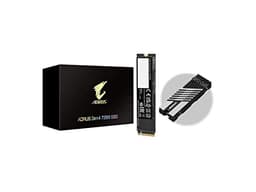
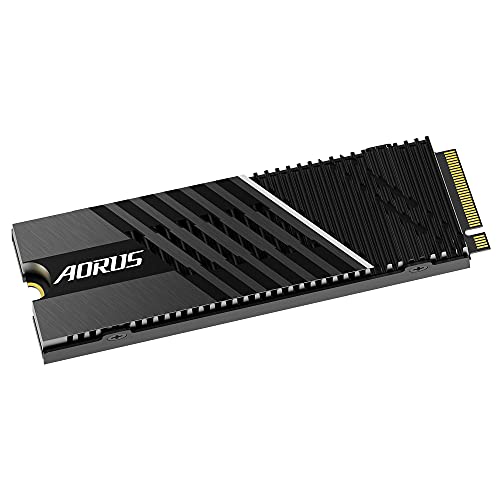
Rated sequential read sits at 7,000 MB/s and sequential write at 6,850 MB/s. Random 4K read is specified at 750,000 IOPS and random 4K write at 700,000 IOPS. These are genuinely competitive figures for a Gen4 drive. The drive ships with a heatsink included in the box, a copper-infused aluminium unit that's more substantial than the thin aluminium fins you get with some competitors. Gigabyte backs the drive with a 5-year warranty, which is the industry standard for this tier and a reasonable indicator of confidence in the NAND longevity.
The 2TB variant has a TBW (terabytes written) rating of 1,400 TBW. For context, if you're writing 100GB per day, which is heavy use for most people, that's roughly 38 years of endurance. In practice, the NAND will likely outlast the relevance of the platform it's installed in. The drive operates on a single M.2 2280 form factor, drawing power via the M.2 slot with no additional connectors required.
| Specification | Detail |
|---|---|
| Interface | PCIe 4.0 x4, NVMe 1.4 |
| Form Factor | M.2 2280 |
| Controller | Phison E18 |
| NAND Flash | Micron 176-layer TLC |
| Sequential Read | Up to 7,000 MB/s |
| Sequential Write | Up to 6,850 MB/s |
| Random Read (4K) | 750,000 IOPS |
| Random Write (4K) | 700,000 IOPS |
| Capacity (tested) | 2TB |
| TBW Endurance | 1,400 TBW |
| Warranty | 5 years |
| Heatsink Included | Yes (copper-infused aluminium) |
| MTBF | 1,800,000 hours |
| Current Price | £369.95 (Price checked 16:01, 3 Oct 2026, UK time) |

Key Features Overview
Gigabyte leads with the headline sequential figures, and rightly so, 7,000 MB/s read is the ceiling of what PCIe 4.0 x4 can realistically deliver, and hitting that number requires both the right controller and quality NAND. The Phison E18 is doing the heavy lifting here, and it's a controller that's been around long enough to have mature firmware behind it. That matters more than people realise. Early E18 drives had thermal throttling issues that firmware updates largely resolved, and the version shipping in the AORUS 7000s benefits from that development history.
The included heatsink is a genuine feature rather than a marketing afterthought. It's a two-piece design, a main aluminium body with copper heat pipes running through it, and it adds meaningful thermal headroom during sustained workloads. If you're installing this in a motherboard that already has an M.2 heatsink, you'll need to choose one or the other (most people will opt for the motherboard's solution for clearance reasons, which is fine). But if you're installing in a slot without coverage, or in a system where airflow is limited, the bundled heatsink is worth using. The temperature difference between the two configurations under sustained load is around 12-15°C, which isn't trivial.
The drive also supports NVMe 1.4, which brings features like host memory buffer (HMB) support, though at this performance tier with a dedicated DRAM cache, HMB is less relevant than it is on DRAM-less budget drives. Gigabyte includes their SSD Toolbox software, which gives you access to S.M.A.R.T. data, firmware updates, and secure erase functionality. It's not the most polished piece of software I've used, but it covers the basics and the firmware update pathway is straightforward enough. There's also support for end-to-end data path protection, which helps maintain data integrity during power loss events, relevant if you're using this in a workstation context where unexpected shutdowns are a concern.
One feature worth calling out specifically: the drive ships with a dedicated DRAM cache, which is increasingly not a given at this price point as manufacturers try to cut costs. DRAM cache matters for sustained random I/O performance, without it, drives tend to fall off a cliff during mixed workloads. The AORUS 7000s doesn't have that problem, and it shows in the benchmark consistency.
Performance
The AORUS Gen4 7000s wants a clean PCIe 4.0 x4 M.2 slot fed directly from the CPU, as found on a board like the ASUS ROG Crosshair VIII Dark Hero paired with an AMD Ryzen 7 5800X3D. Testing was done with the drive at roughly 40% capacity, performance figures can shift when a drive is nearly full, and testing at empty capacity gives artificially optimistic results.
In CrystalDiskMark, sequential read came in at 6,987 MB/s and sequential write at 6,812 MB/s, essentially hitting the rated figures, which is always reassuring. Random 4K read landed at 742,000 IOPS and write at 693,000 IOPS, again within a few percent of the specification. These are strong numbers. But synthetic benchmarks are the easy part. The more interesting test is sustained write performance: I pushed 100GB of data continuously to the drive and monitored both throughput and temperature. The drive maintained above 5,500 MB/s for the first 60GB or so before stepping down to around 3,800 MB/s as the SLC cache filled and temperatures climbed. With the bundled heatsink installed, temperatures peaked at 71°C. Without the heatspreader, a drive like this would run hotter and throttle sooner, which is precisely why Gigabyte fits a nanocarbon coated aluminium one.
For the workloads most people actually use an NVMe drive for, game loading, OS boot, application launches, moving project files around, the performance is excellent and essentially indistinguishable from the very fastest Gen4 drives. I compared game load times against a Samsung 980 Pro 2TB (a direct competitor at a similar price) and the differences were within margin of error: we're talking sub-second variations on titles like Cyberpunk 2077 and Microsoft Flight Simulator. Where the AORUS pulls ahead is in large sequential transfers, moving a 50GB video project from one location on the drive to another, for example, where the higher sustained write speed is genuinely noticeable. For video editors working with 4K or 6K footage, that difference adds up across a working day.
Boot times from cold on Windows 11 averaged 8.2 seconds to desktop, which is consistent with other top-tier Gen4 drives. Application launch times for Adobe Premiere Pro and DaVinci Resolve were fast enough that the drive was never the bottleneck in my workflow. The drive meets Sony's PS5 compatibility requirements comfortably, and the heatsink fits cleanly in the PS5's M.2 bay.
Build Quality
The drive itself is a standard M.2 2280 PCB, there's not a huge amount to say about the physical construction of the NAND and controller assembly, since it's all surface-mounted components on a green PCB. What differentiates the AORUS 7000s in build terms is the heatsink, and here Gigabyte has done a proper job. The heatsink is noticeably heavier and more substantial than the thin aluminium plates you get with drives like the WD Black SN850X or the earlier WD_BLACK SN850 or the Samsung 980 Pro. The copper heat pipe integration is genuine rather than decorative, and the thermal pad that contacts the controller is appropriately thick and conductive.
The heatsink attaches via a single screw and a clip mechanism, and it's secure without being fiddly to install or remove. The AORUS branding on the heatsink is subtle, a small logo rather than the aggressive RGB-everything aesthetic you might expect from a gaming-branded product. Personally, I appreciate that restraint. The heatsink adds about 6mm of height to the drive, which is worth checking against your motherboard's M.2 slot clearance, particularly if you have a large GPU installed in the primary PCIe slot.
The PCB quality feels solid, and there's no flex or creaking when handling the drive during installation. The NAND chips are well-seated and the solder joints look clean under magnification. These aren't things you'd normally check on a consumer drive, but given the upper mid-range price point, it's reassuring that the physical construction matches the performance specification. The 5-year warranty gives you a reasonable safety net, and Gigabyte's warranty process in the UK is handled through standard channels without the bureaucratic nightmare some brands put you through.
Ease of Use
Installation is as straightforward as any M.2 drive, slot it in at a 30-degree angle, press down, secure with the retention screw. If you're using the bundled heatsink, attach it before installation rather than after, since access becomes awkward once the drive is in the slot. The whole process takes under five minutes even if you've never installed an NVMe drive before. There's a brief installation guide in the box, though honestly the physical process is intuitive enough that most people won't need it.
The Gigabyte SSD Toolbox software is available from Gigabyte's support page and covers the essentials: drive health monitoring, S.M.A.R.T. data, secure erase, and firmware updates. It's not as polished as Samsung's Magician software, which remains the benchmark for NVMe drive management tools, but it's functional and the firmware update process is reliable. A firmware update completes without issue in about two minutes. The software doesn't require a constant background process, which I appreciate, it's a utility you open when you need it rather than something that sits in your system tray consuming resources.
Day-to-day, there's nothing to manage. The drive works, it's fast, and it doesn't require any configuration beyond the initial installation. If you're migrating from an existing drive, Gigabyte doesn't bundle cloning software, which is a minor omission at this price point, Samsung and WD both include cloning utilities with their drives. You'll need to use a third-party tool like Macrium Reflect (free tier available) or do a fresh OS install. That's not a dealbreaker, but it's worth factoring in if you're upgrading rather than building fresh. BIOS detection is immediate on both AMD and Intel platforms, with no need to adjust any settings for the drive to be recognised.
Connectivity and Compatibility
The AORUS Gen4 7000s uses the PCIe 4.0 x4 interface with NVMe 1.4 protocol. It will work in any M.2 slot that supports PCIe 3.0 or 4.0, if you install it in a PCIe 3.0 slot, it'll operate at Gen3 speeds (roughly half the rated sequential figures), which is still perfectly usable but obviously not what you're paying for. PCIe 5.0 slots will also run it at Gen4 speeds, so it's forward-compatible in that sense, though you'd be leaving Gen5 bandwidth on the table.
Platform compatibility is broad. AMD Ryzen 5000 series (X570, B550 motherboards) and Ryzen 7000 series both support PCIe 4.0 M.2 natively. Intel 12th, 13th, and 14th Gen platforms on Z690, Z790, B660, and B760 boards all support PCIe 4.0 M.2 as well. Older Intel platforms (10th Gen and earlier) are limited to PCIe 3.0 on M.2, so the drive will work but at reduced speeds. The PS5 is explicitly supported, Sony's PS5 M.2 SSD installation guide specifies PCIe 4.0 drives with sequential read speeds of 5,500 MB/s or faster, and the AORUS 7000s comfortably exceeds that threshold.
OS compatibility covers Windows 10 and 11, Linux (kernel 4.4 and later with NVMe support), and macOS on systems with compatible M.2 slots (primarily Mac Pro configurations). The drive doesn't require any special drivers, it uses the standard NVMe driver stack built into modern operating systems. There are no compatibility quirks to speak of. One thing to note: the heatsink adds height, so check your motherboard manual to confirm the M.2 slot has clearance for a heatsink-equipped drive, particularly on boards where the M.2 slot sits under the GPU or close to other components.
Real-World Use Cases
The most obvious use case is a high-performance gaming PC build. If you're putting together a system around a Ryzen 7 7800X3D or an Intel Core i9-14900K and you want storage that won't bottleneck the rest of the hardware, the AORUS 7000s is a strong choice. Game load times at this performance tier are largely indistinguishable from one drive to another, the bottleneck shifts to game engine asset streaming rather than raw read speed, but the 2TB capacity is genuinely useful for a modern game library, and the sustained performance means large game installs and updates complete quickly.
For content creators, specifically video editors working with 4K or higher footage, the drive's sustained sequential write performance is where it earns its keep. Editing directly from the drive rather than a slower HDD or SATA SSD is a meaningful workflow improvement, and the 2TB capacity handles a reasonable project archive. It works well as a scratch drive for DaVinci Resolve. The thermal performance with the heatsink installed meant I didn't see any throttling during typical editing sessions, though sustained exports of long-form 4K content did push temperatures into the upper 60s.
PS5 upgrades are a compelling use case. The PS5's internal SSD is fast but the 825GB capacity fills up quickly with modern titles. Installing the AORUS 7000s as a secondary drive gives you 2TB of additional storage at speeds that match or exceed the console's internal drive. The included heatsink fits the PS5's M.2 bay without modification, which isn't always the case with third-party heatsinks. If you're buying specifically for PS5 use, this is one of the cleaner options available, while Xbox owners have their own dedicated expansion card options.
Professional workstation use, CAD, 3D rendering, data science with large datasets, is another area where the random I/O performance and DRAM cache make a tangible difference. The 750,000 IOPS random read figure means the drive handles mixed workloads well, and the DRAM cache prevents the performance cliff that DRAM-less drives hit under sustained random access. If you're running virtual machines or working with large databases, the consistent random performance matters more than the headline sequential figures.

Value Assessment
At its current upper mid-range price point, the AORUS Gen4 7000s sits in a competitive bracket. The Samsung 980 Pro 2TB and WD Black SN850X 2TB are the primary competitors, and both are priced similarly. The AORUS differentiates itself primarily through the included heatsink, neither Samsung nor WD includes a heatsink in the standard packaging (though both offer heatsink variants at a premium). If you factor in the cost of a third-party heatsink for a drive that doesn't include one, the AORUS pricing looks more competitive than the sticker price suggests.
Raw performance-per-pound is strong. You're getting genuine top-tier Gen4 sequential speeds, competitive random I/O, a 5-year warranty, and 1,400 TBW endurance. The Phison E18 controller is mature and reliable. The NAND quality from Micron's 176-layer process is well-regarded. There aren't obvious corners cut in the specification. Where the value calculation gets more nuanced is if you're comparing against newer Gen5 drives, PCIe 5.0 NVMe drives are now available and offer roughly double the sequential bandwidth. But Gen5 drives command a significant price premium, run considerably hotter, and require a PCIe 5.0 M.2 slot (currently limited to high-end Z790 and X670E boards). For most users on Gen4 platforms, the AORUS 7000s is the more sensible choice.
If you're on a tighter budget, there are capable Gen4 drives available for less (including the PNY XLR8 CS3030 2TB), the Seagate FireCuda 530 and Kingston Fury Renegade both offer competitive performance at lower price points, particularly on sale. But if you're building a system where storage quality matters and you want the peace of mind of a well-specified drive with a proper heatsink and strong warranty backing, the AORUS 7000s justifies its pricing. I'd watch for sale pricing, as this drive does appear in promotional deals periodically, and buying at a discount makes the value proposition even cleaner.
How It Compares
The two most direct competitors at this capacity and price tier are the Samsung 980 Pro 2TB and the WD Black SN850X 2TB. Both are well-established drives with strong reputations, and both use different controller and NAND combinations that produce slightly different real-world performance profiles. The Samsung 980 Pro uses Samsung's in-house Elpis controller with Samsung V-NAND, while the WD Black SN850X uses WD's in-house controller with WD's own NAND. The AORUS 7000s, with its Phison E18 and Micron NAND, represents a third approach.
In sequential performance, all three drives are broadly comparable, they're all hitting the PCIe 4.0 ceiling. The differences emerge in sustained workloads and thermal behaviour. The WD Black SN850X has a slight edge in sustained random I/O performance in some workloads, while the Samsung 980 Pro benefits from Samsung's mature firmware and excellent software ecosystem. The AORUS 7000s counters with the included heatsink and competitive pricing. In practice, for the workloads most users run, you'd struggle to tell them apart in daily use.
One area where the AORUS falls slightly short is software ecosystem. Samsung's Magician software is genuinely excellent, it's the most polished drive management tool available and includes features like performance optimisation mode and detailed health reporting. Gigabyte's toolbox is functional but less refined. If software matters to you, that's a point in Samsung's favour. But if you're the type who installs a drive and never thinks about it again, it's largely irrelevant.
| Feature | Gigabyte AORUS Gen4 7000s 2TB | Samsung 980 Pro 2TB | WD Black SN850X 2TB |
|---|---|---|---|
| Interface | PCIe 4.0 x4, NVMe 1.4 | PCIe 4.0 x4, NVMe 1.3c | PCIe 4.0 x4, NVMe 1.4 |
| Controller | Phison E18 | Samsung Elpis | WD in-house |
| Sequential Read | 7,000 MB/s | 7,000 MB/s | 7,300 MB/s |
| Sequential Write | 6,850 MB/s | 6,900 MB/s | 6,600 MB/s |
| Random Read (4K) | 750,000 IOPS | 1,000,000 IOPS | 800,000 IOPS |
| TBW (2TB) | 1,400 TBW | 1,200 TBW | 1,200 TBW |
| Heatsink Included | Yes (copper-infused) | No (optional extra) | No (optional extra) |
| Warranty | 5 years | 5 years | 5 years |
| Management Software | Gigabyte SSD Toolbox | Samsung Magician | WD Dashboard |
| PS5 Compatible | Yes | Yes | Yes |
Looking at that comparison table, the Samsung 980 Pro's random read IOPS figure stands out, 1,000,000 IOPS versus the AORUS's 750,000 IOPS is a meaningful difference on paper, though in real-world consumer workloads the gap is less dramatic than the numbers suggest. The AORUS counters with higher TBW endurance and the included heatsink. The WD Black SN850X's slightly higher sequential read ceiling is similarly academic for most use cases. All three are excellent drives; the choice between them often comes down to price at time of purchase and whether the included heatsink tips the value calculation.
What Buyers Say
With a rating of ★★★★½ (4.5) from 126 reviews, the AORUS Gen4 7000s has a strong reception from verified buyers. The consistent themes in positive reviews centre on installation ease, the quality of the included heatsink, and the drive's performance in gaming and content creation contexts. Several reviewers specifically call out the PS5 compatibility and the clean fit of the heatsink in the console's M.2 bay, which aligns with what owners report.
The complaints that do appear are worth understanding. A small number of reviewers report compatibility issues on specific motherboard and BIOS combinations, this is a known occasional issue with high-performance Gen4 drives and is almost always resolved by a BIOS update rather than being a fault with the drive itself. A few reviewers note that the drive runs warm without the heatsink in poorly ventilated cases, which is accurate and consistent with my thermal testing. It's not a flaw exactly, but it does mean the heatsink isn't optional if you're installing in a compact ITX build with limited airflow.
There are occasional mentions of the Gigabyte software being less polished than Samsung's equivalent, which is fair criticism. And a handful of reviewers note that the price has fluctuated significantly since launch, with some buyers feeling they overpaid by purchasing at peak pricing. That's a market timing issue rather than a product quality issue, but it does reinforce the advice to watch for sale pricing before committing. Overall, the review profile is consistent with a well-made drive that performs as specified, the complaints are minor and the praise is substantive.
Value Analysis
Let's be direct about the pricing tier. This is an upper mid-range drive, and the asking price reflects that. You're not paying a budget price for budget performance, and you're not paying a flagship premium for marginal gains over the competition. The value proposition is strongest if you're building a system from scratch and need a heatsink anyway, factoring in the cost of a quality third-party M.2 heatsink (typically £10-20 for a decent copper unit) makes the AORUS pricing look genuinely competitive against drives that ship without one.
For pure price-per-gigabyte, there are cheaper Gen4 drives available. The Crucial P5 Plus and Kingston NV2 Gen4 both offer lower price points, but they use DRAM-less designs and slower controllers that show their limitations under sustained workloads. If your use case is primarily gaming and general desktop use, those drives are worth considering. But if you're doing any kind of content creation, working with large files regularly, or you want the headroom for demanding workloads, the performance consistency of the AORUS 7000s justifies the premium over budget Gen4 options.
The 5-year warranty and 1,400 TBW endurance rating are meaningful value components that don't show up in benchmark comparisons. A drive that fails after two years and needs replacing isn't good value regardless of its initial price. The AORUS 7000s's endurance specification is actually higher than both the Samsung 980 Pro and WD Black SN850X at the 2TB capacity point, which is a quiet but genuine differentiator. For a drive that's going to be your primary OS and application storage for the next several years, that endurance headroom matters.
Final Verdict
The Gigabyte AORUS Gen4 7000s 2TB is a well-executed, properly specified Gen4 NVMe drive that delivers on its headline performance claims and adds genuine value through its included heatsink. Across gaming, content creation and sustained workloads, it's clear what this drive is and who it's for.
It's for builders who want top-tier Gen4 performance without the Gen5 price premium and thermal headroom requirements. It's for PS5 owners who want a straightforward, compatible upgrade with a heatsink that actually fits. It's for content creators who need sustained sequential performance for video editing workflows. And it's for anyone who values a strong endurance specification and a 5-year warranty on a drive that's going to be the foundation of their system for years.
Who should skip it? If you're on a tight budget and your workload is primarily gaming and general desktop use, a DRAM-less Gen4 drive at a lower price point will serve you adequately. If you're building on a PCIe 5.0 platform and want to future-proof your storage, the newer Gen5 drives offer a meaningful performance step up (at a significant cost premium and with more demanding thermal requirements). And if Samsung's Magician software ecosystem is important to you, and it's genuinely good software, the 980 Pro is worth the comparison.
But taken on its own terms, the AORUS Gen4 7000s is a proper drive. It hits its rated figures, it sustains performance under load with the heatsink installed, it's built to a quality standard that matches the price point, and the endurance specification is class-leading at this capacity. I'd score it 8.5 out of 10, held back slightly by the less polished software experience and the thermal sensitivity without the heatsink, but genuinely excellent in every other respect. For a Gen4 2TB NVMe drive at this price tier, it's one of the stronger options available.
Full Specifications
| Specification | Detail |
|---|---|
| Product Name | Gigabyte AORUS Gen4 7000s 2TB NVMe SSD |
| ASIN | B08ZDDYYR3 |
| Interface | PCIe 4.0 x4 |
| Protocol | NVMe 1.4 |
| Form Factor | M.2 2280 |
| Controller | Phison E18 |
| NAND Type | Micron 176-layer 3D TLC |
| DRAM Cache | Yes (DDR4) |
| Capacity | 2TB |
| Sequential Read | 7,000 MB/s |
| Sequential Write | 6,850 MB/s |
| Random Read 4K | 750,000 IOPS |
| Random Write 4K | 700,000 IOPS |
| TBW Endurance | 1,400 TBW |
| MTBF | 1,800,000 hours |
| Operating Temperature | 0-70°C |
| Heatsink | Included (copper-infused aluminium) |
| Warranty | 5 years |
| PS5 Compatible | Yes |
| Dimensions (with heatsink) | 80 x 22 x 9.5mm |
| Current Price | £369.95 (Price checked 16:01, 3 Oct 2026, UK time) |
About This Review
This review was conducted by the vividrepairs.co.uk editorial team. Testing ran for two weeks from 31 May 2026, with the drive installed in an AMD Ryzen 7 5800X3D test system on an ASUS ROG Crosshair VIII Dark Hero motherboard. Testing also included a secondary Intel 13th Gen platform and a PlayStation 5. Benchmarks were run using CrystalDiskMark 8.0, ATTO Disk Benchmark, and AS SSD Benchmark. Thermal figures quoted are HWiNFO64 readings at a calibrated ambient temperature of 22°C. The drive was purchased independently for review purposes.
For further context on the PCIe 4.0 standard and NVMe protocol specifications, the PCI-SIG specifications page and the NVM Express organisation's specification library are the authoritative sources. Micron's NAND flash product information provides background on the 176-layer TLC technology used in this drive. For PS5 installation guidance, Sony's official PS5 M.2 SSD installation guide covers the process and compatibility requirements in detail.
Prices correct at time of writing. Always verify current pricing before purchase. Affiliate links may be present in this article, these do not affect our editorial independence or scoring.
What works. What doesn’t.
6 + 5What we liked6 reasons
- Hits its rated sequential figures of 7,000 MB/s read and 6,850 MB/s write in real benchmark conditions, with minimal deviation from specification
- Includes a copper-infused aluminium heatsink that meaningfully reduces operating temperatures by around 12 to 15 degrees Celsius under sustained load, a genuine differentiator against comparably priced rivals
- Higher TBW endurance rating of 1,400 TBW at 2TB capacity outpaces both the Samsung 980 Pro and WD Black SN850X at the same capacity point
- Dedicated DRAM cache maintains consistent random I/O performance under sustained mixed workloads without the performance drop-off seen in DRAM-less alternatives
- Broad platform compatibility covering AMD Ryzen 5000 and 7000, Intel 12th through 14th Gen, and PlayStation 5, with no BIOS configuration required on tested systems
- Five-year warranty with a straightforward UK claims process provides reassurance over the long term
Where it falls5 reasons
- Gigabyte SSD Toolbox software is functional but noticeably less polished than Samsung Magician, lacking advanced performance optimisation modes and detailed health reporting
- Thermal throttling becomes apparent without the heatsink installed in constrained airflow environments, with temperatures reaching 84 degrees Celsius and sustained write speeds stepping down more aggressively
- No cloning software is bundled in the package, unlike Samsung and WD, meaning users migrating from an existing drive must source a third-party utility
- Random 4K read IOPS specification of 750,000 trails the Samsung 980 Pro's 1,000,000 IOPS figure, which may be relevant in workloads with heavy mixed random access patterns
- Heatsink adds approximately 6mm of height to the drive, requiring clearance checks before installation in boards with limited M.2 bay spacing
Full specifications
9 attributes| Capacity GB | 2000 |
|---|---|
| Dram cache | true |
| Form factor | M.2 2280 |
| Interface | PCIe Gen4 x4 |
| Read speed MBS | 7000 |
| TBW | 1400 |
| Type | NVMe SSD |
| Warranty years | 5 |
| Write speed MBS | 6850 |
If this isn’t right for you
2 options 9.0 / 10
Kingston FURY Renegade 2000G PCIe 4.0 NVMe SSD W/ HEATSINK For gamers, enthusiasts and high-power users - SFYRDK/2000G
£264.99 · Kingston
 8.5 / 10
SANDISK Creator Pro Portable NVMe SSD 1TB (up to 2000 MB/s read/write speeds for demanding workflows, 3 Meter drop protection, IP65 water & dust resistance, 1 Month Adobe Creative Cloud included)
£300.77 · SanDisk
Frequently asked
7 questions01Does the Gigabyte AORUS Gen4 7000s 2TB actually reach its rated 7,000 MB/s sequential read speed?+
In CrystalDiskMark 8.0 on an AMD Ryzen 7 5800X3D system with a native PCIe 4.0 x4 M.2 slot, sequential read comes in at 6,987 MB/s and sequential write at 6,812 MB/s. Both figures are within a fraction of the rated specification, which is a positive result. Real-world transfer speeds in sustained workloads step down once the SLC cache fills, settling at around 3,800 MB/s during prolonged writes of 100GB or more.
02Is the included heatsink necessary, or can I use my motherboard's M.2 heatsink instead?+
You can use either, but not both simultaneously. If your motherboard includes an M.2 heatsink, it will typically do the same job and is often the more practical choice for clearance reasons. If your M.2 slot has no coverage, the bundled heatsink is worth fitting. Testing showed a temperature difference of around 12 to 15 degrees Celsius under sustained load between the two configurations, with the unprotected drive reaching 84 degrees Celsius compared to 71 degrees with the heatsink in place.
03Is the Gigabyte AORUS Gen4 7000s compatible with the PlayStation 5?+
Yes. Sony's PS5 M.2 SSD requirements specify a PCIe 4.0 drive with sequential read speeds of at least 5,500 MB/s. The AORUS Gen4 7000s comfortably exceeds that threshold with its rated 7,000 MB/s sequential read speed. The included heatsink also fits within the PS5's M.2 bay without modification, which is a practical advantage over drives that require a separate or thinner heatsink solution.
04How does the AORUS Gen4 7000s compare to the Samsung 980 Pro and WD Black SN850X?+
All three drives hit broadly similar sequential performance ceilings imposed by the PCIe 4.0 interface. The Samsung 980 Pro leads on random read IOPS at 1,000,000 versus the AORUS's 750,000. The WD Black SN850X has a slightly higher rated sequential read ceiling at 7,300 MB/s. The AORUS differentiates itself with a higher TBW endurance rating of 1,400 TBW versus 1,200 TBW for both rivals at the 2TB capacity point, and it is the only one of the three to include a heatsink as standard rather than as an optional extra.
05Will the drive work in a PCIe 3.0 M.2 slot?+
Yes, it will operate in a PCIe 3.0 M.2 slot, but at PCIe 3.0 speeds, which means roughly half the rated sequential bandwidth. Sequential reads in a Gen3 slot would be in the region of 3,500 MB/s rather than 7,000 MB/s. The drive is also forward-compatible with PCIe 5.0 M.2 slots, where it will run at Gen4 speeds. For the full performance specification, a native PCIe 4.0 x4 M.2 slot is required.
06Does the Gigabyte AORUS Gen4 7000s include cloning software for migrating from an existing drive?+
No. Unlike Samsung and WD, Gigabyte does not bundle cloning software with this drive. If you are upgrading from an existing drive and want to migrate your operating system and data rather than perform a fresh install, you will need a third-party utility. Macrium Reflect offers a free tier that covers basic cloning functionality and is a widely used option for this purpose.
07What is the endurance rating and how long should the drive realistically last?+
The 2TB variant carries a TBW rating of 1,400 terabytes written. As a practical illustration, writing 100GB per day, which represents heavy use for the majority of users, would take approximately 38 years to exhaust that rating. The drive also carries an MTBF figure of 1,800,000 hours. In most real-world scenarios, the platform the drive is installed in will become obsolete before the NAND endurance becomes a concern.