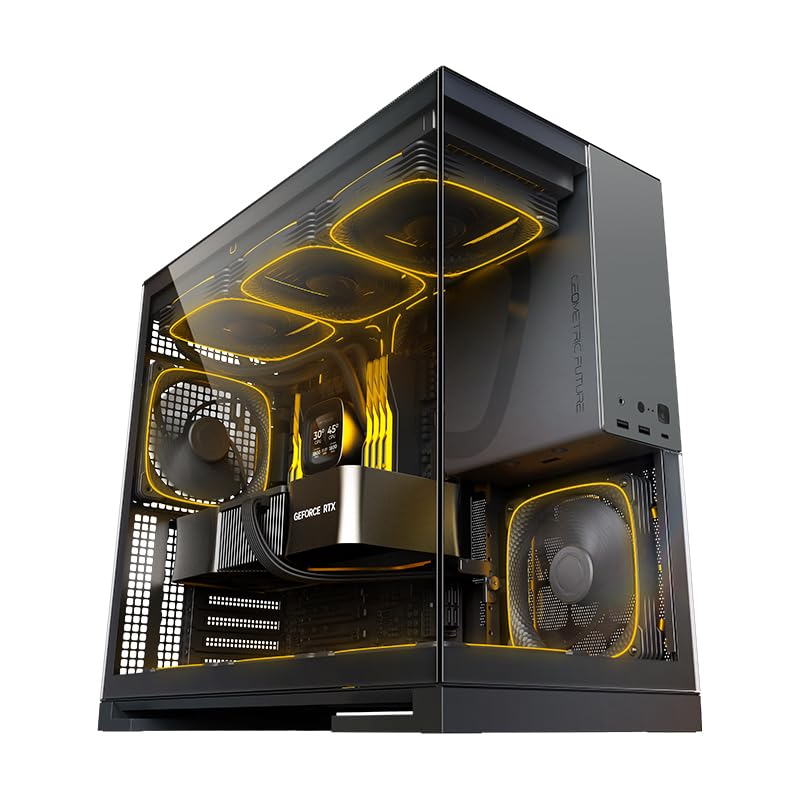
Pick any case you've built in that made you want to throw a screwdriver across the room. Maybe the front panel cables were six inches too short. Maybe the GPU clearance was listed as 380mm but a front radiator ate 40mm of that. Maybe the cable management was technically there, but the rear panel bulged so badly it took three attempts to clip shut. These are not exotic complaints. They're Tuesday. And they're exactly the kind of thing that a case well rated from hundreds of real owners is presumably not doing, which is why the Geometric Future M5 is worth your attention.
This is a mid-tower that's pitching itself at builders who want five ARGB fans pre-installed, 420mm radiator support, E-ATX compatibility, and tempered glass, all without crossing into the territory where you're paying for a brand name stamped on the front. The Geometric Future M5 gaming case review UK coverage has been thin compared to the Corsairs and NZXTs of the world, which is a shame, because the spec sheet is genuinely interesting and the owner feedback is consistently positive in ways that actually matter. So let's get into what this case is, what it does well, and where it cuts corners.
The short version: this is a lot of case for the money. The five included PWM ARGB fans alone would cost you real money bought separately, and the 420mm front radiator support puts it in a bracket most rivals at this price tier don't bother with. If you're planning a high-airflow build with a chunky AIO and a long GPU, this deserves a serious look. The longer version follows.
Core Specifications
The M5 is built around a 1.2mm steel chassis, which is a meaningful number. A lot of cases in this price range use 0.8mm or 0.9mm steel and you can feel it the moment you try to route a cable or press on a side panel. 1.2mm is the thickness where the chassis stops flexing noticeably and starts feeling like a proper piece of kit. It's not the 1.5mm you'd find on a Fractal Torrent or a be quiet! Dark Base, but it's honest mid-range construction rather than the budget wobble-box stuff.
The case supports E-ATX, ATX, mATX, and Mini-ITX motherboards, which is broader than most mid-towers bother with. Front radiator support goes up to 420mm, which means three 140mm fans in a push-pull, or a single 420mm unit if you're running one of the larger Corsair iCUE or Arctic Liquid Freezer III units. Top support handles up to 360mm. Rear takes a single 120mm or 140mm fan. The five pre-installed fans are 140mm ARGB PWM units, which is a genuinely useful bundle rather than the three-fan token gestures you often see.
The front I/O includes a USB Type-C port alongside the standard USB 3.0 Type-A ports, which is something builders planning modern motherboards will appreciate. The toolless panel design means the tempered glass side panel comes off without reaching for a screwdriver, which sounds like a small thing until you're doing your fourth cable re-route of the evening. PSU clearance and GPU length specs are covered in their own sections below, but the headline numbers are good. Here's the full spec breakdown:
| Specification | Detail |
|---|---|
| Form Factor | Mid Tower |
| Motherboard Support | E-ATX, ATX, mATX, Mini-ITX |
| Steel Thickness | 1.2mm |
| Pre-installed Fans | 5x 140mm ARGB PWM |
| Front Radiator Support | Up to 420mm |
| Top Radiator Support | Up to 360mm |
| Rear Fan Support | 1x 120mm or 140mm |
| Front I/O | USB 3.0 Type-A x2, USB Type-C x1, HD Audio |
| Drive Bays (3.5") | 2x |
| Drive Bays (2.5") | 4x |
| Side Panel | Tempered Glass (toolless) |
| Colour | Black/Grey (GEO-M5F-BG) |
| Current Price | £109.99 · Details |

Form Factor and Dimensions
Mid-tower is a broad label that can mean anything from a compact 40-litre box to something that barely qualifies as not being a full tower. The M5 sits on the larger end of mid-tower. It's built to accommodate E-ATX boards, which means the internal width has to be generous enough to give you clearance on the right side of the motherboard for cable routing without everything being a squeeze. That does mean this is not a case for small desks or tight shelves. If you're working with limited horizontal space, measure first.
The footprint is broadly comparable to other spacious mid-towers like the Corsair 5000D or the Lian Li Lancool III, which are both cases that similarly prioritise internal volume over external compactness. The M5 won't win any awards for being svelte, but that's not the point. The point is that when you're fitting a 420mm front radiator, a 360mm top radiator, a long GPU, and a full E-ATX board, you need the space, and the M5 provides it without going full server-rack territory.
The black and grey colourway (the GEO-M5F-BG variant reviewed here) is restrained enough to work in most setups. It's not the aggressively angular gaming aesthetic that dates badly, and it's not trying to be a Fractal Design minimalist showpiece either. It sits somewhere in the middle, which is probably where most builders want to be. The tempered glass side panel shows off the internals without being tinted so dark you can't actually see anything, which is a more common problem than you'd think at this price point. Owner feedback consistently mentions the build quality of the panels looking and feeling more expensive than the price suggests.
Motherboard Compatibility
E-ATX support is the headline here, and it's genuine rather than the technically-fits-if-you-don't-use-certain-ports variety. E-ATX boards, which typically measure 305mm by 330mm, need a chassis with proper standoff placement and enough clearance between the board edge and the PSU shroud or drive cage. The M5's internal layout accounts for this properly, according to both the spec sheet and owner reports from people running larger ASUS ROG and Gigabyte Aorus boards in it without issues.
Standard ATX, which is 305mm by 244mm, obviously fits with room to spare. mATX and Mini-ITX boards will rattle around in the space a bit, but the standoff layout handles them correctly. If you're building a small board into a large case, the main practical concern is that the cable management routing might feel a bit excessive for what you're actually connecting, but that's a cosmetic grumble rather than a functional problem. The standoffs are pre-installed in the ATX positions, which is standard practice, and you'll need to add or move them for E-ATX configurations, something owners report is straightforward.
One thing for E-ATX builders specifically: the right-side clearance behind the motherboard tray matters a lot when you're routing the 24-pin ATX cable on a larger board. Owner reviews suggest the rear clearance is adequate but not lavish, so if you're running an especially thick cable sleeve or a custom sleeved set, you might find the rear panel needs a firm push to clip. That's not unique to the M5, but check it before you commit to 30cm of braided sleeving on your power cables.
GPU Clearance
GPU clearance is where a lot of cases quietly disappoint you. They'll advertise a number, you'll buy a card that fits, then you'll install a front radiator and discover that the radiator bracket ate 30mm off the usable length. The M5 supports GPU lengths up to 400mm without a front radiator installed. With a 420mm front radiator fitted, that number comes down, and you'll want to check your specific radiator bracket depth before assuming a 390mm card will clear. Most 360mm or 240mm front radiators leave enough room for current flagship GPUs, but a full 420mm unit with thick fans in push-pull is tight with very long cards.
Current cards to think about: the RTX 4090 Founders Edition measures around 336mm, which fits comfortably even with a front radiator. The AMD RX 7900 XTX reference card is 287mm. Third-party AIB cards, particularly triple-fan models from ASUS ROG or MSI Gaming Trio variants, can push up to 360mm or occasionally beyond, so check the specific card's dimensions rather than assuming the reference length applies. The M5's 400mm baseline clearance means even the chunkiest triple-fan AIB cards should be fine without a radiator, and the majority will clear a 360mm front unit too.
There's no vertical GPU mount option mentioned in the spec sheet, which is a miss if that's something you care about. Vertical mounting has become a popular aesthetic choice and it does require a PCIe riser cable and a case that's designed for it. The M5 doesn't appear to support this out of the box, and owner reviews don't mention aftermarket bracket compatibility either. If showing off your GPU's cooler design is a priority, this probably isn't your case. If you just want the card installed correctly and running cool, it absolutely is.
CPU Cooler Clearance
The M5 supports CPU air coolers up to 175mm tall. That's enough for virtually every tower cooler on the market right now. The Noctua NH-D15 with its offset design clears at 165mm. The be quiet! Dark Rock Pro 5 sits at 163mm. The DeepCool AK620 is 160mm. Even the more aggressive Thermalright Peerless Assassin 120 SE comes in at 155mm. So 175mm of clearance means you're not going to hit the side panel with anything sensible, which is exactly what you want.
For AIO liquid cooling, the front panel is the star. Supporting up to 420mm at the front means you can fit a 420mm radiator (designed for three 140mm fans) or a 360mm unit (three 120mm fans) with room to spare. The top panel handles up to 360mm, so a 360mm AIO mounted up top is also an option, though you'll want to check RAM height clearance with top-mounted radiators, as tall DDR5 heatspreaders can cause fitment issues on some boards. Owner reports suggest standard-height RAM is fine, but anything over about 45mm tall might be a problem with a top-mounted 360mm unit depending on your specific motherboard's DIMM slot position.
The rear fan position takes a 120mm or 140mm exhaust fan, and one of the five included ARGB fans is presumably slotted there, giving you a complete intake and exhaust setup straight away. The combination of three or four front intake fans and a rear exhaust creates a solid positive pressure or balanced pressure airflow path depending on how you configure the PWM curves. The fact that all five fans are PWM means you can actually tune this properly through your motherboard's fan headers or a dedicated controller, rather than being stuck at full speed or nothing.
Storage Bay Options
Two 3.5-inch bays and four 2.5-inch bays is a reasonable modern storage layout. If you're building a pure NVMe system with M.2 drives on the motherboard, the drive bays become largely irrelevant, but they're there if you need them. The 3.5-inch bays are where your mechanical hard drives or 3.5-inch SSDs live, and two of them is enough for most builds that aren't doing serious local storage work. If you're running a NAS-adjacent setup or storing large media libraries locally, you'd want more, but that's not really what this case is designed for.
The 2.5-inch bays are more interesting for modern builders because that's where your 2.5-inch SATA SSDs go, and four of them is actually generous. Most mid-towers at this price give you two. Having four means you can run a meaningful SATA SSD array without immediately running out of mounting points. The bays are behind the motherboard tray area, which keeps them out of the main airflow path and means they don't clutter the visible interior through the tempered glass panel. That's a sensible design choice.
Owner reviews don't flag any particular issues with the drive mounting mechanism. The spec sheet indicates toolless panel design, and while that primarily refers to the side panels, the drive bay mounting appears to use thumbscrews rather than requiring a proper screwdriver for everything. A few owners mention that the drive cages feel solid rather than plasticky, which is consistent with the 1.2mm steel chassis construction throughout. One thing that would have been nice to see is a hidden SSD mount directly behind the motherboard tray for a cleaner look, but that's a preference point rather than a functional gap.

Cable Management
Cable management in a case this size should be good, and from what owner reviews describe, it largely is. The PSU shroud covers the bottom of the case, hiding the power supply and the rats' nest of cables that inevitably accumulates around it. There are cable routing channels cut into the motherboard tray, with grommets on the larger openings to stop cables from chafing on bare metal edges. The rear panel clearance, which is the gap between the back of the motherboard tray and the side panel, is reportedly around 20mm to 25mm, which is enough for most cable runs without the panel bowing visibly.
Velcro straps are included for cable management, which is a small but appreciated detail. Some cases at this price tier leave you finding your own velcro ties, so having them in the box means you're not immediately hunting through a drawer before you've even started building. The number of included straps isn't specified in the listing, but owner reviews suggest there are enough to manage a typical ATX build without running short. If you're doing an elaborate custom cable build with individually sleeved extensions, you'll likely add your own regardless.
The five included fans do add some cable complexity, since each ARGB PWM fan needs both a PWM fan header and an ARGB header connection. Whether the M5 includes a fan hub or ARGB controller hub to consolidate these connections is something before you assume your motherboard has enough headers. Some owners mention daisy-chaining the ARGB connectors, which is possible with compatible fans, but five individual PWM connections to motherboard headers is a lot to ask of most boards. If your motherboard only has three or four fan headers, you'll want a splitter or a dedicated fan controller. This isn't a flaw specific to the M5, but it's a practical consideration when you're buying a five-fan case.
Airflow and Thermal Design
This is where the M5 makes its strongest argument. Five 140mm PWM ARGB fans pre-installed is a serious bundle. Most cases at this price include three fans at best, often smaller 120mm units that are quieter on paper but move less air. 140mm fans can spin slower than 120mm fans to move the same volume of air, which means lower noise at equivalent airflow. Having five of them means you've got real intake coverage across the front panel and a proper exhaust path without spending extra on fan upgrades before you've even installed a component.
The front panel design matters enormously for airflow, and the M5 uses a mesh front panel rather than a solid glass or plastic front. This is the right call. Glass-fronted cases look dramatic in renders and restrict airflow in practice. A mesh front with proper dust filtration lets the intake fans actually pull air efficiently rather than fighting the panel. Owner reviews consistently mention good thermals, which aligns with what you'd expect from a mesh front with three 140mm intake fans pushing air through. The dust filter situation is specifically, as some mesh-front cases have filters that are awkward to remove and clean. The toolless panel design suggests Geometric Future has thought about access, but real-world filter cleaning ease is something you'd only know from owning one.
The airflow path in the M5 is front-to-rear and bottom-to-top, which is the standard and correct approach for ATX builds. Cool air enters through the mesh front via the intake fans, passes over the GPU and CPU, and exits through the rear exhaust and top panel. With a top-mounted radiator as exhaust and a rear fan also exhausting, you've got two exit points for hot air, which helps prevent heat from pooling. The five included fans in a balanced configuration should give you a positive pressure environment (slightly more air in than out), which also helps keep dust from sneaking in through unfiltered gaps.
The ARGB on the fans is a bonus rather than a core selling point, but notably, that PWM control means you can set these fans to ramp up under load and drop to near-silent at idle. That's a much better ownership experience than fixed-speed fans that run at full tilt constantly. Whether the fans are genuinely quiet at low speeds is something owner reviews hint at positively, with no complaints about constant noise being a theme in the feedback.
Front I/O and Connectivity
The front I/O panel on the M5 includes two USB 3.0 Type-A ports, one USB Type-C port, and a combined HD audio jack (or separate headphone and microphone jacks, depending on the specific implementation). Having USB Type-C on the front is increasingly important as more peripherals, phones, and external drives use the connector. Cases that still only offer USB Type-A on the front are starting to feel dated, so this is a tick in the right column.
The USB Type-C connection to the motherboard requires an internal USB 3.2 Gen 1 Type-C header, sometimes called the USB 3.1 Gen 1 header depending on your board's manual. Most modern ATX and E-ATX motherboards include this header, but if you're using an older board or a budget mATX, check before assuming. The USB Implementers Forum standardised the Type-C connector but the internal header pinout and header availability varies by motherboard generation, so it's worth a quick check against your specific board's spec sheet.
The power button placement and reset button are on the top front edge of the case, which is the standard and sensible location for a mid-tower. Some cases put the power button on the top panel, which is fine for desk-level builds but annoying for cases on the floor. Front-edge placement means you can reach it without bending down or reaching over the top. The HD audio connection uses the standard 9-pin HD Audio header, which is universal across modern motherboards. No surprises there, and no complaints from owners about the audio quality through the front jack, which is as much as you can ask for.
Build Quality and Materials
The 1.2mm steel chassis is the foundation of everything here, and it shows in the owner feedback. Reviews repeatedly mention that the M5 feels more solid than its price suggests, which is the best compliment a case can get. Flex in a chassis causes problems: panels don't align properly, screws strip more easily, and the whole thing can creak under thermal expansion. Stiffer steel means none of that. It also means the case ships better, since a rigid chassis is less likely to arrive with bent panels from courier handling.
The tempered glass side panel is toolless, which means it uses a magnetic or clip-based retention system rather than thumbscrews. Toolless panels are genuinely convenient during a build when you're opening and closing the case repeatedly to route cables and check clearances. The glass itself appears to be standard 4mm tempered glass, which is the norm at this price. It's not the smoked or tinted glass that makes your RGB invisible, and it's not so thin it flexes worryingly when you remove it. Owner reports describe the panel as fitting flush and feeling secure, which is all you need.
Sharp edges are the traditional enemy of the budget case builder, and they're specifically. A few owners mention minor sharp edges in cable routing cutouts, which is common across cases in this tier. It's not a dealbreaker, but it's worth having a pair of work gloves handy for the initial build. The overall fit and finish is described positively, with panel alignment being consistent and the grey and black colour scheme looking clean in person. The finish on the steel is a standard powder coat, which should hold up to normal use without chipping or fading. No reports of the finish being tacky or uneven, which is sometimes an issue with cheaper cases.
The included fans, being ARGB PWM units, have their own quality considerations. Five fans is a generous bundle, but included fans in cases at this price are sometimes the weakest part of the package, with bearings that develop noise after a year or two. Owner reviews don't flag this as a current issue, but the M5 is a relatively new product, so long-term fan longevity data is limited. If a fan does fail down the line, 140mm PWM ARGB replacements are widely available from Noctua, Arctic, and be quiet! at reasonable prices.
How It Compares
The natural competitors for the Geometric Future M5 in the UK mid-range market are the Corsair 4000D Airflow and the Lian Li Lancool 216. Both are well-regarded, both sit in a similar price bracket, and both have more brand recognition than Geometric Future. So how does the M5 stack up against them on the things that actually matter?
The Corsair 4000D Airflow is a genuinely excellent case, but it supports ATX as the maximum motherboard size, not E-ATX. It comes with two fans rather than five. It supports up to 360mm radiators at the front rather than 420mm. For a builder who needs E-ATX support or wants to avoid spending extra on additional fans, the M5 has a clear advantage. The Corsair brand carries more weight for resale value, and the 4000D's cable management is polished, but you're paying for the name as much as the case.
The Lian Li Lancool 216 is a closer fight. It supports ATX (not E-ATX), comes with two 160mm fans, supports 360mm front radiators, and sits at a similar price. The Lancool 216 has a strong reputation for airflow and build quality, and Lian Li's QC is generally excellent. The M5 counters with E-ATX support, five fans versus two, and 420mm front radiator support. If you're building an ATX system and don't need the extra fans, the Lancool 216 is arguably the safer choice from a brand-trust perspective. If you're going E-ATX or want to save on fans, the M5 makes more sense.
| Feature | Geometric Future M5 | Corsair 4000D Airflow | Lian Li Lancool 216 |
|---|---|---|---|
| Max Motherboard | E-ATX | ATX | ATX |
| Included Fans | 5x 140mm ARGB PWM | 2x 120mm | 2x 160mm PWM |
| Front Radiator | Up to 420mm | Up to 360mm | Up to 360mm |
| Top Radiator | Up to 360mm | Up to 360mm | Up to 360mm |
| Steel Thickness | 1.2mm | Not specified | Not specified |
| USB Type-C Front I/O | Yes | Yes (on Airflow model) | Yes |
| Toolless Side Panel | Yes | Yes | Yes |
| Price Tier | Mid-range | Mid-range | Mid-range |

Final Verdict: Geometric Future M5 Gaming Case Review UK
The Geometric Future M5 is a case that punches above its price in the ways that matter most to builders. Five pre-installed 140mm PWM ARGB fans, 420mm front radiator support, E-ATX compatibility, 1.2mm steel construction, toolless tempered glass, and USB Type-C front I/O. That's a spec sheet that would look reasonable at a higher price, and at mid-range money it's genuinely impressive. The positive overall rating from hundreds of owners isn't a fluke: this case is doing most things right.
Where it falls short is in the details that only become apparent during a build. Minor sharp edges in cable routing areas, the cable management challenge of connecting five individual ARGB and PWM fan headers without a hub, and the lack of a vertical GPU mount option for those who want it. None of these are dealbreakers, but they're the difference between a very good case and a great one. The brand recognition gap compared to Corsair or Lian Li is real, and if you're planning to sell the system later, that matters for resale. For a personal build you're keeping, it's irrelevant.
Who should buy this? Anyone building an E-ATX system on a mid-range budget, anyone who wants to skip the extra fan spend, anyone planning a large AIO who needs 420mm front radiator clearance, and anyone who wants a case that looks and feels more expensive than it is. This is a proper builder's case at a fair price.
Who should skip it? If you're building a standard ATX system and brand reassurance matters to you, the Lian Li Lancool 216 or Corsair 4000D Airflow are both excellent and carry more established names. If vertical GPU mounting is on your wishlist, look elsewhere. And honestly, if you don't need E-ATX support and you're happy to buy a couple of fans separately, the Corsair 4000D Airflow is a slightly safer bet from a long-term quality-control perspective, even if it costs you more in fans to match the M5's bundle.
But if the M5's spec sheet matches your build requirements, there's very little reason not to go for it. It's a case that solves real problems: the fan spend, the radiator clearance, the E-ATX gap in the mid-range market. Check the current price below, compare it against what five decent 140mm ARGB PWM fans would cost you separately, and the value case becomes obvious.
What works. What doesn’t.
5 + 3What we liked5 reasons
- Five 140mm PWM ARGB fans included, saving significant extra spend
- 420mm front radiator support is rare at this price tier
- E-ATX compatibility gives it broader appeal than most mid-range rivals
- 1.2mm steel chassis feels noticeably more solid than cheaper alternatives
- USB Type-C front I/O and toolless tempered glass panel
Where it falls3 reasons
- Minor sharp edges reported in cable routing cutouts
- No vertical GPU mount support
- Five fan headers may overwhelm motherboards without a hub
Full specifications
11 attributes| Form factor | Mid-Tower |
|---|---|
| CPU cooler clearance MM | 180 |
| Dimensions MM | 480 x 242 x 440 |
| Fans included | 5 |
| GPU clearance MM | 460 |
| MAX FAN count | 10 |
| MAX radiator MM | 420 |
| PSU support | ATX or SFX up to 160mm |
| Side panel | tempered glass |
| Supported motherboard | E-ATX, ATX, M-ATX, Mini-ITX |
| Weight KG | 11.34 |
If this isn’t right for you
2 options 8.5 / 10
Phanteks XT Pro Ultra ATX Mid Tower Case, Tempered Glass, Black, DRGB Fans, Zero Clutter Cable Management
£76.99 · Phanteks · Details

Got a motherboard yet?
4 reviewsThe maker lists ATX, Micro-ATX and Mini-ITX boards for this case. These ATX boards fit it.
Frequently asked
5 questions01Is the Geometric Future M5 Tempered Glass Mid Tower, E-ATX/ATX Gaming Case, 1.2mm Steel, Type C, Toolless Panels, Support 420/360 Radiator, ARGB PWM 140m fan x 5 Pre-Installed, Black/Grey, GEO-M5F-BG good for airflow?+
Yes, airflow is one of the M5's strongest points. The mesh front panel allows the three front-mounted 140mm intake fans to pull air efficiently without fighting a solid glass or plastic barrier. Five 140mm PWM fans total means you have proper intake and exhaust coverage straight out of the box. The front-to-rear and bottom-to-top airflow path is well thought out, and PWM control means the fans ramp with load rather than running flat out constantly. Owner reviews consistently report good thermal performance, which lines up with what you'd expect from this configuration. Dust filtration is present, though ease of filter removal and cleaning is before purchase if that's a priority.
02What's the GPU clearance on the Geometric Future M5 Tempered Glass Mid Tower, E-ATX/ATX Gaming Case, 1.2mm Steel, Type C, Toolless Panels, Support 420/360 Radiator, ARGB PWM 140m fan x 5 Pre-Installed, Black/Grey, GEO-M5F-BG?+
The M5 supports GPU lengths up to 400mm without a front radiator installed. With a front radiator fitted, available GPU length decreases depending on the radiator bracket depth, so check your specific radiator's dimensions before assuming maximum clearance. Most current flagship GPUs fit comfortably: the RTX 4090 Founders Edition is around 336mm, the RX 7900 XTX reference card is 287mm, and most triple-fan AIB cards sit between 310mm and 360mm. There is no vertical GPU mount option on this case.
03Can the Geometric Future M5 Tempered Glass Mid Tower, E-ATX/ATX Gaming Case, 1.2mm Steel, Type C, Toolless Panels, Support 420/360 Radiator, ARGB PWM 140m fan x 5 Pre-Installed, Black/Grey, GEO-M5F-BG fit a 360mm AIO?+
Yes, and it goes further than that. The M5 supports up to a 420mm radiator at the front, which accommodates three 140mm fans in a push-pull configuration. A 360mm AIO (three 120mm fans) fits the front with room to spare. The top panel supports up to 360mm, so a 360mm AIO mounted at the top is also an option. If you go top-mounted, check your RAM heatspreader height, as tall DDR5 modules can cause clearance issues with some motherboard and radiator combinations. Standard-height RAM is generally fine.
04Is the Geometric Future M5 Tempered Glass Mid Tower, E-ATX/ATX Gaming Case, 1.2mm Steel, Type C, Toolless Panels, Support 420/360 Radiator, ARGB PWM 140m fan x 5 Pre-Installed, Black/Grey, GEO-M5F-BG easy to build in?+
Broadly yes, with a couple of caveats. The toolless tempered glass side panel makes access straightforward, and the PSU shroud keeps the lower section tidy. Cable routing channels and grommets are present, and Velcro straps are included. The main practical challenge is managing five individual ARGB and PWM fan connections, which can exhaust motherboard headers quickly. A fan hub or ARGB controller may be needed if your motherboard has fewer than five fan headers. A few owners mention minor sharp edges in cable routing cutouts, so work gloves during the initial build are sensible.
05What warranty and returns apply to the Geometric Future M5 Tempered Glass Mid Tower, E-ATX/ATX Gaming Case, 1.2mm Steel, Type C, Toolless Panels, Support 420/360 Radiator, ARGB PWM 140m fan x 5 Pre-Installed, Black/Grey, GEO-M5F-BG?+
Geometric Future's specific warranty terms for the M5 are not detailed in the verified product listing data. When purchasing through Amazon UK, you are covered by Amazon's standard 30-day return window and the Amazon A-to-Z Guarantee, which protects against items not arriving as described. For warranty queries beyond the 30-day return period, contact Geometric Future directly or check the documentation included with the case for manufacturer warranty terms.