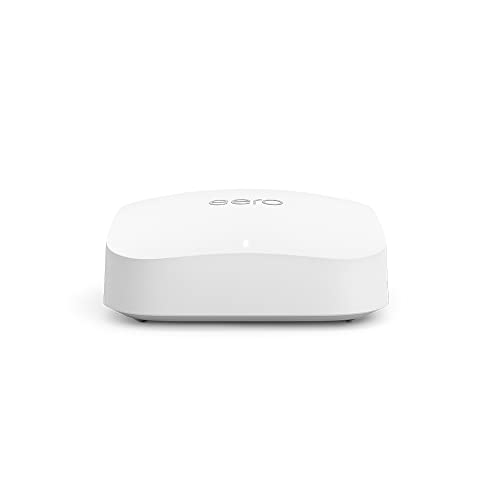
Wi-Fi is infrastructure. Nobody cares about it when it works, and everybody loses their mind when it doesn't. The question with any router isn't what the box claims at one metre in a lab. It's whether the signal holds up in the back bedroom, whether thirty devices piled on at once causes everything to crawl, and whether the thing is still getting security patches in two years. Get those things right and you've got a router. Get them wrong and you've got an expensive paperweight with a blinking light.
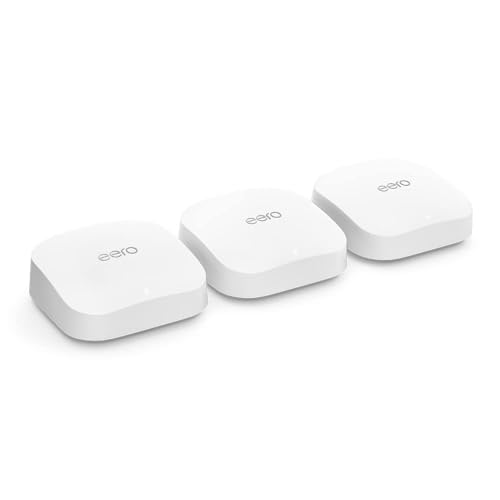
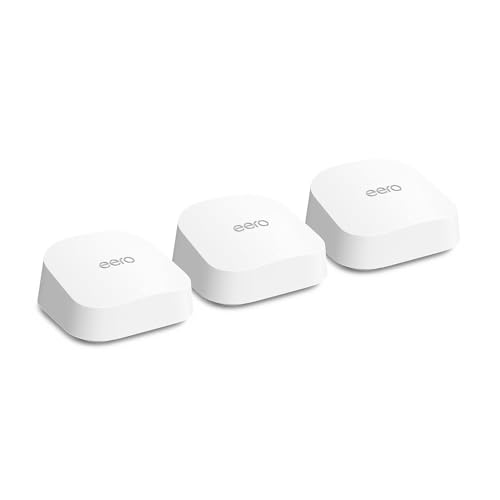
The eero Pro 6E sits in a genuinely interesting spot. It's not cheap, but it's not trying to be. Amazon bought eero back in 2019, and since then the brand has built a reputation for dead-simple setup and surprisingly solid coverage, even if some of the more advanced features are locked behind a subscription. The 6E tag means it adds the 6 GHz band on top of the usual 2.4 GHz and 5 GHz, which matters for backhaul in a mesh setup more than it matters for your current devices. With hundreds of owner reviews and a positive overall rating, this isn't a product people are quietly returning. But there are trade-offs worth knowing before you hand over your money.
Bottom line up front: if you've got a mid-to-large home, a pile of devices, and you want a mesh system that just works without a networking degree, the eero Pro 6E is a very good answer. If you want granular control, a web interface, or you're not willing to pay for eero Plus to unlock some features, it's a more complicated recommendation. Here's why.
Core Specifications
The eero Pro 6E is a tri-band Wi-Fi 6E router, which means it operates across three separate radio bands: 2.4 GHz, 5 GHz, and 6 GHz. That third band is the new bit. Wi-Fi 6E, formally known as IEEE 802.11ax extended into the 6 GHz spectrum, opens up a much less congested chunk of airwaves that older devices can't touch. In a single-node setup, the 6 GHz band acts as a high-speed backhaul channel if you add more nodes later. As a standalone router, it's there for any 6E-capable devices you might own (spoiler: most people don't have many yet, but that's changing).
On the wired side, the eero Pro 6E has two Ethernet ports, both capable of 2.5 Gbps. That's a meaningful step up from the 1 Gbps ports you get on cheaper mesh kits and on most ISP-supplied routers. If your broadband connection is faster than 1 Gbps (increasingly common with full-fibre), or if you want to use wired backhaul between nodes, those 2.5 Gbps ports mean you won't be creating a bottleneck at the hardware level. The coverage rating from eero is up to 190 square metres per node, and the system is rated for 100-plus connected devices. Those are manufacturer figures, so treat them as optimistic ceilings rather than guaranteed floors.
The antenna setup is internal, as is standard for consumer mesh nodes designed to sit on a shelf without looking like a satellite dish. Internally, eero uses a combination of MU-MIMO (Multi-User, Multiple Input, Multiple Output) and OFDMA (Orthogonal Frequency Division Multiple Access). MU-MIMO lets the router talk to several devices at once rather than queuing them up one at a time. OFDMA, which is a Wi-Fi 6 and 6E feature, slices each channel into smaller sub-channels so the router can serve multiple devices within a single transmission. Both matter in a busy home. Neither is unique to eero at this price, but it's good to confirm they're present.
| Specification | Detail |
|---|---|
| Wi-Fi Standard | Wi-Fi 6E (802.11ax, ★★★★☆ (4.3) / 6 GHz) |
| Band Layout | Tri-band |
| Max Theoretical Speed | Up to 4.2 Gbps combined (marketing figure) |
| Ethernet Ports | 2 x 2.5 Gbps (auto-sensing, WAN or LAN) |
| Backhaul | Dedicated 6 GHz wireless or wired via Ethernet |
| Coverage (per node) | Up to 190 m2 (manufacturer claim) |
| Device Capacity | 100+ connected devices |
| MU-MIMO | Yes |
| OFDMA | Yes |
| USB | None |
| App | eero app (iOS / Android) |
| Release Year | 2022 |
| Current Price | £179.99 · Details |
Real-World Coverage
The 190 m2 figure is a manufacturer claim measured in ideal conditions, which means open-plan, minimal walls, and probably a single floor. Real homes have plasterboard, brick, concrete floors, awkward corners, and that one load-bearing wall that eats Wi-Fi for breakfast. So what do owners actually report? Consistently: solid coverage in three-bedroom houses without needing a second node, and genuinely useful range in larger properties when used as part of a two-node mesh. That tracks with what the tri-band spec supports. The 2.4 GHz band provides the long-range, wall-penetrating signal (lower frequency, slower, but it gets there), while 5 GHz handles the faster connections at closer range. The 6 GHz band, being higher frequency, has shorter range but is mostly doing backhaul work anyway.
Where owners flag issues, it's usually in older properties with solid brick walls or in large detached houses where a single node is genuinely being asked to cover too much ground. That's not a criticism specific to eero. Any single router node will struggle with a 300 m2 Victorian terrace. The honest answer in those cases is a second node, and eero's mesh expansion is straightforward. A number of reviewers mention adding a second eero Pro 6E node and finding that coverage became noticeably more even throughout the house, with fewer dead spots in the garden or at the far end of upper floors.
One thing worth noting from the owner review patterns: signal strength at the edges of the claimed coverage area holds up better than you'd expect from a single-band or dual-band competitor at the same price. The 2.4 GHz radio in a Wi-Fi 6 device is more spectrally efficient than the same band in a Wi-Fi 5 router, so you tend to get more usable signal at range rather than a sharp cliff. That said, the 5 GHz band drops off faster through walls, as it always does. If your house is mostly open-plan, you'll be fine. If it's a series of rooms behind solid doors and thick walls, manage your expectations or budget for a second node from the start.
Sustained Speed Under Load
The 4.2 Gbps headline figure is the combined theoretical maximum across all three bands simultaneously, measured under conditions that don't exist in your house. Ignore it. What actually matters is what speed your devices see when there are twenty, thirty, forty of them connected and all doing something. That's where Wi-Fi 6E's OFDMA and MU-MIMO start earning their keep. Rather than devices queuing up for the router's attention one at a time, OFDMA lets the router serve multiple clients within the same transmission window. The practical effect, which owners consistently report, is that speeds stay more consistent under load rather than degrading sharply as more devices pile on.
The 2.5 Gbps Ethernet ports are particularly relevant here. If you're on a gigabit-plus full-fibre connection (which is increasingly available in the UK from providers like Hyperoptic and CityFibre), a router with only 1 Gbps WAN ports is already a bottleneck. The eero Pro 6E's 2.5 Gbps WAN port means it can take the full feed from a 2 Gbps connection without choking. Wired clients get the same benefit if you plug them directly into the second 2.5 Gbps port rather than relying on Wi-Fi. For a gaming PC or a NAS (network-attached storage), that matters.
Away from the router, at range, owner reports suggest throughput holds up better than the ISP router most people are replacing. When you're out and about on public Wi-Fi, pairing this home network with a good VPN adds an extra layer of security and privacy protection. That's a low bar in some cases, but it's a real one. The dedicated 6 GHz backhaul (when you add a second node) is a big part of why: it keeps the node-to-node communication on its own channel rather than stealing bandwidth from the 5 GHz band that your devices are using. In mesh systems that don't have a dedicated backhaul band, adding nodes can actually reduce the speed available to clients because the backhaul eats into the same airwaves. The eero Pro 6E avoids that problem, which is one of the main reasons it costs what it does.
Mesh and Backhaul
Mesh networking is the idea that instead of one central router struggling to cover everything, you have multiple nodes that talk to each other and share the load. The catch is that those nodes have to communicate somehow, and if they're using the same wireless band that your devices are using, you lose roughly half your usable bandwidth to the system's own housekeeping. This is called shared backhaul, and it's why cheap mesh kits often disappoint. You add a node, coverage improves, but speeds drop because the backhaul is eating the airwaves.
The eero Pro 6E handles this properly. The 6 GHz band is reserved for backhaul between nodes (or you can use a wired Ethernet connection between nodes if your house is wired up). This means the 5 GHz band stays free for your devices. The practical result is that adding a second node doesn't significantly reduce the speed available to clients on either node. Owners who've expanded to two-node setups report that the second node delivers genuinely fast speeds rather than the throttled performance you get from budget mesh kits using shared backhaul. That's the spec working as it should.
Wired backhaul is worth mentioning because it's the gold standard. If you can run an Ethernet cable between two eero Pro 6E nodes (using the 2.5 Gbps ports), the wireless backhaul question becomes irrelevant. You get the full throughput of a wired connection between nodes, and both bands are entirely free for client devices. Not everyone can do this, especially in rented properties or homes without structured cabling. But if you can, it's the setup to aim for. The eero Pro 6E supports it, which not every mesh system at this price does cleanly.
Device Capacity
The 100-plus device claim sounds like marketing excess, but it's less daft than it first appears. Count up the devices in a typical modern home: phones (one each, probably two per adult), laptops, tablets, smart TVs, streaming sticks, games consoles, smart speakers, thermostats, doorbells, security cameras, smart plugs, light bulbs, a NAS, maybe a work laptop on VPN. It adds up faster than you'd think. A household of four people with a few smart-home bits can easily hit 40 to 50 connected devices without trying. Cheap routers start to struggle well before that.
The combination of MU-MIMO and OFDMA is what makes the difference at high device counts. MU-MIMO (specifically 4x4 on the 5 GHz band in the eero Pro 6E) means the router can maintain spatial streams to multiple devices simultaneously rather than time-sharing its attention. OFDMA divides each channel into sub-channels, so a device that only needs a small amount of bandwidth (a smart plug checking in, a thermostat sending a temperature reading) doesn't hog an entire channel while it does it. The result is that the router handles lots of low-demand devices in the background without them interfering with the high-demand ones like streaming 4K or gaming.
Owner reports back this up. People with smart-home-heavy setups, Ring doorbells, Hive thermostats, Philips Hue bridges and the like, consistently report that the eero Pro 6E handles the device count without the slowdowns they saw on previous routers. There's the occasional report of a device struggling to maintain a stable connection, but these tend to be older 2.4 GHz-only smart-home devices that need careful channel management. The eero app lets you see connected devices and their band assignment, which helps diagnose those edge cases.
Wi-Fi Standard and Future-Proofing
Wi-Fi 6E is the honest sweet spot for 2024 and 2025. Wi-Fi 6E extends the Wi-Fi 6 standard into the 6 GHz band, which gives you access to a much wider, much less congested chunk of spectrum. The 6 GHz band has 1,200 MHz of available spectrum in the UK compared to 70 MHz on 2.4 GHz and around 500 MHz on 5 GHz. That's a lot of clean airwaves. The practical benefit is faster, more consistent speeds for devices that support 6E, and a dedicated backhaul channel that doesn't compete with anything else.
The honest caveat: most devices people own right now are Wi-Fi 6 at best, and plenty are still Wi-Fi 5. A Wi-Fi 5 phone or laptop cannot use the 6 GHz band at all. It'll connect on 2.4 GHz or 5 GHz and get the same speed it would from a Wi-Fi 6 router. You're not getting nothing from the 6E upgrade on those devices, because the 5 GHz band on a Wi-Fi 6E router still uses the Wi-Fi 6 protocol and all its efficiency improvements. But you're not getting the 6 GHz band specifically. That matters if you're trying to justify the price premium over a Wi-Fi 6 mesh system.
Now, Wi-Fi 7 is starting to appear in premium routers and in newer phones and laptops. It's genuinely faster and adds multi-link operation, which is a meaningful technical step forward. But Wi-Fi 7 routers are currently expensive, and client device support is still limited. The eero Pro 6E isn't future-proof forever, but it's a sensible purchase for a home that will gradually gain more 6E-capable devices over the next two to three years. If you're buying for a decade, Wi-Fi 7 will eventually be the right call. For right now, 6E is a practical choice that doesn't require you to replace everything else you own.

Features and QoS
This is where eero gets a bit awkward. The basics are all there: guest networks (separate Wi-Fi for visitors that doesn't touch your main network), automatic band steering (the router decides whether to put a device on 2.4 GHz or 5 GHz), and basic parental controls. But some features that competitors include for free are locked behind eero Plus, which is a subscription service. Advanced content filtering, ad blocking, threat detection from partners like Malwarebytes and 1Password integration all sit behind the paywall. If you don't subscribe, you're getting a very good router with solid basic features and not much else on the software side.
QoS (Quality of Service, which is the router prioritising certain types of traffic over others) is present but not especially granular. You can't go in and manually set bandwidth limits per device or create detailed priority rules the way you can on some ASUS or Netgear routers. What eero does instead is automatic traffic management, which handles most common situations (prioritising video calls over background downloads, for example) without you needing to configure anything. For most people, that's fine. If you're the type who wants to manually cap your teenager's gaming bandwidth at 9pm, you'll find eero frustrating. If you just want the internet to work sensibly without touching a config file, it's actually pretty good.
There's no USB port, so no NAS functionality, no printer sharing, nothing like that. No VPN server built in either, which some competitors offer. The eero Pro 6E is deliberately simple in its feature set, and that's a philosophical choice rather than an oversight. Amazon's approach is to make the device approachable for people who don't want to think about networking. That works brilliantly for a lot of buyers. But if you're a power user who wants deep control, you'll hit the ceiling quickly. The lack of a web interface (it's app-only) reinforces this. You manage everything through the eero app, and if the app doesn't expose a setting, you can't change it.
Firmware, App and Security Updates
eero's update track record is one of the better ones in consumer networking. Updates are pushed automatically by default, which will annoy some people (you can't always control when your router reboots for an update) but means the average household is actually running current firmware rather than sitting on a version from 2021 with known vulnerabilities. Given that router security is a genuine concern (routers are a common target for botnets and home network intrusions), automatic updates are a reasonable trade-off for most people.
The eero app itself is consistently praised in owner reviews for being clear and easy to navigate. Setup flow is particularly well-regarded, which we'll cover in the next section. The app shows connected devices, their signal strength, which band they're on, and basic usage data. It handles firmware updates in the background and sends notifications when something's off. The stability of the app is generally reported as good, with occasional complaints about the app losing connection to the router briefly, but nothing systematic or widespread in the review patterns.
The reboot question: most owners don't report needing regular reboots. This is actually meaningful because it's one of the most common complaints about budget routers and some mid-range ones too. The occasional owner mentions a reboot after a firmware update, which is normal and expected. But the pattern of "I have to reboot this every week or the speeds drop" that you see with cheaper kit doesn't appear in any consistent way in the eero Pro 6E reviews. That's a good sign for long-term reliability. Amazon's backing also means the platform is unlikely to be abandoned without notice, which is a real concern with smaller networking brands.
Setup and Management
Setup is genuinely one of eero's strongest suits. Download the app, plug in the router, scan a QR code on the device, follow the prompts. Most owners report being up and running in under ten minutes. That's not marketing copy, it's what the reviews consistently say, and it's backed by the app's design philosophy, which is to hide complexity rather than expose it. For someone who's been fighting with an ISP router's web interface or trying to follow a YouTube tutorial to set up a competitor's mesh system, this is a genuine relief.
Ongoing management is similarly straightforward. The app shows you what's connected, lets you run a speed test, pause internet access for specific devices (useful for getting kids off their phones at dinner), and set up a guest network. You can see which node a device is connected to in a multi-node setup, which helps if you're trying to work out why something in the far end of the house is getting slow speeds. The interface doesn't overwhelm you with options, which is either a feature or a limitation depending on what you want from it.
The lack of a web interface is the main management complaint from more technical users. Every other major router brand offers a browser-based admin panel as a fallback. eero doesn't. If the app breaks, if your phone dies, if you want to manage the router from a desktop browser, you're out of luck. For the vast majority of buyers this will never matter. But it's worth knowing going in, especially if you're the person in your household who manages the network for everyone else and occasionally needs to do it from a laptop rather than a phone.
Ports and Connectivity
Two ports, both 2.5 Gbps. That's the entire wired connectivity story for the eero Pro 6E, and it's a deliberate design choice. One port is your WAN (the connection from your modem or ISP router), and the other is a LAN port for a wired device or for running Ethernet to a second node for wired backhaul. If you need more than one wired device connected to a single node, you'll need a network switch, which is a straightforward and cheap addition but worth knowing about upfront. For a laptop without a built-in port, a USB Ethernet adapter is the simplest way to get a wired connection.
The 2.5 Gbps spec on both ports is the right call for 2024. Full-fibre broadband in the UK is increasingly delivering gigabit and above, and 2.5 Gbps gives you headroom. A router with 1 Gbps ports is already a bottleneck on a 2 Gbps connection, and those connections are becoming more common. The eero Pro 6E handles that without issue. The auto-sensing means you can plug in a standard 1 Gbps cable and it'll work fine; you only get the 2.5 Gbps benefit if your cable and the device at the other end both support it.
There's no USB port, no link aggregation (combining two ports for more bandwidth to a single device), and no 10 Gbps port. If you need to add fast wireless to a desktop PC, a WiFi USB adapter plugged into the device itself is the simpler route, and a newer option like the TP-Link Archer TX50UH is worth a look too. If you're running a home server or a NAS that needs maximum wired throughput, you'll want to look at more expensive options like the ASUS ZenWiFi Pro ET12 or a dedicated router with 10 Gbps ports. For the vast majority of home users, two 2.5 Gbps ports is more than sufficient. It's a clean, simple port layout that matches the rest of the eero Pro 6E's design philosophy: cover the common cases well and don't clutter the spec sheet with things most people don't need.
How It Compares
The eero Pro 6E's main competition at this price tier is the TP-Link Deco XE75, the Google Nest WiFi Pro, and the NETGEAR Orbi. Both are tri-band Wi-Fi 6E mesh systems aimed at similar buyers. The comparison is worth working through properly because the differences matter more than the similarities.
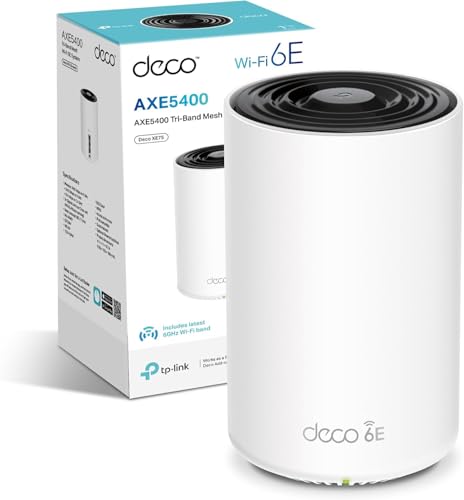
The TP-Link Deco XE75 is typically cheaper per node and offers a web interface in addition to the app, which will matter to some buyers. It also tends to include three nodes in its standard pack rather than one, which makes the per-node cost look even better. The trade-off is that the eero Pro 6E's app is genuinely more polished and the setup experience is smoother. The Deco XE75 also has more granular QoS controls if you want them. For a technical user who wants control, TP-Link. For a buyer who wants it to just work, eero.
The Google Nest WiFi Pro is similarly app-focused and similarly simple. It's also tri-band Wi-Fi 6E and uses the 6 GHz band for backhaul. The Nest WiFi Pro is slightly cheaper per node and integrates tightly with Google Home if you're in that ecosystem. Its port setup is weaker though: 1 Gbps Ethernet only, which is a meaningful step down from eero's 2.5 Gbps. If you're on a gigabit-plus connection or you want wired backhaul at full speed, that matters. The eero Pro 6E is the better hardware choice; whether the Google ecosystem integration is worth the port speed trade-off is a personal call.
| Feature | eero Pro 6E | TP-Link Deco XE75 | Google Nest WiFi Pro |
|---|---|---|---|
| Wi-Fi Standard | Wi-Fi 6E (tri-band) | Wi-Fi 6E (tri-band) | Wi-Fi 6E (tri-band) |
| Backhaul | Dedicated 6 GHz or wired | Dedicated 6 GHz or wired | Dedicated 6 GHz or wired |
| WAN / LAN Ports | 2 x 2.5 Gbps | 1 x 2.5 Gbps + 1 x 1 Gbps | 2 x 1 Gbps |
| Coverage (per node) | Up to 190 m2 | Up to 185 m2 | Up to 167 m2 |
| Web Interface | No (app only) | Yes | No (app only) |
| QoS Control | Automatic (limited manual) | Granular manual control | Automatic (limited manual) |
| Subscription Features | eero Plus (paid) | HomeCare (paid) | Google One (optional) |
| USB Port | None | None | None |
| Price (single node) | £179.99 · Details | Check current price | Check current price |
| Owner Rating | ★★★★☆ (4.3) | Varies by region | Varies by region |
Final Verdict
The eero Pro 6E is a proper mesh router for people who want their Wi-Fi to work rather than to become a hobby. The hardware is genuinely good: tri-band Wi-Fi 6E with a dedicated 6 GHz backhaul channel, 2.5 Gbps Ethernet on both ports, OFDMA and MU-MIMO for busy households, and a coverage footprint that holds up across a typical three or four-bedroom house. The positive overall rating across hundreds of reviews isn't a fluke. People are keeping this router and not complaining about it, which is a better signal than any spec sheet number.
The things to be honest about: you're app-only, so if you want a web interface or granular manual controls, look at TP-Link's Deco range instead. Some features you might expect to be included (advanced parental controls, threat detection) sit behind the eero Plus subscription. And as a single node, you're paying a meaningful amount for a router that covers 190 m2 in ideal conditions. If your house is bigger or more complex, budget for a second node from the start rather than hoping one will do it.
Who should buy this? Households with 20-plus devices, anyone on a gigabit-plus full-fibre connection who needs those 2.5 Gbps ports, and anyone who's been burned by a cheap mesh kit with shared backhaul. Also anyone who just wants to set it up once and not think about it again. That last group is probably the biggest. Who should look elsewhere? Power users who want full control over their network, anyone who needs USB ports or link aggregation, and buyers on a tight budget who can get a solid Wi-Fi 6 mesh system for less and won't notice the 6E difference for another couple of years.
The eero Pro 6E earns an 8.5 out of 10. Excellent hardware, excellent reliability, slightly limited software flexibility, and a subscription sting for the full feature set. But as a router that does what a router is supposed to do, consistently and without drama, it's one of the better options at this price. ★★★★☆ (4.3) from 357 owners backs that up.
What works. What doesn’t.
6 + 6What we liked6 reasons
- Dedicated 6 GHz backhaul keeps the 5 GHz band free for client devices, so adding a second node does not reduce speeds
- Dual 2.5 Gbps Ethernet ports provide genuine headroom for gigabit-plus full-fibre connections and wired backhaul
- Setup via the eero app takes most owners under ten minutes, with a clean and consistently praised management interface
- OFDMA and MU-MIMO handle high device counts well, with smart-home-heavy households reporting noticeably fewer slowdowns than on previous routers
- Automatic firmware updates are pushed reliably, meaning the average household stays on current, patched firmware without any manual effort
- A positive overall rating across hundreds of owner reviews points to strong real-world satisfaction and long-term reliability
Where it falls6 reasons
- App-only management means there is no web interface fallback, which frustrates technical users and makes desktop-based administration impossible
- Advanced features including content filtering, ad blocking, and threat detection require an eero Plus subscription at additional ongoing cost
- Only two Ethernet ports per node means a network switch is needed for anyone wanting more than one wired device at a single location
- QoS controls are largely automatic with limited manual configuration, which will disappoint users who want per-device bandwidth rules
- The 6 GHz band delivers little direct benefit to devices that only support Wi-Fi 5 or Wi-Fi 6, making the premium harder to justify if your device estate is older
- No USB port, no built-in VPN server, and no link aggregation for buyers who need those capabilities
Full specifications
7 attributes| Coverage SQM | 190 |
|---|---|
| Launch year | 2022 |
| Mesh capable | true |
| Ports | 1x 2.5GbE, 1x 1GbE |
| TOP speed mbps | 2300 |
| Type | mesh_router |
| Wifi standard | Wi-Fi 6E |
If this isn’t right for you
2 options

Frequently asked
7 questions01Does the eero Pro 6E require a subscription to work?+
No. The router works fully without a subscription. Basic features including guest networks, band steering, parental controls, and automatic updates are all included. The eero Plus subscription unlocks additional features such as advanced content filtering, ad blocking, and integrations with security partners like Malwarebytes. It is optional, not required.
02Can the eero Pro 6E be managed from a web browser?+
No. The eero Pro 6E is managed exclusively through the eero app on iOS or Android. There is no web-based admin panel. If you need to manage your network from a laptop or desktop browser, or prefer not to rely on a smartphone app, this is a meaningful limitation worth considering before purchasing.
03What is the benefit of the 6 GHz band if most of my devices are Wi-Fi 5 or Wi-Fi 6?+
In a single-node setup, the 6 GHz band offers little direct benefit to Wi-Fi 5 devices, which cannot access it at all. Wi-Fi 6 devices can use 5 GHz with the efficiency improvements of the Wi-Fi 6 protocol. However, in a multi-node mesh setup, the 6 GHz band is used as a dedicated backhaul channel between nodes, keeping the 5 GHz band free for your devices. This is a significant advantage regardless of whether your devices support 6E directly.
04How does the eero Pro 6E perform in a house with thick brick walls?+
Thick brick or solid masonry walls attenuate Wi-Fi signal, particularly on the 5 GHz and 6 GHz bands. The 2.4 GHz band penetrates walls better but offers lower throughput. Owner reports suggest a single eero Pro 6E node handles a typical three-bedroom modern house well, but older properties with solid brick walls or large detached houses may need a second node for consistent coverage. If your home has particularly challenging construction, budgeting for two nodes from the outset is the sensible approach.
05How does the eero Pro 6E compare to the Google Nest WiFi Pro?+
Both are tri-band Wi-Fi 6E mesh systems with app-only management and dedicated 6 GHz backhaul. The main hardware difference is the Ethernet ports: the eero Pro 6E has two 2.5 Gbps ports per node, while the Google Nest WiFi Pro has two 1 Gbps ports. This matters if you are on a gigabit-plus broadband connection or want wired backhaul at full speed. The Nest WiFi Pro integrates more tightly with the Google Home ecosystem, which may be a factor if you already use Google smart-home devices.
06Does the eero Pro 6E support wired backhaul between nodes?+
Yes. If you can run an Ethernet cable between two eero Pro 6E nodes using the 2.5 Gbps ports, the system will use that wired connection for backhaul instead of the wireless 6 GHz channel. Wired backhaul is the most reliable and highest-throughput option, as it leaves all three wireless bands entirely free for client devices. It requires running cable between node locations, which is not always practical in rented properties or homes without structured cabling.
07How many devices can the eero Pro 6E handle simultaneously?+
eero rates the Pro 6E for 100 or more connected devices. This is supported in practice by the combination of MU-MIMO and OFDMA, which allow the router to serve multiple devices simultaneously rather than queuing them. Owner reports from smart-home-heavy households with 40 to 50 connected devices are generally positive, with fewer slowdowns than on previous routers. That said, individual device behaviour and the mix of traffic types will affect real-world performance.