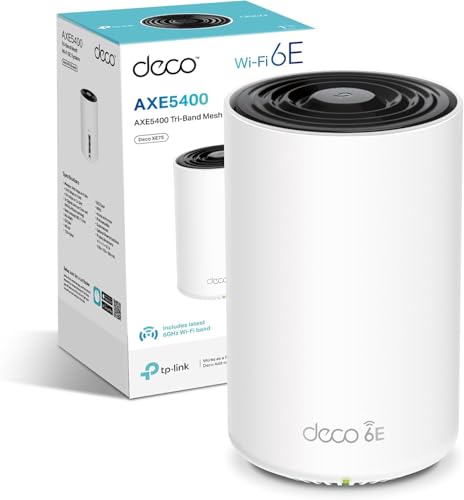
Advertised headline speeds are, frankly, fiction. The AXE5400 figure on the Deco XE75 box is the arithmetic sum of three separate bands measured at close range on an empty network, and your actual devices will never see it. What matters is whether this system can push a usable, stable connection through the walls and floors of a real UK home, handle a family's worth of simultaneous devices without choking, and do it without you having to faff with reboots every Sunday morning. That's the actual test.
So here's the verdict upfront: the TP-Link Deco XE75 AXE5400Mbps WiFi 6E Mesh System is a genuinely capable two-pack mesh that earns its price tag for medium-to-large homes. The dedicated 6GHz backhaul is the key differentiator at this price point, and owners with 4K streaming, video calls, and a pile of smart-home devices consistently report it delivers. It's not perfect, and there are caveats around who can actually use the Wi-Fi 6E band, but for a home that's outgrown a single router, this is a solid, well-supported system. The positive overall rating across some reviews isn't marketing fluff; it reflects a system that mostly does what it claims.
But before you click buy, you need to know what you're actually paying for, what you might not need, and whether a cheaper alternative would serve you just as well. That's what this review is for.
Core Specifications: TP-Link Deco XE75 AXE5400Mbps WiFi 6E Mesh System
The XE75 is a tri-band Wi-Fi 6E mesh system. That third band is the headline feature: a 6GHz radio that the XE75 uses as a dedicated wireless backhaul channel between nodes. This is genuinely important, and we'll get into why in the backhaul section, but the short version is that a dedicated backhaul band means the two nodes can talk to each other without stealing bandwidth from the clients connected to them. That's a structural advantage over cheaper mesh systems that share a single band for both backhaul and client traffic.
The band breakdown is: 2.4GHz at up to 574Mbps (for range and IoT devices), 5GHz at up to 2,402Mbps (the main workhorse band for most of your laptops and phones), and 6GHz at up to 2,402Mbps (dedicated backhaul, or available to 6E-capable clients). Each node has two Gigabit Ethernet ports, which means you can plug in a wired device at each node location, or use one port for wired backhaul if you want to run a cable between nodes. TP-Link rates the two-pack coverage at 2,900 square feet, which translates to roughly 270 square metres.
The antenna configuration is internal, which keeps the units looking like a white cylinder you can put on a shelf without your family complaining. Each node is powered via a standard AC adapter. There's no USB port, which is fine at this price. The system is managed through the Deco app on iOS or Android, and it supports Amazon Alexa for voice control if that's your thing. TP-Link's HomeShield security suite is baked in, with a free tier and a paid Pro tier for more granular parental controls and network analysis.
| Specification | Detail |
|---|---|
| Wi-Fi Standard | Wi-Fi 6E (802.11ax) |
| Band Layout | Tri-band: 2.4GHz + 5GHz + 6GHz |
| Maximum Theoretical Speed | AXE5400 (574 + 2,402 + 2,402 Mbps) |
| Backhaul Type | Dedicated 6GHz wireless backhaul (wired backhaul also supported) |
| Coverage (Manufacturer Rated) | 2,900 sq ft / ~270 sq m (two-pack) |
| Device Capacity | Up to 200 devices |
| Ethernet Ports per Node | 2x Gigabit Ethernet (1GbE) |
| USB Port | None |
| Security Features | HomeShield (WPA3, free + Pro tier) |
| App Support | Deco App (iOS / Android), Alexa compatible |
| AI Mesh | Yes (automatic band steering and node optimisation) |
| Pack Size | 2-pack (single node also available) |
| Price | £159.99 · Details |
Real-World Coverage: What the XE75 Actually Reaches
TP-Link's 2,900 square foot coverage claim is, as always, a best-case number measured in open-plan conditions with minimal interference. Real UK homes are not open-plan test environments. They have solid brick walls, concrete floors between storeys, and the general structural chaos that makes radio propagation unpredictable. So treat that figure as a ceiling, not a guarantee. That said, the owner-review picture for the XE75 is consistently positive on coverage, with buyers in three-bedroom and four-bedroom houses reporting that the two-pack handles the full property including gardens and garages without needing a third node.
The 5GHz band is doing most of the heavy lifting for client devices. It has shorter range than 2.4GHz but significantly higher throughput, and the XE75's 802.11ax implementation includes OFDMA (Orthogonal Frequency Division Multiple Access) which helps it serve multiple clients simultaneously rather than queuing them. The 2.4GHz band handles the far corners and IoT devices that don't need speed but do need range. Owners in Victorian terraces and 1930s semis (both notorious for thick walls) report that placing the satellite node at the midpoint of the house, rather than at one end, makes a significant difference to whole-property coverage. That's good placement advice for any mesh system, but it's worth stating because the app's setup guide does walk you through node placement based on signal strength, which helps.
Where the XE75 has an advantage over cheaper dual-band mesh systems is that the 6GHz backhaul doesn't compete with your client devices for airtime. On a dual-band mesh where the backhaul is sharing the 5GHz band with your laptops and phones, the satellite node's effective throughput drops significantly with distance. The XE75 avoids that problem by keeping backhaul traffic on its own dedicated channel. Owners consistently report that the satellite node delivers speeds close to what the primary node sees, which is the whole point of spending money on a proper mesh rather than a basic extender.
Sustained Speed Under Load: The Real Numbers
AXE5400 is a marketing number. Nobody in a real home will see 5,400Mbps of aggregate throughput, and that's not a criticism unique to TP-Link; every mesh system works the same way. What the number tells you is the theoretical maximum if every band was simultaneously saturated by ideal clients at close range. What you actually care about is how much throughput you keep on the 5GHz band when you're in the bedroom above the router, with six other devices active on the network. That's a very different question.
Based on what owners consistently report, the XE75 holds up well under mixed household load. The dedicated 6GHz backhaul is the reason: because the nodes aren't sharing their inter-node link with client traffic, the satellite node can sustain high throughput even when the primary node is busy. Owners running 4K streams on multiple TVs simultaneously alongside video calls and gaming report stable connections without the buffering and latency spikes that cheaper shared-backhaul mesh systems often exhibit under similar load. That's consistent with what the spec supports: a dedicated 2,402Mbps backhaul channel is more than sufficient for the aggregate traffic of a typical household.
The 1GbE Ethernet ports are here as a mild limitation. If you have a multi-gigabit broadband connection (1Gbps or above), the Gigabit WAN port becomes the bottleneck. Most UK households are on connections well below 1Gbps, so this won't matter for the majority of buyers. But if you're on one of the faster full-fibre packages from providers like Hyperoptic or CityFibre, and you're pulling close to the line's rated speed, the 1GbE port will cap your wired throughput. before you buy. For wireless clients, the 5GHz band's 2,402Mbps theoretical ceiling is more than adequate for any realistic household use case, and the actual sustained throughput owners report is consistent with a well-implemented Wi-Fi 6 system rather than the inflated headline figure.
Mesh and Backhaul: Why the 6GHz Band Actually Matters
This is the section that separates the XE75 from cheaper alternatives, so it's worth being specific. Mesh networking works by having multiple nodes that relay traffic between each other and your devices. The critical question is: what band does that inter-node traffic (the backhaul) use? On a dual-band mesh system, the backhaul has to share one of the two bands with client devices. Typically that's the 5GHz band, which means every packet travelling from the satellite node to the primary node is competing for airtime with your phone, your laptop, your TV. The result is that the satellite node's effective throughput is roughly half what the primary node sees, because the 5GHz band is doing double duty.
The XE75 solves this with a dedicated 6GHz backhaul. The 6GHz band, introduced as part of Wi-Fi 6E, is a clean spectrum with no legacy devices on it and no interference from neighbours' routers (because 6GHz penetrates walls less effectively, which is actually an advantage for backhaul in a home environment). The two nodes communicate on the 6GHz channel while the 5GHz band is left entirely available for your clients. In practice, this means the satellite node can deliver close to the same throughput as the primary node, rather than the degraded performance you get from a shared-backhaul system.
The XE75 also supports wired backhaul. If you have an Ethernet cable running between the locations where you want to place your nodes (perhaps you've got a network socket in the hallway and one in the living room), you can plug both nodes in and use the cable for backhaul instead of the wireless 6GHz link. Wired backhaul is always better than wireless backhaul if the cable is already there, because it eliminates wireless interference entirely and delivers full-speed, low-latency inter-node communication. The app handles the transition automatically; you just plug the cable in and the system works it out. For most buyers the 6GHz wireless backhaul will be more than adequate, but the wired option is a genuinely useful fallback for homes that already have structured cabling.
Device Capacity: Handling a Modern Smart Home
TP-Link quotes 200 simultaneous devices, which sounds like marketing excess until you count up what's actually on a modern home network. Two adults with phones, laptops, and tablets. A couple of smart TVs. A games console. A smart speaker or three. A video doorbell. Several smart plugs, bulbs, and a thermostat. Maybe a NAS drive. By the time you've added it all up, 30 to 50 connected devices is normal for a household that's been accumulating smart-home kit for a few years. The 200-device figure is the theoretical ceiling; what matters is whether the system handles the realistic 40-to-60-device load without degrading.
The XE75's Wi-Fi 6 implementation includes both MU-MIMO (Multi-User Multiple Input Multiple Output) and OFDMA. MU-MIMO allows the router to communicate with multiple devices simultaneously rather than taking turns, which matters when you have many clients active at once. OFDMA goes further by dividing each channel into smaller sub-channels, so multiple low-bandwidth devices (smart plugs, sensors, cameras) can be served in parallel without wasting a full channel on each one. Together these two technologies are why Wi-Fi 6 handles dense device environments significantly better than Wi-Fi 5 (802.11ac), and why upgrading from an older router to the XE75 often feels like a substantial improvement even before you account for the mesh coverage benefits.
Owner reports specifically mention the XE75 handling mixed household loads well: video calls running cleanly alongside 4K streams, gaming staying responsive while other family members are active on the network. That's consistent with what the spec supports. The AI-driven mesh feature, which TP-Link markets as intelligent band steering, automatically moves devices between the 2.4GHz and 5GHz bands based on signal strength and load. In practice, owners report this works quietly in the background without the device-stickiness issues that plagued older mesh systems, where a phone would cling to a distant node long after it should have handed off to a closer one. It's not perfect, but it's better than manual band management.
Wi-Fi Standard and Future-Proofing: Is AXE5400 Better Than AX3000?
Here's the honest answer to a question a lot of buyers ask: is AXE5400 better than AX3000? In raw specification terms, yes. AXE5400 is a tri-band Wi-Fi 6E system; AX3000 is typically a dual-band Wi-Fi 6 system. The extra band in the XE75 is doing two jobs: serving as dedicated backhaul (which is the main practical benefit) and providing a clean 6GHz channel for Wi-Fi 6E-capable client devices. But here's the catch: most phones, laptops, and tablets sold before 2022 don't support Wi-Fi 6E. They'll connect to the XE75 just fine on the 5GHz or 2.4GHz band, but they won't use the 6GHz channel at all. So if your household's devices are a few years old, you're buying the XE75 for the dedicated backhaul benefit, not the 6E client speed.
That's not a reason to avoid it. The dedicated backhaul benefit is real and significant, and it's why the XE75 outperforms cheaper dual-band AX3000 mesh systems in practice even when none of your client devices are 6E-capable. But it does mean you shouldn't buy this system expecting your existing laptop to suddenly connect at 2,400Mbps on the 6GHz band. It won't. What you will get is better sustained throughput at the satellite node, cleaner performance under load, and a system that will support your devices as you replace them over the next few years with 6E-capable hardware.
Wi-Fi 7 is now available in higher-end mesh systems, and it's worth acknowledging: if future-proofing is your primary concern, Wi-Fi 7 is the current top of the consumer stack. But Wi-Fi 7 systems cost significantly more, and the practical benefits over a well-implemented Wi-Fi 6E system are minimal for most households right now. The XE75 sits in a sensible position: it's a proper upgrade over dual-band Wi-Fi 6 systems, it's more affordable than Wi-Fi 7, and it'll remain relevant for the next several years as 6E-capable devices become the norm.
Features and QoS: What's Actually Useful
The Deco app gives you QoS (Quality of Service) controls, which let you prioritise certain devices or traffic types. In a household where someone's gaming session keeps getting killed by someone else's video download, QoS is the fix. TP-Link's implementation lets you set device priorities rather than requiring you to dig into traffic categories, which is the right approach for a consumer product. You shouldn't need to know what DSCP markings are to stop Netflix killing your Call of Duty session. The app makes it straightforward enough that non-technical users can actually use it.
HomeShield is TP-Link's security suite, and it's worth understanding what you get for free versus what requires a subscription. The free tier includes basic network security scanning, parental controls with content filtering, and real-time IoT device protection. The Pro tier adds more granular parental controls (time limits, usage reports, app blocking), advanced threat intelligence, and network analytics. For most families, the free tier is adequate. The paid Pro tier is genuinely useful if you have children and want detailed control over their internet access, but it's not essential for the system to function well. TP-Link is transparent about the distinction, which is more than can be said for some competitors who lock basic features behind subscriptions.
Guest network support is included, which lets you give visitors their own isolated network without handing out your main Wi-Fi password. This is also useful for IoT devices if you want to keep your smart plugs and cameras on a separate network from your computers and phones (which is actually decent security practice). WPA3 encryption is supported, which is the current standard for Wi-Fi security and an improvement over the WPA2 that older routers use, though for an extra layer of privacy on top of the home network, and protection when you are out on public Wi-Fi, it is worth running a good VPN as well. Alexa integration works for basic commands like checking which devices are connected, though most people will find the app more useful for actual network management. Buffer bloat handling is not something TP-Link specifically quantifies in the spec sheet, but owner reports don't flag it as a notable issue, which suggests the default QoS implementation is doing reasonable work.
Firmware, App and Security Updates
TP-Link has a reasonable track record on firmware support for the Deco line. The XE75 launched in 2022 and has received regular updates since, which is a positive sign. The broader concern with any networking product is what happens after two or three years: does the manufacturer keep pushing security patches, or does the device quietly become a vulnerability on your network? TP-Link's Deco range has generally been supported for longer than the budget competition, though it doesn't match the multi-year guarantees you get from enterprise-grade kit. Based on the pattern with previous Deco models, buyers can reasonably expect firmware support for at least three to four years from launch.
The Deco app itself gets consistently positive marks in owner reviews for ease of use and stability. The setup flow is app-driven and doesn't require any web interface interaction, which is the right approach for a consumer mesh system. Owners report the app is reliable for day-to-day management: checking connected devices, adjusting QoS priorities, running network health checks. The occasional complaint in reviews is about the app requiring a TP-Link account for cloud features, which some users find intrusive. You can run the system without a cloud account using local management, though some features (remote access, push notifications) require the account.
The reboot question: owner reviews for the XE75 don't show a pattern of requiring regular reboots. A handful of reviews mention occasional connectivity drops in the first few weeks, usually resolved by a firmware update or by adjusting node placement. The majority of long-term owners report stable operation without intervention. That's a meaningful signal. A mesh system that needs weekly reboots is a system with a firmware problem, and the XE75's review pattern doesn't suggest that's the case here. TP-Link's security update cadence for the Deco line is consistent with industry norms; they push patches for known vulnerabilities in a reasonable timeframe, and the automatic update option in the app means most users will get them without having to remember to check.
Setup and Management: How Easy Is It Really?
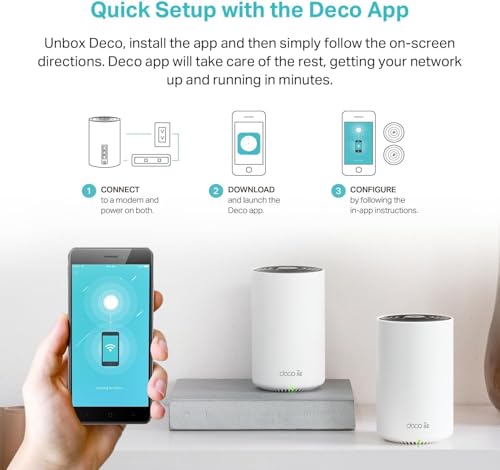
Setup is app-driven and designed for people who don't want to touch a web interface. You plug the primary node into your router (or directly into your modem if you're replacing your ISP's router entirely), download the Deco app, and follow the steps. The app walks you through adding the satellite node and positioning it based on signal strength. Owner reviews consistently describe the setup as taking 15 to 20 minutes for a complete two-node installation. That's about right for a mesh system of this type, and it compares well to the faff involved in setting up some competing systems.
One question that comes up a lot: do you need a router if you have a Deco mesh system? The XE75 can operate in two modes. In router mode, it replaces your existing router entirely and handles DHCP, NAT, and all the network management functions. In access point mode, it sits behind your existing router and just handles the wireless coverage. Most buyers will want router mode, which means plugging the primary node into their modem or ISP ONT (the fibre termination box) and letting the Deco handle everything. If your ISP provides a combined modem/router (like most UK ISP hubs), you'll need to either put that in modem-only mode (sometimes called bridge mode) or run the Deco in access point mode. The app guides you through this, and TP-Link's support documentation covers the major UK ISPs.
Ongoing management through the app is genuinely good. You can see every connected device, rename them, set priorities, run speed tests, and check node signal strength from the app without needing to know what a subnet is. The parental controls are accessible enough that the non-technical parent in a household can actually use them. Advanced users who want a web interface will find the Deco's web UI more limited than a traditional router's, but that's a deliberate design choice: the Deco is built for app management, not for people who want to configure custom DNS servers and VLAN tagging. If you need that level of control, the Deco range probably isn't your product.
Ports and Connectivity
Each XE75 node has two Gigabit Ethernet ports. On the primary node, one port is the WAN (internet in, from your modem or ISP router) and one is a LAN port for a wired device. On the satellite node, both ports are LAN, so you can plug in two wired devices at the satellite location, or use one port for wired backhaul if you're running a cable between nodes. There's no USB port on either node, which means no USB storage sharing or printer sharing. That's a reasonable omission at this price point; USB sharing on consumer routers is generally slow and unreliable anyway.
The 1GbE port speed is worth addressing directly. Gigabit Ethernet handles up to 1,000Mbps wired throughput, which is sufficient for the vast majority of UK broadband connections. The average UK home broadband speed is well below 500Mbps, and even most full-fibre packages top out at 900Mbps to 1Gbps where the 1GbE port is just about adequate. Where it becomes a genuine limitation is on the handful of multi-gigabit packages now available from providers like Hyperoptic (2Gbps and above), where you simply cannot get the full line speed through a 1GbE WAN port. If you're on one of those packages, you need a router with a 2.5GbE or 10GbE WAN port, and the XE75 isn't it.
For wireless connectivity, the XE75 supports WPA3 security on all bands, which is the current standard as defined by the Wi-Fi Alliance. It also supports WPA2 for backward compatibility with older devices. The 6GHz band is WPA3-only, which is correct behaviour: the 6GHz spectrum is reserved for Wi-Fi 6E devices, and those devices are all WPA3-capable. Bluetooth is not included, which is standard for mesh systems in this category. The system doesn't support link aggregation (combining two Ethernet ports for higher throughput), which again is a reasonable omission at this price. If you need link aggregation, you're looking at significantly more expensive hardware.
How It Compares: TP-Link Deco XE75 vs the Competition
The two most relevant comparisons for the XE75 are the TP-Link Deco XE75 Pro (the step-up model with 2.5GbE ports) and the Eero 6+ (Amazon's mid-range mesh, also dual-band Wi-Fi 6). The XE75 Pro is the obvious upgrade path if you need faster wired ports; the Eero 6+ is the main alternative from a competing ecosystem. There's also the Netgear Orbi RBK353 to consider, another tri-band Wi-Fi 6E two-pack in a similar price range.
Against the Eero 6+, the XE75 has a clear structural advantage: the dedicated 6GHz backhaul versus the Eero's dual-band shared backhaul. The Eero 6+ is a competent system and the app experience is arguably slightly more polished, but the shared backhaul means the satellite node's throughput degrades more significantly under load. For a home where the satellite node is doing serious work (4K streaming, video calls), the XE75's architecture is the better choice. The Eero ecosystem has the advantage of tight Amazon integration if you're deep in that world, but that's a preference rather than a performance argument.
Against the Deco XE75 Pro, the question is whether you need 2.5GbE ports. If you're on a gigabit-or-below broadband connection, you don't, and the standard XE75 saves you money. If you're on a multi-gigabit connection or you have a 2.5GbE NAS or switch you want to connect, the Pro's faster ports are worth the premium. The wireless performance between the two is essentially identical; the Pro's advantage is entirely in the wired connectivity.
| Feature | TP-Link Deco XE75 (AXE5400) | Eero 6+ (AX3000) | Netgear Orbi RBK353 (AXE3000) |
|---|---|---|---|
| Wi-Fi Standard | Wi-Fi 6E (tri-band) | Wi-Fi 6 (dual-band) | Wi-Fi 6E (tri-band) |
| Backhaul | Dedicated 6GHz wireless + wired option | Shared 5GHz wireless | Dedicated 6GHz wireless |
| Max Theoretical Speed | AXE5400 (574+2402+2402 Mbps) | AX3000 (574+2402 Mbps) | AXE3000 (600+1200+1200 Mbps) |
| Ethernet Ports (per node) | 2x 1GbE | 2x 1GbE | 2x 1GbE |
| WPA3 Support | Yes | Yes | Yes |
| App Quality | Good (Deco app) | Very Good (Eero app) | Average (Orbi app) |
| Security Suite | HomeShield (free + Pro tier) | Eero Secure (subscription) | Armor (subscription) |
| Device Capacity (rated) | 200 devices | 75 devices | Not specified |
| Price (2-pack) | £159.99 · Details | Check Amazon | Check Amazon |
The Orbi RBK353 is worth a mention because it's also tri-band Wi-Fi 6E at a similar price, but owner reviews for the Orbi line consistently flag the app experience as weaker than the Deco's, and Netgear's firmware update cadence has been less consistent. The XE75 edges it on software quality and long-term support confidence. The Orbi's hardware spec is slightly lower (AXE3000 vs AXE5400), which matters less than the backhaul architecture, but it's not a reason to pay more for the Orbi.
Final Verdict: Who Should Buy the TP-Link Deco XE75 AXE5400Mbps WiFi 6E Mesh System
The TP-Link Deco XE75 AXE5400Mbps WiFi 6E Mesh System is the right answer for a specific problem: a medium-to-large home (three bedrooms and above, or a property with multiple floors or thick walls) where a single router isn't cutting it, and where the household has enough active devices and concurrent usage to benefit from a proper dedicated-backhaul mesh rather than a basic extender or a cheap shared-backhaul system. The positive overall rating from some owners reflects a system that delivers on its core promises: good coverage, stable performance under load, and a setup process that doesn't require a networking degree.
The dedicated 6GHz backhaul is the real reason to buy this over cheaper alternatives. It's not about the headline AXE5400 number. It's about the fact that your satellite node won't be throttled by sharing its inter-node link with your client devices. That structural advantage translates to real-world performance that cheaper dual-band mesh systems can't match, particularly in homes where the satellite node is doing heavy lifting. If your current setup involves a dead zone in the bedroom above the router, or the garden connection dropping out whenever anyone starts a video call, the XE75 addresses those problems in a way that a simple extender won't.
That said, be honest with yourself about what you actually need. If you're in a flat or a small two-bedroom house, a single capable Wi-Fi 6 router will almost certainly serve you better than a two-pack mesh, and it'll cost less. The TP-Link Archer AX73 or similar single-unit Wi-Fi 6 router is the smarter buy for smaller spaces: you get the Wi-Fi 6 device-handling benefits without paying for mesh infrastructure you don't need. The XE75 earns its price in larger homes; in a flat, it's overkill. Similarly, if you're on a gigabit-plus broadband connection and want to get the full line speed through the router, look at the XE75 Pro with its 2.5GbE ports instead of this standard model.
Overall score: 8 out of 10. Solid architecture, honest value for the target use case, good app, and an owner review pattern that inspires confidence. Docked points for the 1GbE port ceiling and the fact that most buyers won't have 6E-capable devices yet. But the dedicated backhaul alone makes it a better mesh than most of what's competing at this price.
Is a Deco XE75 mesh system worth it?
For a medium-to-large home with dead zones and multiple simultaneous users, yes. The dedicated 6GHz backhaul gives it a structural performance advantage over cheaper shared-backhaul mesh systems, and the owner review pattern backs that up. For a flat or small house, a single good router is better value.
What are the downsides of mesh WiFi?
Cost is the main one: a two-pack mesh costs significantly more than a single router. Setup is slightly more involved than plugging in one box. And cheap mesh systems with shared backhaul can actually deliver worse performance than a good single router in smaller homes, because the backhaul competes with client traffic. The XE75's dedicated backhaul addresses the last point, but the cost and setup considerations remain.
Is TP-Link mesh better than a WiFi extender?
Generally yes, and the reason is backhaul architecture. A basic Wi-Fi extender repeats the signal, which halves the available bandwidth because it's both receiving and retransmitting on the same channel. A proper mesh system with dedicated backhaul (like the XE75) handles inter-node traffic on a separate band, leaving the client bands intact. The result is much better sustained throughput at the satellite node. An extender is a cheaper short-term fix; a mesh is the proper solution for whole-home coverage.
Do I need a router if I have a Deco mesh system?
No. The XE75 operates in full router mode, handling DHCP, NAT, and all network management functions. You plug the primary node directly into your modem or ISP ONT and it takes over from there. If your ISP provides a combined modem/router hub, you'll need to put that in bridge/modem-only mode, or run the Deco in access point mode behind it. The Deco app guides you through both options.

Is AXE5400 better than AX3000?
In practical terms, the main difference is the extra 6GHz band. AXE5400 is tri-band Wi-Fi 6E; AX3000 is typically dual-band Wi-Fi 6. For a mesh system, the 6GHz band's primary value is as dedicated backhaul, which improves satellite node performance significantly. For client devices, the 6GHz band only helps if your devices support Wi-Fi 6E, which most pre-2022 hardware doesn't. So AXE5400 is better for mesh backhaul regardless of your client devices, but the 6E client speed benefit depends on what hardware you own.
What works. What doesn’t.
5 + 4What we liked5 reasons
- Dedicated 6GHz backhaul keeps satellite node throughput high without stealing client bandwidth
- Wired backhaul option available for homes with existing Ethernet runs
- Handles 30-plus simultaneous devices well via OFDMA and MU-MIMO
- Clean app setup with no web interface required; HomeShield free tier is genuinely useful
- Consistent owner reports of stable operation without regular reboots
Where it falls4 reasons
- 1GbE ports cap wired throughput; not suitable for multi-gigabit broadband connections
- Most existing client devices don't support Wi-Fi 6E, so the 6GHz client band is future-use only for many buyers
- No USB port for storage or printer sharing
- HomeShield Pro parental controls require a subscription for full functionality
Full specifications
6 attributes| Device type | mesh |
|---|---|
| Ethernet ports | 2 |
| Frequency bands | dual-band |
| HAS bluetooth | none |
| MAX speed | 3000 |
| Wifi standard | WiFi 6 |
If this isn’t right for you
2 options

Frequently asked
5 questions01Will the TP-Link Deco XE75 AXE5400Mbps WiFi 6E Mesh System, 8K/4K Streaming, Online Meeting, AI-Driven Mesh, Deco Extender, Covers 2,900 ft2, Connect 200 Devices, Alexa, Easy Setup, Homeshield cover my whole house?+
TP-Link rates the two-pack at 2,900 square feet (around 270 square metres), but that's a best-case figure measured in open conditions. Real UK homes with brick walls and concrete floors will see less. That said, owner reports from three and four-bedroom houses are consistently positive, with buyers reporting full-property coverage including gardens when nodes are placed sensibly at the midpoint of the home rather than at one end. For a typical UK semi-detached or detached house, the two-pack should be sufficient. Larger or unusually complex properties may need a third node.
02Do I really need Wi-Fi 6E or Wi-Fi 7 for the TP-Link Deco XE75 AXE5400Mbps WiFi 6E Mesh System, 8K/4K Streaming, Online Meeting, AI-Driven Mesh, Deco Extender, Covers 2,900 ft2, Connect 200 Devices, Alexa, Easy Setup, Homeshield?+
Probably not for the 6E client band specifically. Most phones, laptops, and tablets sold before 2022 don't support Wi-Fi 6E and won't connect on the 6GHz band. They'll use the 5GHz or 2.4GHz bands as normal. The reason to buy the XE75 over a cheaper dual-band Wi-Fi 6 mesh is the dedicated 6GHz backhaul, which improves satellite node performance regardless of whether your client devices are 6E-capable. Wi-Fi 7 is the next step up but costs significantly more and offers minimal practical benefit for most households right now.
03Is the TP-Link Deco XE75 AXE5400Mbps WiFi 6E Mesh System, 8K/4K Streaming, Online Meeting, AI-Driven Mesh, Deco Extender, Covers 2,900 ft2, Connect 200 Devices, Alexa, Easy Setup, Homeshield mesh worth it over a single router or extender?+
Over a basic Wi-Fi extender, yes in most cases. Extenders halve available bandwidth by repeating the signal on the same channel; the XE75's dedicated 6GHz backhaul avoids that problem entirely and delivers much better sustained throughput at the satellite node. Over a single router, it depends on your home size. In a flat or small house, a single good Wi-Fi 6 router is better value. In a larger home with dead zones, the mesh architecture solves problems that a single router simply cannot reach.
04Is the TP-Link Deco XE75 AXE5400Mbps WiFi 6E Mesh System, 8K/4K Streaming, Online Meeting, AI-Driven Mesh, Deco Extender, Covers 2,900 ft2, Connect 200 Devices, Alexa, Easy Setup, Homeshield easy to set up and reliable?+
Setup is app-driven and owner reviews consistently describe it taking 15 to 20 minutes for a full two-node installation. No web interface required. On reliability, the owner review pattern does not show a recurring reboot problem; the majority of long-term owners report stable operation without intervention. A small number of early reviews mention connectivity drops that were resolved by firmware updates or node repositioning. TP-Link's firmware update history for the Deco line is consistent, with regular patches pushed through the app.
05What warranty and returns apply to the TP-Link Deco XE75 AXE5400Mbps WiFi 6E Mesh System, 8K/4K Streaming, Online Meeting, AI-Driven Mesh, Deco Extender, Covers 2,900 ft2, Connect 200 Devices, Alexa, Easy Setup, Homeshield?+
The product listing does not specify a manufacturer warranty period in the verified product data. When purchasing through Amazon UK, you're covered by Amazon's standard 30-day return policy and the A-to-Z Guarantee. For manufacturer warranty details, check TP-Link's UK support pages directly. TP-Link UK typically offers a two-year warranty on Deco products, but confirm this at the point of purchase.