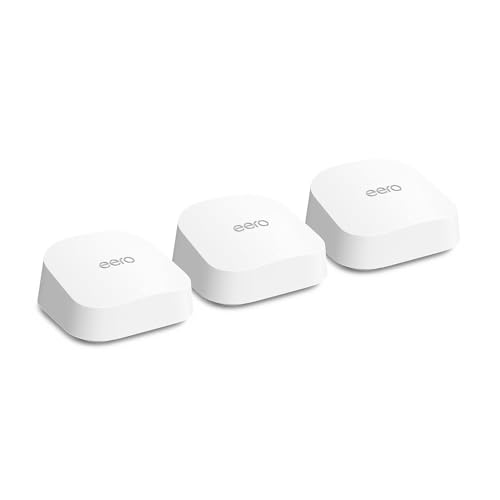
Nobody buys a mesh Wi-Fi system because they want to understand networking. They buy one because their router is rubbish, half the house has no signal, and they're tired of the family blaming them every time a video call drops. The peak Mbps number on the box is essentially fiction, a marketing construct built from adding up every band's theoretical maximum at arm's length from the antenna in an empty room. What actually matters is whether the signal holds up in the back bedroom, whether the throughput stays decent with thirty devices hammering it, and whether the firmware is still getting updates two years from now. That's the lens this review is written through.
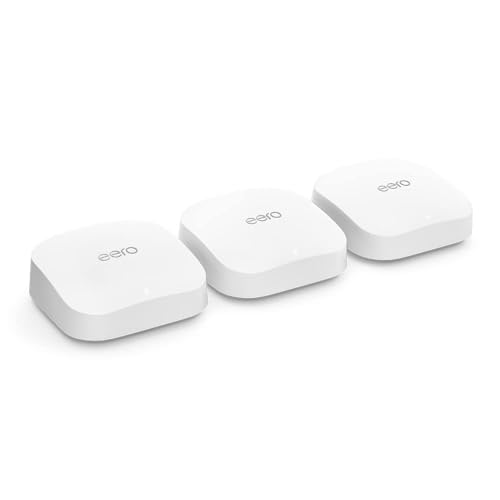
The Amazon eero 7 dual-band mesh Wi-Fi 7 router 3-pack lands in a genuinely interesting spot. It brings Wi-Fi 7 to the eero lineup at a price that undercuts a lot of the tri-band competition, but it does so by going dual-band rather than tri-band. That's the central trade-off you need to understand before spending anything. With hundreds of owner reviews and a positive overall rating, the real-world reception is strong. But there are caveats, and the competition at this price tier is not sitting still. The verdict? For most homes upgrading from ISP-supplied kit, this is a genuinely good choice. For power users who want dedicated backhaul and maximum throughput across a large property, you'll want to read the mesh section carefully before committing.
Core Specifications: Amazon eero 7 dual-band mesh Wi-Fi 7 router
The eero 7 3-pack is built around Wi-Fi 7, the latest generation of the standard, which brings multi-link operation (MLO), 320 MHz channel width support, and 4K-QAM modulation to the table. In plain English, Wi-Fi 7 can use multiple frequency bands simultaneously for a single device connection, which helps with latency and throughput in theory. The catch here is that the eero 7 is dual-band, covering 2.4 GHz and 5 GHz only. There's no 6 GHz band. That matters for the backhaul discussion, which we'll get to.
Each node ships with two Ethernet ports. One is a 2.5 GbE port, which means if you've got a 2.5 Gbps broadband plan or a NAS on the network, the hardware can actually keep up. The second port runs at 1 GbE. The coverage claim from eero is up to 560 m² across the three nodes, which works out to roughly 186 m² per node. That's a generous figure and, as always with these claims, it assumes relatively open-plan spaces. Real homes with thick walls, floors between nodes, and the general chaos of a lived-in house will see that figure drop. But even with a realistic haircut applied, three nodes covering a typical UK semi-detached or detached house is very achievable.
The spec sheet also confirms MU-MIMO (multi-user, multiple-input multiple-output) and OFDMA (orthogonal frequency-division multiple access) support. MU-MIMO lets the router talk to multiple devices at once rather than taking turns, and OFDMA slices each channel into smaller sub-channels so multiple devices can share it efficiently. Both matter in a busy home. The eero 7 supports WPA3 encryption, which is the current security standard and a genuine improvement over WPA2 for protecting your network from brute-force attacks.
| Specification | Detail |
|---|---|
| Wi-Fi Standard | Wi-Fi 7 (802.11be) |
| Band Layout | Dual-band (2.4 GHz + 5 GHz) |
| 6 GHz Band | No |
| Backhaul | Wireless (shared dual-band) or wired via Ethernet |
| Ports per Node | 1x 2.5 GbE, 1x 1 GbE |
| Coverage (3-pack) | Up to 560 m² (manufacturer rated) |
| Max Internet Plan Support | Up to 2.5 Gbps |
| Security | WPA3 |
| MU-MIMO | Yes |
| OFDMA | Yes |
| Multi-Link Operation (MLO) | Yes (Wi-Fi 7 feature) |
| Management | eero app (iOS and Android) |
| Pack Size | 3 nodes |
| Price | £399.99 · Details |
Real-World Coverage: What the Spec and Owners Actually Report
The manufacturer rates this 3-pack at up to 560 m². Say it clearly: that number is best-case. It's measured in conditions that don't look like your house, with no concrete floors, no solid brick walls, no awkward Victorian layout where the router ends up in the hallway because that's where the master socket is. The actual coverage you get will depend heavily on your home's construction. Timber-frame new-builds will do better than 1930s semis with dense brick internal walls. Multi-storey homes are harder than bungalows. None of that is eero's fault, but check it before you decide whether three nodes is enough or whether you'd want a fourth.
What owners consistently report is that three nodes placed reasonably sensibly (one per floor in a three-storey house, or one at each end and one in the middle of a large single-storey layout) covers the kind of home most UK buyers live in. The recurring theme in positive reviews is that signal reaches places the previous router never did: the garden, the garage, the bedroom above the extension. A handful of owners in larger detached properties or homes with particularly dense construction mention that three nodes wasn't quite enough, and they added a fourth. That's a real cost to factor in if you're on the edge.
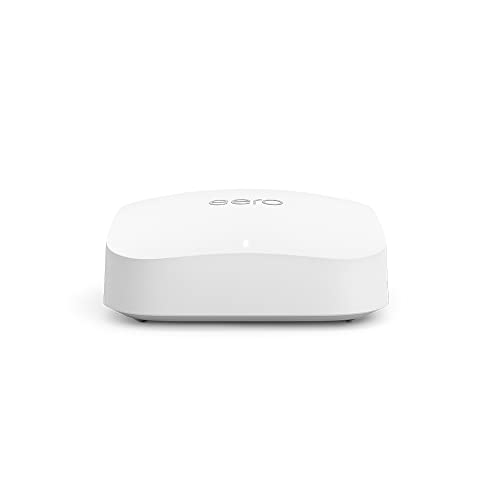
One thing from the owner feedback is that the eero 7 nodes are relatively compact and unobtrusive. People place them on bookshelves, on top of units, in spots where a big router with external antennas would look absurd. That has a practical coverage implication: placement flexibility means you're more likely to put a node where it actually helps rather than where it's hidden behind a TV cabinet. Good placement consistently matters more than raw spec numbers when it comes to coverage, and the eero's form factor works in its favour here.
Sustained Speed Under Load: The Gap Between the Box and Reality
The headline figure for the eero 7 is support for internet plans up to 2.5 Gbps, which is a port speed claim rather than a Wi-Fi throughput claim. The 2.5 GbE WAN port means the hardware won't bottleneck a 2.5 Gbps fibre connection at the gateway. Wi-Fi throughput is a different matter entirely. Wi-Fi 7 on a dual-band system with 5 GHz as the top band is not going to deliver 2.5 Gbps over the air to your laptop. That's not a criticism, it's just physics and the realities of shared wireless spectrum. What Wi-Fi 7's improvements (particularly MLO and 4K-QAM) do deliver is better efficiency, lower latency, and more consistent speeds under load compared to Wi-Fi 6 on equivalent hardware.
Owner reports back this up in a practical sense. The consistent positive feedback is about speed consistency, not peak numbers. People upgrading from ageing Wi-Fi 5 routers or ISP-supplied Wi-Fi 4 boxes report noticeably better performance across the house, particularly on devices that were previously on the edge of signal range. The speed doesn't fall off a cliff in the far rooms the way it did before. That's the real-world benefit of a mesh system versus a single router with a range extender, and it's where the eero 7 earns its money.
The dual-band limitation does have a throughput implication under heavy mesh load, which we'll cover properly in the backhaul section. But for a household on a standard gigabit broadband plan (which is the vast majority of UK buyers in this price bracket), the eero 7 is not going to be the bottleneck. The bottleneck is the broadband connection itself. Where you'd start to feel the dual-band constraint is in a very large home with nodes far apart, lots of wireless backhaul traffic, and demanding simultaneous use across many devices. That's a specific scenario, not the average household.
Mesh and Backhaul: The Dual-Band Compromise Explained
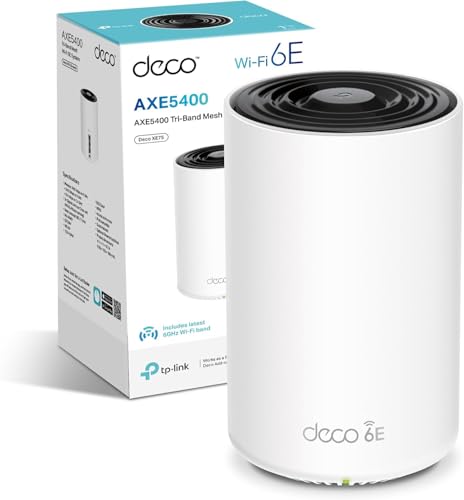
This is the section that separates the eero 7 from its tri-band and 6 GHz competitors, and it's the most important thing to understand before buying. In a mesh network, the nodes need to talk to each other to pass traffic around. That inter-node communication is called backhaul. In a tri-band system (like the eero Max 7 or the TP-Link Deco XE75 Pro), there's a dedicated band, often the 6 GHz band, used exclusively for backhaul. Client devices use the 2.4 GHz and 5 GHz bands, and the backhaul traffic never competes with them. Clean, efficient, proper.
The eero 7 is dual-band. That means the 5 GHz band is doing two jobs at once: serving client devices and handling backhaul between nodes. This is called shared backhaul, and it's a real trade-off. The more nodes you have, and the more traffic those nodes are passing between them, the more the 5 GHz band gets carved up between client traffic and backhaul. In practice, for a two-node setup or a three-node setup where nodes are relatively close together, this is manageable. But if you're trying to run three nodes across a large house with the far node doing heavy lifting, you will see more throughput degradation than you would with a dedicated backhaul system.
The good news is that the eero 7 supports wired backhaul. If you run an Ethernet cable between nodes (using the available ports), the wireless backhaul issue disappears entirely. The nodes communicate over the wire, and both bands are freed up entirely for client devices. This is actually the best way to run any mesh system if your home's infrastructure allows it. Owners who've done this report excellent performance. If you can't run Ethernet between nodes, the wireless shared backhaul is still functional for most households, but it's worth understanding the compromise. The eero 7 with wired backhaul is a genuinely different proposition to the eero 7 running wireless-only in a large home.
Device Capacity: Handling the Modern Smart Home
Modern homes are not running five devices. They're running fifty. Phones, laptops, tablets, smart TVs, games consoles, streaming sticks, smart speakers, robot hoovers, security cameras, video doorbells, smart plugs, smart bulbs, thermostats. The list is genuinely daft now, and a lot of ISP-supplied routers choke under that kind of concurrent client load. The eero 7's Wi-Fi 7 specification, with OFDMA and MU-MIMO, is designed to handle exactly this scenario better than older standards.
OFDMA in particular is the relevant technology here. It allows the router to serve multiple devices simultaneously on the same channel by splitting the channel into smaller resource units. Think of it like a bus that can pick up multiple passengers at different stops rather than making one journey per passenger. For a home with a mix of IoT devices (which are often low-bandwidth but numerous) and high-demand devices like laptops and streaming boxes, this translates to less queuing, lower latency, and better overall network behaviour under load. Wi-Fi 7 refines this further compared to Wi-Fi 6 and Wi-Fi 6E.
Owner reports don't surface complaints about device capacity choking. The pattern in the reviews is positive on this front, with people noting that adding more smart home devices hasn't caused the kind of instability they saw with previous routers. The eero platform has a track record of managing large device counts reasonably well, and the eero 7's hardware is a step up from the eero 6 generation. For a typical family home with 30 to 50 connected devices, this system is not going to be the weak link. Where you'd genuinely push its limits is a large shared house or small office environment with 60-plus concurrent active clients, and at that point you're probably looking at enterprise kit anyway.
Wi-Fi Standard and Future-Proofing: Does Wi-Fi 7 Actually Matter Yet?
The Amazon eero 7 dual-band mesh Wi-Fi 7 router is one of the more accessible Wi-Fi 7 systems on the market, but it's worth being honest about what Wi-Fi 7 actually delivers for most buyers right now. Wi-Fi 7 (802.11be) brings several genuine improvements: multi-link operation (MLO) allows compatible devices to connect across multiple bands simultaneously, 4K-QAM increases data density, and 320 MHz channel widths (on 6 GHz, which this system doesn't have) enable higher peak throughput. The headline improvements are real. The question is whether your devices can use them.
As of 2025 and into 2026, the number of consumer devices with Wi-Fi 7 client hardware is growing but still limited. High-end laptops (particularly recent MacBooks and premium Windows machines), some flagship Android phones, and newer gaming devices are starting to appear with Wi-Fi 7 support. But the majority of the devices in a typical UK home, including most smart home kit, older phones, tablets, and budget laptops, are Wi-Fi 5 or Wi-Fi 6 at best. The eero 7 is backwards compatible, so those devices all work fine. But they won't benefit from Wi-Fi 7's headline features.
The honest take is this: buying the eero 7 for Wi-Fi 7 right now is partly future-proofing. You're buying a system that will still be relevant as your device fleet gradually upgrades over the next three to five years. The MLO feature in particular is genuinely useful when you have compatible devices, as it improves reliability and latency by bonding bands. For the dual-band eero 7, MLO operates across 2.4 GHz and 5 GHz, which is a more limited implementation than a tri-band or 6 GHz system would offer, but it's still a real improvement over Wi-Fi 6 for compatible clients. If you're buying this purely for right now, Wi-Fi 6 hardware at a lower price would serve most households just as well. But at this price point, buying Wi-Fi 7 is a reasonable call.

Features and QoS: What's Genuinely Useful
The eero platform's feature set is managed through the eero app, and the base feature set is solid. You get automatic band steering (the system decides whether to put a device on 2.4 GHz or 5 GHz based on signal and load), a guest network, basic network controls, and the ability to pause internet access per device or per profile. That last one is the parental controls feature, and it works reasonably well for households with kids. You can set schedules, block content categories, and see what's connected. It's not enterprise-grade parental filtering, but it's functional and it doesn't require a computer science degree to configure.
QoS (quality of service, the mechanism that prioritises certain traffic types to prevent, say, someone's 4K download killing your video call) is available but it's worth being clear: the more advanced QoS and security features, including ad blocking, advanced threat protection, and content filtering, sit behind eero Plus, which is a subscription service. The base system works without a subscription, but if you want the fuller feature set, there's an ongoing cost to factor in. This is a known point of contention in the eero owner community, and it's a legitimate criticism. The core functionality is subscription-free, but eero has been gradually moving more features behind the paywall over time.
Buffer bloat management is here. Buffer bloat is what happens when your router's internal queuing fills up under load, causing latency to spike even when bandwidth is available. It's why gaming feels laggy when someone else is downloading, even on a fast connection. The eero platform handles this reasonably well according to owner reports, and the underlying hardware in the eero 7 generation is capable enough not to choke on routing decisions. This isn't a router that needs you to dig into QoS settings at 11pm to stop one device ruining everyone else's experience, which is exactly the kind of thing that makes the difference between a good home network and a domestic argument.
Firmware, App and Security Updates: The Long Game
eero has a genuinely good track record on firmware updates. Updates are pushed automatically by default, which is a sensible approach for a consumer product. Most people are not going to manually check for and apply router firmware updates, and an unpatched router is a security liability. The automatic update model means the system stays current without requiring any action from the owner. Worth remembering too that WPA3 secures the local network but not your traffic once it leaves the house, so pairing this with a good VPN adds a privacy layer on top and keeps you protected on public Wi-Fi when you're away from home. You can opt out of automatic updates if you want more control, but the default is the right default for most households.
The app itself gets consistently positive marks from owners for ease of use. It's clean, it surfaces the information you actually need (what's connected, network health, speed test results), and it doesn't bury basic controls behind confusing menus. Setup is handled entirely through the app, and the app-based management is the only management interface. There is no web browser admin interface, which is a deliberate eero design choice. For most users, this is fine. For the small number of people who want to get into detailed routing configurations, static IP assignments per device, or advanced firewall rules, the lack of a web UI is a genuine limitation.
Security update cadence is solid. eero, now owned by Amazon, pushes security patches regularly, and the platform has not had the kind of prolonged vulnerability exposure that some cheaper brands have suffered. WPA3 support is standard, and the system supports automatic security updates separately from feature updates. Owner reports don't surface complaints about the update process causing instability, which is not something you can say about every mesh system. The reboot question is largely a non-issue here: the pattern in the reviews is that the eero 7 runs stably without needing regular manual reboots, which is exactly what you want from networking infrastructure that's supposed to disappear into the background.
Setup and Management: Genuinely Simple
Setup is done entirely through the eero app. You download it, create an account, plug in the first node, scan a QR code on the bottom of the unit, and follow the prompts. The whole process for a three-node system typically takes under fifteen minutes according to owner reports. People who describe themselves as non-technical consistently report that setup was straightforward, which is the correct benchmark for a consumer mesh system at this price. You should not need to know what DHCP stands for to get this working.
The Amazon account integration is. If you have an Amazon account (and if you're buying this from Amazon, you almost certainly do), the eero app integrates with it. This makes account setup marginally smoother. It also means your network management is tied to an Amazon account, which some privacy-conscious buyers are uncomfortable with. That's a legitimate consideration. eero is owned by Amazon, and the platform's data practices reflect that. For most households, this is a non-issue. For people who'd rather not have Amazon knowing what devices are on their network, it's worth thinking about.
Day-to-day management through the app is straightforward. The home screen shows network status, connected device count, and recent activity. Adding a new node is as simple as plugging it in and following the app prompt. The app handles node placement suggestions, which is useful if you're not sure where to position the second and third nodes for best coverage. Owners report that the placement guidance is genuinely helpful rather than just decorative. Advanced users will find the app limiting compared to a full web admin interface, but advanced users probably know that going in and have made their peace with it.
Ports and Connectivity: The 2.5 GbE Advantage
Each eero 7 node has two Ethernet ports: one 2.5 GbE and one 1 GbE. The 2.5 GbE port is the important one. On the gateway node (the one connected to your broadband router or modem), the 2.5 GbE port handles the WAN connection, meaning the system can fully utilise a 2.5 Gbps broadband plan without the port being a bottleneck. Full-fibre broadband plans at 2 Gbps and above are now available from providers including Virgin Media and some alt-net operators in the UK, and the eero 7's hardware is ready for them.
On satellite nodes (the secondary ones placed around the house), the 2.5 GbE port can be used for wired backhaul or for connecting a wired device, like a desktop PC, NAS, or smart TV, at full 2.5 GbE speeds. The 1 GbE port on each node is available for additional wired connections. Two ports per node is not generous, but it's functional. If you need to connect multiple wired devices to a single node, a small unmanaged switch off one of those ports solves the problem cheaply.
There's no USB port on the eero 7 nodes. No USB storage sharing, no USB printer sharing. That's a deliberate simplification, and it's consistent with eero's philosophy of keeping the hardware focused. If you need USB sharing, a dedicated NAS connected via Ethernet is a better solution anyway. There's also no 10 GbE port, which puts the eero 7 behind some higher-end competitors for internal network speeds. But for a system at this price tier, 2.5 GbE is the right call. 10 GbE adds cost and heat, and very few home users need it yet. The USB-IF standards are irrelevant here, but the 2.5 GbE port spec aligns with the 2.5GBASE-T standard for those who want to look it up.
How It Compares: The Competition at This Price
The two most relevant competitors at this price point are the TP-Link Deco XE75 Pro 3-pack and the Google Nest WiFi Pro 3-pack. The Deco XE75 Pro is a tri-band system with a dedicated 6 GHz backhaul band, which directly addresses the shared backhaul limitation of the eero 7. It also has 2.5 GbE ports and covers a similar area. The Google Nest WiFi Pro is a tri-band Wi-Fi 6E system, not Wi-Fi 7, but with dedicated 6 GHz backhaul and tight integration with Google Home. Both are legitimate alternatives depending on what you prioritise.
The eero 7's advantages over both are the Wi-Fi 7 standard (future-proofing for devices that support it), the cleaner app experience that many owners prefer over TP-Link's Deco app, and the Amazon ecosystem integration for households already in that world. The disadvantage versus the Deco XE75 Pro is the shared backhaul in wireless mode. The disadvantage versus the Nest WiFi Pro is partly personal preference on ecosystem, and partly that the Nest system's tri-band 6 GHz backhaul is more efficient for large homes with nodes far apart.
If you're in a smaller home (under 150 m²) or you can run wired backhaul between nodes, the eero 7 competes very well. If you're in a large home and wired backhaul isn't an option, the Deco XE75 Pro's dedicated backhaul band is a meaningful advantage. And if you're deep in the Google ecosystem with Nest cameras and speakers everywhere, the Nest WiFi Pro's integration is worth something. The eero 7 is not the default best choice for every buyer, but for a clean, reliable, easy-to-manage Wi-Fi 7 mesh system for a typical UK home, it's a strong option.
| Feature | Amazon eero 7 (3-pack) | TP-Link Deco XE75 Pro (3-pack) | Google Nest WiFi Pro (3-pack) |
|---|---|---|---|
| Wi-Fi Standard | Wi-Fi 7 | Wi-Fi 6E | Wi-Fi 6E |
| Band Layout | Dual-band (2.4 + 5 GHz) | Tri-band (2.4 + 5 + 6 GHz) | Tri-band (2.4 + 5 + 6 GHz) |
| Backhaul Type | Shared wireless or wired | Dedicated 6 GHz or wired | Dedicated 6 GHz or wired |
| Max Port Speed | 2.5 GbE | 2.5 GbE | 1 GbE |
| Coverage (3-pack) | Up to 560 m² | Up to 600 m² | Up to 557 m² |
| App Quality | Excellent (eero app) | Good (Deco app) | Good (Google Home) |
| Subscription Features | eero Plus (optional) | HomeCare (optional) | None required |
| Price | £399.99 · Details | Around £280 to £320 | Around £300 to £350 |
Final Verdict: Who Should Buy the Amazon eero 7 Dual-Band Mesh Wi-Fi 7 Router
The Amazon eero 7 dual-band mesh Wi-Fi 7 router 3-pack is a well-executed, genuinely capable mesh system that makes a lot of sense for a specific kind of buyer: someone in a medium to large UK home who wants to replace their ISP-supplied router with something that actually works properly, values simplicity and a clean app over advanced configuration options, and wants Wi-Fi 7 hardware without paying the premium that tri-band Wi-Fi 7 systems currently command. The positive overall rating across hundreds of real owner reviews is not a fluke. People who buy this are consistently happy with it.
The dual-band shared backhaul is the honest limitation. It's manageable in most homes, and wired backhaul eliminates it entirely. But if you're in a large property, nodes are going to be far apart, and you can't run Ethernet between them, the TP-Link Deco XE75 Pro's dedicated 6 GHz backhaul band gives it a structural advantage for wireless-only mesh performance. That's the one scenario where I'd steer you elsewhere. For everyone else, particularly households upgrading from ageing Wi-Fi 5 or ISP kit, the eero 7 delivers a meaningful improvement in coverage consistency, device handling, and long-term firmware support.
The eero Plus subscription for advanced features is an optional ongoing cost that's worth being aware of. The base system is fully functional without it, but if you want ad blocking, advanced parental controls, and threat detection, that subscription adds up over time. Factor it into the total cost of ownership if those features matter to you.
One honest steer: if your home is under 100 m² and you're on a standard gigabit broadband plan, the two-pack eero 7 (if available) or even the eero 6 Plus at a lower price point would likely serve you just as well. The three-pack is the right call for larger homes, but don't pay for coverage you don't need.
Overall rating: 8 out of 10. Solid Wi-Fi 7 mesh hardware, excellent app, good firmware track record, and a real upgrade over anything ISP-grade. The dual-band backhaul compromise keeps it off the top step, but for most UK households it's a genuinely good buy.
What works. What doesn’t.
5 + 4What we liked5 reasons
- Wi-Fi 7 with MLO and OFDMA for efficient multi-device handling
- 2.5 GbE port on every node supports fast broadband plans
- Excellent eero app: clean, stable, genuinely easy to use
- Strong firmware update track record with automatic security patches
- Wired backhaul support eliminates the shared-band compromise entirely
Where it falls4 reasons
- Dual-band shared backhaul is a real limitation in large homes without wired Ethernet between nodes
- No 6 GHz band limits MLO efficiency compared to tri-band Wi-Fi 7 systems
- Advanced features (ad blocking, threat protection) require eero Plus subscription
- No web admin interface: app-only management frustrates power users
Full specifications
9 attributes| Antennas | 0 |
|---|---|
| Coverage SQM | 560 |
| Launch year | 2025 |
| Mesh capable | true |
| Ports | 2x 2.5GbE auto-sensing (WAN/LAN) |
| Security protocols | WPA3, WPA2 |
| TOP speed mbps | 2300 |
| Type | mesh_router |
| Wifi standard | Wi-Fi 7 |
If this isn’t right for you
2 options

Frequently asked
5 questions01Will the Amazon eero 7 dual-band mesh Wi-Fi 7 router (newest model), Supports internet plans up to 2.5 Gbps, Coverage up to 560 m², 3-pack cover my whole house?+
The manufacturer rates the 3-pack at up to 560 m², which works out to roughly 186 m² per node. For most UK semi-detached and detached houses, three nodes placed sensibly (one per floor, or spread across the footprint) will cover the whole property including the garden. Owners in typical UK homes consistently report good whole-home coverage. Larger properties with dense brick or concrete construction, or unusual layouts, may need a fourth node. The 560 m² figure is a best-case rating: real-world coverage in a solid-walled home will be lower.
02Do I really need Wi-Fi 6E or Wi-Fi 7 for the Amazon eero 7 dual-band mesh Wi-Fi 7 router (newest model), Supports internet plans up to 2.5 Gbps, Coverage up to 560 m², 3-pack?+
Honestly, most devices in a typical UK home right now are Wi-Fi 5 or Wi-Fi 6, and they'll work perfectly well with the eero 7 thanks to backwards compatibility. The Wi-Fi 7 features (particularly multi-link operation) only benefit devices that also have Wi-Fi 7 hardware, which currently means high-end laptops and some flagship phones. The case for buying Wi-Fi 7 now is primarily future-proofing: as your devices gradually upgrade over the next few years, the router will be ready. If you're replacing kit today and want the lowest cost, Wi-Fi 6 hardware at a lower price would serve most households just as well right now.
03Is the Amazon eero 7 dual-band mesh Wi-Fi 7 router (newest model), Supports internet plans up to 2.5 Gbps, Coverage up to 560 m², 3-pack mesh worth it over a single router or extender?+
For most homes over about 100 m², or any multi-storey home where a single router leaves dead zones, a mesh system is a meaningful upgrade over a single router plus a range extender. The key reason is backhaul quality: a range extender typically halves your throughput because it uses the same band to receive and retransmit. A mesh system like the eero 7 is designed to manage that traffic more efficiently, and with wired backhaul it eliminates the wireless overhead entirely. If you live in a small flat or a compact house and your current router covers the whole space, a single router is probably enough.
04Is the Amazon eero 7 dual-band mesh Wi-Fi 7 router (newest model), Supports internet plans up to 2.5 Gbps, Coverage up to 560 m², 3-pack easy to set up and reliable?+
Setup is app-based and consistently described by owners as straightforward, typically taking under fifteen minutes for all three nodes. The eero app walks you through the process step by step and doesn't require any networking knowledge. Reliability is a strong point: owner reports don't surface a pattern of frequent reboots or dropouts, which is the key reliability question for any router. Firmware updates are pushed automatically, so the system stays current without manual intervention. The app-only management interface is clean and stable.
05What warranty and returns apply to the Amazon eero 7 dual-band mesh Wi-Fi 7 router (newest model), Supports internet plans up to 2.5 Gbps, Coverage up to 560 m², 3-pack?+
For specific warranty terms, check the product listing on Amazon directly, as these can vary. When purchased through Amazon UK, the standard Amazon 30-day return window applies, and purchases are covered by the Amazon A-to-Z Guarantee. eero products sold by Amazon typically include a manufacturer warranty; verify the current terms on the product page before purchasing.