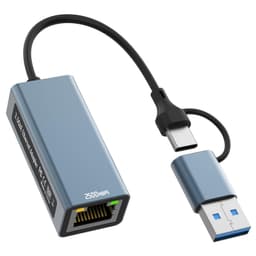
Most laptops these days have shed ports like they're going on a diet. You get one or two USB-C connectors, maybe a headphone jack if you're lucky, and that's your lot. Which is fine until you actually need to plug something in. A wired Ethernet connection matters more than people admit, especially if you're on a video call that keeps dropping, or you're trying to shift a large file and your Wi-Fi decides to have a moment. That's the gap this Omivine USB-C Ethernet Hub is aimed at filling.
What you're looking at is a compact aluminium adapter that takes a single USB-A or USB-C port and turns it into a gigabit Ethernet port plus three USB 3.0 ports. No drivers, no faff, no external power brick. It's budget kit, priced accordingly, and it doesn't pretend to be anything else. The question is whether it actually does what it says on the tin, or whether it's the kind of thing that works fine for a week then starts dropping connections at the worst possible moment.
Owner feedback across 179 averages ★★★★☆ (4.2), which for a budget adapter in a category full of cheap knockoffs is a decent signal. But averages hide a lot. So here's what the specs tell you, what real owners consistently report, and whether this is worth your money or whether you should spend a bit more elsewhere.
Core Specifications
The Omivine is a 4-in-2 hub, meaning it takes two types of input (USB-A and USB-C) and expands them into four usable connections. On the output side you get one RJ45 Ethernet port running at up to 1000 Mbps (that's gigabit, for anyone who hasn't memorised the numbers), and three USB 3.0 ports rated for up to 5 Gbps data transfer each. The dual-input design is genuinely useful. It means the same hub works whether your laptop has USB-A or USB-C, which covers pretty much every laptop made in the last decade.
The Ethernet side supports 10/100/1000 Mbps auto-negotiation, so it'll work fine on older network hardware that isn't gigabit-capable. The USB 3.0 ports are backward-compatible with USB 2.0 and USB 1.1 devices, so you're not going to run into compatibility headaches with older peripherals. The build is aluminium, which matters for heat dissipation. Cheap plastic hubs can get warm under sustained load, and warm chips are unhappy chips. The operating temperature range is specified as 0 to 70 degrees Celsius, which is the kind of detail that suggests the manufacturer has actually thought about thermal management rather than just bolting components into a shell.
One thing to flag clearly: there is no charging support on the USB ports. This is a data hub, not a charging hub. If you're hoping to top up your phone while transferring files, you'll need a different product. That's not a flaw exactly, but it's worth knowing before you buy. The product listing is upfront about it, which is more than can be said for some competitors in this bracket.
| Specification | Detail |
|---|---|
| Model | Omivine 4-in-2 USB to Ethernet Adapter |
| Input connections | USB-A and USB-C (dual input) |
| Ethernet port | 1 x RJ45, 10/100/1000 Mbps |
| USB ports | 3 x USB 3.0 (up to 5 Gbps each) |
| Charging support | None |
| Build material | Aluminium unibody |
| Driver required | No (plug and play) |
| Operating temperature | 0 to 70 degrees Celsius |
| OS compatibility | Windows XP and above, macOS, Linux, Chrome OS |
| Compatible devices | MacBook Pro/Air, Samsung, Google Chromebook, Huawei, Dell, Asus, Lenovo, HP, and others with USB or USB-C |
| Price | £11.99 |

Real-World Coverage and Connection Stability
This isn't a router, so there's no coverage radius to talk about in the traditional sense. What matters here is Ethernet reliability: does the wired connection stay up, does it maintain its negotiated speed, and does the hub behave itself over hours of sustained use? Those are the questions owners actually care about, and the feedback pattern across the reviews gives a reasonably clear picture.
The majority of owners report a stable, consistent connection once the hub is plugged in. Plug and play works as advertised on Windows 10, Windows 11, and modern macOS versions. Chrome OS users also report no issues, which makes sense given that Chromebooks are exactly the kind of thin-and-light machines that tend to be short on ports. The gigabit Ethernet connection is reported as solid for video conferencing and streaming, which are the two use cases most people buy this kind of adapter for. A wired connection at 1000 Mbps is always going to be more stable than Wi-Fi for a Teams or Zoom call, regardless of what router you're on, because you're removing the wireless variable entirely.
Where it gets slightly less rosy is with a minority of owners who report the connection dropping after extended use, or the hub not being recognised immediately on wake from sleep. These aren't universal complaints, but they come up often enough to be worth mentioning. Whether that's a firmware quirk in the chip, a USB power management issue on the host laptop, or just the occasional dud unit is hard to say definitively. If you're buying this for critical work use, it's worth knowing that some owners have hit intermittent issues. For most people doing normal laptop tasks, the 4.2 average suggests it's reliable enough.
Sustained Speed Under Load
The gigabit Ethernet port is rated at 1000 Mbps, and the USB 3.0 ports are rated at up to 5 Gbps each. Those are the theoretical peaks, and as with any spec, real-world numbers sit below them. How far below depends on the host laptop's USB controller, the quality of your Ethernet cable, and what else is running on the hub simultaneously. But the gap between spec and reality is much smaller here than it is with Wi-Fi, because wired connections don't suffer from interference, signal degradation through walls, or the chaos of a shared wireless medium.
For the Ethernet port specifically, owners transferring large files or running sustained downloads report speeds consistent with their broadband tier, which is what you want. If your broadband tops out at 500 Mbps, the gigabit Ethernet port isn't the bottleneck. You'd need a multi-gigabit connection before this hub became the limiting factor, and very few UK home broadband packages are there yet. The USB 3.0 standard supports up to 5 Gbps in theory. In practice, transferring from a fast SSD to a USB 3.0 flash drive will be limited by the drive's write speed long before the USB 3.0 interface becomes the constraint. For moving HD video files or large photo libraries, owners report the speeds feel meaningfully faster than USB 2.0, which is the practical comparison that matters.
Running all three USB ports and the Ethernet simultaneously is where some cheaper hubs fall over, because the internal chip can't handle the aggregate bandwidth without throttling. The Omivine's aluminium build and the mention of a built-in heat dissipation block suggests the manufacturer has at least addressed the thermal side of sustained load. Owner reports don't flag obvious throttling under normal multi-device use, though nobody's going to be saturating all four ports at once in typical laptop use. If you're doing something unusual like running three external drives and a gigabit Ethernet connection at full tilt simultaneously, that's a heavier demand than what this price bracket promises.
Connectivity Architecture: How the Hub Handles Multiple Devices
There's no mesh networking here, obviously. This is a USB hub, not a router. But the underlying question, which is how well it handles multiple simultaneous connections, is still worth addressing properly. The hub uses a single USB connection to the host laptop and then distributes bandwidth across four outputs. That means all four ports share the bandwidth available from the host USB controller. For the Ethernet port, that's fine because most broadband connections don't saturate gigabit. For the USB 3.0 ports, it means three devices are sharing the USB 3.0 bus, which has a theoretical ceiling of 5 Gbps total.
In practice, this architecture is entirely adequate for what the hub is designed to do. Plugging in a mouse, a flash drive, and a keyboard while using wired Ethernet is the realistic use case, and that puts minimal aggregate load on the bus. The problems start if you try to run two high-speed external drives simultaneously and expect both to hit their peak transfer rates. They won't. They'll share the available bandwidth. That's not a flaw specific to this hub; it's how USB hubs work at any price point without dedicated per-port controllers, which would push the price up considerably.
The dual-input design (USB-A and USB-C) is worth flagging again here because it's a genuine differentiator. Most hubs in this category commit to one input type. If you use multiple laptops, or you upgrade from a USB-A machine to a USB-C machine, you don't need to buy a new hub. That's a small but real practical advantage that owners mention positively. It also means you can use the same hub on a MacBook Air and a Windows laptop without carrying two adapters.
Device Capacity and Peripheral Compatibility
Three USB 3.0 ports and one Ethernet port gives you four simultaneous connections from a single laptop port. That's enough for most portable setups: a wired network connection, an external drive or USB stick, a wired mouse or keyboard, and maybe a printer. The product listing specifically calls out flash drives, hard drives, keyboards, mice, and printers as compatible peripherals, which covers the realistic range of what people actually plug into a laptop hub.
Compatibility is reported as broad. Windows, macOS, Linux, and Chrome OS all work without drivers. The plug-and-play approach means there's no software to install, no driver conflicts to navigate, and no compatibility matrix to check before you buy. For older operating systems, the listing mentions Windows XP compatibility, which is either reassuring if you're running legacy kit or irrelevant if you're not. More practically, modern Windows 10 and 11 machines recognise the hub immediately, as do current macOS versions, which is what the majority of buyers are running.
Smart home and IoT devices aren't really in scope here, since those connect wirelessly rather than via USB. But if you're using this hub at a desk with a laptop docked, you could realistically run a wired keyboard, a wired mouse, an external drive, and a network connection all at once, which turns a thin-and-light laptop into something approaching a proper workstation setup. Not a replacement for a Thunderbolt dock with video output, but a solid step up from relying on built-in ports alone. Owners who use it as a semi-permanent desk setup report it working well in that role.
USB-C Ethernet Hub vs Wi-Fi: When Wired Actually Matters
Wi-Fi has got genuinely good. Wi-Fi 6 and the newer Wi-Fi 6E standard offer real improvements in congested environments, and for most casual home use, a decent modern router delivers all the speed you need wirelessly. So why would you bother with a wired connection via a USB-C Ethernet Hub?
Because wireless has failure modes that wired doesn't. Interference from neighbours' networks, walls and floors eating signal, the laptop's Wi-Fi antenna being in a position that doesn't play nicely with your router's location. All of these are real, and they all go away the moment you plug in an Ethernet cable. Latency on a wired gigabit connection is consistently lower than Wi-Fi, and it doesn't vary. That matters for video calls, where a spike in latency causes the audio to stutter. It matters for online gaming. And it matters for large file transfers, where a sustained gigabit connection will always outperform a Wi-Fi connection that's dropping in and out of its peak rate.
The other scenario where this hub earns its keep is in offices, hotels, and conference venues that provide wired Ethernet but not reliable Wi-Fi. Many modern laptops, particularly ultrabooks and MacBooks, have dropped the RJ45 port entirely. If you travel with one of those machines and you need a wired connection, an adapter like this is the only option. The Omivine's compact aluminium build makes it easy enough to throw in a laptop bag. It's not going to save you from a terrible hotel Wi-Fi network if the hotel only has wireless, but when there's a cable to plug into, this is how you use it.

Features and What You Actually Get
This is a USB hub, not a router, so there's no QoS, no parental controls, no guest network, no VPN client, and no app. That's not a criticism. It's not supposed to have any of those things. What it does have is plug-and-play simplicity, which is its own kind of feature. You plug it in, the operating system recognises it, and it works. No configuration, no firmware to update, no app to install. For a lot of people, that's exactly what they want.
The gigabit Ethernet auto-negotiation means it will step down to 100 Mbps or 10 Mbps if the network infrastructure it's connected to doesn't support gigabit. That's standard behaviour for any modern Ethernet adapter, but it's worth knowing if you're connecting to an older switch or router. You won't get an error; it'll just run at the highest speed both ends support. The USB 3.0 ports are similarly backward-compatible with USB 2.0 devices, so older peripherals work fine, just at USB 2.0 speeds.
The aluminium build contributes to passive heat dissipation, which is a real feature rather than a cosmetic one. The product mentions a built-in heat dissipation block and anti-interference design, and while those are marketing-adjacent claims, the operating temperature range of 0 to 70 degrees Celsius is a concrete spec that suggests the thermal design has been considered. Cheap plastic hubs in this category can run hot under sustained use, and heat is the enemy of long-term reliability. The aluminium construction at least gives the hub somewhere for that heat to go.
Firmware, Drivers, and Long-Term Reliability
Because this is a driverless plug-and-play device, there's no firmware to update and no app to maintain. That's a double-edged situation. On one hand, you're never going to be left with an unsupported device because the manufacturer stopped pushing updates. On the other hand, if there's a bug in the chip's firmware, there's no mechanism for the manufacturer to push a fix. What you buy is what you get, permanently.
The chip inside is described as stable with anti-interference properties, which is the kind of claim that's hard to verify independently. What owner reviews do tell you is whether the chip behaves in practice. The overall pattern is positive: most owners report reliable operation without needing to unplug and replug the hub to reset it. The minority of reports about connection drops after sleep are worth noting, but they're not dominant in the feedback. If your laptop aggressively manages USB power states during sleep (which some Windows laptops do), you may need to adjust the USB selective suspend settings in Windows power management to keep the hub awake. That's a laptop configuration issue rather than a hub fault, but it's something to be aware of.
Long-term durability is harder to assess from a review window, but the aluminium construction is a reasonable indicator of build quality compared to all-plastic alternatives. The unibody design means there are fewer joints and seams to fail. Owners who've been using similar aluminium hub designs report them lasting years without issues, though obviously that's not a guarantee for this specific model. At this price point, the build quality is noticeably better than the cheapest plastic options in the category.
Setup and Day-to-Day Management
Setup is as simple as it gets. Plug the hub into your laptop's USB-A or USB-C port, plug an Ethernet cable into the RJ45 port, and your operating system will detect the new network adapter within a few seconds. On Windows, you may see a brief notification that a new device has been installed. On macOS, the Ethernet interface appears in System Settings under Network. On Chrome OS, it just works. There's nothing to configure unless you want to set a static IP address, which is an optional step that most home users won't need.
Day-to-day management is equally minimal. The hub has no lights, no indicators, no app, and no settings. It either works or it doesn't, and when it works, you forget it's there. That's genuinely what you want from a peripheral like this. The only ongoing management task is making sure the cable is seated properly if you're moving the laptop around, since a slightly loose USB connection can cause intermittent behaviour. But that applies to any USB device.
For non-technical buyers, the lack of any setup complexity is a significant advantage. There's no manual to read, no driver disc to hunt for (not that most laptops have optical drives anymore), and no account to create. You buy it, you plug it in, it works. That simplicity is worth something, especially if you're buying this for someone who doesn't want to troubleshoot technology. The broad OS compatibility also means you don't need to check whether your specific laptop and operating system version are on a supported list.
Ports and Connectivity: The Full Picture
The port layout is the core proposition of this hub, so it's worth being precise about what you get. One RJ45 Ethernet port running at up to 1000 Mbps. Three USB 3.0 Type-A ports, each capable of up to 5 Gbps data transfer. Two input options: USB-A and USB-C, so you use whichever your laptop has. That's four output connections from a single laptop port, which is the practical expansion most people actually need.
What you don't get: no HDMI or DisplayPort for external monitors, no SD card slot, no USB-C pass-through charging, and no USB-C output ports (the three data ports are all USB-A). If you need to connect a monitor or charge your laptop through the hub, this isn't the product. There are more expensive multi-function docks that handle those use cases, but they cost considerably more and are physically larger. The Omivine is specifically a network and peripheral expansion hub, and it does that job without trying to be everything at once.
The USB 3.2 specification (which USB 3.0 falls under in modern nomenclature) supports the 5 Gbps transfer rate on each port, though as noted earlier, all ports share the host USB bandwidth. For the realistic use cases this hub is designed for, that shared bandwidth isn't a meaningful limitation. Wired Ethernet at gigabit speeds, a mouse or keyboard, and an external drive for file transfers: that's the sweet spot, and the port layout serves it well.
How It Compares to the Competition
The budget USB-C Ethernet hub market is crowded. You've got offerings from Anker, Uni, and a dozen no-name brands all competing in roughly the same price bracket. The Omivine sits comfortably in the budget tier, and at that price it's competing primarily on build quality and reliability rather than features. Two obvious competitors worth comparing are the Anker USB-C Hub (model A83460A1) and the Uni USB C Hub, both of which are widely available in the UK and cover similar use cases.
Anker is the better-known brand and generally has a stronger reputation for build quality and customer support. Their hubs typically include USB-C pass-through charging, which the Omivine lacks, and they often have an additional card reader slot. But you pay for the brand name, and the price difference is real. If you specifically need pass-through charging, Anker is worth the premium. If you just need Ethernet and USB ports and don't need to charge through the hub, the Omivine's dual USB-A/USB-C input is a more flexible option than most Anker hubs at a similar price, since Anker's budget models typically commit to one input type.
The Uni USB C Hub is another solid option, often priced similarly to the Omivine with comparable port layouts. Uni's build quality is generally well-regarded, and their hubs tend to include an SD card slot that the Omivine doesn't have. If you regularly work with cameras or need to read SD cards, Uni is worth looking at. For pure Ethernet-plus-USB expansion without the card reader, the Omivine's dual-input design and aluminium build hold up well in the comparison. The 4.2 owner rating across 179 is competitive with what both alternatives achieve in their respective review pools.
| Feature | Omivine USB-C Ethernet Hub | Anker USB-C Hub (A83460A1) | Uni USB C Hub |
|---|---|---|---|
| Price | £11.99 | Budget to mid-range tier | Budget tier |
| Ethernet | 1 x Gigabit RJ45 (1000 Mbps) | 1 x Gigabit RJ45 | 1 x Gigabit RJ45 |
| USB 3.0 ports | 3 x USB 3.0 (5 Gbps) | Typically 2 to 3 USB-A | Typically 3 USB-A |
| Input type | USB-A and USB-C (dual input) | USB-C only (most models) | USB-C only |
| Pass-through charging | None | Yes (on most models) | Yes (on some models) |
| SD card reader | None | Some models | Yes (most models) |
| Build material | Aluminium unibody | Aluminium | Aluminium |
| Driver required | No | No | No |
| OS compatibility | Windows, macOS, Linux, Chrome OS | Windows, macOS, Chrome OS | Windows, macOS, Chrome OS |

Final Verdict
The Omivine USB-C Ethernet Hub does exactly what a budget adapter in this category should do: it adds a gigabit wired connection and three USB 3.0 ports to a laptop that doesn't have enough of either, without requiring you to install anything or read a manual. The dual USB-A and USB-C input is a genuinely useful design choice that most competitors at this price don't offer. The aluminium build is better than you'd expect for the money. And the 4.2 average across 180 owner reviews suggests it's reliable for the majority of people using it in normal conditions.
The lack of pass-through charging is the main practical limitation, and it's worth being clear-eyed about that. If you're plugging this into a USB-C laptop and you want to keep the laptop charged while using the hub, you'll need to use a separate charger or buy a different product. That's a real trade-off, not a minor footnote. The occasional reports of connection drops after sleep are worth knowing about too, though they're not the dominant experience in the review pool. Most owners are happy with it.
For the price, this is a solid buy for anyone who needs a wired Ethernet connection on a thin-and-light laptop, works across multiple machines with different port types, or just needs more USB ports without spending serious money on a full Thunderbolt dock. It won't replace a proper multi-function hub with video output and charging, but it's not trying to. It's a focused tool for a specific job, and it does that job well. The Ethernet standard it uses is proven technology, and a gigabit wired connection is still the most reliable way to get a stable network link on a laptop that's lost its RJ45 port.
Rating: 7.5 out of 10. Good build quality and a genuinely useful dual-input design at a budget price. Loses points for no pass-through charging and the minority of reliability reports. But for pure Ethernet-plus-USB expansion, it earns its place.
What works. What doesn’t.
5 + 3What we liked5 reasons
- Dual USB-A and USB-C input works across multiple laptop types
- Gigabit Ethernet is stable and fast enough for any current UK broadband tier
- Aluminium build dissipates heat better than cheap plastic alternatives
- Plug and play across Windows, macOS, Linux, and Chrome OS with no drivers
- Compact enough to carry in a laptop bag without noticing it
Where it falls3 reasons
- No pass-through charging on the USB-C input
- No SD card slot, unlike some competitors at similar prices
- Minority of owners report connection drops after laptop sleep
Full specifications
6 attributes| Antennas | 0 |
|---|---|
| Launch year | 2026 |
| Mesh capable | false |
| Ports | 1x 1GbE Ethernet, multiple USB-A, SD, microSD via USB-C |
| TOP speed mbps | 1000 |
| Type | switch |
Frequently asked
5 questions01Does the Omivine USB-C Ethernet Hub work with MacBook Pro and MacBook Air?+
Yes. The hub is listed as compatible with MacBook Pro and MacBook Air, and owner reports confirm it works without drivers on current macOS versions. Plug it into the USB-C port and macOS recognises the Ethernet adapter automatically under System Settings > Network.
02Can I charge my laptop through the Omivine USB-C Ethernet Hub?+
No. The product listing explicitly states there is no charging support. The USB ports are data-only. If you need pass-through charging while using a hub, you'll need to look at a different product, typically a Thunderbolt or USB-C hub with Power Delivery support.
03Is the Omivine USB-C Ethernet Hub worth it over a cheaper plastic alternative?+
The aluminium build genuinely matters for heat dissipation under sustained use, and the dual USB-A/USB-C input is a practical advantage that most cheaper alternatives don't offer. At this price tier, the Omivine represents reasonable value for the build quality and feature set.
04Is the Omivine USB-C Ethernet Hub easy to set up?+
As easy as it gets. No drivers, no software, no account required. Plug it in and the operating system detects it within seconds. Works on Windows, macOS, Linux, and Chrome OS. Owner reports confirm plug-and-play works as advertised on current OS versions.
05What warranty and returns apply to the Omivine USB-C Ethernet Hub?+
Amazon offers 30-day returns on most items. The manufacturer typically provides a warranty on budget adapters. You're also covered by Amazon's A-to-Z guarantee, which provides a fallback if the product arrives faulty or stops working within the covered period.