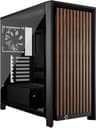
The spec sheet on the Corsair FRAME 4000D WOOD RS tells you it's a mid-tower ATX case with walnut wood accents, a mesh front panel, and a modular interior. That's the easy part. What the spec sheet can't tell you is whether the wood veneer holds up to real use, whether the modular drive cage system actually makes sense in practice, or whether Corsair has priced this thing sensibly against the competition. That's where the 90 owner reviews and a hard look at the numbers come in, and the picture they paint is more nuanced than the marketing suggests.
The short version: this is a genuinely good mid-range case that earns its ★★★★½ (4.5) rating from owners, but it's not flawless. The walnut aesthetic is real and distinctive, the airflow credentials are solid, and the build experience is clean. But the wood trim is a polarising design choice, and at mid-range pricing you're competing with some very capable alternatives that don't ask you to commit to a specific interior design scheme. If you want a case that looks different from every black mesh rectangle on the market and you've got a proper GPU to show off through the side panel, this is worth a serious look. If you just want the best airflow per pound, there are cheaper ways to get there.
Core Specifications
The FRAME 4000D WOOD RS is a mid-tower built around the Corsair 4000D platform, which has been one of the more popular mid-tower foundations since its introduction. The WOOD RS variant adds the walnut front trim and side accent as the headline differentiator, while the RS designation signals the modular, reconfigurable internal layout. Form factor support runs to ATX, mATX, and mITX motherboards. The chassis measures 453mm tall, 230mm wide, and 466mm deep, putting it squarely in standard mid-tower territory. Weight comes in at around 8.4kg without components, which is on the heavier side for a steel mid-tower but not unusual given the combination of steel construction and the wood elements.
Fan support is where the spec sheet gets interesting. The case supports up to six 120mm fans or a mix of 120mm and 140mm configurations depending on placement. The front panel supports three 120mm or two 140mm fans. The top supports three 120mm or two 140mm. The rear takes a single 120mm. Corsair includes three 120mm fans in the box, which is a reasonable starting point. Radiator support is strong: 360mm at the front, 360mm at the top, and 120mm at the rear, which gives you proper flexibility for AIO cooling across a range of build budgets.
Storage provision is modest but appropriate for a modern build. You get two 3.5-inch drive bays and two 2.5-inch dedicated mounts, with the modular cage system allowing some reconfiguration depending on your storage and airflow priorities. The PSU shroud is full-length, hiding the power supply and cable clutter from the main chamber view. The side panel is 4mm tempered glass, which is the standard you'd expect at this price tier. One thing the spec sheet confirms: there's no included RGB lighting in the base configuration, which keeps the price honest and lets you add what you actually want rather than paying for LEDs you might strip out anyway.
| Specification | Detail |
|---|---|
| Form Factor | Mid-Tower ATX |
| Motherboard Support | ATX, mATX, mITX |
| Dimensions (H x W x D) | 453mm x 230mm x 466mm |
| Weight | ~8.4kg |
| Max GPU Length | 420mm |
| Max CPU Cooler Height | 170mm |
| Front Fan Support | 3x 120mm or 2x 140mm |
| Top Fan Support | 3x 120mm or 2x 140mm |
| Rear Fan Support | 1x 120mm |
| Front Radiator Support | Up to 360mm |
| Top Radiator Support | Up to 360mm |
| Included Fans | 3x 120mm |
| Drive Bays (3.5-inch) | 2 |
| Drive Bays (2.5-inch) | 2 dedicated |
| Side Panel | 4mm Tempered Glass |
| PSU Shroud | Full-length |
| Front I/O | 1x USB 3.1 Gen 2 Type-C, 2x USB 3.0 Type-A, HD Audio |
| Material | Steel, Tempered Glass, Walnut Wood Veneer |
| Current Price | £109.99 |
| Rating | ★★★★½ (4.5) (91 reviews) |

Form Factor and Dimensions
At 453mm tall, 230mm wide, and 466mm deep, the FRAME 4000D WOOD RS sits comfortably in the mainstream mid-tower category. It's not a compact case trying to squeeze into tight spaces, and it's not a full-tower with wasted volume. The 230mm width is fairly typical for a mid-tower with a full-length PSU shroud, and it means the case fits on most standard desks without dominating them. You can place it on a desk beside a monitor without it becoming the main event in the room, which matters more than people admit when they're spec-hunting.
The footprint question is a practical one. At 230mm wide, this is narrower than some competitors like the Fractal Design Meshify 2, which runs to 240mm. That extra 10mm doesn't sound like much, but on a desk with limited depth it can be the difference between the case fitting neatly or hanging over the edge. The 466mm depth is standard and accommodates a full PSU plus cable management space behind the motherboard tray without any compromises. The 453mm height is enough for dual 140mm top fans or a 360mm radiator without the case looking disproportionate.
The walnut wood trim changes the visual footprint considerably compared to a standard all-black mesh case. The wood runs along the front panel frame and appears as an accent on the side, giving the case a warm, furniture-adjacent look that's genuinely distinctive. Some owners specifically call this out as the reason they chose it over a plain mesh alternative. Others find it polarising, and a handful of reviews mention that the wood finish is more subtle in person than the product photos suggest, which cuts both ways depending on your expectations. The overall build presence is that of a premium-leaning mid-tower that knows it's going to be seen.
Motherboard Compatibility
The FRAME 4000D WOOD RS supports ATX, mATX, and mITX motherboards. E-ATX is not officially supported, which is a limitation if you're running a workstation-class board, but for the vast majority of gaming and productivity builds it's a non-issue. The ATX standoff layout is standard, and owner reviews don't flag any alignment problems or missing standoff positions, which is more than you can say for some budget cases where standoff placement is optimistic at best.
The interior volume is sized for ATX, so if you're building with an mATX or mITX board you'll have noticeably more room around the motherboard than the board itself requires. That's not a problem, it just means the cable routing channels and drive cage positions are designed around a full ATX layout. For mATX builders in particular, the extra space can actually make cable management easier since you're not fighting for room around a board that fills the tray edge to edge.
The modular aspect of the RS designation comes into play here too. The drive cage system can be repositioned or removed entirely, which affects how much airflow you can direct at the bottom of the motherboard and the GPU. For high-end ATX builds with large tower coolers or 360mm AIOs, removing the lower cage section frees up space and improves the intake path from the front fans. Corsair has designed the standoff layout and cable routing channels with ATX as the primary use case, and it shows in how the cable cutouts align with a standard ATX board's power connector positions.
GPU Clearance
Corsair rates the maximum GPU length at 420mm. To put that in context: an RTX 4090 Founders Edition measures 336mm, the ASUS ROG STRIX RTX 4090 comes in at 358mm, and even the notoriously large Sapphire Nitro+ RX 7900 XTX sits at 355mm. So 420mm of clearance means this case handles every current flagship GPU without a problem, and then some. You'd have to go looking for trouble to find a card that doesn't fit.
That 420mm figure applies with the drive cage in its standard position. If you install a 360mm front radiator, GPU clearance reduces, and Corsair specifies a minimum clearance figure that varies depending on radiator thickness. A 30mm-thick 360mm radiator will eat into that clearance more than a 27mm unit, so if you're planning both a front 360mm AIO and a very long GPU, check the radiator thickness before assuming everything fits. Owner reviews haven't flagged this as a real-world problem, but it's the kind of thing that catches people out when they're ordering parts without checking the interaction.
There's no native vertical GPU mount bracket included in the box, which is a mild disappointment at this price point. Vertical mounting is a popular way to show off a card through the tempered glass side panel, and given that the walnut aesthetic clearly targets buyers who care about how their build looks, the omission is a bit odd. You can add a third-party vertical mount bracket, but that adds cost and complexity. Corsair sells its own vertical GPU mount bracket separately if you want to keep it in-family. For most builders this won't matter, but if showing off a flagship card was part of the plan, factor in that extra spend.
CPU Cooler Clearance
The maximum CPU cooler height is 170mm. That's a generous figure that accommodates virtually every popular tower cooler on the market. The Noctua NH-D15 sits at 165mm, the be quiet! Dark Rock Pro 5 at 162.8mm, and the DeepCool AK620 at 160mm. All of them fit with room to spare. You'd need to be reaching for something unusually tall, like a custom triple-tower setup, to run into problems here. For the overwhelming majority of air-cooling builds, 170mm is a non-issue.
AIO radiator support is genuinely strong. Front mounting takes up to a 360mm radiator, top mounting also takes up to 360mm, and the rear accommodates a single 120mm unit. That means you can run a 360mm front AIO or a 360mm top AIO without any case modifications, which puts this case in the same bracket as much more expensive options in terms of cooling flexibility. The 4000D platform has always been good for AIO builds and the WOOD RS inherits that without compromise.
One thing to check if you're planning a top-mounted 360mm AIO: RAM clearance. Tall RAM with large heatspreaders can conflict with top-mounted radiators in some mid-towers, depending on how close the radiator sits to the motherboard. The FRAME 4000D WOOD RS has enough internal height that this is less of a problem than in more compact cases, but if you're running 50mm-tall heatspreaders like the Corsair Dominator Platinum, double-check the clearance against your specific radiator and fan combination before ordering. Owner reviews don't flag this as a widespread issue, but it's the kind of edge case that produces frustrated forum posts after the fact.
Storage Bay Options
Two 3.5-inch bays and two dedicated 2.5-inch mounts. That's the storage provision, and it's honest about what this case is designed for. Modern gaming and productivity builds increasingly run on one or two NVMe SSDs with no spinning hard drives at all, so the two 3.5-inch bays cover the people who still want mechanical storage for bulk data without wasting space on a cage that most buyers will never use. If you're running a NAS-adjacent setup with four or more hard drives, this isn't your case. But that's not who this is aimed at.
The modular drive cage system, which is the RS part of the name, allows you to remove or reposition the drive cage entirely. This is genuinely useful. Removing the cage improves front-to-GPU airflow and cleans up the interior aesthetically, which matters when you've got a tempered glass side panel and walnut trim drawing attention to the build. Owners who've gone all-NVMe report that removing the cage transforms the interior into something that looks properly curated rather than functional-but-busy. The cage removal process is tool-free according to the spec, which owners broadly confirm works as advertised.
The 2.5-inch mounts are positioned behind the motherboard tray and on the PSU shroud, keeping SSD installations tidy and out of the main chamber view. This is the right approach for a case that cares about aesthetics. Nobody wants to see a 2.5-inch SSD strapped to the front of a drive cage when they're looking through tempered glass at walnut trim. The tool-free SSD mounting gets a positive mention in several owner reviews, with the general consensus being that the mechanism is secure and doesn't require fiddling to get drives seated properly.

Cable Management
The full-length PSU shroud hides the power supply and the inevitable cable chaos that surrounds it, which is the single most impactful cable management feature a case can have. Everything below the motherboard tray is hidden from the glass side panel view, so even a mediocre cable job looks presentable from the outside. Behind the motherboard tray, Corsair has built in cable channels with Velcro straps and a rear panel clearance of approximately 20mm to 25mm, which is enough to route modular PSU cables without forcing the panel shut.
The cable routing cutouts align sensibly with standard ATX motherboard connector positions. The 24-pin ATX power cutout, the CPU EPS cutout near the top of the tray, and the PCIe power routing path all land where you'd expect them. Owner reviews are broadly positive on cable management, with several specifically mentioning that the Velcro strap positions are well-thought-out and that the rear panel closes cleanly even with a full complement of cables routed. A few reviews mention that the rear panel requires a bit of pressure to close when cables are bulky, but that's true of almost every mid-tower in this class.
The PSU shroud has a cutout for the PSU fan, which is a small but sensible detail that prevents the power supply from running hotter than it needs to. Some cheaper cases omit this and rely on the PSU pulling air from the rear of the shroud only, which can cause temperature creep under sustained load. The FRAME 4000D WOOD RS gets this right. There's also a rubber grommet on the main PSU cable entry point, which keeps the shroud looking clean from the glass side. These are the kinds of details that separate a properly designed case from one that was designed to a price.
Airflow and Thermal Design
The front panel is mesh, which is the right call for a case that wants to be taken seriously on thermals. The walnut trim surrounds the mesh rather than replacing it, so the wood aesthetic doesn't come at the cost of intake airflow. This is the key design decision Corsair got right with the WOOD RS. A tempered glass front panel with walnut accents would have looked gorgeous and performed poorly. A mesh front with walnut framing looks good and breathes properly. The mesh coverage is generous across the full front face, and Corsair includes a removable dust filter behind it, which owners confirm is easy to pull and clean.
The three included 120mm fans are positioned as front intakes. The rear position is empty in the default configuration, so you're relying on either adding a rear exhaust fan or using an AIO pump head at the rear. For a case in this price bracket, three included fans is a reasonable starting point, but you'll want to add a rear 120mm exhaust fan if you're not running an AIO. The front-heavy fan configuration creates positive pressure by default, which helps keep dust out of the case but can lead to slightly elevated temperatures compared to a balanced intake/exhaust setup. Add that rear fan and the thermal picture improves noticeably.
The top panel also supports fans or a radiator, and the ventilation mesh at the top is covered by a magnetic dust filter. Magnetic dust filters are a quality-of-life feature that gets underappreciated until you've owned a case with a friction-fit filter that you have to unscrew to clean. The magnetic top filter just lifts off, which means you'll actually clean it regularly rather than ignoring it for six months. The overall airflow path, front mesh intake through to rear and top exhaust, is a proven layout that the 4000D platform has been delivering reliably for several years. The WOOD RS doesn't change what works.
Owner reviews on thermals are positive without being exceptional. The consistent theme is that GPU temperatures are well-managed with the front mesh intake feeding cool air directly to the graphics card, and CPU temperatures are sensible with either a tower cooler or an AIO. Nobody's reporting thermal problems. A handful of reviews mention that the included fans are audible at full speed, which is true of most 120mm fans running at their rated RPM, and that connecting them to a motherboard fan header rather than running them at full speed makes the system much quieter without a significant thermal penalty.
Front I/O and Connectivity
The front I/O panel sits at the top of the case and includes one USB 3.1 Gen 2 Type-C port, two USB 3.0 Type-A ports, and a combined HD Audio jack. The USB 3.1 Gen 2 Type-C is the headline here, offering up to 10Gbps throughput for fast external storage or device charging. This is the right spec for a mid-range case in 2026. Cases that still ship with USB 3.0 Type-C (5Gbps) as their headline port are starting to feel dated, and Corsair has kept pace here.
Two Type-A USB 3.0 ports is adequate but not generous. High-end cases in the same bracket sometimes offer three Type-A ports, and if you're regularly connecting USB devices at the front of your case, two can feel limiting. That said, most people plug in a headset and occasionally a USB drive, and two ports covers that use case fine. The HD Audio connector is standard and works with both headphone and microphone connections, though the audio quality you get depends entirely on your motherboard's audio implementation rather than anything the case does.
The power button placement is clean and the button itself has a satisfying feel according to owner reports. There's no reset button, which is increasingly common on modern cases as manufacturers drop it to clean up the I/O panel. If you're the kind of person who still hard-resets rather than using the OS restart function, you'll need to use the motherboard's reset header differently or just get used to holding the power button. The I/O panel position at the top of the case works well for desk placement but can be slightly awkward if the case is on the floor, since you're reaching down and over to connect anything. That's a desk-versus-floor placement consideration rather than a design flaw.
Build Quality and Materials
The steel construction is solid. Corsair uses a consistent steel gauge across the chassis that gives the case a rigid feel without unnecessary weight. Owner reviews are positive on build quality, with several specifically mentioning that the panels align well and that there are no sharp edges on the interior that catch hands or cables during a build. Sharp interior edges are a surprisingly common complaint on budget cases and even some mid-range options, so the clean finish here is genuinely appreciated by the owners who mention it.
The 4mm tempered glass side panel is thick enough to feel premium and thin enough not to add excessive weight. The panel is hinged, not screwed, which makes access straightforward. A hinged glass panel is a build-quality indicator that separates properly designed cases from ones where you're unscrewing thumbscrews every time you need to get inside. The hinge mechanism gets positive mentions in owner reviews for feeling solid and not wobbling when open, which is a detail that cheaper hinged panels often get wrong. The magnetic dust filter on the top panel has already been mentioned, but it's the kind of detail that reflects a considered design process rather than an afterthought.
The walnut wood veneer is the element that generates the most discussion in owner reviews, and the consensus is that it looks better in person than in photos for some buyers and slightly less impressive for others. The wood is a real veneer rather than a printed plastic approximation, which you can verify by the grain variation between units. A few owners mention that the wood trim arrived with minor surface marks or handling scuffs, which suggests the protective packaging could be more robust. This isn't a widespread complaint, but if you're paying mid-range money partly for the aesthetic, it's the kind of thing that would sting if your unit arrived with a scratched wood panel. Corsair's customer service record on warranty claims is generally solid, so a damaged panel on arrival should be resolvable.
How It Compares
The two most natural comparisons are the Fractal Design North and the NZXT H7 Flow. The Fractal Design North is the obvious rival because it also uses real wood accents, targets a similar aesthetic buyer, and sits in a comparable price bracket. The NZXT H7 Flow is the airflow-focused alternative that shows what you get if you drop the aesthetic premium and optimise purely for thermals and build quality.
The Fractal Design North is the more mature wood-accent case. It's been on the market longer, has more owner reviews to draw from, and the wood front panel is a more integrated part of the design rather than a trim accent. It also supports E-ATX, which the FRAME 4000D WOOD RS does not. However, the North's front panel is a solid wood slat design that restricts airflow compared to a full mesh front, and if thermals matter to you, the FRAME 4000D WOOD RS's mesh front with wood framing is the better thermal choice. The North looks warmer and more furniture-like. The WOOD RS looks more like a performance case that happens to have wood trim.
The NZXT H7 Flow undercuts the WOOD RS on price in most markets and delivers excellent airflow with a clean, tool-free build experience. It has no wood, no distinctive aesthetic, and looks like a premium black rectangle. If you don't care about the walnut trim and just want a well-built mid-tower with good airflow and strong cable management, the H7 Flow is the more pragmatic choice. The WOOD RS is asking you to pay a premium for the aesthetic, and whether that premium is justified depends entirely on whether you want your build to look different from every other black case on a desk.
| Feature | Corsair FRAME 4000D WOOD RS | Fractal Design North | NZXT H7 Flow |
|---|---|---|---|
| Form Factor | Mid-Tower ATX | Mid-Tower ATX | Mid-Tower ATX |
| Max GPU Length | 420mm | 431mm | 400mm |
| Max CPU Cooler Height | 170mm | 185mm | 185mm |
| Front Panel | Mesh with wood trim | Wood slat (restricted) | Full mesh |
| E-ATX Support | No | Yes | No |
| Included Fans | 3x 120mm | 2x 140mm | 3x 120mm |
| Max Front Radiator | 360mm | 360mm | 360mm |
| Wood Aesthetic | Yes (veneer trim) | Yes (front panel) | No |
| Hinged Glass Panel | Yes | Yes | Yes |
| Price Tier | Mid-range | Mid-range | Mid-range |

Final Verdict: Corsair FRAME 4000D WOOD RS Review
The Corsair FRAME 4000D WOOD RS is a well-executed case that does what it sets out to do. The airflow credentials are genuine, the build experience is clean, the clearances are generous, and the walnut trim is real rather than a printed approximation. Owner feedback at ★★★★½ (4.5) across 90 reviews is a strong signal that this isn't a case that looks good in photos and disappoints in practice. The modular RS interior is a thoughtful addition that makes sense for builds going all-NVMe, and the hinged glass panel and magnetic dust filters show that Corsair has thought about the ownership experience beyond the initial build.
The limitations are real but not disqualifying. No E-ATX support narrows the audience slightly. No included rear fan means you'll want to add one if you're not running an AIO. No vertical GPU mount bracket in the box is a missed opportunity given the aesthetic target audience. And the wood trim is genuinely polarising in a way that the spec sheet can't fully communicate. If you see the product photos and think it looks great, you'll probably think the same in person. If you're on the fence about the aesthetic, the North is the more committed wood-aesthetic case and the H7 Flow is the more focused performance case.
Who is this for? Builders who want a mid-range case that looks different from every other black mesh rectangle, who have a flagship GPU they want to show off through the glass, and who care enough about thermals not to sacrifice the mesh front for the sake of aesthetics. It's also a strong choice for anyone who's looked at the Fractal Design North and wanted better front-panel airflow without giving up the warm, wood-accented look entirely.
Who should skip it? If you don't care about the wood trim and just want the best airflow and build experience at mid-range money, the standard Corsair 4000D Airflow or the NZXT H7 Flow will get you there for less. The WOOD RS is asking you to pay for a design choice, and if that design choice doesn't resonate with you, the premium doesn't make sense. The standard Corsair 4000D Airflow is the smarter buy if you want the same platform without the aesthetic premium.
Overall, this earns an 8 out of 10. It's a genuinely good case with a distinctive identity, strong fundamentals, and an owner satisfaction rate that backs up the spec sheet claims. The missing rear fan and the absent vertical GPU bracket are minor frustrations at this price, but neither is a dealbreaker. If the walnut trim is what brought you here, the rest of the case won't let you down.
What works. What doesn’t.
5 + 4What we liked5 reasons
- Genuine mesh front panel keeps thermals honest without sacrificing the wood aesthetic
- 420mm GPU clearance handles every current flagship card without compromise
- Hinged tempered glass panel and magnetic dust filters make ongoing ownership easy
- Modular drive cage removes cleanly for all-NVMe builds, improving airflow and looks
- Strong AIO support: 360mm front and top radiator mounting included
Where it falls4 reasons
- No rear exhaust fan included; you'll want to add one if not running an AIO
- No vertical GPU mount bracket in the box, odd given the aesthetic focus
- E-ATX motherboards not supported
- Wood veneer packaging could be more protective; a few owners report minor surface marks on arrival
Full specifications
11 attributes| Form factor | Mid-Tower |
|---|---|
| CPU cooler clearance MM | 170 |
| Dimensions MM | 486 x 239 x 490 |
| Fans included | 3 |
| GPU clearance MM | 430 |
| MAX FAN count | 13 |
| MAX radiator MM | 360 |
| PSU support | ATX up to 220mm |
| Side panel | tempered glass |
| Supported motherboard | ATX, Micro-ATX, Mini-ITX, E-ATX |
| Weight KG | 11 |
Frequently asked
5 questions01Is the CORSAIR FRAME 4000D WOOD RS Modular Mid-Tower ATX PC Case good for airflow?+
Yes. The front panel is a full mesh design with walnut trim framing it, not a solid wood or glass panel that restricts intake. This means the three included 120mm front fans pull cool air directly into the case without obstruction. A removable dust filter sits behind the front mesh, and the top panel has a magnetic dust filter over its ventilation mesh. The rear position is empty in the default configuration, so adding a 120mm rear exhaust fan is recommended for builds without an AIO. With a balanced fan setup, owner reviews report well-managed GPU and CPU temperatures.
02What is the GPU clearance on the CORSAIR FRAME 4000D WOOD RS?+
Corsair rates maximum GPU length at 420mm in the standard configuration with the drive cage installed. That clears every current flagship GPU including the RTX 4090 Founders Edition at 336mm, the ASUS ROG STRIX RTX 4090 at 358mm, and the Sapphire Nitro+ RX 7900 XTX at 355mm. If you install a 360mm front radiator, available clearance reduces depending on radiator thickness, so check your specific radiator dimensions if you plan to run both a front 360mm AIO and a very long GPU simultaneously.
03Can the CORSAIR FRAME 4000D WOOD RS fit a 360mm AIO?+
Yes. The front panel supports up to a 360mm radiator, and the top panel also supports up to a 360mm radiator. The rear takes a single 120mm unit. This gives you full flexibility for AIO cooling: front-mounted 360mm for GPU-focused cooling, top-mounted 360mm for CPU-focused builds, or a combination using both positions. If running a top-mounted 360mm AIO, check clearance against your specific RAM heatspreader height, particularly if using tall modules like Corsair Dominator Platinum.
04Is the CORSAIR FRAME 4000D WOOD RS easy to build in?+
Owner reviews are broadly positive on the build experience. The hinged tempered glass side panel removes without tools, the cable routing cutouts align sensibly with standard ATX motherboard connector positions, and the rear panel clearance of approximately 20mm to 25mm is enough to route modular PSU cables cleanly. Velcro cable straps are included and positioned usefully. The modular drive cage removes tool-free for all-NVMe builds. No reports of sharp interior edges catching hands or cables, which is a more common issue than it should be at this price point.
05What warranty and returns apply to the CORSAIR FRAME 4000D WOOD RS?+
Corsair typically covers its cases with a two-year limited warranty covering manufacturing defects. For specific warranty terms applicable to your purchase, check the Corsair website directly. If purchased through Amazon UK, you also benefit from Amazon's standard 30-day return window and the A-to-Z Guarantee, which provides a route to resolution if the product arrives damaged or not as described.