Pick the wrong case and you'll be fighting it for every step of the build. Cable routing that goes nowhere useful, GPU clearance that rules out half the cards you might want to upgrade to, panels that flex when you look at them sideways. The case shapes what you can actually do with your hardware, both today and two years from now when you decide to swap the GPU or add a 360mm AIO. Get that choice wrong and you pay for it in frustration, not just once but every time you open the side panel.
The Corsair 2500X solves a specific set of those frustrations, and it does it at a price that sits firmly in the budget tier. This is a compact mATX dual-chamber case with panoramic tempered glass, reverse connector motherboard support, and enough clearance to fit a proper GPU and a 280mm AIO without the usual small-form-factor compromises. Based on the published specs and the pattern across over a hundred owner reviews with a positive overall rating, it earns that rating. It is not perfect. But for what it costs, it gets a lot right that cases at this price usually get wrong. If you want a tidy, glass-sided small tower that does not make cable management a misery, this is a genuinely strong option. That is the verdict. Here is why.
Core Specifications
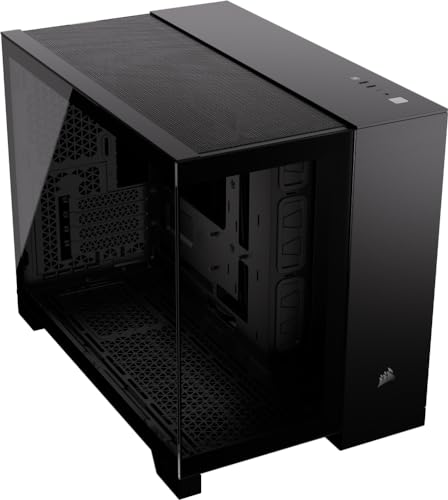
The 2500X is built around the mATX form factor, which immediately tells you something about the design philosophy. Corsair is not trying to cram a full-tower feature set into a shoebox. Instead, they have taken the mATX sweet spot, where you get genuine expansion headroom without the case dominating your desk, and built a dual-chamber layout around it. The main chamber handles the motherboard, CPU cooler, and GPU. The secondary chamber, tucked behind the PSU shroud, handles the power supply and most of your cable mess. That separation is the single most important thing the 2500X does for build cleanliness.
GPU clearance is rated at 330mm, which is enough for virtually any current card including the RTX 4080 Super and RX 7900 GRE without modification. CPU cooler height clearance sits at 155mm, so most tower air coolers will fit, though anything approaching the 165mm mark on a Noctua NH-D15 is going to be too tall. Radiator support covers 280mm at the front and 120mm at the rear, which is a sensible layout for an mATX chassis. The case ships with no fans included, which is either a frustration or a non-issue depending on whether you were planning to buy specific fans anyway. Most builders at this level are, so it is less of a problem than it might sound.
The panoramic tempered glass side panel is the obvious visual selling point. It is a full-height panel rather than a partial window, and the dual-chamber layout means the motherboard side of the case looks clean because the PSU cables are hidden behind the shroud. The steel construction is standard for the price tier, and owner reviews broadly confirm the panels feel solid rather than flimsy, which is not a given at this price. The reverse connector motherboard compatibility is a notable feature for anyone building with an Asus BTF or MSI Project Zero board, and we will come back to that.
| Specification | Detail |
|---|---|
| Form Factor | Small Tower (mATX) |
| Motherboard Support | mATX, Mini-ITX |
| GPU Clearance | 330mm |
| CPU Cooler Height | 155mm |
| Radiator Support (Front) | Up to 280mm |
| Radiator Support (Rear) | 120mm |
| Drive Bays (3.5") | 2 |
| Drive Bays (2.5") | 2 |
| Fan Mounts (Front) | 2x 140mm or 2x 120mm |
| Fan Mounts (Rear) | 1x 120mm |
| Expansion Slots | 4 |
| Front I/O | 1x USB 3.2 Gen 1 Type-A, 1x USB 3.2 Gen 2 Type-C, HD Audio |
| Included Fans | None |
| Side Panel | Panoramic Tempered Glass |
| Reverse Connector Compatible | Yes |
| Price | £93.00 · Details |

Form Factor and Dimensions
Small tower is the right description here. The 2500X is not a cube case and it is not trying to be a micro-ITX build. It sits in the compact mATX category, which means it is noticeably smaller than a standard mid-tower ATX case but still has enough internal volume to breathe properly. The footprint is manageable on a normal desk, and the dual-chamber design means the external dimensions are used efficiently rather than wasted on a single cavernous space that makes cable management optional.
For context, a typical ATX mid-tower like the Corsair 4000D runs to around 453mm tall and 230mm wide. The 2500X is more compact than that, which matters if your desk space is limited or if you want a build that does not visually dominate the room. The panoramic glass panel means it still looks substantial and premium from the front, even though the actual footprint is smaller than you might expect from looking at it. Several owner reviews specifically mention being surprised by how well it fits on a smaller desk setup, which is a useful real-world data point.
The compact dimensions do impose some constraints, and it is worth being clear about those. You are not fitting an E-ATX board in here. Full ATX is also out. This is an mATX and Mini-ITX case, full stop. If you have already bought an ATX motherboard or you are planning to, this is not the case for you and no amount of wishing will change that. For everyone building on mATX, though, the size trade-off is genuinely worthwhile. You lose the ATX expansion options but you gain a tidier, more compact build that is easier to move and takes up less space on your desk.
Motherboard Compatibility
The 2500X supports mATX and Mini-ITX motherboards. The standoff layout is pre-installed for mATX, and you can shift things around for Mini-ITX if that is your plan, though most people buying this case will be going the mATX route. The case is also explicitly designed to support reverse connector motherboards, which is worth unpacking because it is not a standard feature at this price point.
Reverse connector boards, like those in the Asus BTF range and MSI's Project Zero lineup, move all the main power and data connectors to the back of the PCB. The idea is that you get a completely clean front-facing motherboard with no cables visible at all, even without a PSU shroud doing the hiding work. The 2500X accommodates these boards specifically, with the right cutouts and routing channels to make the back-of-board connections work without forcing cables into awkward bends. That is a thoughtful inclusion for a case at this price tier, and it future-proofs the build nicely for anyone who wants to go down that route.
Standard mATX boards obviously work without any fuss. The standoff positions are where you expect them, and owner reviews do not flag any issues with board fitment or alignment. A few reviewers specifically mention building with Asus and MSI mATX boards without any problems, which is reassuring even if it is not exactly surprising. The internal layout gives you reasonable access to the rear I/O area once the board is in, and the cable routing channels near the 24-pin and EPS connectors are positioned sensibly rather than as an afterthought.
GPU Clearance
Three hundred and thirty millimetres of GPU clearance is the headline number, and it is a good one for a compact mATX case. To put it in perspective, an RTX 4070 Super Founders Edition measures around 267mm. An RTX 4080 Super comes in at around 336mm in some third-party variants, so you will want to check the exact length of your specific card, but the vast majority of current mid-range and high-end GPUs land comfortably inside the 330mm limit. The RX 7800 XT, RTX 4070 Ti Super, and most three-fan 4070 variants all fit without drama.
There is no vertical GPU mount option in the 2500X, which will disappoint some people but is not unusual at this price. Vertical mounts add cost and complexity, and they often require a riser cable that costs as much as a budget case by itself. Given the panoramic glass panel, the GPU is visible from the side anyway, so the lack of a vertical option is more of a missed opportunity than a genuine problem. The GPU sits in the standard horizontal position and is visible through the glass, which is fine for most builders.
The dual-chamber design does help GPU clearance indirectly. Because the PSU is in its own compartment behind the shroud, there is no PSU encroaching on the GPU space from below. The full depth of the main chamber is available for the graphics card, which is part of why Corsair can offer 330mm in a relatively compact chassis. Owner reviews confirm that long GPUs sit without issues, and nobody flags clearance problems in the review set, which is a good sign. The four expansion slots give you the standard two-slot GPU plus room for a capture card or Wi-Fi card if you need one.
CPU Cooler Clearance
One hundred and fifty-five millimetres of CPU cooler clearance is where the compact dimensions start to bite a little. It is enough for a lot of popular tower coolers. The be quiet! Dark Rock 4 sits at 159mm, which is too tall. The Noctua NH-D15 is 165mm, also out. But the Noctua NH-U12S Redux at 158mm is right on the edge and technically too tall, while the NH-U12A at 158mm is similarly marginal. The DeepCool AK400, which is one of the most popular budget air coolers right now, measures 155mm exactly, so it should fit, but you will want to double-check with your specific motherboard and RAM combination because tall RAM can affect clearance.
The practical upshot is that if you are going air cooling, you want something in the 150mm or under bracket to be comfortable. The Noctua NH-U9S at 125mm fits easily. The be quiet! Pure Rock 2 at 155mm is right at the limit. Most 120mm tower coolers from reputable brands land under 155mm and will be fine. If you want a big dual-tower air cooler, this is not the case for you. But honestly, if you are buying a compact mATX case, a 280mm AIO at the front is probably a better thermal solution anyway, and the 2500X supports that properly.
AIO support at the front is up to 280mm, which covers the most popular AIO sizes. A 240mm or 280mm unit fits at the front, and a 120mm unit can go at the rear. You cannot fit a 360mm AIO in this case, which is a direct consequence of the mATX chassis width. That is not a design flaw, it is just physics. For a compact build, 280mm is genuinely sufficient for most CPUs, including the Ryzen 7 9800X3D and Core Ultra 7 265K, both of which run warm enough that you want proper cooling but do not necessarily need a 360mm radiator to keep them happy. The pump head clearance from the radiator to the motherboard socket area is with your specific AIO, but owner reviews do not flag any fitment issues with standard 280mm units.
Storage Bay Options
Two 3.5-inch drive bays and two 2.5-inch drive bays. That is the storage provision, and it is honest rather than generous. For a modern build, two M.2 slots on the motherboard handle your primary and secondary SSDs, so the 3.5-inch bays are really there for mass storage HDDs if you need them. Two bays covers the typical use case of one boot drive on the motherboard and one or two spinning disks for media or backups. If you are running a NAS-style setup with four or more drives, this is not the right case and probably not the right form factor either.
The 2.5-inch bays are mounted in the secondary chamber, which is where the PSU and cables live. This keeps them out of the main airflow path and out of sight behind the shroud, which is good for aesthetics. The mounting itself is tool-free on the 2.5-inch bays according to the spec, which makes swapping drives easier. The 3.5-inch bays use standard screws rather than tool-free trays, which is a minor inconvenience but not unusual at this price. A few owner reviews mention that the drive mounting is straightforward and does not require any particular gymnastics to access.
What the 2500X does not have is a dedicated HDD cage that you can remove to free up space for cable management. Some cases at this price tier let you yank the drive cage entirely if you are going all-SSD, which gives you more room to route cables. The 2500X keeps its drive bays fixed in place, which is a small limitation but not a dealbreaker for most builds. If you are going M.2-only and want maximum cable management space, you will not gain any extra room by removing a cage here. That said, the dual-chamber design already gives you more cable routing space than most single-chamber cases at this price, so it balances out.

Cable Management
This is genuinely one of the 2500X's stronger suits. The dual-chamber layout puts the PSU and its cable mess in a completely separate compartment from the motherboard, which immediately makes the visible side of the build cleaner. The PSU shroud covers the bottom of the main chamber, hiding any cables that spill over from the secondary side. The result is that even a moderately careful cable management job looks good through the panoramic glass panel, because the structural design is doing a lot of the hiding work for you.
Cable routing channels run along the right side of the motherboard tray, and there are cutouts positioned for the 24-pin ATX power, the EPS CPU power, and the GPU power connectors. The rear panel clearance, which is the gap between the motherboard tray and the back panel, is around 20mm based on owner reports. That is enough to stuff cables behind without the panel bulging, though it is not the 25mm to 30mm you get in some more expensive cases. A few reviewers mention that getting the rear panel back on with a full complement of cables takes a bit of persuasion, which is a common complaint at this price tier but about.
Velcro tie points are present, which is the right call. Zip ties are fine but Velcro makes future cable adjustments much less painful, and cases that skip Velcro entirely are making your life harder for no good reason. The secondary chamber has enough room to bundle the PSU cables that you are not using, which is important for modular PSU builds. Non-modular PSU users will have more cable bulk to manage, and the secondary chamber helps but does not perform miracles. The general consensus from owner reviews is that cable management is noticeably easier than in comparable single-chamber cases, which tracks with what the dual-chamber design promises on paper.
Airflow and Thermal Design
No fans included. That is the first thing to get straight. The 2500X ships empty on the fan front, so you are budgeting for fans on top of the case cost. The front panel supports two 140mm or two 120mm fans, and the rear supports one 120mm fan. That is a total of three fan positions, which is a reasonable configuration for a compact mATX case. The standard push-pull setup of two front intake fans and one rear exhaust gives you positive pressure airflow, which helps keep dust out of the case even without sealed filters on every opening.
The front panel design matters here. The 2500X uses a tempered glass front panel rather than a mesh front, and that is the main thermal trade-off in this design. Glass and mesh are fundamentally different propositions for airflow. A mesh front panel, like the one on the Corsair 4000D Airflow or the Fractal Design Pop Air, lets air flow freely into the case with minimal restriction. A glass front panel looks better but restricts airflow more, because air has to come in from the sides and top of the front panel rather than straight through it. Corsair has designed the 2500X with side vents around the front panel to compensate, but physics is physics. You will get better raw airflow numbers from a mesh-fronted case.
For most typical gaming builds, the thermal difference between a glass front and a well-vented glass front is manageable rather than catastrophic. Owner reviews do not flag thermal issues as a common complaint, which suggests the side venting does enough work to keep temperatures reasonable. If you are running a very high TDP CPU and a top-end GPU simultaneously and you want the absolute best case airflow, a mesh-fronted alternative will serve you better. But for a mid-range build with a Ryzen 5 or Core i5 class CPU and a 4070-tier GPU, the 2500X's airflow provision is adequate. The dual-chamber layout also helps by keeping PSU heat separated from the main component area, which is a real thermal benefit that single-chamber cases do not offer.
Front I/O and Connectivity
The front I/O panel gives you one USB 3.2 Gen 1 Type-A port, one USB 3.2 Gen 2 Type-C port, and a combined HD Audio jack. The Type-C port is the more interesting inclusion here. USB 3.2 Gen 2 over Type-C delivers up to 10Gbps, which is fast enough for external SSDs and modern peripherals without bottlenecking. Having it on the front panel rather than hunting around the back of the case is genuinely useful for day-to-day use. Plugging in a USB-C phone, a fast external drive, or a VR headset is much less annoying when the port is right there on the front.
The Type-A provision is a single port, which feels a bit lean. Most cases at this price give you two Type-A ports on the front, and having only one means you are routing to the rear more often than you would like. It is not a dealbreaker, but it is a minor frustration that a few owner reviewers flag. The HD Audio jack covers headphone and microphone in a single combo socket, which is fine for most people and standard for the price tier. A separate headphone and mic socket would be nicer but is not something you typically get at this price without paying a premium for it.
Power button placement is on the top of the case, which is sensible for a desktop-oriented build. Reset button is present but small, which is actually the right call because you do not want to accidentally hit reset when you are reaching for power. There is no built-in RGB controller or fan hub on the front I/O, which is consistent with the no-fans-included approach. If you are buying RGB fans separately, you will need either a motherboard header to control them or a standalone fan controller. That is worth factoring into your total budget if RGB is part of the plan. The overall front I/O layout is practical rather than flashy, which suits the pragmatic nature of the case.
Build Quality and Materials
The steel construction is what you expect at this price tier. It is not the thick, heavy gauge steel of a Fractal Design Define 7 or a be quiet! Silent Base 802, but it is not the thin, bendy sheet metal of the cheapest no-name cases either. Owner reviews consistently describe the panels as feeling solid, and nobody in the 131-review set flags flexing or poor rigidity as a problem. The finish is clean, with the black coating applied evenly and without the kind of rough edges that cheaper cases sometimes have.
The panoramic tempered glass side panel is the premium element of the build. Tempered glass is the right choice for a case at this price point because it looks good, does not scratch as easily as acrylic, and does not yellow over time. The panel attaches with thumbscrews rather than a tool-free latch, which is slightly less convenient than the magnetic or hinge-mounted panels you get on more expensive cases, but thumbscrews are reliable and do not develop wobble over time the way some latch mechanisms do. A couple of owner reviews mention that the glass panel is straightforward to remove and replace, which is the baseline you want.
Sharp edges are always a concern with budget steel cases, and it is worth being honest about this. The 2500X does not have a reputation for drawing blood, and owner reviews do not flag sharp edges as a common issue, which is a good sign. Corsair has been making cases long enough to know that rolled edges on steel panels are not optional. The overall build quality impression from the owner review set is that this case punches above its price tier, which is the same conclusion you reach looking at the specs. It is not a premium case, but it does not feel like a budget case either. That gap between expectation and reality is where a lot of the positive overall rating comes from.
How It Compares
The two most obvious comparisons are the Fractal Design Pop Mini Air and the NZXT H510. The Pop Mini Air is Fractal's compact mATX offering with a mesh front panel, and it is priced similarly to the 2500X. The H510 is NZXT's long-running compact case that supports ATX as well as mATX, which immediately makes it a different proposition for anyone who has not yet committed to a form factor.
Against the Pop Mini Air, the 2500X wins on the glass panel aesthetics and the reverse connector support, but loses on raw airflow. The Pop Mini Air's mesh front is meaningfully better for intake airflow, and if thermals are your primary concern, that matters. The 2500X's dual-chamber layout is a genuine advantage for cable management and build cleanliness, which the Pop Mini Air does not match at the same price. It comes down to whether you prioritise thermals or aesthetics and build tidiness.
The NZXT H510 is a slightly different animal. It supports ATX motherboards, which gives it broader compatibility, but it has a glass front panel and similar airflow characteristics to the 2500X. The H510 does not have dual-chamber cable management, and it typically costs more. For an mATX build specifically, the 2500X is the better value proposition. The H510 makes more sense if you want ATX support and the NZXT ecosystem integration. Neither case includes fans, so that cost is the same across all three options.
| Feature | Corsair 2500X | Fractal Pop Mini Air | NZXT H510 |
|---|---|---|---|
| Form Factor | mATX / Mini-ITX | mATX / Mini-ITX | ATX / mATX / Mini-ITX |
| Front Panel | Tempered Glass (side vents) | Mesh | Tempered Glass (side vents) |
| GPU Clearance | 330mm | 321mm | 381mm |
| CPU Cooler Height | 155mm | 169mm | 165mm |
| Max Radiator (Front) | 280mm | 240mm | 240mm |
| Dual Chamber | Yes | No | No |
| Reverse Connector Support | Yes | No | No |
| Included Fans | None | 2x 120mm | 2x 120mm |
| Front USB-C | Yes (Gen 2) | Yes (Gen 2) | Yes (Gen 2) |
| Price Tier | Entry | Entry | Mid-range |

Final Verdict
The Corsair 2500X is a well-thought-out compact mATX case that does the most important things right. The dual-chamber layout genuinely improves cable management compared to single-chamber cases at the same price. The 330mm GPU clearance is generous for the chassis size. The 280mm front radiator support is better than most competitors in this tier. And the reverse connector motherboard compatibility is a forward-looking feature that costs Corsair almost nothing to include but adds real value for anyone building with a BTF or Project Zero board now or in the future.
The trade-offs are real but manageable. The glass front panel restricts airflow more than a mesh alternative would. The 155mm CPU cooler height limit rules out some popular large air coolers. There is only one front USB Type-A port. And you are buying fans separately, which adds to the total cost. None of those are surprising for the price tier, and the positive overall rating from over a hundred owners suggests that most people who buy this case end up happy with it. That is not a trivial result.
Who is this for? Anyone building a compact mATX system who wants a clean, glass-sided build without paying mid-range prices for it. People using reverse connector motherboards who want a case that actually supports them properly. Builders who prioritise build tidiness and cable management aesthetics over absolute maximum airflow. And anyone who wants a case that looks more expensive than it is.
Who should skip it? If you are running a very high TDP build and thermals are your primary concern, go for a mesh-fronted case like the Fractal Pop Mini Air instead. It ships with two fans included, which offsets some of the price difference, and the mesh front will keep temperatures lower under sustained load. If you need ATX motherboard support, the 2500X simply does not work for you regardless of anything else. And if you want a big dual-tower air cooler, the 155mm height limit is a hard no.
Overall, this is a solid 8 out of 10 at the budget tier. It is not trying to be a premium case and it does not pretend to be. What it is trying to be is a well-designed compact mATX case at an accessible price, and it succeeds at that. The Corsair product page confirms the key specs, and the owner review pattern backs them up. Buy it, add three decent 140mm fans, and you have a genuinely good compact build platform for not a lot of money.
What works. What doesn’t.
5 + 4What we liked5 reasons
- Dual-chamber layout genuinely improves cable management at this price
- 330mm GPU clearance is generous for a compact mATX chassis
- 280mm front radiator support beats most competitors in the tier
- Reverse connector motherboard compatibility is a forward-looking inclusion
- Panoramic tempered glass looks more expensive than the price suggests
Where it falls4 reasons
- Glass front panel restricts airflow compared to mesh alternatives
- No fans included adds to total build cost
- 155mm CPU cooler height limit rules out popular large air coolers
- Only one front USB Type-A port
Full specifications
11 attributes| Form factor | Mid-Tower |
|---|---|
| CPU cooler clearance MM | 180 |
| Dimensions MM | 469 x 304 x 376 |
| Fans included | 0 |
| GPU clearance MM | 400 |
| MAX FAN count | 7 |
| MAX radiator MM | 360 |
| PSU support | ATX up to 225mm |
| Side panel | tempered glass |
| Supported motherboard | Micro-ATX, Mini-ITX |
| Weight KG | 13 |
Got a motherboard yet?
4 reviewsThe maker lists Micro-ATX and Mini-ITX boards for this case. These Micro-ATX boards fit it.
Frequently asked
5 questions01Is the CORSAIR 2500X Small-Tower mATX Dual Chamber PC Case good for airflow?+
Airflow is adequate rather than exceptional. The glass front panel restricts intake airflow compared to a mesh-fronted case, though Corsair has included side vents around the front panel to compensate. The case supports two 140mm or 120mm fans at the front and one 120mm fan at the rear, but ships with no fans included. For a mid-range build with a 4070-tier GPU and a Ryzen 5 or Core i5 CPU, the airflow provision is sufficient. If you are running a very high TDP build and want the best possible thermals, a mesh-fronted case like the Fractal Pop Mini Air will serve you better. The dual-chamber design does help by keeping PSU heat separated from the main component area, which is a genuine thermal benefit.
02What is the GPU clearance on the CORSAIR 2500X?+
The Corsair 2500X supports GPUs up to 330mm in length. That is enough for the vast majority of current mid-range and high-end cards, including most RTX 4070 and RX 7800 XT variants. Some triple-fan RTX 4080 Super cards from third-party manufacturers can push close to or beyond 330mm, so check the exact length of your specific card before buying. There is no vertical GPU mount option. The dual-chamber layout means the full depth of the main chamber is available for the GPU without a PSU encroaching from below.
03Can the CORSAIR 2500X fit a 360mm AIO?+
No. The 2500X supports a maximum 280mm radiator at the front and a 120mm radiator at the rear. A 360mm AIO will not fit. This is a direct consequence of the compact mATX chassis dimensions. For most builds, a 280mm AIO is more than sufficient, covering CPUs like the Ryzen 7 9800X3D and Core Ultra 7 265K without thermal issues. If a 360mm AIO is a firm requirement, you will need a larger case, likely a full ATX mid-tower.
04Is the CORSAIR 2500X easy to build in?+
Generally yes, with a few caveats. The dual-chamber layout is the standout feature for build experience, keeping PSU cables separated from the main motherboard area and making the visible side of the build much cleaner. Cable routing channels are positioned sensibly for the 24-pin, EPS, and GPU power connectors. Rear panel clearance is around 20mm, which is enough for most cable runs but may require some persuasion to close with a full complement of cables. Velcro tie points are included. Owner reviews broadly confirm that the build experience is better than expected for the price tier, with the dual-chamber design doing most of the heavy lifting for cable tidiness.
05What warranty and returns apply to the CORSAIR 2500X?+
Corsair cases typically come with a two-year limited warranty, though you should verify the current terms on the Corsair website for your specific purchase. If you buy through Amazon UK, you also benefit from Amazon's standard 30-day return policy and the A-to-Z Guarantee, which covers you if the item arrives damaged or not as described. Always keep your proof of purchase for any warranty claim.