
Specs on paper are one thing. Whether a laptop actually holds up when you're juggling twelve browser tabs on a train to Manchester, or scribbling notes in a client meeting while your bag is shoved under the seat, is another matter entirely. The numbers tell part of the story. Build quality, keyboard feel, and whether the fan kicks in every time you open a spreadsheet tell the rest.
The Acer Aspire Spin 14 (ASP14-52MTN), here with a Core Ultra 5 115U, 16GB of RAM and a 512GB SSD, is pitching itself squarely at the professional on the move. Convertible hinge, active stylus, Thunderbolt 4, and a proper widescreen display. On paper, it ticks a lot of boxes. But the mid-range laptop market is brutal right now, and £728.05 buys you a lot of machine if you know where to look. So does this Acer earn its place, or does it get swallowed up by the competition?
Here's the short version: it's a capable convertible with a few caveats worth knowing before you buy. The longer version is below.
Where the Acer Aspire Spin 14 Sits in the Market
The mid-range convertible space has got properly competitive over the last couple of years. You've got the Lenovo IdeaPad Flex 5, the HP Envy x360 and the ASUS VivoBook Flip series all hovering around the same territory. All of them are chasing the same buyer: someone who wants a 2-in-1 without paying Surface Pro money for it.
The headline features are the Intel Core Ultra 5 chip and, crucially, the dual Thunderbolt 4 ports. If you regularly dock to an external monitor or need fast data transfer, that matters a lot. The included active stylus with over 4,000 levels of pressure sensitivity is another draw.
The WUXGA (1920x1200) resolution is a small but meaningful upgrade over standard 1080p. That extra vertical real estate, the 16:10 aspect ratio rather than the more common 16:9, makes a genuine difference when you're working with documents, code, or anything that benefits from seeing more of the page at once. It's a detail that suggests Acer has thought about who's actually buying this, rather than just hitting a price point. So on paper at least, the Spin 14 is punching with intent. Let's see if the specs back that up.

Core Specifications
The Intel Core Ultra 5 115U is the heart of this machine, and it's worth understanding what you're actually getting. This is part of Intel's Meteor Lake architecture, which brought a meaningful structural change: the processor is built as a tile-based design rather than a monolithic chip, splitting compute, graphics and the SoC (home to the new NPU, or Neural Processing Unit) onto distinct tiles. The practical upshot is better power efficiency than previous generations, which matters enormously in a thin convertible where thermal headroom is limited. The 115U is a 15W processor, meaning it's tuned for efficiency over raw grunt, which is exactly the right call for a machine like this.
Sixteen gigabytes of RAM is the sweet spot for productivity use. It's enough to run a dozen Chrome tabs, a Teams call, and a few Office documents simultaneously without things grinding to a halt. 8GB would be a dealbreaker at this price, and 32GB would push the cost up unnecessarily for most buyers. Acer has called this one correctly. The 512GB SSD is similarly sensible, though heavy media workers or anyone who stores large video files locally will probably want to think about external storage. The SSD is a PCIe 4.0 NVMe drive, which means fast read and write speeds for day-to-day use.
The integrated Intel graphics sit on their own tile in the Meteor Lake package. This isn't the old UHD Graphics you might remember from a few years back. Intel's integrated graphics have improved considerably, and the Meteor Lake graphics tile is built for light creative work, video playback, and some casual gaming at lower settings. It won't run demanding games at high settings, and it's not meant to. If you need a discrete GPU, this isn't your laptop. But for the target buyer, a professional or student who wants a versatile convertible, the integrated graphics are more than adequate. The AI Boost NPU is a bonus for anyone leaning into Microsoft Copilot or AI-assisted workflows, though in practice most users won't notice it in day-to-day use just yet.
| Specification | Detail |
|---|---|
| Processor | Intel Core Ultra 5 115U (Meteor Lake) |
| RAM | 16GB |
| Storage | 512GB SSD |
| Graphics | Intel Graphics (integrated) |
| Display | 14" WUXGA (1920x1200) IPS touchscreen, 16:10 |
| Operating System | Windows 11 |
| Connectivity | 2x Thunderbolt 4 (USB-C), 2x USB-A 3.2 Gen 1, HDMI, Wi-Fi 6, Bluetooth 5.3 |
| Stylus | Acer Active Stylus, over 4,000 pressure levels, dockable |
| Form Factor | Convertible, 360-degree hinge |
| Battery | 53Wh, up to 18 hours (Acer claim) |
| Weight | Approx. 1.50kg |
| Security | Fingerprint reader |
| Price | £728.05 |
Performance Benchmarks
The Intel Core Ultra 5 115U sits in a comfortable middle ground in the current CPU landscape. Single-core performance is what most everyday tasks actually care about: opening apps, switching between windows, loading web pages.
For the kind of work most buyers will throw at this, Office apps, web browsing, video calls, light photo editing, the Core Ultra 5 115U is more than fast enough. It doesn't struggle. Where you'll notice the ceiling is sustained heavy workloads. Video encoding, compiling large projects, or running multiple virtual machines will push the chip to its thermal limits faster than a full-voltage H-series processor would. That's the trade-off with a 15W efficiency chip in a slim chassis. For most users, this is the right trade-off.
The integrated graphics, part of the Meteor Lake tile design, are a step forward from previous Intel integrated solutions, though still well behind a dedicated GPU. For video streaming, light creative work, and some older or less demanding games, that's enough. Don't expect to run anything from the last couple of years at high settings.
The NPU (Neural Processing Unit) included in the Meteor Lake architecture is worth a brief mention. Intel's AI Boost is designed to offload AI inference tasks from the CPU and GPU, which means things like real-time background blur in video calls or on-device AI features in Windows 11 run more efficiently. In practice, right now, most users won't feel the difference day to day. But as AI features in Windows mature, having the hardware to support them without hammering the CPU is a sensible investment. It's one of those specs that looks forward rather than backward.
Display Analysis
The 14-inch WUXGA panel is one of the Spin 14's highlights. 1920x1200 at 14 inches gives you a pixel density that makes text sharp and images clean without needing to squint or scale things up awkwardly. The 16:10 aspect ratio is the bit that really matters for productivity work. You get noticeably more vertical space than a standard 1080p 16:9 screen, which means more of your document, spreadsheet, or code editor is visible at once. Once you've used a 16:10 display for a few weeks, going back to 16:9 feels cramped.
The stylus integration is where things get interesting: over 4,000 levels of pressure sensitivity is proper creative-tool territory, not a gimmick. Whether you're annotating PDFs in a meeting or sketching ideas, the dockable stylus is a practical addition rather than a marketing bullet point. The dock means you're not constantly losing it in your bag, which is a more useful feature than it sounds.
Brightness is harder to pin down, because Acer doesn't give a nit figure. The colour gamut is quoted at 45% NTSC, which is fine for documents, browsing and video but well short of what you'd want for colour-critical photo work. Outdoor use in direct sunlight is likely to be a challenge, as it is with most laptops in this class.
Battery Life
Battery life is where manufacturer claims and real-world experience tend to diverge most dramatically. Acer quotes up to 18 hours from the 53Wh battery, which is best read as a light-use ceiling rather than a working-day promise. Meteor Lake U-series chips are genuinely more efficient than their predecessors, which is a meaningful improvement for a machine you'll be using away from a desk.
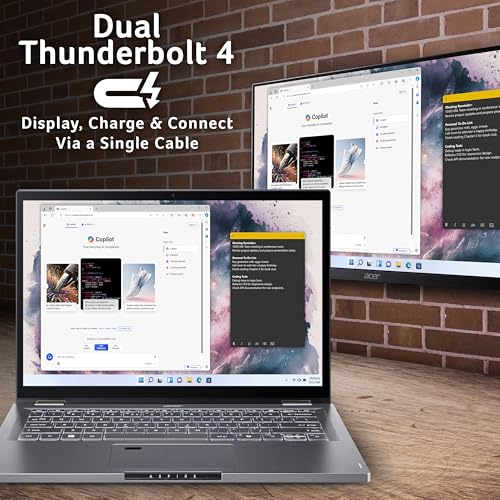
The Thunderbolt 4 ports support USB Power Delivery charging, which means you can charge via a USB-C power bank or a compatible dock rather than being tied to Acer's own charger. For frequent travellers, that's a useful feature. A single cable to a Thunderbolt dock can handle charging, external display, and data transfer simultaneously, which keeps the desk tidy and the bag lighter.
One thing worth flagging: convertible laptops with touchscreens tend to draw slightly more power than their clamshell equivalents, because the digitiser layer adds to the panel's power draw. It's not a huge difference, but it's worth factoring in if you're comparing battery life expectations between this and a standard non-touch laptop. Don't expect the same figures you'd get from a thin, non-touch ultrabook running the same chip.
Portability
A 14-inch convertible is a sensible size for travel. It's big enough to be useful for work, small enough to fit comfortably in a backpack or a laptop sleeve without taking over the whole bag. Acer puts the weight at approximately 1.50kg, which is reasonable for a machine with a 360-degree hinge and a glass touchscreen. It's not ultrabook-light, but it's not a brick either.
The four usage modes, laptop, tent, display, and tablet, expand where and how you can use it. Tent mode is underrated for presentations or watching content on a small surface. Tablet mode with the stylus is useful for note-taking in lectures or meetings where opening a laptop feels antisocial. These aren't features you'll use every day, but when you need them, they're there.
The dockable stylus is a small but meaningful portability win. Not having to remember to pack a separate stylus, or worry about where you left it, makes the whole setup more practical for daily carry. The Iron colourway is understated enough to look professional in a meeting room without screaming "gaming laptop" or looking like a toy. For the commuter, student, or professional who wants one device that handles desk work and mobile use without compromise, the Spin 14 makes a reasonable case for itself.
Keyboard and Trackpad
Keyboard quality is one of those specs that never appears on the box but matters more than almost anything else for daily use. Shallow, mushy keyboards are the enemy of anyone who types for a living.
There are no backlit keys, which is a real drawback for anyone who works in variable lighting conditions. Whether you're on a train at night or in a dim meeting room, being able to see the keys without squinting is a basic requirement, and this machine omits it. A machine like this spends much of its life on café, airport and hotel Wi-Fi, so it is worth pairing it with a good VPN to keep your connection private on shared networks. The layout is standard for a 14-inch laptop without a numpad, which keeps the key sizes sensible rather than cramping everything to fit extra keys in. For UK buyers, the keyboard layout should be the standard UK arrangement.
Acer lists a Microsoft Precision touchpad, which is what makes multi-finger gestures (three-finger swipe to switch apps, two-finger scroll, pinch to zoom) work reliably. In tablet mode the trackpad is obviously less relevant. There's a fingerprint reader for Windows Hello sign-in, too.

Thermal Performance
Thermals on a thin convertible are always a balancing act. The chassis needs to be slim enough to work comfortably as a tablet, which means there's limited room for cooling hardware. The Core Ultra 5 115U's 15W TDP helps here: it's a chip designed to run efficiently rather than generate heat, and Meteor Lake's tile architecture means the chip can distribute workloads intelligently across the compute tile, the NPU, and the graphics tile rather than hammering a single core until it throttles.
The underside will get warmer under sustained load, as it does on any thin laptop, which means extended use on a lap during heavy tasks might become noticeable. For a machine primarily used on a desk or table, this is unlikely to be an issue.
Sustained performance under heavy load is where efficiency chips in thin chassis can disappoint. If you're running a long video encode or a complex Photoshop batch job, the processor may reduce its clock speeds to stay within thermal limits. This is normal behaviour and not a fault, but it's worth knowing if your workload involves sustained heavy compute. For the target buyer, someone doing office work, web browsing, and occasional creative tasks, the thermal management should be transparent. You won't notice it happening.
Acoustic Performance
A 15W efficiency chip gives a laptop the best chance of staying quiet during everyday use, which matters in libraries, open-plan offices, or late-night working sessions.
Under heavier load, the fan will spin up. That's unavoidable. The character of the fan noise matters here: a steady, low-pitched whoosh is far less distracting than a high-pitched whine or an erratic pulse.
Ports and Connectivity
This is where the Spin 14 earns its money, with dual Thunderbolt 4 ports. Thunderbolt 4 supports up to 40Gbps data transfer, USB Power Delivery charging, and DisplayPort video output, all over a single USB-C connector. Two of them means you can charge through one while connecting a dock or display to the other, which is a small but useful flexibility. You can also connect two 4K monitors simultaneously via a compatible Thunderbolt dock, which effectively turns this into a desktop replacement when you're at your desk.
Alongside the Thunderbolt 4 pair, Acer lists two USB-A 3.2 Gen 1 ports and an HDMI output, so everyday accessories and a basic monitor connection don't need adapters. There's no card reader. Wireless is Wi-Fi 6 with Bluetooth 5.3. With two Thunderbolt 4 ports the connectivity foundation is strong, and a single Thunderbolt 4 dock can add ethernet, a card reader and more ports if you need them.
The Thunderbolt 4 charging support deserves emphasis for travellers. Being able to charge from a USB-C power bank, a hotel room USB-C charger, or a shared office dock charger is a meaningful quality-of-life improvement over machines that require a proprietary barrel connector. It's the kind of feature that sounds minor until you're stuck in an airport with a dead laptop and only a USB-C cable to hand.
- Dual Thunderbolt 4 (USB-C, 40Gbps, DisplayPort, USB PD charging)
- Touchscreen display with active stylus support
- 360-degree convertible hinge
- Dockable Acer Active Stylus (included)
- Dedicated Microsoft Copilot keyboard key
Webcam and Audio
The listing doesn't give a webcam resolution. Most buyers at this price point are using the webcam for Teams and Zoom calls rather than recording YouTube content, and for that use case, a decent webcam with reasonable low-light performance is all you need.
Speaker quality on thin convertibles is generally a weak point, because there simply isn't room for large drivers or a resonant chamber. For music and media consumption, most buyers will want headphones or external speakers. For calls and the occasional YouTube video at your desk, the built-in speakers should be perfectly functional. The Copilot key on the keyboard suggests tight Windows 11 integration, which includes AI-enhanced noise suppression for calls via the NPU.
NPU-assisted AI noise suppression should mean background noise on calls is handled better than on older machines without dedicated AI hardware. That's a practical benefit for anyone taking calls from noisy environments like coffee shops or open-plan offices.
Build Quality
The Iron colourway and the Aspire Spin branding suggest a machine aimed at professionals who want something that looks the part without being ostentatious. For a convertible that you'll be folding and rotating regularly, hinge durability and chassis rigidity matter more than on a standard clamshell.
The 360-degree hinge is central to the whole proposition. The hinge needs to hold the screen firmly in tent and display modes without being stiff enough to make one-handed opening impossible in laptop mode. Hinge failures are one of the more common long-term reliability complaints on convertibles, so it's worth giving the hinge a proper workout while you're still inside the returns window.
Final Verdict
The Acer Aspire Spin 14 ASP14-52MTN is a well-thought-out machine for a specific type of buyer. If you're a professional or student who wants a versatile convertible with proper connectivity, an included stylus, and a chip that's ready for the next wave of AI-assisted Windows features, this hits the mark. The dual Thunderbolt 4 ports and the 16:10 display with active stylus support make it useful in ways that spec-sheet comparisons don't fully capture.
Who should skip it? If you're primarily after the best possible display and are willing to pay a premium, an OLED-equipped rival might serve you better. If you don't need the convertible functionality and just want the fastest possible processor for the money, a standard clamshell with an H-series chip will outperform it under sustained load. And if integrated graphics won't cut it for your work, you already know this isn't the machine for you. But for the majority of buyers in the mid-range bracket, those aren't the relevant comparisons. Most people want a reliable, versatile machine that handles daily work without drama, and that's what the Spin 14 is built for.
It's rated ★★★★☆ (4.2) out of 5 from 17 Amazon reviews, a relatively small sample. Call it a solid 7.5 out of 10 for the mid-range convertible tier. It earns its price, it doesn't pretend to be something it isn't, and for the right buyer it's a good choice.
What works. What doesn’t.
7 + 4What we liked7 reasons
- Dual Thunderbolt 4 ports add genuine connectivity flexibility
- Active stylus with over 4,000 pressure levels is included in the box rather than sold separately
- 16:10 WUXGA display provides noticeably more vertical screen space than a standard 1080p 16:9 screen
- Intel Core Ultra 5 115U is a 15W chip built for power efficiency
- NPU-ready Meteor Lake platform positions the machine well for AI-assisted Windows features as they mature
- USB Power Delivery charging over Thunderbolt 4 allows use with power banks and universal docks
- Two USB-A ports and HDMI alongside the Thunderbolt 4 pair, so fewer adapters
Where it falls4 reasons
- Sustained heavy workloads can push the 15W efficiency chip to its thermal ceiling fairly quickly
- No discrete GPU means demanding creative or gaming tasks are beyond its practical capability
- No keyboard backlight
- Touchscreen and digitiser layer add slightly to power draw compared with equivalent non-touch clamshells
Full specifications
12 attributes| Screen size | 14 |
|---|---|
| CPU brand | Intel |
| GPU type | integrated |
| RAM | 16GB |
| Storage type | PCIe Gen4 SSD |
| Battery life H | 10 |
| Battery WH | 53 |
| Bluetooth | 5.3 |
| CPU | Intel Core Ultra 5 115U |
| Display refresh HZ | 60 |
| Display resolution | 1920x1200 |
| Display size IN | 14 |
If this isn’t right for you
2 options 8.0 / 10
HP Envy x360 14" 2in1 Laptop, AMD Ryzen 7 8840HS Processor, AI Enhanced, 16 GB RAM, 1TB SSD, AMD Radeon Graphics, WUXGA IPS Touchscreen, Up to 14hrs 45 battery, Win 11, Glacier Silver, 14-fa0000sa
£889.12 · HP
 8.0 / 10
Microsoft Surface Pro (11th Edition) | 13” Touchscreen | Snapdragon X Plus / X Elite
£749.00 · Microsoft
Frequently asked
6 questions01Does the Acer Aspire Spin 14 ASP14-52MTN come with a stylus included?+
Yes. The Acer Active Stylus with over 4,000 levels of pressure sensitivity is included in the box and docks directly into the laptop chassis, so you are unlikely to misplace it during daily carry.
02Can you charge the Acer Aspire Spin 14 via USB-C?+
Yes. The Thunderbolt 4 ports support USB Power Delivery charging, which means you can use a compatible USB-C power bank, a universal dock charger, or a third-party USB-C charger rather than relying solely on Acer's own supplied charger.
03Is the Intel Core Ultra 5 115U powerful enough for everyday office work?+
For typical productivity tasks including web browsing, Office applications, video calls, and light photo editing, the Core Ultra 5 115U is more than adequate. It is a 15W efficiency chip designed for efficiency rather than raw peak performance, which suits most professional and student workloads well.
04What display resolution does the Acer Aspire Spin 14 use, and does it matter?+
The display is WUXGA, which means 1920x1200 pixels at a 16:10 aspect ratio rather than the standard 16:9. The extra vertical space is useful for documents, code editors, and spreadsheets, making the screen feel less cramped than a conventional 1080p panel of the same physical size.
05Is the fan noise noticeable during everyday use?+
The Core Ultra 5 115U is a 15W efficiency chip, which gives it the best chance of staying quiet under light to moderate loads such as browsing, document editing, and video calls. Under sustained heavy load the fan will spin up.
06Can the Acer Aspire Spin 14 connect to two external monitors simultaneously?+
Yes, in principle. With a compatible Thunderbolt 4 dock or by using both Thunderbolt 4 ports directly, the integrated graphics can support dual external 4K displays, effectively turning the laptop into a desktop replacement when on a fixed desk.