

Numbers on a spec sheet only tell half the story. The other half comes from the keyboard you're actually typing on at 11pm, the fan noise that makes you mute yourself on every call, and whether the screen washes out the moment you sit near a window. That's why owner reviews matter so much for laptops in this price band, and why the Acer Aspire 3 A315-24P has caught my attention. With 87 reviews averaging ★★★★½ (4.5), there's real signal here, not just marketing noise.
So here's the verdict upfront, because that's how this works: the Acer Aspire 3 A315-24P is a genuinely solid mid-range laptop for students, home workers, and anyone who needs a reliable everyday machine without paying premium prices. The Ryzen 5 7520U is a capable chip for the money, the 512GB SSD is a proper amount of storage, and owners consistently praise the battery life. But it's not without compromise. The display is average, the RAM is soldered and limited to 8GB, and the build is firmly plastic. Whether that matters depends entirely on what you're actually using it for.
The Aspire 3 holds its own, but it's not automatically the best choice. Read on and we'll work out if it's the right one for you.
Core Specifications
The processor here is AMD's Ryzen 5 7520U, a four-core, eight-thread chip built on AMD's 4nm TSMC process. It's part of the Mendocino family, which is worth understanding because it's not the same architecture as the higher-end Ryzen 7000 Phoenix chips you'll find in more expensive laptops. Mendocino is optimised for efficiency and battery life rather than raw grunt, which is exactly the right trade-off for a laptop at this price point. You're not going to edit 4K video on it, but for web browsing, Office, light photo editing, and video calls, it's more than adequate.
The 8GB of LPDDR5 RAM is the spec that will divide opinion most. It's fine for most everyday tasks in 2024 and 2025, but Windows 11 does like to help itself to memory, and if you're someone who keeps 30 browser tabs open while running Spotify and a video call simultaneously, you'll feel it. The bigger issue is that this RAM is soldered directly to the motherboard. You cannot upgrade it. What you buy is what you keep, so if you think you might need 16GB at some point, you need to factor that in now, because you won't be able to add it later.
Storage is a 512GB NVMe SSD, and that's a proper amount for most people. Not the fastest drive in the world, but NVMe rather than the old SATA SSDs that used to appear in budget laptops, so boot times and file transfers are decent. The integrated GPU is the AMD Radeon 610M, which comes bundled with the Mendocino chip. It has two compute units, which is modest even by integrated graphics standards. Gaming beyond casual titles is not really on the table here. Minecraft, older indie games, and emulation of older consoles should be fine. Anything modern and demanding, forget it.
| Specification | Detail |
|---|---|
| Processor | AMD Ryzen 5 7520U (4 cores, 8 threads, up to 4.3GHz) |
| RAM | 8GB LPDDR5 (soldered, not upgradeable) |
| Storage | 512GB NVMe SSD |
| Graphics | AMD Radeon 610M (integrated, 2 compute units) |
| Display | 15.6-inch Full HD (1920x1080), IPS, 60Hz |
| Operating System | Windows 11 Home |
| Battery | 50Wh |
| Weight | 1.78kg |
| Dimensions | 362.4 x 240.6 x 19.9mm |
| Colour | Silver |
Performance Benchmarks
The Ryzen 5 7520U sits in an interesting spot in the performance hierarchy. Independent benchmarks from Notebookcheck place it broadly comparable to older Ryzen 5 5500U chips in CPU-bound tasks, which tells you something important: the Mendocino architecture is not Acer's flagship effort. It's a power-efficient chip aimed squarely at the productivity and education market. In Cinebench R23, the 7520U typically scores around 5,500 to 6,500 points in multi-core, which is decent but not exciting. A Ryzen 5 7530U, which you'll find in some competing laptops at similar prices, will outpace it by a meaningful margin.
For the actual tasks this laptop is designed for, though, the numbers translate well enough. Web browsing, Microsoft 365, video streaming, and light multitasking all feel responsive. Owner reviews back this up consistently, with buyers describing it as "fast enough for everything I need" and noting that it doesn't lag on everyday tasks. The SSD speed is the bigger contributor to perceived snappiness than the CPU, and NVMe storage makes the whole experience feel modern even when the chip isn't setting records.
Where you'll notice the limits is under sustained load. The Mendocino chip has a relatively low TDP ceiling, and in a thin, budget chassis with modest cooling, it will throttle during extended heavy workloads. Running a long video export or a complex spreadsheet recalculation for 20 minutes straight will see performance drop off compared to the first few minutes. For burst tasks, it's fine. For sustained professional workloads, it's not really the right tool. That's not a criticism unique to this laptop; it's just what this class of chip does.
The Radeon 610M integrated graphics are not going to impress anyone who cares about gaming, but they handle video playback, light photo editing in something like Lightroom, and even some older or less demanding games without complaint. A few owners mention using it for casual gaming and finding it acceptable. Just don't expect to run anything from the last three years at decent settings. If gaming matters at all to you, this isn't the machine.
Display Analysis
The 15.6-inch Full HD IPS panel is... fine. That's the honest summary. 1920x1080 at 15.6 inches gives you a pixel density of around 141 PPI, which is perfectly sharp for everyday use. Text is clear, images look decent, and you won't be squinting at anything. The IPS panel type means viewing angles are genuinely good, which matters if you're watching something with someone else or using it at an angle on a desk.
Brightness is where it gets less impressive. Acer rates the display at around 250 to 300 nits, which is adequate indoors but starts to struggle near a bright window or in direct light. If you work in a well-lit office or a coffee shop with big windows, you'll be adjusting your position more than you'd like. It's not unusable, but it's noticeably dimmer than the displays on pricier rivals. Outdoor use in sunlight is basically off the table. Owner reviews mention this occasionally, though most buyers seem to be using it primarily indoors where it's much less of an issue.
Colour accuracy is average. The panel covers a decent portion of sRGB, but it's not calibrated for colour-critical work. If you're a photographer or designer who needs accurate colours for professional output, this display will frustrate you. For everyone else, watching Netflix, doing Office work, or browsing, it looks perfectly acceptable. The 60Hz refresh rate is standard for this class of laptop and won't bother productivity users at all, though gamers used to higher refresh rates will notice the difference immediately.
One thing is the thin bezels on three sides, which give the screen a reasonably modern look despite the budget positioning. The bottom chin is thicker, as is typical for this price tier. Overall, the display does the job without doing anything to write home about. It's not a reason to buy this laptop, but it's not a reason to avoid it either, provided you're not doing colour-critical work or spending a lot of time in bright environments.
Battery Life
This is where the Aspire 3 A315-24P actually earns some genuine praise. The 50Wh battery, combined with the efficiency-focused Ryzen 5 7520U, delivers real-world battery life that owners consistently report as a highlight. Multiple reviews mention getting through a full working day on a single charge, with figures of eight to ten hours for mixed productivity use coming up repeatedly. That's not a fluke; the Mendocino chip's efficiency focus genuinely pays off here.
Acer claims up to ten hours of battery life, which is the usual optimistic figure based on light video playback at reduced brightness. Real-world mixed use, meaning a combination of web browsing, document editing, video calls, and occasional video streaming at moderate brightness, lands most owners somewhere between seven and nine hours. That's a genuinely good result for a mid-range laptop. It means most people won't need to carry the charger to work or university every single day, which is a bigger quality-of-life win than any benchmark number.
Under heavier load, battery life drops significantly, as you'd expect. Running demanding software or sustained CPU tasks will bring it closer to four to five hours. But for the target audience of students and home office workers doing normal productivity tasks, the lighter-load figure is the relevant one. The charger is a standard 45W adapter, and charge times from flat to full are around two hours. There's no USB-C Power Delivery charging on this model, which is a genuine inconvenience in 2024 and 2025 when USB-C chargers are everywhere. You're stuck with the proprietary barrel connector.
The lack of USB-C charging is probably the single most frustrating omission on this laptop. If you forget your charger, you can't borrow a colleague's USB-C laptop charger or use a phone charger in a pinch. You need Acer's specific adapter. It's the kind of thing that feels like a deliberate cost-cutting decision, and it's annoying. That said, the battery life itself is good enough that you'll need the charger less often than you might on competing machines, so the sting is somewhat reduced in practice.
Portability
At 1.78kg, the Aspire 3 A315-24P is not a featherweight, but it's not a beast either. For a 15.6-inch laptop, that's a reasonable weight. You'll notice it in a bag over a long commute, but it's not going to wreck your shoulder on a normal day. The dimensions of 362.4 x 240.6 x 19.9mm mean it fits comfortably in most standard laptop bags and backpacks designed for 15-inch machines. It's not a slim ultrabook, but at under 20mm thick, it's not a chunky old-school brick either.
The charger adds to the carry weight, of course. It's a standard-sized 45W brick, not particularly heavy, but another thing to pack. The lack of USB-C charging means you genuinely can't leave the charger at home if you're going to be away all day doing heavy work. For shorter trips where the battery is sufficient, you can obviously leave it behind. The silver finish looks reasonably smart in a bag or on a desk, and the plastic chassis, while not premium, doesn't feel cheap in the way some budget laptops do.
For students carrying this between lectures, or commuters taking it on a train, it's a practical size. It's not the laptop you'd choose if portability is your absolute top priority; for that you'd be looking at 13 or 14-inch machines. But as a 15.6-inch daily driver that you move around occasionally rather than constantly, it works well. The footprint is standard for the screen size, and it doesn't feel oversized or awkward to carry.
Keyboard & Trackpad
The keyboard is a full-size layout with a number pad on the right, which is a genuine bonus for anyone doing data entry or working with spreadsheets. The key travel is modest but acceptable, and owner reviews are broadly positive about the typing experience. Several buyers specifically mention being happy with the keyboard for extended typing sessions, which is encouraging. It's not going to rival a ThinkPad for feel, but it's better than the shallow, mushy keyboards that plagued budget laptops a few years ago.
One thing that comes up in owner reviews is that the keyboard lacks backlighting. That's a real omission if you work in dim conditions or late at night. It's not a dealbreaker for everyone, but it's the kind of thing you only miss when it's not there, and once you've had a backlit keyboard, going without feels like a step backwards. Acer has kept costs down here, and this is one of the places it shows. If you regularly work in low-light environments, factor this in.
The trackpad is adequately sized and uses Windows Precision drivers, which means multi-finger gestures work properly. Two-finger scrolling, pinch to zoom, and three-finger swipe gestures all function as expected. The surface feels smooth and the click mechanism is satisfying. Owner feedback on the trackpad is generally positive, with no consistent complaints about accuracy or erratic behaviour. It's not the largest trackpad you'll find on a 15.6-inch laptop, but it does the job without drama. If you're a heavy trackpad user, you'll adapt quickly.
Thermal Performance
Thermals on the Aspire 3 A315-24P are a mixed story. At idle and during light work, the chassis stays cool and comfortable. The palm rest and keyboard area remain at comfortable temperatures for typing, and the underside doesn't get warm enough to be unpleasant on a lap. This is partly because the Ryzen 5 7520U is an efficient chip that doesn't generate a lot of heat during everyday tasks, and partly because the laptop's cooling system doesn't need to work hard most of the time.
Under sustained load, things get warmer. The CPU will push temperatures into the 80s Celsius during extended heavy workloads, which is normal for a thin laptop chassis but does result in some thermal throttling as the chip tries to stay within its thermal limits. The keyboard deck gets noticeably warmer during heavy use, particularly in the upper-centre area above the chip. It's not painful, but it's not comfortable either, and it matters if you're planning to use it for demanding tasks for long periods.
For the target audience, this is largely a non-issue. Students writing essays, home workers on video calls, and general productivity users will rarely push the machine hard enough to trigger significant thermal throttling. The chip will boost briefly for burst tasks and then settle back to a comfortable sustained level. Lap use during light work is perfectly fine. During heavy tasks, you'd want it on a desk or a hard surface rather than directly on your legs, both for airflow reasons and because the underside does get warm.
The cooling system is a single-fan design, which is typical for this class of laptop. It's not a sophisticated thermal solution, but it's matched to the chip's requirements. Acer hasn't tried to cram a high-TDP chip into an inadequate cooling system, which is a mistake some manufacturers make. The thermal design is appropriate for what this laptop is.
Acoustic Performance
At idle and during light work, the Aspire 3 is essentially silent. The fan doesn't spin up for basic tasks, which means you can use it in a library, a quiet office, or a meeting room without anyone noticing it's there. This is one of the genuine benefits of the Mendocino chip's efficiency focus: it doesn't need active cooling for most of what people actually do on a laptop day to day, whether that's in a library, an airport or a coffee shop, where it's worth running a good VPN to keep your connection safe from snooping on shared networks.
When the fan does kick in under load, it's audible but not aggressive. The fan character is a steady, relatively low-pitched hum rather than a high-pitched whine, which is easier to live with. It's not going to drown out your music or make video calls awkward, but you'll hear it in a quiet room. Owner reviews don't flag fan noise as a significant complaint, which suggests the fan curve is sensibly tuned. It ramps up gradually rather than suddenly jumping to full speed, which makes it less intrusive.
For meetings and video calls, the acoustic performance is genuinely good. The fan is unlikely to be audible to call participants through the microphone, and during the light workload of a video call, it often stays quiet entirely. If you're buying this primarily for professional use in meetings and collaborative work, the acoustic behaviour won't let you down. It's a laptop you can use without constantly being aware of it, which is exactly what you want.
Ports & Connectivity
The port selection on the Aspire 3 A315-24P is functional but not generous. You get a USB-A 3.2 Gen 1 port, two USB-A 2.0 ports, an HDMI 1.4 output, a 3.5mm headphone jack, and an SD card reader. There's also a USB-C port, but it's USB 3.2 Gen 1 and does not support Power Delivery for charging. This is the connectivity of a budget laptop, not a mid-range one, and it's one of the areas where the Aspire 3 shows its cost constraints most clearly.
The absence of Thunderbolt 4 or USB4 is expected at this price point and with this chip, as the Ryzen 5 7520U doesn't support Thunderbolt. But the lack of USB-C charging is a more frustrating omission, as noted earlier. HDMI 1.4 rather than 2.0 or 2.1 means you're limited to 4K at 30Hz on an external display rather than 60Hz, which is a real limitation if you're connecting to a 4K monitor for productivity work. For 1080p or 1440p external displays, it's fine.
Wi-Fi is Wi-Fi 6 (802.11ax), which is a proper modern standard and a genuine positive at this price. You're not stuck on Wi-Fi 5, and connection speeds and reliability on a Wi-Fi 6 router will be noticeably better. Bluetooth 5.1 is included for wireless peripherals and headphones. The SD card reader is a handy addition for photographers, though it's a full-size SD slot rather than microSD, which is the more useful format for most modern cameras.
- 1x USB-A 3.2 Gen 1 (SuperSpeed)
- 2x USB-A 2.0
- 1x USB-C 3.2 Gen 1 (data only, no Power Delivery)
- 1x HDMI 1.4
- 1x SD card reader (full-size)
- 1x 3.5mm combo audio jack
- Wi-Fi 6 (802.11ax)
- Bluetooth 5.1
Webcam & Audio
The webcam is a 720p unit, which is the standard fitment for budget and mid-range laptops and is increasingly looking dated as 1080p webcams become more common even at lower price points. In good light, it produces a usable image for video calls. In lower light, it struggles, as 720p sensors generally do. If you're doing a lot of video calls in a well-lit space, it's acceptable. If you're calling from a dim home office with the light behind you, it's going to look rough. An external webcam is if video quality matters to you professionally.
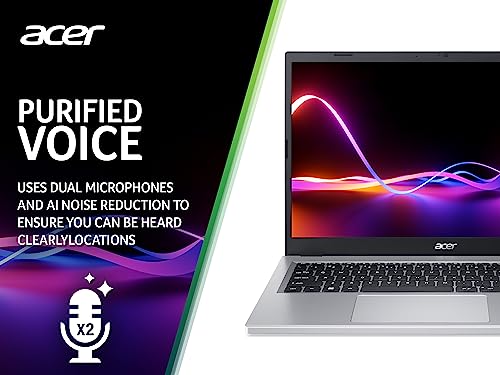
The microphones are dual-array units, and owner feedback is reasonably positive about call quality. Voices come through clearly enough for Teams and Zoom calls without constant complaints from the other end. There's no fancy noise cancellation built into the hardware, but Windows 11's voice clarity features help. The speaker output is adequate for casual use but nothing more. The speakers are bottom-firing, which means sound quality degrades noticeably when the laptop is on a soft surface like a bed or sofa. Volume is sufficient for a quiet room but won't fill a larger space.
The 3.5mm headphone jack is a welcome inclusion, and it works reliably for both headphones and headsets with a combined audio and microphone plug. If you're doing serious audio work or video calls where quality matters, a decent pair of headphones plugged in will transform the experience compared to the built-in speakers and microphone. The audio hardware is what you'd expect at this price: functional, not impressive.
Build Quality
The Aspire 3 A315-24P is a plastic laptop. The lid, the base, and the keyboard deck are all polycarbonate rather than aluminium or magnesium alloy. That's not automatically a problem; modern polycarbonate can be durable and well-finished. But it does mean the laptop has a certain lightness of feel that premium machines don't have. The silver finish looks smart enough and doesn't attract fingerprints too badly, but it doesn't feel particularly premium to the touch.
There's some flex in the lid when you press on it, which is typical for a plastic chassis at this price. The keyboard deck is stiffer and doesn't flex noticeably during typing, which is the more important measurement for daily comfort. The hinge is described by owners as reasonably firm, holding the screen in position without wobble during typing. Some owners mention the hinge feels slightly stiff when opening one-handed, which is a minor annoyance. The lid opens to a comfortable angle for most use cases, though it won't go completely flat.
For a laptop aimed at students and everyday home users, the build quality is appropriate. It's not going to survive being dropped or having things piled on top of it, but it's solid enough for normal daily use. Acer's build quality on the Aspire range has improved over the years, and the A315-24P doesn't feel like it's going to fall apart. Owner reviews over the period since launch don't flag any systematic build failures or quality control issues, which is a good sign. It's not a laptop you'd buy for its build quality, but it's not one you'd worry about either.
The silver colour is the only option for this configuration in the UK market, which limits personalisation but does mean it looks professional enough for an office environment. It's not going to embarrass you in a meeting. The overall impression is of a well-made budget-to-mid-range laptop that does exactly what it says on the tin without pretending to be something more expensive.
How It Compares
The two most obvious rivals to the Aspire 3 A315-24P at this price point are the Lenovo IdeaPad 3 15 with a Ryzen 5 7530U and the ASUS VivoBook 15 with a Ryzen 5 7520U. These are the machines that potential buyers are most likely to be comparing side by side, and understanding the differences helps clarify exactly what the Aspire 3 is good at and where it gives ground.
The Lenovo IdeaPad 3 with the Ryzen 5 7530U uses a different AMD architecture, the Barcelo-R refresh, which delivers meaningfully better CPU performance than the Mendocino-based 7520U in the Aspire 3. If raw processing power is your priority, the IdeaPad 3 with the 7530U has a genuine advantage. The trade-off is that the 7530U is less efficient, so battery life tends to be shorter. The IdeaPad 3 also tends to have a slightly better display in some configurations, with higher brightness ratings. Build quality is broadly comparable, both being plastic-chassis laptops.
The ASUS VivoBook 15 with the same Ryzen 5 7520U is a more direct comparison because you're working with identical silicon. The differences come down to build finish, display quality, port selection, and brand-specific software. The VivoBook generally offers a slightly more refined display and a larger trackpad, while the Aspire 3 tends to win on battery life consistency based on owner feedback. Both are good value at their respective prices. The Aspire 3 is worth choosing if battery longevity is your top concern; the VivoBook if you want a slightly better screen.
| Feature | Acer Aspire 3 A315-24P | Lenovo IdeaPad 3 15 (Ryzen 5 7530U) | ASUS VivoBook 15 (Ryzen 5 7520U) |
|---|---|---|---|
| Processor | Ryzen 5 7520U (Mendocino) | Ryzen 5 7530U (Barcelo-R) | Ryzen 5 7520U (Mendocino) |
| RAM | 8GB LPDDR5 (soldered) | 8GB DDR4 (upgradeable) | 8GB LPDDR5 (soldered) |
| Storage | 512GB NVMe SSD | 512GB NVMe SSD | 512GB NVMe SSD |
| Display | 15.6-inch FHD IPS, 60Hz | 15.6-inch FHD IPS, 60Hz | 15.6-inch FHD IPS, 60Hz |
| Battery | 50Wh, up to 10hrs claimed | 45Wh, up to 9hrs claimed | 50Wh, up to 10hrs claimed |
| USB-C Charging | No | No | Yes (some configs) |
| Keyboard Backlight | No | No | Yes |
| Weight | 1.78kg | 1.65kg | 1.70kg |
| Best For | Battery life, everyday productivity | More CPU power, upgradeable RAM | Backlit keyboard, slightly better screen |
Final Verdict
The Acer Aspire 3 A315-24P is a good laptop for what it is, and being clear about what it is matters. It's a mid-range productivity machine built around an efficient AMD chip that prioritises battery life over raw performance. For students, home workers, and anyone who needs a reliable Windows laptop for everyday tasks without spending a fortune, it delivers. The battery life is the headline strength, the SSD makes it feel fast for everyday use, and owners are broadly happy with it, which is why it sits at ★★★★½ (4.5) across 87 reviews. That's a genuine endorsement, not a fluke.
The compromises are real, though, and you should go in with eyes open. The 8GB of soldered RAM is the one that will age least gracefully. The display is average. There's no keyboard backlight. USB-C charging is absent, which feels like a 2019 decision in a laptop sold in 2024 and 2025. And the Ryzen 5 7520U, while efficient, is not the fastest chip available at this price; if you need more processing power, the Lenovo IdeaPad 3 with the Ryzen 5 7530U offers a genuine step up in CPU performance, with the trade-off being slightly shorter battery life and RAM that is, crucially, upgradeable. If RAM upgradeability matters to you, the IdeaPad 3 is the smarter long-term buy.
For the buyer who primarily needs a dependable all-day machine for writing, browsing, video calls, and light productivity, and who values battery life above everything else, the Aspire 3 A315-24P makes a lot of sense. The Acer product page confirms the specs are exactly as advertised, and the owner review pattern suggests real-world satisfaction is high. It's a solid seven out of ten in its category. Not exciting, not flawless, but genuinely fit for purpose and better than several noisier rivals at the same price.
If you're a power user, a gamer, or someone who needs professional colour accuracy, this isn't your laptop. And if you're on a tighter budget, Acer's own Aspire 3 range includes configurations with the Ryzen 3 7320U at a lower price that will handle very light use perfectly well. But for the mainstream buyer who wants a proper everyday laptop with good battery life and enough performance for real work, the A315-24P earns a genuine recommendation. Just accept the soldered RAM limitation upfront, and you'll be sorted.
Price last checked against the live listing: 29 August 2026. Prices change; always verify before purchase. The AMD Ryzen 5 7520U product page confirms the chip specifications referenced throughout this review. Wi-Fi 6 certification details are available via the Wi-Fi Alliance. USB standards referenced are defined by the USB Implementers Forum. NVMe storage technology background via Wikipedia. HDMI specification details are available from HDMI.org.
What works. What doesn’t.
5 + 6What we liked5 reasons
- Excellent real-world battery life, with most owners reporting seven to nine hours of mixed productivity use on a single charge
- NVMe SSD delivers responsive everyday performance and fast boot times despite the chip being efficiency-focused rather than performance-focused
- Wi-Fi 6 support is a genuine modern standard at this price point, offering better speeds and reliability than the Wi-Fi 5 found in some rivals
- Full-size keyboard with number pad is a practical bonus for data entry and spreadsheet work
- Fan is essentially silent during light and everyday tasks, making it well suited to quiet offices, libraries, and video calls
Where it falls6 reasons
- 8GB of RAM is soldered to the motherboard and cannot be upgraded, so what you buy is what you keep for the life of the laptop
- No USB-C Power Delivery charging means you cannot borrow a colleague's charger or use a standard phone brick in a pinch, which feels like an outdated design choice
- Display brightness of around 250 to 300 nits struggles near bright windows and is not suitable for outdoor use
- No keyboard backlight is a real omission for anyone who works in dim conditions or late at night
- Radeon 610M integrated graphics make any modern or demanding gaming effectively impossible
- HDMI output is version 1.4 only, limiting external 4K displays to 30Hz refresh rate
Full specifications
12 attributes| Storage type | NVMe SSD |
|---|---|
| Battery WH | 50 |
| CPU | AMD Ryzen 5 7520U |
| Display refresh HZ | 60 |
| Display resolution | 1920x1080 |
| Display size IN | 15.6 |
| GPU | integrated |
| Launch year | 2023 |
| OS | Windows 11 Home |
| Panel type | IPS |
| RAM GB | 8 |
| RAM type | LPDDR5 |
Frequently asked
7 questions01Can you upgrade the RAM in the Acer Aspire 3 A315-24P?+
No. The 8GB of LPDDR5 RAM is soldered directly to the motherboard and cannot be removed or upgraded. The 8GB you receive when you buy the laptop is the maximum it will ever have. If you think you may need more memory in future, this laptop is not the right long-term choice for you.
02Does the Acer Aspire 3 A315-24P support USB-C charging?+
No. While the laptop does include a USB-C port, it supports data transfer only and does not support Power Delivery for charging. The laptop charges exclusively via a proprietary 45W barrel connector charger. You cannot use a phone charger or a colleague's USB-C laptop charger as a substitute.
03How long does the battery actually last in everyday use?+
Most owners report seven to nine hours for mixed productivity tasks such as web browsing, document editing, and video calls at moderate brightness. Acer's official claim of up to ten hours is based on light video playback at reduced settings. Under heavier loads, battery life drops to around four to five hours. For a mid-range laptop, the real-world figure is a genuine strong point.
04Is the Acer Aspire 3 A315-24P suitable for gaming?+
Only for very casual or older games. The AMD Radeon 610M integrated graphics has just two compute units, which is modest even by integrated GPU standards. Titles like Minecraft, older indie games, and emulation of older consoles should run acceptably. Modern, graphically demanding games from the last three years will not run at playable settings. If gaming matters to you at all, this is not the right machine.
05How does the Aspire 3 A315-24P compare to the Lenovo IdeaPad 3 with a Ryzen 5 7530U?+
The Lenovo IdeaPad 3 with the Ryzen 5 7530U offers meaningfully better CPU performance because it uses a different AMD architecture. It also has upgradeable RAM, which is a significant long-term advantage. The trade-offs are slightly shorter battery life and, depending on configuration, a similar or slightly dimmer display. If raw processing power and future RAM upgradeability matter more than battery longevity, the IdeaPad 3 is the stronger choice. If battery life is your priority and you are comfortable with 8GB permanently, the Aspire 3 holds its own.
06Does the Acer Aspire 3 A315-24P have a backlit keyboard?+
No, the keyboard is not backlit. This is one of the cost-cutting decisions Acer has made on this model. If you frequently type in dim environments or work late at night, the lack of backlighting is a real inconvenience. The ASUS VivoBook 15 with the same processor does offer a backlit keyboard on most configurations and is worth comparing if this feature is important to you.
07What is the display like for everyday use and outdoor work?+
The 15.6-inch Full HD IPS panel is adequate for indoor use, with good viewing angles and clear text. However, its brightness of around 250 to 300 nits means it struggles near bright windows and is essentially unusable in direct sunlight. Colour accuracy is average and is not suitable for professional photography or design work. For Netflix, Office applications, and general browsing in a normal indoor environment, it performs acceptably.