VIVID·REPAIRS/THE FIELD GUIDE/LAPTOPUpdated 7 October 2026Prices live from Amazon UK
Best of · UK · Field of 5
Best Acer Laptops Under £1000
By the Vivid Repairs deskUpdated 7 October 20265 ranked picks189 owner ratings read
As an Amazon Associate we may earn from qualifying purchases. We have not handled these products. Everything below is judged on published specifications, the owner ratings on the UK listings and our own product reviews, and the ranking stays independent of what any of them pay.
As an Amazon Associate, we may earn from qualifying purchases. Our ranking is independent.
Amazon confirms the live price, seller, stock and delivery. Prices here are read from the live listing through the day; a pick Amazon cannot supply is marked as such, and where the list has one in stock it is offered.
vividrepairs.co.uk / best-acer-laptops-under-1000Updated 7 October 2026 · Prices from the live Amazon UK listing
§ The field
Five picks, on one page
Ranked on fit for the job in the title, not on raw specification. Tap any one to jump to the argument for it. Prices are the live Amazon UK figure, read today; a pick with no figure is out of stock and says so in its entry.
Excellent real-world battery life, with most owners reporting seven to nine hours of mixed productivity use on a single charge
NVMe SSD delivers responsive everyday performance and fast boot times despite the chip being efficiency-focused rather than performance-focused
Wi-Fi 6 support is a genuine modern standard at this price point, offering better speeds and reliability than the Wi-Fi 5 found in some rivals
Where it gives up
8GB of RAM is soldered to the motherboard and cannot be upgraded, so what you buy is what you keep for the life of the laptop. Display brightness of around 250 to 300 nits struggles near bright windows and is not suitable for outdoor use.
Intel Core i3-1315U delivers genuine performance headroom for Chrome OS workloads, well beyond what older Celeron machines offered
Dual Thunderbolt 4 USB-C ports are a rare differentiator at the budget tier, enabling docks, external displays, and fast storage
14-inch WUXGA 16:10 IPS touchscreen provides extra vertical real estate and solid viewing angles for the price
Where it gives up
128GB of local storage is tight, particularly if you plan to install Linux apps or cache Android app data. RAM is soldered and cannot be upgraded, so 8GB is the ceiling for this configuration.
The rules this ranking ran under, in plain sight: what we read, what we weighed and what no merchant can move.
How we picked
Our editors evaluated 5 Laptop options against the criteria readers actually weigh up: price, real-world performance, build quality, warranty, and UK availability. Picks lean toward what we'd recommend to a friend buying today, not specs-on-paper winners.
Editorial contextEditor notes from individual reviews, not press releases.
Live UK pricingRefreshed from Amazon UK twice daily.
No paid placementsAffiliate commission doesn't change what wins.
The full guideEverything behind the shortlist above: the spec sheet, the write-ups in full, our method and the verdict.
§ Editorial · The full guide · five proofs, nothing hidden
The Doubt Index.
The shortlist told you what we picked; this zone shows the working. Come in through whichever doubt you’re carrying, or read straight down; we’d rather you checked us than trusted us.
Here’s the sheet the desk works from, kept deliberately factual. Every row is written to be checked against the retailer’s current listing, and you should check. The table scrolls sideways inside its own frame; the page underneath stays still.
Scroll sideways →7 rows · 5 columns · Prices swap to the live figure at render
You can, and you should. What follows is the part a sheet can’t do: the working between what these products have and what your desk actually needs, kept word for word.
Acer's budget and mid-range line is a bit of a maze. Aspire 3, Aspire Go, Aspire 16, Aspire 17, two Chromebook Plus models, all sitting near enough the same money on Amazon UK. So we lined up seven of them to sort out who each one is actually for. The Best Acer Laptops Under £1000 here range from a sub-£350 ChromeOS machine to a 16-inch OLED laptop with Thunderbolt 4, and the right pick depends entirely on whether you live in a browser, need Windows software, or just want the biggest screen for the least money. We've leaned on published specifications, our own research-led reviews and verified Amazon owner ratings to rank them. Every entry names who should skip it.
Buying Guide: What to Look For
Start with the operating system, because it decides everything else. The two Chromebook Plus models run ChromeOS, which is fast, secure and low-maintenance, but it can't install native Windows or macOS software. If your work lives in a browser and Google Workspace, that's fine. If you need desktop Photoshop, a specific accounting package or Steam, you need one of the Windows Aspire machines.
Then look at RAM, and check whether it's soldered. The Aspire 16, the Aspire Go 15 AG15-42P and the Aspire 17 all give you 16GB, which is the sweet spot for keeping lots of tabs and apps open for years. Several others ship 8GB soldered to the board, meaning no future upgrade. 8GB copes today, but Windows and browsers keep getting hungrier, so factor in how long you plan to keep the machine.
Storage type matters as much as size. An NVMe SSD (in the Aspire models and the CB514-5H) boots and loads apps faster than the UFS storage in the entry-level machines. And 128GB fills up fast on Windows once updates and a few apps land, so budget for an external drive if you go for a 128GB model.
Ports are the quiet dealbreaker. Thunderbolt 4 (on the Aspire 16 and the Spin 514) lets you dock, drive an external display and charge over one cable. USB-C Power Delivery charging is a related convenience: without it, you're tied to the barrel-connector brick, which the Aspire 3 and the AG15-32P both are.
Finally, panels. IPS screens give better viewing angles and colour than TN, and OLED (only the Aspire 16) is a clear step above both. If you watch films or edit photos, the panel is the upgrade you'll notice daily. The most common mistake is buying the biggest screen or the highest clock speed and ignoring the RAM ceiling and storage, which are what actually age a budget laptop.
Five write-ups, none folded away. We don’t lab-test, so every line below sticks to what can be defended: the published sheet, the owner ratings on the UK listings and our own reviews.
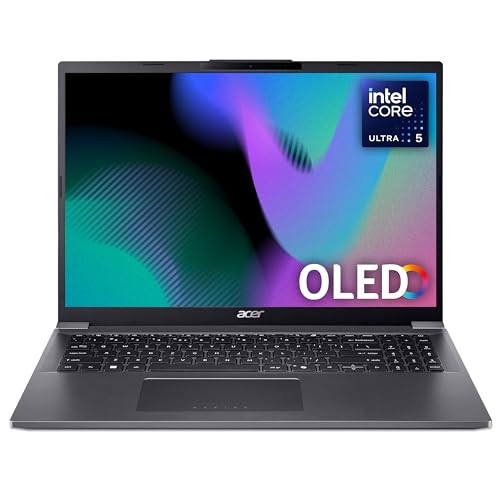
The panel decides this one. A 16-inch OLED at 2048x1280, running up to 120Hz, is the kind of screen you normally pay a lot more for, and no other Windows laptop on this page comes close on display quality. Against the Aspire 17 A17-51M, which uses a 17.3-inch IPS panel our review calls below the mid-range average for brightness and colour, the OLED is a clear step up for anyone editing photos, watching films or just staring at a screen all day.
Under the lid sits an Intel Core Ultra 5 125H with Intel Arc graphics, paired with 16GB of LPDDR5X and a 512GB PCIe NVMe SSD. That's a genuinely current chip, not a warmed-over efficiency part like the N150 or the Ryzen 5 7520U found further down this list, so it has the muscle for heavier multitasking, light content work and the AI features Acer's listing makes noise about (Intel AI Boost, Copilot, the usual). The listing also flags a premium aluminium lid with recycled plastic in the base, so it isn't all plastic like the cheaper Aspire Go models.
Connectivity is where it pulls further ahead. Two USB-C Thunderbolt 4 (USB4) ports sit alongside two USB-A 3.2 Gen 1, HDMI 2.1 and a 3.5mm jack, plus Wi-Fi 6E and Bluetooth 5.3. That Thunderbolt pairing means one cable to a dock, an external 4K display, fast storage and charging all at once.
The 1080p webcam is a nice touch for video calls, ahead of the 720p cameras on the Aspire Go 15 machines. At 1.64kg it's also lighter than the 17-inch model. Amazon UK owners rate it 4.8 stars, though only from 6 ratings, so treat that as early rather than settled. Battery is listed at 8 hours from a 65Wh cell, which is fair for an OLED panel of this size. If you want one Acer here that doesn't feel like a compromise, this is it.
Pros
OLED panel is unique in this lineup and covers media and light creative work
Dual Thunderbolt 4 (USB4) for single-cable docking and charging
1080p webcam beats the 720p cameras on the Aspire Go models
Wi-Fi 6E and Bluetooth 5.3
Cons
Only 6 owner ratings so far, so the 4.8-star score is an early sample
Integrated Arc graphics still won't handle serious gaming
OLED at 120Hz is harder on the battery than the FHD IPS rivals
If you want a laptop that lasts a full day away from the socket, start here. Our review singles out genuinely strong battery life as the standout, and the AMD Ryzen 5 7520U is an efficiency-first chip built exactly for that. It won't win races against the Ryzen 5 5625U in the Aspire Go 15 AG15-42P above, but it sips power.
The NVMe SSD is the other reason our review rates it 7 out of 10. Despite the modest chip, storage speed keeps the machine responsive for boot times and everyday app loads. There's a full-size keyboard with a number pad, which our review flags as a real bonus for spreadsheet and data-entry work, and the fan is essentially silent during light tasks, so it suits libraries and quiet offices. Wi-Fi 6 is included too, a step up from the Wi-Fi 5 on some older budget rivals.
Now the compromises, and there are a few. The 8GB of RAM is soldered to the board, so what you buy is what you keep for the life of the machine. That's the key difference from the Aspire Go 15 AG15-42P, which gives you 16GB for a bit more money. There's also no USB-C Power Delivery charging, so you can't top up from a phone brick or a colleague's charger, which our review calls an outdated choice. The HDMI is version 1.4, capping external 4K output at 30Hz, and there's no keyboard backlight. Owners rate it 4.5 stars from 87 ratings, one of the higher scores here.
The 360-degree hinge and 14-inch WUXGA touchscreen make this the only flip-and-fold machine here, ideal for note-takers who want tablet mode. Our review scores it 7.5 out of 10 and rates the dual Thunderbolt 4 ports as a rare feature at this tier, plus Wi-Fi 6E and a 1080p webcam. The i3-1315U has real headroom for ChromeOS. The catches: 128GB of UFS storage is tight if you add Linux or Android apps, the RAM is soldered at 8GB, and there's no HDMI, so you'll need a USB-C adapter. Owners rate it 4.2 stars from 29 ratings.
Our review scores it 8 out of 10, if ChromeOS works for you. It runs the same i3-1315U as the Spin above but doubles the storage to a 256GB NVMe SSD, which our review says makes it feel noticeably quicker than eMMC Chromebooks. The 1920x1200 IPS panel and a strong port set (dual USB-C 3.2 Gen 2, dual USB-A, HDMI) mean fewer dongles than the Spin. It's not a convertible and there's no touchscreen, so if you want tablet mode, the Spin 514 is the one to get. HDMI is 1.4b, capping 4K external displays at 30Hz. Owners rate it 4.1 stars from 18 ratings.
Pros
256GB NVMe SSD, double the Spin's storage
USB-C charging from either port
Real-world battery covers a full working day per our review
The entry point to Windows here. The Intel N150 runs cool and quiet, and our review scores it 7 out of 10 for light everyday tasks, browsing, email and documents. It ships in Windows 11 S Mode with a Full HD IPS panel our review rates better than the price suggests, plus Wi-Fi 6 and a full-size number pad. But the N150 is well below the mid-range chips above, so skip it for video editing or heavy multitasking. The 128GB UFS storage is tight and the 8GB RAM is soldered. Owners rate it 4.1 stars from 39 ratings.
Pros
Quiet, cool N150 for light tasks and shared spaces
Wi-Fi 6 and a number pad
Better display than the price implies per our review
This page carries affiliate links; they never set the order. We don’t lab-test: rankings come from published specifications, the owner ratings on the UK listings and our own reviews.
How We Compared These
We ranked these seven Acer laptops on published specifications, our own research-led reviews and verified Amazon UK owner ratings with their counts. Our reviews are built from specs and owner feedback rather than hands-on testing, so we've quoted our review scores and verdicts only where they match each exact configuration. Where a claim comes from Acer's own listing, such as battery hours, we've said so and flagged where our review considers it optimistic. Prices move daily and show live on the page, so we've ranked on value bracket and features rather than a fixed figure.
A crown that can’t be argued with isn’t proof of quality; it’s proof nobody checked. So rather than restate the winner’s virtues, we defend the crown against the strongest cases to take it.
acer Aspire 16 A16-71M Laptop
Cross-examination · Three challengers, taken seriously
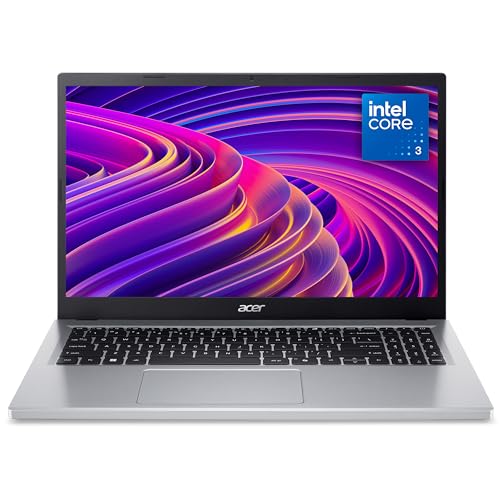
The £190 argumentacer Aspire 3 A315-24P 15.6 Inch Laptop
At £499.00 today against the winner’s £689.00, its strongest case is the £190 it hands back. Owners rate it 4.5 from 86 ratings. Our review scores it 7.0. If the cheaper pick covers the job you actually do, take the saving with a clear conscience. The crown stays where it is because rank follows fit for the job in the title, not the receipt, and its full argument is in the write-up above.
Prices checked (this pick) and (the winner) · Details
The owners’ argumentacer Chromebook Plus Spin 514 CP514-4HN Convertible Laptop
Owners rate it 4.2 from 30 ratings. Our review scores it 7.5. The crown holds on the ranking rules: the order above was set before any link was attached, and its case is argued in full in the write-up above.
The £214 argumentacer Chromebook Plus 514 CB514-5H Laptop
At £475.00 today against the winner’s £689.00, its strongest case is the £214 it hands back. Owners rate it 3.8 from 20 ratings. Our review scores it 8.0. If the cheaper pick covers the job you actually do, take the saving with a clear conscience. The crown stays where it is because rank follows fit for the job in the title, not the receipt, and its full argument is in the write-up above.
Prices checked (this pick) and (the winner) · Details
The original verdict, preserved in full
Final Verdict: Best Acer Laptops Under £1000
The Acer Aspire 16 A16-71M is the pick of the range. An OLED panel, a current Core Ultra 5 chip and dual Thunderbolt 4 give it a spec sheet nothing else here matches, and it's the one machine that doesn't ask you to accept a glaring weakness. At the other end, the Aspire Go 15 AG15-32P is the sensible entry point for light Windows use on the tightest budget, quiet and tidy if you can live with 128GB. If your work sits in a browser, the Chromebook Plus 514 CB514-5H is the smartest value buy of the lot. Match the machine to how you actually work: OLED and Thunderbolt at the top, ChromeOS speed in the middle, quiet basics at the bottom.
The Aspire 16 A16-71M, and by a clear margin. It is the only OLED laptop on this page, a 16-inch 2048x1280 panel at up to 120Hz, so it gives deeper blacks and richer colour than the IPS screens on the Aspire Go 15 AG15-42P and the Chromebook Plus models.
The 14-inch Chromebook Plus models are the most portable here. Among the Windows laptops, the Aspire 16 weighs 1.64kg, which is fine for carrying most days. The Aspire 17 is the one to avoid if you commute: at 2.4kg it is a desk machine.
Less than the listing says, on most of these. Our reviews call the claims optimistic on the Aspire Go 15 AG15-42P and on the Aspire 17 with its small 48Wh battery. The Aspire 3 A315-24P is the one our review singles out for strong battery life, thanks to its efficient Ryzen 5 7520U.
If coursework lives in Google Docs and a browser, the Chromebook Plus 514 CB514-5H is quick, simple and cheaper than the Windows models. If the course needs Windows software, the Aspire Go 15 AG15-42P gives 16GB of RAM at a modest price, and the Aspire 16 is the one to stretch to for a better screen and a longer useful life.
The Acer Aspire 16 A16-71M is the pick of this list. It pairs a 16-inch OLED panel, an Intel Core Ultra 5 125H, 16GB of LPDDR5X and dual Thunderbolt 4 ports, which is a rare combination at this price. Amazon UK owners rate it 4.8 stars from a small sample of 6 ratings.
That’s the field: five acer laptops under £1000, ranked for the job in the title and nothing else. We read the published specifications, the owner ratings and our own reviews; we haven’t handled these products, and no maker moves the order. Figures checked against the live Amazon UK listings, page updated 7 October 2026.
The Vivid Repairs desk
1Our top pickAcer Aspire 16 A16-71M Laptop - Intel Core Ultra 5 125H, 16GB, 512GB SSD, Integrated Graphics, 16" WUXGA+ OLED, Windows 11, IronCompare all →Buy on Amazon →