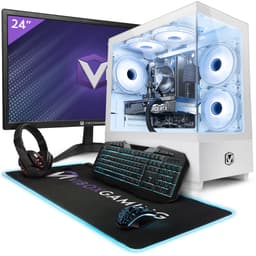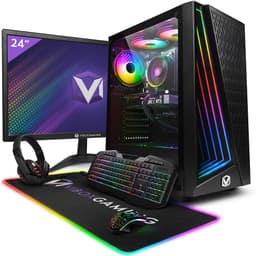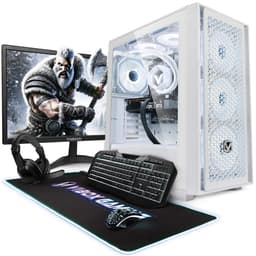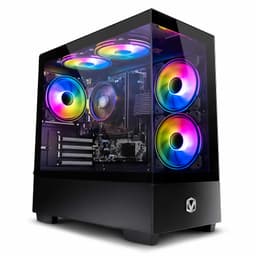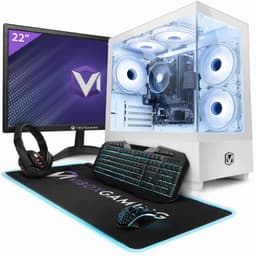
Prebuilt gaming PCs are a minefield. Half of them are dressed-up office boxes with a gaming sticker slapped on the side, and the other half are genuinely decent starter rigs that save you the faff of sourcing parts yourself. The Vibox Gaming PC Bundle lands somewhere in the middle of that spectrum, and the spec sheet tells you exactly where the compromises are before you hand over your money. So let's look at what you're actually getting, what 874 owners think about it, and whether this makes sense versus building something yourself.
The short answer? This Vibox Gaming PC Bundle is a first PC or family computer dressed up in gaming language. It's not going to run modern AAA titles at high settings, and anyone expecting that from an integrated GPU will be disappointed. But for light gaming, kids' gaming, productivity, and anyone who just wants a complete working setup out of the box without touching a screwdriver, it has a real case to make. The 4-star average across 874 backs that up. Just go in with realistic expectations about what the Radeon Vega 8 can actually do.
Core Specifications
The headline components here are the AMD Ryzen 3 3200G, 16GB of RAM, a 1TB NVMe M.2 SSD, and integrated Radeon Vega 8 graphics. Windows 11 comes pre-installed, and the bundle includes a 22-inch monitor and WiFi connectivity. That's a genuinely complete package. You plug it in, you're on the internet, you've got a screen. For a lot of buyers, that simplicity is worth something real.
The Ryzen 3 3200G is a four-core, four-thread Zen+ architecture chip that launched back in 2019. It boosts to 4.0GHz, which is fine for everyday tasks. The Vega 8 integrated graphics share system memory rather than having dedicated VRAM, which is the single biggest performance constraint on this machine. The 16GB of RAM is generous for this price tier and actually helps the Vega 8 more than you might expect, since integrated graphics performance scales with available memory bandwidth. The 1TB NVMe M.2 SSD is a proper highlight though. Fast storage at this price point isn't guaranteed, and getting NVMe rather than a slower SATA SSD or, worse, a spinning hard drive is a meaningful win for day-to-day responsiveness.
Vibox doesn't publish full motherboard or PSU specs openly, which is pretty typical for budget prebuilts. That's because the motherboard and PSU are exactly where manufacturers save money on machines at this price. Owner reviews don't flag widespread PSU failures, which is a reasonable signal that it's not completely rubbish, but you should go in knowing that the ancillary components are likely budget-tier. The monitor inclusion is a nice touch for the money, though a 22-inch panel at this price bracket will be a basic TN or VA at 1080p with no high refresh rate to speak of.
| Specification | Detail |
|---|---|
| CPU | AMD Ryzen 3 3200G (4-core, 4-thread, 4.0GHz boost) |
| GPU | Integrated AMD Radeon Vega 8 |
| RAM | 16GB |
| Storage | 1TB NVMe M.2 SSD |
| Operating System | Windows 11 |
| Monitor | 22-inch (included in bundle) |
| Connectivity | WiFi included |
| Rating | ★★★★☆ (4.0) (874 reviews) |
CPU and Performance
The AMD Ryzen 3 3200G is not a new chip. That's the honest starting point. It's built on the Zen+ microarchitecture and launched in mid-2019, which puts it several generations behind AMD's current Ryzen 5000 and 7000 series. But here's the thing: for what this machine is actually being sold as, that matters less than you'd think. Web browsing, Office, video calls, light photo editing, and even some older or less demanding games? The 3200G handles all of that without breaking a sweat. Four cores at 4.0GHz is enough for the use cases this PC is genuinely suited to.
Where the age shows is in anything more demanding. Video editing with modern codecs, streaming while gaming, or running anything CPU-heavy alongside your games will start to expose the four-thread limitation. The Ryzen 5 3600, for context, offered six cores and twelve threads at a similar price point when it launched, so the 3200G was never a powerhouse even in its own era. That said, the integrated GPU is the actual bottleneck on this system, not the CPU. The processor can keep up with the Vega 8 easily. You're not CPU-bottlenecked here in any gaming scenario.
Owner reviews are broadly positive about everyday performance. The consistent theme in the feedback is that people are pleasantly surprised by how snappy the machine feels for general use, and a lot of that credit goes to the NVMe SSD rather than the CPU specifically. Boot times are fast, apps open quickly, and the whole experience feels modern despite the older processor. If you're upgrading from an old spinning-disk machine or a cheap laptop, the perceived performance jump will be significant. Just don't expect to run Cyberpunk 2077 on it and you'll be fine.
GPU and Gaming Performance
The Radeon Vega 8 is integrated graphics. Full stop. It shares system RAM rather than having its own dedicated VRAM pool, and it's built into the Ryzen 3 3200G die. For context, the Vega 8 sits below even a budget discrete GPU like an Nvidia GTX 1650 in terms of raw performance. At 1080p, you're looking at playable frame rates in older or less demanding titles, think Minecraft, Fortnite at low settings, CS2 at low to medium, older FIFA titles, Rocket League. Games like that. Modern AAA titles at 1080p? Forget it. You'll be dropping to 720p and lowest settings just to get above 30fps in something like Elden Ring or Hogwarts Legacy.
The 16GB of RAM does help the Vega 8 more than the bare minimum would. Integrated graphics performance on AMD's APUs scales noticeably with memory speed and capacity, so the 16GB allocation gives the GPU more to work with than a 8GB config would. That said, the Vega 8 has eight compute units running at around 1250MHz, which is simply not a lot of shader performance by any measure. Published benchmarks from independent sources consistently put the Vega 8 at roughly 1.0 to 1.2 TFLOPS of compute, which is well below even entry-level discrete GPUs from recent years.
So who actually buys this for gaming? Mostly parents buying for younger kids, or adults who play casual or older titles and don't need high-end performance. And honestly, for that use case, the Vega 8 is fine. Minecraft at 60fps with decent render distance, Roblox, older Call of Duty titles, indie games. That's a real gaming experience for a lot of people. The important thing is knowing what you're buying. Vibox calling this a "gaming PC" is generous marketing. It's an entry-level productivity PC with enough graphics grunt for light gaming. If you know that going in, you won't be disappointed.
Memory and Storage
Sixteen gigabytes of RAM is genuinely good at this price point. A lot of budget prebuilts try to get away with 8GB, which in 2026 is honestly not enough for comfortable Windows 11 use alongside a browser with multiple tabs open. The 16GB here means you're not constantly hitting memory pressure during normal use, and as mentioned, it gives the integrated Vega 8 graphics more breathing room. The channel configuration isn't specified by Vibox in the listing, which is a bit annoying. Dual-channel memory would give the Vega 8 a meaningful performance boost over single-channel, since integrated graphics bandwidth is directly tied to memory bandwidth. Whether this ships in dual-channel or single-channel is something when you set it up, and if it's single-channel, reseating the sticks into the correct slots for dual-channel is a free performance upgrade.
The 1TB NVMe M.2 SSD is the component that probably impresses most for the money. NVMe storage is significantly faster than SATA SSDs for sequential reads and writes, and the difference in everyday responsiveness is real. Windows boots fast, applications load quickly, and you don't get that infuriating spinning-cursor lag that plagues machines with older storage. A terabyte is also a generous starting point. You can install a good library of games and still have plenty of room for documents, photos, and whatever else before you need to think about adding more storage.
Upgrade headroom on storage is unclear without knowing the exact motherboard spec, but most budget AM4 boards have at least one additional M.2 slot alongside SATA ports for traditional drives. If you fill the 1TB, adding a second drive later is likely straightforward. The RAM situation is similar: budget AM4 motherboards typically have two or four DIMM slots, so if you're starting with two sticks in a four-slot board, you've got room to expand later. Owner reviews don't mention storage or memory issues specifically, which suggests the base configuration is working fine for the typical buyer.
Cooling Solution
Vibox doesn't publish detailed cooling specs, so we're working from what's typical for prebuilts at this price point and what owner reviews mention. The Ryzen 3 3200G has a rated TDP of 65W, which is manageable. AMD includes a stock Wraith Stealth cooler with the 3200G in retail packaging, and it's reasonable to assume a similar or equivalent cooler is used here. The Wraith Stealth is adequate for the 3200G under normal use. It's not a performance cooler, but it keeps temperatures in check for a chip that doesn't run particularly hot under typical workloads.
The bigger thermal concern with budget prebuilts is case airflow. A cheap case with poor ventilation can cause even a modest CPU to run warmer than it should, which can lead to thermal throttling under sustained load. Owner reviews don't flag excessive heat or throttling as a widespread issue, which is a reasonable sign that the thermal design is at least functional. But it's worth keeping the case in a well-ventilated spot and not shoving it into an enclosed cabinet, especially if you're planning to run it for extended sessions.
Noise levels should be acceptable for most environments. The 3200G with a stock-equivalent cooler and integrated graphics doesn't generate a huge amount of heat, so the fans don't need to work particularly hard. Owner reviews occasionally mention fan noise under load, but nothing that suggests an unusually aggressive or loud fan curve. For a family room or bedroom setup, it should be fine. If you're sensitive to fan noise, notably, that budget prebuilts rarely have premium fan configurations with low-noise bearings, so some hum under load is expected.
Case and Build Quality
Vibox uses their own branded cases, and at this price point you're getting a functional rather than premium enclosure. The cases are typically mid-tower or compact ATX designs in a black finish, which is inoffensive and practical. Don't expect tempered glass panels, premium cable management channels, or tool-free drive bays. What you should expect is a solid enough steel chassis that doesn't flex alarmingly, basic cable management that keeps things tidy enough for airflow, and a layout that makes sense for the components inside.
Owner reviews have mixed things to say about build quality, but mostly in a "it's fine for the price" way rather than "this is falling apart." A few reviewers mention that the internal cable routing is a bit rough around the edges, which is absolutely standard for prebuilts at this price. Nobody's paying for a boutique cable management job at the entry-level tier. The more relevant question is whether the cables are clear of the CPU cooler and fan intakes, and the lack of thermal complaints in the reviews suggests that's largely the case.
The included 22-inch monitor is worth talking about separately. At this price tier, you're getting a basic 1080p panel, almost certainly with a TN or entry-level VA panel technology. TN panels have fast response times but poorer viewing angles and colour reproduction. VA panels offer better contrast and colours but can have slower pixel response. Either way, it's a functional monitor for everyday use and light gaming. It's not going to have a high refresh rate (100Hz or above), and colour accuracy won't be up to creative work standards. But as a bundled screen for a first PC setup, it does the job and saves you buying one separately, which at any price is a practical bonus.
Connectivity and Ports
WiFi is confirmed as part of this bundle, which is a genuinely useful inclusion for a desktop. A lot of budget prebuilts either skip WiFi entirely or charge extra for it, so having it built in means you're not running an Ethernet cable across the room or buying a USB WiFi dongle on day one. The specific WiFi standard isn't detailed in the verified specs, but given the AM4 platform and the era of this build, it's likely WiFi 5 (802.11ac) or possibly WiFi 6. Either is fine for typical home internet speeds.
The exact port configuration on the front and rear panels isn't specified in the verified product data, so we won't invent numbers. What's typical for an AM4 prebuilt at this tier is a mix of USB-A ports on the rear (usually a combination of USB 2.0 and USB 3.0), front panel USB-A ports for convenience, and video output via the motherboard's rear I/O since there's no discrete GPU. The 3200G outputs video through the motherboard, so you'll be using whatever display outputs the board provides, typically HDMI and possibly DisplayPort. The monitor connection to the rear I/O is standard for integrated graphics setups.
Audio connectivity will follow the typical prebuilt pattern of 3.5mm audio jacks on the rear panel and usually a headphone/microphone combo jack on the front panel. Ethernet is almost certainly present as a rear port alongside the WiFi, giving you the option to go wired if your router is nearby. Owner reviews don't flag connectivity issues, which suggests the port selection is at least adequate for the target user. If you're planning to connect multiple monitors, a gaming headset, an external drive, and a keyboard and mouse simultaneously, just check the port count on the listing before buying.
Pre-installed Software and OS
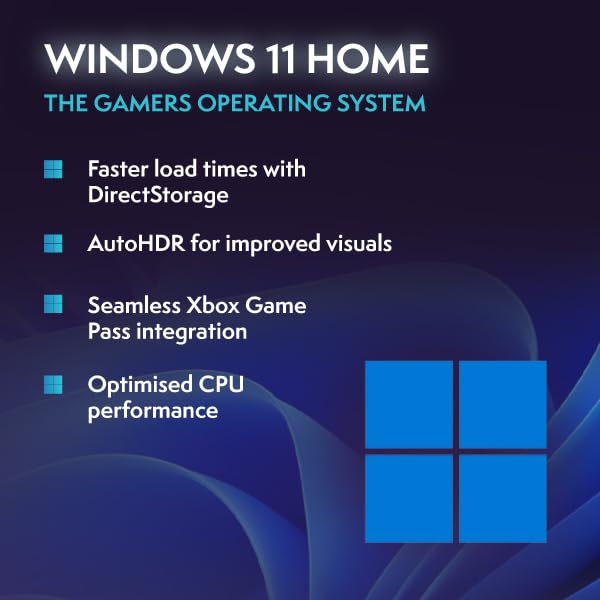
Windows 11 Home is pre-installed, which is the right call for a consumer desktop in 2026. Windows 11 runs fine on the Ryzen 3 3200G. The chip meets the TPM 2.0 and Secure Boot requirements that Microsoft mandates for Windows 11, so you're not getting a workaround install that could cause update headaches down the line. That's because some budget prebuilts have shipped older hardware with Windows 11 installed via bypass methods, which creates ongoing compatibility concerns. The 3200G is legitimately compatible.
Vibox typically ships their machines with minimal bloatware, which is a relative win compared to some larger manufacturers who load their prebuilts with trial software, antivirus subscriptions, and manufacturer utilities that slow the machine down from day one. Owner reviews don't flag excessive bloatware as a problem, and several mention that the machine felt clean and ready to use out of the box. That said, Windows 11 itself comes with Microsoft's own suite of pre-installed apps (OneDrive, Teams, Xbox app, etc.), which you can uninstall if you don't want them.
There's no mention of a Vibox-specific utility app or management software in the product listing or owner reviews, which is actually fine. Budget prebuilts that ship proprietary software often do so to lock you into their ecosystem or upsell you on services. A clean Windows install with no extra junk is preferable. You'll want to make sure Windows Update runs fully after first boot, and All drivers are current, particularly the AMD chipset and Radeon drivers, which AMD updates regularly and which can have a noticeable impact on integrated graphics performance.
Upgrade Potential
This is where the Vibox Gaming PC Bundle gets interesting as a long-term proposition. The AM4 socket is one of AMD's most upgrade-friendly platforms ever produced. AMD supported AM4 from 2016 right through to 2022 with Ryzen 5000 series chips, meaning you can potentially drop a Ryzen 5 5600 or even a Ryzen 7 5700X into this board later, assuming the motherboard BIOS supports it. That's a meaningful upgrade path. A Ryzen 5 5600 would transform this machine's CPU performance for a relatively modest outlay, and it's a genuine option if you want to extend the machine's life.
Adding a discrete GPU is the other obvious upgrade, and it's the one that would make the biggest difference to gaming performance. Whether the PSU can handle a dedicated GPU is the key question, and it's one Vibox doesn't answer clearly in the specs. Budget prebuilts at this price often ship with 300W to 400W PSUs. A modern budget GPU like an AMD RX 6600 or Nvidia RTX 3060 needs around 130W to 170W of power, so a 400W PSU could handle it, but a 300W unit would be tight. Before buying a GPU upgrade, it's the PSU wattage on the actual unit. Owner reviews don't widely discuss GPU upgrades, so we can't draw firm conclusions from the community on this one.
Storage expansion should be straightforward. The 1TB NVMe SSD is using one M.2 slot, and budget AM4 boards typically have a second M.2 slot or SATA ports available for additional drives. RAM expansion depends on how many DIMM slots are populated and available. If the 16GB is two sticks in a four-slot board, you've got room to go to 32GB later, which would be a sensible upgrade if you move into more demanding workloads. The machine's upgrade ceiling is ultimately limited by the PSU and the motherboard quality, but as a starting point on a well-supported platform, it's better positioned for future improvements than a lot of budget prebuilts.
How It Compares
The honest comparison for this Vibox Gaming PC Bundle is against two things: a DIY build at the same spec, and rival entry-level prebuilts. On the DIY front, the maths is genuinely close. A Ryzen 3 3200G, 16GB of RAM, a 1TB NVMe SSD, a budget AM4 motherboard, a case, a PSU, and Windows 11 licence will cost you somewhere in the same ballpark as this bundle when you add everything up. Throw in a 22-inch monitor and the equation tips in Vibox's favour for buyers who need a complete setup. The convenience premium here is small to non-existent when you account for the monitor inclusion, and you avoid the hassle of building it yourself.
Against rival prebuilts, the picture is mixed. You can find machines from other brands at similar prices with slightly newer CPUs (Ryzen 5 4500 or even 5600 in some sales), but they often don't include a monitor. The monitor bundle is the differentiator here. If you already have a screen, you might find better raw PC value elsewhere. If you don't have a monitor, the bundle makes a lot of sense. The 4-star average across 874 puts it ahead of a lot of competitors in terms of buyer satisfaction, which counts for something.
The Ryzen 3 3200G is the weakest point of the spec relative to 2026 standards. Newer APUs like the Ryzen 5 5600G offer significantly better integrated graphics performance (Vega 7 on the 5600G is notably quicker than Vega 8 on the 3200G in real-world gaming, and the CPU cores are substantially faster). If Vibox or a competitor offers a 5600G-based bundle at a comparable price, that's a better buy for gaming specifically. But if this is priced competitively against those alternatives, the monitor inclusion and the solid owner satisfaction record make it a defensible choice.
| Feature | Vibox Gaming PC Bundle (3200G) | DIY Equivalent Build | Rival Prebuilt (5600G-based) |
|---|---|---|---|
| CPU | Ryzen 3 3200G (4c/4t, Zen+) | Ryzen 3 3200G or similar | Ryzen 5 5600G (6c/12t, Zen 3) |
| GPU | Integrated Vega 8 | Integrated Vega 8 | Integrated Vega 7 (faster per CU) |
| RAM | 16GB | 16GB | Typically 8GB to 16GB |
| Storage | 1TB NVMe M.2 SSD | 1TB NVMe M.2 SSD | Varies (512GB to 1TB) |
| Monitor Included | Yes (22-inch) | No | Usually no |
| WiFi Included | Yes | Depends on motherboard | Varies |
| OS | Windows 11 | Windows 11 (licence extra) | Windows 11 |
| Gaming Performance | Light/casual gaming only | Light/casual gaming only | Better, still light gaming |
| Upgrade Path | AM4 socket (good) | AM4 socket (good) | AM4 socket (good) |
| Convenience | Plug and play | Self-build required | Plug and play |

Final Verdict
The Vibox Gaming PC Bundle is a solid first PC for the right buyer. It's not a gaming powerhouse, and anyone who goes in expecting to run modern games at 1080p high settings is going to be frustrated. But for a family's first desktop, a kid's gaming and homework machine, or an adult who wants a complete working setup for casual gaming and everyday computing without any assembly required, it does exactly what it promises. The 1TB NVMe SSD keeps it feeling fast, the 16GB of RAM is generous, Windows 11 runs properly on the hardware, and the included monitor removes a significant extra cost from the equation.
The four-star average across 874 is a meaningful signal. That's not a small sample, and it reflects buyers who are broadly happy with what they received. The most common complaints in the feedback relate to gaming performance expectations (people expecting more from integrated graphics) rather than build quality or reliability issues, which tells you the hardware itself is doing its job. If you're buying with clear eyes about what the Vega 8 can do, you're unlikely to be disappointed.
The honest caveat: if gaming is your primary goal and you have a bit more flexibility on budget, look at prebuilts with a discrete GPU, even a budget one like an RX 6500 XT or GTX 1650. The jump from integrated Vega 8 to any dedicated GPU is enormous for gaming. And if you already own a monitor, you might find better value in a barebones prebuilt without the display bundle. But if you need a complete setup, you're buying for light use, and you want something that works without any setup headaches, the Vibox Gaming PC Bundle earns its four stars. It's a fair deal for what it is.
What works. What doesn’t.
5 + 4What we liked5 reasons
- 1TB NVMe M.2 SSD is fast and generous for the price tier
- 16GB RAM is above average for entry-level prebuilts
- Complete bundle including 22-inch monitor adds real value
- AM4 socket offers a genuine CPU upgrade path to Ryzen 5000
- Clean Windows 11 install with minimal bloatware reported by owners
Where it falls4 reasons
- Radeon Vega 8 integrated graphics limits gaming to light/casual titles only
- Ryzen 3 3200G is a 2019 chip, well behind current-gen APUs
- PSU wattage not specified, limits confidence on GPU upgrade headroom
- Bundled 22-inch monitor will be a basic panel with no high refresh rate
Full specifications
12 attributes| CPU | AMD Ryzen 3 3200G |
|---|---|
| GPU | integrated |
| Bluetooth | 5.4 |
| Chipset | Radeon Vega 8 |
| Interface | Integrated |
| MAX RAM GB | 128 |
| Memory type | GDDR6 |
| OS | Windows 11 |
| RAM GB | 16 |
| RAM type | DDR4-3200 |
| Storage GB | 1000 |
| Storage type | NVMe M.2 SSD |
If this isn’t right for you
2 options

Frequently asked
5 questions01Is the Vibox Gaming PC Bundle AMD Ryzen 3 3200G Radeon Vega 8 16GB RAM 1TB SSD Windows 11 22 Monitor WiFi Black good for gaming?+
It depends entirely on what you want to play. The Radeon Vega 8 is integrated graphics, meaning it shares system RAM rather than having dedicated VRAM. For casual and older titles, think Minecraft, Roblox, Fortnite at low settings, CS2 at low to medium, and older FIFA or Call of Duty games, it's playable and can hit 30 to 60fps at 1080p with settings turned down. Modern AAA titles like Cyberpunk 2077, Elden Ring, or Hogwarts Legacy are a different story. You'd be dropping to 720p and lowest settings just to get above 30fps, and even then some titles won't be enjoyable. If your gaming library is older titles or less demanding games, this works. If you want to play the latest releases at decent quality, you need a machine with a discrete GPU.
02Can I upgrade the Vibox Gaming PC Bundle AMD Ryzen 3 3200G Radeon Vega 8 16GB RAM 1TB SSD Windows 11 22 Monitor WiFi Black?+
The AM4 socket is the biggest upgrade advantage here. AMD supported AM4 from 2016 through to the Ryzen 5000 series, so you can potentially drop in a Ryzen 5 5600 or Ryzen 7 5700X later, subject to the motherboard's BIOS supporting the newer chips. That's a meaningful CPU upgrade path. Adding a discrete GPU is the most impactful gaming upgrade, but you need to check the PSU wattage first since Vibox doesn't publish this spec, and a budget PSU may not have headroom for a dedicated card. Storage expansion should be possible via a second M.2 slot or SATA ports on the board. RAM can likely be expanded if slots are available. The upgrade ceiling is real but the AM4 platform gives you more options than many budget prebuilts.
03Is the Vibox Gaming PC Bundle AMD Ryzen 3 3200G Radeon Vega 8 16GB RAM 1TB SSD Windows 11 22 Monitor WiFi Black worth it vs building my own?+
When you account for the included 22-inch monitor, the value equation is surprisingly close. A DIY build with the same core components (Ryzen 3 3200G, 16GB RAM, 1TB NVMe SSD, budget AM4 motherboard, case, PSU) plus a Windows 11 licence and a 22-inch monitor will cost you a similar amount in total, and you'll spend time sourcing and building it. If you already own a monitor, the DIY route might offer better component choice for the money, particularly if you can find a better CPU or a budget discrete GPU. But for buyers who need a complete setup and don't want the hassle of building, the convenience premium here is minimal, and the 874-review track record gives you more confidence than a self-build from unknown parts.
04What PSU does the Vibox Gaming PC Bundle AMD Ryzen 3 3200G Radeon Vega 8 16GB RAM 1TB SSD Windows 11 22 Monitor WiFi Black use?+
Vibox does not publish the PSU wattage or brand in the verified product specifications for this bundle. This is common practice among budget prebuilt manufacturers and is, because the PSU is one of the components most likely to be cost-cut at this price tier. Owner reviews do not widely report PSU failures, which is a reasonable positive signal, but we cannot confirm the wattage or 80 Plus efficiency rating. If you're planning to add a discrete GPU later, check the PSU wattage on the actual unit before buying a graphics card. A 300W PSU would be limiting; a 400W unit would handle a budget GPU like an RX 6600 or GTX 1650 adequately.
05What warranty and returns apply to the Vibox Gaming PC Bundle AMD Ryzen 3 3200G Radeon Vega 8 16GB RAM 1TB SSD Windows 11 22 Monitor WiFi Black?+
The verified product data does not specify a manufacturer warranty period for this bundle. Vibox typically offers a warranty on their prebuilt systems, so it is the current product listing and Vibox's website directly for the specific terms before purchasing. Regardless of the manufacturer warranty, buying through Amazon gives you a 30-day return window under Amazon's standard returns policy, and the Amazon A-to-Z Guarantee provides additional buyer protection if the item arrives damaged or not as described. Keep your order confirmation and packaging in case you need to make a return or warranty claim.