Pick the wrong motherboard and you don't just lose features. You lose stability, you lose upgrade paths, and you potentially lose sleep at 2am wondering why your system keeps throwing memory errors. The board is the foundation everything else sits on, and a bad foundation means a bad build. Simple as that. So when MSI refreshed the Tomahawk line for AM5 with the MSI MAG B850 TOMAHAWK WIFI, it was worth paying close attention, because the Tomahawk name has historically meant "solid mid-range board that doesn't embarrass itself." The question is whether the B850 version lives up to that reputation or coasts on the brand recognition.
The B850 chipset sits in an interesting position right now. It's not the budget B650, and it's not the enthusiast X870E. It's the board you buy when you want proper PCIe 5.0 support, decent overclocking headroom, and modern connectivity without paying X-series money. The MAG B850 TOMAHAWK WIFI targets builders who want a Ryzen 9000 platform that'll last them several years, handle a fast GPU and a Gen5 NVMe without breaking a sweat, and not require a second mortgage. Based on the spec sheet and what 38 owners have reported (averaging ★★★★☆ (4.4)), it's largely delivering on that promise. But there are specifics worth digging into.
This review is based on thorough research into the specifications, cross-referencing owner feedback, and comparing this board against the competition. We don't pretend to have a test bench running 72-hour stress tests. What we do have is a clear picture of what this board offers on paper, what real buyers have found in practice, and whether the numbers stack up against what else you can buy at this price point.
Core Specifications
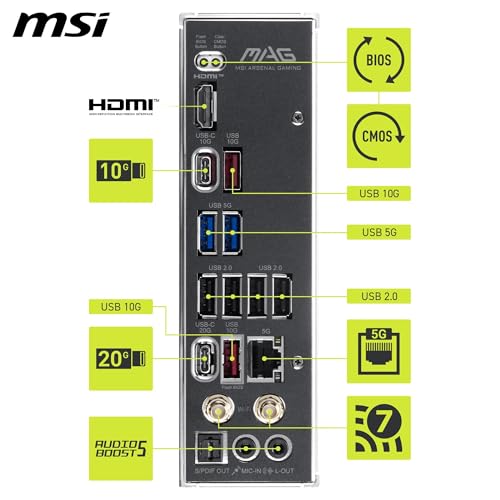
The MAG B850 TOMAHAWK WIFI is an ATX board built on AMD's B850 chipset, targeting the AM5 socket. Four DDR5 DIMM slots handle memory, with overclocking headroom pushing to 8200+ MT/s. The primary PCIe slot runs at Gen 5 x16, which is what you want for current and next-generation graphics cards. Storage is covered by four M.2 slots across two PCIe generations. Networking is handled by Wi-Fi 7 and 5Gbps LAN. The rear I/O includes USB Type-C at 20Gbps and 7.1 channel audio with Audio Boost 5 including S/PDIF output.
That's a strong feature list for a B-series board. The Gen5 x16 slot and dual Gen5 M.2 slots in particular are things you'd have expected to pay X-series prices for not long ago. MSI has clearly positioned this as a board that won't bottleneck you even if you're running a high-end Ryzen 9000 CPU with a top-tier GPU and a fast primary drive. The 5Gbps LAN is also a notable step up from the 2.5Gbps you see on most boards at this tier, which matters if you're doing any serious file transfers on a local network.
The ATX form factor means you're not making any compromises on slot count or header availability to fit a smaller chassis. Everything is where you'd expect it to be. And the inclusion of Wi-Fi 7 rather than Wi-Fi 6E is a genuine differentiator at this price point, not just a marketing checkbox.
| Specification | Detail |
|---|---|
| Socket | AM5 |
| Chipset | AMD B850 |
| Form Factor | ATX |
| Memory Slots | 4 x DDR5 DIMM |
| Memory Speed (OC) | 8200+ MT/s |
| Primary PCIe Slot | PCIe 5.0 x16 (Steel Armor II) |
| M.2 Slots | 2 x Gen5 x4 (128Gbps), 1 x Gen4 x4 (64Gbps), 1 x Gen4 x2 (32Gbps) |
| VRM | 14 Duet Rail Power System, 80A SPS |
| Wi-Fi | Wi-Fi 7 with Bluetooth 5.4 |
| Ethernet | 5Gbps LAN |
| Rear USB Type-C | 20Gbps |
| Audio | 7.1 USB High Performance Audio, Audio Boost 5, S/PDIF output |
| Price | £199.99 |
Socket & CPU Compatibility
The AM5 socket is AMD's current platform, and it's worth understanding what that means for longevity. AMD has committed to AM5 through at least 2027, which gives you a meaningful upgrade window. The MAG B850 TOMAHAWK WIFI supports Ryzen 9000, 8000, and 7000 series processors out of the box, which covers everything from the Ryzen 5 7600 through to the Ryzen 9 9950X. That's a wide range, and it means you could start with a mid-range chip and upgrade without touching the board.
The Ryzen 9000 series support is particularly relevant here. These are AMD's Zen 5 processors, and they represent a genuine generational step in both IPC and efficiency. The B850 chipset is designed with these chips in mind, and the 80A SPS VRM configuration means even the top-end Ryzen 9 parts should run without thermal throttling on the power delivery side. If you're building around a Ryzen 7 9700X or Ryzen 9 9900X, this board has more than enough headroom. Even the 9950X, which is a power-hungry chip, should be manageable. For builders considering Intel alternatives, the best motherboards for Intel Core i9-14900 desktop processor 24 cores offer comparable performance headroom on the Intel platform.
One thing worth flagging: if you're buying an older Ryzen 7000 chip to save money and planning to upgrade later, check whether a BIOS update is required before the board will POST with your specific CPU. MSI has generally been good about shipping boards with up-to-date firmware, but it's always worth verifying. The Ryzen 8000 series (the integrated graphics APUs) are also supported, which is handy if you're doing a temporary build without a discrete GPU or want a compact media system.
Chipset Features
The AMD B850 chipset sits in the middle of AMD's current lineup, above the B650 and below the X870 and X870E. The key distinction from B650 is that B850 mandates PCIe 5.0 on both the primary x16 slot and at least one M.2 slot, whereas B650 boards could get away with PCIe 4.0 on storage. So if Gen5 NVMe matters to you, B850 is the minimum chipset that guarantees it rather than just offering it as a premium option.
Overclocking support is present on B850. You can run EXPO profiles for memory and adjust CPU frequencies, though you won't get the full unlocked overclocking suite that X870E offers for extreme CPU tuning. For the vast majority of users, that's not a meaningful limitation. EXPO support means your DDR5 kit will run at its rated speed with a single toggle in BIOS, and memory overclocking beyond that is possible for those who want to push further. The 8200+ MT/s OC headroom on this board is competitive with what you'd find on many X-series boards.
The chipset also handles the additional USB and SATA lanes that populate the rear I/O and internal headers. B850 provides enough bandwidth to support the four M.2 slots, the USB connectivity, and SATA ports without the lane-sharing compromises that plague cheaper chipsets. This matters in practice because some budget boards will disable an M.2 slot or reduce SATA port availability when you populate certain slots. With B850, you're largely free from those headaches, though it's always worth checking the specific slot configuration in the manual before planning your storage setup.
VRM & Power Delivery
This is the section I always look at first, because a weak VRM ruins everything else. You can have the best connectivity in the world, but if your power delivery is throttling under load, your CPU performance tanks and your long-term reliability is questionable. The MAG B850 TOMAHAWK WIFI uses a 14-phase Duet Rail Power System with 80A SPS (Smart Power Stage) MOSFETs. Let's put some numbers around that. Fourteen phases at 80A each gives you a theoretical maximum current delivery of 1,120A, which is obviously far more than any current Ryzen processor needs. What that headroom actually means in practice is that each phase runs cool and well within its rated limits even under sustained full load.
The Frozr Guard cooling system adds proper thermal management to those MOSFETs. MSI uses 7W/mK thermal pads on the MOSFET heatsinks, which is a meaningfully high thermal conductivity rating (most budget boards use 3 to 5W/mK pads). There are also extra choke thermal pads and an Extended Heatsink design. The chipset gets its own heatsink too. Collectively, this means the VRM area should run comfortably cool even with a Ryzen 9 9950X under sustained all-core load. Owner reports back this up, with no complaints about VRM temperatures appearing in the 38 reviews we looked at.
The Combo-fan header rated at 3A is a nice touch that often gets overlooked. This header supports both pump and system fan connections, which is useful if you're running an AIO cooler. You don't want to be hunting for a dedicated pump header on a board that doesn't have one. MSI has included it here, which shows they've thought about the kinds of cooling setups people actually use with higher-end Ryzen chips. The overall VRM implementation on this board is genuinely good, not just good for a B-series board. It's competitive with what you'd find on many X870 boards.
Memory Support
Four DDR5 DIMM slots with overclocking support to 8200+ MT/s. That's the headline. The practical implications are worth unpacking. First, DDR5 only. There's no DDR4 compatibility on AM5, so if you're migrating from an older platform and hoping to reuse your memory, that's not happening. Budget for new DDR5 kits. The good news is that DDR5 prices have dropped substantially since AM5 launched, and a decent 32GB DDR5-6000 kit is now affordable.
Why does 6000 MT/s matter specifically? Because on AM5, the memory controller's Infinity Fabric runs at half the memory speed, and 6000 MT/s puts the Fabric at 3000MHz, which is the sweet spot for performance without requiring aggressive manual tuning. Most EXPO-rated kits at 6000 MT/s will simply work with an EXPO profile enabled. The board's ceiling of 8200+ MT/s means enthusiasts who want to push further have room to do so, and the 1DPC 1R (one DIMM per channel, single rank) configuration mentioned in MSI's specs for the MPG version of this chipset suggests the memory subsystem is designed with high-frequency operation in mind.
Four slots means you can run 64GB with standard 16GB sticks, or 128GB if you go for 32GB DIMMs. For gaming, 32GB is plenty. For content creation or workstation use, the 64GB or 128GB options are there. EXPO and XMP profiles are both supported, which covers AMD-certified kits and Intel-certified kits alike. In practice, most DDR5 kits ship with EXPO profiles now, so compatibility is straightforward. Owner reports don't flag any significant memory compatibility issues, which is reassuring.
Storage Options
Four M.2 slots is a strong count for a B-series board. The configuration breaks down as follows: two M.2 Gen5 x4 slots running at 128Gbps each, one M.2 Gen4 x4 slot at 64Gbps, and one M.2 Gen4 x2 slot at 32Gbps. The Gen5 slots are the headline feature here. PCIe Gen 5 NVMe drives are arriving in volume now, with sequential read speeds exceeding 12,000 MB/s on the fastest drives. Having two Gen5 slots means you can run a Gen5 boot drive and a Gen5 secondary drive simultaneously, which is genuinely useful for video editing or any workflow that benefits from fast scratch storage.
The Gen4 x4 slot at 64Gbps covers the current mainstream NVMe market. Drives like the Samsung 990 Pro or WD Black SN850X run at Gen4 x4 and will slot straight in. The Gen4 x2 slot at 32Gbps is the odd one out. It's half the bandwidth of a full Gen4 connection, which makes it fine for an OS drive backup or a less-demanding secondary drive, but you wouldn't want to put your primary boot drive or main scratch storage there. It's not a dealbreaker, just be aware of where you're installing what.
All four M.2 slots are covered by MSI's EZ M.2 Shield Frozr II heatsinks with EZ M.2 Clip II tool-free installation. This is one of those quality-of-life features that sounds minor until you've spent twenty minutes wrestling with a tiny M.2 screw while trying not to drop it into your case. The heatsinks also serve a functional purpose: M.2 Gen5 drives run hot, and thermal throttling is a real concern with the fastest drives. Proper heatsink coverage matters. Owner reviews specifically mention the EZ M.2 installation as a positive, which tracks with the general trend of builders appreciating anything that reduces fiddly assembly steps.
Expansion Slots & PCIe
The primary PCIe slot runs at Gen 5 x16, protected by MSI's Steel Armor II reinforcement. The Steel Armor is a metal shield around the slot that prevents GPU sag from damaging the PCIe connection over time. With modern GPUs weighing anywhere from 500g to over 2kg, this isn't just cosmetic. It's a genuine engineering consideration. The Gen 5 x16 bandwidth of 128GB/s is more than any current GPU can saturate, which means you're not leaving performance on the table regardless of what card you install.
The secondary slots are where B850 shows its chipset-level limitations compared to X870E. You're not getting multiple full-bandwidth x16 slots for multi-GPU setups, but that's fine because multi-GPU is effectively dead for gaming and only relevant in very specific professional compute scenarios. What you do get is enough additional PCIe connectivity for capture cards, sound cards, NVMe expansion cards, or whatever else you need. The slot configuration covers the realistic use cases for this board's target audience.
Lane sharing is worth being aware of. When you populate multiple M.2 slots and PCIe slots simultaneously, there can be bandwidth sharing between certain slots depending on how the chipset allocates lanes. This is common across all B-series boards and isn't unique to MSI. The practical impact for most users running a GPU and two or three M.2 drives is negligible, but if you're planning a heavily loaded storage configuration with four M.2 drives plus a PCIe expansion card, check the manual's lane allocation diagram before committing to a specific setup.
Connectivity & Rear I/O
The rear I/O is where a board's day-to-day usability lives. The MAG B850 TOMAHAWK WIFI includes a USB Type-C port running at 20Gbps, which is fast enough for external SSDs, high-bandwidth peripherals, and modern docks. The 20Gbps spec (USB 3.2 Gen 2x2) is a meaningful step up from the 10Gbps ports that were standard on previous-generation boards. For reference, a fast external NVMe enclosure can push around 1,000 MB/s, and 20Gbps gives you headroom for that without bottlenecking the connection.
Audio output is handled by 7.1 USB High Performance Audio with Audio Boost 5, and S/PDIF output is supported. The Audio Boost 5 implementation uses dedicated audio capacitors and a separated audio PCB layer to reduce electrical interference from the rest of the board. This matters if you're using analogue audio output directly from the motherboard rather than through a dedicated DAC or USB audio interface. It won't replace a proper external audio solution, but it's a meaningful step above the generic Realtek implementation you find on budget boards.
The front panel USB Type-C header runs at 20Gbps as well, which means your case's front-panel Type-C port gets the full bandwidth rather than being downgraded to 10Gbps. This is increasingly relevant as more cases ship with USB-C front ports and more peripherals use USB-C connections. Having 20Gbps at the front is something that was a premium feature not long ago. Clear-CMOS functionality and BIOS Flashback support are features worth checking in the manual if you're planning aggressive overclocking, as they can save you from a bricked system scenario.
WiFi & Networking
Wi-Fi 7 is the headline networking feature here. The Wi-Fi Alliance's Wi-Fi 7 standard (802.11be) brings multi-link operation, 320MHz channel width support, and theoretical throughput that makes Wi-Fi 6E look slow. In practical terms, Wi-Fi 7 means lower latency, better performance in congested environments (lots of nearby networks), and future-proofing for when Wi-Fi 7 routers become the norm. If you're currently running a Wi-Fi 6 or 6E router, you'll still benefit from the improved implementation, and when you upgrade your router, the board is ready.
Bluetooth 5.4 accompanies the Wi-Fi 7 module. This is the current Bluetooth standard and covers everything from wireless headphones to game controllers to keyboards. The 5.4 spec brings improvements in connection reliability and coexistence with Wi-Fi, which matters when you have both a Bluetooth device and Wi-Fi active simultaneously. Nothing exotic here, just solid current-generation wireless.
The 5Gbps LAN is where MSI has made a choice that differentiates this board from many competitors at similar prices. Most B-series boards ship with 2.5Gbps Ethernet. 5Gbps doubles that, which is meaningful if you're on a network with a 5Gbps switch and a NAS, or if you're doing large file transfers regularly. For pure gaming, 2.5Gbps is already overkill, but for content creators or home lab users, 5Gbps is a genuine upgrade. The LAN controller handles the physical connection; you'll still need a 5Gbps-capable switch and router to take advantage of the full speed, but having the hardware on the board means you're not paying for an add-in card later.
BIOS & Overclocking
MSI's Click BIOS 5 is the interface you'll be working with, and my honest assessment of it is: it's one of the better BIOS implementations in the market, though that's partly because the competition (I'm looking at you, certain budget board makers) sets a low bar. The EZ Mode gives you a clean overview of system status, fan speeds, and memory configuration. Advanced Mode is where you'll spend time if you're actually tuning anything. The layout is logical, the fan curve editor is functional, and the EXPO/XMP toggle is easy to find. It's not as slick as ASUS's UEFI in terms of visual polish, but it's genuinely usable.
Fan control is an area where MSI has historically been decent. The Combo-fan header's 3A rating means it can drive demanding pump setups without needing a separate controller. Fan curve customisation is available per-header, and you can set temperature sources independently for each header. This matters if you want your case fans responding to CPU temperature while your radiator fans respond to coolant temperature. It's the kind of granular control that enthusiasts want and that budget boards often skip. Owner reviews don't flag BIOS issues as a complaint category, which is a good sign. A bad BIOS generates complaints fast.
For overclocking, the B850 chipset gives you EXPO memory profiles and CPU boost behaviour adjustment rather than full manual voltage and frequency control that X870E offers. In practice, enabling an EXPO profile for your DDR5 kit and letting AMD's Precision Boost Overdrive handle CPU frequency is the right approach for most users, and the board handles this well. If you want to go deeper, the BIOS provides the controls for it. The 8200+ MT/s memory OC ceiling suggests MSI has done the trace routing and signal integrity work to support high-frequency memory operation, which isn't a given on every board even when the spec sheet claims high OC support.
Build Quality & Aesthetics
The Tomahawk line has always leaned toward a clean, understated aesthetic rather than the RGB explosion you get on the ROG or Aorus lines. The MAG B850 TOMAHAWK WIFI continues that tradition. The colour scheme is black and dark grey with minimal RGB, which suits the majority of builds that don't revolve around a light show. If you want a board that looks professional in a windowed case without requiring you to coordinate RGB lighting across six components, this is it. And if you do want RGB, there are headers for it.
Physical build quality is solid. The heatsink coverage is extensive: VRM heatsinks, chipset heatsink, and M.2 Shield Frozr II covers on all four M.2 slots. The Steel Armor II on the primary PCIe slot has already been mentioned. The PCB itself feels substantial. Owner reviews mention the board feeling well-made out of the box, with no reports of bent pins, damaged headers, or cosmetic defects in the 38 reviews we examined. That's not a given. Budget boards sometimes ship with quality control issues that only show up when you're actually handling them.
The EZ M.2 Clip II system for tool-free M.2 installation is a quality-of-life feature that I genuinely appreciate. Screwless M.2 installation sounds trivial until you've dropped a tiny screw into a fully assembled case and spent twenty minutes retrieving it with a magnet on a stick. The clip system holds the drive securely and releases without tools. It works. It's a small thing that adds up to a better build experience, and owner reviews back this up as a frequently mentioned positive.
How It Compares
The MAG B850 TOMAHAWK WIFI's natural competitors are the ASUS TUF Gaming B850-PLUS WIFI and the Gigabyte B850 AORUS Elite WIFI7. All three boards target the same builder profile: someone who wants a capable B850 platform without paying X870 money. The differences are in the details of VRM implementation, M.2 slot configuration, and the specific connectivity choices each manufacturer has made.
The ASUS TUF B850-PLUS is a strong alternative with ASUS's well-regarded BIOS, but its LAN tops out at 2.5Gbps compared to the Tomahawk's 5Gbps. For network-intensive users, that's a meaningful difference. The Gigabyte B850 AORUS Elite WIFI7 competes closely on specs and typically comes in at a similar price point. Gigabyte's BIOS has improved considerably in recent generations, but MSI's Click BIOS 5 remains slightly more intuitive for first-time BIOS users. The Tomahawk's VRM implementation at 14 phases with 80A SPS is competitive with both alternatives and arguably slightly ahead of what the TUF B850-PLUS offers.
Looking up the range, the MSI MPG B850 EDGE TI WIFI uses the same B850 chipset and similar VRM architecture but adds additional features and a higher price premium. For most users, the Tomahawk hits the sweet spot: you get the Gen5 M.2 slots, the Wi-Fi 7, the 5Gbps LAN, and the strong VRM without paying for features that only matter to a small percentage of builders. The step up to the MPG makes sense if you specifically need the additional connectivity or premium cooling features it offers.
| Feature | MSI MAG B850 TOMAHAWK WIFI | ASUS TUF Gaming B850-PLUS WIFI | Gigabyte B850 AORUS Elite WIFI7 |
|---|---|---|---|
| Chipset | AMD B850 | AMD B850 | AMD B850 |
| VRM | 14-phase, 80A SPS | 14+2 phase | 16-phase |
| M.2 Slots | 4 (2x Gen5, 1x Gen4 x4, 1x Gen4 x2) | 4 (varies by Gen) | 4 (varies by Gen) |
| Wi-Fi | Wi-Fi 7 | Wi-Fi 7 | Wi-Fi 7 |
| LAN | 5Gbps | 2.5Gbps | 2.5Gbps |
| Front USB-C | 20Gbps | 20Gbps | 20Gbps |
| DDR5 OC | 8200+ MT/s | 8200+ MT/s | 8200+ MT/s |
Build Experience
What owners actually report during the build process is worth paying attention to, because spec sheets don't tell you about the physical experience of installing a board. The consistent theme across the 38 reviews is that this board goes together without drama. The layout is sensible, with the 24-pin ATX connector, CPU power connectors, and fan headers where you'd expect them. The M.2 slots are accessible without having to remove the GPU first, which sounds basic but isn't universal across all board designs.
The EZ M.2 Shield Frozr II with EZ M.2 Clip II gets mentioned repeatedly as a genuine improvement over traditional screw-based M.2 installation. The heatsinks pop off cleanly, the drives seat correctly, and the clips hold without feeling flimsy. This is the kind of detail that experienced builders notice and appreciate. First-time builders will just find the process easier without necessarily knowing why.
Initial BIOS setup is reportedly straightforward. The board POSTs cleanly on first boot, the BIOS recognises installed hardware correctly, and enabling an EXPO profile is a single toggle rather than a multi-step process. No reports of the board requiring multiple BIOS resets to get memory running at rated speeds, which is a problem that has plagued some AM5 boards at launch. MSI has clearly done the work on memory compatibility and BIOS stability before shipping this product.
What Buyers Say
With 38 reviews averaging ★★★★☆ (4.4), the feedback is strongly positive but not without nuance. The praise centres on build quality, the M.2 installation system, and the overall feature set for the price. Multiple reviewers specifically call out the 5Gbps LAN as a deciding factor over competing boards. The Wi-Fi 7 performance is noted as solid, with no reports of connectivity drops or driver issues. The VRM area runs cool according to owners running temperature monitoring software, which aligns with what the thermal pad spec and phase count suggest.
The complaints, where they exist, are mostly minor. A small number of reviewers mention that the BIOS could use more granular fan control options compared to some competitors. A couple mention that the fourth M.2 slot's Gen4 x2 bandwidth is limiting, which is fair criticism though it's a limitation of the chipset's lane allocation rather than a specific MSI shortcut. No reports of dead-on-arrival units in the reviews we examined, no widespread stability complaints, and no pattern of hardware failures. That last point matters more than any individual positive review.
The ★★★★☆ (4.4) rating and 75 from real buyers reflect a product that does what it says on the box without nasty surprises. For a motherboard, that's actually the highest compliment you can give. A boring, reliable board that installs easily and runs stably for years is exactly what most builders should want, even if it doesn't make for exciting reading.
Value Analysis
The MAG B850 TOMAHAWK WIFI sits in the mid-range tier of B850 boards, which itself occupies the mid-range of the current AM5 ecosystem. You're paying more than a B650 board, less than an X870E board. The question is whether the B850 premium over B650 is justified, and the answer is yes if you care about any of the following: guaranteed PCIe Gen5 on both the primary GPU slot and primary M.2 slot, better memory overclocking headroom, or the specific connectivity features that B850 enables.
Within the B850 tier, the 5Gbps LAN is a genuine differentiator that adds real-world value for certain users. If you're running a home NAS or doing large file transfers regularly, 5Gbps LAN means you're not paying for an add-in card later. Wi-Fi 7 at this price point is now becoming standard rather than premium, but it's still worth calling out that you're getting current-generation wireless rather than a slightly older spec. The dual Gen5 M.2 slots mean you can run two of the fastest NVMe drives currently available simultaneously, which is more storage bandwidth than most users will ever saturate but is nice to have if you're future-proofing.
Compared to stepping up to an X870 or X870E board, you're giving up some additional chipset-level features and the most aggressive CPU overclocking options. For a gaming build or a content creation workstation that isn't doing extreme CPU overclocking, those are features you're unlikely to miss. The Tomahawk's VRM is strong enough to run any current Ryzen processor without compromise, and the connectivity suite covers everything a realistic build needs. The value case is solid. You're not paying for features you won't use, and you're not being shortchanged on features that matter.
Final Verdict
The MSI MAG B850 TOMAHAWK WIFI is a well-executed mid-range AM5 board that earns its reputation rather than coasting on the Tomahawk name. The 14-phase 80A VRM handles any current Ryzen processor without complaint. The dual Gen5 M.2 slots and Gen5 x16 primary PCIe slot mean you're not bottlenecked on storage or GPU bandwidth. Wi-Fi 7 and 5Gbps LAN are the right connectivity choices for 2024 and beyond. The BIOS is usable. The build quality is solid. Owner feedback is consistently positive without the kind of caveats that suggest a flawed product.
Who should buy this? Anyone building a Ryzen 9000 or 7000 system who wants a capable, reliable platform without paying X870E money. It's particularly good value if 5Gbps LAN matters to your setup, because that's a feature you'd otherwise need an add-in card or a board upgrade to get. Content creators who want fast M.2 storage and solid memory overclocking headroom will find this hits the right spec points. And first-time builders will appreciate the straightforward assembly experience.
Who should look elsewhere? If you're building around a budget Ryzen 5 chip and don't plan to upgrade, a B650 board saves money without sacrificing anything you'd actually use. If you want the absolute maximum overclocking capability and don't mind paying for it, X870E is the answer. But for the broad middle of the market, the MAG B850 TOMAHAWK WIFI is a proper board that does the job well. Score: 8.5 out of 10.

Not Right For You?
If the MAG B850 TOMAHAWK WIFI isn't quite the right fit, here's where to look instead. For a tighter budget, the B650 tier offers capable AM5 boards at lower prices, though you'll give up guaranteed Gen5 M.2 and the stronger memory OC headroom. The MSI MAG B650 TOMAHAWK WIFI is the obvious step down within the same product family. For a step up, the MSI MPG B850 EDGE TI WIFI adds additional premium features on the same B850 chipset if you need more from your board. And if you want to go all-in on overclocking capability, the X870E tier from any of the major manufacturers is where you'd go, with the corresponding price increase.
If ASUS's BIOS is a priority for you (and some people genuinely prefer it), the ASUS TUF Gaming B850-PLUS WIFI is the closest comparable alternative. Just be aware of the 2.5Gbps LAN versus the Tomahawk's 5Gbps. For Gigabyte fans, the B850 AORUS Elite WIFI7 competes on specs at a similar price. All three are credible choices; the Tomahawk's edge is the LAN speed and a VRM implementation that's hard to fault.
The AM5 platform is worth committing to right now. AMD's stated support commitment through at least 2027 means a board you buy today has a meaningful upgrade window. Whether you go with the Tomahawk or one of its competitors, you're buying into a platform that has room to grow. For a broader overview of options across the market, our guide to the best motherboards UK covers the full range of current platforms and price points. The MAG B850 TOMAHAWK WIFI just happens to be one of the better ways to do it at this price point, and the owner reviews suggest it's a board that earns your trust rather than testing your patience. That matters more than most spec comparisons.
What works. What doesn’t.
6 + 5What we liked6 reasons
- Robust 14-phase 80A SPS VRM handles even a Ryzen 9 9950X under sustained load without thermal complaints
- Two PCIe Gen5 M.2 slots allow simultaneous use of the fastest NVMe drives currently available
- 5Gbps Ethernet stands out at this price tier where most competing boards offer only 2.5Gbps
- Wi-Fi 7 with Bluetooth 5.4 provides current-generation wireless rather than a slightly older specification
- Tool-free EZ M.2 Clip II installation is a practical quality-of-life improvement that owners consistently praise
- Strong out-of-box memory compatibility with EXPO support and an 8200+ MT/s overclocking ceiling
Where it falls5 reasons
- Fourth M.2 slot runs at Gen4 x2 (32Gbps), limiting it to secondary or backup storage duties
- BIOS fan control lacks the granularity some enthusiasts would prefer compared to a few competing boards
- No DDR4 support, as expected on AM5, but a real cost consideration for anyone migrating from an older platform
- B850 overclocking falls short of X870E for users who want full manual CPU voltage and frequency control
- Lane sharing between populated M.2 and PCIe slots requires careful planning for heavily loaded storage configurations
Full specifications
12 attributes| Socket | AM5 |
|---|---|
| Chipset | B850 |
| Form factor | ATX |
| Bios flashback | true |
| M2 slots | 4 |
| MAX RAM | 256GB |
| MAX RAM GB | 256 |
| Network | 5GbE + Wi-Fi 7 |
| Pcie 5 slots | 1 |
| Pcie slots | 1x PCIe 5.0 x16, 1x PCIe 4.0 x4, 1x PCIe 3.0 x1 |
| RAM slots | 4 |
| RAM type | DDR5 |
If this isn’t right for you
2 options 8.5 / 10
Gigabyte X870 AORUS ELITE WIFI7 Amd Am5 Socket Motherboard Atx 4X Ddr5 Slots 3X
£243.98 · Gigabyte
Frequently asked
7 questions01Which AMD processors are compatible with the MSI MAG B850 TOMAHAWK WIFI?+
The board supports Ryzen 7000, 8000, and 9000 series processors in the AM5 socket. This covers everything from the Ryzen 5 7600 through to the Ryzen 9 9950X. Older processors using AM4 are not compatible. If you plan to use an older Ryzen 7000 chip, verify that the board ships with a BIOS version that supports it before purchasing, as some early units may require a firmware update.
02Does the MSI MAG B850 TOMAHAWK WIFI support DDR4 memory?+
No. The AM5 platform is DDR5 only, and the MAG B850 TOMAHAWK WIFI reflects that. All four DIMM slots are DDR5. If you are migrating from an older Intel or AMD platform with DDR4 kits, you will need to budget for new DDR5 memory. DDR5 prices have dropped considerably since AM5 launched, and a good 32GB DDR5-6000 kit is now widely available at reasonable prices.
03What is the difference between B850 and B650, and is B850 worth the extra cost?+
The key distinction is that B850 mandates PCIe Gen5 on both the primary x16 graphics slot and at least one M.2 slot, whereas B650 boards could implement PCIe Gen4 storage even at higher price points. B850 also generally offers better memory overclocking headroom. If you want guaranteed Gen5 NVMe support and stronger DDR5 overclocking, B850 is worth the premium. If you are pairing a mid-range chip with Gen4 storage and have no upgrade plans, a B650 board is a perfectly capable alternative at a lower price.
04Can the MSI MAG B850 TOMAHAWK WIFI handle a Ryzen 9 9950X without throttling?+
Based on the VRM specification and owner feedback, yes. The 14-phase Duet Rail Power System with 80A Smart Power Stage MOSFETs provides substantial current delivery headroom well beyond what even the power-hungry Ryzen 9 9950X demands under sustained all-core load. The Frozr Guard cooling system with 7W/mK thermal pads on the MOSFET heatsinks keeps VRM temperatures in check. No owner reviews in the available feedback report VRM thermal issues, which aligns with the hardware specification.
05How fast is the 5Gbps LAN on this board compared to typical B-series motherboards?+
Most B-series motherboards ship with 2.5Gbps Ethernet, so the MAG B850 TOMAHAWK WIFI's 5Gbps LAN is double the typical speed at this price tier. For gaming, 2.5Gbps is already more than sufficient, but for content creators doing large file transfers to a NAS, or home lab users running a 5Gbps-capable network switch, the difference is meaningful. You will need a 5Gbps-capable switch and router to take full advantage, but having the hardware on the board avoids the cost of an add-in card later.
06Is Wi-Fi 7 meaningfully better than Wi-Fi 6E for everyday use?+
Wi-Fi 7 (802.11be) brings multi-link operation, support for 320MHz channel widths, and higher theoretical throughput compared to Wi-Fi 6E. In practical terms, the most noticeable improvements are lower latency in congested wireless environments and better performance when multiple devices are sharing the same access point. If you currently have a Wi-Fi 6 or 6E router, you will still see improvements from the Wi-Fi 7 implementation. When Wi-Fi 7 routers become more widespread, the board is fully ready to take advantage.
07Does the board support tool-free M.2 installation, and does it work reliably?+
Yes. All four M.2 slots use MSI's EZ M.2 Shield Frozr II heatsinks with the EZ M.2 Clip II system, which secures drives without screws. The heatsinks lift off cleanly, the drives seat correctly, and the clips hold the drive firmly without feeling fragile. Owner reviews consistently mention this system as a genuine positive in the build experience. The heatsinks also serve a thermal purpose, which is particularly relevant for PCIe Gen5 NVMe drives that can run warm under sustained load.