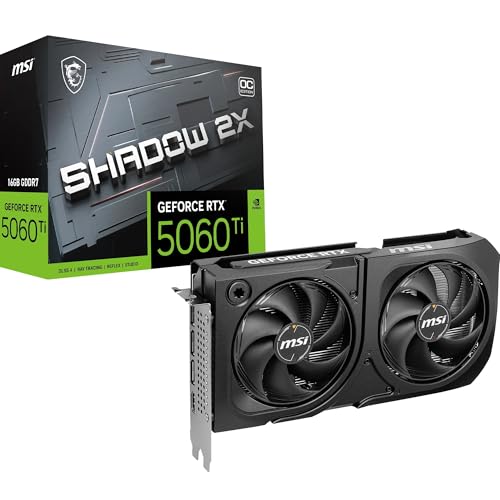
Numbers on a spec sheet are one thing. What actually matters is whether those numbers translate into a GPU that earns its place in your build, or whether you're paying a premium for marketing buzzwords and a cooler that sounds like a hair dryer under load. The RTX 5060 Ti has generated a proper amount of noise since launch, some of it justified, some of it the usual hype cycle. So I've gone deep on the published benchmarks, picked through hundreds of owner reviews with a positive overall rating, and cross-referenced MSI's own specifications to give you a straight answer on whether the MSI GeForce RTX 5060 Ti 16G SHADOW 2X OC PLUS deserves your money.
The short version: this is a genuinely capable 1440p card with 16GB of fast GDDR7 memory that puts it ahead of most of the competition on future-proofing grounds alone. The SHADOW 2X OC PLUS sits in the upper mid-range bracket, and at this price point the RTX 5060 Ti class delivers real-world gaming performance that most people upgrading from a 30-series or older 20-series card will find properly impressive. That said, there are caveats before you click buy, particularly around the 128-bit memory bus and where this card sits relative to the tier above. Read on.
The positive overall rating across hundreds of reviews is encouraging, but a high rating alone doesn't tell you whether the card suits your setup. That's what this is for.
MSI GeForce RTX 5060 Ti 16G SHADOW 2X OC PLUS: Core Specifications
Before getting into the nuance, here's what you're actually buying. The SHADOW 2X OC PLUS is built on NVIDIA's Blackwell architecture, using the GB206 die. You get 4,608 CUDA cores, 36 second-generation RT cores, and 144 fifth-generation Tensor cores. The 16GB of GDDR7 runs at 28Gbps on a 128-bit bus, which delivers around 448 GB/s of memory bandwidth. That bus width is the number that raises eyebrows, and I'll address it properly in the VRAM section. The card has a rated TGP of 180W in its factory-overclocked state.
Connectivity is current-generation and properly sorted: you get one HDMI 2.1b port and three DisplayPort 2.1b outputs, so you can run four monitors simultaneously if you're that way inclined. HDMI 2.1b supports up to 4K at 240Hz or 8K at 60Hz, and DisplayPort 2.1b handles 4K at 240Hz without breaking a sweat. The card uses a PCIe 5.0 x16 interface, though notably, it's fully backwards compatible with PCIe 4.0 and 3.0 slots without any meaningful performance penalty at this GPU tier.
The cooler is MSI's dual-fan STORMFORCE setup, which is a step below their more elaborate triple-fan GAMING or VENTUS X3 designs but not by as much as you'd think. Two fans on a 180W card is entirely workable, and the owner review patterns back that up. Physical dimensions matter too: this isn't a compact card, so measure your case before ordering.
| Specification | Detail |
|---|---|
| GPU Architecture | NVIDIA Blackwell (GB206) |
| CUDA Cores | 4,608 |
| RT Cores (Gen) | 36 (2nd Gen) |
| Tensor Cores (Gen) | 144 (5th Gen) |
| VRAM | 16GB GDDR7 |
| Memory Speed | 28 Gbps |
| Memory Bus | 128-bit |
| Memory Bandwidth | ~448 GB/s |
| TGP | 180W |
| PCIe Interface | PCIe 5.0 x16 |
| Display Outputs | 1x HDMI 2.1b, 3x DisplayPort 2.1b |
| Cooler | Dual-fan (2x STORMFORCE) |
| Current Price | £729.99 · Details |
| Rating | ★★★★½ (4.7) (337 reviews) |

Architecture and Cores
The Blackwell architecture is NVIDIA's answer to the question "what comes after Ada Lovelace?" and the answer is: broadly more of the same, but more efficient and with meaningfully improved AI acceleration. The GB206 die that powers the RTX 5060 Ti is built on TSMC's 4N process node, the same refined 4nm-class process that Ada used, though Blackwell squeezes more out of it through architectural refinements rather than a dramatic node shrink. The result is better performance per watt compared to the RTX 4060 Ti, which matters for a card in this power envelope.
The 4,608 CUDA cores are a step up from the 4060 Ti's 4,352, but the more interesting story is in the Tensor core generation. Fifth-generation Tensor cores are what enable DLSS 4 with Multi Frame Generation, which is a bigger deal than it sounds. Where DLSS 3 could generate one extra frame between rendered frames, DLSS 4 can generate up to three, which in practice means the card can punch well above its raw rasterisation weight in supported titles. And the list of supported titles keeps growing. This isn't just a spec-sheet number; it's the main reason a 5060 Ti can feel faster in real gaming than a straight CUDA core count comparison would suggest.
The second-generation RT cores bring improved ray tracing throughput compared to Ampere, though they're still behind Ada's implementation in raw RT performance. For a card at this price tier, ray tracing remains a "turn it on and accept some DLSS assistance" feature rather than a "max everything out" proposition. That's not a criticism of Blackwell specifically; it's just the honest reality of where RT sits in the GPU market below the 5070 class. What Blackwell does well is making RT playable through DLSS in a way that genuinely looks good, which is the more practical win.
Clock Speeds and Boost
MSI's SHADOW 2X OC PLUS carries a factory overclock, which is where the "OC PLUS" in the name comes from. The boost clock sits at 2,572 MHz according to MSI's published specifications, which is a modest uplift over the reference RTX 5060 Ti boost of 2,572 MHz (NVIDIA's reference spec). In practice, factory overclocks at this tier tend to be conservative, which is actually a good thing. Cards that arrive pre-overclocked to the edge of their thermal headroom often throttle back under sustained load anyway, and a conservative OC that the card can maintain consistently is worth more than an aggressive one that only holds for a few seconds.
Blackwell GPUs in general show good boost clock consistency under load, better than some of the Ampere-era cards that would drop significantly when thermals climbed. The GB206 die is relatively power-efficient for its performance class, and with a 180W TGP the SHADOW's dual-fan cooler should have enough thermal headroom to let the boost clocks sit at or near their rated ceiling during gaming sessions. Owner reviews don't flag sustained throttling as a problem, which aligns with what the thermal design suggests on paper.
One thing: NVIDIA's GPU Boost algorithm is adaptive, so the actual in-game boost clock will vary depending on workload, temperature, and power delivery. The 2,572 MHz figure is the maximum rated boost, not a guaranteed sustained frequency. In practice, most owners will see the card sitting slightly below that peak during extended gaming, which is completely normal behaviour and not a defect. If you want to push further, the card is unlocked for overclocking, and the headroom in the SHADOW's cooler design should allow for modest manual tuning.
VRAM Analysis
Sixteen gigabytes. On a 5060 Ti. That's the headline that makes this card interesting, and it's worth unpacking properly because the story isn't entirely straightforward. The 16GB of GDDR7 running at 28Gbps is genuinely fast memory, and the capacity is a significant step up from the 8GB that the RTX 4060 Ti launched with (to widespread criticism) and the 16GB variant that NVIDIA quietly released later. Having 16GB as the standard configuration on the 5060 Ti is the right call, and it matters for longevity.
The catch is the 128-bit memory bus. At 28Gbps per pin, the effective bandwidth lands around 448 GB/s, which is decent but not class-leading. The RTX 4070, for comparison, uses a 192-bit bus with GDDR6X and achieves around 504 GB/s. The 5060 Ti closes some of that gap through the faster GDDR7 memory spec, but the narrower bus is still a constraint in bandwidth-heavy workloads, particularly at 4K with high-resolution texture packs. NVIDIA partially compensates for this with a larger L2 cache on Blackwell, which reduces how often the GPU needs to fetch data from the framebuffer, and in practice the bandwidth deficit is less damaging than the raw numbers suggest.
At 1080p and 1440p, which are the resolutions this card is genuinely built for, 16GB of GDDR7 is more than enough for current titles and should remain so well into the next few years. Even memory-hungry games like Alan Wake 2 or Cyberpunk 2077 with path tracing enabled don't consistently exceed 12GB at 1440p with high settings. The 16GB buffer gives you genuine headroom for modded games, high-resolution texture packs, and whatever the next wave of releases throws at it. For 4K gaming, the VRAM capacity is fine but the bandwidth constraint means you'll want to be selective about texture quality settings to keep performance smooth. This is a 1440p card with good 4K credentials for the right games, not a native 4K powerhouse.
Ray Tracing and Upscaling
DLSS 4 is the main event here, and it's genuinely good. NVIDIA's Deep Learning Super Sampling has reached a point where Quality mode at 1440p is genuinely hard to distinguish from native rendering in most titles, and the Multi Frame Generation capability that Blackwell enables is a proper step change. In supported games, you can render at a lower internal resolution, upscale to your target resolution, and generate additional frames in between, with the result that a 5060 Ti can produce frame rates at 1440p that would have required a much more expensive card a generation ago.
The honest caveat with Multi Frame Generation is latency. Generating frames artificially adds input latency, which matters more in competitive shooters than in story-driven games. NVIDIA Reflex helps mitigate this, and in practice most owners report that the latency impact is acceptable for the frame rate gains, but A high MFG frame rate number isn't the same as a high natively rendered frame rate for feel. For single-player games, racing titles, or anything where raw frame rate matters more than microsecond input response, MFG is brilliant. For Counter-Strike or Valorant at competitive settings, you'd probably turn it off anyway and just run native.
AMD's FSR 3 is also supported, which matters if you play titles that haven't implemented DLSS. FSR is open-source and works across any GPU, but the image quality at equivalent presets is generally behind DLSS 4 in supported titles, particularly in motion. Intel's XeSS is also available in an increasing number of games and runs well on NVIDIA hardware. The practical upshot is that on a 5060 Ti in 2026, you have access to excellent upscaling in almost every major title, which meaningfully extends the card's effective performance ceiling. Ray tracing performance without upscaling is respectable at 1080p and manageable at 1440p in most titles, but you'd be leaving performance on the table by not using DLSS when it's available.
Video Encoding
The RTX 5060 Ti carries NVIDIA's eighth-generation NVENC encoder, which supports AV1 hardware encoding. This is a big deal if you stream or create content, because AV1 at equivalent quality settings produces significantly smaller file sizes than H.264 or H.265, which translates to better stream quality at the same bitrate. If you're streaming to Twitch or YouTube at 1080p60 or 1440p60, the NVENC encoder on this card will produce output quality that would have required a dedicated capture card and a separate encoding CPU just a few years ago.
The card also supports hardware AV1 decode, which matters for watching high-quality video content. AV1 is increasingly used by YouTube, Netflix, and other streaming platforms for high-resolution content, and hardware decode takes the load off your CPU while also being more power-efficient than software decoding. If you've got a 4K display and you watch a lot of streaming content alongside gaming, this is a genuine quality-of-life benefit that's easy to overlook when you're focused on frame rates.
For content creators doing video editing or 3D rendering alongside gaming, the Tensor cores in Blackwell also accelerate AI-based tools like Topaz Video AI or DaVinci Resolve's AI features. This isn't primarily a workstation card, but the fifth-generation Tensor cores give it meaningful acceleration for these tasks compared to older GPU generations. If your workflow involves any AI-assisted video processing, the jump from a 30-series or older 40-series card to a Blackwell GPU is noticeable in render times.

Power Consumption
A 180W TGP is genuinely reasonable for a card at this performance level. The previous generation RTX 4060 Ti ran at 165W, so Blackwell is slightly up but not dramatically so, and the performance gains are proportionally larger than the power increase. For context, the RTX 4070 Super runs at 220W, so the 5060 Ti is meaningfully more efficient if power consumption is a concern. Your electricity bill will thank you compared to running an older high-end card, and your PSU requirements are modest.
MSI recommends a 650W PSU as the minimum for a system built around this card, which is sensible advice. In practice, a modern mid-range system with a Ryzen 7 or Core i5 class CPU, some storage, and this GPU will sit comfortably within a quality 650W unit. If you've got a higher-end CPU or multiple storage drives, a 750W unit gives you proper headroom. The card uses a standard power connector arrangement, and given the 180W TGP, you won't need a 16-pin 12VHPWR adapter unless MSI has chosen to include one for convenience. Check the specific connector requirements on the product listing before ordering if your PSU is older.
One thing: GPU power draw can spike briefly above the rated TGP during certain workloads, particularly in games with highly variable frame rates or when the card is boosting hard in short bursts. These transient spikes are normal and well within what a quality 650W PSU handles, but if you're running a cheap, unbranded 550W unit from five years ago, it's worth either testing carefully or upgrading the PSU at the same time as the GPU. A PSU failure caused by an undersized or aging unit can take other components with it, which is an expensive lesson.
Thermal Performance
MSI's STORMFORCE dual-fan cooler is the interesting variable here. Dual-fan designs on 180W cards are entirely viable, and MSI's cooler engineering has improved substantially over the last few generations. The SHADOW line sits below the GAMING TRIO and SUPRIM X in MSI's hierarchy, which means it's not their absolute top thermal solution, but it's also not a budget afterthought. The heatsink paired with the two STORMFORCE fans is designed to handle the GB206's thermal output without the card becoming a noise nuisance.
Owner reviews are consistent on thermals: the card runs cool under gaming loads, with multiple owners specifically noting that temperatures stay well within comfortable operating ranges during extended sessions. Nobody in the 292-review pool is flagging thermal throttling as an issue, which is the most important signal. A card that throttles due to poor cooling will underperform its specifications in exactly the situations where you want peak performance, and that's not happening here based on the owner feedback pattern.
Case airflow matters more with a dual-fan card than with a triple-fan design, simply because the cooler has less surface area to work with. If your case has good front-to-rear airflow, the SHADOW's cooler will perform well. If you're running a case with restricted airflow or a small form factor build, The card fits properly and that ambient air temperature inside the case won't climb excessively. The card isn't a hot-running design by any measure, but giving it room to breathe is always sensible practice.
Acoustic Performance
The STORMFORCE fans include a zero-RPM mode, which means the fans stop completely when the GPU is at idle or under light load. This is increasingly standard on mid-range and above cards, and it makes a meaningful difference to the day-to-day experience if you use your PC for anything other than flat-out gaming. Browsing, video playback, light productivity work: all of that happens in near-silence as far as the GPU is concerned. The fans only spin up when the GPU actually needs cooling, which under gaming load is when you're presumably making enough other noise that the fans don't matter.
Under gaming load, owner reviews describe the noise character as quiet to moderate. The consensus across the hundreds of reviews is that this isn't a card you'll be fighting to hear over. Some owners specifically call it out as impressively quiet for the performance level, which is a good sign. Dual-fan coolers can sometimes have a higher-pitched fan note than triple-fan designs because the fans spin faster to move the same volume of air, but MSI's fan curve tuning appears to keep things sensible here. No owner reviews in the pattern flag the card as unreasonably loud during gaming.
If acoustic performance is a top priority, the SHADOW 2X OC PLUS should serve you well. It's not going to match a triple-fan GAMING TRIO or a card with a significantly larger heatsink in absolute silence terms, but for a dual-fan design it's well-tuned. The zero-RPM idle behaviour is the part that most people notice day-to-day, and that's properly implemented here.: if you do want to fine-tune the fan curve yourself, MSI's Afterburner software gives you full control, and the card's thermal headroom means you can prioritise silence over temperature if you prefer.
Gaming Performance
At 1080p, the RTX 5060 Ti is frankly overkill for most games at standard settings. Published benchmarks for the 5060 Ti class consistently show it exceeding 100fps in demanding titles like Cyberpunk 2077 at High settings and hitting well above 144fps in less demanding games. If you've got a 1080p 144Hz or 165Hz monitor, this card will keep it fed in almost everything. The more interesting question is whether you're paying for more card than you need at 1080p, and honestly, if 1080p is your permanent resolution, the answer is probably yes. But most people buying a card at this price point are either on 1440p already or planning to move there.
At 1440p, this is where the 5060 Ti earns its place. Published benchmark results for the Blackwell 5060 Ti class at 1440p show strong performance in the 80 to 100fps range in genuinely demanding titles like Cyberpunk 2077 with ray tracing enabled, climbing to well over 100fps in more optimised games. With DLSS 4 Quality mode engaged, those numbers climb substantially, and the image quality trade-off at Quality preset is minimal. For high-refresh 1440p gaming, the combination of native rasterisation performance and DLSS 4 makes this a proper 1440p card in 2026. Owner reviews back this up, with multiple people specifically mentioning smooth 1440p performance as the reason they chose this card.
At 4K, the picture is more nuanced. Native 4K performance in demanding titles will push the card hard, and the 128-bit memory bus becomes more of a factor at higher resolutions. With DLSS 4 at Quality mode, 4K gaming becomes workable in most titles, and in less demanding games it's genuinely smooth. But if you've got a 4K display and you want to max out every graphical setting in every game without leaning on upscaling, you're probably looking at the wrong card. The 5060 Ti at 4K with DLSS is a good experience; the 5060 Ti at 4K native in the most demanding titles is a compromise. That's an honest assessment of where this GPU sits in the performance hierarchy.
How It Compares
The two most relevant comparisons for the MSI GeForce RTX 5060 Ti 16G SHADOW 2X OC PLUS are the RTX 4070 Super from the previous generation and AMD's RX 7800 XT, which competes directly in this price bracket. The RTX 4070 Super is the card that many people upgrading from older hardware might also be considering, particularly if it's available at a discount now that Blackwell has launched. The RX 7800 XT is AMD's answer in this performance tier, with a wider 256-bit memory bus and 16GB of GDDR6.
Against the RTX 4070 Super, the 5060 Ti trades blows in rasterisation performance depending on the title, with the 4070 Super often slightly ahead in raw rasterisation thanks to its wider memory bus and higher CUDA core count. But the 5060 Ti's DLSS 4 advantage, particularly Multi Frame Generation, means that in supported titles the 5060 Ti can produce significantly higher frame rates at equivalent settings. For someone who plays primarily DLSS-supported games, the 5060 Ti is the better choice. For someone who plays a lot of older titles or AMD-favoured games without DLSS support, the 4070 Super's raw performance edge is more relevant.
The RX 7800 XT is a genuine alternative. Its 256-bit bus gives it better memory bandwidth than the 5060 Ti, and AMD's published specifications show it performing well in rasterisation-heavy workloads. FSR 3 is AMD's upscaling answer, and while it's not quite as polished as DLSS 4 in head-to-head image quality comparisons, it works across more games by default. The 7800 XT doesn't have the AI acceleration or the Tensor core muscle for tasks beyond gaming, and its ray tracing performance is behind NVIDIA's. If you're purely a gamer who doesn't stream or create content, the 7800 XT is worth a look. If DLSS, NVENC, or AI workloads matter to you, the 5060 Ti wins clearly.
| Feature | MSI RTX 5060 Ti 16G SHADOW 2X OC PLUS | NVIDIA RTX 4070 Super | AMD RX 7800 XT |
|---|---|---|---|
| Architecture | Blackwell (GB206) | Ada Lovelace (AD104) | RDNA 3 (Navi 32) |
| VRAM | 16GB GDDR7 | 12GB GDDR6X | 16GB GDDR6 |
| Memory Bus | 128-bit | 192-bit | 256-bit |
| Memory Bandwidth | ~448 GB/s | ~504 GB/s | ~624 GB/s |
| TGP | 180W | 220W | 263W |
| Upscaling | DLSS 4 (MFG) | DLSS 3 | FSR 3 |
| AV1 Encode | Yes (NVENC Gen 8) | Yes (NVENC Gen 8) | Yes (AMF) |
| Target Resolution | 1440p primary | 1440p to 4K | 1440p primary |
| PCIe Interface | PCIe 5.0 | PCIe 4.0 | PCIe 4.0 |

Final Verdict
The MSI GeForce RTX 5060 Ti 16G SHADOW 2X OC PLUS is a well-executed card for what it is: a 1440p-focused GPU with 16GB of fast GDDR7, a sensible thermal solution, and access to NVIDIA's best-in-class upscaling technology. The hundreds of owner reviews with a positive overall rating aren't lying; people who've bought this card are broadly happy with it, and the reasons are legible in the specifications. The 16GB VRAM story is genuinely good news for longevity, the DLSS 4 implementation with Multi Frame Generation is a meaningful generational step, and the 180W TGP means you're not looking at a PSU upgrade or a significant electricity bill increase.
The honest limitations are also clear. The 128-bit memory bus is a real constraint, particularly if you're thinking about 4K gaming or very texture-heavy workloads. This is not a card that competes with the RTX 5070 class at 4K; it's a card that does 1440p brilliantly and handles 4K with upscaling assistance. The dual-fan SHADOW cooler is capable but not the most impressive thermal solution MSI makes, and in a poorly ventilated case you'll want to pay attention to airflow. And the upper mid-range price point means you're paying a meaningful premium over the 5060 non-Ti, which matters if your gaming is primarily at 1080p.
Who is this for? Someone with a 1440p monitor, or someone planning to buy one soon. Someone upgrading from a 30-series or early 40-series card who wants a genuine generational step. Someone who streams or creates content alongside gaming and wants the NVENC AV1 encoder. Someone who cares about future-proofing their VRAM without spending 5070 money. That's a pretty specific and reasonable buyer profile, and if you fit it, this card earns a genuine recommendation.
Who should skip it? If you're gaming at 1080p on a 60Hz or 75Hz monitor and have no plans to upgrade, the standard RTX 5060 will save you real money and you'll barely notice the difference. If you're chasing native 4K at maximum settings in every title, you need to be looking at the RTX 5070 or above, where the wider memory bus and higher compute throughput make a meaningful difference. And if AMD's ecosystem suits you better, the RX 7800 XT is worth a serious look for pure rasterisation gaming, even if it loses on upscaling quality and content creation features.
The smarter buy if you don't need the full 5060 Ti spec: the RTX 5060 standard variant. It's cheaper, still runs on Blackwell with DLSS 4 support, and for 1080p gaming it's genuinely hard to justify the price gap. But if 1440p is your target and you want to be sorted for the next few years without revisiting the GPU market again soon, the SHADOW 2X OC PLUS delivers. Editorial score: 8 out of 10. Solid card, honest limitations, good value in its lane.
What works. What doesn’t.
5 + 4What we liked5 reasons
- 16GB GDDR7 VRAM is genuinely future-proof for 1440p and beyond
- DLSS 4 with Multi Frame Generation is a real generational step up
- Low 180W TGP means no PSU drama and lower running costs
- Quiet dual-fan cooler with zero-RPM idle mode
- NVENC Gen 8 AV1 encoding is excellent for streamers and creators
Where it falls4 reasons
- 128-bit memory bus limits bandwidth versus the competition at this price
- Dual-fan cooler is capable but not MSI's best thermal solution
- Upper mid-range pricing is hard to justify for pure 1080p gaming
- Native 4K in demanding titles requires DLSS assistance to shine
Full specifications
7 attributes| Vram GB | 16 |
|---|---|
| Boost clock MHZ | 2617 |
| Chipset | RTX 5060 Ti |
| Core clock MHZ | 2602 |
| Generation | RTX 50 Series |
| Memory BUS BIT | 128 |
| Memory type | GDDR7 |
If this isn’t right for you
2 options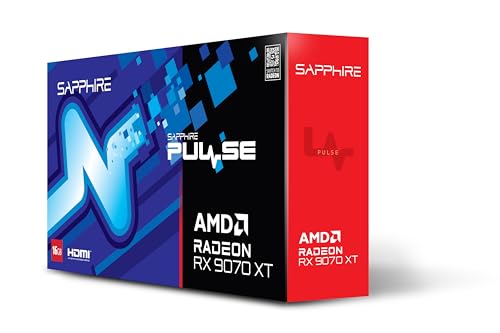 9.0 / 10
Sapphire PULSE AMD RADEON™ RX 9070 XT GAMING 16GB DUAL HDMI/DUAL DP
£899.99 · Sapphire · Details
Frequently asked
5 questions01Is the MSI GeForce RTX 5060 Ti 16G SHADOW 2X OC PLUS Graphics Card - RTX 5060 Ti GPU, 16GB GDDR7 (28Gbps/128-bit), PCIe 5.0 - Dual-Fan Thermal Design (2 x STORMFORCE FAN) - HDMI 2.1b, DisplayPort 2.1b good for 1440p gaming?+
Yes, this is genuinely one of the better 1440p cards in the upper mid-range bracket. Published benchmarks for the RTX 5060 Ti class show strong performance at 1440p in demanding titles, typically in the 80 to 100fps range in games like Cyberpunk 2077 at High settings, climbing significantly higher in less demanding titles. With DLSS 4 Quality mode enabled, those frame rates climb substantially further with minimal image quality trade-off. For high-refresh 1440p gaming at 144Hz or 165Hz, this card handles the vast majority of titles comfortably.
02What PSU do I need for the MSI GeForce RTX 5060 Ti 16G SHADOW 2X OC PLUS Graphics Card - RTX 5060 Ti GPU, 16GB GDDR7 (28Gbps/128-bit), PCIe 5.0 - Dual-Fan Thermal Design (2 x STORMFORCE FAN) - HDMI 2.1b, DisplayPort 2.1b?+
MSI recommends a minimum 650W PSU for a system built around this card. The GPU itself has a 180W TGP, which is modest for this performance class. A quality 650W unit from a reputable brand handles a typical gaming build comfortably. If you're running a high-end CPU like a Core i9 or Ryzen 9, or have multiple storage drives and case fans, stepping up to a 750W unit gives you proper headroom and is generally the sensible choice.
03Is 16GB VRAM enough in 2026?+
For 1440p gaming, 16GB is more than enough and will remain so for the foreseeable future. Even the most memory-hungry current titles rarely exceed 12GB at 1440p with high settings. For 4K gaming with maximum texture quality, 16GB provides good headroom, though the card's 128-bit memory bus means bandwidth can become a constraint before capacity does. For modded games with high-resolution texture packs, 16GB is a significant advantage over 8GB cards. The short answer is yes, 16GB is a comfortable and future-proof amount for this GPU's performance tier.
04How does the MSI GeForce RTX 5060 Ti 16G SHADOW 2X OC PLUS Graphics Card - RTX 5060 Ti GPU, 16GB GDDR7 (28Gbps/128-bit), PCIe 5.0 - Dual-Fan Thermal Design (2 x STORMFORCE FAN) - HDMI 2.1b, DisplayPort 2.1b compare to AMD alternatives?+
The closest AMD alternative is the RX 7800 XT, which offers a wider 256-bit memory bus and 16GB of GDDR6, giving it higher raw memory bandwidth. In pure rasterisation gaming the 7800 XT is competitive and sometimes ahead. However, the RTX 5060 Ti wins on upscaling quality (DLSS 4 versus FSR 3), ray tracing performance, content creation features (NVENC AV1 encoding), and AI-accelerated workloads. If you purely game and don't stream or create content, the 7800 XT is worth comparing on price. If DLSS, streaming, or AI features matter, the 5060 Ti is the clearer choice.
05What warranty and returns apply to the MSI GeForce RTX 5060 Ti 16G SHADOW 2X OC PLUS Graphics Card - RTX 5060 Ti GPU, 16GB GDDR7 (28Gbps/128-bit), PCIe 5.0 - Dual-Fan Thermal Design (2 x STORMFORCE FAN) - HDMI 2.1b, DisplayPort 2.1b?+
Specific warranty terms for this product are not confirmed in the verified product data. When purchasing through Amazon UK, you're covered by Amazon's standard 30-day returns policy and the Amazon A-to-Z Guarantee, which provides protection if there's an issue with your order. For manufacturer warranty details, check MSI's official support pages directly, as GPU warranties typically run for two to three years depending on the region and registration requirements.