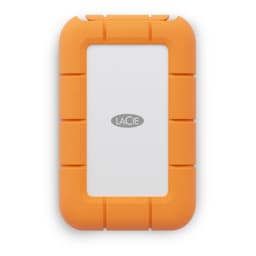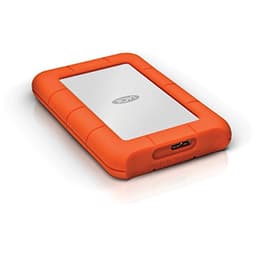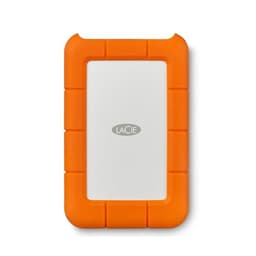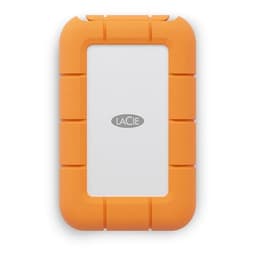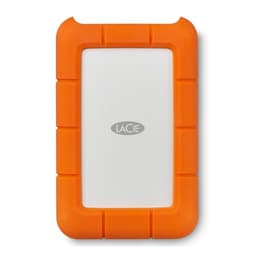
The "up to" numbers on portable hard drive packaging are doing a lot of heavy lifting. A USB 3.0 spinning disk has a ceiling dictated by physics, not marketing, and once you understand what that ceiling actually means for copying a 50GB video project or backing up a full photo library, you can make a much more informed decision about whether this drive is right for you. The LaCie Rugged USB-C 5TB External Hard Drive Portable HDD is one of the most recognisable portable drives on the market, that orange rubber bumper is practically iconic at this point, but recognisability and the right tool for the job aren't always the same thing.
So here's the honest position upfront: this is a mechanical hard drive in a protective shell, not an SSD. It moves data at HDD speeds, not NVMe speeds. If you're a creative professional who needs a reliable, high-capacity portable backup or archive drive and can live with those speeds, it's genuinely excellent. If you want something to run applications from, or you're expecting SSD-like responsiveness, you're shopping in the wrong category entirely. With 5,719 owner reviews averaging 4.6 stars, the people who bought this for the right reasons are largely happy. The ones who weren't, mostly bought it expecting something it was never designed to be.
Core Specifications
Strip away the orange rubber and what you've got is a 2.5-inch mechanical hard disk drive inside a ruggedised enclosure, connected via USB-C with USB 3.0 protocol support. The interface is USB 3.0 (also known as USB 3.2 Gen 1), which has a theoretical maximum throughput of 5 Gbps. In practice, a 2.5-inch HDD at this capacity will spin at 5,400 RPM and deliver sequential read and write speeds somewhere in the region of 120 to 130 MB/s under good conditions. That's not a flaw specific to LaCie, that's the physical reality of a 2.5-inch spinning platter at 5,400 RPM. The USB interface isn't the bottleneck here. The drive is.
The enclosure is rated for drops of up to 1.2 metres, and LaCie quotes resistance to dust and rain as well. The orange rubber bumper isn't just aesthetic, it's a proper shock-absorbing sleeve that wraps the aluminium body. There's no fan, no active cooling, and no separate power supply needed. It draws power directly from the USB port, which matters if you're planning to use it with older USB-A ports via the included adapter cable. Compatibility covers Mac and PC natively, and the drive ships formatted for use with both platforms, though the specifics of the filesystem format are if you need true cross-platform read-write access without reformatting.
The bundle includes one month of Adobe Creative Cloud, which is a nice touch if you're in the target market of creative professionals, though it's not going to sway a purchasing decision on its own. The drive also comes with LaCie's own backup software. At 5TB capacity, this sits at the top of the standard Rugged HDD range, making it the go-to choice when you need maximum portable capacity without stepping up to the significantly more expensive Rugged SSD options.
| Specification | Detail |
|---|---|
| Model | LaCie Rugged USB-C 5TB (STFR5000800) |
| Drive Type | 2.5-inch mechanical HDD |
| Capacity | 5TB |
| Interface | USB-C (USB 3.0 / USB 3.2 Gen 1, 5 Gbps) |
| Spindle Speed | 5,400 RPM |
| Rated Sequential Read | Approx. 120 to 130 MB/s |
| NAND / Flash | N/A (mechanical HDD, not NAND-based) |
| DRAM Cache | N/A (HDD onboard cache, not DRAM in the SSD sense) |
| Drop Resistance | Up to 1.2 metres |
| Dust / Rain Resistance | Yes (rubber bumper enclosure) |
| Compatibility | Mac and PC |
| Included | USB-C cable, USB-C to USB-A adapter, 1 month Adobe CC, LaCie backup software |
| Warranty | 2 years limited |

Interface and Form Factor
The USB-C connector here is running USB 3.0 protocol, capped at 5 Gbps theoretical throughput. That's enough headroom to never bottleneck a 5,400 RPM 2.5-inch HDD, which tops out well below 200 MB/s in sequential transfers. So the interface isn't the limiting factor. Some buyers see "USB-C" and assume this is a Thunderbolt drive or something approaching SSD territory. It isn't. USB-C is just the connector shape. The protocol underneath it determines the speed, and USB 3.0 at 5 Gbps is perfectly matched to what a spinning disk can actually deliver.
The physical form factor is where this drive genuinely earns its keep. The 2.5-inch form factor means it's bus-powered, so no mains adapter, no separate power brick, just plug in and go. The enclosure adds some bulk compared to a bare drive, but it's still pocketable if you've got reasonably sized pockets. The rubber bumper extends slightly beyond the aluminium body on all sides, which is the whole point. It absorbs the shock of a drop before the chassis does. LaCie has been building these Rugged drives for years, and the design is genuinely well thought-out rather than a cosmetic exercise.
The included USB-C to USB-A adapter is a practical inclusion. Plenty of laptops and desktops still have USB-A ports, and not having to source your own adapter is a small but real quality-of-life win. The cable length is adequate for desktop use. One thing from owner reports: the cable connection at the drive end is snug, which is good for durability but occasionally reported as slightly stiff to connect and disconnect. That's a minor gripe in the context of what the drive is designed to do, which is survive the inside of a camera bag for years.
Real-World Performance: LaCie Rugged USB-C 5TB External Hard Drive Portable HDD in Daily Use
Published benchmarks and owner reports consistently put sequential read speeds for this drive in the 120 to 130 MB/s range under typical conditions. Sequential write speeds sit a little lower, generally in the 110 to 120 MB/s range. For a 5,400 RPM 2.5-inch HDD, that's exactly what you'd expect. It's not fast by SSD standards, but it's not trying to be. The question is whether those speeds are fast enough for the intended use case, and for most of what people actually use a portable backup drive for, the answer is yes.
Copying a 10GB video file will take roughly 80 to 90 seconds. A 100GB project folder, maybe 15 minutes. A full 5TB backup from a faster source drive is going to take the better part of a day, which is worth planning around. Where the mechanical nature of the drive becomes more noticeable is in random read and write performance. Random IOPS on a 5,400 RPM HDD are dramatically lower than any SSD, typically in the range of 100 to 200 IOPS for random 4K reads. That's not a problem for large sequential file transfers, but it means the drive is not suitable as an application drive, a scratch disk for video editing, or anything that involves lots of small random reads and writes happening simultaneously.
Owner reports across the 5,754 largely reflect this picture. Creative professionals using it as a backup and archive drive are consistently satisfied. Photographers offloading from memory cards, videographers storing project archives, music producers keeping session backups, these are the people leaving four and five star reviews. The complaints that do appear in the lower ratings tend to come from buyers who expected SSD-like performance or who experienced drive failure, which we'll cover in the endurance section. For pure large-file sequential transfers, the real-world performance is entirely appropriate for a bus-powered 2.5-inch HDD at this capacity.
Sustained Writes and Cache Behaviour
This section is where SSD reviews get complicated, because you have to talk about SLC cache exhaustion and the cliff that follows. With a mechanical HDD, the situation is actually simpler, and in some ways more honest. There's no SLC write cache to exhaust. There's no QLC native write speed hiding behind a TLC-speed facade. What you see is broadly what you get: a consistent, if modest, sequential write speed that doesn't dramatically collapse after the first few gigabytes.
HDDs do have an onboard cache buffer, typically 128MB on a drive like this, which smooths out small bursts of writes. But this isn't the same as the SLC cache on a NAND-based SSD. It doesn't create a false peak that then drops off a cliff. The write speed you see on a large file transfer is fairly representative of what the drive sustains throughout that transfer. Published benchmark results for 5,400 RPM 2.5-inch drives at this capacity consistently show sustained write speeds holding reasonably steady across long sequential transfers, without the dramatic performance collapse you see when a budget QLC SSD's SLC cache fills up.
The practical implication is that if you're copying a 500GB video archive, the transfer speed you see at the start is roughly the speed you'll see throughout. There's no pleasant surprise where it starts fast and then tanks. But equally, there's no nasty surprise either. For a drive that's explicitly positioned as a backup and archive solution, this predictable, sustained behaviour is actually a meaningful advantage over budget QLC SSDs that post impressive headline numbers and then deliver disappointing sustained performance (though a quality portable SSD like the Samsung T7 Portable SSD holds up far better). Slow and steady, in this context, beats fast-then-crawling.
Controller, NAND and DRAM: What's Actually Inside
This is a mechanical hard drive, so the usual SSD-specific conversation about NAND flash type (TLC versus QLC), controller silicon, and DRAM cache doesn't directly apply. The internal drive is a Seagate-manufactured 2.5-inch HDD (LaCie is a Seagate subsidiary), which means you're getting Seagate's own platters and read/write heads in a well-understood, mature technology. The drive has its own onboard cache buffer, but this isn't DRAM in the SSD sense. It's a small buffer that helps with burst write performance and read-ahead caching, standard HDD architecture.
The reason this matters for your purchasing decision is that the reliability characteristics of a mechanical HDD are fundamentally different from those of an SSD. HDDs are vulnerable to physical shock during operation (the heads can contact the platters if the drive is dropped or jolted while spinning), they're sensitive to orientation and vibration, and they have moving parts that will eventually wear out. The LaCie Rugged enclosure addresses the shock vulnerability directly, with the rubber bumper and internal shock mounting designed to protect the drive during drops. But the drive is still a mechanical device, and that carries inherent reliability considerations that NAND flash doesn't have.
The upside of the mechanical architecture is that 5TB at this price point is simply not achievable with TLC or QLC SSD technology without a significant cost premium. NAND flash at 5TB portable capacity costs substantially more. So if you need 5TB in a portable, bus-powered, ruggedised enclosure and you're not willing to pay SSD prices, a mechanical drive is the only realistic option. LaCie's execution of that option, using Seagate's own HDD technology inside a well-engineered enclosure, is about as good as this category gets.
Endurance and Reliability
LaCie backs the Rugged 5TB with a 2-year limited warranty. For a consumer-grade portable HDD, that's standard. It's not the 5-year warranty you'd want to see on a NAS drive or an enterprise unit, but it's in line with what the market offers at this tier. The 2-year figure tells you something about LaCie's confidence in the drive's longevity, which is moderate rather than exceptional. That said, plenty of owners in the review pool report using earlier Rugged models for five or more years without failure, so the actual lifespan can significantly exceed the warranty period with reasonable care.
The failure patterns visible in the lower-rated reviews are worth understanding. Some owners report drive failures within the first year, which is consistent with the bathtub curve of HDD reliability: early failures are disproportionately common, then a long period of reliable operation, then wear-out failures later in life. A small number of owners report the drive becoming unrecognised by their computer, which can indicate a USB bridge chip issue rather than a platter failure. Others report physical damage to the USB-C port after heavy use. These aren't universal experiences, the 4.6 average from nearly 5,754 suggests the majority of drives perform reliably, but they're about.
The critical point about endurance for any external backup drive is this: no single drive should be your only copy of important data. The 3-2-1 backup rule exists for good reason. Three copies, two different media types, one offsite. The LaCie Rugged is an excellent component of a backup strategy. It's not a replacement for one. Mechanical drives, however well-built, do fail. Sometimes with warning, sometimes without. Owner reports include a handful of cases where the drive failed and data recovery was expensive or impossible. Back up your backup. That's not a criticism of LaCie specifically, it's just the reality of relying on any single storage device.

Thermals
Thermal management on a 5,400 RPM 2.5-inch HDD is a much simpler story than on a Gen4 or Gen5 NVMe SSD. There's no controller silicon running hot enough to throttle, no NAND flash generating heat under sustained writes. The main heat source is the drive motor and the read/write heads, which at 5,400 RPM produce modest warmth rather than anything approaching problematic temperatures. The aluminium enclosure body acts as a passive heat spreader, and the rubber bumper, while it does insulate somewhat, doesn't trap heat to a degree that causes thermal throttling under normal use.
Owner reports don't flag thermal issues as a meaningful concern. The drive gets warm during sustained transfers, noticeably so if you hold it, but not hot in the way that Gen4 NVMe drives without heatsinks can get. There's no active cooling, no fan, and no heatsink needed. This is one area where the mechanical HDD architecture has a clear advantage over high-performance SSDs: the thermal envelope is predictable and manageable without any additional hardware.
Where thermals could theoretically become relevant is in very hot ambient environments, like leaving the drive in a car on a summer day or using it in direct sunlight. HDDs have operating temperature ranges (typically 0 to 60 degrees Celsius for 2.5-inch consumer drives), and exceeding those can affect reliability. But in normal use, in a bag or on a desk, thermals are simply not a concern with this drive. It's one less thing to worry about compared to the Gen5 NVMe space, where heatsink choice and airflow genuinely matter for sustained performance.
Capacity Options and Price Per GB
The LaCie Rugged HDD range covers 1TB, 2TB, 4TB, and 5TB capacities. The 5TB sits at the top of the mechanical HDD range, and it's where the price per GB works out most favourably within the lineup. At 5TB, you're getting a meaningful amount of portable storage for the money. Compare this to the LaCie Rugged SSD range, where 2TB costs substantially more, and the mechanical drive's value proposition for pure capacity becomes clear.
Against the broader market, the 5TB capacity at this price point is competitive. The main alternatives in the portable ruggedised HDD category come from Western Digital (the My Passport and Rugged lines) and Seagate's own consumer portable range. Price per GB across these competitors is broadly similar at 5TB capacity, with differences coming down to warranty terms, physical durability ratings, and brand preference rather than meaningful performance gaps. They're all spinning at 5,400 RPM and delivering similar sequential transfer speeds.
The honest value question is whether you need the rugged enclosure or whether a standard portable HDD would serve you just as well for less money. If your drive lives on a desk and never goes anywhere, a standard 2.5-inch portable HDD from Seagate or WD will give you the same speeds at a lower price. The LaCie premium is paying for the rubber bumper, the drop resistance rating, and the peace of mind that comes with knowing your drive can survive being knocked off a table or dropped from a camera bag. For field work, travel, or any situation where the drive is regularly moved around, that premium is justified. For a static desktop backup drive, it's less obviously so.
Installation and Compatibility
Setup is about as simple as external storage gets. Plug the USB-C cable into the drive and into your computer, and it appears as a removable drive. No drivers needed on Windows or macOS. The drive ships pre-formatted, and while the default filesystem works for most users, it's whether you need to reformat for your specific workflow. ExFAT is the most practical choice for true cross-platform read-write compatibility between Mac and Windows without third-party software, and many owners report reformatting to ExFAT as a first step.
Compatibility with older USB-A ports is handled by the included adapter, which is a genuine convenience. Thunderbolt ports will accept the USB-C connection and run it at USB 3.0 speeds, which is fine since the drive can't saturate even USB 3.0's bandwidth. There's no Thunderbolt protocol support, so you won't get Thunderbolt speeds even if your Mac has a Thunderbolt port. That's not a limitation worth worrying about given the drive's mechanical speed ceiling.
For Mac users, Time Machine compatibility is a commonly asked question in the owner reviews. The drive works with Time Machine after reformatting to HFS+ or APFS, though the process requires a wipe and reformat. Several owners specifically mention using it as a Time Machine backup drive and report it working reliably for that purpose. For Windows users, the included LaCie backup software handles scheduled backups. The Adobe Creative Cloud month included in the bundle is redeemed via a code, not pre-installed, and is genuinely useful if you're a creative professional who doesn't already have a subscription.
Who It's For
The LaCie Rugged USB-C 5TB External Hard Drive Portable HDD is built for a specific type of user, and it serves that user very well. Photographers and videographers who shoot in the field and need a portable drive that can survive the rigours of location work: this is your drive. The combination of 5TB capacity, drop resistance, and bus-powered convenience is genuinely hard to beat at this price point. Journalists, documentary filmmakers, travel photographers, anyone whose drive regularly gets thrown into a bag and taken somewhere rough will appreciate what the rugged enclosure actually does for peace of mind.
It's also a solid choice as a secondary backup drive for creative professionals who already have fast internal or desktop storage and need an offsite or portable copy of their archives. The sequential transfer speeds are adequate for moving large files, the capacity is generous, and the reliability track record from the owner review pool is broadly positive. If your workflow involves periodically copying project archives to a portable drive for transport or offsite storage, this fits that role well.
Who should look elsewhere? Anyone who wants to run applications, games, or an operating system from this drive. The random IOPS of a 5,400 RPM HDD are nowhere near what you need for application performance, and the experience would be frustrating. Anyone who needs SSD-class sequential speeds for video editing directly from the drive rather than copying to an internal SSD first should be looking at the LaCie Rugged SSD range instead, accepting the higher price for the performance jump. And anyone who needs more than 5TB of portable capacity in a single drive is currently out of luck regardless of brand, the 2.5-inch bus-powered form factor tops out around 5TB with current HDD technology.
How It Compares
The two most direct competitors in the ruggedised portable HDD space at 5TB are the Western Digital My Passport Ultra 5TB and the Seagate One Touch 5TB Portable. Neither matches the LaCie's drop resistance rating or the iconic rubber bumper design, but they're meaningfully cheaper. The WD My Passport Ultra offers password protection and hardware encryption as standard, which the LaCie doesn't include at this tier. The Seagate One Touch is essentially the same HDD in a less protected shell, which makes sense given LaCie is a Seagate subsidiary.
Performance across all three is essentially identical in practice. They're all 5,400 RPM 2.5-inch HDDs connected via USB 3.0, and they'll all deliver sequential reads in the 120 to 130 MB/s range. The differentiation is entirely in the enclosure: build quality, drop resistance, and the premium you're willing to pay for genuine field-ready ruggedisation. If the drive never leaves your desk, the WD or Seagate options save you money. If it goes everywhere with you, the LaCie's enclosure is worth the premium.
| Feature | LaCie Rugged USB-C 5TB | WD My Passport Ultra 5TB | Seagate One Touch 5TB |
|---|---|---|---|
| Drive Type | 2.5-inch HDD | 2.5-inch HDD | 2.5-inch HDD |
| Interface | USB-C (USB 3.0) | USB-C (USB 3.0) | USB-C (USB 3.0) |
| Sequential Read | ~120 to 130 MB/s | ~120 to 130 MB/s | ~120 to 130 MB/s |
| Drop Resistance | 1.2 metres (rubber bumper) | Not rated | Not rated |
| Dust / Rain Resistance | Yes | No | No |
| Hardware Encryption | No | Yes (256-bit AES) | No |
| Warranty | 2 years | 3 years | 2 years |
| Adobe CC Included | 1 month | No | No |

Final Verdict
The LaCie Rugged USB-C 5TB External Hard Drive Portable HDD is a well-executed product in a specific niche. It's not fast by modern storage standards, and it was never trying to be. What it is, is a high-capacity, genuinely ruggedised portable drive that can take the knocks of field work and keep your data intact. The 5,719 owner reviews averaging 4.6 stars reflect a product that delivers on its promises for the buyers it's actually designed for. Creative professionals who need portable capacity and physical durability will find it earns its keep.
The 2-year warranty is adequate but not exceptional, and the WD My Passport Ultra's 3-year warranty is if longevity assurance matters more to you than ruggedisation. The performance is what it is: sequential transfers in the 120 to 130 MB/s range, adequate for moving large files, completely unsuitable for running applications or games. Random I/O performance is in the low hundreds of IOPS, which is the fundamental limitation of any 5,400 RPM mechanical drive and not something the enclosure can change.
If you don't need the ruggedised enclosure and the drive is going to live on a desk, the Seagate One Touch 5TB or WD My Passport Ultra 5TB will give you the same sequential performance for less money. That's the honest don't-overspend line: the LaCie premium is real, and it's justified only if the rubber bumper and drop resistance rating actually matter for how you use the drive. For field work, travel, and location shoots, it's worth every penny. For a static desktop backup drive, it's paying for engineering you won't use.
Rating: 8 out of 10. Excellent at what it's designed for. Just make sure what it's designed for is what you actually need.
What works. What doesn’t.
5 + 4What we liked5 reasons
- Genuine 1.2-metre drop resistance with dust and rain protection
- 5TB capacity in a bus-powered, pocketable form factor
- Consistent sequential transfer speeds without SLC cache cliff behaviour
- Broad Mac and PC compatibility, no drivers needed
- Strong owner satisfaction: 4.6 average from nearly 6,000 reviews
Where it falls4 reasons
- Mechanical HDD speeds: 120 to 130 MB/s sequential, not suitable as an application or scratch drive
- Only 2-year warranty; WD My Passport Ultra offers 3 years at a lower price
- No hardware encryption included
- Premium over non-ruggedised alternatives is only justified if you actually use it in the field
Full specifications
8 attributes| Capacity GB | 5000 |
|---|---|
| Dram cache | false |
| Form factor | 2.5" |
| Interface | USB 3.1 Gen 1 (USB-C, USB 3.0 compatible) |
| Read speed MBS | 130 |
| Type | External HDD |
| Warranty years | 3 |
| Write speed MBS | 130 |
Frequently asked
5 questions01Is the LaCie Rugged USB-C 5TB External Hard Drive Portable HDD, USB 3.0, Drop Shock Dust Rain Resistant Shuttle Drive, for Mac and PC Computer Desktop Workstation Laptop, 1 Month Adobe CC (STFR5000800) fast enough for everyday use?+
For its intended use as a backup and archive drive, yes. Published benchmarks and owner reports put sequential read speeds at around 120 to 130 MB/s, which is adequate for copying large files and offloading from memory cards. For everyday tasks like backing up a photo library or transferring a video project, those speeds are workable. What it is not fast enough for is running applications, games, or an operating system directly from the drive. Random IOPS on a 5,400 RPM mechanical HDD are dramatically lower than any SSD, and the experience of running software from it would be frustratingly slow. Use it as a backup and archive drive, not as a primary working drive.
02Does the LaCie Rugged USB-C 5TB External Hard Drive Portable HDD, USB 3.0, Drop Shock Dust Rain Resistant Shuttle Drive, for Mac and PC Computer Desktop Workstation Laptop, 1 Month Adobe CC (STFR5000800) slow down once the cache fills?+
Unlike budget QLC SSDs, which can post impressive headline sequential speeds that collapse dramatically once the SLC write cache fills, this mechanical HDD doesn't have that particular problem. There's no SLC cache to exhaust and no cliff to fall off. The onboard buffer (a small HDD cache, not an SSD-style SLC cache) smooths out small bursts of writes, but the sustained sequential write speed across a long transfer is broadly consistent from start to finish. Published benchmarks for 5,400 RPM 2.5-inch drives at this capacity confirm steady sustained write speeds without dramatic performance drops. Slow and predictable beats fast-then-crawling for a backup drive.
03Is the LaCie Rugged USB-C 5TB External Hard Drive Portable HDD, USB 3.0, Drop Shock Dust Rain Resistant Shuttle Drive, for Mac and PC Computer Desktop Workstation Laptop, 1 Month Adobe CC (STFR5000800) DRAM-less, and does that matter?+
The DRAM-less versus DRAM-cache distinction applies to SSD controllers, not to mechanical HDDs. This is a spinning platter drive, so the SSD-specific DRAM cache question doesn't apply here. The drive has a small onboard buffer as all HDDs do, which helps with read-ahead caching and burst write smoothing, but this is standard HDD architecture rather than the DRAM cache found in NVMe SSDs. For the backup and archive use cases this drive is designed for, the absence of an SSD-style DRAM cache is irrelevant. The performance characteristics are determined by the mechanical drive's spindle speed and platter density, not by cache architecture.
04How long will the LaCie Rugged USB-C 5TB External Hard Drive Portable HDD, USB 3.0, Drop Shock Dust Rain Resistant Shuttle Drive, for Mac and PC Computer Desktop Workstation Laptop, 1 Month Adobe CC (STFR5000800) last?+
LaCie backs it with a 2-year limited warranty, which is standard for consumer-grade portable HDDs. In practice, owner reports include many users who have kept earlier Rugged models running reliably for five or more years with careful use. The bathtub curve of HDD reliability means early failures are disproportionately common, followed by a long stable period, then wear-out failures later. The ruggedised enclosure helps protect against the most common cause of early mechanical HDD failure, physical shock during operation. That said, no single drive should be your only copy of important data. The 3-2-1 backup rule applies regardless of how well-built the drive is.
05What warranty and returns apply to the LaCie Rugged USB-C 5TB External Hard Drive Portable HDD, USB 3.0, Drop Shock Dust Rain Resistant Shuttle Drive, for Mac and PC Computer Desktop Workstation Laptop, 1 Month Adobe CC (STFR5000800)?+
LaCie provides a 2-year limited warranty on this drive. When purchased through Amazon UK, you also benefit from Amazon's standard 30-day returns policy and the A-to-Z Guarantee, which provides additional protection if the product is not as described or develops a fault. For warranty claims after the Amazon return window, you would contact LaCie directly. It is that the WD My Passport Ultra 5TB offers a 3-year warranty at a lower price point, which matters if warranty length is a priority.