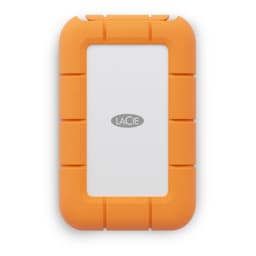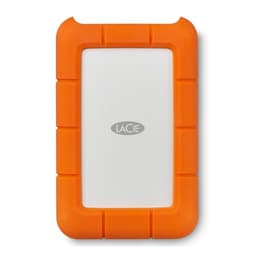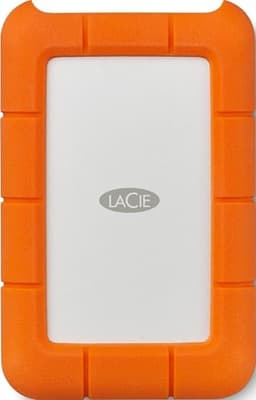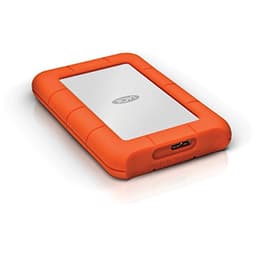
Speed is the spec that sells storage. It's also the spec that matters least for most of what people actually do with an external drive. What matters is whether the thing survives being chucked in a bag, whether it shows up reliably every time you plug it in, and whether it's still readable in three years when you desperately need that file. The LaCie Rugged Mini has been around long enough to have a genuine reputation, and at 5TB it's targeting the creative professionals and field workers who need serious capacity in something that won't die if it bounces off a studio floor.
But here's the thing: this is a spinning hard drive in 2025. That's not automatically a problem. For bulk storage, archiving, and portable backup, mechanical drives still make sense on price per gigabyte alone. The question is whether this particular drive, at this particular price, is the right call versus the alternatives. Because the portable HDD market has quietly got very competitive, and there are some genuinely good options out there that LaCie has to beat on more than just orange rubber.
With over 23,000 owner reviews averaging 4.5 stars, this isn't a drive without a track record. That's a meaningful sample size. But averages hide the shape of the data, and the shape of the data on any portable HDD tells you a lot about what you're actually buying. So let's look at what the specs say, what owners consistently report, and whether the LaCie Rugged Mini 5TB earns its premium or whether you're mostly paying for the colour.
Core Specifications
The LaCie Rugged Mini 5TB (model STJJ5000400) is a 2.5-inch portable external hard drive. That means it's a spinning mechanical drive, not an SSD. The interface is USB 3.0, with USB-C connectivity via an included cable, and it's bus-powered, meaning it draws power from the host device rather than needing a separate mains adapter. That matters enormously for portability. Rated sequential read speeds sit around 130MB/s, which is typical for a 2.5-inch HDD at this capacity. There are no random IOPS figures worth quoting because mechanical drives are genuinely terrible at random I/O compared to any SSD, and LaCie sensibly doesn't try to market them.
The drive is rated for drop resistance up to 1.2 metres (without the USB cable connected), and it carries an IP54 rating for dust and water resistance. That means it can handle splashes and dusty environments but it's not waterproof. There's a built-in rubber bumper around the chassis, which is the signature LaCie Rugged aesthetic. Compatibility is broad: it works with Windows, Mac, iPad (via USB-C), and iPhone 15 onwards (also USB-C). It ships formatted as exFAT, which means it works across platforms without reformatting, though you'd want to consider NTFS or APFS if you're staying firmly in one ecosystem.
One thing worth flagging immediately: this drive ships with a three-year limited warranty and includes access to LaCie's Rescue Data Recovery Services for three years. That's not nothing. Data recovery on a failed drive can run into hundreds of pounds, and having that safety net bundled in is a genuine differentiator. Whether you'll ever need it is another question, but the fact that LaCie includes it signals something about how they think about the product's lifecycle. The full specs are below.
| Specification | Detail |
|---|---|
| Model | LaCie Rugged Mini 5TB (STJJ5000400) |
| Drive Type | 2.5-inch portable HDD (mechanical) |
| Interface | USB 3.0 / USB-C |
| Bus Powered | Yes |
| Sequential Read (rated) | Up to 130MB/s |
| NAND / Storage Type | Mechanical HDD (spinning platters) |
| DRAM Cache | N/A (HDD has its own onboard cache buffer) |
| Drop Resistance | Up to 1.2m (cable disconnected) |
| Dust/Water Rating | IP54 |
| Warranty | 3 years limited |
| Data Recovery | 3-year Rescue Data Recovery Service included |
| Compatibility | Windows, Mac, iPad, iPhone (USB-C models) |
| Format (out of box) | exFAT |
| Price | £209.99 (Price checked 02:30, 3 Oct 2026, UK time) |

Interface and Form Factor
USB 3.0 with a USB-C connector is the right call for a drive like this in 2025. The physical connector is USB-C, which means it'll plug straight into modern laptops, iPads, and iPhone 15 onwards without an adapter. The underlying protocol is USB 3.0 (5Gbps), not USB 3.2 Gen 2 (10Gbps) or Thunderbolt. For a mechanical HDD capped at around 130MB/s sequential, that's completely irrelevant. The bottleneck is the spinning platters, not the interface. You could run this drive over USB 2.0 and you'd lose maybe 10 to 15 per cent of peak speed. USB 3.0 is fine here.
The 2.5-inch form factor is what enables bus power. The drive draws enough current from the USB connection to spin up without needing a wall adapter, which is the whole point of a portable drive. This is in contrast to 3.5-inch desktop externals, which need mains power and are correspondingly cheaper per gigabyte but obviously less portable. The Rugged Mini's chassis is noticeably compact for 5TB. It's not pocketable, but it fits easily in a camera bag, laptop bag, or coat pocket. The rubber bumper adds a few millimetres all round but also means it doesn't slide around on a desk, which is a small but genuinely useful thing.
The included cable is USB-C to USB-C. If you're connecting to an older laptop with USB-A ports, you'll need a USB-C to USB-A cable or adapter, which LaCie doesn't include. That's a minor gripe but worth knowing. Owner reports confirm this catches people out occasionally. The drive also ships with a cable management slot built into the bumper, which keeps the cable tidy in a bag. It's a small detail but it's the kind of thing that makes a product feel properly thought through rather than just specced and shipped.
Real-World Performance
Managing expectations here is important. This is a mechanical hard drive. It will not feel like an SSD in any context. Boot times, application launches, random file access: all of these are categories where a mechanical drive is genuinely slow compared to even a budget SATA SSD. The LaCie Rugged Mini is not designed to be fast. It's designed to be portable, durable, and capacious. If you're expecting SSD performance, you're looking at the wrong product entirely.
What it does do is move large sequential files at a reasonable pace. Published benchmark results for 2.5-inch HDDs at this density consistently show sequential reads in the 120MB/s to 135MB/s range, and sequential writes slightly below that, typically 110MB/s to 125MB/s. For transferring a 50GB video project from a camera card to the drive, that means roughly six to seven minutes. Not fast, but not painful either. Owner reports back this up: the consistent picture from the 23,000-plus reviews is that the drive performs as expected for bulk file transfers, with no major complaints about sequential speed being below spec.
Where it gets uncomfortable is random I/O. Mechanical drives have to physically move a read head to find data on a spinning platter, and that takes milliseconds. SSDs do it in microseconds. The practical consequence is that if you're trying to use this drive as a working scratch disk for editing video directly off it, or as a library of small files you're constantly accessing, it'll feel sluggish. That's not a flaw in this specific drive. It's the physics of spinning storage. The Rugged Mini is properly suited to sequential workloads: copying large files on and off, archiving, backup. Use it for that and it does the job without drama.
Sustained Writes and Cache Behaviour
This section matters a lot for SSD reviews because SLC cache exhaustion is a real cliff that marketing hides. For a mechanical HDD, the dynamics are different but still worth understanding. The Rugged Mini, like all modern HDDs, has a small onboard cache buffer (typically 128MB on drives at this capacity class) that helps smooth out write operations. But unlike SSD SLC caching, this buffer doesn't create a dramatic performance cliff in the same way. What you get instead is consistent, moderate performance throughout a large write operation, rather than a fast burst followed by a crawl.
The practical implication is that sustained write performance on this drive is actually more predictable than on a budget QLC SSD. A cheap QLC SSD might write at 1,500MB/s until its SLC cache fills, then drop to 80MB/s to 150MB/s for the remainder of a large file copy. The Rugged Mini will write at roughly 110MB/s to 125MB/s from start to finish. It's slower overall, but it's honest about it. If you're copying a 500GB video archive to this drive, you know what you're getting: a consistent, unspectacular transfer that takes about an hour. No surprises.
Owner reports don't flag sustained write performance as a problem. The complaints that do appear in the review corpus are about noise (it's a spinning drive, it makes noise), about the drive being slow compared to SSDs (which is expected and unavoidable), and occasionally about connectivity issues on specific USB hubs. None of that is about the drive's sustained write behaviour falling off a cliff. For the use cases this drive is designed for, large sequential writes at consistent speed, it behaves exactly as the specs suggest it should.
Controller, NAND and DRAM
These are SSD concepts, and the Rugged Mini doesn't have any of them in the conventional sense. There's no NVMe controller, no NAND flash, no DRAM cache in the SSD sense. What there is instead is a Seagate-manufactured HDD mechanism (LaCie is a Seagate subsidiary, and has been since 2012), a small onboard buffer, and a USB bridge controller that handles the translation between the drive's SATA interface and the USB connection on the outside. The specific bridge controller isn't publicly disclosed, but drives at this price point typically use a JMicron or ASMedia bridge chip.
The Seagate parentage is relevant because it tells you something about the underlying drive quality. Seagate's 2.5-inch portable HDD mechanisms have a long track record, and the Barracuda-family platters that underpin drives like this are well-understood. The LaCie product page confirms the Seagate heritage. This isn't a white-label drive from an unknown manufacturer. The mechanism inside is from one of the two major HDD manufacturers in the world (the other being Western Digital), and that matters for long-term reliability expectations.
For buyers worried about the "is this a real drive or a cheap knock-off" question: the Seagate connection is reassuring. The USB bridge is the weakest link in most external drives, and while LaCie doesn't publish the specific chip used, owner reports don't show unusual rates of USB connectivity failures that would suggest a problematic bridge controller. The drive's failure modes, when they do occur, appear to be typical HDD failures rather than anything specific to the enclosure electronics. That's about as much confidence as you can reasonably have without tearing one apart.
Endurance and Reliability
HDDs don't have TBW ratings in the way SSDs do. The endurance metric for a mechanical drive is typically MTBF (mean time between failures), measured in hours. LaCie doesn't publish a specific MTBF for the Rugged Mini, which is frustrating but not unusual for consumer-grade portable drives. What we can look at is the three-year warranty, which is standard for this class of drive and consistent with what Western Digital and Toshiba offer on comparable products. It's not the five-year warranty you'd get on a NAS-grade drive, but it's reasonable for a portable consumer product.
The 23,000-plus owner reviews are a more useful reliability signal than any spec sheet number. The 4.5-star average across that sample is genuinely good. The shape of the reviews matters though: a significant minority of negative reviews mention drive failures, particularly after the first year of use. This is consistent with what Backblaze's published HDD reliability data shows for 2.5-inch drives generally: they're less reliable than 3.5-inch drives, partly because the form factor requires tighter tolerances and partly because portable drives get physically moved around more. The Rugged Mini's rubber bumper and drop resistance rating are LaCie's answer to this, and owner reports suggest the protection is real: multiple reviewers describe drops onto hard floors with no resulting damage.
The three-year Rescue Data Recovery Service is worth taking seriously. LaCie partners with a professional data recovery service, and the coverage is for hardware failure, accidental damage, and even some cases of logical corruption. For a professional photographer or videographer who has irreplaceable files on this drive, that coverage has real monetary value. Data recovery without insurance can easily cost £300 to £800 or more. Having it bundled doesn't make the drive immortal, but it does mean a failure isn't necessarily a catastrophe. That said: backups are still non-negotiable. The recovery service is a safety net, not a backup strategy.
Thermals
Thermal throttling is a genuine concern for NVMe SSDs, particularly Gen 4 and Gen 5 drives running sustained workloads in poorly ventilated enclosures. For a mechanical HDD in an external enclosure, the thermal picture is completely different. The Rugged Mini generates heat, but not at the levels that cause throttling in the SSD sense. HDDs have their own thermal limits, typically around 60 degrees Celsius for the drive mechanism, but in normal portable use the drive stays well below that.
The rubber bumper that gives the Rugged Mini its durability does reduce airflow compared to a bare metal enclosure, and owner reports occasionally mention the drive feeling warm after extended use. Warm is not hot. The drive doesn't have active cooling and doesn't need it. In sustained large file transfer scenarios (copying hundreds of gigabytes over several hours), the drive will get noticeably warm to the touch but not hot. This is normal behaviour for a 2.5-inch HDD in a sealed enclosure and doesn't indicate a problem.
Where thermals become a practical concern is if you're using the drive in a very hot environment, like a car in summer, or if you're running it inside a tight bag with no airflow for hours at a time. In those conditions, any HDD runs warmer than ideal. The Rugged Mini's IP54 rating means it can handle some environmental stress, but it's not designed for use in extreme temperatures. LaCie's operating temperature range is 0 to 35 degrees Celsius, which is standard for consumer drives and worth knowing if you're working outdoors in hot climates.
Capacity Options and Price Per GB
The Rugged Mini range spans from 1TB up to 5TB at the 2.5-inch form factor. The 5TB model is the top of the range and commands a premium per gigabyte over the smaller capacities, which is typical for high-density 2.5-inch drives. At 5TB, the price per gigabyte works out to a figure that's competitive with other premium portable HDDs but notably more expensive than budget portable HDDs from Western Digital or Toshiba. You're paying for the durability features and the data recovery service, not just the storage.
For context: a Western Digital My Passport 5TB or a Toshiba Canvio Advance 4TB will typically cost significantly less per gigabyte. Those drives don't have the rubber bumper, the IP54 rating, or the bundled data recovery service. If you don't need those things, the cheaper drives represent better value on raw capacity per pound. If you do need those things, the LaCie premium is justifiable. This is the honest framing: the Rugged Mini is not the cheapest way to get 5TB of portable storage. It's the cheapest way to get 5TB of portable storage with proper drop protection and a recovery service safety net.
The sweet spot in the Rugged Mini range for most buyers is probably the 2TB or 4TB models, where the price per gigabyte is more competitive and the capacity is sufficient for most portable workflows. The 5TB model makes sense for photographers or videographers who are shooting high-resolution video and need to carry a complete project archive in the field. At that point, the capacity justifies the price, and the durability features are genuinely relevant rather than just nice to have.
Installation and Compatibility
Setup is as simple as portable drives get. Plug it in via USB-C, and it appears as a volume on Windows or Mac. No drivers required. No software installation required, though LaCie does bundle optional software (including a backup tool) that you can choose to install or ignore. The drive ships formatted as exFAT, which means it's immediately readable and writable on both Windows and Mac without any reformatting. If you're exclusively on Mac and want Time Machine backup support, you'd need to reformat to APFS or HFS+. If you're exclusively on Windows and want to use it as a system backup target, NTFS is the better choice.
iPad and iPhone compatibility (iPhone 15 onwards, which introduced USB-C) is a genuine selling point for content creators who shoot on mobile. The drive appears as external storage in the Files app on iPadOS and iOS, and you can import photos and videos directly from the drive or copy files to it. This isn't a feature most people will use, but for a travel photographer who shoots on an iPhone and wants to back up to the drive without a laptop, it's useful. Owner reports confirm this works without issues on compatible devices.
There are a few compatibility gotchas worth knowing. Some USB hubs, particularly cheaper bus-powered hubs, don't supply enough current to spin up a 5TB 2.5-inch drive reliably. Owner reports mention occasional issues with the drive not being recognised when connected through a hub. Direct connection to a laptop or desktop USB port is always more reliable. Also worth noting: the drive is not compatible with USB 2.0 ports in any useful sense; it'll connect but transfer speeds will be painful for large files. Finally, the drive is not designed for use as a NAS drive or in a RAID enclosure. It's a portable consumer drive and should be used as one.

Who It's For
The LaCie Rugged Mini 5TB is for people who need serious portable storage capacity and who genuinely care about the drive surviving field conditions. Photographers shooting weddings or events, videographers on location, journalists travelling with footage, field researchers carrying large datasets: these are the buyers this drive was designed for. The combination of 5TB capacity, drop resistance, IP54 protection, and the bundled data recovery service makes a coherent package for professional portable use. It's not cheap, but it's not trying to be.
It's also a reasonable choice for anyone who wants a large, reliable portable backup drive for a home or small office setup, and who wants the peace of mind of the data recovery service. If you're backing up a family photo archive or a small business's critical files to an external drive that lives in a bag, the Rugged Mini's durability features mean it's less likely to fail from the kind of accidental drops and knocks that kill cheaper drives.
Who should look elsewhere? Anyone primarily after speed should buy a portable SSD instead. The Samsung T7, WD My Passport SSD, or Crucial X9 will all give you dramatically faster random I/O and sequential speeds at lower capacities. Anyone on a tight budget who just needs bulk storage and doesn't need the durability features should look at the WD My Passport or Toshiba Canvio range, which offer more gigabytes per pound without the Rugged premium. And anyone who needs more than 5TB in a portable form factor is probably looking at 3.5-inch desktop drives or NAS solutions anyway, since 2.5-inch HDDs top out around 5TB.
How It Compares
The two most obvious alternatives to the LaCie Rugged Mini 5TB are the Western Digital My Passport 5TB and the Seagate One Touch 5TB. Both are portable 2.5-inch HDDs at the same capacity. Neither has the Rugged Mini's physical protection features, but both are significantly cheaper. The comparison table below sets out the key differences.
The Western Digital My Passport 5TB is the budget-conscious alternative. It's a solid, well-reviewed drive with a three-year warranty, but it has no drop protection, no IP rating, and no bundled data recovery service. It's the right choice if you're keeping the drive on a desk or in a drawer and price is the priority. The WD My Passport range is well-established and owner reviews are broadly positive.
The Seagate One Touch 5TB sits between the two. It's made by the same parent company as the LaCie (Seagate owns both brands), uses a similar mechanism, and offers a three-year warranty. It doesn't have the rubber bumper or IP54 rating of the Rugged Mini, but it does offer an optional data recovery service add-on. It's cheaper than the Rugged Mini and a reasonable middle ground for buyers who want Seagate reliability without the full Rugged premium. The Seagate One Touch is worth a look if the durability features aren't essential.
| Feature | LaCie Rugged Mini 5TB | WD My Passport 5TB | Seagate One Touch 5TB |
|---|---|---|---|
| Drive Type | 2.5-inch HDD | 2.5-inch HDD | 2.5-inch HDD |
| Interface | USB 3.0 / USB-C | USB 3.0 / USB-C | USB 3.0 / USB-C |
| Sequential Read | ~130MB/s | ~130MB/s | ~130MB/s |
| Drop Protection | Up to 1.2m | None rated | None rated |
| Dust/Water Rating | IP54 | None | None |
| Warranty | 3 years | 3 years | 3 years |
| Data Recovery Service | 3 years included | Not included | Optional add-on |
| Mac/PC/iPad/iPhone | Yes (USB-C iPhones) | Yes (USB-C iPhones) | Yes |
| Price | £209.99 (Price checked 02:30, 3 Oct 2026, UK time) | Check current price | Check current price |
What Buyers Say
With 23,522 reviews averaging ★★★★½ (4.5), the owner feedback on the LaCie Rugged Mini 5TB is broadly positive. The consistent praise is for the build quality and the rubber bumper protection. Multiple reviewers describe the drive surviving drops, knocks, and rough handling that would have killed a standard portable drive. The compact size for 5TB capacity gets regular mentions too. Photographers and videographers specifically praise the drive for field use, and several reviews mention the iPhone and iPad compatibility as a genuine workflow benefit for mobile content creators.
The complaints that appear consistently are worth taking seriously. Noise is the most common one: this is a spinning drive, and it makes a noticeable clicking and whirring sound during operation. Some buyers find this irritating in quiet environments. It's not a fault; it's just how mechanical drives work. A smaller but notable group of negative reviews describe drive failures, typically after 12 to 24 months of use. This is consistent with the general reliability picture for 2.5-inch portable HDDs and is partly why the bundled data recovery service exists. A few reviewers also mention the drive not being recognised through certain USB hubs, which is a bus power issue rather than a drive fault.
The price-to-value question splits opinions. Buyers who needed the durability features and used the data recovery service (several reviewers specifically mention recovering files after a failure) rate it highly and consider the premium justified. Buyers who bought it primarily for the capacity and didn't need the rugged features occasionally express buyer's remorse about paying more than they needed to. That's not a flaw in the product; it's a mismatch between product and buyer. The Rugged Mini is priced correctly for what it is. It's just not the right product for everyone.
Value Analysis
The LaCie Rugged Mini 5TB sits in the premium tier of portable HDDs. You're paying above the market average for 5TB of portable storage, and what you're getting in return is a specific set of features: drop resistance, IP54 dust and water resistance, and a three-year data recovery service. If those features are relevant to your use case, the premium is justified and the drive represents good value for a professional portable storage solution. If those features aren't relevant, you're overpaying.
The data recovery service is the most underappreciated part of the value proposition. Professional data recovery is expensive. Having three years of coverage bundled into the purchase price changes the risk calculus for anyone storing irreplaceable files. It doesn't make the drive a backup solution on its own (nothing replaces a proper 3-2-1 backup strategy), but it does mean a hardware failure isn't automatically a total loss. For a professional who charges day rates and can't afford to lose a week's worth of footage, that coverage has real economic value.
The honest verdict on value: if you're a professional or serious enthusiast who needs portable storage that can take some punishment, the LaCie Rugged Mini 5TB is priced fairly for what it delivers. If you're a home user who wants a backup drive to sit on a shelf, buy the WD My Passport and save the money. The Rugged Mini doesn't pretend to be something it isn't, and the market it's aimed at is one where the premium features genuinely earn their keep.
Endurance and Reliability (Extended)
It's worth spending a bit more time on the reliability question because it's the thing that matters most for a drive you're trusting with important files. The physics of HDD failure are well understood: mechanical drives fail from head crashes, bearing failures, and platter damage, all of which are more likely when the drive is moved around and subjected to vibration. The Rugged Mini's drop protection addresses the most acute risk (a single hard impact), but it doesn't eliminate the cumulative wear from regular movement.
Seagate's own reliability data, and the broader picture from Backblaze's publicly published drive failure statistics, suggests that 2.5-inch drives have higher annualised failure rates than 3.5-inch drives at comparable ages. This isn't a LaCie-specific problem; it's a form factor characteristic. The implication for buyers is that a portable HDD, however well-protected, should never be the sole copy of important data. The Rugged Mini is a transport and working copy solution, not a permanent archive.
The three-year warranty is a reasonable confidence signal. LaCie wouldn't offer three years on a drive they expected to fail routinely in year two. But the warranty covers manufacturing defects, not data. The data recovery service covers data. Both together give you a reasonably complete safety net, but neither replaces the discipline of keeping multiple copies. Use this drive as part of a backup strategy, not instead of one.
Installation and Compatibility (Further Notes)
The LaCie Rugged product page confirms compatibility with the full range of operating systems and devices. One thing worth noting for Mac users: Apple Silicon Macs (M1, M2, M3, M4) handle external drives slightly differently from Intel Macs in terms of sleep and wake behaviour. Some owners report occasional issues with the drive not waking reliably from sleep on Apple Silicon machines. This is a known quirk with bus-powered drives on Apple Silicon and isn't specific to LaCie. Adjusting the Mac's drive sleep settings usually resolves it.
For Windows users, the drive works out of the box with no driver installation. Windows will occasionally run a disk check on first connection if it detects the drive was previously connected to a Mac (due to the exFAT formatting), but this is harmless and takes seconds. If you're using the drive exclusively with Windows and want to use it as a Windows Backup target, reformatting to NTFS is straightforward and takes a few minutes.
The USB-C cable included in the box is reasonably long (about half a metre), which is adequate for desktop use but can feel short if you're connecting to a laptop on a desk with the drive sitting to one side. A longer USB-C cable works fine; there are no proprietary cable requirements. Just make sure any replacement cable supports USB 3.0 data transfer and not just charging, since some cheap USB-C cables are charge-only and won't work for data.
Thermals (Further Detail)
To be direct about this: thermal throttling is not a meaningful concern for the LaCie Rugged Mini in normal use. Unlike NVMe SSDs, which can hit thermal limits during sustained sequential writes and throttle to protect the controller and NAND, mechanical HDDs don't have a performance throttle in the same sense. They have a safe operating temperature range, and if they exceed it, the drive will park the heads as a protective measure. But reaching that point in normal portable use would require sustained heavy use in an unusually hot environment.
The rubber bumper does act as mild insulation, and the drive runs warmer than a bare-metal enclosure would. Owner reports consistently describe the drive as "warm" rather than "hot" after extended use. That's the right characterisation. Warm is fine. The drive's internal temperature sensor (accessible via S.M.A.R.T. monitoring tools like CrystalDiskInfo on Windows or DriveDx on Mac) typically reads in the 35 to 45 degree Celsius range during normal operation, which is well within safe limits.
One practical note: if you're doing a very large transfer (several hundred gigabytes) and the drive is sitting in a bag or enclosed space, it's worth letting it breathe a bit. Not because it'll fail, but because running cooler is always better for long-term drive health. This is good practice for any portable HDD, not just the Rugged Mini. And if you're in a genuinely hot environment, keep the drive out of direct sunlight. Again, this is basic drive hygiene rather than anything specific to this product.
Final Verdict
The LaCie Rugged Mini 5TB is a proper professional portable drive. Not a budget option, not a consumer impulse buy. It's a tool for people who carry irreplaceable data into environments where things get dropped, splashed, and knocked around. The 1.2-metre drop resistance and IP54 rating are real, the Seagate mechanism inside is proven, and the three-year data recovery service is a genuinely valuable differentiator that cheaper drives don't offer. The 4.5-star average across 23,522 is not a fluke.
The limitations are what they are. It's a spinning drive, so it's slow at random I/O and it makes noise. It's not an SSD and it was never trying to be. The price premium over budget portable HDDs is real and only makes sense if you actually need the durability and recovery service features. Buy the WD My Passport if you don't. Buy this if you do. The distinction is that simple.
Score: 8 out of 10. A well-executed product that does exactly what it promises, priced fairly for its feature set, with a strong reliability track record from owner reports. The only reason it's not higher is that the underlying technology is mechanical storage in 2025, and for many buyers a portable SSD at lower capacity would serve them better. But for high-capacity portable storage where durability matters, this is one of the best options on the market.

Not Right For You?
If speed is your priority, look at portable SSDs instead. The Samsung T7 Shield offers similar ruggedisation with SSD speeds (up to 1,050MB/s sequential read) at lower capacities. The Samsung T7 Shield is worth a look for anyone who needs fast portable storage that can take a knock.
If you need maximum capacity per pound and don't need durability features, the WD My Passport range or Toshiba Canvio range will give you more storage for less money. They're not as tough, but if the drive lives in a desk drawer, that doesn't matter.
If you need more than 5TB in a portable form factor, you're probably looking at a different class of solution entirely: either a 3.5-inch desktop drive in a USB enclosure, or a portable NAS device. The 2.5-inch HDD form factor tops out at 5TB with current technology, and there's no 2.5-inch HDD option that goes higher than that.
And if you're primarily a Mac user who wants to use the drive with Time Machine, remember you'll need to reformat it from exFAT to APFS or HFS+ first. That's a five-minute job but it means the drive won't be readable on Windows without reformatting again. Plan your ecosystem before you commit to a format.
What works. What doesn’t.
6 + 6What we liked6 reasons
- Genuine 1.2-metre drop resistance and IP54 dust and water protection that owner reports confirm works in the field
- Three-year Rescue Data Recovery Service is a meaningful differentiator with real monetary value, covering hardware failure and accidental damage
- Seagate-manufactured mechanism provides confidence in long-term reliability, backed by one of only two major HDD makers in the world
- Compact chassis for 5TB capacity fits easily in a camera bag or coat pocket without needing a mains adapter
- exFAT formatting out of the box means immediate cross-platform compatibility with Windows, Mac, iPad, and USB-C iPhones
- Sustained write performance is consistent and predictable throughout large transfers, with no dramatic cache cliff behaviour
Where it falls6 reasons
- Mechanical spinning drive is significantly slower at random I/O than any portable SSD, making it unsuitable as a working scratch disk
- Audible clicking and whirring during operation can be irritating in quiet environments, which is unavoidable with spinning storage
- Commands a clear price premium over budget portable HDDs such as the WD My Passport and Toshiba Canvio, which is only justified if you need the durability features
- USB-C to USB-A cable not included, which catches out buyers with older laptops
- Some reported connectivity issues when connected through bus-powered USB hubs rather than directly to a host device
- At 5TB the drive sits at the absolute ceiling of the 2.5-inch HDD form factor, leaving no upgrade path within the same format
Full specifications
9 attributes| Capacity | 5TB |
|---|---|
| Capacity GB | 5000 |
| Form factor | 2.5" |
| Interface | USB 3.0 |
| Read speed | 130 MB/s |
| Read speed MBS | 130 |
| Type | Hard Disk |
| Warranty years | 2 |
| Write speed MBS | 130 |
Frequently asked
7 questions01Is the LaCie Rugged Mini 5TB an SSD or a hard drive?+
It is a mechanical hard drive, not an SSD. The drive uses spinning platters inside a 2.5-inch chassis. This means it is considerably slower at random file access than any SSD, but it offers 5TB of capacity at a price per gigabyte that SSDs cannot yet match at this size. If speed is your priority, a portable SSD is the better choice.
02What does the IP54 rating actually cover?+
IP54 means the drive is protected against dust ingress sufficient to prevent harmful deposits, and against water splashed from any direction. It is not waterproof and should not be submerged. It can handle rain, splashes, and dusty environments, but dropping it in a puddle or exposing it to running water could cause damage. For full waterproofing you would need an IP67 or IP68-rated device.
03Does the LaCie Rugged Mini 5TB work with iPhone and iPad?+
Yes, with certain conditions. It is compatible with iPads via USB-C and with iPhones that have a USB-C port, which means iPhone 15 and later models. On older iPhones with a Lightning connector it will not work without a separate adapter, and Apple's Lightning-to-USB adapters do not supply enough power to spin up a 5TB drive reliably. On compatible devices the drive appears in the Files app and can be used to import or store photos and videos.
04What is the LaCie Rescue Data Recovery Service and how does it work?+
LaCie bundles three years of access to a professional data recovery service with the Rugged Mini. If the drive fails due to hardware fault, accidental damage, or in some cases logical corruption, you can submit a claim and LaCie's partner recovery service will attempt to retrieve your data. Professional data recovery without this coverage can cost between £300 and £800 or more, so the bundled service has genuine monetary value. It is a safety net rather than a substitute for maintaining your own backups.
05Will the LaCie Rugged Mini 5TB work through a USB hub?+
It will often work through a powered USB hub, but bus-powered hubs, particularly cheaper ones, may not supply enough current to spin up a 5TB 2.5-inch drive reliably. Owner reports mention occasional connection failures through hubs. For consistent results, connect the drive directly to a USB port on your laptop or desktop rather than through a hub. If you must use a hub, a self-powered hub with its own mains adapter is more reliable than a bus-powered one.
06Does the drive need any software or drivers to work?+
No drivers are required on Windows or Mac. The drive appears as a standard external volume as soon as it is connected. LaCie includes optional bundled software, including a backup utility, but you are not required to install any of it. The drive ships formatted as exFAT, which is readable and writable on both Windows and Mac without reformatting. If you want to use it with Time Machine on Mac, you will need to reformat it to APFS or HFS+, which takes a few minutes.
07How loud is the LaCie Rugged Mini 5TB during use?+
It produces audible clicking and whirring sounds during operation, which is normal behaviour for a mechanical hard drive. The noise is not excessive, but it is noticeable in a quiet room. Some buyers find this irritating; others do not notice it. It is not a fault and does not indicate a problem. If you need completely silent storage, a portable SSD produces no audible noise during operation.