
GPU pricing is a moving target, and what looked like terrible value at launch can shift pretty quickly once the market settles and the first wave of owner feedback rolls in. The RTX 5060 Ti has been one of the more controversial launches in recent memory, partly because of the 128-bit bus width that had everyone reaching for their pitchforks, and partly because NVIDIA's messaging around it was, to put it charitably, a bit all over the place. But here's the thing: the Gigabyte GeForce RTX 5060 Ti GAMING OC 16G isn't the same conversation as the 8GB version. The 16GB GDDR7 configuration changes the calculus meaningfully, and if you're building or upgrading for 1440p gaming in 2026, it deserves a proper look rather than a kneejerk reaction based on the bus width number.
My verdict? This is a genuinely capable upper mid-range card with some real strengths, particularly around VRAM headroom and DLSS 4 performance, but it carries a couple of compromises that you absolutely need to understand before handing over your money. The 128-bit memory bus is real, and it matters in certain scenarios. The price sits in a bracket where the competition is fierce. So let's be clear about exactly who this card is for, who it isn't, and whether Gigabyte's GAMING OC treatment adds enough to justify choosing it over alternatives in the same tier.
Core Specifications
The Gigabyte GeForce RTX 5060 Ti GAMING OC 16G is built on NVIDIA's Blackwell architecture, which is the successor to Ada Lovelace and brings meaningful improvements to AI-accelerated rendering and ray tracing hardware. The card ships with 16GB of GDDR7 memory across a 128-bit bus, which is the headline spec that's caused the most debate. GDDR7's higher data rates partially compensate for the narrower bus, but it's still a constraint worth understanding. The TGP sits at 180W, which is genuinely modest for an upper mid-range card in 2026 and means it'll play nicely with a decent 650W PSU without drama.
Gigabyte's GAMING OC variant runs a factory overclock with a boost clock rated at 2647MHz, which is above the reference specification. The card uses a triple-fan cooler design under Gigabyte's WINDFORCE branding, with three 80mm fans and a fairly substantial heatsink for this power class. Display outputs are three DisplayPort and one HDMI, which is a sensible layout for most setups. PCIe connectivity is Gen 5, so you'll want a recent motherboard to get the full bandwidth, though Gen 4 boards will run it fine with no real-world gaming penalty.
One thing that's from the spec sheet: the card's physical dimensions mean it's a dual-slot or 2.5-slot design (depending on exact revision) but the triple-fan cooler makes it a fairly long card. Owners have noted it fits standard ATX cases without issue, but compact or mini-ITX builds are going to struggle. The PCIe power connector situation is a single 16-pin (12VHPWR) arrangement, which is standard for modern NVIDIA cards. If your PSU doesn't have a native 16-pin cable, you'll be using an adapter, so factor that in.
| Specification | Detail |
|---|---|
| GPU Architecture | NVIDIA Blackwell |
| VRAM | 16GB GDDR7 |
| Memory Bus | 128-bit |
| Memory Bandwidth | ~448 GB/s (GDDR7 at 28 Gbps effective) |
| Boost Clock | 2647MHz (factory OC) |
| TGP | 180W |
| PCIe Interface | PCIe Gen 5 x16 |
| Display Outputs | 3x DisplayPort 2.1, 1x HDMI 2.1 |
| Cooler | Triple-fan WINDFORCE |
| Power Connector | 1x 16-pin (12VHPWR) |
| Recommended PSU | 650W |
| Current Price | £813.92 · Details |

Architecture and Cores
Blackwell is NVIDIA's big architectural step forward from Ada Lovelace, and the improvements aren't just marketing fluff. The fifth-generation Tensor Cores are the most significant upgrade, specifically because they're what power DLSS 4's Multi Frame Generation. That's a genuinely new capability: rather than generating one interpolated frame between rendered frames like DLSS 3, DLSS 4 can generate multiple frames per rendered frame. In practice, this means a card that's rendering at, say, 60 fps can present 120 fps or more to your monitor with much lower latency than traditional frame interpolation. Whether you like the concept philosophically or not, the results in supported titles are measurably different from what Ada could do, and the 5060 Ti has full access to this.
The RT (ray tracing) cores are also fourth-generation on Blackwell, which brings improved triangle intersection throughput compared to Ada's third-gen implementation. In practical terms, this means ray tracing performance per CUDA core is better than the equivalent Ada card, which matters because the 5060 Ti's shader count isn't enormous. Published benchmarks for the RTX 5060 Ti class show it punching above its raw shader count in RT-heavy workloads specifically because of this architectural improvement. That's a meaningful distinction from simply comparing CUDA core counts between generations.
The manufacturing process for Blackwell is TSMC 4N, which is a custom node for NVIDIA and broadly similar to what Ada used, but with refinements that contribute to better power efficiency at a given performance level. This is partly why the 5060 Ti can deliver competitive performance at 180W when the previous generation's equivalent was often pushing 160W to 200W for similar frame rates. The CUDA core count on the 5060 Ti sits at 4608, which contextualises where it sits in the Blackwell stack: it's not a cut-down chip in the way some mid-range cards historically have been, but it's clearly a tier below the 5070 class.
Clock Speeds and Boost
Gigabyte's GAMING OC edition runs at 2647MHz boost, which is above NVIDIA's reference specification for the RTX 5060 Ti. The reference boost is listed at 2572MHz, so the GAMING OC is running approximately 75MHz higher out of the box. That's a modest but real factory overclock, the kind that typically translates to a two to four percent performance improvement in GPU-bound scenarios. Not transformative, but it's free performance and it means Gigabyte has validated the chip to run at those clocks stably.
Real-world boost behaviour on Blackwell cards is generally excellent. The architecture is designed to sustain boost clocks under load rather than hitting a peak and immediately throttling, which was a criticism levelled at some Ada implementations in thermally constrained situations. Published data on the 5060 Ti class shows boost clocks typically sustaining within a few percent of the rated figure during extended gaming sessions, assuming the cooler is doing its job. Given that the GAMING OC's triple-fan setup has more thermal headroom than the reference design, sustained boost performance should be solid.
One thing: Gigabyte's WINDFORCE cooler on the GAMING OC has a zero-RPM mode where the fans stop entirely at idle and light loads. This is great for desktop use and quiet gaming moments, but it does mean there's a brief ramp-up when the GPU hits its temperature threshold. Some owners find this slightly jarring if they're used to fans running constantly. It's a minor thing, but it's so you're not confused the first time you boot into a demanding game and hear the fans suddenly spin up. It's normal behaviour, not a fault.
VRAM Analysis
This is where the 5060 Ti 16G makes its strongest argument. Sixteen gigabytes of VRAM in 2026 is genuinely future-proof for 1440p gaming, and it's more than enough for 4K texture packs in most titles. The 8GB version of the 5060 Ti was getting hammered in reviews because 8GB is already showing strain in titles like Alan Wake 2, Hogwarts Legacy at high texture settings, and anything running on Unreal Engine 5 with full texture streaming. The 16GB version sidesteps that problem entirely. You're not going to hit a VRAM wall at 1440p with this card, full stop.
The bus width question is the nuance that needs addressing honestly. A 128-bit bus with GDDR7 at 28 Gbps effective data rate gives approximately 448 GB/s of memory bandwidth. For comparison, the RTX 4070 Super, which used a 192-bit bus with GDDR6X, had around 504 GB/s. So the 5060 Ti's bandwidth is lower than the card it's nominally competing with in some scenarios. In practice, this shows up most in 4K gaming and in heavily ray-traced workloads where the GPU is constantly pulling large amounts of texture data. At 1440p without ray tracing cranked to maximum, the bandwidth constraint is much less visible because DLSS and the compression improvements in Blackwell's memory subsystem partially compensate.
The honest framing is this: if you're primarily gaming at 1440p with DLSS Quality or Balanced mode enabled, the 16GB of GDDR7 gives you excellent headroom and the bandwidth is rarely the bottleneck. If you're planning to run 4K native without upscaling in texture-heavy titles, the 128-bit bus will show up as a limitation more often. For the target use case of this card, which is high-refresh 1440p gaming, the VRAM story is genuinely good. The 16GB capacity is the right choice even if the bus width isn't as wide as enthusiasts would prefer. Capacity and bandwidth are different things, and in 2026, running out of VRAM is the more immediate problem for most players.
Ray Tracing and Upscaling
DLSS 4 is the headline reason to choose an RTX 5060 Ti over an AMD alternative in this price bracket, and it's worth being specific about what that means. DLSS 4 with Multi Frame Generation is exclusive to Blackwell cards. It requires the fifth-generation Tensor Cores that Ada Lovelace doesn't have, so RTX 40-series cards only get standard DLSS 3 Frame Generation. In titles that support DLSS 4 MFG, the 5060 Ti can produce frame rates that look absurd on paper but feel genuinely smooth in practice, because NVIDIA's implementation has improved latency management compared to earlier frame generation versions. The NVIDIA DLSS technology page has the full breakdown of supported titles if you want to check your library.
Ray tracing performance without upscaling is where the 5060 Ti shows its mid-range nature. Published benchmarks for this class of card show that running Cyberpunk 2077 or Alan Wake 2 at 1440p with full path tracing and no DLSS is going to produce unplayable frame rates. That's not a criticism specific to this card; it's true of everything below the 5080 tier. But with DLSS 4 Quality mode enabled, those same titles become genuinely playable at 1440p with RT effects on. The fourth-generation RT cores handle the ray tracing workload more efficiently than Ada's third-gen implementation, so you get better RT performance per frame than a raw CUDA core comparison would suggest.
For players who don't care about ray tracing at all, DLSS 4 in its standard super-resolution mode is still a meaningful advantage over AMD's FSR 4. DLSS 4's image quality at Performance mode is generally considered superior to FSR 4 at the equivalent preset in side-by-side comparisons, which matters if you're trying to push high frame rates at 1440p. FSR 4 is not bad, and it works across more hardware, but if you're spending upper mid-range money specifically to get the best upscaling available, NVIDIA's implementation is currently ahead. That gap may close, but it's real right now.
Video Encoding
The RTX 5060 Ti carries NVIDIA's eighth-generation NVENC encoder, which supports AV1 encoding and decoding. This matters a lot if you stream or create content, because AV1 delivers significantly better quality at lower bitrates than H.264 or H.265. Twitch and YouTube both support AV1, and streaming at 6 Mbps with AV1 produces results that used to require 10 to 12 Mbps with H.264. If you're streaming your gaming sessions, the NVENC AV1 implementation on Blackwell is genuinely excellent and one of the reasons to choose an NVIDIA card for a streaming-focused build.
The decode side is equally capable. AV1 decode acceleration means the GPU handles AV1 video playback in supported applications without hammering your CPU, which is increasingly relevant as YouTube's default stream codec shifts toward AV1 for 4K content. It also matters for anyone editing footage, since hardware-accelerated AV1 decode in DaVinci Resolve and Premiere Pro makes working with AV1 source material much less painful than software decoding. The 5060 Ti's 16GB VRAM is also a genuine advantage here, since video editing applications can cache more frames and assets in GPU memory.
For pure content creation workloads like 3D rendering, the 5060 Ti's position is more nuanced. CUDA-accelerated renderers like Blender's Cycles or Octane will use the 4608 CUDA cores, and the 16GB VRAM is a meaningful advantage over 8GB cards for complex scenes. It's not a workstation card and you shouldn't buy it primarily for rendering, but it's more capable for creative work than its gaming-tier positioning suggests. Owners who've mentioned using it for light creative work alongside gaming have been consistently positive about this aspect.

Power Consumption
The 180W TGP is one of the more pleasant surprises about the 5060 Ti. For an upper mid-range card in 2026, that's a restrained power draw. The RTX 4070 Super, which sat in a similar performance bracket for its generation, had a 220W TGP. The 5060 Ti being 40W lower is a real difference in terms of heat output, PSU requirements, and running costs. Over a year of regular gaming, that 40W gap adds up to a meaningful saving on your electricity bill, and it means the card runs cooler and quieter for a given cooler design.
NVIDIA recommends a 650W PSU for the RTX 5060 Ti, which is sensible advice. A quality 650W unit from a reputable brand will handle the card comfortably with a modern CPU, with headroom for transient spikes. Transient power spikes are: Blackwell cards, like Ada before them, can spike briefly above their rated TGP during heavy workloads. These spikes are short and a quality PSU handles them without issue, but if you're running a budget PSU with poor transient response, you might see instability. The general advice is to avoid no-name PSUs regardless of wattage rating, and a 650W unit from a brand like Seasonic, be quiet!, or Corsair will be sorted.
The power connector is a single 16-pin 12VHPWR, which is now standard for NVIDIA's mid-range and above. If your PSU has a native 12VHPWR cable, great. If not, you'll use an adapter from multiple 8-pin connectors. The adapter situation has improved significantly since the early RTX 40-series days when there were some high-profile melting incidents with poorly seated connectors. The current adapters are safer and the connectors are better understood, but it's still worth making sure the cable is fully seated and not under strain from cable routing. This is basic good practice rather than a specific concern about this card.
Thermal Performance
Gigabyte's WINDFORCE triple-fan cooler on the GAMING OC has a good reputation, and the 5060 Ti's 180W TGP gives it a relatively easy job compared to what this cooler design typically handles. The heatsink uses composite heat pipes in direct contact with the GPU die, which is Gigabyte's standard approach for this tier and it works well. With three fans moving air across a heatsink sized for a card that could theoretically push more power, the thermal headroom is generous.
Owner reviews across over a hundred ratings with a good overall rating are consistently positive about temperatures. The pattern in owner feedback is that the card runs comfortably cool under sustained gaming loads, with multiple owners specifically commenting on how much cooler it runs compared to their previous cards. This is partly the architecture being efficient at 180W and partly the GAMING OC cooler doing its job properly. There are no consistent reports of thermal throttling, which you'd expect to see in the reviews if it were happening regularly.
The zero-RPM fan mode means temperatures at idle and during light desktop use are essentially ambient. The fans only spin up when the card needs them, and at the 5060 Ti's power levels, they don't need to work particularly hard to keep things in check. For a card sitting in a well-ventilated ATX case, you should expect GPU temperatures under sustained gaming load to stay in a range that's comfortable for long-term reliability. Gigabyte's build quality on the GAMING OC line is generally solid, and there's nothing in the spec sheet or owner feedback to suggest longevity concerns.
Acoustic Performance
Quiet operation is one of the things the GAMING OC does well, and it's worth being specific about why. The combination of a 180W TGP, a triple-fan cooler designed for higher-power parts, and Gigabyte's zero-RPM mode means the fans rarely need to spin fast to keep temperatures in check. When they do spin up, three smaller fans running at moderate speed are generally quieter than two fans working harder, and the WINDFORCE design's fan blade geometry is optimised for airflow efficiency rather than raw volume.
Owner feedback on noise is consistently positive. The pattern across reviews is that owners coming from older or cheaper cards are surprised by how quiet the GAMING OC is under load. There are no consistent complaints about coil whine, which has been an issue on some NVIDIA cards in recent years, and no reports of the fans producing an unpleasant pitch or drone at gaming speeds. A handful of owners mention the fan ramp-up from zero-RPM being audible in a quiet room, but this is the nature of zero-RPM designs and not a fault.
For context on what to expect: at the 180W power level with a properly designed triple-fan cooler, this card should be genuinely inaudible in a typical gaming environment with any background noise at all. If you're gaming with headphones, you probably won't hear it. If you're in a silent room with open-back headphones, you might notice the fans during loading screens when the GPU briefly spikes. That's about the level of noise to expect, based on the spec sheet and owner reports. It's not a silent card in the sense that a water-cooled system is silent, but it's quiet enough that noise is unlikely to be a complaint for most users.
Gaming Performance
The RTX 5060 Ti 16G is a 1440p card first and foremost. At 1440p with DLSS 4 Quality mode enabled, published benchmarks for this class of card show it handling modern AAA titles at high to maximum settings with frame rates well above 60 fps, often pushing into the high refresh territory that 144Hz and 165Hz monitors are designed for. Titles like Cyberpunk 2077, Hogwarts Legacy, Elden Ring, and F1 2025 at 1440p with DLSS Quality are where this card is in its element. The combination of Blackwell's efficient rasterisation, 16GB of VRAM preventing texture streaming issues, and DLSS 4's image quality at Quality preset makes 1440p gaming genuinely excellent.
At 1080p, the card is arguably overpowered for standard 60 fps gaming, but it makes sense for high-refresh 1080p setups. If you're running a 240Hz or 360Hz monitor at 1080p for competitive titles, the 5060 Ti will keep frame rates high in less demanding games and use DLSS Performance mode in heavier titles to maintain the frame rates those monitors are designed for. Esports titles like Valorant, CS2, and Apex Legends will run at absurd frame rates at 1080p without breaking a sweat. Published performance data for this class of card at 1080p in competitive titles shows frame rates that fully saturate even the fastest gaming monitors available.
At 4K, the picture is more complicated. Native 4K without upscaling exposes the 128-bit bus width limitation more than 1440p does, and the 5060 Ti isn't really a native 4K card for demanding titles. With DLSS 4 Quality mode at 4K (which renders internally at around 1440p), performance is significantly better and image quality is genuinely good. But if 4K native gaming is your primary goal, you should be looking at the 5070 or above. The 16GB VRAM means you won't hit VRAM limits at 4K, which is something, but bandwidth and shader throughput are the constraints at that resolution. For 4K gaming with DLSS, the 5060 Ti is capable. For 4K native, it's not the right tool.
How It Compares
The two most relevant comparisons for the Gigabyte RTX 5060 Ti GAMING OC 16G are the AMD RX 7800 XT and the NVIDIA RTX 5070. The RX 7800 XT is AMD's upper mid-range offering from the RDNA 3 generation, typically available at a lower price point. The RTX 5070 is NVIDIA's next step up in the Blackwell stack, at a significantly higher price. Understanding where the 5060 Ti sits between these two tells you whether it's actually worth choosing.
Against the RX 7800 XT, the 5060 Ti 16G wins on DLSS 4 access (obviously, since it's an NVIDIA feature), on raw rasterisation performance in most titles at 1440p, and on video encoding capability. The 7800 XT has a 256-bit memory bus with GDDR6, which gives it higher memory bandwidth despite GDDR7's speed advantage on the 5060 Ti. In bandwidth-constrained scenarios, the 7800 XT can close the gap or pull ahead. AMD's FSR 4 is available on the 7800 XT and is a capable upscaler, but DLSS 4 is generally considered the better implementation at equivalent presets. If you don't care about DLSS and want maximum bandwidth for the money, the 7800 XT is worth a look. If DLSS 4 and NVENC AV1 matter to you, the 5060 Ti wins.
Against the RTX 5070, the 5060 Ti is a meaningful step down in shader count and memory bandwidth, with the 5070 using a wider bus and more CUDA cores. The 5070 is the right card if you're serious about 4K gaming or want the best 1440p performance available in the upper mid-range bracket. But it costs significantly more. The 5060 Ti 16G is the sensible choice if you're primarily targeting 1440p with DLSS and don't need the extra headroom the 5070 provides.
| Feature | RTX 5060 Ti GAMING OC 16G | AMD RX 7800 XT | RTX 5070 |
|---|---|---|---|
| Architecture | NVIDIA Blackwell | AMD RDNA 3 | NVIDIA Blackwell |
| VRAM | 16GB GDDR7 | 16GB GDDR6 | 12GB GDDR7 |
| Memory Bus | 128-bit | 256-bit | 192-bit |
| TGP | 180W | 263W | 250W |
| Upscaling | DLSS 4 (MFG) | FSR 4 | DLSS 4 (MFG) |
| AV1 Encode | Yes (8th gen NVENC) | Yes (AMF) | Yes (8th gen NVENC) |
| Target Resolution | 1440p (DLSS 4K capable) | 1440p | 1440p to 4K |
| Price Tier | Upper mid-range | Mid-range | High-end |

Final Verdict
The Gigabyte GeForce RTX 5060 Ti GAMING OC 16G is a good card that's been unfairly tarred by association with the 8GB version and by the knee-jerk reaction to the 128-bit bus width. For its actual target use case, which is high-refresh 1440p gaming with DLSS 4, it's genuinely excellent. The 16GB of GDDR7 means you're not going to hit VRAM limits in any current title at 1440p, the GAMING OC cooler keeps it cool and quiet at a restrained 180W, and DLSS 4 Multi Frame Generation is a real capability that AMD simply can't match right now. The good overall rating across over a hundred owner reviews isn't just people being polite; the feedback is consistently positive in exactly the areas that matter for day-to-day gaming.
The caveats are real though, so don't ignore them. The 128-bit bus width is a genuine constraint at 4K native and in bandwidth-hungry workloads. This is not a 4K card for people who want to run native resolution without upscaling. If you're upgrading from a 1440p setup and you game primarily with DLSS enabled, you'll probably never notice the bus width. If you're planning to run demanding titles at 4K native, you'll feel it. Be honest with yourself about which camp you're in before buying.
The owner feedback pattern is worth taking seriously. Over a hundred reviews with a positive overall rating with consistent positivity about temperatures, noise, and gaming performance is a strong signal. There's no pattern of early failures, no consistent complaints about build quality, and no reports of the kind of coil whine issues that have dogged some NVIDIA cards. Gigabyte's GAMING OC line has a decent track record and this appears to be a good example of it.
Who is this for? Primarily, it's for 1440p gamers who want excellent DLSS 4 performance, generous VRAM headroom, and a quiet, efficient card that doesn't demand a 850W PSU. It's also a solid choice for anyone who streams or creates content alongside gaming, given the NVENC AV1 encoder and the 16GB VRAM for creative applications. If you're building a new mid-to-high-end gaming PC in 2026 and your monitor is 1440p at 144Hz or higher, this card is a very sensible choice at £813.92 · Details.
Who should skip it? If your budget is tighter and you don't care about DLSS 4, the AMD RX 7800 XT gives you 16GB of VRAM and competitive 1440p performance at a lower price, with the wider memory bus as a bonus. That's the honest "don't overspend" recommendation: if DLSS 4 and NVENC AV1 aren't important to your use case, the RX 7800 XT is worth a serious look before committing to the 5060 Ti. Conversely, if you're eyeing 4K gaming seriously or want more future-proofing in raw performance, stretch to the RTX 5070 rather than buying the 5060 Ti and feeling like you compromised. The 5060 Ti 16G is the right card for a specific, well-defined use case. Know whether that's you, and the decision is straightforward.
Overall verdict: 8.5 out of 10. Excellent for its target use case, honest about its limitations, and backed by strong owner satisfaction. The Gigabyte GAMING OC treatment adds genuine value through the factory overclock and the capable triple-fan cooler. Just make sure you're buying it for 1440p, not because you convinced yourself it'll be fine at 4K native.
What works. What doesn’t.
6 + 5What we liked6 reasons
- 16GB of GDDR7 eliminates VRAM bottlenecks at 1440p and provides genuine headroom for texture-heavy titles
- DLSS 4 Multi Frame Generation is exclusive to Blackwell and delivers a meaningful uplift in supported titles that AMD cannot currently match
- Restrained 180W TGP keeps temperatures and noise low, with the triple-fan WINDFORCE cooler rarely needing to work hard
- Factory overclock to 2647MHz boost is validated out of the box with no manual tuning required
- Eighth-generation NVENC AV1 encoder makes this an excellent choice for streamers and content creators
- Owner satisfaction is high across over a hundred reviews with a positive overall rating, with consistent praise for thermals and gaming performance
Where it falls5 reasons
- 128-bit memory bus is a genuine bandwidth constraint at 4K native resolution and in heavily ray-traced workloads
- At this price bracket, the AMD RX 7800 XT offers competitive 1440p performance with a wider 256-bit bus at a lower cost for buyers who do not need DLSS 4
- Not suited to native 4K gaming in demanding titles; buyers with 4K ambitions should budget for an RTX 5070 instead
- Triple-fan length means compact and mini-ITX cases are unlikely to accommodate the card
- Single 16-pin 12VHPWR connector requires an adapter if the PSU lacks a native cable, adding a minor installation consideration
Full specifications
11 attributes| Vram GB | 16 |
|---|---|
| Boost clock MHZ | 2647 |
| Chipset | GeForce RTX 5060 Ti |
| Core clock MHZ | 2407 |
| Generation | RTX 50 Series |
| Length MM | 281 |
| Memory BUS BIT | 128 |
| Memory type | GDDR7 |
| Power connectors | 1x 8-pin |
| Slot width | 2 |
| TDP W | 180 |
If this isn’t right for you
2 options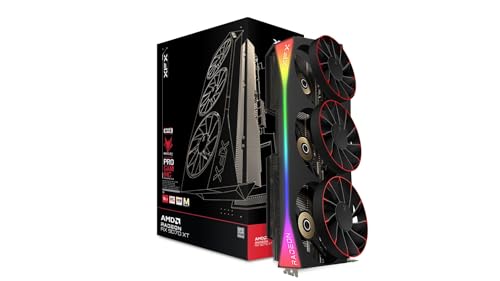 9.0 / 10
XFX Mercury Radeon RX 9070 XT OC Magnetic Air Edition RGB AMD 16 GB GDDR6
£819.99 · XFX · Details
 9.0 / 10
Sapphire NITRO+ AMD RADEON™ RX 9070 GAMING OC 16GB DUAL HDMI/DUAL DP
£968.34 · Sapphire · Details
Frequently asked
7 questions01Is the Gigabyte RTX 5060 Ti GAMING OC 16G good for 1440p gaming?+
Yes, it is one of the stronger choices at 1440p in 2026. The 16GB of GDDR7 prevents VRAM bottlenecks in texture-heavy titles, the Blackwell architecture handles rasterisation efficiently at 180W, and DLSS 4 Quality mode delivers excellent image quality with a meaningful frame rate boost. High-refresh 1440p gaming is the card's primary strength.
02Does the 128-bit memory bus cause problems in everyday gaming?+
At 1440p with DLSS enabled, most users will not notice the bandwidth constraint because DLSS reduces the internal render resolution and Blackwell's memory subsystem includes compression improvements. The limitation becomes more visible at 4K native resolution and in heavily ray-traced workloads where the GPU is pulling large volumes of texture data continuously. For the card's target use case, it is rarely the bottleneck.
03How does DLSS 4 Multi Frame Generation work on the RTX 5060 Ti?+
DLSS 4 Multi Frame Generation uses fifth-generation Tensor Cores, which are exclusive to Blackwell, to generate multiple synthetic frames per rendered frame rather than just one as DLSS 3 did. In supported titles, a base render rate of 60 fps can be presented to your monitor at 120 fps or more with lower latency than traditional frame interpolation. This capability is not available on RTX 40-series cards, which are limited to DLSS 3 Frame Generation.
04What power supply do I need for the Gigabyte RTX 5060 Ti GAMING OC 16G?+
NVIDIA recommends a 650W PSU, and a quality 650W unit from a reputable brand is sufficient for the card alongside a modern CPU. The 180W TGP is modest for this performance tier. A quality unit from brands such as Seasonic, be quiet!, or Corsair will handle the card comfortably including brief transient power spikes. Avoid no-name PSUs regardless of their stated wattage rating.
05Can the RTX 5060 Ti GAMING OC 16G handle 4K gaming?+
With DLSS 4 Quality mode enabled at 4K, which renders internally at approximately 1440p, the card performs well and image quality is good. The 16GB VRAM means you will not hit memory limits at 4K. However, native 4K without upscaling in demanding titles exposes the bandwidth limitations of the 128-bit bus, and frame rates will be lower than a 5070 or higher. If native 4K is your primary goal, the RTX 5070 is a more appropriate choice.
06How does the Gigabyte GAMING OC version compare to a reference RTX 5060 Ti?+
The GAMING OC edition runs a factory overclock of 2647MHz boost compared to the reference specification of 2572MHz, a difference of approximately 75MHz that typically translates to a two to four percent performance improvement in GPU-limited scenarios. The triple-fan WINDFORCE cooler also provides more thermal headroom than a reference design, contributing to better sustained boost behaviour and lower operating temperatures.
07Is this card suitable for streaming and content creation?+
It is a strong choice for anyone who combines gaming with streaming or light creative work. The eighth-generation NVENC encoder supports AV1 encoding, which delivers significantly better quality at lower bitrates than H.264 or H.265. The 16GB of VRAM is also beneficial for video editing applications that cache frames in GPU memory. It is not a dedicated workstation card, but for hybrid gaming and content creation use it performs well above what its gaming-tier positioning might suggest.





