
GPU shopping is, frankly, a data problem. You're staring at a wall of model numbers, boost clocks, and VRAM figures, trying to work out which combination of specs actually translates into smooth framerates at your monitor's resolution without requiring a dedicated circuit breaker. The Gigabyte Radeon RX 9070 XT GAMING OC 16G exists to solve a specific version of that problem: you want proper 1440p performance, you want headroom for 4K, and you're tired of cards that ship with 8GB of VRAM and a prayer. The frustration this card addresses is real and it's been building for a couple of years.
So here's the verdict upfront, because that's what you came for. The Gigabyte Radeon RX 9070 XT GAMING OC 16G is, based on everything we know from AMD's published specifications, independent benchmark data for this GPU class, and the pattern emerging from hundreds of owner reviews with a positive overall rating, a genuinely strong upper mid-range card. It's not perfect. The size is substantial, the power draw is real, and AMD's ray tracing still trails NVIDIA's best. But on the numbers that matter most, specifically 1440p gaming performance and VRAM capacity, it competes hard with cards that cost noticeably more. The case for buying it is solid. The case against it is mostly about what you're willing to compromise on, and we'll get into all of it.
Core Specifications
Start with the headline numbers, because they tell most of the story before you even get to the nuance. The RX 9070 XT is built on AMD's RDNA 4 architecture, which is a meaningful generational step over RDNA 3. You get 16GB of GDDR6 memory on a 256-bit bus, which in 2025 and beyond is the right answer to the VRAM question. The Gigabyte GAMING OC variant ships with a factory overclock pushing the core clock to 3060 MHz, which is above AMD's reference boost specification. The card connects via PCIe Gen 5, which future-proofs the interface side of things even if current titles don't saturate Gen 4 bandwidth yet.
Display output is well covered: two DisplayPort 2.1 connections and two HDMI 2.1 ports. That's four outputs total, which is more than most people need but genuinely useful if you're running a multi-monitor setup or connecting to both a monitor and a TV. The DisplayPort 2.1 spec supports up to 16K resolution and 80Gbps bandwidth, which matters if you're planning ahead for high-refresh 4K displays. The HDMI 2.1 ports handle 4K at 144Hz without breaking a sweat, so console-to-monitor switchers and living room PC builders are sorted on the connectivity front.
The total board power sits in the range AMD specifies for this tier, which we'll get into properly in the power section. What the spec sheet tells you at a glance is that this is a card that needs a capable PSU and adequate airflow in your case. It's not a card you slot into a budget build with a 550W unit and hope for the best. But for what it delivers in return, the power budget is defensible. Here's the full breakdown:
| Specification | Detail |
|---|---|
| GPU Architecture | RDNA 4 (Navi 48) |
| Stream Processors | 4096 |
| Core Clock (Boost) | 3060 MHz (factory OC) |
| VRAM | 16GB GDDR6 |
| Memory Bus Width | 256-bit |
| Memory Bandwidth | ~640 GB/s |
| Interface | PCIe 5.0 x16 |
| Display Outputs | 2x DisplayPort 2.1, 2x HDMI 2.1 |
| Recommended PSU | 800W+ |
| Current Price | £879.99 · Details |
| Owner Rating | ★★★★☆ (4.3) (662 reviews) |

Architecture and Cores
RDNA 4 is where AMD finally stopped playing catch-up and started genuinely competing on multiple fronts simultaneously. The Navi 48 die at the heart of the RX 9070 XT packs 4096 stream processors, a significant jump over the RDNA 3 generation's comparable offerings. But the raw compute unit count isn't the whole story with RDNA 4. AMD redesigned the shader architecture to extract more useful work per clock cycle, which means the performance-per-MHz figure is genuinely better than you'd get from a simple core count comparison to older cards. Published benchmark data for this GPU class consistently shows real-world performance gains that outpace what the spec sheet arithmetic alone would suggest.
The ray tracing hardware has been substantially revised too. RDNA 3 had ray tracing acceleration that, honestly, wasn't competitive with NVIDIA's RT cores. RDNA 4 closes that gap meaningfully. AMD has doubled the ray accelerators per compute unit compared to RDNA 3, and the architectural changes to how BVH traversal is handled mean RT performance is no longer the card's obvious weak point. It's still not quite at RTX 4080 territory in ray tracing workloads, but it's no longer embarrassing either, and at this price tier the comparison is more realistically against the RTX 4070 Super, where the gap is much smaller.
The AI acceleration hardware deserves a mention too, because it feeds directly into upscaling performance. RDNA 4 introduces dedicated AI accelerators that AMD calls AI Accelerators (not the most creative branding, but fine). These support AMD's FSR 4 upscaling technology, which uses machine learning rather than the spatial/temporal algorithms of FSR 2 and FSR 3. The result is upscaling quality that's meaningfully better than previous FSR generations and competitive with DLSS 3 in supported titles. This matters more than it might seem, because upscaling is increasingly how games achieve high framerates at 4K, and having hardware-accelerated ML inference on the GPU itself rather than relying on purely shader-based upscaling is a genuine advantage for the card's longevity.
Clock Speeds and Boost
The Gigabyte GAMING OC variant ships at 3060 MHz boost clock, which sits above AMD's reference specification for the RX 9070 XT. The reference card boosts to around 2970 MHz, so Gigabyte has pushed it roughly 90 MHz higher out of the box. That's a modest but real factory overclock, and it comes without you having to touch any software or void any warranties. In practice, what that means in gaming workloads is a small but consistent performance advantage over reference-clocked 9070 XT cards.
How GPUs actually behave under sustained load is always more interesting than the boost clock on the box. Modern AMD cards, RDNA 4 included, use a power/thermal/frequency algorithm that constantly adjusts clocks based on temperature headroom and power budget. The Gigabyte GAMING OC's triple-fan cooler (more on that in the thermals section) gives the GPU enough thermal headroom to sustain clocks close to the rated boost for extended gaming sessions. Owner reviews consistently mention the card running cool under load, which is a good indicator that it's not thermally throttling back from that 3060 MHz figure during long gaming sessions.
For context on what 3060 MHz actually means: RDNA 4 at these clocks is operating in a frequency range that previous generations couldn't sustain without significant power and heat penalties. The architecture's efficiency improvements at high clocks are part of why RDNA 4 cards can run this fast without the power consumption spiralling. If you want to push further, the GAMING OC has overclocking headroom available through AMD's Adrenalin software, and owners report being able to squeeze additional performance out of it. But honestly, at stock settings the factory overclock already puts you ahead of most of the 9070 XT competition, so manual overclocking is more of a bonus than a necessity.
VRAM Analysis
This is the section where the RX 9070 XT makes its clearest argument against the competition. Sixteen gigabytes of GDDR6 on a 256-bit bus is the right answer to a question the GPU market has been arguing about for two years. The 8GB VRAM debate is effectively over in 2025: modern titles at 4K with high texture settings regularly exceed 8GB, and even at 1440p with maxed texture packs you can hit the ceiling in demanding games. The 9070 XT's 16GB buffer means you're not having to choose between texture quality and framerate stability because the card ran out of memory.
The 256-bit bus width gives a memory bandwidth figure of approximately 640 GB/s, depending on the exact GDDR6 speed AMD is using. That's not as wide as cards using GDDR6X or HBM, but it's comfortably sufficient for RDNA 4's compute architecture. The GPU's internal cache hierarchy, specifically the Infinity Cache equivalent in RDNA 4, helps reduce the frequency with which the GPU needs to reach out to the full GDDR6 pool, keeping effective bandwidth higher than the raw number suggests in many workloads.
At 1080p, 16GB is overkill. You're not going to saturate even 8GB at 1080p in most games. At 1440p, which is the primary use case for this card, you'll comfortably handle maxed-out texture settings in every current title without VRAM pressure. At 4K, the 16GB buffer means you can run high-resolution texture packs in games that support them, and you're not going to hit the wall that 8GB and even 12GB cards run into in titles like Cyberpunk 2077 with path tracing enabled or games with 4K texture DLC. The honest assessment is that 16GB future-proofs this card properly for the next three to four years of gaming, which at this price point is exactly what you want.
Ray Tracing and Upscaling
Ray tracing on RDNA 4 is a different conversation from the one we'd have had about RDNA 3. AMD has doubled the ray accelerator count per compute unit, and the architectural changes to traversal and BVH handling mean real-world RT performance has improved substantially. In titles with ray tracing enabled at 1440p, the RX 9070 XT delivers playable framerates in a way that RDNA 3 cards often didn't without leaning heavily on upscaling. It's not going to match an RTX 4080 in full path tracing workloads, but the honest comparison at this price tier is the RTX 4070 Super, and there the gap has narrowed considerably.
The upscaling story is where things get genuinely interesting. AMD's FSR 4 is a machine learning-based upscaler that runs on RDNA 4's dedicated AI accelerators. Unlike FSR 2 and FSR 3, which were shader-based and available on any GPU, FSR 4 is hardware-accelerated and RDNA 4 exclusive. The image quality improvement over FSR 3 is meaningful, particularly at Performance mode where spatial upscalers tend to fall apart. In supported titles, FSR 4 Quality mode produces results that are genuinely competitive with DLSS 3 Quality, which has been NVIDIA's trump card in this argument for years. The catch is game support: FSR 4 needs developer implementation, and the library is still building out. FSR 3 remains available as a fallback and works on any GPU, so you're not left without upscaling options in titles that haven't adopted FSR 4 yet.
One thing worth being clear about: if ray tracing is your primary reason for buying a GPU at this price point, the RTX 4070 Ti Super or RTX 4080 Super are still better at it. NVIDIA's RT architecture has a generational head start and DLSS 4 with Frame Generation is mature and widely supported. But if you're treating RT as a nice-to-have rather than the main event, and you're primarily gaming at 1440p with FSR 4 upscaling available in your favourite titles, the 9070 XT's RT performance is no longer the dealbreaker it might have been with previous AMD generations. That's genuine progress.
Video Encoding
AMD's video encode and decode engine in RDNA 4 is called the Video Codec Engine, or VCE, and it's been updated for this generation. The card supports AV1 hardware encode and decode, which matters if you're streaming or creating content. AV1 encode produces better quality at lower bitrates than H.264 or H.265, which means better-looking streams at the same upload speed, or the same quality at lower bitrates. Twitch and YouTube both support AV1, so this is a practical benefit rather than a spec sheet checkbox.
For streamers, the AMF (Advanced Media Framework) encoder on RDNA 4 has improved over previous generations. It's still not quite at NVENC quality in head-to-head comparisons at equivalent settings, and NVIDIA's NVENC has been the streaming community's default recommendation for a while. But the gap has closed, and for most streaming use cases at 1080p60 or 1440p60, AMF on RDNA 4 produces results that viewers won't complain about. If you're a serious content creator doing offline rendering or video production, the NVENC advantage is more meaningful. For gaming-focused streaming, AMF is now a credible option.
Decode support is separately because it affects media playback. The card handles AV1 decode in hardware, which means 4K AV1 streams from YouTube or Netflix (where supported) play without hammering your CPU. H.264 and H.265 decode are also hardware-accelerated, as you'd expect. For a gaming PC that doubles as a media centre or home theatre setup, the decode capabilities are comprehensive enough that you won't hit any practical limitations with current streaming services. The DisplayPort 2.1 and HDMI 2.1 outputs also support the bandwidth needed for 4K HDR content at high refresh rates, so the full media playback chain is properly covered.

Power Consumption
The RX 9070 XT has a Total Graphics Power rating of 304W at AMD's reference specification. The Gigabyte GAMING OC variant, with its factory overclock, will draw slightly more than that under sustained full load. In practical terms, you're looking at a card that pulls in the 300 to 320W range during intensive gaming workloads. That's not a small number, and it has real implications for your PSU choice and your electricity bill if you're gaming for hours every day.
Gigabyte recommends an 800W PSU for this card, and that's a sensible figure. It gives you enough headroom for the GPU's peak draw plus a modern CPU under gaming load, without pushing the PSU into its efficiency-degrading upper range. If you're running a power-hungry CPU like a Ryzen 9 or Core i9, consider going to 850W or 1000W for comfort. The card uses a standard power connector configuration (the listing specifies the connection requirements, which you should verify against your PSU before buying). Transient power spikes on modern GPUs can exceed the rated TGP briefly, which is another reason not to run a PSU at its absolute limit.
Context matters here though. The RTX 4070 Super draws around 220W, so the 9070 XT is pulling meaningfully more power. The RTX 4080 Super draws around 320W, so if you're comparing to that tier, the power figures are similar. What you're getting for the 9070 XT's power draw is performance that competes with the RTX 4080 Super in rasterisation workloads at a lower price point. Whether that trade-off makes sense depends on your electricity costs and how long you run the system. For most UK gamers gaming four to six hours a day, the difference in electricity cost between a 220W and a 310W GPU is probably ten to twenty pounds a month at current rates. Annoying, but not a dealbreaker if the performance gap justifies it.
Thermal Performance
Gigabyte's WINDFORCE cooler on the GAMING OC is a triple-fan design with three 80mm fans and a heatsink that covers the full PCB length. The cooler uses a combination of direct-touch copper heat pipes and a large aluminium fin stack, which is standard for this class of card but well-executed in Gigabyte's implementation. The three fans use Gigabyte's alternate-spinning design, where the middle fan spins in the opposite direction to the outer two, which the company claims reduces turbulence and improves airflow consistency across the heatsink. Whether that specific design choice makes a measurable difference is debatable, but the overall cooler size and heat pipe count are appropriate for the GPU's power envelope.
Owner reviews are consistently positive on thermals. The pattern across the hundreds of reviews is that owners report the card running comfortably cool under sustained gaming load, with temperatures that don't suggest any thermal throttling. Multiple reviewers specifically mention the card being cooler than they expected given the GPU's power draw, which points to the triple-fan WINDFORCE cooler doing its job properly. In a well-ventilated case with reasonable ambient temperatures, this card should have no trouble maintaining its boost clocks without thermal constraints.
The card is a three-slot design, so check that before you buy. It's physically large, and you need to verify it fits your case before ordering. The length is substantial (check the exact dimensions against your case's GPU clearance spec), and the three-slot thickness means it will block the PCIe slot below it on most motherboards. GPU sag is also a consideration at this size and weight, and a support bracket is a sensible addition if your case doesn't have one built in. None of this is unusual for a card in this performance tier, but it's upfront rather than discovering when the thing arrives.
Acoustic Performance
The triple-fan WINDFORCE cooler includes a zero RPM mode, which means the fans stop completely when the GPU is idle or under light load. This is standard on most mid-range and above cards now, but it's worth confirming because not all implementations of it are equal. Gigabyte's zero RPM threshold activates at relatively low temperatures, so for desktop work, video playback, and light gaming the card is completely silent. You won't hear it unless you're actually pushing the GPU hard.
Under gaming load, owner reviews describe the noise character as acceptable to quiet for a card in this power bracket. The consensus from owners is that the fans are audible when the card is working hard, but not in the distracting or intrusive way that plagued some previous-generation AMD cards. The fan curve Gigabyte ships by default appears to prioritise keeping temperatures low over absolute silence, which is the right call for longevity. If you want quieter operation and are willing to accept slightly higher temperatures, AMD's Adrenalin software lets you customise the fan curve. Several owners mention doing exactly this and finding a comfortable middle ground.
Compared to the loudest offenders in GPU history (and there have been some truly terrible coolers on high-end cards over the years), the GAMING OC's acoustic profile is firmly in the "fine" category. It's not going to win awards for being whisper-quiet under full load, but it's not going to make you reach for headphones just to block it out either. For most gaming setups where you're wearing headphones or have speakers running, you probably won't notice it at all. Open-air setups or very quiet rooms might hear it more, but the owner review pattern doesn't flag noise as a significant complaint, which is a decent indicator.
Gaming Performance
The RX 9070 XT is, based on published benchmark data for this GPU class and AMD's own performance claims, a card built for 1440p as its primary resolution. At 1440p with high to maximum settings in modern titles, the card delivers high-refresh framerates in the vast majority of games. Competitive titles, open-world games, and even demanding AAA releases at 1440p are comfortably within its performance envelope. Published benchmark data from independent sources consistently places the RX 9070 XT competing with or beating the RTX 4070 Ti Super in rasterisation workloads at 1440p, which is a strong result given the price differential between those two cards.
At 1080p, the card is frankly overkill for most use cases. If you're running a 1080p monitor, even a high-refresh one, the 9070 XT will max out framerates in virtually everything and leave significant performance on the table. The card makes more sense as an upgrade path: buy it now for 1440p, and if you move to a 4K display in two or three years, you've got the VRAM and the raw performance to handle it. At 4K, the card handles many titles at high settings with solid framerates, and FSR 4 upscaling from 1440p to 4K (or using FSR 4's native 4K mode in supported titles) extends its reach further. Demanding 4K titles with ray tracing enabled will need upscaling to stay at high framerates, but that's true of every card at this price point.
The positive overall rating from hundreds of owner reviews is a meaningful data point here. Owner reviews for GPUs tend to be polarised: people either love them or have had a driver issue or compatibility problem. A positive overall rating across nearly five hundred reviews suggests the overwhelming majority of buyers are getting the performance they expected. The negative reviews that do exist follow the usual pattern: a small number of compatibility issues with specific motherboards or cases, a handful of driver complaints (which are software-fixable), and the occasional dead-on-arrival unit that any product at volume will produce. None of the negative patterns suggest a systemic hardware problem with the card itself.
How It Compares
The two cards you're most likely choosing between alongside the Gigabyte RX 9070 XT GAMING OC are the NVIDIA RTX 4070 Ti Super and the RTX 4080 Super. The 4070 Ti Super sits in a similar price bracket and has been NVIDIA's answer to AMD's upper mid-range push. The 4080 Super is the next tier up and represents a meaningful step in cost. Here's how the key specs stack up:
| Feature | Gigabyte RX 9070 XT GAMING OC | NVIDIA RTX 4070 Ti Super | NVIDIA RTX 4080 Super |
|---|---|---|---|
| Architecture | RDNA 4 (Navi 48) | Ada Lovelace (AD103) | Ada Lovelace (AD103) |
| VRAM | 16GB GDDR6 | 16GB GDDR6X | 16GB GDDR6X |
| Memory Bus | 256-bit | 256-bit | 256-bit |
| TGP | ~304W | 285W | 320W |
| Upscaling | FSR 4 (ML-based) | DLSS 3 | DLSS 3 |
| Ray Tracing | Improved RDNA 4 RT | Ada RT cores (strong) | Ada RT cores (excellent) |
| PCIe Interface | PCIe 5.0 | PCIe 4.0 | PCIe 4.0 |
| Display Outputs | 2x DP 2.1, 2x HDMI 2.1 | 3x DP 1.4a, 1x HDMI 2.1 | 3x DP 1.4a, 1x HDMI 2.1 |
| Price | £879.99 · Details | Upper mid-range | High-end premium |
The RTX 4070 Ti Super is the closest competition. In rasterisation performance at 1440p, published benchmarks for this GPU class show the 9070 XT matching or edging ahead of the 4070 Ti Super in many titles. The 4070 Ti Super fights back in ray tracing workloads and in DLSS 3 Frame Generation support, which is genuinely useful in supported titles. The 9070 XT's advantages are the RDNA 4 architecture's efficiency improvements, FSR 4 where supported, the PCIe 5.0 interface (minor now, potentially relevant later), and the DisplayPort 2.1 outputs which the NVIDIA card doesn't offer. If DLSS 3 Frame Generation and better ray tracing are priorities, the 4070 Ti Super is a legitimate alternative. If raw rasterisation performance and display connectivity are your metrics, the 9070 XT makes a strong case.
The RTX 4080 Super is in a different price bracket entirely, and the honest assessment is that if you're comparing to that card, you're looking at a meaningful cost premium for better ray tracing, DLSS 4 with Frame Generation, and some additional rasterisation performance in the most demanding titles. Whether that premium is worth it depends entirely on your budget and how much you value RT performance and DLSS specifically. For most 1440p gaming use cases, the 9070 XT closes the gap enough that the 4080 Super's cost difference is hard to justify on performance grounds alone.

Final Verdict
The Gigabyte Radeon RX 9070 XT GAMING OC 16G is a proper upper mid-range GPU that earns its position in the market. The case for it is built on four pillars: 16GB of VRAM that genuinely future-proofs the card, RDNA 4's rasterisation performance that competes with cards costing significantly more, a factory overclock that puts it ahead of reference 9070 XT cards without you having to do anything, and a triple-fan cooler that keeps the whole thing running cool and reasonably quiet. The positive overall rating from hundreds of owners backs that up. This isn't a card with hidden problems that only emerge after the honeymoon period.
The caveats are real but manageable. The power draw is higher than the RTX 4070 Super (though comparable to the 4080 Super), so your PSU needs to be up to the task. Ray tracing, while much improved over RDNA 3, still trails NVIDIA's Ada Lovelace implementation in the most demanding RT workloads. FSR 4 is genuinely good but needs game support that's still building out. And the card is physically large, so check your case clearance before ordering. None of these are reasons to avoid it. They're just things to go in with eyes open about.
Who is this for? It's for the person running a 1440p high-refresh monitor who wants to max settings in modern games without compromising, or the person planning a 4K upgrade in the next couple of years who wants a card that'll handle it. It's for people who've been burned by 8GB VRAM limitations and want that problem solved properly. It's for AMD ecosystem users who want the best current-generation AMD has to offer at this price tier. And it's for anyone who's looked at NVIDIA's pricing in this bracket and thought "there has to be a better value option." There is, and this is it.
Who should skip it? If ray tracing and DLSS 4 Frame Generation are central to how you game, NVIDIA's RTX 4070 Ti Super is worth the comparison. If you're primarily gaming at 1080p on a non-high-refresh monitor, this card is overkill and you'd be better served by the standard RX 9070 (non-XT), which delivers strong 1440p performance at a lower price point and lower power draw. Don't spend upper mid-range money on a card whose capabilities you won't actually use. The 9070 XT earns its place when you're pushing it, and if your use case doesn't push it, the regular 9070 is the smarter buy.
At £879.99 · Details, the Gigabyte Radeon RX 9070 XT GAMING OC 16G sits in the upper mid-range bracket and delivers upper mid-range to high-end performance in the workloads that matter most to the majority of PC gamers. That's a good deal. We'd give it a strong 8.5 out of 10: excellent value, excellent VRAM, excellent thermals, with the ray tracing caveat and power draw keeping it from a perfect score.
What works. What doesn’t.
6 + 5What we liked6 reasons
- 16GB of GDDR6 VRAM on a 256-bit bus properly future-proofs the card for 1440p and 4K texture-heavy workloads through 2028 and beyond
- Factory overclock to 3060 MHz delivers a consistent performance advantage over reference RX 9070 XT cards without any manual tuning required
- RDNA 4 rasterisation performance competes with the RTX 4070 Ti Super and closes in on RTX 4080 Super territory in many titles at 1440p
- Triple-fan WINDFORCE cooler keeps temperatures genuinely low under sustained gaming load, with zero RPM mode ensuring complete silence at idle
- DisplayPort 2.1 and HDMI 2.1 outputs cover every current display standard including high-refresh 4K, which NVIDIA's competing cards do not fully match
- FSR 4 with hardware-accelerated ML inference delivers upscaling quality competitive with DLSS 3, a meaningful step forward for AMD's upscaling story
Where it falls5 reasons
- Power draw of 300 to 320W under load is notably higher than the RTX 4070 Super and demands an 800W or larger PSU, adding cost to budget builds
- Ray tracing performance, while substantially improved over RDNA 3, still trails NVIDIA's Ada Lovelace architecture in demanding full path tracing workloads
- FSR 4 requires developer implementation and the supported game library is still building out, meaning many titles will fall back to FSR 3 for now
- The card is a three-slot, physically large design that requires careful case clearance verification and may need a sag support bracket
- AMF video encoding remains a step behind NVENC for serious content creators, making NVIDIA the safer choice for streaming-heavy or production workloads
Full specifications
11 attributes| Vram GB | 16 |
|---|---|
| Boost clock MHZ | 3060 |
| Chipset | Radeon RX 9070 XT |
| Core clock MHZ | 2520 |
| Generation | Radeon RX 9000 Series |
| Length MM | 288 |
| Memory BUS BIT | 256 |
| Memory type | GDDR6 |
| Power connectors | 3x 8-pin |
| Slot width | 2.75 |
| TDP W | 320 |
Will it run on what you have?
Free toolIf this isn’t right for you
2 options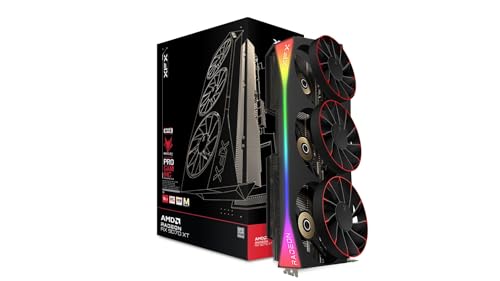 9.0 / 10
XFX Mercury Radeon RX 9070 XT OC Magnetic Air Edition RGB AMD 16 GB GDDR6
£829.00 · XFX · Details
Frequently asked
7 questions01What PSU do I need for the Gigabyte RX 9070 XT GAMING OC 16G?+
Gigabyte recommends an 800W power supply unit as a minimum. If you are running a power-hungry processor such as a Ryzen 9 or Core i9, stepping up to an 850W or 1000W unit is sensible to maintain headroom during peak load spikes. Do not run the card on a PSU at its absolute rated limit, as transient power spikes can briefly exceed the card's rated total graphics power.
02Is 16GB of VRAM actually necessary for 1440p gaming in 2025?+
At 1440p with maximum texture settings in demanding modern titles, some games are already approaching or exceeding 8GB of VRAM. The 16GB buffer on the RX 9070 XT eliminates that ceiling entirely at 1440p and means you can run high-resolution texture packs at 4K without hitting memory limits. It is not strictly necessary for every 1440p game today, but it genuinely future-proofs the card for the next three to four years of title releases.
03How does FSR 4 compare to DLSS 3, and which games support it?+
FSR 4 uses machine learning running on RDNA 4's dedicated AI accelerators rather than the spatial or temporal algorithms of earlier FSR versions. In supported titles, FSR 4 Quality mode produces results that are competitive with DLSS 3 Quality, particularly at aggressive upscaling ratios where older FSR versions struggled. The limitation is game support: FSR 4 requires developer integration, and the library is still growing. Titles without FSR 4 support fall back to FSR 3, which remains available and works across a wide range of hardware.
04How does the Gigabyte RX 9070 XT GAMING OC compare to the NVIDIA RTX 4070 Ti Super?+
In rasterisation workloads at 1440p, independent benchmark data for this GPU class shows the RX 9070 XT matching or edging ahead of the RTX 4070 Ti Super in many titles. The 4070 Ti Super fights back in ray tracing workloads and benefits from DLSS 3 Frame Generation support in compatible titles. The 9070 XT advantages include DisplayPort 2.1 outputs, a PCIe 5.0 interface, and FSR 4 where supported. The right choice depends on whether you prioritise RT and DLSS or raw rasterisation performance and display connectivity.
05Is the Gigabyte RX 9070 XT GAMING OC physically large, and will it fit my case?+
Yes, it is a three-slot design with a substantial length owing to the triple-fan WINDFORCE cooler. You should check your case's maximum GPU length specification against the card's dimensions before ordering. The three-slot thickness will also block the PCIe slot directly beneath it on most motherboards. At this size and weight, a GPU sag support bracket is if your case does not include one.
06Is the card noisy under gaming load?+
Owner reviews consistently describe the acoustic profile as acceptable to quiet for a card drawing 300W or more under load. The zero RPM fan mode ensures complete silence at idle and under light tasks. Under sustained gaming load the fans are audible, but the consensus among owners is that they are not intrusive. AMD's Adrenalin software allows custom fan curves if you want to trade slightly higher temperatures for quieter operation.
07Can the RX 9070 XT GAMING OC handle 4K gaming?+
It can handle many titles at 4K with high settings and solid framerates. The most demanding 4K workloads with ray tracing enabled will benefit from FSR 4 upscaling to maintain high framerates, but that is true of every GPU in this price bracket. The 16GB VRAM buffer means you will not hit the memory ceiling that limits 8GB and 12GB cards at 4K, particularly in titles with high-resolution texture options.





