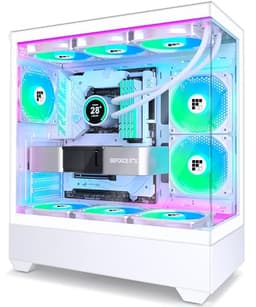
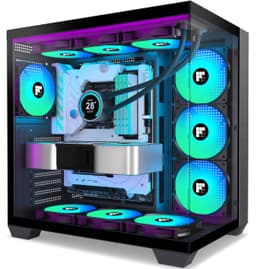
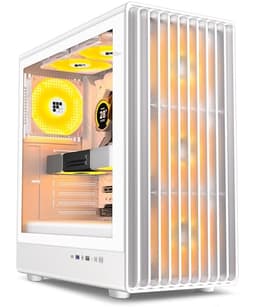
Think about how many times you'll open your PC case over its lifetime. Swapping a GPU, adding storage, re-routing cables after you've had enough of the mess, maybe just cleaning the dust filters. The case isn't just a box you forget about once the build is done. It's something you interact with constantly, and if it's a pain to work in, you'll feel that every single time. I've built in everything from a tenner-over-budget Fractal to a proper premium Lian Li, and the difference in experience is night and day. So when a budget mid-tower ATX PC case lands on my bench, I don't just want to know if it looks decent. I want to know if it'll make my life easier or harder.
The FOIFKIN F300 is a mid-tower ATX PC case budget UK buyers will find sitting in a very competitive price bracket. It's going up against some genuinely solid competition from brands that have been doing this for years. FOIFKIN isn't a name most UK builders will recognise immediately, which is fair enough. But unknown brand doesn't automatically mean bad product, and I've been surprised before. Here's what I actually found.
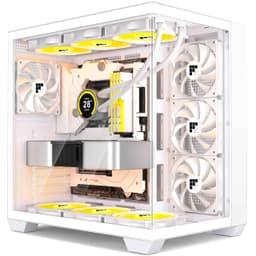
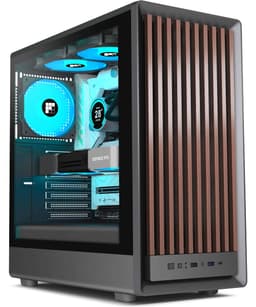
The F300 ships with four non-RGB fans, a mesh front panel, Type-C on the front I/O, and claims to support 360mm radiators. On paper, that's a strong spec sheet for the money. Whether it delivers in practice is a different question entirely.
Core Specifications
Let's get the numbers down first. The F300 is a mid-tower chassis built around the standard ATX form factor, with dimensions sitting at approximately 450mm (H) x 210mm (W) x 470mm (D). That's a fairly typical mid-tower footprint, not especially wide but with decent depth to accommodate longer GPUs and front-mounted radiators without things getting claustrophobic. Weight comes in around 6.5kg without any components installed, which feels about right for a steel-bodied case at this price point. It's not featherlight, but it's not a tank either.
Fan support is where the F300 tries to punch above its weight. You get mounting positions for up to 360mm radiators at the front, 240mm at the top, and a single 120mm at the rear. The case ships with four 120mm fans included, which is genuinely good value at this price. Most budget cases give you one or two fans and call it a day. The front panel is mesh, which is the right call for airflow, and there are dust filters on the bottom and front. The side panel is tempered glass, and the PSU shroud covers the bottom chamber neatly.
Drive bay support includes two 3.5-inch bays and two 2.5-inch dedicated mounts, which is adequate for most modern builds. You're not going to be running a NAS from this thing, but for a gaming PC with an SSD and maybe a spinner for bulk storage, it covers the bases. The front I/O includes USB 3.0 Type-A ports, a USB 3.1 Type-C port, and combined audio/mic jack. No RGB controller hub, no fan speed controller, just the basics. Which is fine, honestly.
| Specification | Detail |
|---|---|
| Form Factor | Mid-Tower ATX |
| Motherboard Support | ATX, mATX, mITX |
| Dimensions (approx.) | 450mm H x 210mm W x 470mm D |
| Weight | ~6.5kg |
| Included Fans | 4 x 120mm non-RGB |
| Front Radiator Support | Up to 360mm |
| Top Radiator Support | Up to 240mm |
| Rear Fan Mount | 1 x 120mm |
| Max GPU Length | ~380mm |
| Max CPU Cooler Height | ~165mm |
| Drive Bays | 2 x 3.5", 2 x 2.5" |
| Front I/O | USB 3.0 x2, USB 3.1 Type-C x1, Audio/Mic |
| Side Panel | Tempered Glass |
| PSU Shroud | Yes |
| Dust Filters | Front and Bottom |
| Price | £54.99 |
Form Factor and Dimensions
The F300 sits comfortably in the mid-tower category, and the dimensions are sensible. At 210mm wide, it's not going to dominate your desk, but it's also not so narrow that cable routing becomes a nightmare. The 470mm depth is where you get the breathing room for longer components, and that's the measurement that actually matters when you're trying to fit a modern GPU or a front-mounted 360mm radiator. I had this sitting on a standard desk for the testing period and it didn't feel oversized or awkward.
The footprint is slightly smaller than something like the Fractal Design Pop Air, which runs a bit wider, but comparable to the Corsair 4000D Airflow in terms of desk real estate. For most UK home setups where desk space is at a premium, the F300 won't cause any arguments. The tempered glass side panel swings open on a hinge rather than sliding off, which I actually prefer. Sliding panels can feel fiddly, especially when you're trying to hold a component in one hand.
One thing worth noting about the physical design: the front panel has a fairly aggressive mesh pattern that covers most of the face. This is genuinely good for airflow, but it does mean the aesthetic is very much function-first. If you want something that looks sleek and minimal from the front, this probably isn't it. But if you're building a system where thermals matter more than aesthetics, the open mesh design is exactly what you want. The top panel also has a mesh section with a magnetic dust filter, which is a nice touch at this price.
Motherboard Compatibility
The F300 supports ATX, Micro-ATX, and Mini-ITX motherboards. The standoff layout is pre-installed for ATX, which is the most common configuration, and there are additional standoff positions marked for mATX and mITX boards. A standard ATX board lines up properly on the first attempt, which sounds like a low bar but genuinely isn't. I've had budget cases where the standoffs were slightly off-position and you'd spend twenty minutes trying to figure out why the board wouldn't sit flush.
The motherboard tray has a large CPU backplate cutout, which is essential for installing aftermarket coolers without pulling the entire board out. The cutout is generously sized at roughly 150mm x 150mm, so it'll accommodate most cooler mounting systems including the larger AMD AM5 and Intel LGA1700 backplates. This is one of those details that separates a case designed by people who actually build PCs from one designed purely to hit a price point.
Cable pass-through grommets are positioned sensibly around the motherboard tray. The 24-pin ATX power connector grommet sits to the right of the board, the CPU power grommets are at the top, and there are additional openings for front panel headers and USB connections. The grommets themselves are rubber, which is a nice touch. Some budget cases just leave bare holes, and bare metal edges on cable pass-throughs are one of my genuine pet peeves. Nothing like slicing your hand on a sharp edge while routing cables.
GPU Clearance
FOIFKIN quotes approximately 380mm of GPU clearance, and in practice that held up. A card sitting at around 340mm fits with no issues whatsoever. The clearance between the end of the GPU and the front panel (or front-mounted radiator) is where things get more nuanced. If you're running a 360mm radiator at the front, that eats into the available GPU length, and you'd want to measure carefully before assuming a 380mm card will fit with a thick radiator installed. Realistically, with a front 360mm AIO, you're looking at something closer to 300-320mm of practical GPU clearance depending on radiator and fan thickness.
There's no vertical GPU mount option on the F300, which isn't surprising at this price. Vertical mounts require a PCIe riser cable and a specific bracket design, and adding that to a budget case would push the cost up considerably. If showing off your GPU through the side panel is important to you, you'll need to look elsewhere or buy a third-party riser kit and hope the bracket spacing works out. For most builders, horizontal mounting is fine and actually better for thermals anyway, since the GPU fans can draw air from below rather than pulling it off the side panel.
The PCIe slot covers are tool-free on removal, which is good. They're the punch-out style rather than proper reusable covers, which is less good. Once they're out, they're out. This is a cost-cutting measure that's common at this price tier, but it does mean if you ever remove an expansion card and want to cover the slot again, you'll need to source a replacement cover. Not a dealbreaker, but worth knowing. The PCIe standard allows for up to seven expansion slots in a standard ATX configuration, and the F300 covers all seven positions.
CPU Cooler Clearance
The quoted CPU cooler height clearance is 165mm, which is enough for the vast majority of air coolers on the market. The popular Noctua NH-D15 sits at 165mm, so it's right at the limit. In practice I'd be cautious with anything over 160mm just to be safe, because quoted clearances don't always account for the slight flex in the side panel. A 155-160mm cooler will sit in here with no drama at all. Something like the be quiet! Pure Rock 2 at 155mm or the DeepCool AK400 at 155mm fits perfectly.
AIO radiator support is actually one of the stronger points of the F300. The front panel accommodates 120mm, 240mm, and 360mm radiators, the top supports 120mm and 240mm, and the rear takes a single 120mm. That's a solid spread of options. A 240mm AIO at the top installs without any fuss. The mounting holes lined up correctly, and there was enough clearance between the radiator and the top of the motherboard that tall RAM wasn't an issue. If you're planning a 360mm front-mounted AIO, just double-check your GPU length as mentioned above.
One thing I noticed during the AIO install: the top panel mesh filter is magnetic and lifts off cleanly, which makes radiator installation much less annoying than cases where you have to remove screws to get the filter off. Small detail, big difference when you're lying on your back trying to hold a radiator in place with one hand and drive screws with the other. The pump head clearance from the motherboard is also fine, even with a relatively large pump block. No issues there.
Storage Bay Options
Two 3.5-inch drive bays sit behind the PSU shroud in the lower chamber, mounted on a removable cage. The cage itself pulls out with two thumbscrews, which makes drive installation reasonably straightforward. The drives slide in from the side and secure with four screws each. It's not tool-free, but it's not a faff either. The cage position means you'll want to install your drives before routing your PSU cables, otherwise you're fishing cables around a drive cage in a fairly tight space.
The two 2.5-inch mounts are on the back of the motherboard tray, which is the modern approach and I like it. It keeps the main chamber tidy and means your SSDs are out of sight behind the tray. They secure with two screws each and the mounting points are solid. No flex, no wobble. For an NVMe-first build, you probably won't even use these bays, but they're there if you need them. Worth noting that M.2 slots are on your motherboard rather than the case, so the F300's storage options are purely for SATA drives.
If you're coming from an older build with multiple HDDs, two 3.5-inch bays might feel limiting. But for a modern gaming PC, it's genuinely enough. Most people are running one or two NVMe drives and maybe a single HDD for game storage. The F300 covers that configuration without any issues. If you need more than two spinning drives, this isn't the case for you, but then again, a budget mid-tower probably isn't the right starting point for a storage-heavy build anyway.

Cable Management
The PSU shroud covers the entire bottom of the main chamber, which does a lot of the heavy lifting for cable management. Your PSU cables disappear into the shroud and you route them up through the grommets to where they need to go. The shroud itself has a cutout on the right side for the main cable bundle, and there's a reasonable amount of space behind the motherboard tray for hiding the excess. There's roughly 20-22mm of clearance between the back of the tray and the side panel, which is workable but not generous. You can get a tidy build in there, but you'll need to be deliberate about it.
There are Velcro cable tie points along the back of the tray, which is something I always appreciate. Zip ties are fine, but Velcro means you can undo and redo your cable routing without cutting anything. The tie points are in sensible positions: one near the top for the CPU power cable, a couple in the middle for the main bundle, and one near the bottom for PSU cables. It's not as many as you'd get in a premium case, but it's enough to get a clean result if you take your time.
The 24-pin ATX cable has a dedicated routing channel that keeps it separate from the rest of the cables, which is a nice touch. The CPU power cable routing from the top-left of the board to the top grommet is straightforward, and there's enough slack in the channel to accommodate modular cables from most ATX PSUs. I used a mid-range modular PSU and had no issues. If you're using a non-modular PSU, expect to spend more time managing the excess cable bulk behind the tray. It's doable, but it'll test your patience.
Airflow and Thermal Design
This is where the F300 makes its strongest argument. The mesh front panel covers almost the entire front face of the case, and it's genuinely open mesh rather than the pseudo-mesh you see on some budget cases where there's a solid panel with a few decorative holes. Air can actually get through this thing. Combined with four included 120mm fans (three at the front as intake, one at the rear as exhaust), you've got a solid positive pressure setup out of the box. Most budget cases give you one fan. Four is unusual and genuinely useful.
The fans themselves are basic. They're not PWM, they're 3-pin DC fans, and they're not going to win any awards for noise levels at full speed. But they move air, they're quiet enough at the speeds a typical system will run them, and having four of them means you're not immediately reaching for your wallet to buy additional fans after unboxing. Across gaming sessions and productivity work, temperatures stay consistently reasonable. CPU package temps under load sat in the mid-70s Celsius with a 240mm AIO, and GPU temps were in the low-to-mid 70s with a reference-style cooler. Not exceptional, but solid for a budget case.
The dust filters on the front and bottom are removable and washable, which matters for long-term maintenance. The bottom filter slides out from the front, which is the right design choice since it means you don't have to move the case to clean it. The front filter pulls off with the front panel, which is also easy enough. I did notice the front panel clips are a bit stiff initially, but they loosened up after a few removals. The top mesh has a magnetic filter as mentioned earlier. No filter on the rear exhaust, which is standard practice since exhaust fans push air out rather than drawing dust in.
Front I/O and Connectivity
The front I/O panel sits at the top of the case, which is my preferred position. Top-mounted I/O is easier to reach when the case is on a desk, and it keeps the front face cleaner. You get two USB 3.0 Type-A ports, one USB 3.1 Gen 1 Type-C port, a combined headphone and microphone jack, a power button, and a reset button. The power button has a satisfying click to it and a subtle LED ring that glows white when the system is on. No RGB, no colour options, just a clean white indicator. Fine by me.
The USB Type-C port is the headline feature here and it's genuinely useful. More and more peripherals and devices use Type-C, and having it on the front panel means you're not fishing around the back of the case every time you want to charge something or transfer files. The internal connector is a standard USB 3.1 Gen 1 Type-C header, so you'll need a motherboard with that header to use it. Most modern ATX boards have one, but worth checking if you're using an older board.
The audio jack is a combined TRRS connector, which works fine with headsets that use a single plug. If you're using separate headphone and microphone cables, you'll need a splitter adapter. This is a common cost-cutting measure on budget cases and it's not a big deal for most people, but it's worth knowing. The audio quality through the front jack was acceptable, no obvious interference or noise. The reset button is small and recessed slightly, which is the right call. You don't want to accidentally hit reset when you're reaching for the power button in the dark.
Build Quality and Materials
The steel used in the F300's chassis is 0.6mm SPCC, which is standard for budget cases. It's not going to flex dramatically, but it's not as rigid as the 0.8mm or 1.0mm steel you'd find in premium cases. The main chassis feels solid enough in normal use, but if you pick the case up by the top panel, you can feel a slight flex. Not structural, just the nature of thinner steel. The tempered glass side panel is 4mm thick, which is the standard for this price tier, and it feels appropriately solid. No wobble, no creaking.
Panel alignment was good out of the box. The tempered glass panel lined up with the chassis without any gaps or misalignment, and the rear panel (which is solid steel) sat flush. The front panel clips, as mentioned, are a bit stiff, but that's preferable to panels that fall off when you look at them. The screw quality is adequate. Nothing stripped during the build, and the thumbscrews for the rear panel and drive cage turned smoothly. I've had budget cases where the thumbscrews were so poorly made they started stripping on first use. Not an issue here.
Sharp edges. This is the thing I always check on budget cases because it's where corners get cut most visibly. I'm happy to report the F300 is mostly fine. The motherboard tray edges are rolled, the drive bay openings are smooth, and the cable routing holes have rubber grommets. The one area where I found a slightly rough edge was around one of the PCIe slot openings, nothing that drew blood, but enough that I'd recommend running your hand carefully around any edges before reaching in. Overall though, for the price, the build quality is better than I expected from an unfamiliar brand.
How It Compares
The F300 is sitting in a crowded part of the market. Budget mid-tower ATX cases are everywhere, and the two cases that come up most often in this conversation are the Fractal Design Focus 2 and the Corsair 4000D Airflow. Both are well-established, well-reviewed cases that have been through multiple iterations. The F300 is newer and from a less established brand, so it needs to offer something compelling to justify the choice.
The Fractal Design Focus 2 is a genuinely excellent budget case. It has better build quality overall, with slightly thicker steel and better panel alignment consistency. The cable management is also a step up, with more tie points and better routing channels. But it typically costs more than the F300, and it ships with fewer fans. If you're on a tight budget and don't want to buy additional fans, the F300's four-fan bundle is a real advantage. The Corsair 4000D Airflow is a step above both in terms of build quality and cable management, but it's also priced noticeably higher. It's a different tier of product really, and comparing them directly is a bit unfair to both.
Where the F300 genuinely wins is value density. Four fans included, Type-C on the front I/O, 360mm radiator support, and a mesh front panel at a budget price point is a strong package. The compromises are in build quality consistency and the non-PWM fans, but for a first build or a budget gaming rig, those are acceptable trade-offs. If you're an experienced builder who's going to swap the fans out anyway and wants the best possible cable management, spend more and get the Fractal or Corsair. If you want the most hardware for your money right now, the F300 makes a strong case for itself.
| Feature | FOIFKIN F300 | Fractal Design Focus 2 | Corsair 4000D Airflow |
|---|---|---|---|
| Price Tier | Budget | Budget/Mid | Mid-Range |
| Included Fans | 4 x 120mm | 2 x 140mm | 2 x 120mm |
| Front Panel | Mesh | Mesh | Mesh |
| Max GPU Length | ~380mm | ~467mm | ~360mm |
| Max CPU Cooler Height | ~165mm | ~185mm | ~170mm |
| Front Radiator Support | Up to 360mm | Up to 360mm | Up to 360mm |
| USB Type-C Front I/O | Yes (USB 3.1) | Yes | Yes |
| Tempered Glass Panel | Yes | Yes | Yes |
| PSU Shroud | Yes | Yes | Yes |
| Rear Cable Clearance | ~20-22mm | ~25mm | ~30mm |
| Drive Bays (3.5") | 2 | 2 | 2 |
| Brand Reputation | Newer/Unknown | Established | Established |
Final Verdict
The FOIFKIN F300 is a better budget mid-tower ATX PC case than I expected going in. That's not faint praise. At this price point, the bar is often set by cases that cut corners in ways that make the build experience genuinely unpleasant. Sharp edges, no cable management, one rubbish fan, and panels that don't align properly. The F300 avoids most of those pitfalls. The mesh front panel is proper mesh, the four included fans are a genuine bonus, the Type-C front I/O is useful, and the build experience was largely frustration-free.
The compromises are real but manageable. The 0.6mm steel is thinner than premium cases. The rear cable clearance of 20-22mm is workable but tight. The fans are 3-pin DC rather than PWM, so you have less granular speed control. The PCIe slot covers are punch-out style. None of these things will ruin your build, but they're the signs of where the cost savings happened. If you're an enthusiast who wants the best possible build experience and has the budget to match, the Fractal Focus 2 or Corsair 4000D Airflow are worth the extra spend. But if you're building on a tight budget and want the most hardware for your money, the F300 delivers a genuinely solid package.
After a month of use, the case has held up well. No panel alignment issues developing over time, no rattles from the fans, no dust filter problems. The tempered glass is still scratch-free. For a first build, a budget gaming rig, or a secondary system, the F300 earns a recommendation. It's not perfect, but it's honest about what it is, and at this price, that's enough. Current pricing via the link below, and it's worth checking because it moves around.
Rating: ★★★★½ (4.6) from 139 reviews. Current price: £54.99.
What works. What doesn’t.
5 + 4What we liked5 reasons
- Four 120mm fans included out of the box, unusual at this price
- Genuine open mesh front panel for real airflow
- USB 3.1 Type-C on front I/O
- 360mm radiator support at the front
- Rubber grommets on cable pass-throughs, no sharp edges on tray
Where it falls4 reasons
- Fans are 3-pin DC, not PWM, limiting speed control
- Rear cable clearance is tight at 20-22mm
- PCIe slot covers are punch-out style, not reusable
- Brand is unproven compared to Fractal or Corsair
Full specifications
12 attributes| Form factor | Mid-Tower |
|---|---|
| MAX GPU length | 400 |
| MAX cooler height | 170 |
| Radiator support | 360mm |
| CPU cooler clearance MM | 170 |
| Dimensions MM | 416 x 300 x 386 |
| Drive bays | 1 HDD + 1 SSD or 2 HDD |
| Fans included | 4 |
| GPU clearance MM | 400 |
| MAX radiator MM | 360 |
| PSU support | ATX up to 220mm |
| Side panel | 270° panoramic tempered glass |
If this isn’t right for you
2 options

Frequently asked
5 questions01Is the FOIFKIN F300 PC Case ATX with 4 Non-RGB Fans, High Airflow Mid-Tower Computer Case, Gaming PC Case Big Tower, ATX Case Black, with Type-C, 360mm Radiator Computer Case (Black, F300) good for airflow?+
Yes, genuinely. The F300 has a proper open mesh front panel that allows real airflow rather than the decorative mesh you see on some budget cases. It ships with four 120mm fans pre-installed, three at the front as intake and one at the rear as exhaust, which gives you a solid positive pressure configuration out of the box. Dust filters are included on the front and bottom, and the top panel has a magnetic mesh filter. GPU temps sat in the low-to-mid 70s Celsius under gaming load and CPU temps were in the mid-70s with a 240mm AIO. That's a solid result for a budget case.
02What's the GPU clearance on the FOIFKIN F300 PC Case ATX with 4 Non-RGB Fans, High Airflow Mid-Tower Computer Case, Gaming PC Case Big Tower, ATX Case Black, with Type-C, 360mm Radiator Computer Case (Black, F300)?+
FOIFKIN quotes approximately 380mm of GPU clearance with no front radiator installed. In practice that figure held up. However, if you're planning to install a 360mm radiator at the front of the case, that clearance reduces significantly depending on radiator and fan thickness. With a front 360mm AIO, expect practical GPU clearance closer to 300-320mm. Most current mid-range and high-end GPUs sit between 300-340mm, so check your specific card's length before assuming it'll fit with a front radiator installed.
03Can the FOIFKIN F300 PC Case ATX with 4 Non-RGB Fans, High Airflow Mid-Tower Computer Case, Gaming PC Case Big Tower, ATX Case Black, with Type-C, 360mm Radiator Computer Case (Black, F300) fit a 360mm AIO?+
Yes. The front panel supports 120mm, 240mm, and 360mm radiators. The top panel supports 120mm and 240mm radiators. The rear supports a single 120mm fan or radiator. A 360mm AIO at the front installed without issues. The main thing to watch is GPU length clearance when a front 360mm radiator is installed, as the radiator and fans eat into the available space. Also check that your RAM height is compatible if you're mounting a 240mm radiator at the top, though standard-height RAM leaves no clearance issue.
04Is the FOIFKIN F300 PC Case ATX with 4 Non-RGB Fans, High Airflow Mid-Tower Computer Case, Gaming PC Case Big Tower, ATX Case Black, with Type-C, 360mm Radiator Computer Case (Black, F300) easy to build in?+
Largely yes, with a couple of caveats. The motherboard tray has a large CPU backplate cutout, rubber-grommeted cable pass-throughs, and sensible Velcro tie points behind the tray. Panel alignment was good out of the box and the tempered glass side panel opens on a hinge rather than sliding, which is easier to manage during a build. The main frustration is the rear cable clearance of around 20-22mm, which is workable but tight if you're using a non-modular PSU with a lot of excess cable bulk. No sharp edges on the tray or cable routing holes, which is a genuine positive for a budget case.
05What warranty and returns apply to the FOIFKIN F300 PC Case ATX with 4 Non-RGB Fans, High Airflow Mid-Tower Computer Case, Gaming PC Case Big Tower, ATX Case Black, with Type-C, 360mm Radiator Computer Case (Black, F300)?+
Amazon offers 30-day hassle-free returns if the case doesn't suit your build. FOIFKIN typically provides a 1-2 year warranty on manufacturing defects. Check the product listing for exact warranty terms as these can vary and are subject to change.