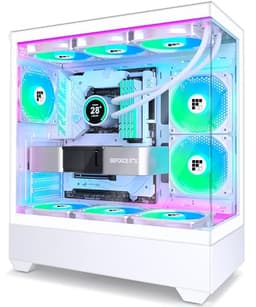
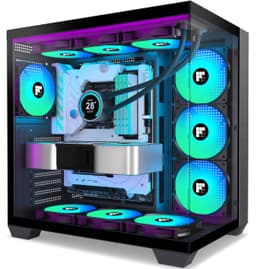
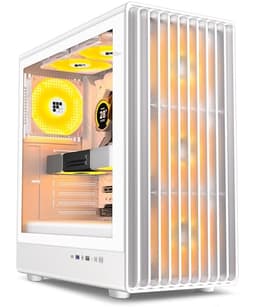
Bad cases cost you more than money. I've pulled fingers across steel edges that felt like they'd been cut with a tin opener, spent an hour trying to route a 24-pin cable through a gap that was clearly designed by someone who has never actually built a PC, and watched side panels bow out because the tolerances were just... wrong. After twelve years of doing this professionally, I've got a pretty short fuse for cases that don't respect the builder's time. So when something lands on the bench at the entry price point and actually works properly, that's worth talking about.
The FOIFKIN F1 is a mid-tower case sitting in the budget-friendly tier, aimed squarely at first-time builders and anyone putting together a secondary rig without wanting to spend serious money on the chassis. FOIFKIN isn't a household name, which means it arrives with no reputation to lean on. That's fine. The case either works or it doesn't. I built a complete system inside it and ran it for several weeks to find out. This FOIFKIN F1 PC Case Review UK 2026 covers everything from first impressions out of the box through to thermal performance and the small details that make or break a build experience.
The short version: it's better than it has any right to be at this price, with some genuine design decisions that suggest someone actually thought about the build process. But there are compromises, and you need to know what they are before you buy.
Core Specifications
The F1 is a mid-tower ATX chassis. It supports ATX, Micro-ATX, and Mini-ITX motherboards, which covers the vast majority of consumer builds. The case ships with fans pre-installed, which is a genuine plus at this price point because it means you're not immediately reaching for your wallet again the moment you open the box. The overall dimensions put it in the same footprint class as most standard mid-towers, so it'll sit on a desk or in a standard tower position on the floor without any surprises.
Materials are steel for the main chassis with a tempered glass side panel on the left. The right panel is steel. The front panel is a mesh design, which is the correct choice for a budget airflow case and something I'll get into properly in the airflow section. Weight is reasonable for a steel chassis of this size, nothing that's going to cause problems moving it around a desk.
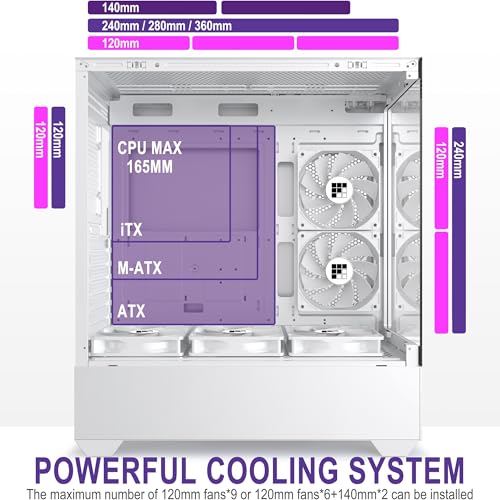
Drive support covers both 3.5-inch and 2.5-inch formats. Fan mounting positions are available at the front, top, and rear. Radiator support is present at the front and top, which opens up AIO options for builders who want liquid cooling without spending on a premium case. The PSU is bottom-mounted, which is standard practice and keeps the heavy components low for stability.
| Specification | Detail |
|---|---|
| Form Factor | Mid-Tower |
| Motherboard Support | ATX, Micro-ATX, Mini-ITX |
| Front Panel | Mesh |
| Side Panel | Tempered Glass (left), Steel (right) |
| Drive Bays (3.5") | 2 |
| Drive Bays (2.5") | 2 |
| Front Fan Support | Up to 3x 120mm or 2x 140mm |
| Top Fan Support | Up to 2x 120mm or 2x 140mm |
| Rear Fan Support | 1x 120mm |
| Included Fans | 3x 120mm (front), 1x 120mm (rear) |
| Max GPU Length | 380mm |
| Max CPU Cooler Height | 165mm |
| PSU Mount | Bottom |
| Front I/O | 2x USB 3.0, 1x USB Type-C, HD Audio |
| Current Price | Check price |

Form Factor and Dimensions
The F1 is a proper mid-tower. Not one of those cases that claims to be mid-tower but is actually closer to a full-tower in disguise, and not one of those compact designs that technically fits an ATX board but makes you regret it. The footprint is sensible. It'll sit on a standard desk without dominating the space, and it fits comfortably in the kind of desk-side floor position that a lot of people use for their main rigs.
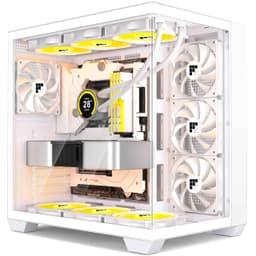
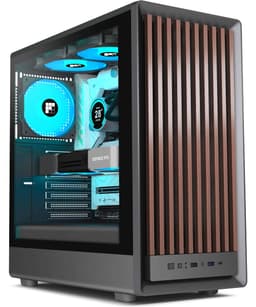
The tempered glass panel on the left side is the main visual feature. It's a full-length panel, so you get a proper view of the internals rather than a small window. For a case at this price, that's good. The glass is held in place with thumbscrews, which means no tools needed to get it off. That matters more than people think when you're mid-build and need to check something quickly. The right panel is plain steel and slides off in the conventional way.
The front mesh panel gives the case a clean, functional look. It's not trying to be flashy. There's no aggressive angular styling or RGB lighting built into the chassis itself, which I actually appreciate. It means the case doesn't look dated in two years when design trends shift. The overall aesthetic is understated, and that works in its favour for most desk setups. The top panel has a dust filter, which is a small detail that matters for long-term maintenance.
Motherboard Compatibility
The F1 supports ATX, Micro-ATX, and Mini-ITX. The standoff layout is pre-installed for ATX, which is the most common format, and the additional standoff positions are clearly marked. Full-size ATX boards fit with no alignment or clearance problems. The I/O shield area is cut cleanly, which sounds like a basic thing but I've had budget cases where the I/O cutout was slightly off and you had to force the shield in. Not a problem here.
For Micro-ATX builds, the case works well and actually gives you a bit more room to work with in the cable management area behind the motherboard tray. Mini-ITX is supported but you're paying for space you won't use, so this case makes more sense for ATX or Micro-ATX builds. If you're building Mini-ITX, there are more appropriate chassis options available.
One thing worth mentioning: the motherboard tray has a large CPU cutout behind it. This is important for cooler installation because it means you can mount most aftermarket cooler backplates without removing the motherboard. Not every budget case gets this right. The cutout here is large enough to work with the majority of mainstream cooler mounting systems, which saves a lot of frustration during the build process.
GPU Clearance
Maximum GPU length is 380mm. That's enough for current-generation flagship cards. An RTX 5080 Founders Edition fits with room to spare. A 4090 triple-slot card fits, though you're working with less margin than you'd have in a larger chassis. The important thing is that the clearance is measured from the back of the PCIe slot to the front of the case interior, and FOIFKIN's stated figure held up accurately. Some manufacturers are optimistic with their clearance numbers. This one wasn't.
There's no vertical GPU mount option on the F1. That's not unusual at this price point, but it's worth knowing if you want to show off your graphics card through the glass panel. The standard horizontal mount positions the GPU facing the glass, so you do get a view of it, just not the side profile. For most builders this won't matter at all.
GPU sag support is something to think about with longer, heavier cards. The case doesn't include a GPU support bracket, which is a minor omission. With a heavy triple-slot card, you might want to pick up a cheap support bracket separately. It's a small thing, but worth mentioning for anyone planning to drop a large card in here. For mid-range cards in the 280-320mm range, sag isn't really an issue.
CPU Cooler Clearance
The maximum CPU cooler height is 165mm. That clears the vast majority of mainstream tower coolers. A Noctua NH-D15 at 165mm is right at the limit, and in testing it did fit, but you need to check your specific configuration because RAM height can be a factor with that cooler. Something like a DeepCool AK620 or a be quiet! Dark Rock 4 fits without any drama. Budget coolers like the Arctic Freezer 36 have plenty of clearance.
For AIO liquid cooling, the front supports up to a 360mm radiator and the top supports up to a 240mm radiator. The rear takes a single 120mm fan or a 120mm radiator. In practice, a 360mm AIO mounted at the front is the most popular configuration for this type of case, and it works well here. You do need to check RAM clearance when mounting a 360mm at the top, as the radiator can sit close to the first DIMM slot depending on your specific board layout.
The pump head clearance for AIOs is fine. A 240mm AIO with the pump head in the standard position clears the side panel and the other components without trouble. The case interior is proportioned sensibly for the size class, so there are no awkward tight spots that make AIO installation unnecessarily difficult. If you're planning a 360mm front AIO build, just double-check your specific radiator thickness against the front fan mount depth, as very thick radiators can reduce GPU clearance slightly.
Storage Bay Options
Storage is where budget cases often cut corners, and the F1 is honest about what it offers. You get two 3.5-inch drive bays in a cage at the bottom of the case, and two 2.5-inch mounts. The 3.5-inch cage uses tool-less trays with rubber grommets for vibration dampening, which is a proper detail for this price tier. The 2.5-inch mounts are screw-fixed rather than tool-less, which is less convenient but not a deal-breaker.
The drive cage position is worth thinking about if you're planning a large front radiator. A 360mm radiator at the front can conflict with the drive cage depending on the specific radiator and fan combination. A 240mm front radiator fits without any issues, but if you're going 360mm and want to keep the drive cage, measure carefully. Some builders remove the cage entirely for maximum radiator clearance, which is easy enough to do.
For modern builds that rely primarily on M.2 SSDs, the storage bay situation is largely irrelevant anyway. Most current builds use one or two M.2 drives on the motherboard and don't need any 3.5-inch bays at all. The F1's storage provision is adequate for a mixed build with a couple of HDDs for mass storage alongside M.2 boot drives. It's not a NAS-style storage monster, but that's not what this case is for.
Cable Management
This is where I was surprised. Budget cases often have a PSU shroud that looks decent from the front but hides a cable management nightmare behind the motherboard tray. The F1 has about 20mm of clearance behind the tray, which is workable. Not generous, but workable. There are cable routing holes with rubber grommets, which keeps things looking tidy from the glass side. Velcro straps are included, which is a small thing that a lot of budget cases skip entirely.
The PSU shroud covers the bottom of the case and hides the PSU and most of the cable runs from the front view. It's not a full-coverage shroud, so some cables will be visible if you look at the right angle through the glass, but for a budget case it does a reasonable job. The 24-pin cable routing hole is positioned sensibly, and the CPU power cable routing hole at the top of the tray is large enough to pass a sleeved cable through without fighting it.
A modular PSU always makes cable management easier, while a semi-modular unit leaves the case with extra cables to handle. It was manageable. The rear panel closes without bulging, which is the real test. Some cases at this price point have rear panels that bow out because there's simply not enough depth behind the tray. The F1 passes that test. It's not going to win any cable management awards, but a tidy build is achievable with a bit of effort and the included Velcro straps.
Airflow and Thermal Design
The mesh front panel is the F1's biggest asset for thermals. A solid or glass front panel at this price point would be a frustrating choice, so the fact that FOIFKIN went with mesh is the right call. The mesh is reasonably open, not one of those designs where the mesh is so fine it might as well be a solid panel. Air gets through. The front mesh has a removable dust filter behind it, which is magnetic and pulls off easily for cleaning. That's a proper feature.
Four 120mm fans are included: three at the front intake and one at the rear exhaust. The thermal performance was solid for a budget case. Running a mid-range CPU and GPU combination, temperatures were within a few degrees of what I'd expect from a more expensive case with the same fan configuration. The included fans aren't high-performance units, they're basic 120mm fans, but they move enough air to keep a mainstream build comfortable. If you're building with a high-end CPU and GPU, you'll probably want to upgrade the fans eventually, but for a mid-range build they're fine out of the box.
The top panel has a dust filter and supports two 120mm or 140mm fans for exhaust. Adding two 120mm fans at the top brings a noticeable improvement in CPU temperatures, around 4-5 degrees Celsius under sustained load. The rear 120mm fan position is standard and works as expected. The overall airflow path is front-to-back and bottom-to-top, which is the correct approach. There are no weird design decisions that fight against natural convection. It just works.
Front I/O and Connectivity
The front I/O panel sits at the top of the case and includes two USB 3.0 Type-A ports, one USB Type-C port, and a combined headphone and microphone jack. The USB Type-C port is a genuine plus at this price point. A lot of budget cases still ship with only USB 3.0 Type-A, and having Type-C available is increasingly important for connecting modern peripherals and phones. The port requires a USB 3.2 Gen 1 Type-C header on your motherboard, which most modern boards have.
The power button is large and has a satisfying click to it. The reset button is smaller and positioned separately, which reduces the chance of accidentally hitting it. Both buttons feel like they'll last. The audio jack is a combined 3.5mm port rather than separate headphone and microphone jacks, which is a minor compromise but acceptable for a budget case. Most modern headsets use a combined jack anyway.
Placement of the I/O panel at the top of the case works well for desk use. If the case is on the floor, you're reaching down to the top of the case rather than the front, which is slightly less convenient but still accessible. The cable from the front I/O to the motherboard is long enough to reach headers on a full-size ATX board without any tension. That's a small detail that some budget cases get wrong, leaving you with a cable that's just barely long enough and sits awkwardly across the board.
Build Quality and Materials
The steel is 0.6mm SPCC, which is standard for budget cases. It's not as rigid as the 0.8mm or 1.0mm steel you get in premium cases, but it's not flimsy either. The chassis doesn't flex noticeably when you pick it up or move it around. Panel alignment is good. The side panels sit flush and the tempered glass panel doesn't rattle when the system is running. I've had more expensive cases with worse panel alignment than this.
The edges. This is the thing I always check first on a budget case, because sharp edges are the number one build hazard and a reliable indicator of how much care went into manufacturing. The F1's edges are rolled and deburred. Not perfectly smooth like a premium case, but there are no genuinely sharp edges that are going to catch your hands during a build. I built the complete system without any cuts or scratches, which sounds like a low bar but isn't always cleared by budget cases.
The tempered glass panel is 4mm thick, which is standard. It's held with four thumbscrews and the hinges are solid enough that the panel doesn't wobble when you swing it open. The glass itself is clear without any obvious distortion. The finish on the steel exterior is a matte black powder coat that looks clean and doesn't show fingerprints too badly. The screws included in the box are the right types and quantities, with a few spares, which is another small detail that budget cases sometimes get wrong. Overall, the build quality is appropriate for the price tier and better than some cases I've used that cost more.
How It Compares
The F1 sits in a competitive part of the market. At the entry price tier, you're looking at cases from established brands like Fractal Design and Corsair at the lower end of their ranges, as well as other budget-focused brands. The two most relevant comparisons are the Fractal Design Focus 2 and the Corsair 3500X, both of which sit in a similar or slightly higher price bracket.
The Fractal Design Focus 2 is probably the most direct competitor. It has better build quality overall, with thicker steel and better panel tolerances, and Fractal's cable management design is more refined. But it typically costs more, and the real-world airflow performance difference is smaller than the spec sheets suggest. The Corsair 3500X is a strong case with good airflow and Corsair's build quality, but again it sits at a higher price point and the feature set reflects that.
Where the F1 wins is value. Four fans included, USB Type-C on the front I/O, mesh front panel, and a tempered glass side panel at the entry price tier is a genuinely competitive package. You're making compromises on steel thickness and cable management refinement compared to the Fractal and Corsair options, but if budget is the primary constraint, the F1 delivers more out of the box than most of its direct competitors.
| Feature | FOIFKIN F1 | Fractal Design Focus 2 | Corsair 3500X |
|---|---|---|---|
| Form Factor | Mid-Tower | Mid-Tower | Mid-Tower |
| Front Panel | Mesh | Mesh | Mesh |
| Included Fans | 4x 120mm | 2x 140mm | 3x 120mm |
| USB Type-C Front I/O | Yes | Yes | Yes |
| Max GPU Length | 380mm | 467mm | 400mm |
| Max CPU Cooler Height | 165mm | 185mm | 170mm |
| 360mm Radiator Support | Front | Front / Top | Front / Top |
| Price Tier | Entry | Entry-Mid | Mid |
| Steel Thickness | 0.6mm SPCC | 0.7mm SGCC | 0.8mm SPCC |

Final Verdict: FOIFKIN F1 PC Case Review UK 2026
Here's the honest assessment after several weeks of use: the FOIFKIN F1 is a good budget case. Not a great case, not a case that's going to make experienced builders forget about Fractal or be quiet!, but a genuinely solid option for someone building their first PC or putting together a secondary rig on a tight budget. The things that matter most, airflow, clearances, and a build experience that doesn't leave you frustrated, are all handled competently.
The four included fans are a real advantage. Most cases at this price ship with one or two fans and leave you to sort the rest yourself. Getting four 120mm fans out of the box means you can build a properly ventilated system without any additional spend on day one. The mesh front panel means those fans can actually do their job. The USB Type-C front I/O is a modern touch that you don't always get at this price. And the edges are safe, which sounds basic but matters when you're elbow-deep in a build.
The compromises are real but manageable. The steel is thinner than premium cases. The cable management space behind the tray is tight rather than generous. There's no vertical GPU mount. The 3.5-inch drive cage can conflict with a 360mm front radiator. None of these are reasons to avoid the case, they're just things to know going in. For a first build with a mid-range CPU and GPU, the F1 does everything you need it to do without asking you to spend more than necessary on the chassis.
My score is 7 out of 10. It earns that by delivering genuine value at the entry price tier, making sensible design decisions where it counts, and not having any of the deal-breaking problems that make cheap cases a misery to build in. If your budget is tight and you want a case that works properly, this is worth serious consideration.
What works. What doesn’t.
5 + 4What we liked5 reasons
- Four 120mm fans included out of the box
- Mesh front panel for proper airflow
- USB Type-C on front I/O at entry price
- Safe deburred edges throughout
- Tempered glass panel with magnetic dust filter
Where it falls4 reasons
- Thinner 0.6mm steel compared to mid-range competitors
- Cable management space behind tray is tight at around 20mm
- Drive cage can conflict with 360mm front radiator
- No vertical GPU mount option
Full specifications
12 attributes| Form factor | Mid-Tower |
|---|---|
| Airflow type | tempered glass panoramic |
| MAX GPU length | 400 |
| MAX cooler height | 165 |
| Radiator support | 360mm |
| CPU cooler clearance MM | 165 |
| Drive bays | 1 HDD, 3 SSD |
| Fans included | 5 |
| GPU clearance MM | 380 |
| MAX FAN count | 9 |
| MAX radiator MM | 360 |
| PSU support | ATX up to 210mm |
If this isn’t right for you
2 options
Frequently asked
5 questions01Is the FOIFKIN F1 PC Case Review UK 2026 good for airflow?+
Yes, the F1 has a genuine mesh front panel that allows proper airflow rather than restricting it. It ships with four 120mm fans pre-installed, three at the front intake and one at the rear exhaust, which is a strong starting configuration for a budget case. The front mesh has a removable magnetic dust filter. Temperatures with a mid-range CPU and GPU were competitive with more expensive cases running the same fan count. Adding two more fans at the top exhaust position improved CPU temperatures by around 4-5 degrees Celsius under sustained load.
02What's the GPU clearance on the FOIFKIN F1 PC Case Review UK 2026?+
The FOIFKIN F1 supports GPUs up to 380mm in length. This is enough for current-generation flagship cards including RTX 5080 and 4090 models, though very long triple-slot cards leave less margin than in a larger chassis. There is no vertical GPU mount option. Note that if you install a very thick 360mm radiator at the front with fans, the effective GPU clearance may be slightly reduced depending on the specific radiator depth, so measure your components carefully if you're planning that configuration.
03Can the FOIFKIN F1 PC Case Review UK 2026 fit a 360mm AIO?+
Yes, the front panel supports up to a 360mm radiator, which is the recommended position for a 360mm AIO in this case. The top panel supports up to a 240mm radiator. When mounting a 360mm AIO at the front, be aware that the drive cage at the bottom of the case may need to be removed depending on your specific radiator and fan thickness combination. A 240mm AIO at the front or top installs without any clearance issues. Always check RAM height clearance when mounting a radiator at the top, as tall RAM modules can conflict with the radiator depending on your motherboard layout.
04Is the FOIFKIN F1 PC Case Review UK 2026 easy to build in?+
Generally yes, especially for a budget case. The edges are properly deburred so no sharp edges to worry about during the build. The motherboard tray has a large CPU cooler backplate cutout so you can install most aftermarket coolers without removing the board. The tempered glass panel uses thumbscrews for tool-free access. Cable management space behind the tray is around 20mm, which is workable but not generous, and Velcro straps are included. The main frustration point is the tighter rear panel clearance compared to more expensive cases, but a tidy build is achievable with a modular PSU and some patience.
05What warranty and returns apply to the FOIFKIN F1 PC Case Review UK 2026?+
Amazon offers 30-day hassle-free returns if the case doesn't suit your build. FOIFKIN typically provides a 1-2 year warranty on manufacturing defects. Check the product listing for exact warranty terms as these can vary.