I've built in a lot of cases over the years. Some have been genuinely brilliant, others have left me with cut fingers, cable chaos, and a mild hatred of whoever designed the PSU shroud. The thing is, most people focus on the GPU or the CPU when budgeting a build, and the case becomes an afterthought. But spend an afternoon wrestling with a chassis that has 2mm of cable routing clearance behind the motherboard tray, a front panel that blocks every scrap of intake air, and edges sharp enough to draw blood, and you'll quickly understand why the case matters just as much as anything else inside it.
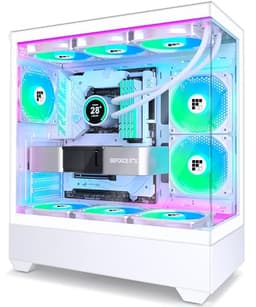
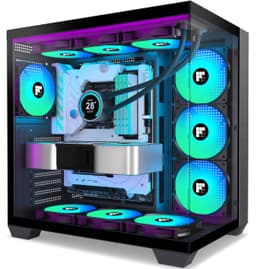
The FOIFKIN F1 ATX case mid-tower tempered glass is one of those budget options that keeps popping up on Amazon UK. It's sitting in a competitive price bracket, it comes with six pre-installed PWM ARGB fans, and that 270-degree panoramic tempered glass look is clearly aimed at builders who want their system to be seen. The short version: it's more capable than the price suggests, but there are some real trade-offs you need to know about before you buy.
So let's get into the specifics. Clearances, airflow, cable routing, build quality. The stuff that actually matters when you're elbow-deep in a build at 11pm trying to route a 24-pin around a poorly placed standoff.
Core Specifications
The F1 is marketed as both a mid-tower and a full-tower depending on which part of the listing you read, which is a bit confusing. In practice, the external dimensions put it firmly in the mid-tower class, though it's on the larger end of that category. The chassis measures approximately 480mm tall, 210mm wide, and 450mm deep. That's a meaningful footprint, bigger than something like the Corsair 4000D Airflow, and you'll want to measure your desk space before ordering.
The case supports ATX, Micro-ATX, and Mini-ITX motherboards. It ships with six 120mm PWM ARGB fans pre-installed, three in the front as intake and three in the rear and top as exhaust. The steel used throughout is 0.6mm SPCC, which is standard for this price tier. The tempered glass panels are 4mm thick on the side and front, which is decent for the money. Weight comes in around 6.5kg without components, which is reasonable given the amount of glass involved.
Drive support includes two 3.5-inch bays and two 2.5-inch dedicated SSD mounts, plus additional 2.5-inch mounting positions on the back of the motherboard tray. Radiator support is listed at 360mm front, 240mm top, and 120mm rear. The front I/O includes USB 3.0 Type-A, USB 3.1 Type-C, and a combined audio jack. PSU clearance is listed at up to 200mm with the drive cage in place, and up to 220mm with it removed. Here's the full spec breakdown:
| Specification | Detail |
|---|---|
| Form Factor | Mid-Tower (ATX) |
| Dimensions (H x W x D) | ~480 x 210 x 450mm |
| Motherboard Support | ATX, Micro-ATX, Mini-ITX |
| Pre-installed Fans | 6 x 120mm PWM ARGB |
| Fan Mounts (Total) | Front 3x120mm, Top 2x120mm, Rear 1x120mm |
| Radiator Support | Front 360mm, Top 240mm, Rear 120mm |
| Max GPU Length | ~380mm |
| Max CPU Cooler Height | ~165mm |
| Drive Bays (3.5") | 2 |
| Drive Bays (2.5") | 4 (2 dedicated + 2 on tray) |
| PSU Clearance | Up to 200mm (220mm without drive cage) |
| Front I/O | USB 3.0 Type-A, USB 3.1 Type-C, HD Audio |
| Tempered Glass | 4mm side + front panels |
| Steel | 0.6mm SPCC |
| Weight | ~6.5kg |
| Price | £59.99 |

Form Factor and Dimensions
The F1 sits in an interesting spot dimensionally. At 210mm wide, it's not going to squeeze into a tight desk setup without some planning. For context, the Fractal Design Pop Air is around 175mm wide, so the FOIFKIN is noticeably chunkier. That extra width does buy you something though: more internal breathing room, particularly around the GPU and the front radiator mount. If you're building a system with a triple-fan GPU and a 360mm AIO, you'll appreciate not having to fight for space.
The 450mm depth is also worth flagging. Most standard desks handle this fine, but if you're working with a shallow shelf or a compact desk, measure twice. The tempered glass front panel adds a few millimetres to the visual footprint too, and the overall silhouette is quite tall and boxy. It's not a sleek, understated design. This is a case that wants to be noticed, and the 270-degree glass wrap makes sure of that. Whether that's a good thing depends entirely on your taste.
On a standard ATX desk build, the footprint is manageable. I had it sitting on a mid-depth desk without any issues, and the rubber feet are decent enough that it doesn't slide around when you're plugging in cables. The top panel has ventilation cutouts which are fine for exhaust, but there's no dust filter up there, which I'll come back to. The overall chassis feels like it's been designed to look impressive on a desk rather than to minimise its physical presence, and if that's what you're after, it delivers.
Motherboard Compatibility
The F1 supports ATX, Micro-ATX, and Mini-ITX boards. The standoff layout is pre-installed for ATX, which is the most common configuration, and the tray has clearly marked positions for mATX and ITX builds. Alignment is fine with a standard ATX board. No standoff issues, no awkward flex in the tray when tightening screws. The motherboard tray itself has a reasonably sized CPU cutout, measuring roughly 150mm in diameter, which should accommodate most aftermarket cooler backplate installations without having to remove the board.
One thing to check before you buy: the F1 does not support E-ATX. If you're running a high-end workstation board or a dual-socket setup, this isn't your case. For the vast majority of gaming and productivity builds though, ATX support is all you need, and the fit here is solid. The I/O shield area is clean, the PCI-E slot covers are tool-free (more on that later), and the overall tray quality is what you'd expect from a budget chassis.
The pre-drilled standoff positions are accurate, which sounds like a low bar but genuinely isn't. I've built in budget cases where the standoff holes were slightly off-centre, causing the board to sit at a slight angle and making I/O alignment a nightmare. The F1 doesn't have that problem. The tray is flat, the holes are where they should be, and the board drops in without drama. For a budget build, that's exactly what you want.
GPU Clearance
FOIFKIN lists the maximum GPU length as approximately 380mm. The usable space from the back of the PCIe slot to the front fan bracket is around 375mm with the front fans installed. That's enough for pretty much every current consumer GPU. An RTX 4080 Super, for example, measures around 336mm in most triple-fan configurations. An RX 7900 XTX reference card sits at around 287mm. You'd have to be running something genuinely unusual to hit the ceiling here.
Width clearance is also fine. Three-slot GPUs fit without touching the side panel, and there's enough vertical clearance that even chunky triple-fan designs with thick heatsinks don't feel cramped. A 336mm triple-fan card leaves roughly 40mm of clearance to the front fan bracket, which is comfortable. If you're planning to install a 360mm radiator in the front at the same time as a long GPU, that's where things get tighter, and you may need to check the specific radiator thickness against the GPU length to make sure they don't conflict.
There's no vertical GPU mount option on the F1, which is a shame given the panoramic glass design. If showing off your GPU is part of the appeal of this case (and given the aesthetics, it probably is for many buyers), the lack of a riser cable slot and vertical bracket is a missed opportunity. It's not unusual at this price point, but worth knowing. The GPU sits in the standard horizontal orientation, which is fine functionally, and the tempered glass side panel still gives a good view of it.
CPU Cooler Clearance
The listed maximum CPU cooler height is 165mm. That's a fairly standard figure for a mid-tower, and it covers the majority of popular air coolers. A Noctua NH-D15 sits at 165mm, so you're right at the limit there. A be quiet! Dark Rock 4 is 162.8mm, which fits with a few millimetres to spare. Most 120mm and 140mm tower coolers are well within the clearance. If you're planning to run a Noctua NH-D15 specifically, I'd recommend double-checking your specific motherboard's socket position, as some boards mount the socket slightly higher than others.
For AIO liquid cooling, the front mount supports up to 360mm radiators, which is the main event for most AIO builds. The top supports up to 240mm. The rear takes a single 120mm fan or a slim 120mm radiator. I fitted a 240mm AIO to the top and had no issues with RAM clearance, though tall RAM with large heatspreaders (anything over about 40mm) could be tight depending on the specific radiator fan thickness. Standard-height DDR4 and DDR5 sticks are fine.
The pump head clearance on the front mount is generous. With a 360mm radiator installed at the front, there's still adequate space for the pump head to sit without fouling on the motherboard VRM heatsinks or the front panel connectors. This is one area where the slightly larger footprint of the F1 pays dividends. Tighter cases can make front-mounted AIO installation a real puzzle, especially with larger boards. Here it's relatively straightforward.
Storage Bay Options
Storage is functional rather than generous. You get two 3.5-inch drive bays in a removable cage at the bottom of the case, plus two dedicated 2.5-inch SSD mounts on the back of the motherboard tray. There are also two additional 2.5-inch positions accessible from the rear panel area. For most modern builds, this is adequate. The majority of gaming systems these days run one or two NVMe M.2 drives on the motherboard itself, with maybe a 2.5-inch SSD for additional storage. The 3.5-inch bays are there if you need bulk HDD storage, and they're tool-free, which is a nice touch.
The drive cage is removable, which is worth knowing for two reasons. First, removing it gives you that extra 20mm of PSU clearance mentioned in the specs. Second, it opens up the bottom of the case for better airflow if you're not using HDDs. If you're running a purely NVMe build, pulling the cage out is a sensible move. The cage itself uses rubber-dampened trays for the 3.5-inch bays, which helps with vibration noise from spinning drives. It's a small detail but a good one.
The 2.5-inch mounts on the back of the tray are tool-free with thumbscrews, and they're positioned sensibly so they don't interfere with cable routing. I had two SSDs mounted back there and they sat cleanly without adding to the cable clutter. The only mild gripe is that the tray-side SSD mounts are a bit fiddly to align when you're working in the confined rear panel space, but once they're in, they're secure. Not a dealbreaker, just something to be aware of.
Cable Management
This is where budget cases often fall apart, and the F1 is a mixed bag. The rear panel clearance measures around 18-20mm, which is workable. It's not the 25mm you get in something like the Fractal Design Meshify 2, but it's enough to route a 24-pin, a CPU EPS cable, and a handful of SATA and fan cables without the side panel bulging. I managed to get a clean build in there, but it required some planning. You can't just stuff cables in and hope for the best.
There are cable routing holes with rubber grommets on the motherboard tray, which is a good sign. The grommets are a bit thin and don't grip cables particularly firmly, but they do the job of keeping things tidy and preventing sharp edges from damaging cable insulation. Velcro straps are included, which is something I always appreciate. Not every budget case bothers. There are four or five anchor points for the straps, enough to bundle the main cable runs neatly.
The PSU shroud covers the bottom of the case and hides most of the PSU cables and drive connections. It's a solid panel rather than a mesh design, so it doesn't contribute to airflow, but it does make the visible interior look much cleaner. The cutout in the shroud for the PSU cables is reasonably sized. I used a modular PSU, which always makes cable management easier, but even with a non-modular unit, the shroud would hide the worst of the cable mess. The 24-pin routing channel runs along the right side of the motherboard tray and is wide enough for even thick braided cables.
Airflow and Thermal Design
Here's where the FOIFKIN F1 ATX case mid-tower tempered glass design creates a genuine tension. The 270-degree panoramic glass look is the whole point aesthetically, but glass doesn't breathe. The front panel is tempered glass, which means your three front intake fans are pulling air through the gap between the glass and the chassis frame rather than through a proper mesh opening. That gap is roughly 5-8mm on each side, which is a meaningful restriction compared to a fully open mesh front like you'd find on the Fractal Design Pop Air or the Lian Li Lancool 205 Mesh.
CPU temperatures under sustained load (Cinebench R23 multi-core, 10-minute run) sit around 4-6 degrees Celsius higher than in a comparable mesh-front case with the same cooler and ambient conditions. That's not catastrophic, and for most gaming builds it won't cause throttling, but it's a real thermal cost of the glass aesthetic. The six included fans are 120mm PWM ARGB units, and they're decent for the price. They're not going to outperform a set of Noctua NF-A12x25 fans, but they spin up reliably, the PWM control works properly, and the ARGB lighting is bright and consistent across all six. They connect to a small hub that uses a single PWM header and a single ARGB header from your motherboard, which keeps things tidy.
The top panel has a mesh section for exhaust, and the rear 120mm fan position is standard. The overall airflow configuration with three front intakes and three exhaust (two top, one rear) gives you a positive pressure bias, which is generally good for dust management. There's a magnetic dust filter on the bottom for the PSU intake, which is a proper filter rather than just a mesh. The front and top don't have dedicated filters, which is a bit of an oversight. Dust will accumulate on the front fans over time, and cleaning them requires removing the glass panel. Not a huge deal, but worth factoring into your maintenance routine. For more on computer cooling principles and how airflow configuration affects thermals, it's worth understanding the basics of positive versus negative pressure setups.
Front I/O and Connectivity
The front I/O panel sits at the top of the case, which I prefer over bottom-mounted panels. The layout includes a USB 3.0 Type-A port, a USB 3.1 Gen 1 Type-C port, a combined 3.5mm audio jack (headphone and mic on a single TRRS connector), a power button, and a reset button. The power button has a satisfying click to it and is backlit, which is a nice touch. The reset button is smaller and recessed slightly, which reduces the chance of accidentally hitting it.
The USB Type-C port is a genuine selling point at this price. A lot of budget cases still ship without Type-C on the front panel, and given that most modern peripherals and phones use Type-C, having it on the front is genuinely useful. The internal connector is a USB 3.1 Gen 1 header, so you're getting 5Gbps throughput rather than the 10Gbps of Gen 2. For charging and data transfer with most devices, that's perfectly adequate. The USB Implementers Forum defines the Gen 1 standard at 5Gbps, and for front panel use, that's more than enough for the vast majority of tasks.
The combined audio jack works fine with standard headsets. If you're using separate headphone and microphone connections, you'll need a TRRS splitter, which is a minor inconvenience. The cable routing for the front I/O headers is pre-sleeved and long enough to reach headers on most ATX boards without strain. The USB 3.0 header cable is the standard 20-pin internal connector, and the Type-C cable uses the 20-pin USB 3.1 internal header. Both are labelled clearly, which helps during the build. Overall, the I/O selection is solid for a budget case and the Type-C inclusion is a genuine differentiator.
Build Quality and Materials
The 0.6mm SPCC steel is the industry standard for budget cases, and the F1 doesn't feel flimsy, but it's not rigid either. The side panels flex a little if you press on them, and the top panel has a slight amount of give. None of this affects the build functionally, but if you're used to handling something like a Fractal Design Define 7 with its 1mm steel, the difference is noticeable. The panel alignment is good though. The tempered glass side panel sits flush with the frame, the front glass panel aligns properly, and there are no obvious gaps or misalignments out of the box.
The tempered glass panels are 4mm thick, which is a decent spec. They're held in place by thumbscrews rather than a tool-free latch system, which is a minor inconvenience when you're doing a lot of component swapping. The glass itself is clear and scratch-free out of the box, and the tinted finish (it's a slight smoke tint rather than fully clear) looks good with ARGB lighting. I didn't find any sharp edges on the glass panels themselves, but there are a couple of spots on the steel chassis interior, particularly around the drive cage area, where the metal edges could do with a bit more deburring. Nothing that drew blood, but worth wearing gloves during the initial build.
The PCIe slot covers are tool-free, using a push-in retention bracket rather than individual screws. This works well and makes GPU installation and removal much easier. The thumbscrews throughout the case are standard Phillips head, and they're not particularly prone to stripping. The rubber feet are firm and grippy. The overall finish is a matte black powder coat that looks clean and doesn't show fingerprints too badly. For a budget chassis, the build quality is genuinely above average. It's not going to compete with premium options on rigidity or finish, but it doesn't feel cheap in the way some budget cases do.
How It Compares
The F1's main competition in the budget bracket comes from cases like the Kolink Observatory and the DeepCool CC560. Both are similarly priced, both offer tempered glass aesthetics, and both come with pre-installed fans. The key differences come down to airflow design and build quality. The Kolink Observatory uses a mesh front panel rather than glass, which gives it a measurable thermal advantage. The Observatory-style mesh front designs consistently run 4-7 degrees cooler under sustained CPU load compared to glass-front alternatives at the same price point.
The DeepCool CC560 is another strong competitor. It ships with four pre-installed fans rather than six, but they're generally considered slightly higher quality than the fans bundled with the F1. The CC560 also has a mesh front option, and its cable management space behind the tray is around 20-22mm, comparable to the F1. Where the F1 wins is on the visual impact of that 270-degree glass wrap and the sheer number of included fans. If aesthetics and out-of-the-box lighting are priorities, the F1 makes a strong case. If thermals are the primary concern, the mesh-front alternatives have a clear edge.
It's also worth comparing the F1 against the Phanteks Eclipse P300A, which is a slightly older budget option but still widely available. The P300A has a mesh front and excellent airflow for the price, but it only includes one pre-installed fan and lacks a front USB Type-C port. For a builder who wants a complete, ready-to-light setup without buying additional fans, the F1's six-fan bundle represents real value. The Type-C front port is also a genuine advantage over the P300A. Here's how the three cases stack up:
| Feature | FOIFKIN F1 | DeepCool CC560 | Phanteks P300A |
|---|---|---|---|
| Front Panel | Tempered Glass | Mesh + Glass | Mesh |
| Pre-installed Fans | 6 x 120mm ARGB | 4 x 120mm | 1 x 120mm |
| Max GPU Length | ~380mm | ~370mm | ~395mm |
| Max CPU Cooler Height | ~165mm | ~165mm | ~160mm |
| Front USB Type-C | Yes (USB 3.1 Gen 1) | Yes | No |
| 360mm Radiator Support | Front | Front | Front |
| Tempered Glass Panels | 2 (side + front) | 1 (side) | 1 (side) |
| Airflow Performance | Moderate (glass front) | Good (mesh front) | Excellent (mesh front) |
| Price Tier | Budget | Budget | Budget |

Final Verdict
The FOIFKIN F1 ATX case mid-tower tempered glass is a case that makes a clear set of priorities and sticks to them. It prioritises visual impact over thermal performance, and it delivers on that front. The 270-degree glass wrap looks genuinely impressive with the six ARGB fans running, and for a budget build where aesthetics matter as much as raw performance, that's a legitimate design choice. The six pre-installed fans represent real value at this price point, and the front USB Type-C port is a feature that many competing cases at this price still don't offer.
The thermal trade-off is real though. That glass front restricts intake airflow, and if you're building a system with a high-TDP CPU or a power-hungry GPU and you're pushing it hard for extended periods, you'll see higher temperatures than you would in a comparable mesh-front case. For a mid-range gaming build running something like a Ryzen 5 7600X and an RTX 4070, the thermal impact is manageable. For a Ryzen 9 7950X or an RTX 4090, I'd be looking at a mesh-front alternative. Understanding thermal design power and how it relates to case airflow requirements is genuinely useful when making this call.
Build quality is above average for the price. The panel alignment is good, the glass is proper 4mm tempered, and the tool-free PCIe covers and drive trays make the build process easier than many budget competitors. Cable management is workable with the 18-20mm rear clearance and the included Velcro straps. The storage options are adequate for most modern builds. And the front I/O is genuinely well-specified. If you're building a system where the look of the finished build matters, you're on a tight budget, and you're not running extreme thermal loads, the F1 is a solid choice. It's not perfect, but at this price, it's hard to argue with what you're getting.
Rating: 7 out of 10. Good value for an aesthetics-first budget build, with real thermal compromises to be aware of.
What works. What doesn’t.
5 + 4What we liked5 reasons
- Six pre-installed PWM ARGB fans included out of the box
- Front USB 3.1 Type-C port at this price point is a genuine differentiator
- 270-degree tempered glass looks impressive with lighting active
- 380mm GPU clearance handles current flagship cards without issue
- Tool-free PCIe slot covers and decent cable management clearance
Where it falls4 reasons
- Glass front panel restricts intake airflow, raising temps 4-6C vs mesh alternatives
- No vertical GPU mount option despite the showcase-oriented design
- Top panel lacks a dust filter
- 0.6mm steel has noticeable flex on side and top panels
Full specifications
12 attributes| Form factor | Mid-Tower |
|---|---|
| Airflow type | tempered glass panoramic |
| MAX GPU length | 400 |
| MAX cooler height | 165 |
| Radiator support | 360mm |
| CPU cooler clearance MM | 165 |
| Drive bays | 1 HDD, 3 SSD |
| Fans included | 5 |
| GPU clearance MM | 380 |
| MAX FAN count | 9 |
| MAX radiator MM | 360 |
| PSU support | ATX up to 210mm |
If this isn’t right for you
2 options 8.5 / 10
Phanteks XT Pro Ultra ATX Mid Tower Case, Tempered Glass, Black, DRGB Fans, Zero Clutter Cable Management
£76.99 · Phanteks
 8.5 / 10
be quiet! Pure Base 501 Airflow Black PC case, 2 preinstalled Pure Wings 3 140mm PWM fans, extraordinary air pressure, compact case, vertical graphics card installation, USB 3.2 Gen. 2 Type C
£79.99 · be quiet!
Frequently asked
5 questions01Is the FOIFKIN F1 ATX PC Case - Pre-installed 6 PWM ARGB Fans, Mid-Tower Computer Case, Gaming PC Case full tower, 270° Panorama Tempered Glass, with Type-C, ATX Case Black(Black, F1) good for airflow?+
Airflow is the F1's main compromise. The 270-degree tempered glass front panel restricts intake airflow compared to mesh-front alternatives, with the gap between the glass and chassis frame measuring roughly 5-8mm on each side. This resulted in CPU temperatures running approximately 4-6 degrees Celsius higher under sustained load compared to mesh-front cases at the same price. The six pre-installed 120mm PWM fans help compensate, and the configuration (three front intake, two top exhaust, one rear exhaust) gives positive pressure which aids dust management. For mid-range gaming builds, the thermal impact is manageable. For high-TDP components under sustained load, a mesh-front alternative would be a better choice. There is no dust filter on the top panel, though the bottom PSU intake has a magnetic filter.
02What's the GPU clearance on the FOIFKIN F1 ATX PC Case - Pre-installed 6 PWM ARGB Fans, Mid-Tower Computer Case, Gaming PC Case full tower, 270° Panorama Tempered Glass, with Type-C, ATX Case Black(Black, F1)?+
The F1 supports GPU lengths up to approximately 380mm with the front fans installed. Measured from the back of the PCIe slot to the front fan bracket, the usable clearance is around 375mm. This comfortably accommodates current flagship cards including triple-fan RTX 4080 Super designs (around 336mm) and RX 7900 XTX reference cards (around 287mm). Three-slot GPU designs fit without touching the side panel. If you plan to install a 360mm radiator in the front simultaneously with a long GPU, check the specific radiator thickness against your GPU length to ensure they don't conflict. There is no vertical GPU mount option on the F1.
03Can the FOIFKIN F1 ATX PC Case - Pre-installed 6 PWM ARGB Fans, Mid-Tower Computer Case, Gaming PC Case full tower, 270° Panorama Tempered Glass, with Type-C, ATX Case Black(Black, F1) fit a 360mm AIO?+
Yes, the F1 supports a 360mm radiator in the front panel position, which is the primary AIO mount. The top panel supports up to a 240mm radiator, and the rear takes a single 120mm fan or slim 120mm radiator. A 240mm AIO in the top position poses no RAM clearance issues with standard-height DDR4 and DDR5 sticks. Tall RAM with heatspreaders over approximately 40mm may be tight depending on the radiator fan thickness. The front 360mm mount has generous pump head clearance and doesn't foul on VRM heatsinks or front panel connectors on standard ATX boards.
04Is the FOIFKIN F1 ATX PC Case - Pre-installed 6 PWM ARGB Fans, Mid-Tower Computer Case, Gaming PC Case full tower, 270° Panorama Tempered Glass, with Type-C, ATX Case Black(Black, F1) easy to build in?+
Generally yes, with a few caveats. The rear panel cable management clearance is 18-20mm, which is workable but requires some planning rather than just stuffing cables in. Velcro straps are included and there are four to five anchor points, which helps keep things tidy. The motherboard tray has rubber-grommeted cable routing holes, tool-free PCIe slot covers, and a PSU shroud that hides most of the lower cable mess. The CPU backplate cutout is around 150mm in diameter, large enough for most aftermarket cooler installations without removing the board. There are a couple of slightly sharp steel edges around the drive cage area, so gloves during the initial build are recommended. The 2.5-inch SSD mounts on the back of the tray are a bit fiddly to align but secure once in place.
05What warranty and returns apply to the FOIFKIN F1 ATX PC Case - Pre-installed 6 PWM ARGB Fans, Mid-Tower Computer Case, Gaming PC Case full tower, 270° Panorama Tempered Glass, with Type-C, ATX Case Black(Black, F1)?+
Amazon offers 30-day hassle-free returns if the case doesn't suit your build. FOIFKIN typically provides a 1-2 year warranty on manufacturing defects. Check the product listing for exact warranty terms as these can vary.