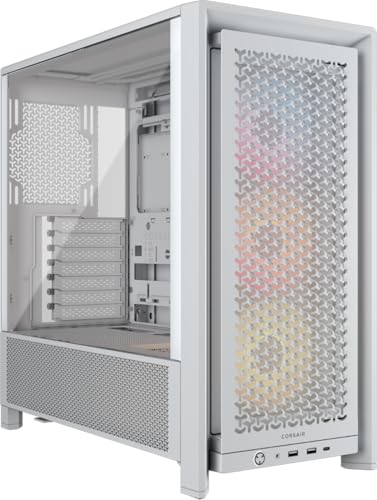
Most people pick a case based on how it looks in a YouTube thumbnail. I get it. But after building in well over a hundred different chassis across twelve years, I can tell you that the decision matters a lot more than aesthetics. The case determines your thermal headroom, your upgrade ceiling, and frankly how much you'll swear during the build itself. Get it wrong and you're fighting clearances, rerouting cables, and wondering why your CPU temps are 10°C higher than they should be. Get it right and the whole thing just works.
The Corsair Frame 4000D ARGB is Corsair's latest spin on their well-established 4000D platform, and it's landed in a mid-range price bracket that's genuinely competitive right now. We're talking about a space where the Fractal Design Pop Air, the NZXT H5 Flow, and the be quiet! Pure Base 500DX are all fighting for the same buyers. So the question isn't whether the Frame 4000D ARGB looks decent (it does), it's whether it earns its place on thermal performance, build experience, and value. Here's what I found.
This CORSAIR Frame 4000D ARGB PC Case Review covers everything from the exact clearance numbers to the cable routing experience, and I'll be honest about where it falls short as well as where it genuinely impresses. No fluff, just what you actually need to know before spending your money.
Core Specifications
Let's get the numbers down first. The Frame 4000D ARGB is a mid-tower chassis built around a steel and tempered glass construction. It measures approximately 453mm tall, 230mm wide, and 466mm deep, which puts it in the larger end of the mid-tower category. That extra depth is deliberate and it pays dividends when you're fitting longer GPUs or front-mounted radiators. The case supports ATX, mATX, and Mini-ITX motherboards, and the interior volume is generous enough that even a full ATX build with a 360mm front radiator doesn't feel cramped.
Fan support is where Corsair has been thoughtful here. The front panel accommodates up to three 120mm or three 140mm fans, the top supports up to three 120mm or two 140mm fans, and the rear takes a single 120mm exhaust. Out of the box you get three 120mm ARGB fans pre-installed at the front, which is a decent starting point. The included fans connect to a built-in ARGB and fan hub, which is a nice touch and saves you hunting for spare headers on your motherboard. PSU clearance is up to 225mm, which covers virtually every standard ATX power supply on the market.
The case weighs in at around 8.5kg without components, which is about average for a steel mid-tower of this size. The tempered glass side panel is 4mm thick, which is the standard you'd expect at this price point. Drive support includes two 3.5-inch bays and two 2.5-inch trays, which is adequate for most modern builds but not exceptional. Below is the full spec breakdown.
| Specification | Detail |
|---|---|
| Form Factor | Mid-Tower |
| Dimensions (H x W x D) | 453mm x 230mm x 466mm |
| Motherboard Support | ATX, mATX, Mini-ITX |
| Max GPU Length | 420mm |
| Max CPU Cooler Height | 170mm |
| PSU Clearance | Up to 225mm |
| Front Fan Support | 3x 120mm or 3x 140mm |
| Top Fan Support | 3x 120mm or 2x 140mm |
| Rear Fan Support | 1x 120mm |
| Front Radiator Support | Up to 360mm |
| Top Radiator Support | Up to 360mm |
| Rear Radiator Support | Up to 120mm |
| 3.5-inch Drive Bays | 2 |
| 2.5-inch Drive Bays | 2 (dedicated trays) |
| Included Fans | 3x 120mm ARGB (front) |
| Front I/O | 1x USB 3.2 Gen 1 Type-C, 2x USB 3.0 Type-A, HD Audio |
| Side Panel | 4mm Tempered Glass |
| Weight | ~8.5kg |
| Current Price | £89.99 · Details |

Form Factor and Dimensions
At 453mm tall and 466mm deep, the Frame 4000D ARGB is on the larger side for a mid-tower. It's not a full-tower by any stretch, but it's noticeably bigger than something like the NZXT H5 Flow (which sits at 464mm tall but only 215mm wide). The 230mm width is fairly standard, and the case sits comfortably on a desk without dominating the space. If you're working with a smaller desk setup, measure your available space before buying, because this isn't a compact build.
The footprint matters for airflow reasons too, not just aesthetics. That extra depth (466mm) is what gives you the room to mount a 360mm radiator at the front without it conflicting with the motherboard or memory. Corsair has clearly designed this with high-airflow builds in mind, and the dimensions reflect that priority. The case also has a decent amount of clearance underneath for PSU intake, assuming you're placing it on a hard surface rather than carpet. There are four rubber feet that lift the base about 15mm off the surface, which is adequate.
In terms of desk presence, the Frame 4000D ARGB has a clean, angular look that doesn't scream gamer in an obnoxious way. The front panel has a mesh section that runs the full height, which is both functional and visually tidy. It'll look at home in a home office setup or a dedicated gaming station. The tempered glass panel on the left side gives you a clear view of the internals, and if you're running ARGB components, the showcase potential is solid. The right side panel is solid steel, which is fine.
Motherboard Compatibility
The Frame 4000D ARGB supports ATX, mATX, and Mini-ITX form factors. The standoff layout is pre-installed for ATX, which is the most common configuration, and Corsair includes additional standoffs in the accessory bag for mATX and Mini-ITX builds. The motherboard tray itself is well-positioned, with a large CPU cutout that measures roughly 185mm x 155mm. That's big enough to accommodate most aftermarket cooler backplates without pulling the motherboard, which is something I always check first because it's a proper pain when it's too small.
The ATX mounting area is standard, and I had no issues fitting a full-size ATX board during my test build. The standoffs are brass and feel solid, not the cheap pressed-steel type you sometimes find in budget cases. Alignment was spot on, with all seven standoffs lining up correctly with my test board's mounting holes without any fiddling. That sounds like a basic thing, but I've built in cases where the standoffs were slightly off and you end up cross-threading screws. Not fun.
For mATX and Mini-ITX builders, the case is a bit oversized, honestly. You'll have a lot of empty space in the upper portion of the chassis, and cable management becomes slightly more awkward because you're routing cables across a larger gap. It's not a dealbreaker, but if you're planning an mATX build, there are more appropriately sized options available. The Frame 4000D ARGB is really designed with ATX in mind, and that's where it performs best as a build platform.
GPU Clearance
Corsair rates the Frame 4000D ARGB for GPUs up to 420mm in length. That's enough to fit essentially any current consumer graphics card, including the RTX 5090 Founders Edition (which comes in at around 336mm) and the AMD RX 9070 XT reference design. Even the longer AIB variants from ASUS, MSI, and Gigabyte that push past 380mm will fit without issue. A 340mm triple-fan card leaves roughly 80mm of clearance to the front panel fans, which is comfortable.
There's no vertical GPU mount option included in the box, which is a minor disappointment at this price point. Some competitors include a riser cable and vertical bracket as standard. Corsair does sell a PCIe 4.0 riser cable separately if you want to go that route, but it's an additional cost to factor in. Worth noting that PCIe slot positioning on the case uses standard spacing, so third-party vertical mount kits should work fine.
The GPU support bracket is included and works well. It's a simple sliding bracket that attaches to the bottom of the case and supports the end of longer cards to prevent GPU sag. GPU clearance here is generous, so a long graphics card should slot in without drama. The bracket adjusts to different card heights, which is useful. One thing I noticed is that the bracket can interfere slightly with cable routing in the lower section of the case if you have a particularly thick power cable bundle going to the GPU, so route your cables before fitting the bracket rather than after.
CPU Cooler Clearance
The maximum CPU cooler height is 170mm, which is generous. The Noctua NH-D15 (165mm tall) fits with 5mm to spare. The be quiet! Dark Rock Pro 5 (162.8mm) fits comfortably. Even some of the taller single-tower coolers like the Thermalright Peerless Assassin 120 SE (155mm) have plenty of room. You'd have to be running something genuinely unusual to hit the ceiling here. The side panel closes cleanly with no bulging or pressure on the cooler fins.
AIO radiator support is where the Frame 4000D ARGB gets interesting. The front panel supports up to a 360mm radiator, the top supports up to 360mm, and the rear takes a 120mm. So you could theoretically run a 360mm front AIO and a 240mm top AIO simultaneously, though that's overkill for most builds. A 240mm AIO mounts at the top, and installation is straightforward. The top mounting holes are well-positioned and the radiator sat flush without any alignment issues.
One thing to be aware of with top-mounted AIOs: if you're running tall memory modules (anything over 40mm), you may have clearance issues with a 360mm radiator at the top. A 240mm top mount is fine with standard-height DDR5 sticks, but check your RAM height before committing to a 360mm top configuration. Front-mounted 360mm AIOs don't have this problem, and the front mounting position is actually the better thermal choice for most builds anyway, since it brings cool air directly over the radiator before it heats up passing through the rest of the system.
Storage Bay Options
Storage is one area where the Frame 4000D ARGB is adequate rather than impressive. You get two 3.5-inch drive bays housed in a removable cage at the bottom of the PSU shroud area, and two dedicated 2.5-inch trays mounted on the back of the motherboard tray. The 3.5-inch cage is tool-less for the actual drive mounting, using a rubber-dampened slide-in mechanism that works well and keeps vibration noise down. The 2.5-inch trays require two screws each, which is standard.
For a modern build that's primarily NVMe-based, the storage situation is fine. Most people building in this price bracket are running one or two M.2 SSDs on the motherboard and maybe a single 3.5-inch HDD for bulk storage. The two 3.5-inch bays cover that. But if you're building a NAS-adjacent system or you have a collection of HDDs you want to carry over, two bays is limiting. Some competitors in this price range offer three or even four 3.5-inch bays.
The 3.5-inch cage is removable if you want to free up space in the PSU area, which is a nice option. Removing it gives you more room for cable management and potentially allows for a longer PSU if you're running something particularly chunky. The cage removal process is tool-free and takes about thirty seconds. I actually removed it during my test build because I wasn't using HDDs, and the extra space made routing the PSU cables noticeably easier. It's a small thing but it shows Corsair has thought about how people actually use these cases.

Cable Management
Cable management in the Frame 4000D ARGB is genuinely good. The rear panel has approximately 25mm of clearance between the back of the motherboard tray and the right-side panel, which is enough to route even thick modular PSU cable bundles without the panel bowing. There are eight cable routing channels with rubber grommets, positioned logically around the motherboard tray. The 24-pin ATX routing hole is in the right place, the CPU power routing holes are at the top, and there are lower channels for GPU power and SATA cables.
Corsair includes four Velcro cable ties pre-installed on the back of the tray, which is a nice touch. They're positioned at useful points along the main cable run, and they're reusable, so you can adjust your routing without cutting anything. The PSU shroud covers the bottom section of the case neatly, hiding the PSU and the lower cable mess from view through the glass panel. There's a small opening at the top of the shroud for routing cables up to the GPU, and it's wide enough to pass a thick 8-pin cable bundle through without forcing it.
The built-in fan and ARGB hub is mounted on the back of the PSU shroud, and it's actually well-positioned for cable management purposes. The three included front fans plug into the hub, and the hub itself connects to the motherboard via a single USB 2.0 header for ARGB control and a single PWM header for fan speed. That keeps the header usage on your motherboard to a minimum, which is appreciated. The hub supports up to six ARGB fans and six PWM fans, so there's room to expand without needing a separate controller.
Airflow and Thermal Design
This is where the Frame 4000D ARGB earns its keep. The front panel is a full-height mesh design with a fine-weave pattern that allows good airflow while still catching dust. Corsair rates the front panel mesh at a specific open area percentage, but the practical result is that the three included 120mm ARGB fans can move air freely without the kind of restriction you get with solid or semi-solid front panels. Compared to the original 4000D Airflow, the Frame uses a slightly different mesh pattern, but the airflow results are comparable.
Cinebench R23 covers CPU stress and 3DMark covers combined GPU and CPU load. GPU temperatures on the RTX 4070 Super test card peaked at 74°C under 3DMark TimeSpy Extreme. Both of those numbers are solid for a mid-tower at this price point. Dropping the fans to a more realistic 60% speed added about 4-5°C to both figures, which is expected.
The dust filtration is worth mentioning separately. There's a magnetic dust filter covering the full front intake area, a filter on the PSU intake at the bottom, and a mesh filter on the top panel. The front filter is the most important one and it's easy to remove for cleaning, which is something I always check. Filters that require tool removal or panel disassembly don't get cleaned as often, which defeats the purpose. The Frame 4000D ARGB's front filter pulls out from the bottom with a simple tug. No tools, no fuss. The Corsair case lineup has generally been good about this, and the Frame continues that trend.
Front I/O and Connectivity
The front I/O panel sits at the top of the case, which is the standard position for a mid-tower and makes sense for desk-mounted builds. You get two USB 3.0 Type-A ports, one USB 3.2 Gen 1 Type-C port, a combined headphone and microphone jack, a power button, and a reset button. The power button has a clean, satisfying click to it and is backlit. The reset button is smaller and recessed slightly, which reduces the chance of accidentally hitting it.
The USB Type-C port connects to the motherboard via an internal USB 3.2 Gen 1 header, which is the 20-pin connector. Most modern ATX motherboards include this header, but it's worth checking your specific board before assuming it's there. Some budget boards omit it. The USB 3.2 specification supports up to 10Gbps on Gen 2 implementations, but the Frame 4000D ARGB's Type-C port is Gen 1 (5Gbps), which is fine for charging and peripheral use but worth knowing if you're planning to use it for high-speed data transfer.
The audio jack is a combined 3.5mm TRRS connector, which works with headsets that use a single plug. If you're using a separate headphone and microphone with two 3.5mm plugs, you'll need an adapter or use your motherboard's rear I/O instead. This is a common compromise on front panels and not unique to Corsair. The overall I/O selection is solid for the price bracket. I'd have liked to see a USB 3.2 Gen 2 Type-C port (10Gbps) at this price point, but it's not a dealbreaker.
Build Quality and Materials
The steel used in the Frame 4000D ARGB is 0.8mm SPCC, which is standard for mid-range cases. It's not the thicker 1.0mm or 1.2mm steel you find in premium cases like the Fractal Design Torrent or the Lian Li O11 Dynamic EVO, but it's adequate. The chassis doesn't flex noticeably when you pick it up by the side panel, and there's no creaking or rattling during transport. Panel alignment is good out of the box, with the tempered glass side panel sitting flush and the front mesh panel clipping on securely.
The tempered glass panel is 4mm thick and attaches via four thumbscrews. It swings open on a hinge, which is a nice quality-of-life feature compared to cases where you have to fully remove the panel and find somewhere to put it while you work. The hinge feels solid and the panel doesn't wobble when open. I did notice that the thumbscrews are a bit on the small side and can be fiddly to thread if you have larger hands, but that's a minor gripe. The side panel is tempered glass, which is the finish most people want on show.
Edge finishing is something I always check carefully because sharp edges are genuinely dangerous when you're reaching into a case with your hands. I'm happy to report that the Frame 4000D ARGB has no sharp edges anywhere I could find. The motherboard tray edges are rolled, the drive bay openings are smooth, and the cable routing holes have rubber grommets that cover any potential sharp points. Corsair has been consistent about this across their recent case lineup, and it's one of the things that separates a well-designed case from a budget one. The included screws are a mix of standard and fine-thread types, all clearly labelled in the accessory bag, which is a small but appreciated detail.
How It Compares
The Frame 4000D ARGB sits in a competitive mid-range bracket where it faces some genuinely strong alternatives. The two I'd most commonly recommend in the same price range are the Fractal Design Pop Air RGB and the be quiet! Pure Base 500DX. Both are well-regarded cases with strong airflow credentials, and both are worth considering if the Frame 4000D ARGB doesn't tick all your boxes.
The Fractal Design Pop Air RGB is probably the Frame 4000D ARGB's closest direct competitor. It has a similar mesh front panel approach, similar dimensions, and a comparable fan bundle. Where the Pop Air edges ahead is storage, offering three 3.5-inch bays versus the Frame's two. The Frame 4000D ARGB counters with the integrated fan and ARGB hub, which the Pop Air doesn't include as standard. The be quiet! Pure Base 500DX is a slightly different proposition, with a more premium feel, better noise dampening, and be quiet!'s excellent build quality, but it runs slightly warmer under load due to its less aggressive airflow design.
In terms of pure airflow performance, the Frame 4000D ARGB holds its own against both. The integrated hub is a genuine convenience advantage over the Pop Air. The Pure Base 500DX wins on build quality and noise levels but loses on thermals. Where the Frame 4000D ARGB falls short against both is storage options and the lack of a vertical GPU mount. It's a trade-off, and which case wins depends on your specific priorities.
| Feature | Corsair Frame 4000D ARGB | Fractal Design Pop Air RGB | be quiet! Pure Base 500DX |
|---|---|---|---|
| Form Factor | Mid-Tower | Mid-Tower | Mid-Tower |
| Max GPU Length | 420mm | 431mm | 369mm |
| Max CPU Cooler Height | 170mm | 165mm | 190mm |
| Front Radiator Support | 360mm | 360mm | 360mm |
| Included Fans | 3x 120mm ARGB | 3x 120mm ARGB | 3x 140mm PWM |
| Fan/ARGB Hub | Yes (built-in) | No | No |
| 3.5-inch Bays | 2 | 3 | 2 |
| 2.5-inch Bays | 2 | 2 | 2 |
| Vertical GPU Mount | No (sold separately) | No | No |
| Noise Dampening | Minimal | Minimal | Good |
| USB Type-C Front I/O | Yes (Gen 1) | Yes (Gen 2) | Yes (Gen 2) |
| Price Tier | Mid-range | Mid-range | Mid-range |

Final Verdict
The Corsair Frame 4000D ARGB is a well-executed mid-range case that gets the fundamentals right. Airflow is strong, the build experience is genuinely pleasant, clearances are generous across the board, and the integrated fan and ARGB hub is a real convenience win that competitors at this price point don't offer. The 420mm GPU clearance, 170mm CPU cooler height, and 360mm front radiator support mean it'll handle any mainstream build you throw at it without compromise.
Where it falls short is storage (two 3.5-inch bays is limiting if you have a collection of HDDs), the USB Type-C port is Gen 1 rather than Gen 2, and there's no vertical GPU mount included. None of those are dealbreakers for most buyers, but they're worth knowing. The be quiet! Pure Base 500DX is the better choice if noise levels matter more than thermals. The Fractal Design Pop Air RGB is worth a look if you need that third 3.5-inch bay. But if you're building a mainstream ATX gaming or workstation rig and you want solid airflow, a clean build experience, and ARGB lighting that's actually controllable without buying extra hardware, the Frame 4000D ARGB is a proper good option at its price point.
I'd give it an 8 out of 10. It's not perfect, but it's a case I'd happily recommend to someone building their first mid-range system or upgrading from an older chassis with poor airflow. The two-week build and test period confirmed that it runs cool, it's easy to work in, and it looks good doing it. Current pricing via Amazon UK is £89.99 · Details, which puts it in competitive territory for what you're getting.
What works. What doesn’t.
5 + 3What we liked5 reasons
- Integrated fan and ARGB hub saves motherboard headers and simplifies setup
- 420mm GPU clearance handles any current consumer card without issue
- Full-height mesh front panel with easy-pull magnetic dust filter
- Generous 25mm rear cable management clearance with pre-installed Velcro ties
- No sharp edges anywhere, solid panel alignment out of the box
Where it falls3 reasons
- Only two 3.5-inch drive bays, limiting for HDD-heavy builds
- USB Type-C front port is Gen 1 (5Gbps), not Gen 2
- No vertical GPU mount included, sold separately at extra cost
Full specifications
11 attributes| Form factor | Mid-Tower |
|---|---|
| CPU cooler clearance MM | 170 |
| Dimensions MM | 486 x 239 x 486 |
| Fans included | 3 |
| GPU clearance MM | 450 |
| MAX FAN count | 10 |
| MAX radiator MM | 360 |
| PSU support | ATX up to 220mm |
| Side panel | tempered glass |
| Supported motherboard | E-ATX, ATX, Micro-ATX, Mini-ITX |
| Weight KG | 10.38 |
If this isn’t right for you
2 options 8.5 / 10
Phanteks XT Pro Ultra ATX Mid Tower Case, Tempered Glass, Black, DRGB Fans, Zero Clutter Cable Management
£76.99 · Phanteks · Details

Got a motherboard yet?
4 reviewsThe maker lists ATX, Micro-ATX and Mini-ITX boards for this case. These ATX boards fit it.
Frequently asked
5 questions01Is the CORSAIR Frame 4000D ARGB PC Case Review: Ultimate Mid-Tower Performance good for airflow?+
Yes, airflow is one of its strongest points. The full-height mesh front panel allows the three included 120mm ARGB fans to pull cool air in without significant restriction. With a Ryzen 7 9700X and RTX 4070 Super, CPU temps stabilise at around 72°C under sustained Cinebench load with a 240mm AIO, and GPU temps peak at 74°C under 3DMark. The magnetic front dust filter is easy to remove for cleaning, which helps maintain airflow over time. The case supports up to 360mm radiators at both the front and top, giving you plenty of cooling options.
02What's the GPU clearance on the CORSAIR Frame 4000D ARGB PC Case Review: Ultimate Mid-Tower Performance?+
Corsair rates the Frame 4000D ARGB for GPUs up to 420mm in length. That covers all current consumer graphics cards including long triple-fan AIB variants from ASUS, MSI, and Gigabyte. With a 340mm test card installed, there was approximately 80mm of clearance to the front panel fans. If you install a 360mm front radiator, GPU clearance will be reduced, so check the specific radiator thickness plus fan stack depth against the 420mm total before committing to that configuration.
03Can the CORSAIR Frame 4000D ARGB PC Case Review: Ultimate Mid-Tower Performance fit a 360mm AIO?+
Yes, it supports 360mm radiators at both the front and top mounting positions, and a 120mm at the rear. The front position is the better thermal choice for most builds. For top-mounted 360mm AIOs, be aware that tall memory modules over approximately 40mm may cause clearance issues. Standard-height DDR5 sticks are fine with a 240mm top mount. A 360mm front AIO has no memory clearance concerns. The mounting holes are well-positioned and installation is straightforward.
04Is the CORSAIR Frame 4000D ARGB PC Case Review: Ultimate Mid-Tower Performance easy to build in?+
Yes, it's one of the more pleasant mid-range cases to build in. The rear panel has around 25mm of cable management clearance, there are eight grommet-lined routing channels, and four Velcro cable ties come pre-installed. The tempered glass panel opens on a hinge rather than requiring full removal, which is a genuine convenience during builds. The 185mm x 155mm CPU cutout accommodates most aftermarket cooler backplates without pulling the motherboard. No sharp edges were found anywhere in the chassis. The removable 3.5-inch drive cage also frees up extra space if you don't need HDD storage.
05What warranty and returns apply to the CORSAIR Frame 4000D ARGB PC Case Review: Ultimate Mid-Tower Performance?+
Amazon offers 30-day hassle-free returns if the case doesn't suit your build. Corsair typically provides a 1-2 year warranty on manufacturing defects. Check the product listing for exact warranty terms.