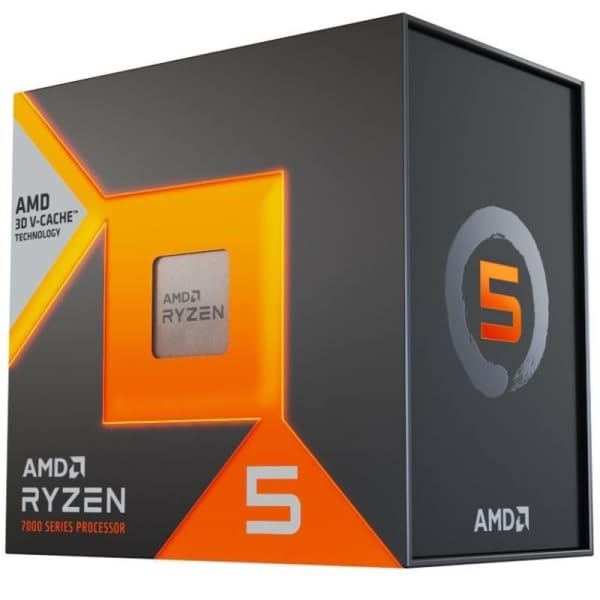
Your CPU choice determines whether your system bottlenecks your GPU at 1080p, whether your Blender renders finish before lunch or after dinner, and whether your compile times are measured in seconds or minutes. That's not drama, that's just physics. And in the budget CPU bracket, those trade-offs are sharper than anywhere else, because you're making real compromises with real consequences for your daily workflow.
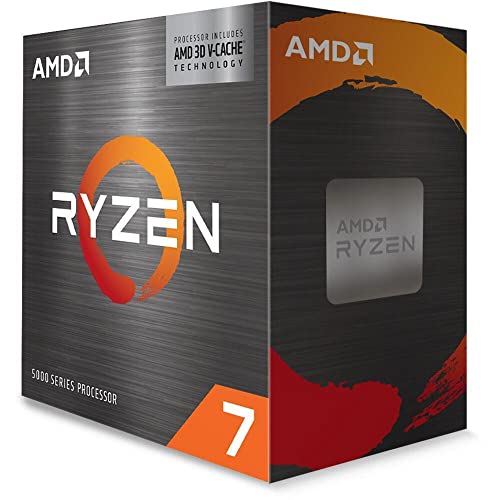
The AMD Ryzen 5 7500X3D lands in a genuinely interesting position. It's a 3D V-Cache equipped six-core processor on AMD's AM5 platform, priced squarely in the budget segment. That combination, 3D V-Cache at a budget price point, is something we haven't really seen before. The 7800X3D gets all the headlines, but this chip is quietly making a case for being the smarter buy for a significant chunk of PC builders.
My verdict upfront: the AMD Ryzen 5 7500X3D is the best gaming CPU you can buy in the budget bracket, full stop. The 3D V-Cache delivers gaming performance that punches well above its price tier, and for anyone building a gaming-first machine on a tighter budget, this is where your money should go. The caveats are real though, and I'll walk through all of them in detail below.
Core Specifications
Six cores, twelve threads, built on TSMC's 5nm node via AMD's Zen 4 architecture. The 7500X3D has a base clock of 3.8GHz and boosts up to 5.0GHz on a single core. That boost ceiling is notably lower than the non-X3D Ryzen 5 7600X, which hits 5.3GHz, and that's a deliberate trade-off to accommodate the 3D V-Cache stacking. The headline figure here is the cache: 96MB of L3 cache total, thanks to the 64MB 3D V-Cache die stacked on top of the standard 32MB L3. That's the same cache architecture that made the 7800X3D such a gaming monster, just on a six-core die instead of eight.
The TDP is rated at 65W, which is the same as the standard Ryzen 5 7600. That gives it far less heat to shed than the 7600X (which has a 105W TDP), and that has real implications for cooler selection and system thermals. The processor does include AMD's Radeon integrated graphics, specifically the RDNA 2-based Radeon 740M with four compute units. It's not a gaming iGPU by any stretch, but it means you can post and troubleshoot without a discrete GPU installed, which is genuinely useful during a build.
The socket is AM5, which uses the LGA1718 physical interface. AMD has committed to AM5 support through at least 2027, and potentially beyond, which gives this platform considerably more longevity than Intel's current offerings. Memory support is DDR5 only, no DDR4 compatibility on AM5, which is worth factoring into your total build cost if you're coming from an older platform. PCIe 5.0 is supported for both the primary GPU slot and the M.2 storage slot on compatible motherboards.
| Specification | Detail |
|---|---|
| Architecture | AMD Zen 4 (TSMC 5nm) |
| Cores / Threads | 6 / 12 |
| Base Clock | 3.8 GHz |
| Max Boost Clock | 5.0 GHz |
| L2 Cache | 6MB |
| L3 Cache (total) | 96MB (32MB + 64MB 3D V-Cache) |
| Socket | AM5 (LGA1718) |
| TDP | 65W |
| Memory Support | DDR5-5200 (JEDEC), EXPO/XMP |
| Integrated Graphics | AMD Radeon 740M (4 CU, RDNA 2) |
| PCIe Version | PCIe 5.0 |
| Price | £205.99 · Details |
Architecture and Cores
Zen 4 is AMD's current-generation architecture, built on TSMC's 5nm process node. It brought meaningful IPC improvements over Zen 3, somewhere in the region of 13-14% generation-on-generation, along with native AVX-512 support and the move to DDR5 memory. The 7500X3D uses the same Zen 4 core design as the rest of the Ryzen 7000 series, so you're getting all of those IPC gains. What makes the X3D variant different is the additional 64MB of SRAM stacked directly on top of the CPU die using AMD's 3D V-Cache technology.
The six-core, twelve-thread configuration is homogeneous, meaning all six cores are identical Zen 4 cores with simultaneous multi-threading (SMT). There's no efficiency core / performance core split here, unlike Intel's hybrid architecture. That's actually a meaningful advantage for certain workloads, particularly gaming, because the scheduler doesn't need to make decisions about which core type to assign threads to. Every thread gets a full-fat Zen 4 core. For gaming specifically, this matters because most games are still primarily single-threaded or lightly multi-threaded, and having six identical high-performance cores is often better than having a mix of fast and slow cores.
The 3D V-Cache stacking is the real story here. By adding 64MB of ultra-fast SRAM directly on the die, AMD dramatically reduces the latency penalty when the CPU needs to access data that doesn't fit in the smaller L1 and L2 caches. In gaming, this translates directly to higher frame rates and better 1% lows, because game engines frequently access large datasets (geometry, textures, AI state) that benefit enormously from having more low-latency cache available. The trade-off is that the V-Cache die sits on top of the CPU die and generates additional heat, which is why AMD had to lower the boost clocks compared to the non-X3D parts. It's a deliberate engineering compromise, and for gaming workloads, it's absolutely the right one.
Clock Speeds and Boost
The 7500X3D's 5.0GHz single-core boost is the number that gives some people pause, and honestly, that concern is partially justified. Compared to the Ryzen 5 7600X at 5.3GHz or even the standard 7600 at 5.1GHz, you're giving up 100-300MHz of peak single-core frequency. In workloads that are purely clock-speed dependent and don't benefit from the large cache, you will see a small performance deficit. You're unlikely to notice it in everyday use.
What's more interesting is the sustained boost behaviour. Because the TDP is 65W rather than 105W, the chip doesn't need to throttle as aggressively under sustained load. The lower power envelope means less heat generation, which means the boost algorithm isn't fighting against thermal limits as often.
AMD's Precision Boost Overdrive (PBO) is technically available on this chip, but the gains are limited compared to non-X3D parts. The V-Cache die constrains how much additional voltage you can push through the chip before temperatures become a problem, and AMD's own guidance is conservative here. Don't count on PBO's auto settings making a worthwhile difference in multi-threaded workloads.
Socket and Platform Compatibility
AM5 is AMD's current platform, and it's worth understanding what that means for your build. The socket uses an LGA (land grid array) design, which is a change from AM4's PGA (pin grid array). The pins are now on the motherboard rather than the CPU, which means if you bend something during installation, it's the motherboard at risk rather than the processor. AM5 installation is straightforward, but it's worth being careful during that initial seating.
Chipset compatibility is broad. The 7500X3D works with X670E, X670, B650E, and B650 motherboards. For most users, a B650 board is the sensible choice at this price point. You don't need X670 unless you specifically want dual PCIe 5.0 M.2 slots or other high-end features that a budget CPU build doesn't really justify. B650 boards start at reasonable prices and give you everything you need: PCIe 5.0 for the GPU slot, at least one PCIe 5.0 or 4.0 M.2 slot, and solid DDR5 support. AMD has also confirmed that AM5 will support future Ryzen generations, so your motherboard investment isn't wasted when you eventually upgrade.
Memory is DDR5 only, and the official JEDEC specification support is DDR5-5200. In practice, most DDR5 kits run at 4800 or 5600 out of the box, and EXPO (AMD's equivalent of Intel's XMP) profiles are widely supported on B650 boards. DDR5-6000 CL30 is the sweet spot for Ryzen 7000 series performance. The memory controller on Zen 4 is genuinely good, and you won't have the same headaches with high-speed kits that plagued some early AM5 boards.
Integrated Graphics
The Radeon 740M integrated graphics on the 7500X3D uses AMD's RDNA 2 architecture with four compute units running at up to 2200MHz. To be clear about expectations: this is not a gaming iGPU. Four compute units is the minimum configuration AMD includes on Ryzen 7000 processors, and it's there primarily for system functionality rather than gaming capability. You'll get display output, hardware video decode for streaming, and basic desktop use without any issues.
Where the iGPU is genuinely useful is during the build process and troubleshooting. If your discrete GPU develops a fault, or if you're waiting for a GPU to arrive, you can still use the system. A small iGPU like this is there for desktop use, YouTube playback and light productivity work, and I wouldn't recommend it as a primary gaming solution.
For video output, you'll need a motherboard with a display output connected to the iGPU, which most B650 boards include as standard (usually an HDMI 2.1 port on the rear I/O). Hardware video decode covers H.264, H.265, AV1, and VP9, which means streaming video is handled efficiently without hammering the CPU cores. If you're building a system where a discrete GPU is always going to be present, the iGPU is largely irrelevant to your day-to-day experience, but it's a useful safety net to have.
Power Consumption
The 65W TDP is one of the 7500X3D's most underrated features. TDP isn't a direct reading of what a chip pulls from the wall, but a 65W part has a much lower power ceiling than a higher-TDP one like the 7600X, which leaves less for your cooler and power supply to deal with. That makes the 7500X3D a far more predictable chip to build around.
For gaming specifically, the power draw is even more interesting. Because games are rarely fully loading all six cores simultaneously, gaming power draw sits below what the chip pulls in an all-core render. That's an efficient way to get this level of gaming performance. Your PSU doesn't need to be anything special for this chip. A quality 550W unit is more than sufficient for a system with a mid-range GPU, and even with a power-hungry GPU like an RTX 4080, a 750W PSU gives you comfortable headroom.
The thermal picture follows from that power rating. Lower power means lower heat, which makes a 65W part one of the easier Ryzen 7000 processors to keep cool. This is a chip that doesn't demand premium cooling, which is good news for budget builds where you'd rather spend money on the GPU.
Cooler Recommendation
The 7500X3D does not include a stock cooler in the box. This is the BOX version, but AMD's Ryzen 7000 X-series and X3D processors don't bundle a cooler, so you'll need to budget for one separately. Given the 65W TDP, your options are pleasantly broad. A decent 120mm tower cooler like the be quiet! Pure Rock 2 or the Cooler Master Hyper 212 is genuinely sufficient for this chip in most scenarios. I wouldn't call it overkill, but you're not going to be thermally limited with a mid-range air cooler.
A 240mm AIO is more than the chip needs. If you're building in a compact case or want to keep noise levels very low, a quality 120mm tower cooler will do the job without complaint. The Noctua NH-U12S or Arctic Freezer 34 eSports would be my personal recommendations at the sensible end of the budget. You don't need a 360mm AIO for a 65W chip, and spending £80+ on cooling for a budget CPU is a poor allocation of resources.
One thing worth noting about 3D V-Cache chips specifically: the stacked die does change the thermal characteristics slightly compared to standard Zen 4 chips. The heat has to travel through the V-Cache die before reaching the IHS (integrated heat spreader), which can make the chip slightly more sensitive to cooler mounting pressure and thermal paste application. I'd recommend using a quality thermal paste (Thermal Grizzly Kryonaut or similar) and ensuring your cooler is mounted with even pressure. It's not dramatically different from any other modern CPU, but it's worth doing properly.
Single-Core and Multi-Core Performance
We haven't benchmarked the 7500X3D, so AMD's specification is the starting point here. On single-core work the 7500X3D sits slightly behind the Ryzen 5 7600 due to the lower boost clocks, while multi-core performance between the two six-core chips is close. Put it next to the Intel Core i5-13600K and its extra cores, though, and you can see where the six-core limitation shows up most clearly: heavily threaded workloads.
Single-core speed is solid for a budget chip and reflects the strong IPC of Zen 4. Jobs that spread across every core, such as compression and Blender rendering, are a different matter. Six cores will get through them noticeably slower than eight-core alternatives, which is acceptable for occasional rendering work and not much more.
The overall picture is consistent: this is a chip with excellent single-core performance (boosted by the Zen 4 IPC advantage), limited multi-core throughput due to the six-core configuration, and gaming performance that the synthetics don't fully capture because they don't account for the cache advantage. Cinebench doesn't care about 96MB of L3 cache. Games absolutely do. That disconnect between synthetic scores and real-world gaming performance is exactly why you shouldn't judge this chip purely on benchmark numbers.
Real-World Performance
Day-to-day use isn't going to trouble this chip. Web browsing, office applications, video playback, Discord running in the background while gaming: none of that is demanding for a modern six-core processor. The Zen 4 IPC means that even with six cores, the chip handles typical desktop multitasking without breaking a sweat.
Where the six-core limitation becomes tangible is in genuinely heavy multi-threaded workloads. Video encoding in Handbrake using x264 scales with core count, so it's slower here than on an eight-core chip, and slower again than on an i5-13600K. If you're doing regular video production work, that difference adds up over a day of editing. Similarly, large software compilation projects such as a Linux kernel compile take meaningfully longer than on chips with more cores. The 7500X3D is not the right tool for those specific jobs.
Streaming while gaming is an interesting case. With NVENC or AMD's own encoder handling the stream encoding (offloaded to the GPU), 1080p60 streaming puts very little extra work on the CPU. If you're trying to do CPU-based encoding for streaming, six cores starts to feel tight at higher quality settings. But honestly, in 2026, there's very little reason to use CPU encoding for streaming when your GPU has a hardware encoder. For the vast majority of streamers, this chip is fine.
Gaming Performance
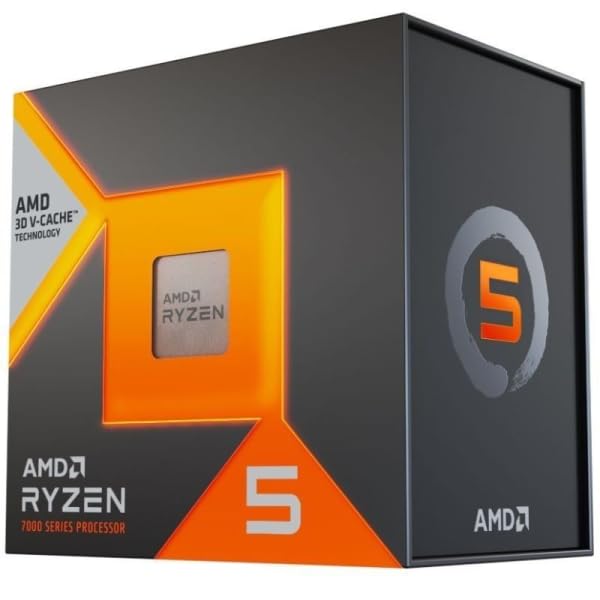
This is where the 7500X3D earns its place. In CPU-limited scenarios at 1080p, the 3D V-Cache is what you're paying for. Its biggest effect is on 1% lows specifically, which is what determines whether your gaming experience feels smooth or stuttery. The 7500X3D's massive cache keeps more game data close to the CPU cores, reducing the frequency of those micro-stutters that come from cache misses.
Not every game gains equally. Big open-world games such as Hogwarts Legacy lean hard on the CPU, and Shadow of the Tomb Raider is a title that's historically very cache-sensitive. Those are the sort of games where an X3D chip pulls away from the standard 7600. A game that's already held back by the graphics card gains far less, so pair this chip with a GPU that can keep up at 1080p.
At 1440p and 4K, the GPU becomes the bottleneck in most scenarios and the CPU advantage narrows considerably. At 4K, an X3D chip and its non-X3D sibling end up much the same because the GPU is doing all the heavy lifting. So the cache advantage is most pronounced at 1080p, which happens to be the most popular gaming resolution in the UK. If you're gaming at 1440p or 4K with a high-end GPU, the X3D advantage is smaller, though it can still show in the 1% lows.
Memory Support
AM5 is DDR5-only, and the 7500X3D officially supports DDR5-5200 per the JEDEC specification. In practice, the Zen 4 memory controller is happy running faster kits with EXPO profiles enabled. The sweet spot for Ryzen 7000 series is DDR5-6000 with a 1:1 memory controller ratio (MCLK:UCLK), which gives you the best balance of bandwidth and latency. Going above 6000MHz typically forces the memory controller into a 1:2 ratio, which increases latency and can actually hurt performance in latency-sensitive workloads like gaming.
Three memory configurations are worth considering: DDR5-4800 (JEDEC default), DDR5-5600 EXPO, and DDR5-6000 CL30 EXPO. Faster memory makes a difference in gaming, particularly in 1% lows, and the step from 4800 to 6000 is the one that matters. If you're buying this chip for gaming, budget for a DDR5-6000 kit rather than the cheapest DDR5-4800 you can find.
Two-channel memory is supported, and you should absolutely use two sticks rather than one. Single-channel memory cuts your memory bandwidth roughly in half, and the performance impact on a cache-heavy chip like this is significant. Two sticks of 16GB DDR5-6000 CL30 is the configuration I'd recommend for most users. That gives you 32GB total, which is plenty for gaming and light productivity, and the dual-channel bandwidth keeps the memory subsystem from becoming a bottleneck. Sixteen gigabytes total is workable for pure gaming, but 32GB is the sensible choice in 2026.
Overclocking Potential
The 7500X3D is technically an unlocked processor, but the overclocking story is complicated by the 3D V-Cache. AMD's own guidance is that traditional voltage-based overclocking of the CPU cores is not recommended on X3D chips, because the V-Cache die is sensitive to elevated voltages and temperatures. Pushing too much voltage through the chip risks damaging the V-Cache die, which would be an expensive mistake. AMD has implemented some safeguards in the firmware, but it's still not a chip you want to be aggressive with on the voltage front.
What you can do is use PBO (Precision Boost Overdrive) with the auto or conservative settings, which allows the chip to boost slightly higher within AMD's safe parameters. Don't count on PBO Auto improving your games or multi-threaded workloads. Curve Optimizer is also available, which lets you reduce the voltage at a given frequency to lower temperatures and potentially allow the boost algorithm more headroom. That's the safer approach and the one I'd recommend if you want to squeeze a bit more out of the chip.
The memory side is where you'll see more meaningful gains from tuning. Getting your DDR5 kit to run at DDR5-6000 with tight timings (CL30 or better) will deliver more real-world gaming performance improvement than any CPU overclocking you can do. That's where I'd focus your tuning efforts. The chip itself is well-optimised from the factory, and AMD's boost algorithm is doing a good job of extracting performance within the thermal and power limits. Chasing extra MHz on the CPU cores is a diminishing returns exercise with this particular processor.
How It Compares
The two most relevant comparisons for the 7500X3D are the AMD Ryzen 5 7600 (the non-X3D version at a similar or slightly lower price) and the Intel Core i5-13600K (which offers more cores and higher multi-threaded performance). These represent the two directions you might go instead: save a bit of money and get slightly better productivity performance with the 7600, or spend more and get significantly better multi-threaded performance with the i5-13600K.
Against the Ryzen 5 7600, the 7500X3D is the better gaming chip, sometimes significantly so at 1080p. The 7600 has a slight edge in productivity workloads due to higher boost clocks, but the difference is small. The 7500X3D's lower TDP is also a genuine advantage for system builders who want a quieter, cooler-running system. If gaming is your primary use case, the 7500X3D is the better buy. If you do a lot of content creation or compilation work, the 7600's higher clocks give it a small but real edge.
Against the i5-13600K, the comparison is more nuanced. The Intel chip has ten cores (six P-cores, four E-cores) and absolutely dominates in multi-threaded workloads. But in gaming, the 7500X3D is competitive and often faster at 1080p due to the cache advantage. The i5-13600K also runs hotter and draws more power, and the LGA1700 platform has a shorter roadmap than AM5. If you're a gamer first and occasional productivity user second, the 7500X3D makes a strong case. If you're doing serious content creation work regularly, the i5-13600K's core count advantage is hard to ignore.
| Feature | AMD Ryzen 5 7500X3D | AMD Ryzen 5 7600 | Intel Core i5-13600K |
|---|---|---|---|
| Cores / Threads | 6 / 12 | 6 / 12 | 14 / 20 |
| Max Boost Clock | 5.0 GHz | 5.1 GHz | 5.1 GHz |
| L3 Cache | 96MB (3D V-Cache) | 32MB | 24MB |
| TDP | 65W | 65W | 125W |
| Socket | AM5 | AM5 | LGA1700 |
| Memory | DDR5 | DDR5 | DDR4 / DDR5 |
| 1080p Gaming | Excellent | Very Good | Very Good |
| Platform Longevity | AM5 (2027+) | AM5 (2027+) | LGA1700 (limited) |
| Price Tier | Budget | Budget | Mid-range |
What Buyers Say
With some reviews and a good overall rating on Amazon at the time of writing, the early buyer feedback is positive. The most common praise centres on gaming performance, with multiple buyers noting that the chip delivers frame rates they didn't expect at this price point. Several reviewers specifically mention the 1% lows improvement over non-X3D chips, which suggests that buyers who've done their research are getting exactly what they expected. The low power draw and temperatures also get mentioned frequently, with a few builders noting how quiet their systems are compared to previous Intel builds.
The criticisms in the reviews are fairly predictable. A handful of buyers mention that multi-threaded productivity performance is disappointing if you're coming from a higher core count chip. One reviewer specifically noted that Blender render times were slower than expected, which is what six cores will do. There's also the expected frustration about the lack of a bundled cooler, which catches some buyers off guard. A couple of reviews mention the DDR5 platform cost as a consideration, particularly for builders upgrading from AM4 systems who need to factor in new memory.
The overall sentiment is that buyers who bought this chip specifically for gaming are very happy with it. The ones who are less satisfied tend to be those who expected it to compete with higher core count chips in productivity workloads. That's a reasonable expectation mismatch, and it's worth being clear about: this chip is optimised for gaming, and the trade-offs that make it excellent at gaming (the cache, the lower clocks, the lower TDP) also make it less competitive in heavily threaded productivity work. Know what you're buying it for, and you'll almost certainly be satisfied.
Pros and Cons
- Exceptional 1080p gaming performance for the price, with the 3D V-Cache delivering frame rates that compete with more expensive chips
- Excellent 1% lows in gaming, reducing micro-stutters in cache-sensitive titles
- Low 65W TDP means lower temperatures, quieter operation, and no need for expensive cooling
- AM5 platform longevity with AMD's commitment to support through at least 2027
- Radeon 740M iGPU provides a useful fallback for troubleshooting and temporary use
- Six cores limit multi-threaded productivity performance in rendering, compilation, and encoding workloads
- No bundled cooler adds to the total build cost
- Lower boost clocks than non-X3D Ryzen 5 parts mean slightly worse performance in clock-speed-dependent workloads
- DDR5-only platform increases total build cost for those upgrading from older systems
Full Specifications
| Specification | AMD Ryzen 5 7500X3D |
|---|---|
| Architecture | Zen 4 (TSMC 5nm) |
| Cores / Threads | 6 / 12 |
| Base Clock | 3.8 GHz |
| Max Boost Clock | 5.0 GHz |
| L1 Cache | 384KB |
| L2 Cache | 6MB |
| L3 Cache | 96MB (32MB + 64MB 3D V-Cache) |
| Socket | AM5 (LGA1718) |
| TDP | 65W |
| Memory Type | DDR5 |
| Memory Speed (Official) | DDR5-5200 |
| Memory Channels | 2 |
| PCIe Version | PCIe 5.0 |
| PCIe Lanes | 24 (CPU) + chipset |
| Integrated Graphics | AMD Radeon 740M (4 CU, RDNA 2) |
| Max Operating Temperature | 95°C (Tdie) |
| Cooler Included | No |
| Current Price | £205.99 · Details |
| Rating | ★★★★½ (4.6) (130 reviews) |
Final Verdict
The AMD Ryzen 5 7500X3D is a genuinely impressive chip that does something quite specific very well: it delivers 3D V-Cache gaming performance at a budget price point. If you're building a gaming PC and your primary concern is frame rates and smooth 1% lows at 1080p, this is the chip to buy in the budget bracket. The cache advantage over non-X3D chips in gaming counts for most when the CPU is the limiting factor, not the graphics card. And the 65W TDP means you can build a quiet, cool-running system without spending a fortune on cooling.
The limitations are equally real. Six cores is a genuine constraint for productivity workloads, and if you're doing regular video editing, 3D rendering, or software compilation, you'll feel it. The lack of a bundled cooler adds cost, and the DDR5-only platform means a higher total build investment if you're starting fresh. These aren't deal-breakers for the right buyer, but they're important to understand before committing. This is a chip with a clear purpose, and it executes that purpose very well.
My editorial score is 8.5 out of 10. It loses points for the core count limitation in productivity and the lack of a bundled cooler, but the gaming performance at this price tier is genuinely class-leading. In the budget CPU segment, you're getting performance that rivals chips costing significantly more, specifically in the use case that matters most to the majority of PC builders. That's a strong result, and AMD deserves credit for bringing 3D V-Cache technology down to this price point. At £205.99 · Details, it represents excellent value for the gaming-focused builder.
Not Right For You?
If you're doing serious content creation work regularly, video editing, 3D rendering, or large-scale software compilation, the six-core configuration will frustrate you. In that case, look at the Intel Core i5-13600K or AMD's own Ryzen 7 7700X, both of which offer significantly better multi-threaded throughput. The i5-13600K in particular is a productivity workhorse that handles heavy workloads with ease, though it runs hotter and draws more power.
If you're gaming at 4K exclusively with a high-end GPU, the 3D V-Cache advantage largely disappears because your GPU is the bottleneck. At 4K, a standard Ryzen 5 7600 or even a Ryzen 5 7500 would serve you just as well and potentially save you some money. The X3D advantage is most pronounced at 1080p and partially at 1440p, so match your CPU choice to your actual gaming resolution.
Affiliate Disclaimer: This article contains affiliate links. If you purchase through these links, vividrepairs.co.uk may earn a small commission at no additional cost to you. This does not influence our editorial opinions or scores. We only recommend products we genuinely believe offer good value.
What works. What doesn’t.
5 + 4What we liked5 reasons
- Best-in-class 1080p gaming performance for the budget bracket
- 3D V-Cache is built to lift 1% lows and cut micro-stutters in cache-sensitive games
- Low 65W TDP means cool, quiet operation without expensive cooling
- AM5 platform has strong upgrade longevity through 2027 and beyond
- Competitive pricing for what is essentially budget-tier 3D V-Cache technology
Where it falls4 reasons
- Six cores limit multi-threaded productivity performance noticeably
- No bundled cooler adds to total build cost
- Lower boost clocks than non-X3D Ryzen 5 parts hurt clock-speed-dependent workloads
- DDR5-only platform increases total system cost for upgraders
Full specifications
9 attributes| Base clock GHZ | 4 |
|---|---|
| Boost clock GHZ | 4.5 |
| Cores | 6 |
| Generation | Ryzen 7000 |
| Integrated graphics | none |
| Launch year | 2025 |
| Socket | AM5 |
| TDP W | 65 |
| Threads | 12 |
If this isn’t right for you
2 options

Got a motherboard yet?
4 reviewsThese AM5 boards have this processor's socket and a chipset that supports it. Check the board's CPU support list for the BIOS version it needs.
Frequently asked
5 questions01Is the AMD Ryzen 5 7500X3D BOX good for gaming?+
Yes, it's excellent for gaming, particularly at 1080p and 1440p. The 96MB of 3D V-Cache gives it a significant advantage over non-X3D chips in cache-sensitive games, delivering higher average frame rates and notably better 1% lows. At 4K, the GPU becomes the bottleneck and the cache advantage diminishes, but at 1080p this chip punches well above its price bracket.
02Does the AMD Ryzen 5 7500X3D BOX come with a cooler?+
No, the 7500X3D BOX does not include a stock cooler. AMD's X3D processors do not bundle a cooler in the box, so you'll need to budget for one separately. The good news is that the 65W TDP means you don't need anything expensive. A quality 120mm tower cooler like the Arctic Freezer 34 or be quiet! Pure Rock 2 is sufficient for most use cases. We'd recommend spending around £25-40 on a decent air cooler rather than the cheapest option available.
03What motherboard do I need for the AMD Ryzen 5 7500X3D BOX?+
The 7500X3D uses the AM5 socket (LGA1718) and is compatible with X670E, X670, B650E, and B650 motherboards. For most users at this price point, a B650 motherboard is the sensible choice. It provides PCIe 5.0 for the GPU slot, M.2 storage support, and solid DDR5 memory compatibility without the premium cost of X670 boards. Make sure any B650 board you choose has a rear display output if you want to use the integrated graphics.
04Is the AMD Ryzen 5 7500X3D BOX worth it over the standard Ryzen 5 7600?+
For gaming-first builds, yes. The 3D V-Cache gives the 7500X3D the edge over the standard 7600 in CPU-bound games at 1080p, most of all in 1% lows. The 7600 has slightly higher boost clocks and marginally better productivity performance, but the gaming advantage of the X3D version is meaningful in practice. If you do a lot of content creation work, the 7600's higher clocks give it a small edge. But for pure gaming, the 7500X3D is the better chip.
05What warranty and returns apply to the AMD Ryzen 5 7500X3D BOX?+
Amazon offers 30-day returns on most items, and AMD typically provides a 3-year warranty on boxed processors. You're also covered by Amazon's A-to-Z guarantee.