Getting a gaming laptop wrong is an expensive mistake you live with for years. Unlike a desktop where you can yank out a GPU and drop in something better, a laptop is what it is. You're locked in. So when someone's shopping in the upper mid-range, they need to know exactly what they're committing to before they hand over their money.
Here's the short version on the Acer Nitro 5 GTX 1650 review UK buyers keep searching for: this is a solid entry-level gaming laptop that punches reasonably well for its generation, but the spec sheet shows its age more than its price tag should allow. The GTX 1650 and 9th-gen i5 combo was already mid-tier when this launched, and time hasn't been kind. That said, thousands of owners give it ★★★★½ (4.6) out of 5, which tells you something real. People who bought it mostly aren't furious. That's worth unpacking.
So who is this actually for? Students who want to game without going full enthusiast budget. People who do light creative work and occasional gaming. Anyone who needs a 15.6-inch workhorse that won't embarrass itself in Fortnite or Minecraft. The Acer Nitro 5 GTX 1650 isn't trying to be a RTX 4070 laptop. It knows what it is. The question is whether what it is justifies the current price, and that's what we're here to figure out.
Core Specifications
The processor here is Intel's Core i5-9300H, a 9th-generation quad-core chip with eight threads, a base clock of 2.4GHz and a boost up to 4.1GHz. It was a genuinely decent mobile CPU when it launched in 2019. For everyday tasks, light coding, web browsing, and even some video editing, it still holds up surprisingly well. But let's be honest: we're now multiple generations past Coffee Lake Refresh, and Intel's 12th and 13th gen H-series chips have made this look quite pedestrian by comparison. If you're running anything that hammers all cores simultaneously, you'll feel it.
The GPU is NVIDIA's GeForce GTX 1650, and this is where things get a bit complicated. The 1650 is a capable card for 1080p gaming at low to medium settings in modern titles. It's not going to run Cyberpunk 2077 at Ultra, but it'll handle older titles, esports games, and less demanding releases without breaking a sweat. What you don't get here is ray tracing support, and you don't get DLSS either, both of which are now standard on RTX cards. So if you're buying this expecting to future-proof yourself into 2027, you're going to be disappointed sooner than you'd like.
RAM sits at 8GB DDR4, which is honestly the weakest point on the spec sheet right now. In 2026, 8GB is scraping by. Windows 11, a browser with a dozen tabs, and a game running simultaneously will push you right up against that ceiling. The good news is that the Nitro 5 has two SO-DIMM slots, and owners consistently report that upgrading to 16GB is straightforward and makes a noticeable difference. Storage is a 256GB NVMe SSD, which is fast but small. Games eat that alive. Again, owners report the M.2 slot is accessible and adding a second drive is a common first upgrade. So the upgrade path is there, but factor that cost in if you're buying this new.
| Specification | Detail |
|---|---|
| Processor | Intel Core i5-9300H (9th Gen), quad-core, 8 threads, up to 4.1GHz |
| GPU | NVIDIA GeForce GTX 1650 (4GB GDDR5) |
| RAM | 8GB DDR4 (2 x SO-DIMM slots, upgradeable) |
| Storage | 256GB NVMe SSD (M.2 slot, expandable) |
| Display | 15.6" Full HD (1920x1080) IPS, 60Hz |
| Battery | 57.5Wh |
| Operating System | Windows 10 Home (upgradeable to Windows 11) |
| Wireless | Wi-Fi 6 (802.11ax), Bluetooth 5.0 |
| Ports | USB 3.1 Gen 1 Type-C, USB 3.1 Gen 1 Type-A (x2), USB 2.0, HDMI 2.0, Ethernet (RJ-45), SD card reader, 3.5mm combo jack |
| Webcam | 720p HD |
| Keyboard | Backlit, full-size with numpad |
| Dimensions | 363.4 x 255 x 23.9mm |
| Weight | 2.3kg |
| Price | £908.89 · Details |

Performance Benchmarks
The i5-9300H scores around 7,000 to 8,000 in Cinebench R20 multi-core, which puts it comfortably ahead of older dual-core mobile chips but well behind anything from Intel's 12th gen onwards. In single-core tasks, it's still punchy enough for everyday use, and that 4.1GHz boost clock means snappy response when you're just browsing or working. But throw a heavy compile job or serious video export at it and you'll see the quad-core limitation pretty quickly. It's not a content creator's dream processor.
The GTX 1650 in 3DMark Time Spy lands around 3,500 to 4,000, which is firmly in the entry-level gaming territory. In practical terms, that means Fortnite at 1080p medium settings will run at a smooth 60 to 80fps. CS2 will push well over 100fps at medium. Valorant barely breaks a sweat. Older titles like GTA V, The Witcher 3 at medium-low, and most indie games run absolutely fine. Where it struggles is anything released in the last two years with modern rendering demands. Hogwarts Legacy, Alan Wake 2, Cyberpunk at anything approaching quality settings: you'll be dropping to low and still fighting for 60fps. That's the honest reality of the 1650 in 2026.
One thing owners consistently flag in their reviews is that the NVMe SSD makes the whole system feel responsive in daily use. Boot times are quick, apps launch fast, and the system doesn't feel sluggish despite the ageing CPU. That's the beauty of NVMe storage: it papers over a lot of sins. Sequential reads on the included SSD sit around 2,000MB/s, which is solid for a budget-tier drive. Where you'll feel the pinch is game load times once you've filled that 256GB and started relying on slower external storage.
One more thing: owners do report that performance under sustained load can dip due to thermal throttling. The Nitro 5 runs warm, and when the thermals get ahead of the cooling system, the CPU and GPU pull back their clocks to protect themselves. This isn't unusual for a slim-ish gaming laptop, but it does mean sustained workloads don't always perform as well as the headline specs suggest. Short bursts are fine. Long gaming sessions or extended rendering jobs are where you might notice the ceiling.
Display Analysis
The 15.6-inch Full HD IPS panel is, genuinely, one of the better things about this laptop. IPS means wide viewing angles, and at 1080p on a 15.6-inch screen you get a pixel density of around 141 PPI, which is sharp enough for gaming and comfortable for text. Colours are decent rather than stunning: the panel covers around 62% of the sRGB colour space based on what owners and spec comparisons indicate, which is perfectly fine for gaming and general use but not something you'd want to rely on for colour-critical creative work.
Brightness is rated at 250 nits, which is adequate indoors but will struggle near a window in direct sunlight. If you're planning to use this predominantly in bright environments, that's a real limitation. Indoors, in a reasonably lit room, it's absolutely fine. The IPS panel does help here because the anti-glare coating cuts reflections better than a glossy display would. Gaming in a darkened room? Looks great. Working in a sun-drenched coffee shop? You'll be squinting and angling the lid constantly.
The 60Hz refresh rate is the other thing to flag. For the esports crowd who want silky-smooth high-frame-rate gaming, 60Hz is going to feel limiting. Most competitors at this price point now offer 144Hz displays as standard, and once you've gamed on 144Hz, going back to 60Hz feels noticeably sluggish. For casual gaming and everyday use it's fine, but it's a genuine spec disadvantage compared to newer rivals. Colour accuracy won't satisfy photographers or video editors either, so if that's your primary use case, look elsewhere.
Battery Life
The Nitro 5 packs a 57.5Wh battery, which sounds reasonable until you remember it's powering a discrete GPU and a quad-core H-series processor. Acer's official figures are optimistic, as they always are. In real-world use, owners consistently report three to five hours of mixed productivity work with the discrete GPU disabled via NVIDIA Optimus. Push it into gaming and you're looking at one to two hours before the battery taps out. This is not a laptop you take to a full day of lectures without a charger.
The charger is a 135W barrel-connector brick. It's chunky. There's no USB-C charging support here, which is a meaningful inconvenience in 2026 when most people carry a USB-C power bank or a multi-port GaN charger. You need the proprietary barrel connector, full stop. Charge time from near-empty to full is roughly two hours, which is acceptable. But the lack of USB-C charging is a genuine quality-of-life miss that newer gaming laptops have largely sorted.
NVIDIA Optimus does help battery life in lighter use: the system switches between the integrated Intel UHD 630 graphics and the GTX 1650 depending on what you're doing. When you're just browsing and writing, the discrete GPU stays off and battery life improves meaningfully. That's good. But the moment you fire up a game or anything GPU-intensive, the 1650 wakes up and the battery starts draining fast. Owners who use this as a desk-bound machine with occasional unplugged use report it works fine. People who expected all-day battery life are disappointed. Manage your expectations on this one.
One owner pattern: several buyers mention keeping this plugged in the vast majority of the time and treating it more like a portable desktop than a truly mobile machine. For that use case, the battery situation is entirely liveable. If you genuinely need to work unplugged for five or six hours regularly, this isn't the right machine. A ThinkPad or a MacBook-style ultrabook would serve you better. The Nitro 5 is a laptop that happens to be portable, not a portable-first machine.
Portability
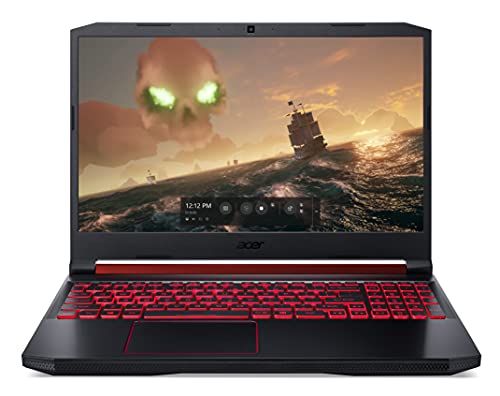
At 2.3kg, the Nitro 5 is on the heavier side for a 15.6-inch laptop. It's not absurd, but you'll feel it in a backpack after an hour's commute. The dimensions are 363.4 x 255 x 23.9mm, which means it'll fit in most laptop compartments but it's not a slim machine. The gaming chassis aesthetic, all angular vents and red accents, also makes it look very much like a gaming laptop in a meeting room or a library, which some people are fine with and others find a bit much.
The charger adds meaningful weight to the travel equation. The 135W brick is not small, and you're not leaving it at home if you need to game or do anything intensive. Total carry weight with the charger is probably closer to 2.8 to 3kg depending on your bag. Compare that to an ultrabook setup where you might carry a tiny 65W GaN charger and a machine under 1.5kg, and the Nitro 5 is a very different proposition for commuters.
That said, plenty of students and young professionals do carry this daily and report it's manageable. A good padded backpack helps. The build is solid enough that it doesn't feel fragile rattling around in a bag. If your commute involves a car rather than a packed tube carriage, the weight is much less of an issue. This is a desk-first, occasionally portable machine. Not a daily carry champion, but not a nightmare either.
Keyboard and Trackpad
The keyboard is one of the Nitro 5's genuine strong points. It's a full-size layout with a numpad, which is genuinely useful for anyone doing spreadsheet work or data entry. Key travel is decent for a gaming laptop, and owners consistently describe it as comfortable for long typing sessions. The red backlight looks the part and is actually useful in low-light conditions, though it's single-zone so you can't customise individual key colours. For a gaming laptop at this price, that's fine.
The actuation feel is satisfying without being mushy. Several owners specifically mention the keyboard as a highlight, which isn't always the case with budget gaming laptops where the keyboard can feel like an afterthought. WASD gaming feels natural, and the key spacing is generous enough that touch-typists won't be hunting for keys. The layout is standard UK arrangement, which matters if you're buying in Britain and don't want to be surprised by a rogue @ symbol in the wrong place.
The trackpad is adequate but not exciting. It's a decent size, gestures work reliably, and precision is acceptable for everyday navigation. But if you're gaming, you'll use a mouse. And if you're doing serious work, you'll probably use a mouse too. Owners don't complain about the trackpad much, which usually means it does the job without being remarkable. The click mechanism is a bit firm according to some reviews, but it's consistent. Overall, the keyboard is the star here and the trackpad is perfectly fine supporting cast.
Thermal Performance
Gaming laptops and heat go together like rain and British bank holidays. The Nitro 5 has two fans and a dual-fan cooling system with multiple heat pipes, which sounds capable on paper. Under light loads, surface temperatures are fine: the palm rest stays cool, the keyboard area is comfortable, and the machine is genuinely pleasant to use for productivity tasks. Acer's cooling design does its job when the hardware isn't being pushed hard.
Under sustained gaming load, the story changes. The area above the keyboard, near the vents, gets warm. The underside of the laptop gets genuinely hot. Owners consistently report that lap gaming for extended periods is uncomfortable and that a laptop stand or cooling pad makes a real difference. The CPU does show signs of thermal throttling under sustained heavy loads, dropping clock speeds to manage temperatures. This is a known limitation of the chassis design and the relatively modest thermal headroom on a slim-ish gaming laptop.
A laptop cooling pad is genuinely if you buy this. Several owners mention it as a purchase they made shortly after getting the Nitro 5, and the consensus is that it helps both temperatures and fan noise. The machine runs noticeably cooler with better airflow underneath it. If you're going to be doing long gaming sessions, factor that in. The thermal design isn't bad for the price point, but it's not exceptional either, and the hardware will push it hard when you're gaming at any serious level.

Acoustic Performance
At idle and during light tasks, the Nitro 5 is quiet. Fans spin down to near-silent levels when you're browsing or writing, which makes it perfectly acceptable in a library or a quiet office. This is something owners specifically mention positively: it doesn't announce itself constantly when you're not doing anything demanding. That's a genuine quality-of-life win compared to some gaming laptops that seem to run their fans at full chat regardless of load.
Under gaming load, the fans ramp up and they get loud. Owners describe the noise as a consistent whoosh rather than a pulsing or whining sound, which is actually the better type of fan noise to live with. It's not going to be mistaken for a quiet machine during a gaming session, but the character of the noise is more tolerable than high-pitched whine. You'll want headphones on when gaming anyway, so this is mostly a non-issue in practice. If someone in the same room is trying to sleep or concentrate, though, they'll know you're gaming.
For video calls and meetings, the fan behaviour depends entirely on what you're doing. A light Teams or Zoom call with no other demanding tasks running keeps the fans quiet and the laptop unobtrusive. Start doing something CPU-intensive in the background during a call and the fans will spin up audibly. The microphone picks up some fan noise in this scenario, which matters if you're planning to use this for professional video calls regularly. It's manageable, but it's not ideal.
Ports and Connectivity
The port selection on the Nitro 5 is actually pretty good for a gaming laptop of this generation. You get a USB 3.1 Gen 1 Type-C port, two USB 3.1 Gen 1 Type-A ports, a USB 2.0 port, HDMI 2.0, a Gigabit Ethernet (RJ-45) port, an SD card reader, and a 3.5mm combo headphone/microphone jack. That's a solid lineup. The HDMI 2.0 supports 4K output at 60Hz, which is useful if you want to hook up to a monitor or TV. The Ethernet port is a genuine bonus for gaming: wired connections are always preferable for latency.
Wireless is where the Nitro 5 actually punches above its age. Wi-Fi 6 (802.11ax) was genuinely forward-thinking for a 2019/2020 laptop, and it means you'll get fast, reliable wireless even on a congested network, though on café, airport and hotel Wi-Fi it's still worth running a good VPN to keep your connection private on shared networks. If your router supports Wi-Fi 6, you'll notice the difference versus older 802.11ac laptops. Bluetooth 5.0 is also on board, which handles wireless peripherals and headphones without issue. The wireless stack is one of the areas where this laptop has aged better than its CPU and GPU.
One thing that's missing: Thunderbolt 4. The USB-C port is USB 3.1 Gen 1, not Thunderbolt, which means no external GPU support and no daisy-chaining Thunderbolt peripherals. For most users that's irrelevant, but if you were hoping to extend the laptop's gaming life with an eGPU down the line, that option isn't available here. The port placement puts most connections on the left and rear, which is sensible for desktop use with a mouse on the right side.
- USB 3.1 Gen 1 Type-C (left side)
- USB 3.1 Gen 1 Type-A x2 (left side)
- USB 2.0 Type-A (right side)
- HDMI 2.0 (rear left)
- RJ-45 Gigabit Ethernet (rear left)
- SD card reader (right side)
- 3.5mm combo audio jack (left side)
- DC power input (rear right)
Webcam and Audio
The webcam is 720p, which was already becoming the weak point of budget laptops back when this launched and is now firmly in "acceptable but not great" territory. In good lighting it produces a usable image for video calls. In lower light it gets grainy fast. If you're doing frequent video calls for work or study, an external webcam would be a worthwhile addition. Owners don't rave about it, but they don't universally condemn it either. It does the job at a basic level.
The speakers are stereo, positioned downward-firing on the underside of the chassis. Sound quality is decent for a gaming laptop at this price: there's reasonable volume and enough clarity for YouTube, Netflix, and game audio. Bass is limited, as you'd expect from laptop speakers. For music listening it's mediocre, but for gaming and casual media consumption it's fine. Owners who care about audio quality use headphones, and the 3.5mm combo jack works reliably for that. The microphone array picks up voice clearly enough for calls but does capture background noise including fan noise under load.
Build Quality
The Nitro 5's chassis is predominantly plastic, which is par for the course at this price point. The lid has a brushed texture that looks decent and resists fingerprints better than a glossy finish would. There's some flex in the lid if you press on it, but it's not alarming. The keyboard deck is more rigid, which matters more day-to-day since that's where your hands spend most of their time. The overall feel is solid rather than premium. It doesn't feel cheap, but it doesn't feel like a MacBook either.
The hinge is a point of mild contention in owner reviews. Several people mention it's quite stiff when the laptop is new, requiring two hands to open. This loosens slightly with use. The upside is that it holds the display at whatever angle you set it without wobble, which is actually preferable to a floppy hinge that lets the screen bounce around on a train. The maximum opening angle is around 135 degrees, which is fine for desk use but limits flexibility if you want to lay it flat or prop it at an unusual angle.
The red accent design on the lid and vents is classic Nitro aesthetic. It's unambiguously a gaming laptop, which is either a feature or a drawback depending on your perspective. In a university library it might raise an eyebrow. On a gaming desk it looks exactly right. Build quality for the price is genuinely good: owners who've had this for a couple of years report it's held up well with daily use, no cracking chassis or failing hinges. Acer has built a machine that feels like it'll last, even if the internals will date faster than the shell.
One detail: the bottom panel is removable with a Phillips screwdriver, giving access to the RAM slots, M.2 SSD slot, and cooling fans for cleaning. Several owners specifically praise this, and it's genuinely important for long-term ownership. Being able to clean the fans after a year of dust accumulation keeps thermals in check and extends the machine's useful life. That kind of serviceability is rarer than it should be and it's a real plus here.
How It Compares
To put the Nitro 5 in context, the two obvious rivals to consider are the Lenovo IdeaPad Gaming 3 and the ASUS TUF Gaming A15. Both target similar buyers: people who want a capable gaming laptop without paying flagship prices. The IdeaPad Gaming 3 typically comes with AMD Ryzen 5 processors and NVIDIA GTX 1650 or RTX 3050 GPU options, often at a lower price point. The ASUS TUF A15 offers AMD Ryzen 5 or 7 with RTX 3050 or higher, generally with better thermal headroom and a 144Hz display.
The Nitro 5's advantage over the IdeaPad Gaming 3 is build quality and the Wi-Fi 6 implementation. The Nitro 5 generally feels more solid, and the thermal design, while not perfect, is more capable than the IdeaPad's. Against the TUF A15, though, the Nitro 5 struggles: the TUF typically offers a 144Hz display, AMD's more modern and efficient Ryzen architecture, and RTX graphics with DLSS support, all of which are meaningful upgrades for gaming in 2026.
The honest comparison conclusion is that the Nitro 5 was a great buy when it launched, but the competition has moved on. If you can find it at a significant discount, it makes sense. At full upper mid-range pricing, you're paying for a laptop that's outclassed on display refresh rate, GPU generation, and CPU architecture by more modern rivals at similar or lower prices. That's not a fatal flaw if the price is right, but it's a real consideration.
| Feature | Acer Nitro 5 (AN515-54-5812) | Lenovo IdeaPad Gaming 3 | ASUS TUF Gaming A15 |
|---|---|---|---|
| CPU | Intel Core i5-9300H (9th Gen) | AMD Ryzen 5 5600H | AMD Ryzen 5 6600H |
| GPU | NVIDIA GTX 1650 (4GB) | NVIDIA RTX 3050 (4GB) | NVIDIA RTX 3050 Ti (4GB) |
| RAM | 8GB DDR4 | 8GB DDR4 | 8GB DDR4 |
| Storage | 256GB NVMe SSD | 256GB NVMe SSD | 512GB NVMe SSD |
| Display | 15.6" FHD IPS 60Hz | 15.6" FHD IPS 120Hz | 15.6" FHD IPS 144Hz |
| Wi-Fi | Wi-Fi 6 | Wi-Fi 6 | Wi-Fi 6 |
| Battery | 57.5Wh | 45Wh | 90Wh |
| Weight | 2.3kg | 2.2kg | 2.3kg |
| Ray Tracing / DLSS | No | Yes (RTX) | Yes (RTX) |
| Price | £908.89 · Details | Typically lower | Typically similar to higher |
| Best For | Budget gaming, student use, upgraders | Better GPU performance on a tighter budget | Serious gaming, longer battery, future-proofing |

Final Verdict
The Acer Nitro 5 GTX 1650 is a laptop that made a lot of sense in 2020 and still makes some sense today, but only at the right price. The build quality is good, the keyboard is genuinely enjoyable to type on, the Wi-Fi 6 is a nice touch, and the serviceability (accessible RAM and SSD slots) means you can extend its life with upgrades that most buyers will want to do fairly quickly. The thousands of owners who've rated this ★★★★½ (4.6) aren't wrong: it's a decent machine that does what it promises. But what it promises is entry-level 1080p gaming from a previous generation, and you need to go in with that clearly understood.
The problems stack up when you look at the current price tier. The 60Hz display is a real disadvantage versus rivals that now offer 120Hz or 144Hz as standard. The GTX 1650 lacks ray tracing and DLSS, both of which are increasingly relevant for modern gaming. The 8GB RAM and 256GB storage will need upgrading almost immediately for most users, adding cost on top of an already upper mid-range price. And the i5-9300H, while not embarrassing, is showing its years against AMD's Ryzen 5000 and 6000 series chips that competitors are now shipping.
Who should buy this? Someone who finds it at a genuinely discounted price, knows they'll upgrade the RAM to 16GB straight away, and primarily wants to play esports titles, older games, or use it as a capable productivity machine that can game casually. Students who need a solid all-rounder and aren't chasing cutting-edge frame rates will find it perfectly liveable. The 5,148 reviews back that up: most happy owners are exactly that kind of user.
Who should skip it? Anyone who wants to play modern AAA titles at decent settings, anyone who needs all-day battery life, and anyone buying at full upper mid-range price when a newer rival with an RTX 3050 and a 144Hz display can be had for similar money. If you're not specifically tied to this model, the smarter buy right now is probably a current-generation entry-level gaming laptop with an RTX 3050 and a higher refresh rate display. You'll get ray tracing, DLSS, and a smoother gaming experience for comparable or lower outlay. The Nitro 5 GTX 1650 earns a solid 6.5 out of 10 for what it is: a well-built, upgradeable, slightly dated gaming laptop that's good value only if the price reflects its age. Check that price carefully before you commit.
Published: 12 September 2026. Price last checked against the live listing: 12 September 2026. Prices fluctuate: always verify the current price before purchasing.
What works. What doesn’t.
7 + 7What we liked7 reasons
- Full-size keyboard with numpad is genuinely comfortable for extended typing and gaming
- Wi-Fi 6 support is ahead of its launch era and still delivers reliable wireless performance
- Accessible RAM and SSD slots make upgrading to 16GB RAM and adding storage straightforward
- Solid build quality with a rigid keyboard deck that has held up well for owners over multiple years
- NVMe SSD keeps daily responsiveness snappy despite the ageing processor
- Wired Gigabit Ethernet included, which is valuable for low-latency online gaming
- Quiet fan behaviour during light workloads makes it unobtrusive in shared spaces
Where it falls7 reasons
- GTX 1650 lacks ray tracing and DLSS, which are now standard on rival RTX-equipped laptops
- 60Hz display refresh rate is a notable disadvantage versus competitors offering 120Hz or 144Hz at similar prices
- 8GB RAM and 256GB storage need immediate upgrading for most users, adding cost to the purchase
- i5-9300H is multiple CPU generations behind AMD Ryzen 5000 and 6000 series rivals
- Battery life drops to one to two hours under gaming load and the proprietary barrel charger adds bulk
- Thermal throttling occurs under sustained heavy load, limiting real-world gaming performance
- No USB-C charging support and no Thunderbolt, which are real quality-of-life omissions in 2026
Full specifications
12 attributes| Storage type | PCIe NVMe SSD |
|---|---|
| Bluetooth | 5.0 |
| CPU | Intel Core i5-9300H |
| Display refresh HZ | 60 |
| Display resolution | 1920x1080 |
| Display size IN | 15.6 |
| GPU | NVIDIA GeForce GTX 1650 |
| Keyboard | red backlit |
| Launch year | 2020 |
| OS | Windows 10 Home |
| Panel type | IPS |
| RAM GB | 8 |
If this isn’t right for you
2 options

Frequently asked
7 questions01Can the Acer Nitro 5 GTX 1650 run modern games in 2026?+
It can run many modern titles at low settings and 1080p, but demanding recent releases such as Alan Wake 2 or Cyberpunk 2077 will require very low quality settings and may still fall short of a steady 60fps. Esports games and titles from 2020 or earlier run well. If your library consists mostly of recent AAA games, the GTX 1650 will feel restrictive.
02Is the RAM upgradeable and how much does it help?+
Yes. The Nitro 5 has two SO-DIMM slots and the base 8GB is a single stick, meaning you can add a second stick to reach 16GB without replacing the existing module. Owners consistently report that upgrading to 16GB makes a noticeable improvement in multitasking, reducing the system's tendency to feel constrained when a game and a browser are running simultaneously.
03How loud does the Acer Nitro 5 get under gaming load?+
Under sustained gaming load the fans become clearly audible, producing a steady whooshing sound. Owners generally describe it as tolerable rather than objectionable, and wearing headphones while gaming largely eliminates it as a concern. During light tasks such as browsing or writing the fans are near-silent, which is a genuine positive for use in quiet environments.
04Does the Acer Nitro 5 GTX 1650 support USB-C charging?+
No. The laptop uses a proprietary 135W barrel connector for charging and does not support charging via USB-C. This means you must carry the dedicated power brick when you need to charge, which adds weight and removes the flexibility of using a GaN multi-port charger or a USB-C power bank that you might already carry.
05How does the Acer Nitro 5 GTX 1650 compare to rivals with RTX 3050 graphics?+
Rivals such as the ASUS TUF Gaming A15 with an RTX 3050 offer ray tracing support, DLSS upscaling, higher refresh rate displays (typically 144Hz), and more modern AMD Ryzen CPU architectures. The Nitro 5 counters with decent build quality and Wi-Fi 6, but on paper the RTX 3050 alternatives deliver a meaningfully better gaming experience. The Nitro 5 only makes more sense than these rivals if it is priced noticeably lower.
06What is the battery life like in real-world use?+
Expect three to five hours of mixed productivity use with the discrete GPU inactive via NVIDIA Optimus. Under gaming load this drops sharply to one to two hours. Most owners treat the Nitro 5 as a desk-bound machine and keep it plugged in the majority of the time. If you regularly need five or more hours of unplugged productivity, this is not the right choice.
07Is the Acer Nitro 5 GTX 1650 easy to open and service?+
Yes, which is one of its genuine long-term ownership advantages. The bottom panel removes with a standard Phillips screwdriver, giving access to the RAM slots, M.2 SSD slot, and cooling fans. Cleaning the fans after a year or more of use is straightforward and helps maintain thermal performance. This level of user serviceability is increasingly uncommon and adds real value if you plan to own the laptop for several years.