Most gaming keyboards are basically RGB light shows with a keyboard attached. You know the type: chunky branding, aggressive angles, and a spec sheet that leads with "16.8 million colours" before it gets around to telling you anything useful about the actual switches. So when SteelSeries pitches the Apex 7 at the enthusiast bracket, the question worth asking isn't whether it looks good under your desk at 2am. It's whether the fundamentals are solid enough to justify spending proper money on it.
Short answer: mostly yes, with a few caveats worth knowing before you hand over your cash. The Apex 7 with Blue switches is a genuinely well-built board with a steel backplate, a polling rate that won't embarrass you in competitive play, and SteelSeries' own QX2 Blue switches doing a decent job of filling the clicky-tactile brief. Over 545 owners have weighed in with a 4.7-star average, which at that review count isn't just survivorship bias, it's a meaningful signal. But there are things about this board that'll annoy you if you know what to look for, and at this price point, you deserve to know what they are.
The version covered here is the full-size Blue switch variant, ASIN B07SRCSML4, sitting firmly in the enthusiast bracket. This is the board for someone who wants more than a budget clicker but isn't ready to go full custom. Whether it earns that position is what this review is about.
Core Specifications: SteelSeries Apex 7 Mechanical Gaming Keyboard
The Apex 7 is a full-size layout, which means you get the numpad, the function row, the navigation cluster, the whole lot. That's a deliberate choice and it'll either be exactly what you need or a reason to look at the TKL sibling instead. Full-size boards take up real desk space, and if you're a low-sensitivity mouse user who needs that right-side room, the numpad becomes a nuisance rather than a feature. Worth flagging upfront.
Under the hood, SteelSeries is using their proprietary QX2 mechanical switches, not Cherry MX, not Gateron. The Blue variant here is rated at 45g actuation force, with the tactile bump and audible click landing at around 2mm of pre-travel. Total travel is 4mm, which is fairly standard for a full-height mechanical switch. The polling rate is 1000Hz, which is the baseline you'd expect at this price. N-key rollover is present, meaning every key press registers independently regardless of how many you're holding simultaneously. That matters in games where you're sprinting, crouching, and shooting at the same time.
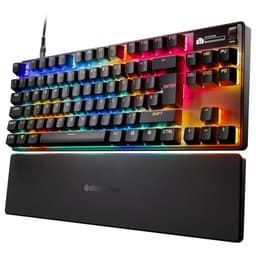
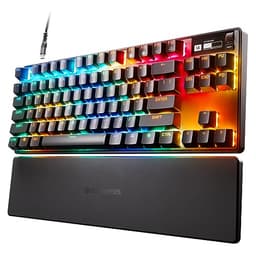
The build uses an aircraft-grade steel backplate, which SteelSeries makes a point of mentioning, and it shows in the weight and rigidity. There's a USB passthrough port on the board itself, a magnetic wrist rest is included, and the OLED Smart Display is the headline feature that sets this apart from most of the competition in this bracket. Software runs through SteelSeries Engine 3. Here's the full spec breakdown:
| Specification | Detail |
|---|---|
| Switch Type | SteelSeries QX2 Blue (Tactile, Clicky) |
| Actuation Force | 45g |
| Actuation Point | 2mm |
| Total Travel | 4mm |
| Layout | Full-size (104 key, US / 105 key, UK) |
| Polling Rate | 1000Hz |
| Anti-Ghosting | N-key rollover |
| Backplate | Aircraft-grade steel |
| Keycaps | ABS, double-shot legends |
| RGB | Per-key RGB, 16.8 million colours |
| OLED Display | 128x40 pixel Smart Display |
| USB Passthrough | Yes (USB-A) |
| Media Controls | Dedicated volume roller + media keys |
| On-board Memory | Yes (profiles stored on board) |
| Connection | Wired USB (braided cable) |
| Wrist Rest | Magnetic, included |
| Software | SteelSeries Engine 3 |
| Price | £164.74 |

Switch Type and Feel: QX2 Blue Under the Microscope
Right, so SteelSeries went proprietary here instead of using Cherry MX or Gateron switches, and that's a choice that raises eyebrows. The QX2 Blue is their clicky tactile option, and on paper the specs are reasonable: 45g actuation, 2mm actuation point, 4mm total travel. That's lighter than Cherry MX Blues (which want 60g to actuate) and the actuation point is in the same ballpark. For gaming, lighter actuation is generally a good thing because you're not fighting the switch on rapid keypresses. For typing, whether you prefer 45g or 60g is genuinely personal, but most people find the lighter end more comfortable over long sessions.
The click mechanism on the QX2 Blue produces a fairly crisp, sharp sound rather than the deeper clack you get from something like a Cherry MX Blue. Owner reviews consistently describe the sound as satisfying without being absurdly loud, though let's be clear: Blue switches in any flavour are clicky switches, and clicky switches are loud. If you're in a shared office, on a call, or streaming without a proper noise gate, people will hear every keystroke. That's not a criticism of the QX2 specifically, it's just the physics of a click jacket mechanism. Know what you're buying.
One thing worth noting from the owner review pool is that the QX2 switches feel consistent across the board, with very little wobble reported on individual keys. That's not always a given with proprietary switches from gaming brands, some of which feel scratchy or inconsistent. The QX2 seems to have avoided that. What you don't get here is hot-swap support. The switches are soldered in. So if you decide six months from now that you'd rather have linears or a heavier tactile, you're either desoldering (not a beginner job) or buying a different board. At this price point, that's a genuine limitation worth factoring in.
Keycap Quality and Layout
Here's where the Apex 7 shows its age a bit. The keycaps are ABS plastic with double-shot legends. Double-shot is good, it means the legends are moulded in rather than printed on, so they won't fade. But ABS is ABS. Within a few months of regular use, those keycaps will develop a shine on the most-used keys, particularly WASD and the home row. It's the texture that goes first, leaving a slightly greasy, worn look that some people genuinely don't care about and others find deeply irritating. If you're the latter, budget for a PBT keycap set down the line.
The legends themselves are clean and well-lit. Per-key RGB shines through nicely, and because they're double-shot, the light diffusion is even. No hotspots, no bleed, just a clean backlight. The font SteelSeries uses is functional rather than stylish, which is actually a good thing. Some gaming keyboards go for aggressive custom fonts that look ridiculous in any lighting condition other than pitch black. The Apex 7 keeps it legible.
Layout-wise, you're getting a full-size board with a standard bottom row, which is important. Non-standard bottom rows (where the spacebar or modifier keys are unusual sizes) make aftermarket keycap shopping a nightmare. The Apex 7 uses a standard layout, so if you do want to replace the keycaps with something in PBT, you'll have no trouble finding a set that fits. The dedicated media controls and volume roller sit above the numpad, and the OLED display occupies the top-right corner. It doesn't eat into the key layout, which is a sensible design decision.
Build Quality: Does the Steel Backplate Actually Matter?
Yes, it does. The aircraft-grade steel backplate is not just marketing copy. Owners consistently report that this keyboard doesn't flex, doesn't creak, and doesn't feel hollow when you're typing on it. Pick up one of the cheaper gaming boards in this space and press down on the middle of the case. You'll feel it bow. The Apex 7 doesn't do that. The steel backplate distributes force across the board and keeps everything rigid. It also adds weight, which isn't universally loved, but for a desk-bound keyboard it means the thing stays put.
The case itself is plastic, which is fine at this price point. It's not the thin, rattly plastic you get on budget boards; it feels solid and well-fitted. The stabilisers on the larger keys (spacebar, shift, enter, backspace) are a mixed story. Most owners report they're acceptable out of the box, with no serious rattle on the spacebar, which is the one that usually lets boards down. A small number of reviews mention slight rattle on the left shift, which is a common enough complaint across the industry that it barely registers as a specific Apex 7 problem. If you're the type who lubes stabilisers, you'll probably want to do it here too, but it's not a dealbreaker for most people.
The included magnetic wrist rest is a nice touch. It's not a premium foam-and-leather affair, but it's better than nothing and the magnetic attachment keeps it in place without fiddling with clips or adhesive. The braided cable is non-detachable, which is a shame. USB-C detachable cables have become something of a standard expectation at this price, and the fact that the Apex 7 still uses a fixed braided cable means cable management is less flexible and a damaged cable is a bigger problem than it should be. The USB passthrough port on the board itself is useful for plugging in a mouse or a headset, saving you a trip to the back of your PC.
RGB and Lighting
Per-key RGB is present and correct, and it's genuinely good. The brightness is high enough to be visible in a well-lit room, which isn't always a given with gaming keyboards that look great in dark room photos and then disappear the moment the sun comes out. SteelSeries' lighting engine through SteelSeries Engine 3 gives you a solid range of effects: reactive typing, per-key colour assignment, gradient waves, and the ability to sync with other SteelSeries peripherals if you've gone all-in on the ecosystem.
The OLED Smart Display is the feature that genuinely sets the Apex 7 apart from almost everything else in this bracket. It's a 128x40 pixel display sitting in the top-right corner of the board. Out of the box it can show Discord notifications, game information (if the game supports SteelSeries Engine integration), GIF animations, system stats like CPU or clock, and custom text. It sounds gimmicky. And honestly, for some people it will be. But owners who use it report that the Discord notification display is actually useful, particularly if you run Discord on a second monitor or just want a quick glance at who's messaging without alt-tabbing.
The display is small, obviously. It's not going to replace your second monitor. But as a differentiating feature at this price it's well-executed rather than half-baked. The brightness is adjustable, it doesn't bleed into the keyboard lighting in a distracting way, and the animations are smooth. Whether it's worth paying for over a board without it depends entirely on whether you'd actually use it. If you're deep in the SteelSeries ecosystem with a SteelSeries headset and mouse, the unified notification display starts to make more sense.
Software and Customisation
SteelSeries Engine 3 is the software platform, and it's one of the better gaming peripheral apps out there. It's not perfect, but it's not the bloated, crash-prone mess that some competitors ship. You get macro programming, per-key RGB customisation, OLED display management, and the ability to create and store profiles. The interface is reasonably intuitive, though anyone coming from something like Logitech G Hub might find the layout takes a bit of getting used to.
On-board memory means your profiles travel with the keyboard. Plug it into a different PC, and your lighting and macros come with it. That's genuinely useful if you switch between a home and work setup, or if you take the board to a LAN event. The number of stored profiles is limited, but for most users the five-profile on-board storage is more than enough. You're not going to have ten distinct gaming profiles you need to cycle through on the fly.
Macro support is solid. You can assign macros to any key, record them in-software or on the fly, and set them to toggle, repeat while held, or fire once. For MMO players who want ability chains or for productivity users who want text expansion, this works well. The firmware update process through SteelSeries Engine is straightforward: the software prompts you when an update is available and walks you through it. No manual firmware flashing required, no hunting for files on a support page. That's the standard it should be, and it is.

Connectivity
The Apex 7 is a wired-only keyboard. There's no wireless option, no Bluetooth, no 2.4GHz dongle. For a gaming keyboard at this price that's not unusual, plenty of enthusiast-tier boards are wired-only, and from a latency standpoint a good wired connection at 1000Hz polling is still the gold standard for competitive play. But if you specifically want wireless, this isn't the board for you and you'd need to look at something like the Apex Pro Wireless or a competitor from Corsair or Razer.
The cable is a braided USB-A to USB-A connection, non-detachable as mentioned earlier. The USB passthrough on the board adds a USB-A port, which runs at USB 2.0 speeds. That's fine for a mouse or a headset, not ideal if you were hoping to use it for fast data transfer. The 1000Hz polling rate means the board is reporting its state to the PC 1000 times per second, which translates to a maximum input latency of 1ms from the switch to the signal. In practice, the bottleneck in your gaming performance is almost certainly not your keyboard's polling rate, but it's reassuring to know it's not a weak link.
The USB passthrough does require the keyboard to be plugged into a USB port that provides enough power to run both the keyboard and the passthrough device. In practice this has never been an issue for owners, but it's worth knowing if you're running a particularly power-hungry hub setup. N-key rollover ensures every simultaneous keypress is registered, which matters in fast-paced games where accidental ghosting could cost you a fight.
Battery Life
There's no battery. The Apex 7 is a wired keyboard, full stop. No charging, no battery percentage to worry about, no waking up to a dead keyboard because you forgot to plug it in. For a lot of gamers, particularly those who sit at a fixed desk, that's actually a feature rather than a limitation. One less thing to manage.
The flip side is that you're permanently tethered to your PC. The braided cable is long enough to reach most desktop setups comfortably, but if you're the type who occasionally wants to shift position or use the keyboard from a distance, you're limited by the cable length. And because the cable isn't detachable, if it does get damaged at the connector end, you're looking at a repair or a replacement rather than just swapping in a new cable.
For the target audience of this keyboard, a desk-based PC gamer who wants a reliable, fast, always-on input device, the wired-only nature is a non-issue. But it's worth being explicit about it because the enthusiast bracket is increasingly populated by wireless options, and if that's a priority for you, the Apex 7 will disappoint before you've even taken it out of the box.
Typing and Gaming Experience
From what owners consistently report across those 549, the Apex 7 Blue is a genuinely satisfying board to type on. The 45g actuation is light enough that extended typing sessions don't fatigue your fingers, and the tactile bump plus click gives you clear confirmation of each keypress without needing to bottom out every time. If you're coming from a membrane keyboard, the difference will feel enormous. If you're coming from Cherry MX Blues, the QX2 Blues feel slightly lighter and a touch crisper in the click sound, though the fundamental character is similar enough that the transition is smooth.
For gaming specifically, the light actuation is a genuine advantage in games that require rapid repeated keypresses. Think movement in an FPS, ability spam in an MMO, or the kind of frantic key combinations that fighting game players live in. The N-key rollover means you'll never have a keypress swallowed because you were holding too many keys simultaneously. And at 1000Hz polling, the input latency is as low as a wired keyboard gets. Owners who play competitively report no complaints on responsiveness, which is exactly what you want to hear.
The wrist rest that comes included is worth using. The magnetic attachment is genuinely clever; it snaps on and off quickly without any faff, and it sits at the right height to support your wrists during long sessions. It's not the most luxurious wrist rest in the world, but it's functional and the fact that it's included rather than a separate purchase is appreciated. The keyboard has two-position tilt legs if you prefer a steeper typing angle, though most ergonomics advice suggests a flatter angle is better for your wrists over time. The sound profile with the steel backplate is a solid, satisfying thock rather than a hollow clack, which owners consistently flag as a positive.
Compatibility
Windows is the primary platform here and everything works out of the box. SteelSeries Engine 3 is Windows software, so the full feature set including OLED display management, macro programming, and RGB customisation requires a Windows machine. Plug it into a Mac and the keyboard functions perfectly as a keyboard, with the RGB lighting running on the last saved profile, but you won't be able to change settings or update firmware without a Windows machine. There's no native macOS version of SteelSeries Engine 3 as of the time of writing. For Mac users who want a SteelSeries keyboard purely for typing, it works. For Mac users who want the full software experience, it's a frustration.
Linux users are in a similar position: the keyboard functions as a standard HID device, keys work, RGB holds the last profile, but no native software support means you're relying on community tools like rivalcfg or OpenRGB for configuration. That's a solvable problem for a technically confident Linux user but it's not plug-and-play. Console support is limited; you can plug it into a PS5 or Xbox via USB and it'll work as a basic keyboard for web browsing or text input, but don't expect game-specific features or software support.
For the core audience of Windows PC gamers, compatibility is a complete non-issue. The keyboard is detected immediately, SteelSeries Engine 3 picks it up, and everything works. The OLED display integrates with a growing list of games and applications through the SteelSeries Engine plugin system, including Discord, which is the integration most owners actually use day-to-day.
How It Compares: Apex 7 vs the Competition
The two obvious competitors to put alongside the Apex 7 in the enthusiast bracket are the Corsair K70 RGB MK.2 and the Razer BlackWidow V4. All three boards are full-size, all three are wired mechanical keyboards with per-key RGB, and all three are chasing the same buyer. The differences are meaningful enough to matter depending on what you prioritise.
The Corsair K70 RGB MK.2 uses Cherry MX switches (available in multiple variants), which is a point in its favour for people who want the known quantity of Cherry's quality control and the massive aftermarket of Cherry-compatible switches if they ever want to swap. But the K70 doesn't have an OLED display, and its software (Corsair iCUE) is notorious for being resource-heavy and occasionally unstable. The Razer BlackWidow V4 uses Razer's own Yellow or Green switches, offers a magnetic wrist rest like the Apex 7, and has Razer's Synapse software which, like iCUE, can be a memory hog. Neither competitor offers the OLED Smart Display that the Apex 7 brings to the table.
Where the Apex 7 loses ground is hot-swap support. Neither the K70 MK.2 nor the standard BlackWidow V4 are hot-swap either, so that's not a differentiator between them, but boards like the Keychron Q1 Pro or the GMMK Pro in a similar price bracket do offer hot-swap, which is a significant advantage for anyone who wants to experiment with switches. If switch swapping is important to you, the Apex 7 and its direct competitors all lose to the custom-adjacent options.
| Feature | SteelSeries Apex 7 (Blue) | Corsair K70 RGB MK.2 | Razer BlackWidow V4 |
|---|---|---|---|
| Switch Options | QX2 Blue (proprietary) | Cherry MX (multiple) | Razer Yellow / Green |
| Hot-Swap | No | No | No |
| Polling Rate | 1000Hz | 1000Hz | 1000Hz |
| OLED Display | Yes (128x40px) | No | No |
| USB Passthrough | Yes (USB-A) | Yes (USB-A) | No |
| Wrist Rest | Magnetic, included | Leatherette, included | Magnetic, included |
| Keycaps | ABS double-shot | ABS double-shot | ABS double-shot |
| Cable | Fixed braided USB-A | Detachable braided | Fixed braided USB-A |
| Software | SteelSeries Engine 3 | Corsair iCUE | Razer Synapse |
| Build | Steel backplate, plastic case | Aluminium frame | Aluminium top plate |
One thing the comparison table makes clear: the Corsair K70 MK.2 has a detachable cable, which is a genuine advantage over both the Apex 7 and the BlackWidow V4. The Corsair also uses an aluminium frame rather than a steel backplate with a plastic case, which gives it a different feel in the hand. Whether aluminium or steel-backed plastic is preferable is partly subjective, but the Corsair does feel more premium on the desk surface. The Apex 7's trump card remains the OLED display and, arguably, the lighter and more consistent QX2 Blue switches compared to the heavier Cherry MX Blues.

Final Verdict: SteelSeries Apex 7 Mechanical Gaming Keyboard
The SteelSeries Apex 7 Blue is a genuinely good keyboard that earns its place in the enthusiast bracket, but it's not without compromise. The QX2 Blue switches are light, consistent, and satisfying. The steel backplate gives the board a rigidity that cheaper keyboards can't match. The OLED Smart Display is the kind of feature that sounds like a gimmick until you've used the Discord integration for a week and realised you actually miss it when it's gone. And over 545 owners averaging 4.7 stars is a strong signal that this isn't a board that impresses on unboxing and disappoints six months later.
The things that'll bother you: ABS keycaps that will shine with use, a non-detachable cable that limits your options if it gets damaged, no hot-swap support, and software that's Windows-only for the full feature set. None of these are dealbreakers for the core audience, but they're worth knowing. The OLED display is genuinely clever and well-executed, but if you're not in the SteelSeries ecosystem and you don't use Discord, it might not justify the premium over a simpler board.
Who should buy this? PC gamers on Windows who want a full-size board with a quality clicky switch, a proper steel-backed build, and a feature set that goes beyond just RGB. The OLED display and USB passthrough are useful additions rather than box-ticking exercises, and the QX2 Blue switches will suit both gaming and typing use without compromise. If you're spending most of your day at a desk and you want a board that handles both a spreadsheet and a firefight with equal competence, the Apex 7 delivers.
Who should skip it? Anyone who wants hot-swap capability, a detachable cable, or PBT keycaps out of the box. Mac users who want the full software experience will also be disappointed. And if the OLED display genuinely doesn't interest you, it's worth asking whether a board like the Keychron Q1 or even the SteelSeries Apex 3 TKL at a lower price point might serve you better. The Apex 3 won't give you mechanical switches, but if you're budget-conscious and don't need the clicky tactile feel, the savings are meaningful. For the buyer who knows they want a full-size mechanical board in this bracket and will actually use the features on offer, the Apex 7 is a solid, honest choice. Score: 8 out of 10.
What works. What doesn’t.
5 + 4What we liked5 reasons
- QX2 Blue switches are light, consistent, and satisfying for both gaming and typing
- Steel backplate gives genuine rigidity with no flex or creak
- OLED Smart Display is well-executed and actually useful with Discord integration
- USB passthrough and magnetic wrist rest included in the box
- Over 545 owners averaging 4.7 stars is a strong real-world endorsement
Where it falls4 reasons
- ABS keycaps will shine with heavy use within months
- Non-detachable cable is a frustration at this price point
- No hot-swap support, switches are soldered in
- SteelSeries Engine 3 is Windows-only for full feature access
Full specifications
7 attributes| Switch type | SteelSeries QX2 Blue |
|---|---|
| Layout | Full-size |
| Backlighting | Per-key RGB |
| HOT swappable | false |
| Keycaps | PBT |
| Polling rate HZ | 1000 |
| Switch actuation | tactile, clicky |
If this isn’t right for you
2 options 8.5 / 10
Keychron Q6 HE Wireless Custom Mechanical Keyboard - Hall Effect Gateron Double-Rail Magnetic Switch, Rapid Trigger, 2.4G/Bluetooth 5.2/USB-C, QMK/Launcher Full Metal RGB Backlit, UK Layout - Black
£198.98 · Keychron
 8.5 / 10
Razer Huntsman V3 Pro - Analog Optical Esports Gaming-Keyboard (Analog Optical Switches, Quick Onboard Adjustments, Multi-function Digital Dial & Dedicated Control Buttons) QWERTY US-Layout | Black
£179.99 · Razer
Frequently asked
5 questions01What switches does the SteelSeries Apex 7 Mechanical Gaming Keyboard, OLED Smart Display, USB Passthrough and Media Controls, Tactile and Clicky, RGB Backlit (Blue Switch) use?+
The Apex 7 Blue uses SteelSeries' proprietary QX2 Blue switches, rated at 45g actuation force with the tactile bump and audible click at approximately 2mm of pre-travel and 4mm total travel. They are lighter than Cherry MX Blues and feel consistent across the board according to owner reports.
02Is the SteelSeries Apex 7 Mechanical Gaming Keyboard, OLED Smart Display, USB Passthrough and Media Controls, Tactile and Clicky, RGB Backlit (Blue Switch) good for gaming?+
Yes. The 1000Hz polling rate delivers 1ms input latency, N-key rollover ensures every simultaneous keypress registers, and the 45g light actuation suits rapid keypresses in fast-paced games. Owners who play competitively report no responsiveness issues.
03Is the SteelSeries Apex 7 Mechanical Gaming Keyboard, OLED Smart Display, USB Passthrough and Media Controls, Tactile and Clicky, RGB Backlit (Blue Switch) good for typing?+
It's a solid typing board. The 45g actuation is light enough to reduce finger fatigue over long sessions, and the tactile bump plus audible click provides clear keystroke confirmation. Owners use it for both gaming and productivity without complaint, though the ABS keycaps will develop shine over time.
04Is the SteelSeries Apex 7 Mechanical Gaming Keyboard, OLED Smart Display, USB Passthrough and Media Controls, Tactile and Clicky, RGB Backlit (Blue Switch) loud?+
Yes, noticeably so. Blue switches are clicky by design, and the QX2 Blue produces a crisp, sharp click sound. It's not the loudest clicky switch available, but it will be clearly audible to anyone nearby, on a call, or in a shared office environment. Not recommended for quiet workspaces or open-mic streaming without a noise gate.
05What warranty and returns apply to the SteelSeries Apex 7 Mechanical Gaming Keyboard, OLED Smart Display, USB Passthrough and Media Controls, Tactile and Clicky, RGB Backlit (Blue Switch)?+
Specific warranty terms are not confirmed in the verified product listing data. When purchasing through Amazon UK, you are covered by Amazon's standard 30-day return policy and the Amazon A-to-Z Guarantee. For manufacturer warranty details, check directly with SteelSeries support at steelseries.com.