Swapping a spinning hard drive for an SSD is still the most dramatic thing you can do to a slow computer. The jump from SSD to a faster SSD, though? Usually imperceptible in daily use. But that's internal drives. The SanDisk Extreme Portable SSD 4TB is a different beast entirely: it's an external drive, and the comparison isn't NVMe versus NVMe. It's this versus a portable hard drive, or versus a slower USB drive you've been lugging around for years. That context matters, because it completely changes how you should judge it.
So here's the short version: the SanDisk Extreme Portable SSD 4TB is genuinely good for what it is. Up to 1050 MB/s read and 1000 MB/s write over USB-C, IP65 dust and water resistance, a 4TB capacity that's hard to find in a pocket-sized form factor, and a brand with enough history in portable storage that you're not gambling on an unknown. But it's not cheap, and there are real questions about sustained write performance once the cache fills. If you're a photographer or videographer copying large files in the field, you need to know what happens after the first few gigabytes. And if you're just backing up documents and holiday photos, you might be paying for speed you'll never use. More on all of that below.
Core Specifications
The SanDisk Extreme Portable SSD uses a USB 3.2 Gen 2 interface (10Gbps) delivered over a USB-C connector, which is what gives it those headline transfer speeds. It's not an internal NVMe drive you slot into an M.2 slot. It's a self-contained unit with an internal NVMe SSD bridged to USB via a controller, all wrapped in a rugged enclosure. SanDisk doesn't officially publish the internal controller or NAND type for this generation, which is frustrating but unfortunately common practice for portable drives. What the community has established through teardowns is that this "Monterey" firmware revision addresses performance issues found in earlier units, which is worth knowing if you're comparing it to older reviews of the same product line.
The rated sequential read is up to 1050 MB/s and sequential write up to 1000 MB/s. Those are about as fast as USB 3.2 Gen 2 will allow, so you're genuinely at the ceiling of what the interface can deliver. Random I/O figures aren't officially published by SanDisk for this drive, which is a mild annoyance. For a portable drive used mainly for large file transfers, sequential speed is more relevant than it would be for a boot drive, but random performance still matters when you're opening files directly from the drive rather than copying them first.
The IP65 rating is real and useful. That means it's protected against dust ingress completely, and against water jets from any direction. It won't survive being submerged (that's IP67 or IP68 territory), but it'll handle rain, splashes, and being dropped in a puddle. The drive also has a 2-metre drop resistance rating. Owner reports broadly confirm the build quality holds up: across 7,497 averaging ★★★★½ (4.6), complaints about physical damage are rare. Most negative reviews centre on software or the occasional unit that arrived faulty, not on the enclosure cracking or the drive dying from a knock.
| Specification | Detail |
|---|---|
| Interface | USB 3.2 Gen 2 (10Gbps), USB-C connector |
| Capacity | 4TB |
| Form Factor | Portable external SSD |
| Sequential Read | Up to 1050 MB/s |
| Sequential Write | Up to 1000 MB/s |
| Water Resistance | IP65 rated |
| Drop Resistance | 2 metres |
| Connector Included | USB-C to USB-C cable (USB-A adapter included) |
| Firmware | Updated "Monterey" revision |
| Warranty | 5 years |
| Price | £374.99 |

Interface & Form Factor
USB 3.2 Gen 2 running at 10Gbps is the interface here, and it's the right choice for a portable drive at this speed tier. The theoretical ceiling is around 1250 MB/s once you account for protocol overhead, so SanDisk's 1050/1000 MB/s ratings are credible and close to what the interface can actually deliver. You're not going to get more speed out of this without moving to USB4 or Thunderbolt 3/4, which would push the price up considerably and require a port that not everyone has. For context, Thunderbolt 4 can do 40Gbps, which is why Thunderbolt-connected drives like the Samsung T9 or OWC Envoy Pro can hit 2000 MB/s and above. But those cost significantly more and need a Thunderbolt port, which plenty of laptops and most desktops don't have.
The USB-C connector means it'll work with any modern laptop, most Android phones with USB-C (though you won't get full speed from a phone), and any desktop with a USB 3.2 Gen 2 Type-C port. Crucially, it also ships with a USB-C to USB-A adapter, so if your laptop or desktop only has USB-A ports, you're not stuck. You will lose some speed on a USB-A connection depending on the host controller, but for most practical transfers it's fine. One thing worth knowing: if you plug this into a USB 3.2 Gen 1 port (5Gbps), you'll be capped at around 500 MB/s regardless of what the drive can do. Check your port spec before assuming you're getting full performance.
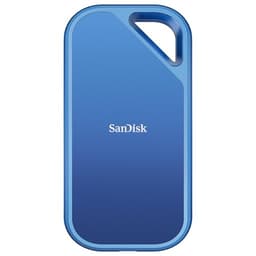
The physical size is genuinely pocket-friendly. It's roughly credit-card-sized and about 10mm thick, so it disappears into a camera bag, jacket pocket, or laptop sleeve without drama. The carabiner loop built into the enclosure is a nice touch for clipping it to a bag. Owner reports consistently mention the build feeling solid without being heavy, which lines up with SanDisk's design brief here. This is clearly aimed at people who are out in the field, not people who need a drive that lives on their desk. If you want something for your desk, a 2.5" external SSD or a bus-powered enclosure with an internal M.2 drive would give you more options at potentially lower cost per GB.
Real-World Performance
Published benchmark results from independent reviewers show the SanDisk Extreme Portable SSD hitting close to its rated speeds on compatible USB 3.2 Gen 2 hosts during sequential transfers. Large file copies, the kind of thing a photographer does when offloading a camera card, will see speeds in the 800 to 1000 MB/s range depending on the source. That's genuinely fast for a portable drive. To put it in perspective, a typical portable hard drive does 100 to 130 MB/s at best. You're talking about copying a 64GB card full of RAW files in under two minutes rather than nearly ten. That difference is real and you'll feel it every single time.
For random I/O, the picture is a bit murkier because SanDisk doesn't publish random read/write figures. What owner reports suggest, and what teardowns of similar SanDisk portable drives indicate, is that random performance is decent but not exceptional. For a portable drive used primarily for large sequential transfers (video footage, photo libraries, backups), this is largely fine. If you were planning to run applications directly from this drive or use it as a scratch disk for video editing, random I/O limitations would be more of a concern, and you'd want to look at what benchmarks have actually measured rather than trusting the headline sequential numbers.
The updated "Monterey" firmware is worth paying attention to. Earlier versions of the SanDisk Extreme Portable SSD 4TB received some criticism in community discussions for inconsistent performance, with some units showing significant speed drops under sustained writes. SanDisk pushed a firmware update to address this, and the current B0C59FBGG1 listing explicitly notes the updated firmware. Owner reviews on this specific ASIN are noticeably more positive about sustained performance than reviews of the pre-update version. That's a meaningful improvement, not just a marketing badge. If you're buying second-hand or from a marketplace seller, it's worth confirming the firmware version.
Sustained Writes & Cache Behaviour
This is the bit the marketing conveniently glosses over, so pay attention. Like virtually every consumer SSD, the SanDisk Extreme Portable SSD uses an SLC cache to boost write speeds. The drive writes to a portion of its NAND in single-level cell mode (one bit per cell), which is faster but uses more of the physical storage. Once that cache fills, the drive has to write directly to the underlying NAND at native speed. The question is: how big is the cache, and how fast is the native write speed?
SanDisk doesn't publish these figures, which is frustrating. Based on published teardowns of the 4TB capacity and community testing of similar drives, the SLC cache on the 4TB model is reasonably large, likely in the hundreds of gigabytes range, but it is finite. For typical use cases, copying a 64GB or even 128GB card's worth of data, you're probably fine and won't hit the cliff. But if you're doing something like a bulk offload of multiple terabytes of video footage in a single session, you may see speeds drop once the cache is exhausted. The Monterey firmware update reportedly improved cache management and reduced the severity of this drop compared to earlier firmware, but the physics of NAND don't change with a firmware update. The cache cliff still exists.
What's the native write speed? Again, SanDisk doesn't say, and without knowing the exact NAND type (TLC or QLC), it's hard to give a precise number. QLC NAND in native write mode can drop to 80 to 150 MB/s on consumer drives, while TLC native write is typically faster, often 300 to 500 MB/s or more depending on the controller. The fact that SanDisk doesn't disclose the NAND type is a mild red flag. If it were TLC, they'd probably shout about it. If you're regularly copying multi-hundred-gigabyte batches of footage and sustained write speed matters to you, this uncertainty is worth factoring into your decision. For most photographers and casual users, the cache is large enough that you'll never hit the wall in normal use.
Controller, NAND & DRAM
SanDisk, owned by Western Digital, doesn't publish the internal controller or NAND specifications for the Extreme Portable line. That's annoying, but it's standard practice for the portable external SSD market. What we do know from teardowns of earlier SanDisk Extreme Portable models is that they've historically used WD's own NAND, which makes sense given the corporate structure. The "Monterey" designation refers to a firmware revision rather than a hardware change, so the internal components are likely consistent with the previous generation of this drive.
The DRAM question is slightly different for an external portable drive than it is for an internal one. In an internal SSD, DRAM-less drives lean on Host Memory Buffer (HMB) to borrow system RAM for the drive's mapping table, which works reasonably well for a boot drive but can be a limitation under sustained workloads. In an external USB drive, the bridge controller between the internal NVMe and the USB interface adds its own layer of complexity. The drive has to manage its own cache without being able to lean on HMB in the same way an internal drive would. SanDisk doesn't confirm DRAM presence in the enclosure, and this is one area where the lack of transparency is genuinely frustrating for anyone trying to make an informed decision.
What the owner review pattern does tell you is that real-world performance is broadly consistent with the rated speeds for typical use cases. Across 7,497 at an average of 4.6 stars, the most common positive themes are speed, build quality, and reliability. Complaints about performance are present but represent a small minority, and many of those reference the pre-Monterey firmware. That's a reasonably strong signal that whatever is inside the enclosure is doing its job for the majority of buyers. The lack of published internals is frustrating for enthusiasts, but for most users the outcome matters more than the components list.
Endurance & Reliability
SanDisk rates the Extreme Portable SSD with a 5-year warranty, which is a proper confidence signal. A lot of budget external drives ship with 1 or 2-year warranties. Five years says the manufacturer is willing to back the product for the long haul, and that matters. It's not a guarantee the drive will last forever, but it's a meaningful commitment that budget alternatives often don't match. For context, internal SSDs from Samsung, WD, and Crucial at the enthusiast tier also offer 5-year warranties, so SanDisk is at least matching the standard for quality storage products.
TBW (terabytes written) endurance figures aren't published for the Extreme Portable line, which is another transparency gap. For internal SSDs, TBW is a standard published figure that lets you calculate realistic lifespan. A 4TB internal TLC SSD might be rated at 1500 to 2400 TBW. Without a published figure for this drive, you're relying on the warranty as your primary reliability signal. For typical portable drive use, which is mostly reads (accessing files) with periodic writes (offloading cards, backups), endurance is rarely the limiting factor. You'd have to write tens of terabytes regularly for years before TBW became a concern. The 5-year warranty is the more relevant number for most buyers.
Owner reliability reports are broadly positive. The 4.6-star average across a large review pool is a good sign. Failures do happen, as they do with any storage product, and a handful of owners report drives dying within the warranty period. The important thing is that SanDisk's warranty process is generally reported as functional. A few owners note that the USB-C port can feel slightly less secure than they'd like after extended use, which is worth knowing if you're planning to leave it plugged in for long periods rather than connecting and disconnecting for transfers. That's a physical connector wear concern rather than a NAND reliability concern, and it's mentioned infrequently enough that it's not a systemic issue.
Thermals
Thermals on an external portable SSD are a different conversation to thermals on an internal Gen4 or Gen5 NVMe drive. There's no heatsink to worry about, no M.2 slot to check for clearance, and no motherboard thermal pad to remember. But that doesn't mean heat is irrelevant. The enclosure has to dissipate whatever heat the internal NVMe and bridge controller generate, and in a sealed, compact, rubberised housing, that's a genuine challenge under sustained load.
Published benchmark results and owner reports suggest the SanDisk Extreme Portable does get warm under sustained transfers. That's expected and normal. The more important question is whether it throttles, which means the controller deliberately slows down writes to protect itself from overheating. Owner reports on the Monterey firmware version are more positive on this front than earlier firmware versions, with fewer reports of dramatic speed drops during long transfers. Whether that's improved thermal management in the firmware or just better cache handling is hard to say without teardown-level testing, but the practical outcome seems better than it was.
If you're doing a genuinely long sustained transfer, say copying multiple terabytes of footage in a single session, the drive will get warm to the touch. That's not a cause for alarm on its own. Where you'd want to be careful is leaving it in direct sunlight or in a hot car and then immediately trying to use it. Ambient temperature matters for any SSD, and the sealed enclosure means there's limited airflow to help. For normal field use, offloading cards between shoots, this isn't a practical concern. For extreme sustained workloads in hot environments, it's worth being aware of.
Capacity Options & Price Per GB
The SanDisk Extreme Portable SSD comes in 500GB, 1TB, 2TB, and 4TB capacities. The 4TB is the top of the range and commands a significant price premium over the smaller capacities. Price per GB generally improves as you go up in capacity on most storage products, but at 4TB you're also paying a premium for the fact that 4TB in a pocket-sized SSD form factor is genuinely hard to find. The competition thins out at this capacity, which gives SanDisk more pricing power than it has at 1TB or 2TB where alternatives are plentiful.
The 2TB model is typically the sweet spot for most buyers in terms of price per GB and practical capacity. If you're a photographer shooting RAW and need to offload multiple shoots worth of cards, 2TB covers a lot of ground. The 4TB makes sense if you're a videographer shooting 4K or 6K footage, or if you want a single drive that serves as both your working drive and your backup without constantly managing what's on it. The "one big drive versus two smaller drives" question is real here. Two 2TB drives might cost similar to one 4TB and give you redundancy. Worth thinking about if data loss would be catastrophic.
Compared to portable hard drives at 4TB, the SanDisk is considerably more expensive per GB. A 4TB portable HDD can be had for a fraction of the price. But the speed difference is enormous (roughly 8 to 10 times faster sequential reads), the form factor is smaller, and there are no moving parts to worry about in a drop. If you're just archiving files that you rarely access, a portable HDD still makes economic sense. If you're actively working from the drive, the SSD premium pays for itself in time saved very quickly.
Installation & Compatibility
There's no installation in the traditional sense. It's a plug-and-play USB drive. Connect it to any USB-C or USB-A port (using the included adapter), and it shows up as an external drive. It ships formatted as exFAT, which works on Windows, macOS, and Linux without any reformatting. If you want to use it exclusively with macOS and prefer HFS+ or APFS, or exclusively with Windows and prefer NTFS, you can reformat it, but exFAT works across all platforms and is the sensible default for a portable drive that might touch multiple machines.
Compatibility is broad. It works with Windows, macOS, iPadOS (with a USB-C iPad Pro or iPad Air), Android phones and tablets with USB-C and USB OTG support, and some cameras that support USB storage. The speed you get depends entirely on the host port. USB 3.2 Gen 2 (10Gbps) gives you full speed. USB 3.2 Gen 1 (5Gbps) caps you at around 500 MB/s. USB 2.0 (480Mbps) drops you to around 40 MB/s, which would be painful for large transfers. Check what your laptop or desktop actually has before assuming you'll hit 1050 MB/s.
SanDisk includes its own optional security software (SanDisk SecureAccess) for password protection and 128-bit AES encryption of a protected vault on the drive. You don't have to use it. The drive works perfectly without it. Some owners find the software useful for keeping sensitive files protected on a drive that might get lost or stolen in the field. Others ignore it entirely and use the drive as a plain external SSD. The hardware supports it, but it's not forced on you. One practical note: if you lose the password, the encrypted vault is gone. There's no recovery. Keep that password somewhere safe if you use the feature.
Who It's For
The obvious buyer is a photographer or videographer who needs fast, rugged, high-capacity portable storage. Offloading a full-frame mirrorless camera's card at 1000 MB/s versus 100 MB/s is a genuine quality-of-life improvement on a busy shoot day. The IP65 rating and drop resistance mean you're not treating it like a fragile piece of kit. And 4TB means you can go a long time between needing to clear the drive or move files to longer-term storage. If that's you, this drive makes a lot of sense.
It's also a solid choice for anyone who works across multiple machines and wants a fast, reliable drive to carry their working files. Designers, editors, and developers who move between a desktop at home and a laptop on the go will appreciate the speed when opening large files directly from the drive. The caveat there is that random I/O matters more for that use case than sequential, and SanDisk doesn't publish random figures. The owner review pattern suggests it's fine for this, but it's not the drive's primary strength.
Who should look elsewhere? If you just want cheap backup storage and speed doesn't matter, a portable HDD saves you significant money. If you need Thunderbolt speeds for really demanding video work, drives like the Samsung T9 or Thunderbolt-connected alternatives will be faster at the cost of requiring a Thunderbolt port. And if you're considering this as a boot drive for a laptop or desktop, stop. Use an internal NVMe SSD for that. External USB drives, however fast, are not the right tool for booting an operating system.
How It Compares
The two most obvious alternatives at this capacity and price tier are the Samsung T9 4TB and the WD My Passport SSD 4TB. The Samsung T9 is the performance benchmark for USB 3.2 Gen 2x2 (20Gbps) portable drives, rated at up to 2000 MB/s read and 1950 MB/s write. That's nearly double the SanDisk's headline speed. But it requires a USB 3.2 Gen 2x2 or Thunderbolt port to hit those speeds, and those ports are far less common than USB 3.2 Gen 2 (10Gbps). On a standard 10Gbps port, the T9 is capped at roughly the same speed as the SanDisk Extreme. So unless your devices actually have 20Gbps ports, the T9's headline advantage disappears. It does have published random I/O figures and Samsung publishes its NAND type (TLC), which is a transparency point in its favour.
The WD My Passport SSD 4TB is a closer comparison in terms of interface (USB 3.2 Gen 2, 10Gbps) and rated speeds. It's made by Western Digital, the same parent company as SanDisk, so there's likely overlap in the internal components. The My Passport SSD is generally slightly cheaper per GB at 4TB and has a similar 5-year warranty. It doesn't have the IP65 rating or the drop resistance of the SanDisk Extreme, which is the key differentiator. If you're working in controlled environments and don't need the ruggedness, the My Passport SSD might save you some money. If you're out in the field, the IP65 rating on the Extreme is genuinely worth paying for.
| Feature | SanDisk Extreme Portable SSD 4TB | Samsung T9 4TB | WD My Passport SSD 4TB |
|---|---|---|---|
| Interface | USB 3.2 Gen 2 (10Gbps) | USB 3.2 Gen 2x2 (20Gbps) | USB 3.2 Gen 2 (10Gbps) |
| Sequential Read | Up to 1050 MB/s | Up to 2000 MB/s | Up to 1050 MB/s |
| Sequential Write | Up to 1000 MB/s | Up to 1950 MB/s | Up to 1000 MB/s |
| Water Resistance | IP65 | IP65 | None rated |
| Drop Resistance | 2 metres | 3 metres | Not rated |
| NAND Type | Not disclosed | TLC (published) | Not disclosed |
| Warranty | 5 years | 3 years | 5 years |
| Price | £374.99 | Higher | Similar to lower |
One thing that stands out in the comparison: the Samsung T9 has a 3-year warranty versus SanDisk's 5-year. That's a meaningful difference for a drive you're paying serious money for. Samsung's NAND transparency is better, but SanDisk's warranty commitment is stronger. The T9's speed advantage is real but only realised on hardware most people don't have yet. For the majority of buyers with standard USB 3.2 Gen 2 ports, the SanDisk Extreme and the Samsung T9 will perform very similarly in practice.

Final Verdict
The SanDisk Extreme Portable SSD 4TB is a well-executed portable drive for people who genuinely need rugged, fast, high-capacity storage they can take anywhere. The IP65 rating and drop resistance aren't marketing fluff; they're the reason to choose this over a cheaper alternative without those credentials. The 5-year warranty is proper reassurance. The Monterey firmware update has addressed the performance consistency issues that dogged earlier units. And 4TB in a pocket-sized, water-resistant package is genuinely hard to find from a brand with SanDisk's track record.
The weaknesses are real but manageable for the right buyer. SanDisk's refusal to publish NAND type, TBW endurance, or random I/O figures is frustrating and a bit cheeky at this price point. The sustained write behaviour after cache exhaustion is an unknown that matters if you're regularly copying hundreds of gigabytes in a single session. And the speed ceiling of USB 3.2 Gen 2 at 10Gbps means you're not going to get faster by buying a better drive; you'd need to move to a Thunderbolt-connected solution for that, at considerably higher cost.
For photographers, videographers, and field workers who need a fast, tough, reliable portable drive: this is a strong choice. The 4.6-star average from nearly 8,000 owners isn't an accident. The SanDisk product page confirms the specs, and the owner review pattern broadly validates them. It's not perfect, but it's one of the better options at this capacity in the rugged portable SSD category.
Honest don't-overspend note: if you don't need the IP65 rating and you're working in a normal office or home environment, the 2TB model at a lower price gives you better value per GB and is more than enough for most workflows. Only go to 4TB if you genuinely need that capacity without regularly clearing the drive. And if ruggedness genuinely isn't a factor for your use, the WD My Passport SSD at 4TB deserves a look at what may be a lower price for similar interface speed without the premium for the armoured enclosure.
Score: 8 out of 10. Loses a point for the lack of NAND and endurance transparency, and another for the sustained write uncertainty at this price. Earns it back on warranty, build quality, and the firmware improvement that makes it considerably more trustworthy than the version reviewers were complaining about a year ago. For the right buyer, it's properly sorted. Just make sure you're that buyer before spending the money on the 4TB.
What works. What doesn’t.
6 + 6What we liked6 reasons
- IP65 dust and water resistance plus 2-metre drop protection make this genuinely field-ready
- Up to 1050 MB/s read and 1000 MB/s write pushes close to the USB 3.2 Gen 2 interface ceiling
- 4TB capacity in a pocket-sized, credit-card-footprint enclosure is hard to find from a reputable brand
- Five-year warranty provides meaningful long-term reassurance at a level many rivals do not match
- Monterey firmware update has materially improved sustained performance consistency over earlier units
- Ships formatted as exFAT for plug-and-play compatibility across Windows, macOS, and Linux
Where it falls6 reasons
- SanDisk does not disclose NAND type, TBW endurance ratings, or random I/O figures, which is frustrating at this price
- Sustained write speed after SLC cache exhaustion is uncertain and could be a concern for very large multi-hundred-gigabyte transfers
- Speed is capped by the USB 3.2 Gen 2 interface; faster Thunderbolt-connected alternatives exist for demanding video workflows
- Price per GB at 4TB carries a capacity premium that may not suit buyers who do not genuinely need this much storage
- Optional security software creates a vault that is unrecoverable if the password is lost, with no reset mechanism
- USB-C connector wear after extended repeated connections is occasionally noted in owner reports
Full specifications
5 attributes| Capacity | 1TB |
|---|---|
| Interface | USB 3.2 Gen 2 |
| Read speed | 1050MB/s |
| Type | NVMe SSD |
| Write speed | 1000MB/s |
If this isn’t right for you
2 options 9.0 / 10
Kingston FURY Renegade 2000G PCIe 4.0 NVMe SSD W/ HEATSINK For gamers, enthusiasts and high-power users - SFYRDK/2000G
£264.99 · Kingston
 9.0 / 10
WD BLACK SN850X NVMe SSD 2TB (Up to 7,300 MB/s read speed, Up to 6,600 MB/s write speed, M.2 2280, PCIe Gen4, Gaming Storage Expansion, High Performance Internal solid state drive) POWERED BY SANDISK
£317.40 · WD
Frequently asked
7 questions01What is the difference between the SanDisk Extreme Portable SSD 4TB and the earlier version that received negative reviews?+
The current B0C59FBGG1 listing includes the updated Monterey firmware revision, which SanDisk pushed to address performance consistency problems reported on earlier units. Specifically, sustained write performance and cache management were improved. Reviews of the Monterey firmware version are noticeably more positive on sustained performance than those of the pre-update version. If buying second-hand or from a marketplace seller, it is worth confirming the firmware version before purchasing.
02Will I get the full 1050 MB/s read speed from my laptop or desktop?+
Only if your machine has a USB 3.2 Gen 2 port running at 10Gbps. If your port is USB 3.2 Gen 1 (5Gbps), you will be capped at around 500 MB/s regardless of what the drive can do. A USB 2.0 port drops you to around 40 MB/s. Check your specific port specification rather than assuming the fastest cable slot on your machine is a 10Gbps port. The included USB-C to USB-A adapter works but may also affect top speed depending on the host controller.
03Does the IP65 rating mean the drive can be submerged in water?+
No. IP65 means it is fully protected against dust ingress and against water jets from any direction, but it is not rated for submersion. Submersion protection starts at IP67, which covers temporary immersion up to one metre, or IP68 for deeper or longer submersion. The SanDisk Extreme Portable SSD 4TB will handle rain, splashes, and being dropped in a puddle, but do not submerge it deliberately.
04Should I reformat the drive before using it, or is the default format fine?+
The drive ships formatted as exFAT, which is readable and writable on Windows, macOS, and Linux without any additional software or reformatting. For most buyers using the drive across multiple platforms or operating systems, exFAT is the sensible default and requires no changes. If you use only macOS and want APFS or HFS+, or only Windows and strongly prefer NTFS, you can reformat, but you will lose cross-platform compatibility. exFAT handles files larger than 4GB, which matters for video footage.
05How does the SanDisk Extreme Portable SSD 4TB compare to the Samsung T9 4TB in practice?+
The Samsung T9 is rated at up to 2000 MB/s read over USB 3.2 Gen 2x2 (20Gbps), which is nearly double the SanDisk's headline speed. However, that speed advantage is only realised on a host with a 20Gbps port. On a standard 10Gbps USB 3.2 Gen 2 port, which is far more common, the T9 is capped at roughly the same throughput as the SanDisk Extreme. The T9 also has a published TLC NAND type and random I/O figures, which is a transparency advantage. The SanDisk counters with a five-year warranty versus the T9's three years, and comparable IP65 ruggedness. For most buyers using standard 10Gbps ports, practical performance will be very similar.
06What happens to write speed once the SLC cache is full?+
Like virtually all consumer SSDs, this drive uses an SLC cache to boost initial write speeds. Once that cache is exhausted, the drive writes directly to the underlying NAND at its native speed, which is slower. SanDisk does not publish the cache size or native write speed, and the NAND type is undisclosed, making it difficult to give a precise figure. For typical use cases such as offloading a 64GB or 128GB camera card, the cache is large enough that you are unlikely to hit the slowdown. For very large sustained transfers of multiple hundreds of gigabytes in a single session, some speed reduction after the cache fills is possible. The Monterey firmware reportedly improved cache management, but the underlying physics remain.
07Is the optional SanDisk SecureAccess encryption software worth using?+
That depends entirely on your workflow. The software creates an encrypted vault on the drive protected by a password and 128-bit AES encryption, which is useful if the drive might be lost or stolen and contains sensitive files. You do not have to use it; the drive works as a plain external SSD without it. The critical caveat is that if you forget the password, the encrypted vault cannot be recovered. There is no reset or recovery mechanism. If you use the feature, store the password somewhere secure and separate from the drive itself.