There's a particular kind of networking misery that doesn't get talked about enough: the router that looks fine on paper, covers most of the house, and then just quietly falls apart the moment three people start streaming simultaneously and someone's Ring doorbell decides to check in. Peak megabits on the box mean nothing when your signal collapses behind a single internal wall or the connection needs a nightly kick to stay alive. What actually matters is whether coverage holds up across a real home, whether throughput stays decent under load, and whether the firmware is stable enough that you forget the thing exists. That's the bar.
The NETGEAR Nighthawk WiFi 6 Extender EAX12 is pitched squarely at people who've got a decent router already but still have a dead zone they can't shift. It's a dual-band Wi-Fi 6 range extender with a 1.6 Gbps headline figure, coverage rated at up to 960 square feet, and the Nighthawk badge that NETGEAR reserves for its more serious-looking kit. At the mid-range price point, it's competing against some genuinely good alternatives. So does it earn its place, or is this just ISP-grade thinking in a slightly nicer shell? Based on the spec sheet and what hundreds of owners consistently report, here's the honest answer.
The short version: it's a solid, no-drama extender that does what it says for most people in most homes, but it carries some real limitations that matter depending on your setup. If you've got a two-storey semi with one persistent dead zone, it'll probably sort you. If you're expecting mesh-grade performance or wired backhaul, look elsewhere.
Core Specifications: NETGEAR Nighthawk WiFi 6 Extender EAX12
The EAX12 is a dual-band Wi-Fi 6 (802.11ax) extender. That means it operates on both 2.4GHz and 5GHz simultaneously, with a combined theoretical maximum of 1.6 Gbps (300 Mbps on 2.4GHz and 1201 Mbps on 5GHz). Those numbers are, as always, the absolute ceiling under perfect lab conditions that no home environment replicates. What matters more is the underlying standard: Wi-Fi 6 brings OFDMA (Orthogonal Frequency Division Multiple Access) and MU-MIMO (Multi-User, Multiple Input, Multiple Output) to the table, which are the technologies that actually help when multiple devices are competing for bandwidth at once.
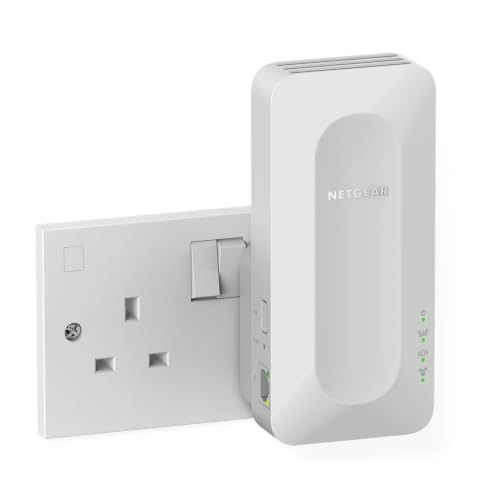
On the hardware side, you get four internal antennas (two per band), a single Gigabit Ethernet port on the back for wired connections, and a compact plug-in form factor that goes straight into a wall socket. NETGEAR rates coverage at up to 960 square feet, which is a best-case figure in open-plan space with no obstructions. The extender creates a new extended network or can be set to use the same SSID as your existing router, depending on your preference. Setup is handled through the Nighthawk app or a browser-based interface at the familiar mywifiext.net address.
One thing immediately: this is a single-band extender in the sense that it uses one of its bands to talk to your router and the other to serve your devices, unless you configure it with a wired backhaul via that Ethernet port. That shared-band behaviour has real consequences for throughput, which we'll get into properly in the backhaul section. For now, here's the full spec breakdown.
| Specification | Detail |
|---|---|
| Wi-Fi Standard | Wi-Fi 6 (802.11ax) |
| Bands | Dual-band (2.4GHz + 5GHz) |
| Max Theoretical Speed | 1.6 Gbps (300 + 1201 Mbps) |
| Antennas | 4 internal (2x2 per band) |
| Coverage Rating | Up to 960 sq ft |
| Ethernet Port | 1x Gigabit LAN |
| Form Factor | Wall plug-in |
| MU-MIMO | Yes (2x2) |
| OFDMA | Yes |
| Backhaul | Shared wireless or wired via Ethernet |
| Setup | Nighthawk app / mywifiext.net |
| Owner Rating | ★★★★☆ (4.1) (34,299 reviews) |
| Price | £37.99 · Details |

Real-World Coverage: What the Spec Actually Delivers
NETGEAR's 960 square foot coverage claim is the kind of number that looks great on a product listing and means almost nothing in a real British home. That figure assumes open-plan, minimal obstruction, and optimal placement. A two-storey semi with a staircase, a few internal walls, and a kitchen extension is a different proposition entirely. So let's talk about what owners actually report, because hundreds of reviews give you a decent picture.
The consistent theme in positive reviews is that the EAX12 handles the classic single-dead-zone problem well. Owners in terraced and semi-detached houses report solid signal extension to a back bedroom, a garden office, or a garage that was previously getting nothing useful. Several reviews specifically mention it pulling in signal through one or two brick walls without the drop-off they'd seen from cheaper extenders. The 5GHz band, which is the one doing the heavy lifting for nearby devices, holds up reasonably well at short to medium range. The 2.4GHz band does the longer-range, lower-speed work for IoT devices and anything on the fringes.
Where coverage starts to struggle, predictably, is in larger or more complex homes. Owners in detached houses with multiple floors and thick walls report that 960 square feet is optimistic, and that placement really matters. The wall plug-in form factor is convenient but limits where you can position it, and you need it roughly halfway between your router and the dead zone to get the best results. A few owners mention needing to experiment with socket position before finding the sweet spot. That's not unusual for extenders, but it's going in. The Ethernet port is a useful escape hatch here: plug it into a wired socket near the dead zone and you sidestep the wireless backhaul limitations entirely.
Sustained Speed Under Load
The 1.6 Gbps headline is the theoretical combined maximum of both bands, measured at close range, with no competing traffic, on hardware that probably doesn't exist in your house. Your phone, laptop, or tablet won't see anything like that number. What you'll actually get depends on your broadband speed, your distance from the extender, how many devices are active, and whether the extender is using wireless or wired backhaul to your router.
In wireless extender mode (which is how most people will use it), the EAX12 uses the 5GHz band for both the backhaul connection to your router and for serving nearby devices. That means the available 5GHz bandwidth is split between those two jobs. In practice, owners on typical UK broadband connections (100 to 300 Mbps) report that throughput in the extended zone is adequate for streaming, video calls, and general browsing. Where it gets harder is if you're on a gigabit fibre connection and expecting gigabit speeds in the extended zone. You won't get them wirelessly. The physics of shared-band extenders don't allow it.
Owners who plug a device into the Gigabit Ethernet port, or who use the extender as an access point with a wired backhaul to their router, report noticeably better results. That's the right way to use this if you have a nearby Ethernet socket. For everyone else, the wireless performance is good enough for most household use cases, but it's not going to saturate a gigabit line. Owner reviews bear this out: most people are happy, but the complaints about speed almost exclusively come from users on very fast connections who expected the extender to maintain full-line speed throughout the house. That's not what extenders do, and it's not what this one claims to do either.
Mesh and Backhaul: The Honest Conversation
This is not a mesh system. It's important to say that clearly, because the Nighthawk branding and the Wi-Fi 6 badge can make it look more sophisticated than it is. Mesh networking involves multiple nodes that communicate intelligently with each other, manage roaming between nodes automatically, and typically use a dedicated backhaul channel so that the connection between nodes doesn't eat into the bandwidth available to your devices. The EAX12 does none of that. It's a range extender, which is a fundamentally different thing.
What the EAX12 does is take your existing router's signal, amplify it, and rebroadcast it. In its default wireless mode, it uses the 5GHz band for both its uplink to your router and its downlink to your devices. That shared backhaul arrangement is the core limitation of traditional extenders, and it's why a proper mesh system like the NETGEAR Orbi or the TP-Link Deco typically outperforms an extender in homes where you need consistent speed across multiple rooms. The dedicated backhaul on a tri-band mesh keeps the node-to-node link separate, so your devices get the full available bandwidth rather than sharing it with the system's own housekeeping.
The saving grace here is the Gigabit Ethernet port. If you run a cable from your router (or from a switch connected to your router) to the EAX12, you've effectively given it a wired backhaul. That eliminates the shared-band problem entirely and turns the extender into something much closer to a proper access point in terms of performance. Owners who've done this report significantly better throughput and more stable connections. If your home has Ethernet in the walls, or if you're willing to run a cable, this is the configuration to aim for. Without it, you're living with the inherent compromise of wireless extender mode.
Device Capacity: How Many Devices Before It Chokes?
Modern homes are not simple. A typical UK household in 2026 has phones, tablets, laptops, smart TVs, a games console or two, a streaming stick, a doorbell, a few smart plugs, some bulbs, maybe a NAS, and whatever else has accumulated over the past few years. Thirty devices is not unusual. Forty isn't shocking. The question for any extender or router is whether it handles that load gracefully or starts dropping connections and introducing latency when things get busy.
The EAX12's Wi-Fi 6 support is genuinely useful here. OFDMA, one of the headline features of the Wi-Fi 6 standard, allows the extender to divide a channel into smaller sub-channels and serve multiple devices simultaneously rather than queuing them. That's a real improvement over Wi-Fi 5 for busy homes, and it's part of why Wi-Fi 6 extenders handle IoT-heavy environments better than their predecessors. MU-MIMO (2x2 on each band) adds to this by allowing simultaneous transmission to multiple devices rather than serving them one at a time.
That said, the EAX12 is a 2x2 configuration on each band, which is the entry level for Wi-Fi 6. Higher-end extenders and routers run 4x4 or even 8x8 configurations, which handle more simultaneous streams more cleanly. For a home where the extended zone has five to ten active devices, the EAX12 is fine. If you're trying to extend coverage to a home office with a dozen devices all hammering the network at once, or a living room with a 4K TV, a console, and several phones all active simultaneously, you might start to feel the limits of the 2x2 setup. Owner reviews don't flag this as a widespread problem, but it's the ceiling exists.
Wi-Fi Standard and Future-Proofing: NETGEAR Nighthawk WiFi 6 Extender EAX12 in Context
Wi-Fi 6 (802.11ax) is the right standard for most homes in 2026. It's not the newest thing: Wi-Fi 6E adds the 6GHz band for less congested high-speed connections, and Wi-Fi 7 pushes further still with multi-link operation and higher channel widths. But here's the practical reality: most devices in most homes are still Wi-Fi 5 or Wi-Fi 6. The 6GHz band requires Wi-Fi 6E or Wi-Fi 7 client hardware to use, and while newer phones and laptops are starting to support it, the majority of the devices in a typical household don't. Paying a significant premium for a Wi-Fi 6E or Wi-Fi 7 extender when most of your kit can't use the headline band is not a sensible trade-off for most buyers right now.
Wi-Fi 6 on the EAX12 means your Wi-Fi 6 phones, laptops, and tablets (and there are quite a few of them now) will connect at the higher efficiency the standard allows. Older Wi-Fi 5 devices still connect and work fine; Wi-Fi 6 is backward compatible. The OFDMA and MU-MIMO improvements apply even to mixed-device environments, because the extender manages the channel allocation intelligently regardless of what's connected to it. So you don't need a full Wi-Fi 6 device fleet to benefit from the upgrade over a Wi-Fi 5 extender.
Future-proofing is a trickier question. The EAX12 is a dual-band device, which means it's already behind the curve compared to tri-band Wi-Fi 6 or Wi-Fi 6E kit. If you're planning to keep this for five or more years and you're on gigabit broadband, the limitations of dual-band wireless backhaul will become more noticeable over time as more of your devices hit higher speeds. For most people on standard UK fibre connections who just want to fix a dead zone, it's fine for the foreseeable future. But if you're the kind of person who's already thinking about Wi-Fi 7 client devices, the EAX12 is probably not your ceiling.

Features and QoS: What's Actually Useful
The EAX12 is not a feature-rich device in the way that a proper router is. It's an extender, so the feature set is deliberately simpler. You get basic network management through the Nighthawk app, the ability to set the same SSID as your router (so devices roam between them without you manually switching networks), a guest network option, and access point mode if you want to use it with a wired backhaul and disable the repeater function. That last option is more useful than it sounds, and owners who switch to it consistently report better performance.
QoS (Quality of Service, the traffic prioritisation system that stops someone's 4K Netflix stream from wrecking your video call) is not a feature on the EAX12 itself. QoS lives on your router, and the extender just passes traffic through. If your router has decent QoS, you're fine. If you're relying on the extender to manage traffic priority, you'll be disappointed. This is standard for extenders, not a specific failing of the EAX12, but it matters if you were expecting it.
The guest network is a genuinely useful inclusion. Running IoT devices, smart speakers, and anything you don't fully trust on a separate guest network is good security hygiene, and layering a good VPN on top adds privacy across the network the extender feeds and protects you on public Wi-Fi when you are out and about, and the fact that the EAX12 supports it means you can maintain that separation even in the extended zone. There's no VPN server, no parental controls of any depth, and no NETGEAR Armor subscription bundled in (that's reserved for the higher-end Orbi range). For a mid-range extender, the feature set is appropriate. You're not paying for things you won't use, but you're also not getting the advanced controls that a proper router or a premium mesh system would offer.
Firmware, App and Security Updates
NETGEAR's firmware track record is mixed, and it's worth being straight about that. On the positive side, the company does push updates for its Nighthawk line, and the EAX12 has received firmware revisions since launch. The NETGEAR support page for the EAX12 shows firmware update history, and it's been updated more recently than some budget extenders from smaller brands that get abandoned within a year. That's reassuring from a security standpoint, even if the updates aren't always frequent.
The Nighthawk app is functional but not the slickest experience. Owner reviews mention that the initial setup through the app is straightforward for most people, but a minority report issues with the app failing to find the extender during setup, requiring a fallback to the browser-based mywifiext.net interface. That's a bit annoying when you're standing in a hallway trying to get the thing working, but it's not a dealbreaker. Once set up, the app lets you see connected devices, check signal strength, and run a basic speed test. It's not deep, but it covers the essentials.
The reboot question: owners don't consistently flag the EAX12 as needing regular reboots to stay stable. A handful of reviews mention occasional disconnections that resolved with a power cycle, but this isn't a dominant theme in the feedback. The majority of owners report it running reliably once positioned correctly. That's a meaningful positive compared to some extenders in this price range that owners describe as needing a weekly reset to stay functional. Stability is one of the things the EAX12 does reasonably well.
Setup and Management
Setup is genuinely simple for most people. You plug it into a wall socket, download the Nighthawk app, and follow the on-screen steps. The app walks you through connecting the extender to your existing router's network and choosing whether to use the same SSID or a separate extended network name. The whole process takes under ten minutes for most owners, and the majority of reviews describe it as painless. There's a WPS button on the unit if you prefer that route, which is even quicker if your router supports it.
The browser-based setup at mywifiext.net is the fallback for people who can't get the app working, and it's more reliable in some cases. It's not a beautiful interface, but it's clear and it works. For non-technical buyers, the app is the right starting point. For anyone who's comfortable with a browser-based admin panel, the web interface gives slightly more control and doesn't require a phone to manage the device day-to-day.
Ongoing management is minimal, which is either a positive or a negative depending on your perspective. You don't get deep traffic analytics, no per-device bandwidth graphs, and no advanced scheduling. What you get is a simple device list, a signal strength indicator, and the ability to run a placement check to see if you've positioned it well. For most people who just want to set it and forget it, that's exactly right. For anyone who wants to monitor their network in detail, the management interface will feel limited, and you'd be better served by a proper router with better firmware or a mesh system with a richer app.
Ports and Connectivity
There's one Ethernet port on the EAX12, and it's Gigabit (1GbE). That's it. No USB, no link aggregation, no second port for daisy-chaining wired devices. The single port can be used in two ways: either as a wired backhaul connection from your router (the better-performing option), or as a wired connection for a device in the extended zone, like a smart TV or a desktop PC that you want on a stable wired link.
You can't do both at once with a single port. If you want wired backhaul and a wired device in the extended zone, you'd need to add a small switch to the Ethernet port, which works fine but adds cost and a bit of cable management. It's a limitation about if you were planning to wire up multiple devices in the dead zone. A cheap five-port switch solves it, but it's an extra step.
The Gigabit port is appropriate for most UK broadband connections. Even on a 900 Mbps full-fibre connection, a single Gigabit port is the bottleneck only if you're trying to push near-line-speed to a wired device through the extender, which in practice most people aren't. The absence of a 2.5GbE port is a mild future-proofing concern for anyone on multi-gigabit broadband, but that's a very small audience at this price point. For standard UK fibre, Gigabit is fine.
How It Compares: NETGEAR Nighthawk WiFi 6 Extender EAX12 vs the Competition
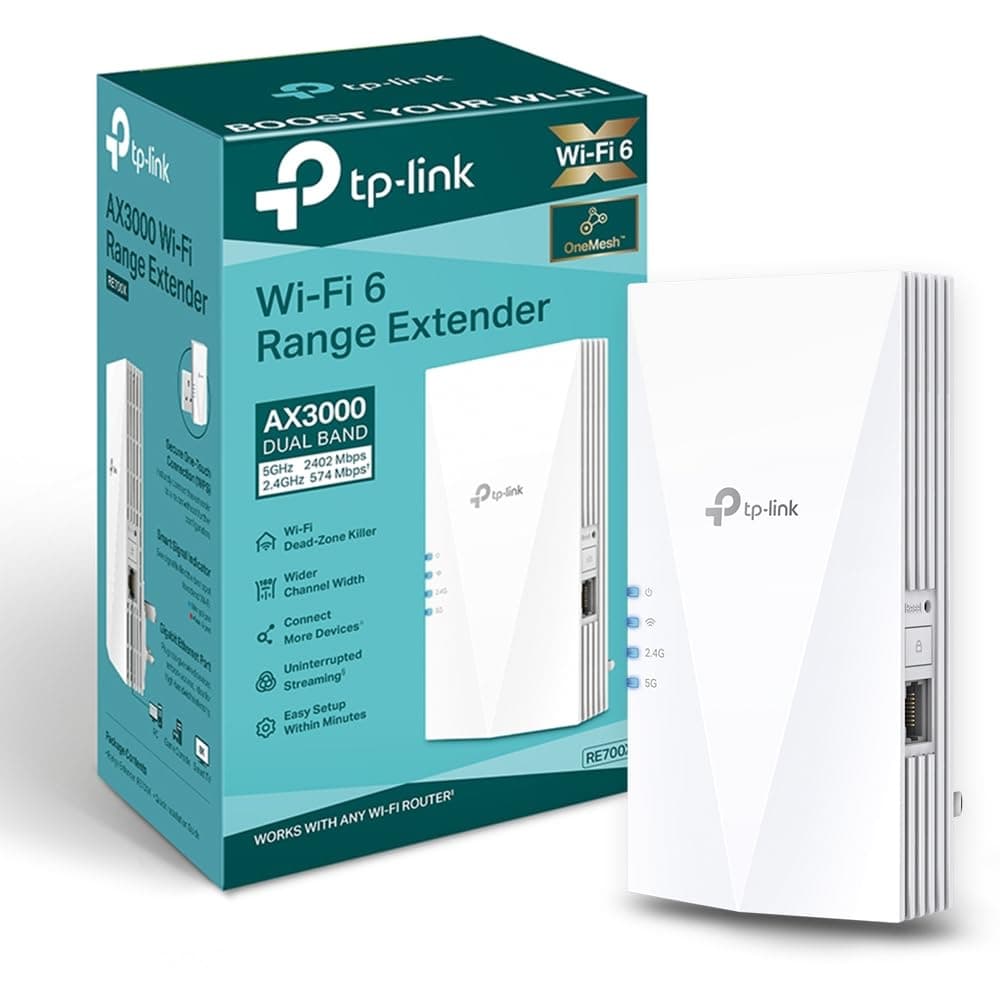
The two most natural comparisons at this price point are the TP-Link RE605X (a dual-band Wi-Fi 6 extender in a similar form factor) and the TP-Link RE700X (a higher-spec Wi-Fi 6 extender with AX3000 speeds and a more powerful antenna setup). Both are before you commit to the EAX12.
The TP-Link RE605X is the closest direct competitor. It's also dual-band Wi-Fi 6, also wall plug-in, also has a single Gigabit Ethernet port, and typically comes in at a similar or slightly lower price. TP-Link's Tether app is generally considered more polished than the Nighthawk app for extender management, and the RE605X has a solid owner rating. The EAX12 has slightly higher theoretical speeds on paper (1.6 Gbps vs 1.5 Gbps for the RE605X), but that distinction is academic in practice. The honest answer is that these two are very close, and brand preference or app ecosystem is probably the deciding factor.
The TP-Link RE700X steps up to AX3000 (574 Mbps on 2.4GHz and 2402 Mbps on 5GHz) with a 4x4 antenna configuration on 5GHz, which is meaningfully better for high-device-count environments or faster broadband connections. It's also a wall plug-in with a Gigabit Ethernet port. If you're on a fast connection and your dead zone has a lot of devices in it, the RE700X is worth the extra spend. If you're on standard fibre and just need to cover a back bedroom, the EAX12 is adequate and you'd be paying for headroom you won't use with the RE700X.
| Feature | NETGEAR Nighthawk EAX12 | TP-Link RE605X | TP-Link RE700X |
|---|---|---|---|
| Wi-Fi Standard | Wi-Fi 6 (AX1800) | Wi-Fi 6 (AX1800) | Wi-Fi 6 (AX3000) |
| Bands | Dual-band | Dual-band | Dual-band |
| Max Speed (theoretical) | 1.6 Gbps | 1.5 Gbps | 3.0 Gbps |
| Antenna Config | 2x2 per band (internal) | 2x2 per band (internal) | 4x4 on 5GHz (internal) |
| Coverage Rating | Up to 960 sq ft | Up to 1,000 sq ft | Up to 1,000 sq ft |
| Ethernet Port | 1x Gigabit | 1x Gigabit | 1x Gigabit |
| OFDMA | Yes | Yes | Yes |
| MU-MIMO | Yes (2x2) | Yes (2x2) | Yes (4x4) |
| App | Nighthawk | TP-Link Tether | TP-Link Tether |
| Price | £37.99 · Details | Check Amazon | Check Amazon |

Final Verdict: NETGEAR Nighthawk WiFi 6 Extender EAX12
The NETGEAR Nighthawk WiFi 6 Extender EAX12 is a competent, stable, mid-range Wi-Fi 6 extender that does the job it's designed for without drama. If you've got a specific dead zone in a small to medium home, a router that's already doing its job well, and you want to extend coverage to one or two extra rooms, this will almost certainly fix your problem. The hundreds of owner reviews back that up with a positive overall rating: most people are happy, and the stability is better than you'd expect at this price point.
The limitations are real and worth naming. Shared wireless backhaul means you're splitting the 5GHz band between the router link and your devices, which caps throughput in the extended zone. It's not a mesh system, it doesn't roam intelligently, and it won't saturate a gigabit connection wirelessly. The Nighthawk app works but isn't the best in class. And if your dead zone is caused by something structural (thick concrete walls, a long distance from the router, or multiple floors), a single extender might not be enough regardless of brand.
The smart move, if you have Ethernet in the walls or are willing to run a cable, is to use the EAX12 in access point mode with a wired backhaul. That sidesteps the shared-band limitation entirely and gives you something much closer to a proper access point for a fraction of the cost of a full mesh system. Without that wired connection, you're working within the constraints of wireless extender technology, and those constraints are the same across every device in this category.
Who should buy this? Someone with a two or three-bedroom house, standard UK fibre broadband, and one persistent dead zone they can't shift. Someone who already has a decent router and doesn't want to replace their whole setup. Someone who wants Wi-Fi 6 efficiency for a mixed-device household without spending mesh money. That's a lot of people, and for them, the EAX12 is a reasonable buy.
Who should skip it? Anyone on gigabit broadband who needs full-speed coverage throughout a larger home. Anyone whose dead zone problem is complex enough to need multiple nodes. Anyone who wants intelligent roaming and dedicated backhaul. For those people, a proper mesh system like the NETGEAR Orbi or the TP-Link Deco range is the right answer, and yes, it costs more, but you're buying a genuinely different product.
The don't-overspend line: if your broadband is under 200 Mbps and your dead zone is just a back bedroom, the TP-Link RE605X does essentially the same job at a similar or lower price, with a slightly better app. The EAX12 isn't a bad buy, but it's not the only sensible option at this price point, and the RE605X is worth a look before you commit.
Editorial score: 7 out of 10. Does what it says, stable, good Wi-Fi 6 efficiency for the price, and the wired backhaul option saves it from being just another average extender. Loses points for the shared wireless backhaul limitation and an app that's functional but not great.
What works. What doesn’t.
5 + 4What we liked5 reasons
- Wi-Fi 6 OFDMA and MU-MIMO handle busy mixed-device homes better than Wi-Fi 5 extenders
- Stable firmware with no widespread reboot complaints from owners
- Wired backhaul via Gigabit Ethernet port sidesteps shared-band limitations
- Simple setup via Nighthawk app or browser interface, typically under ten minutes
- Solid overall rating from hundreds of reviews confirms real-world reliability
Where it falls4 reasons
- Shared wireless backhaul halves usable 5GHz bandwidth in typical wireless mode
- Not a mesh system: no intelligent roaming, no dedicated backhaul band
- Nighthawk app is functional but less polished than TP-Link Tether
- Single Gigabit Ethernet port means you can't do wired backhaul and a wired device simultaneously without adding a switch
Full specifications
7 attributes| Antennas | 0 |
|---|---|
| Coverage SQM | 111 |
| Launch year | 2022 |
| Mesh capable | true |
| TOP speed mbps | 1600 |
| Type | extender |
| Wifi standard | Wi-Fi 6 |
If this isn’t right for you
1 options
Frequently asked
5 questions01Will the NETGEAR Nighthawk WiFi 6 Extender EAX12, Adds up to 960 sq ft, 1.6 Gbps cover my whole house?+
NETGEAR's 960 square foot coverage rating is a best-case figure in open-plan space with minimal obstructions. In a typical UK home with internal walls, floors, and a staircase, real coverage will be less. Owner reports suggest it handles one or two rooms beyond the router reliably in a semi-detached or terraced house, but larger detached homes with thick walls may need more than one extender or a full mesh system. Placement matters a lot: position it roughly halfway between your router and the dead zone for best results.
02Do I really need Wi-Fi 6E or Wi-Fi 7 for the NETGEAR Nighthawk WiFi 6 Extender EAX12, Adds up to 960 sq ft, 1.6 Gbps?+
No, and for most households in 2026 you don't need Wi-Fi 6E or Wi-Fi 7 at all. The EAX12 supports Wi-Fi 6 (802.11ax), which is the right standard for the majority of current devices. Wi-Fi 6E adds a 6GHz band, but your devices need Wi-Fi 6E hardware to use it, and most phones, laptops, and tablets in typical homes don't have that yet. Wi-Fi 7 goes further still, but the premium is hard to justify when your client devices can't use the headline features. Wi-Fi 6 is the practical sweet spot for most buyers right now.
03Is the NETGEAR Nighthawk WiFi 6 Extender EAX12, Adds up to 960 sq ft, 1.6 Gbps mesh worth it over a single router or extender?+
The EAX12 is not a mesh system; it's a range extender. Mesh networking uses dedicated backhaul channels and intelligent roaming between nodes, which gives more consistent speeds throughout a home. The EAX12 uses shared wireless backhaul in its default mode, which means the 5GHz band is split between the router link and your devices. If you have one dead zone to fix and a decent router already, the EAX12 is a cost-effective solution. If you need coverage across a whole house with consistent speeds in every room, a proper mesh system like the NETGEAR Orbi or TP-Link Deco is the better investment.
04Is the NETGEAR Nighthawk WiFi 6 Extender EAX12, Adds up to 960 sq ft, 1.6 Gbps easy to set up and reliable?+
Setup is straightforward for most owners: plug it in, use the Nighthawk app or the mywifiext.net browser interface, and follow the steps. Most reviews describe the process as taking under ten minutes. WPS is also available for a quicker connection if your router supports it. Reliability is generally good: owner reviews don't flag widespread reboot issues, which is a meaningful positive for an extender at this price. A small number of owners report occasional disconnections, but this isn't a dominant theme in the hundreds of reviews.
05What warranty and returns apply to the NETGEAR Nighthawk WiFi 6 Extender EAX12, Adds up to 960 sq ft, 1.6 Gbps?+
NETGEAR typically offers a one-year limited warranty on its extender range, but we'd recommend checking the current warranty terms directly on the NETGEAR support page or the product listing, as these can vary. If you're buying through Amazon UK, you also have Amazon's standard 30-day return window and the A-to-Z guarantee as a safety net regardless of manufacturer warranty.