VIVID·REPAIRS/THE FIELD GUIDE/MOTHERBOARDUpdated 7 October 2026Prices live from Amazon UK
Best of · UK · Field of 4
Best Micro-ATX Motherboards Under £100
By the Vivid Repairs deskUpdated 7 October 20264 ranked picks3,804 owner ratings read
As an Amazon Associate we may earn from qualifying purchases. We have not handled these products. Everything below is judged on published specifications, the owner ratings on the UK listings and our own product reviews, and the ranking stays independent of what any of them pay.
As an Amazon Associate, we may earn from qualifying purchases. Our ranking is independent.
Amazon confirms the live price, seller, stock and delivery. Prices here are read from the live listing through the day; a pick Amazon cannot supply is marked as such, and where the list has one in stock it is offered.
vividrepairs.co.uk / best-micro-atx-motherboards-under-100Updated 7 October 2026 · Prices from the live Amazon UK listing
§ The field
Four picks, on one page
Ranked on fit for the job in the title, not on raw specification. Tap any one to jump to the argument for it. Prices are the live Amazon UK figure, read today; a pick with no figure is out of stock and says so in its entry.
The rules this ranking ran under, in plain sight: what we read, what we weighed and what no merchant can move.
How we picked
Our editors evaluated 4 Motherboard options against the criteria readers actually weigh up: price, real-world performance, build quality, warranty, and UK availability. Picks lean toward what we'd recommend to a friend buying today, not specs-on-paper winners.
Editorial contextEditor notes from individual reviews, not press releases.
Live UK pricingRefreshed from Amazon UK twice daily.
No paid placementsAffiliate commission doesn't change what wins.
The full guideEverything behind the shortlist above: the spec sheet, the write-ups in full, our method and the verdict.
§ Editorial · The full guide · five proofs, nothing hidden
The Doubt Index.
The shortlist told you what we picked; this zone shows the working. Come in through whichever doubt you’re carrying, or read straight down; we’d rather you checked us than trusted us.
Here’s the sheet the desk works from, kept deliberately factual. Every row is written to be checked against the retailer’s current listing, and you should check. The table scrolls sideways inside its own frame; the page underneath stays still.
Scroll sideways →4 rows · 5 columns · Prices swap to the live figure at render
You can, and you should. What follows is the part a sheet can’t do: the working between what these products have and what your desk actually needs, kept word for word.
Buying the board is the least exciting part of a PC build, and the easiest place to overspend or under-buy. This roundup of the Best Micro-ATX Motherboards Under £100 sticks to boards that actually make sense for a mainstream Ryzen or Intel build: the socket you need, enough M.2 and SATA for real storage, and a VRM that won't choke on the CPU you'll realistically pair it with. Three of the four here are AM4 for Ryzen; one is LGA1700 for 12th Gen Intel. None of them pretend to be an enthusiast board, and that's the point. We've ranked them on value, upgrade headroom and honest owner reliability, then flagged the compromises so you know exactly what you're giving up.
Buying Guide: What to Look For
Socket first, everything else second. Three boards here are AM4 for Ryzen; one is LGA1700 for 12th Gen Intel. Pick the socket that matches your CPU before you compare anything else, because a great board for the wrong chip is a paperweight.
Chipset decides your ceiling. A520 is the entry AMD chipset: reliable, but the CPU multiplier is locked, so no overclocking. B450 and B550 both unlock overclocking. B550 adds PCIe 4.0, which the others don't have. On the Intel side, H610 is the budget chipset and locks overclocking too. If you never plan to overclock, A520 and H610 save you money with no real downside for the intended use.
PCIe 4.0 or not. Only the B550M PRO-VDH WIFI gives you Gen 4 M.2 storage. The H610M-E gives Gen 4 to the GPU slot but Gen 3 to storage. Everything else is Gen 3. A Gen 4 NVMe drive still works in a Gen 3 slot, it just runs slower. If you don't own one, don't pay for the feature.
DIMM slots matter more than max capacity. Three boards here have two DIMM slots; only the B550M has four. Two slots means to add RAM later you often have to replace what's already fitted, not just add sticks. If you might expand memory down the line, four slots is the friendlier path.
Common budget-board mistakes. Buying a board whose VRM can't feed your CPU (none of these suit a Ryzen 9 under sustained load). Assuming WiFi is included when only one board here has it. And overlooking the BIOS update trap: on AM4 boards without a Flash BIOS button, a brand-new Ryzen 5000 chip may not post until the firmware is updated with an older CPU fitted. Check the BIOS version before you buy if you're pairing with the latest silicon.
Four write-ups, none folded away. We don’t lab-test, so every line below sticks to what can be defended: the published sheet, the owner ratings on the UK listings and our own reviews.
Spend a little more than the A520 boards lower down this list and the B550M PRO-VDH WIFI hands you the two things they can't: PCIe 4.0 storage and onboard wireless. That's the whole case for it. Two M.2 slots, both running at PCIe 4.0, on a Micro-ATX board in this price bracket is unusual, and it means a Gen 4 NVMe drive runs at full speed instead of being throttled back to Gen 3 the way it would be on either A520.
The socket is AM4, so it takes the same Ryzen chips as two of the three other boards here. Our review positions it squarely at a Ryzen 5600X or 5700X build, and that's where the VRM makes sense. MSI's listing talks up support for Ryzen 9, and the specifications do allow it, but our review is clear that the VRM isn't built for sustained Ryzen 9 heavy workloads. Pair it with a 5600X or 5700X and you're inside its comfort zone; drop a 5900X on it for hours of rendering and you're outside it.
The rear I/O is where the extra money shows. USB 3.2 Gen 2 on the back panel beats every other board in this roundup, none of which offer it. There's a pre-installed IO shield too, which sounds trivial until you've fumbled a loose one into a case. The board uses a 2oz copper PCB and an extended VRM heatsink, both aimed at keeping the power stage cooler under the mid-range Ryzen chips it's designed for.
Two honest catches. Our review notes the onboard WiFi is likely 802.11ac (Wi-Fi 5) rather than Wi-Fi 6, so treat the wireless as convenient rather than cutting-edge, and the specification on record backs this as Wi-Fi 5. And a Ryzen 5000 chip may need a BIOS update before first boot. The board has a Flash BIOS button per MSI's listing, which lets you update without a CPU installed, so that's less of a hurdle than on boards without the feature. Owners rate it 4.4 stars across 1,419 ratings, the largest, if not the highest, sample in this group. It's the one to buy if you want your build to still make sense in two years.
Pros
Two PCIe 4.0 M.2 slots, the only board here with Gen 4 storage
USB 3.2 Gen 2 on rear I/O, absent from every rival here
Flash BIOS button updates firmware without a CPU fitted
Four DIMM slots and up to 128GB RAM, double the capacity of the others
Cons
WiFi is Wi-Fi 5 (ac), not Wi-Fi 6
VRM not suited to sustained Ryzen 9 loads
May need a BIOS update before a Ryzen 5000 chip will post
The odd one out, and the only choice here if you're going Intel. Every other board on this list is AM4 for Ryzen; the PRO H610M-E DDR4 is LGA1700 for 12th Gen Core. So the first question isn't how it stacks up against the B550M, it's which team you're on. If you've got or want an i5-12400, this is your entry point in the bracket.
The DDR4 in the name is deliberate and it's the money-saver. Rather than forcing you onto pricier DDR5, this board runs standard DDR4, so if you're reusing memory from an older build you keep it. Our review points squarely at an i5-12400 with DDR4 already on hand, which is exactly the situation this board is built for. There are two DIMM slots for up to 64GB, dual channel.
It has a genuinely useful trick the AM4 boards below it don't quite match: a PCIe 4.0 x16 GPU slot with a steel-reinforced frame. So while its single M.2 is Gen 3 only, your graphics card gets full Gen 4 bandwidth, which both A520 boards can't offer on the GPU slot. MSI's listing describes Frozr AI cooling that adjusts fan behaviour automatically, and Click BIOS 5, which our review rates as one of the better budget BIOS interfaces.
The compromises are the usual budget ones. No WiFi, so a wireless build needs an adapter. No USB Type-C on the rear panel. A single M.2 limits you to one NVMe drive. And our review is honest that upgrade flexibility to 13th or 14th Gen Intel isn't the plan here: buy it for a 12th Gen chip and treat that as the ceiling. Owners give it 4.5 stars across 830 ratings. For a 1080p gaming or office build on the blue team, it's the sensible pick.
Pros
PCIe 4.0 x16 GPU slot with steel reinforcement
Runs DDR4, so you can reuse existing memory
Frozr AI automatic fan management, no manual BIOS tuning needed
Don't buy this if you want to overclock or plan on a high-TDP chip: the A520 chipset locks the CPU multiplier and the single 4-pin CPU power connector limits how hard you can push it. Get that out of the way and the PRIME A520M-K is a tidy budget AM4 board with two standout tricks for the money. Its ASUS UEFI BIOS includes proper graphical fan curve control, which our review rates as genuinely good at this tier, and it carries four SATA III ports where the MSI A520M-A PRO and most A520 rivals give you fewer. More SATA means more room for extra drives without adding a card.
The PCIe x16 slot is SafeSlot reinforced, a quality touch you don't always get down here, and the M.2 slot sits where you can reach it without pulling the GPU once the system's built. Against the B550M at the top, you lose PCIe 4.0, USB-C and the second M.2, but you save a fair chunk. Our review confirms stable running with Ryzen 5000 chips at 65W to 95W. Owners rate it 4.5 stars across 712 ratings.
Pros
Four SATA III ports, more than most A520 boards
SafeSlot reinforced PCIe x16 slot
M.2 slot reachable without removing the GPU
Cons
Only two memory slots, limited RAM upgrade path
No USB-C anywhere, rear or front header
Single 4-pin CPU power connector limits high-TDP chips
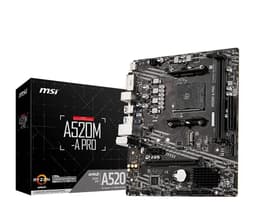
This is the A520 board to pick if fans are your fiddly bit. Four fan headers on a budget Micro-ATX board, with both PWM and DC support, is more than you'd expect at this price, and it means a case with a couple of intakes plus an exhaust doesn't need a splitter or a hub. Our review also calls out reliable XMP support, with DDR4-3200 and DDR4-3600 running without fuss, and right-angled SATA ports that make cable routing in a compact case less of a wrestle.
It sits at the same low end of the bracket as the ASUS PRIME A520M-K, and the two are close rivals. The ASUS wins on SATA count (four against this MSI's fewer) and on BIOS polish; this MSI wins on fan headers and cable-friendly SATA angles. Both lock CPU overclocking, both cap at PCIe 3.0, both give you a single M.2 and no WiFi. Our review is blunt that the VRM can throttle with a 5900X or 5950X, so keep it to mid-range Ryzen 5000. Owners rate it 4.5 stars across 807 ratings. A no-nonsense board for a gaming or productivity build that isn't chasing the top of the stack.
Pros
Four fan headers with PWM and DC support
Right-angled SATA ports ease cable routing
Reliable DDR4-3200 and DDR4-3600 XMP support
Cons
VRM risks throttling on 5900X/5950X chips
Only two USB 3.2 Gen 1 ports and no Type-C on the rear
This page carries affiliate links; they never set the order. We don’t lab-test: rankings come from published specifications, the owner ratings on the UK listings and our own reviews.
How We Compared These
We ranked these four boards on published specifications, our own research-led reviews, and verified Amazon UK owner ratings and counts, not on hands-on bench work. Nobody here has fitted these boards. We weighed chipset features (PCIe generation, overclocking, DIMM slots), rear I/O, storage options and VRM suitability against the CPUs each board realistically pairs with, then checked owner rating volumes as a reliability signal. Seller listing claims are treated as claims, not verified facts, and flagged where they differ from the specifications on record.
A crown that can’t be argued with isn’t proof of quality; it’s proof nobody checked. So rather than restate the winner’s virtues, we defend the crown against the strongest cases to take it.
B550M PRO-VDH Wifi
Cross-examination · Three challengers, taken seriously
The £45 argumentPRO H610M-E DDR4
At £54.99 today against the winner’s £99.95, its strongest case is the £45 it hands back. Owners rate it 4.5 from 839 ratings. Our review scores it 7.5 against the winner’s 8.0. If the cheaper pick covers the job you actually do, take the saving with a clear conscience. The crown stays where it is because rank follows fit for the job in the title, not the receipt, and its full argument is in the write-up above.
Prices checked (this pick) and (the winner) · Details
The £51 argumentAsustek computer Prime A520M-K
At £48.98 today against the winner’s £99.95, its strongest case is the £51 it hands back. Owners rate it 4.5 from 721 ratings. Our review scores it 7.5 against the winner’s 8.0. If the cheaper pick covers the job you actually do, take the saving with a clear conscience. The crown stays where it is because rank follows fit for the job in the title, not the receipt, and its full argument is in the write-up above.
Prices checked (this pick) and (the winner) · Details
The owners’ argumentMSI A520M-A PRO Gaming Motherboard
Owners rate it 4.5 from 818 ratings. The crown holds on the ranking rules: the order above was set before any link was attached, and its case is argued in full in the write-up above.
The original verdict, preserved in full
Final Verdict: Best Micro-ATX Motherboards Under £100
The B550M PRO-VDH WIFI takes the overall win because it's the one board here that won't feel dated in two years: PCIe 4.0 storage, onboard WiFi, USB 3.2 Gen 2 and four DIMM slots put it ahead of everything else in the bracket, provided you pair it with a Ryzen 5600X or 5700X rather than a power-hungry Ryzen 9. For the tightest budget, the Asustek PRIME A520M-K is the smarter buy: a genuinely good BIOS, four SATA ports and reliable running with mid-range Ryzen 5000, so long as you don't need overclocking or PCIe 4.0. Building Intel? The PRO H610M-E DDR4 is your only route here and a sound one for a 12th Gen i5 that reuses DDR4. Match the socket to your CPU, then buy the highest chipset your budget allows.
Honestly? The pickings are slim. Most micro-ATX boards worth buying sit between £120-£190. The market has shifted towards ATX boards in the budget segment, and true micro-ATX options under £100 are nearly extinct in 2026. You'll find better value slightly above this price point.
Micro-ATX boards are smaller (244mm x 244mm vs 305mm x 244mm) with fewer expansion slots. You typically get 2-4 PCIe slots instead of 6-7. For most people, that's not a problem. You'll still get all the essential features, just in a more compact package that fits smaller cases.
Absolutely. The form factor doesn't limit gaming performance. What matters is the chipset, VRM quality, and features. A good micro-ATX board like the ASUS ROG Strix B850-G handles gaming just as well as full ATX boards. You're just working with less physical space.
You can always add Wi-Fi via PCIe card or USB adapter, but built-in Wi-Fi is tidier and often better quality. If you're near your router, save the money and go wired. If not, paying £10-£20 extra for integrated Wi-Fi 6E is usually worth it compared to buying adapters later.
Only the B550M PRO-VDH WIFI offers PCIe 4.0 M.2 slots, and it has two of them. The MSI PRO H610M-E DDR4 has a PCIe 4.0 x16 GPU slot but its single M.2 is Gen 3. The A520 boards are Gen 3 throughout. If you own or plan to buy a Gen 4 NVMe drive and want full speed, the B550 is the only one here that delivers it.
That’s the field: four micro-atx motherboards under £100, ranked for the job in the title and nothing else. We read the published specifications, the owner ratings and our own reviews; we haven’t handled these products, and no maker moves the order. Figures checked against the live Amazon UK listings, page updated 7 October 2026.