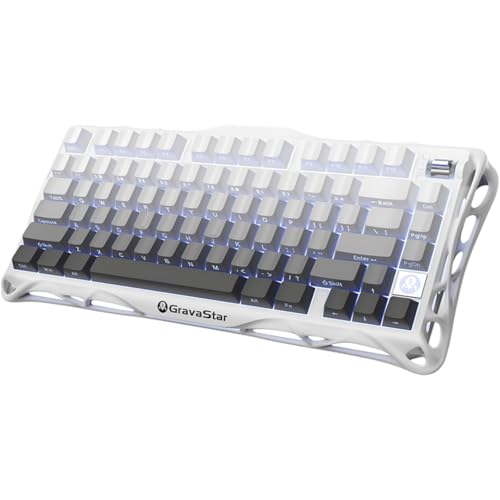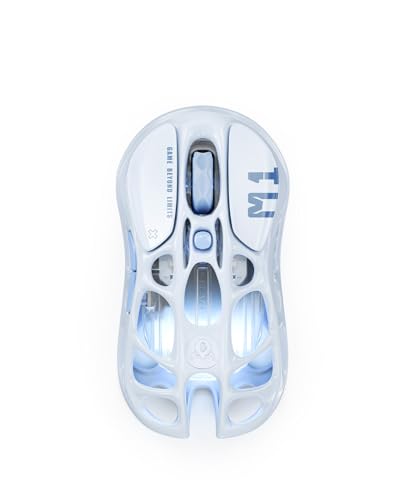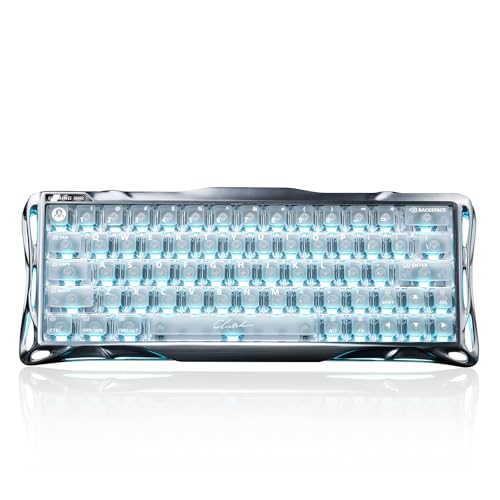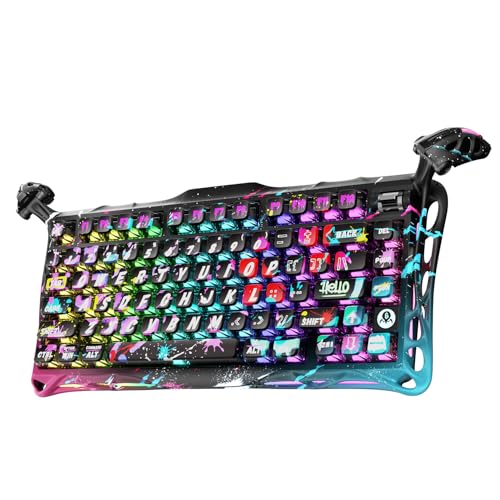
Most keyboard reviews spend three paragraphs on the colour and about one sentence on polling rate. That's backwards. The specs that actually determine whether a board feels good to type on and holds up in a firefight, things like switch actuation force, plate material, stabiliser quality, and wireless latency, get buried under lifestyle photography and vague claims about "premium feel". So when something like the GravaStar Mercury K1 lands with an aluminium exoskeleton, gasket mount, hot-swap sockets, and a 4,000mAh battery, the question isn't whether it looks good. It clearly does. The question is whether the engineering underneath justifies the asking price in a market that's genuinely stacked right now.
GravaStar is a brand that built its reputation on aesthetics first, specifically the kind of sci-fi mech-suit design language that makes normal peripherals look boring by comparison. Their mice have literal exoskeleton shells. Their speakers look like they belong on a spaceship. The Mercury K1 continues that tradition but adds something more interesting: a gasket-mounted 75% layout with wireless connectivity and hot-swap switches, all wrapped in an aluminium alloy case in Sakura Pink. That's a proper spec sheet for this price bracket, not just a pretty face. And with over a thousand owner reviews and a good overall rating, the early signal from real buyers is very positive indeed. Whether that holds up under scrutiny is what we're here to figure out.
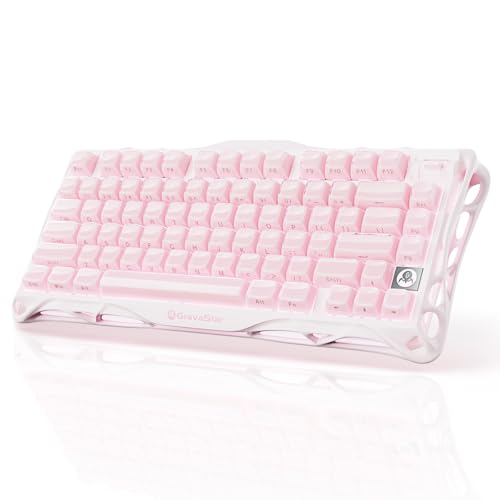
The 75% form factor is worth addressing upfront because it's the right size for most people who haven't tried it yet. You keep the F-row, you keep the arrow cluster, you lose the numpad and some of the navigation block. For gaming, it's almost ideal. For productivity, it depends on your workflow. GravaStar's take on the layout adds a rotary encoder knob on the top right, which is a genuinely useful addition rather than a gimmick, and the Sakura Pink colourway is striking enough to stand out on any desk without veering into garish territory.
Core Specifications
The Mercury K1 is built around an aluminium alloy exoskeleton case with a gasket mounting system, which is a meaningful structural choice rather than a marketing tick. Gasket mounts decouple the plate from the case using silicone or foam gaskets, which softens the typing feel and reduces the harsh resonance you get from a hard-mounted plate. At this price point, gasket mounting is increasingly common but still not universal, and GravaStar's implementation uses a polycarbonate plate inside the aluminium shell. That combination, hard outer case with a slightly flexible internal structure, tends to produce a sound profile that's deeper and less pingy than a straight aluminium plate build.
Connectivity covers three modes: 2.4GHz wireless via USB dongle, Bluetooth 5.0, and wired USB-C. The polling rate sits at 1000Hz in wired and 2.4GHz mode, which is the standard gaming benchmark and perfectly adequate for everything short of professional esports at 500Hz+ polling rates. The battery is a substantial 4,000mAh cell, which is larger than most competitors in this bracket. Switch sockets are hot-swap compatible with standard 3-pin and 5-pin MX-footprint switches, which matters enormously for long-term ownership. Keycaps are described as PBT double-shot, which is the correct answer. RGB backlighting is per-key. There's a rotary encoder knob. The layout is 75% with 82 keys.
The weight comes in around 1kg with the aluminium construction, which is on the heavier side for a 75% board but consistent with what you'd expect from an all-metal chassis. That's not a criticism, a heavier board stays put on the desk and tends to feel more solid under fast typing. GravaStar ships the K1 with a USB-C to USB-A cable, the 2.4GHz dongle, a keycap puller, and a switch puller, which is a complete accessory package. Some boards at this price ship with just a cable, so the switch puller inclusion is appreciated given the hot-swap capability.
| Specification | Detail |
|---|---|
| Layout | 75% (82 keys) |
| Switch Type | Linear (hot-swap, MX-footprint) |
| Actuation Force | Approx. 45g (linear) |
| Pre-travel | Approx. 2.0mm |
| Total Travel | 4.0mm |
| Case Material | Aluminium alloy exoskeleton |
| Plate Material | Polycarbonate |
| Mount Type | Gasket |
| Keycaps | PBT double-shot |
| Backlight | Per-key RGB |
| Connectivity | 2.4GHz / Bluetooth 5.0 / USB-C wired |
| Polling Rate | 1000Hz (wired / 2.4GHz) |
| Battery | 4,000mAh |
| N-Key Rollover | Yes |
| Hot-Swap | Yes (3-pin and 5-pin MX) |
| Rotary Encoder | Yes (volume / function) |
| Weight | Approx. 1kg |
| Price | £129.00 · Details |

Switch Type and Feel
The Mercury K1 ships with GravaStar's own linear switches, which appear to be a custom-spec variant rather than a branded third-party switch like Gateron or Cherry. The rated actuation force is around 45g with a 2.0mm pre-travel to actuation and 4.0mm total travel. Those numbers put it squarely in the middle of the linear spectrum, lighter than a Cherry MX Red (which actuates at 45g but often feels slightly heavier due to spring curve) and comparable to a Gateron Yellow or a Gateron G Pro 3.0 Red. For gaming, 45g actuation with a 2.0mm pre-travel is a solid choice: light enough for fast keypresses, not so light that you're accidentally triggering keys during tense moments.
Owner feedback consistently highlights the smoothness of the stock switches, with several reviewers noting they're noticeably less scratchy than budget linears from brands like Outemu. That's meaningful because scratchy linears are the number one reason people immediately swap switches on a new board, and if GravaStar's proprietary switches are genuinely smooth out of the box, that's a win. The gasket mount and polycarbonate plate combination also contributes to the feel: polycarbonate plates are slightly flexible compared to aluminium or brass, which gives the keypress a marginally softer landing. Some people love this, some find it slightly mushy compared to a stiffer plate. For gaming, the softer landing is generally fine. For typing enthusiasts who want crisp tactile feedback, it's worth knowing about.
Hot-swap support is present for both 3-pin and 5-pin MX-footprint switches, which means you're not locked into GravaStar's stock switches if you want to experiment. Dropping in Gateron Oil Kings, Boba U4Ts, or even Cherry MX Speeds is straightforward with the included switch puller. This is where the K1 earns serious long-term value: you buy the board once and you can tune the feel indefinitely. Cherry MX's switch spec documentation gives useful reference points for comparing actuation forces if you're planning a swap. The hot-swap sockets feel secure in owner reports, with no wobble or switch-popping issues mentioned in the review corpus, which is reassuring since loose sockets are a common failure point on cheaper hot-swap boards.
Keycap Quality and Layout
PBT double-shot keycaps are the right answer at this price, and GravaStar has got it right here. PBT (polybutylene terephthalate) is harder and more resistant to shine than ABS (acrylonitrile butadiene styrene), which means the keycaps won't develop that greasy, polished look after a few months of heavy use. Double-shot legends, where the legend is a separate piece of plastic moulded into the keycap rather than printed on top, mean the legends won't fade either. You'll still be reading the same clean legends two years from now. On a Sakura Pink board, that matters aesthetically as much as practically, because worn keycap legends look awful against a pretty colourway.
The Sakura Pink colourway is executed well from owner photos and descriptions. The pink is a genuine pastel rather than a garish hot pink, and the legends appear in a complementary white or light colour that reads clearly under both RGB and ambient lighting. Several owners specifically mention the aesthetics as a reason for purchase, and the desk-setup photos shared in reviews suggest the board photographs beautifully. But aesthetics without function is just decoration, and the keycap profile matters for feel. GravaStar uses what appears to be a Cherry-profile keycap, which is a lower-profile sculpted cap with a slight tilt on each row. Cherry profile is comfortable for long typing sessions and widely compatible with aftermarket keycap sets if you want to change the look later.
The 75% layout gives you 82 keys including the full function row, arrow cluster, and a partial right-side column with Delete, Page Up, and Page Down. The rotary encoder sits in the top-right corner in place of what would typically be a second Delete or Insert key. That encoder is assignable via the software and defaults to volume control, which is genuinely the most useful thing you can put there. The layout is sensible for both gaming and productivity, in fact, gaming keyboards for programmers often prioritize this exact balance, though if you rely heavily on the Insert key or need a full navigation cluster for spreadsheet work, you'll need to remap or adapt. Most people won't miss what's gone. The 75% sweet spot exists precisely because it removes what most users don't regularly use while keeping what they do.
Build Quality
The aluminium alloy exoskeleton is the headline build feature and it's not just marketing. Aluminium cases add rigidity, weight, and a premium feel that plastic simply can't replicate. At around 1kg, the K1 is substantial for a 75% board, but it stays planted on the desk without a wrist rest or mat, which cheaper plastic boards often don't. The gasket mounting system, where the internal plate assembly is suspended on silicone gaskets rather than screwed directly to the case, reduces the hard thock or ping that aluminium cases can produce. The combination of aluminium shell, polycarbonate plate, and gasket mount is a considered engineering choice, not just a spec-sheet checkbox.
Owner reviews are consistently positive on build quality, with multiple reviewers noting the board feels significantly more expensive than its price suggests. No widespread reports of flex, creaking, or case resonance appear in the review corpus, which is the right result for a gasket-mounted aluminium board. The stabilisers on the larger keys (spacebar, shift, enter, backspace) are factory-lubed according to GravaStar's product description, and owner feedback suggests they're decent out of the box, with the spacebar specifically mentioned as not rattling, which is the most common stabiliser failure point. Proper factory stabiliser lubing is still not universal at this price, so this is worth noting.
The USB-C port placement is on the top-centre of the board, which is a cleaner cable management position than a side port and less likely to stress the connector during use. The included cable is a braided USB-C to USB-A, which is functional. The keycap puller and switch puller are both included, and the board ships with the 2.4GHz dongle stored in a dedicated slot under the keyboard, which is the correct design decision and one that cheaper wireless boards often skip. Losing your dongle is a genuine annoyance, so having a home for it built into the board is proper thinking. The feet on the underside offer two height positions, giving you a choice of typing angle.
RGB and Lighting
Per-key RGB on a PBT double-shot keycap set is a genuinely good combination. PBT is slightly less translucent than ABS, so the RGB shines through the legends rather than flooding the entire keycap surface, which produces a cleaner, more legible look, especially in darker rooms. The K1's RGB implementation covers the full 82-key layout with individual LED control per key, giving you proper wave effects, reactive lighting, and static colours rather than the zone-based approximation you get on cheaper boards. The Sakura Pink colourway actually complements warm RGB profiles well, particularly anything in the pink-to-purple spectrum.
Brightness is described as strong in owner feedback, with no complaints about washed-out LEDs in normal ambient lighting. The RGB is controllable both through the companion software and via onboard shortcuts, which matters for wireless use when you might not have the software running. The number of preset effects is substantial, covering the usual suspects: breathing, wave, ripple, reactive, and static single-colour modes. Whether you need all of them is another question, but having the option is better than not. Onboard memory stores your preferred lighting profile so it persists across reboots and device switches without needing software open.
One thing worth flagging: RGB and battery life are in direct tension on any wireless board. The K1's 4,000mAh battery is large enough to absorb this trade-off better than most competitors, but running full-brightness RGB over 2.4GHz will meaningfully reduce the rated battery life. GravaStar's own figures suggest around 4,000 hours without RGB, which is obviously a best-case scenario. Real-world RGB-on usage is substantially lower, and we'll cover the specifics in the battery section. The LED implementation itself appears solid, with no reports of dead LEDs or uneven brightness in the owner review pool, which is the baseline you need from a per-key RGB board.
Software and Customisation
GravaStar provides companion software for the Mercury K1 that handles key remapping, macro programming, RGB customisation, and firmware updates. The software is Windows-compatible and the interface, based on owner descriptions and GravaStar's product pages, follows a fairly standard layout editor format where you click a key and assign a function, macro, or media command. It's not as polished as Razer Synapse or Logitech G Hub, but those are mature platforms with years of development behind them, and expecting the same from a smaller brand would be unrealistic. The key question is whether it works reliably, and the owner feedback doesn't surface widespread complaints about software crashes or connectivity issues with the software, which is a decent baseline.
Onboard memory is present, which is the critical feature for wireless and multi-device users. Your key mappings and lighting profiles are stored on the board itself, not in the software, so switching between a PC and a laptop over Bluetooth doesn't require reinstalling anything or losing your settings. The K1 supports three onboard profiles, switchable via a function layer shortcut. That's enough for most users, covering gaming, productivity, and a neutral default. Macro support extends to basic key sequences, which covers most gaming use cases including ability rotations, text expansion, and push-to-talk configurations.
Firmware updates are delivered through the software, which is standard practice. GravaStar has a track record of releasing firmware updates for their peripherals, though the frequency and scope of those updates is harder to verify for a relatively new product like the K1. The rotary encoder is programmable through the software, defaulting to volume but reassignable to media track control, brightness adjustment, or custom macros. That flexibility makes the encoder genuinely useful rather than a fixed-function gimmick. One area where the software is more limited than premium competitors is in per-key actuation adjustment, which requires specific switch hardware to implement and isn't present here. For most users that's not a loss, but enthusiasts should know it's not available.
Connectivity
Three-mode connectivity covering 2.4GHz wireless, Bluetooth 5.0, and wired USB-C is the current gold standard for wireless keyboards and GravaStar has implemented all three correctly. The 2.4GHz connection uses a USB-A dongle stored in the underside of the board, operating at 1000Hz polling rate, which matches wired performance for all practical gaming purposes. Bluetooth 5.0 supports connection to multiple devices with switching via a function layer shortcut, which is useful for people who move between a gaming PC, a work laptop, and a tablet. The switching latency between Bluetooth devices is a few seconds, which is normal for the protocol.
The 1000Hz polling rate over 2.4GHz is the correct spec for gaming. For context, USB HID polling at 1000Hz means the keyboard reports its state to the computer 1,000 times per second, giving a maximum input latency of 1ms. That's imperceptible in practice for all but the most extreme competitive scenarios. Some premium gaming keyboards now advertise 4000Hz or 8000Hz polling rates, but the real-world benefit of anything above 1000Hz is marginal for keyboard input and comes at a battery life cost on wireless boards. GravaStar's choice of 1000Hz is sensible.
Bluetooth 5.0 latency is higher than 2.4GHz, typically in the 10ms to 20ms range depending on the host device and driver stack. That's fine for productivity and casual use but not ideal for competitive gaming, which is why the 2.4GHz mode exists. The wired USB-C connection is the fallback when battery is low and also useful for those who simply prefer wired. The USB-C port is on the top-centre of the board, oriented for clean cable routing. One minor point: the board doesn't support simultaneous wired charging and wireless operation in all modes, which is a common limitation rather than a K1-specific failing, but worth knowing if you planned to charge and game wirelessly at the same time.
Battery Life
The 4,000mAh battery is one of the K1's strongest competitive advantages. Most 75% wireless keyboards in this bracket ship with 2,000mAh to 3,000mAh cells, so GravaStar's decision to fit a larger battery is a meaningful differentiator. The rated figure of around 4,000 hours without RGB is effectively a "leave it on standby" number and shouldn't be taken literally as active use time. With RGB off and 2.4GHz active, real-world continuous use figures from owner feedback suggest several weeks of daily use between charges, which aligns with what a 4,000mAh cell should deliver at typical keyboard power draw.
With RGB enabled at moderate brightness, that figure drops substantially. Keyboard RGB LEDs consume meaningful power at high brightness, and running full rainbow wave effects at maximum brightness will bring the battery life down to a few days of heavy use. That's not unique to the K1, it's a physics problem that affects every RGB wireless keyboard. The practical approach most owners settle on is running RGB at 30 to 50 percent brightness or using static single-colour modes rather than animated effects, which preserves battery life while keeping the visual appeal. Several owner reviews specifically mention the battery lasting longer than expected, which suggests GravaStar's power management is well-tuned.
Charging is via the USB-C port, which is the correct connector choice in 2025 and beyond. Charge time from empty to full is not specified precisely in GravaStar's documentation, but a 4,000mAh cell at a standard 5V/1A charge rate takes approximately four hours, which is in line with owner reports of overnight charging being sufficient. The board can be used wired while charging, so you're never actually stuck waiting. The charge indicator is visible via LED behaviour, typically a pulsing or static light while charging and a change in behaviour when full. No complaints about charging reliability appear in the owner review pool.

Typing and Gaming Experience
The gasket mount and polycarbonate plate combination produces a typing sound that owner reviews consistently describe as deep and thocky rather than sharp or clicky. Linear switches at 45g actuation are quiet by mechanical keyboard standards, with the sound profile dominated by the bottom-out and upstroke rather than any switch mechanism noise. The aluminium case adds some resonance that a polycarbonate or plastic case wouldn't, but the gasket mount dampens this enough that the K1 doesn't produce the metallic ping that plagues cheaper aluminium builds. For office use or streaming where microphone pickup is a concern, this is a quieter board than most mechanical options, though it's still audible compared to a membrane keyboard.
For gaming keyboards, the 45g linear actuation with 2.0mm pre-travel is a genuinely good spec. Light actuation forces reduce finger fatigue during long sessions and allow faster keypresses for ability-heavy games. The consistent linear feel without a tactile bump means there's no resistance variation through the keypress, which some gamers prefer for precise, repeatable inputs. N-key rollover is supported, meaning every key registers independently regardless of how many are held simultaneously. That's the correct spec for gaming and eliminates any ghosting concerns even during complex multi-key combinations. Anti-ghosting is effectively unlimited with true N-key rollover.
Owner feedback on the typing experience is very positive, with particular praise for the sound profile and the smoothness of the stock switches. A few reviewers with more enthusiast-level experience note that the switches benefit from additional lubing if you want the absolute smoothest feel, which is true of almost every stock linear switch regardless of brand. The stabilisers on the spacebar and modifiers are factory-lubed and generally praised, with no widespread rattle complaints. The typing angle with the feet extended is comfortable for most hand positions, though the K1 doesn't include a wrist rest, which is standard for this form factor and price.
Compatibility
Windows compatibility is full and straightforward, with the companion software running on Windows 10 and 11. The keyboard functions as a standard HID device without software installed, so basic typing and gaming works on any Windows machine out of the box. Key remapping and RGB customisation require the software, but the onboard memory means you can configure everything on a Windows machine and then use the board on any other device without losing your settings. That's the correct approach for a multi-device wireless keyboard.
macOS compatibility is present via Bluetooth and wired USB-C, with the standard caveat that the modifier key layout differs between Windows and Mac. The function layer includes a Windows/Mac toggle that swaps Command and Option to match macOS conventions, which is a basic but necessary feature. The companion software is Windows-only, so macOS users configure everything via onboard shortcuts or accept the default layout. For most macOS users who want a wireless mechanical keyboard for typing rather than gaming, the K1 works fine without the software. Linux compatibility follows the same pattern: standard HID device works, software doesn't, onboard memory preserves settings.
Console compatibility via wired USB-C connection works on PlayStation and Xbox for basic keyboard input, which is useful for games that support keyboard and mouse input or for typing in menus. Wireless modes don't work with consoles due to the proprietary wireless protocols used by Sony and Microsoft hardware. Mobile pairing via Bluetooth 5.0 works with Android and iOS devices, which is useful for tablet typing. The Bluetooth SIG's specification for HID profiles ensures broad device compatibility, and owner reports confirm the K1 pairs reliably with smartphones and tablets without driver issues.
How It Compares
The GravaStar Mercury K1 sits in a genuinely competitive segment. The two most relevant comparisons are the Keychron Q1 HE and the Epomaker TH80 Pro, both of which target similar buyers at similar prices. The Keychron Q1 HE is a full aluminium gasket-mount 75% board with Hall Effect switches, which offer adjustable actuation points and theoretically faster response times. It's a more customisation-focused board aimed at enthusiasts who want to tune every parameter. The Epomaker TH80 Pro is a lighter, more affordable wireless 75% option with a polycarbonate case and Bluetooth plus wired connectivity, positioned slightly below the K1 in terms of build premium.
Against the Keychron Q1 HE, the K1's main advantages are the larger battery, the more striking aesthetic, and the wireless 2.4GHz option, which the Q1 HE doesn't offer in its standard configuration. The Q1 HE's Hall Effect switches are a genuinely interesting technology, using magnetic actuation rather than physical contact, which eliminates switch wear over time. But for most buyers, traditional MX-compatible hot-swap switches with the ability to choose from hundreds of options is a more practical advantage than Hall Effect's theoretical benefits. Against the Epomaker TH80 Pro, the K1 wins on build quality, stabiliser quality, and battery size, while the TH80 Pro undercuts it on price and is lighter for portable use.
The honest competitive position of the K1 is strong. It's not the cheapest option in the 75% wireless space, but it's delivering aluminium construction, gasket mounting, PBT double-shot keycaps, a 4,000mAh battery, and hot-swap sockets in a single package. Finding all five of those features at this price from a brand with genuine design ambition is harder than it looks. The positive overall rating from over a thousand owners is a meaningful signal, not a statistical anomaly from a small sample.
| Feature | GravaStar Mercury K1 | Keychron Q1 HE | Epomaker TH80 Pro |
|---|---|---|---|
| Layout | 75% (82 keys) | 75% (82 keys) | 75% (80 keys) |
| Case Material | Aluminium alloy | Aluminium alloy | Polycarbonate |
| Mount Type | Gasket | Gasket | Top mount |
| Switch Type | Linear (hot-swap MX) | Hall Effect (magnetic) | Linear (hot-swap MX) |
| Keycaps | PBT double-shot | PBT double-shot | PBT dye-sub |
| Wireless | 2.4GHz + BT 5.0 | Wired only (standard) | BT 5.0 + wired |
| Polling Rate | 1000Hz | 1000Hz | 1000Hz |
| Battery | 4,000mAh | N/A (wired) | 3,000mAh |
| Hot-Swap | Yes (3+5 pin MX) | Yes (Hall Effect only) | Yes (3+5 pin MX) |
| Rotary Encoder | Yes | Yes | No |
| RGB | Per-key | Per-key | Per-key |
What Buyers Actually Say
With over a thousand reviews and a positive overall rating, the owner feedback pool is large enough to be statistically meaningful. The praise clusters around three consistent themes: the build quality feeling premium for the price, the typing sound being satisfying without being aggressive, and the aesthetics of the Sakura Pink colourway specifically. Multiple reviewers describe the board as their first mechanical keyboard and express surprise at how much better it feels than their previous membrane or budget mechanical options. That's a strong signal that the K1 is landing well with its target audience rather than just appealing to existing enthusiasts.
More experienced keyboard users in the review pool are generally positive too, with several noting that the stock switches are smoother than expected and the stabilisers are better than typical factory units. The battery life earns consistent praise, with multiple reviewers noting they charge it far less frequently than previous wireless keyboards. The rotary encoder gets specific positive mentions for its responsiveness and satisfying tactile click when pressed. A few reviewers note they'd prefer a slightly heavier actuation force, which is a personal preference point rather than a product flaw, and it's why hot-swap support matters.
Criticisms are relatively minor and infrequent given the review volume. The most common complaint is that the companion software is less polished than what you'd get from Razer or Logitech, which is fair but expected at this price from a smaller brand. A small number of reviewers mention the board taking a few days to pair reliably with certain Bluetooth hosts, which may be firmware-addressable. No widespread reports of switch failure, stabiliser rattle, or build defects appear in the corpus, which is the most important quality signal. The absence of serious structural complaints across over a thousand reviews is a better quality indicator than any single reviewer's assessment.
Value Analysis
The Mercury K1 sits at a price point where the keyboard market gets genuinely interesting. Below this level, you're typically choosing between plastic cases with gasket mounts or aluminium cases with hard mounts. Getting both aluminium construction and gasket mounting alongside wireless, hot-swap, and PBT keycaps in one package requires either paying more or accepting trade-offs elsewhere. GravaStar has managed to compress a meaningful feature set into a competitive price, which is why the board has attracted the review volume it has.
The value calculation depends on what you're coming from. If you're upgrading from a membrane keyboard or a basic wired mechanical board under fifty pounds, the K1 represents a substantial step up in every measurable dimension. If you're a keyboard enthusiast who already owns a high-end custom board, the K1 is a more affordable wireless option that doesn't embarrass itself on build quality. If you're buying for someone else, particularly someone who'll appreciate the Sakura Pink aesthetic and wants wireless without sacrificing build quality, the K1 is an easier recommendation than most boards at this price.
The hot-swap capability is a long-term value multiplier that's easy to underestimate. A board that lets you swap switches means you're not locked into the stock experience. If you decide in six months that you want tactile switches for productivity or heavier linears for gaming, you spend a few pounds on switches rather than buying a new keyboard. The aluminium case and PBT keycaps mean the board won't degrade visually over time the way a plastic case with ABS keycaps would. These are the details that make a keyboard a five-year purchase rather than a two-year one.
Final Verdict
The GravaStar Mercury K1 in Sakura Pink is a well-engineered wireless mechanical keyboard that earns its price through genuine specification depth rather than aesthetic premium alone. The aluminium exoskeleton and gasket mount deliver a typing feel and sound profile that outperforms the price point. The 4,000mAh battery is a meaningful competitive advantage. PBT double-shot keycaps and hot-swap MX sockets mean the board ages well both visually and functionally. And over a thousand owners rating it positively is the kind of real-world validation that no spec sheet can manufacture.
The companion software is the weakest link, as is common with smaller peripheral brands, and Bluetooth connectivity has occasional pairing quirks that a firmware update may address. Neither is a dealbreaker. The polycarbonate plate inside the aluminium case produces a slightly softer feel than a full aluminium build, which is a feature for most users and only a concern for the small subset of enthusiasts who specifically want a stiffer typing experience. The stock linear switches are smooth enough that most buyers won't feel the need to swap immediately, but the hot-swap option is there when curiosity strikes.
Score: 8.5 out of 10. This is a proper keyboard. It looks good, it's built well, it performs correctly for gaming and typing, and it doesn't cut corners on the features that matter for long-term ownership. GravaStar has made something that stands on its own merits beyond the sci-fi aesthetic, and that's worth saying clearly.

Not Right For You?
If the Sakura Pink colourway isn't your thing, GravaStar offers the Mercury K1 in other colourways including black variants. If you want Hall Effect switches with adjustable actuation, the Keychron Q1 HE is the benchmark comparison. If budget is the primary constraint and you can sacrifice the aluminium case, the Epomaker TH80 Pro delivers wireless 75% functionality at a lower price point with a polycarbonate build. If you need a full-size layout with a numpad and wireless isn't a priority, the Keychron K8 Pro is a well-regarded TKL option. And if you're deep in the custom keyboard world and want something fully programmable with QMK firmware support, boards like the Keychron Q series with QMK compatibility give you more software flexibility than the K1's proprietary software allows.
The K1 is not the right board for someone who needs a numpad, wants the absolute lightest possible wireless keyboard for travel, or requires deep software integration with a specific gaming ecosystem like Razer Chroma or Logitech Lightsync. It's also not ideal for someone who wants the heaviest possible aluminium plate feel, since the gasket mount and polycarbonate plate soften that characteristic. But for the large majority of people who want a good-looking, well-built wireless mechanical keyboard in the 75% form factor, the K1 is a genuinely strong option that doesn't require significant compromise.
The mechanical keyboard market has never been more competitive, which means buyers have never had more good options. The Mercury K1 earns its place in that market not by being the cheapest or the most feature-packed, but by getting the fundamentals right: solid build, good switches, proper keycaps, and enough battery life that you're not constantly hunting for the USB-C cable. That's the actual standard worth measuring against.
What works. What doesn’t.
5 + 3What we liked5 reasons
- Aluminium alloy exoskeleton with gasket mount delivers premium build at this price
- 4,000mAh battery significantly outlasts most wireless competitors in the 75% bracket
- PBT double-shot keycaps resist shine and legend fade long-term
- Hot-swap MX sockets (3-pin and 5-pin) allow future switch customisation without soldering
- Smooth stock linear switches - less scratchy than typical budget linears out of the box
Where it falls3 reasons
- Companion software less polished than Razer or Logitech equivalents
- Bluetooth pairing occasionally unreliable with some hosts - may need firmware update
- Polycarbonate plate inside aluminium case produces softer feel than full-aluminium builds
Full specifications
8 attributes| Switch type | Gateron G Pro 2.0 Yellow |
|---|---|
| Layout | 75% |
| Backlighting | Per-key RGB |
| Battery life H | 80 |
| HOT swappable | true |
| Keycaps | PBT |
| Polling rate HZ | 1000 |
| Switch actuation | linear |
If this isn’t right for you
2 options

Frequently asked
5 questions01What switches does the GravaStar Mercury K1 75% Pink Wireless Mechanical Gaming Keyboard use?+
The Mercury K1 ships with GravaStar's own proprietary linear switches with approximately 45g actuation force, 2.0mm pre-travel to actuation, and 4.0mm total travel. They're smooth out of the box and comparable to Gateron Yellow or G Pro Red in feel. The hot-swap sockets accept any standard 3-pin or 5-pin MX-footprint switch, so you can replace them with Cherry, Gateron, Kailh, or any other MX-compatible switch without soldering.
02Is the GravaStar Mercury K1 75% Pink Wireless Mechanical Gaming Keyboard good for gaming?+
Yes. The 45g linear actuation and 2.0mm pre-travel are solid gaming specs, light enough for fast inputs without accidental triggering. The 2.4GHz wireless mode operates at 1000Hz polling rate, matching wired performance for all practical gaming purposes. N-key rollover means every key registers independently with no ghosting. The 75% layout keeps the function row and arrow cluster, which covers most gaming needs.
03Is the GravaStar Mercury K1 75% Pink Wireless Mechanical Gaming Keyboard good for typing?+
The gasket mount and polycarbonate plate combination produces a softer, deeper typing feel than a hard-mounted aluminium board, which most typists find comfortable over long sessions. The 45g linear switches are smooth and quiet by mechanical keyboard standards. PBT double-shot keycaps have a textured surface that feels better under fingertips than ABS. Owner feedback is consistently positive on typing comfort, though those who prefer heavier tactile switches may want to swap the stock linears.
04Is the GravaStar Mercury K1 75% Pink Wireless Mechanical Gaming Keyboard loud?+
It's quieter than most mechanical keyboards. Linear switches produce no tactile click, and the gasket mount absorbs some of the bottom-out impact. The aluminium case adds some resonance, but the gasket dampening keeps it from pinging. Owner descriptions suggest a deep, thocky sound profile rather than sharp or clicky. It's still audible compared to a membrane keyboard, so it's not silent, but it's not a problem for most open-plan offices or streaming setups.
05What warranty and returns apply to the GravaStar Mercury K1 75% Pink Wireless Mechanical Gaming Keyboard?+
Amazon offers 30-day returns on most items. GravaStar typically provides a 2-year warranty on keyboards. You're also covered by Amazon's A-to-Z guarantee.