Programmers who also game occupy a curious middle ground: they need a keyboard that can handle long coding sessions with comfortable, accurate keystrokes, yet still deliver the responsiveness and customisation that gaming demands. The market has shifted noticeably over the past year, with Hall Effect magnetic switches moving from a niche curiosity into mainstream boards at accessible prices, and 75% layouts becoming the go-to form factor for desk space without sacrificing function keys or arrow clusters. Whether you are writing Python at 2 am and then jumping into a ranked match, or you simply want one board that earns its place across both disciplines, the options below have been chosen with that dual-purpose life in mind. This roundup covers boards ranging from budget-friendly compact options through to premium wireless performers, so there is something here regardless of whether you are equipping a home office or a hot-desking setup.
Quick Verdict
Best Overall: EPOMAKER X AULA F75 MAX, which combines a TFT display, tri-mode wireless, hot-swap sockets and a volume knob into a single 75% package that suits both long coding days and late-night gaming sessions.
Best Value: AULA WIN60 HE, which brings Hall Effect magnetic switches and rapid-trigger capability to under £50, making it the most technically impressive board per pound in this selection.
The AULA WIN60 HE is aimed squarely at programmers and gamers who want cutting-edge switch technology without paying a premium. Hall Effect magnetic switches use magnets rather than physical contact points to register keypresses, which means there is no debounce delay, no switch wear over time, and, crucially, support for rapid-trigger and adjustable actuation. For a programmer, that last point matters more than it might seem: you can dial the actuation point deeper for a deliberate, error-resistant feel during long coding sessions, then tighten it up for gaming where every millisecond counts.
The 60% layout strips away the numpad, function row and navigation cluster, leaving only the alphanumeric block and a handful of modifier keys. That is a significant trade-off for programmers who rely on function keys for IDE shortcuts or use dedicated arrow keys constantly. However, most of those functions are accessible via the Fn layer, and the compact footprint frees up considerable desk space for a large mouse mat, a notebook, or a second screen positioned closer. The board is hot-swappable, so if you decide Hall Effect is not for you, you can swap in conventional switches without soldering.
Build quality punches above its price bracket. The case feels solid, the stabilisers are pre-lubed from the factory, and the keycaps have a pleasant texture that holds up to long typing sessions. RGB backlighting is present and configurable, though the software is fairly basic compared to Logitech or Razer ecosystems. At under £50, the WIN60 HE is a remarkable technical achievement, and it is the board we would recommend to any programmer-gamer who wants to experience Hall Effect switches without a significant outlay.
Verdict: The best value Hall Effect keyboard on this list, ideal for those who want adjustable actuation and rapid-trigger on a tight budget, though the 60% layout demands a willingness to learn Fn-layer shortcuts.
Pros
- Hall Effect switches with adjustable actuation point suit both coding precision and gaming speed
- Hot-swappable sockets allow switch changes without soldering
- Exceptional value at under £50 for this level of switch technology
Cons
- 60% layout removes dedicated function row and arrow keys, which can disrupt IDE workflows
- Software ecosystem is limited compared to major brands
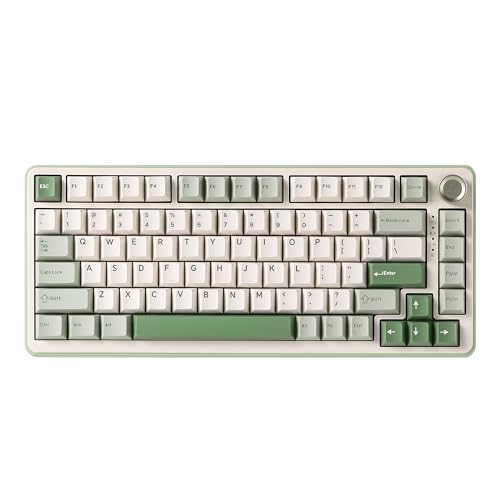
The AULA F75 represents a significant step up in versatility from the WIN60 HE. Moving to a 75% layout restores the function row and arrow keys, which are non-negotiable for many developers who rely on F5 to run code, F12 to open DevTools, or simply need arrow keys for navigating text without reaching for the mouse. The tri-mode connectivity, covering 2.4 GHz wireless, Bluetooth 5.0 and wired USB-C, makes this board genuinely flexible: pair it to a desktop via the USB dongle for zero-latency gaming, switch to Bluetooth for a laptop during a commute, or plug in the cable when the battery runs low.
The board ships with a choice of switch types, including linear and tactile options, and the hot-swap PCB means you are not locked in. For programmers, a tactile switch with a noticeable bump provides physical feedback that helps reduce typing errors during extended coding sessions, while linear switches suit those who prefer a smoother, quieter keystroke. The gasket-free mounting is firmer than some competitors at this price, which some typists prefer for a more direct, precise feel.
Keycap quality is solid for the price, with doubleshot legends that will not fade under heavy use. The RGB lighting is bright and evenly distributed, with per-key control available through the companion software. Battery life is respectable in wireless mode, typically lasting several days of mixed use before needing a charge via USB-C. The volume knob is a genuinely useful addition for programmers who frequently switch between music, video calls and game audio without wanting to break their flow.
One consideration: the 2.4 GHz dongle uses a standard USB-A receiver, so you will need a USB-A port or an adapter on newer laptops. The software, while functional, is not as polished as Logitech G HUB or Razer Synapse, but it covers the essentials including macro assignment and lighting customisation.
Verdict: A well-rounded 75% board that balances typing comfort, wireless flexibility and gaming performance at a price that leaves room in the budget for other peripherals.
Pros
- Tri-mode wireless gives genuine flexibility across desktop, laptop and travel use
- 75% layout retains function row and dedicated arrow keys essential for coding workflows
- Hot-swap PCB allows switch experimentation without soldering
Cons
- Software is functional but lacks the polish of major brand ecosystems
- 2.4 GHz dongle requires USB-A port, which may need an adapter on modern laptops
The EPOMAKER X AULA F75 MAX is the most feature-rich board in this roundup and earns its Best Overall designation by combining nearly every feature a programmer-gamer could want into a single 75% chassis. The headline additions over the standard F75 are a TFT display screen and a volume knob, both of which sit in the top-right corner of the board. The TFT screen can show system stats such as CPU and RAM usage, the current layer, or custom animations, which is a genuinely useful at-a-glance reference when you are deep in a coding session or monitoring a build process.
The volume knob is one of those features that sounds minor until you have used it daily. Adjusting audio output without breaking your typing rhythm or reaching for the mouse is a small quality-of-life improvement that adds up significantly over a working day. For developers on video calls, the ability to quickly mute or adjust volume without a keyboard shortcut is particularly welcome.
Connectivity covers the full tri-mode spectrum: 2.4 GHz wireless for gaming, Bluetooth for device switching, and USB-C for wired use. The hot-swap PCB supports both 3-pin and 5-pin switches, giving you access to virtually the entire aftermarket switch catalogue. The gasket mounting, depending on the specific revision, provides a softer, more cushioned typing feel that reduces finger fatigue during long programming sessions, which is one area where this board differentiates itself from the standard F75.
The RGB lighting is controlled via the TFT interface as well as the companion software, and the per-key customisation is thorough. Macro support is solid, with the ability to assign complex key sequences to any key, which is useful for code snippets, terminal commands or in-game actions. Build quality is excellent for the price bracket, with a weighty, premium feel to the case that belies the cost.
The main trade-off is price: the F75 MAX costs noticeably more than the standard F75, and whether the TFT screen and enhanced mounting justify the difference depends on how much you value those additions. For programmers who spend eight or more hours at the keyboard, the ergonomic and quality-of-life improvements are worth the premium.
Verdict: The best all-round choice for programmer-gamers who want a single board that excels at both disciplines, with the TFT screen and gasket mounting setting it apart from the competition.
Pros
- TFT display shows system stats and layer info, genuinely useful during coding and gaming
- Gasket mounting reduces typing fatigue during long programming sessions
- Full tri-mode wireless with hot-swap PCB supporting both 3-pin and 5-pin switches
- Volume knob allows audio adjustment without breaking typing flow
Cons
- Costs more than the standard F75, so the TFT screen needs to justify the premium for your use case
- Software could be more intuitive for first-time users configuring macros
The EPOMAKER AULA F75 (without the MAX suffix) is the slightly more restrained sibling of the F75 MAX, and it occupies a compelling position in the lineup. It shares the same 75% layout, tri-mode wireless connectivity and hot-swap PCB, but drops the TFT screen and uses a more conventional mounting system. The result is a board that is slightly lighter on features but still extremely capable, and at a price point that makes it attractive to programmers who want the flexibility of the F75 MAX without the additional cost.
The knob is retained, which is a relief, as it is one of the most practically useful additions to any keyboard used in a mixed work-and-gaming context. The switch selection at purchase includes several popular options, and the hot-swap sockets mean you can change your mind later without any tools beyond a switch puller. For programmers who are still finding their preferred switch feel, this is a significant advantage over soldered boards.
The 75% layout deserves particular praise for programmer use. Having the function row intact means your IDE shortcuts work without remapping, the arrow cluster is present for text navigation, and the Delete key sits in its expected position. The layout is compact enough to free up mouse space without requiring the mental overhead of remembering Fn-layer combinations for basic navigation tasks. This is a meaningful distinction from the 60% WIN60 HE, especially for developers who work across multiple files and terminals simultaneously.
Battery life in Bluetooth mode is good, typically lasting a week or more of office use, and the 2.4 GHz mode is recommended for gaming where latency matters. The RGB lighting is bright and configurable, and the keycaps are doubleshot PBT, meaning the legends will remain crisp and legible after years of heavy use. The stabilisers are competently tuned from the factory, reducing rattle on wider keys like the spacebar and backspace.
For programmers on a budget who want a 75% wireless board with hot-swap capability and a knob, the standard F75 is an excellent choice that does not require the premium of the MAX version.
Verdict: A slightly more affordable alternative to the F75 MAX that retains the most important features for programmer-gamers, making it excellent value in the 75% wireless category.
Pros
- 75% layout with function row and arrow keys intact, reducing IDE remapping needs
- Hot-swap PCB with tri-mode wireless at a competitive price point
- Doubleshot PBT keycaps resist legend fade under heavy daily use
Cons
- No TFT screen or gasket mounting compared to the F75 MAX at a similar price difference
- 2.4 GHz dongle occupies a USB-A port, requiring an adapter on USB-C-only machines
The YUNZII B75 PRO approaches the 75% wireless category from a slightly different angle, prioritising typing feel and build quality through its gasket-mounted construction. Gasket mounting places the PCB and plate assembly on a layer of silicone or foam gaskets rather than screwing it directly to the case, which results in a softer, more cushioned keystroke that absorbs the impact of each keypress. For programmers who type for many hours each day, this can meaningfully reduce finger and wrist fatigue compared to top-mounted boards.
The B75 PRO supports tri-mode wireless, covering 2.4 GHz, Bluetooth and wired USB-C, and the hot-swap PCB accommodates both 3-pin and 5-pin switches. The board ships with a choice of switches, and the gasket mounting amplifies the acoustic and tactile characteristics of whichever switch you choose, making a good tactile switch feel even more satisfying to type on. For programmers who care about the sensory experience of typing, this is a board worth considering seriously.
The 75% layout is well-executed, with a logical key arrangement that places the Delete key, arrow cluster and function row exactly where you expect them. The keycaps are doubleshot PBT with a slightly textured surface that provides grip during long typing sessions. The RGB lighting is per-key and configurable, though the software is less feature-rich than the major brand alternatives.
Battery life is competitive with other boards in this category, and the USB-C charging port is positioned conveniently. The board has a premium feel in the hand, with a solid case that does not flex or creak under pressure. The gasket mounting does add a small amount of flex to the typing surface, which some users prefer and others find disconcerting, so it is worth being aware of this characteristic before purchasing.
For programmers who prioritise typing comfort above all else and want a board that will feel good to use after a full working day, the YUNZII B75 PRO is the most ergonomically considered option in this roundup at its price point.
Verdict: The best choice for programmers who spend the majority of their time typing rather than gaming and want a gasket-mounted board that reduces fatigue during marathon coding sessions.
Pros
- Gasket mounting provides a softer, more fatigue-reducing typing feel for long coding sessions
- Hot-swap PCB with tri-mode wireless covers all connectivity scenarios
- Doubleshot PBT keycaps with textured surface improve grip during extended use
Cons
- Gasket flex may feel unfamiliar or unstable to users accustomed to rigid top-mounted boards
- Software lacks the depth of major brand ecosystems for macro and lighting customisation
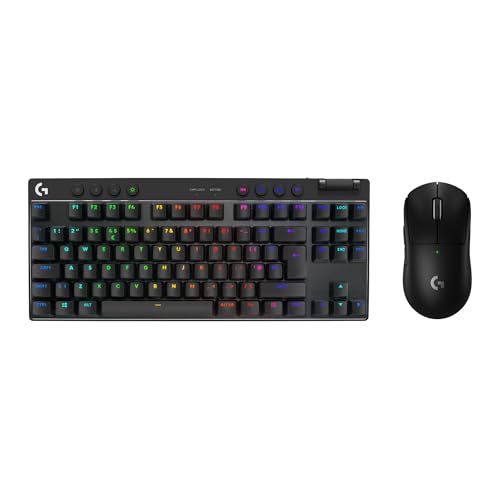
6. Logitech G PRO X TKL LIGHTSPEED Wireless Gaming Keyboard
The Logitech G PRO X TKL LIGHTSPEED is the most established and polished board in this roundup, and it earns its place by offering a level of wireless performance and software ecosystem maturity that the newer brands have not yet matched. LIGHTSPEED wireless technology delivers a 1 ms report rate that is effectively indistinguishable from wired in competitive gaming, and Logitech's track record for reliability means this board is a known quantity rather than a gamble.
The TKL (tenkeyless) layout removes the numpad while retaining the full function row, arrow cluster and navigation keys. For programmers, this is a sensible compromise: you lose the numpad, which most developers rarely use for code entry, but keep every key that matters for IDE navigation, terminal work and debugging. The layout is also more portable than a full-size board, fitting comfortably in a laptop bag alongside a notebook and charger.
The hot-swap PCB is a significant feature at this price point, as it allows you to swap between Logitech's GX Blue (clicky), GX Brown (tactile) and GX Red (linear) switches without soldering. For programmers who prefer a tactile switch for typing but want a linear option for gaming, the ability to change switches in minutes is genuinely useful. The build quality is exceptional, with an aluminium top plate that feels premium and a cable routing system that keeps the desk tidy.
Logitech G HUB software is the most mature ecosystem in this roundup, offering deep macro customisation, per-key RGB lighting, onboard memory for profiles and integration with a wide range of games and applications. For programmers who want to assign complex macros to specific keys, trigger different lighting profiles based on the active application, or sync lighting with other Logitech peripherals, G HUB delivers in a way that the smaller brands cannot yet match.
The price is the main consideration. At over £100, the G PRO X TKL costs significantly more than the AULA and EPOMAKER options, and the lack of a volume knob or TFT screen means you are paying primarily for the LIGHTSPEED wireless performance, the aluminium build and the G HUB ecosystem. For competitive gamers who also code, that premium is justified. For those who game casually and code professionally, the F75 MAX delivers more features per pound.
Verdict: The most polished and reliable board in the roundup, ideal for competitive gamers who also programme and want best-in-class wireless performance backed by a mature software ecosystem.
Pros
- LIGHTSPEED 1 ms wireless is effectively indistinguishable from wired for competitive gaming
- Logitech G HUB offers the most mature macro, lighting and profile ecosystem in this roundup
- Hot-swap PCB with aluminium top plate delivers premium build quality and switch flexibility
Cons
- Significantly more expensive than the AULA and EPOMAKER alternatives with fewer headline features
- No volume knob or TFT screen despite the higher price point
Buying Guide
Layout: Choosing the Right Size for Your Workflow
The single most important decision when buying a keyboard for programming is the layout. Full-size boards include a numpad that most developers rarely use, and they push the mouse further away, which can contribute to shoulder strain over time. TKL (tenkeyless) boards remove the numpad while keeping every other key, making them a popular choice for developers who want a familiar layout without the extra width. The 75% layout goes a step further, compressing the function row and navigation cluster into a more compact arrangement while retaining all the keys. This is currently the most popular choice among developer-gamers because it offers the best balance of desk space and key availability. The 60% layout, as seen on the WIN60 HE, is the most compact option, but it requires learning Fn-layer combinations for function keys and arrow navigation, which can be disruptive during coding.
Switch Type: Tactile, Linear or Hall Effect
Mechanical switches fall into three broad categories. Tactile switches provide a physical bump at the actuation point, giving you feedback that a keypress has registered without bottoming out. This is generally preferred for typing and coding because it reduces errors and fatigue. Linear switches have a smooth, consistent keystroke from top to bottom, which many gamers prefer for rapid key presses. Clicky switches add an audible click to the tactile bump, which is satisfying for some typists but disruptive in office environments. Hall Effect switches, as found in the WIN60 HE, use magnets instead of physical contacts, enabling adjustable actuation points and rapid-trigger functionality. This makes them uniquely versatile for the programmer-gamer use case.
Wireless Connectivity and Latency
For gaming, 2.4 GHz wireless via a USB dongle is the recommended connection type, as it delivers latency comparable to wired. Bluetooth is convenient for switching between devices, such as a desktop and a laptop, but introduces slightly higher latency that is noticeable in competitive gaming. Boards that offer both options, as most 75% wireless boards in this roundup do, give you the flexibility to use the right connection for the task at hand.
Hot-Swap Sockets
Hot-swap PCBs allow you to change switches without soldering, which is particularly valuable if you are new to mechanical keyboards and unsure of your preferred switch feel. All the boards in this roundup except the Logitech G PRO X TKL (which supports switch swapping via its own system) offer hot-swap sockets, making it easy to experiment with different switches over time.
Software and Macro Support
For programmers, macro support is more than a gaming convenience. The ability to assign complex key sequences, such as frequently used code snippets, terminal commands or build scripts, to dedicated keys can meaningfully improve productivity. Logitech G HUB is the most mature ecosystem here, but the EPOMAKER and AULA software covers the essentials adequately for most use cases.
Budget Considerations
You do not need to spend over £100 to get an excellent programmer-gamer keyboard. The AULA WIN60 HE delivers Hall Effect switches at under £50, and the EPOMAKER X AULA F75 MAX provides a feature set that rivals boards costing twice as much. Set a budget, identify which features matter most to your workflow, and choose accordingly rather than defaulting to the most expensive option.
The EPOMAKER X AULA F75 MAX takes the overall win in this roundup. It combines a 75% layout that suits both coding and gaming, tri-mode wireless for genuine flexibility, gasket mounting for comfortable all-day typing, a TFT display for at-a-glance system information, a volume knob for effortless audio control, and a hot-swap PCB that future-proofs your switch choice. At its price point, no other board in this selection offers a comparable feature set for the dual programmer-gamer use case. If budget is the primary concern, the AULA WIN60 HE is a remarkable achievement at under £50, bringing Hall Effect switch technology to an accessible price and delivering a gaming performance that punches well above its cost. For those who want the reassurance of a major brand with a mature software ecosystem and best-in-class wireless, the Logitech G PRO X TKL LIGHTSPEED remains the premium choice.