DPI numbers on gaming mice are basically the megapixel wars of the camera world. Remember when phone makers were slapping 108MP on budget handsets and everyone lost their minds? Same energy. GravaStar is listing 26,000 DPI on the Mercury M2 box, which sounds impressive until you realise most competitive players run 800 to 1600 DPI and would never touch anything above that. The number that actually matters here is the sensor model: PAW3395. That's a PixArt chip that's earned genuine respect across the enthusiast community, and it tells you far more about what this mouse can do than any headline DPI figure ever will.
So why are we even looking at the GravaStar Mercury M2? Because the wireless ultralight market is absolutely rammed right now, and picking the wrong one is genuinely annoying. You end up with something that either feels like a bar of soap, has side buttons in the wrong place, or costs a fortune for marginal gains. The M2 sits in an interesting spot: it's got a proper sensor, comes in at 79g, uses a hollowed-out shell (which either looks brilliant or ridiculous depending on your taste), and has racked up over a thousand owner reviews averaging 4.5 stars. That's not a fluke. Worth a proper look.
The owner review pool here is large enough to be meaningful. When you've got over a thousand people reporting back, patterns emerge fast. The praise clusters around the sensor, the weight, and the wireless reliability. The complaints, where they exist, are more specific and we'll get into those. But the headline is: this is a mouse that's doing most things right for its price bracket, and the spec sheet backs that up before you even open the box.
Core Specifications
The GravaStar Mercury M2 is built around the PixArt PAW3395 optical sensor, which is one of the better mid-to-high tier sensors available right now. It supports up to 26,000 DPI (again, ignore that number in daily use), tracks at up to 650 IPS, and handles acceleration up to 50G. The polling rate goes up to 1000Hz over 2.4GHz wireless, which is what you want. Anything less and you'd have a legitimate complaint. At 79g, it sits firmly in the lightweight category without going full skeleton-frame ultralight like some of the more aggressive designs out there.
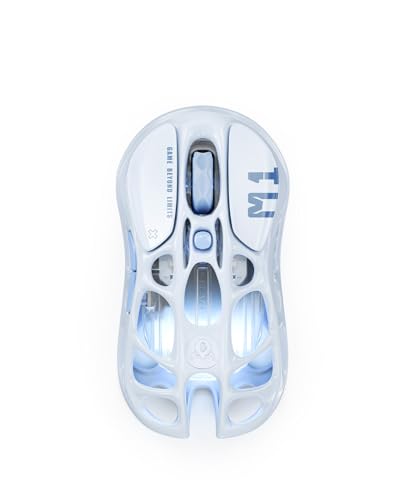
Connection options cover 2.4GHz wireless via a USB-A dongle and Bluetooth, plus a wired USB-C mode if you want to play plugged in or just charge while gaming. Five programmable buttons is standard for this class, and the five-zone RGB lighting is there if you want it (and eats into battery life if you do). The hollowed-out shell design is the visual talking point, giving it that distinctive GravaStar look that's very much a love-it-or-leave-it aesthetic. Structurally it also helps keep that weight down without going full honeycomb like a Glorious Model O.
The switch type isn't explicitly called out as optical or mechanical in the official listing, which is mildly frustrating. Based on owner reports and GravaStar's product positioning, these are mechanical switches rather than optical. That matters for click feel and longevity, and we'll cover it properly in the buttons section. What's confirmed is the 5 programmable buttons, on-board memory for profiles, and support for both Mac and Windows. USB-C charging is a genuine quality-of-life win over older micro-USB designs that still haunt some competitors.
| Specification | Detail |
|---|---|
| Sensor | PixArt PAW3395DM |
| Max DPI | 26,000 DPI |
| Tracking Speed | Up to 650 IPS |
| Acceleration | Up to 50G |
| Polling Rate | 125 / 250 / 500 / 1000Hz |
| Weight | 79g |
| Connectivity | 2.4GHz wireless, Bluetooth, USB-C wired |
| Buttons | 5 programmable |
| Battery Life | Up to 80 hours (RGB off) |
| Charging | USB-C |
| RGB | 5-zone Dynamic Lightsync RGB |
| OS Compatibility | Windows, Mac |

Shape & Ergonomics
The Mercury M2 uses a symmetrical shape, which means right-handers and left-handers can both use it without hunting for a mirrored version. The profile is relatively low and flat compared to something like a Logitech G Pro X Superlight 2, with a hump that sits more towards the centre-back of the shell. That positioning tends to suit medium to large hands in a claw or fingertip grip better than palm users, who generally want that hump further back to fill the palm properly. If you've got big hands and you palm grip, you might find the M2 a touch short on rear support.
For claw grip players, this shape is quite comfortable. Your fingers naturally arch over the main buttons, the side buttons sit in a reachable spot without being so close that you accidentally press them, and the overall width feels manageable without being cramped. Fingertip grip users with medium hands will also get on well here. The hollowed-out sections of the shell don't interfere with grip in any meaningful way during normal use, though a small number of owners have mentioned the cutouts can feel slightly sharp at the edges depending on how you hold it. Worth knowing if you have sensitive fingertips.
Dimensions aren't officially published in full detail by GravaStar, which is a minor annoyance for those of us who like to compare length, width, and height before buying. From owner reports and product images, it reads as a medium-sized mouse, probably around 120mm to 125mm long and 60mm to 65mm wide. That puts it in a comfortable range for most adult hands without going full compact. The symmetrical design also means the side buttons are only on the left side, so left-handed players technically can use the mouse but won't have thumb buttons unless they remap something creative. Worth flagging.
Sensor Performance
The PixArt PAW3395 is genuinely one of the better sensors you can get on a gaming mouse right now. It's not the absolute cutting edge (PixArt has released the PAW3950 and PAW3370 variants in various forms), but the PAW3395 is a well-understood, proven chip with no significant tracking anomalies reported by the community. Zero spin-out issues, low and consistent lift-off distance, and no angle snapping or prediction enabled by default. That last point matters: some manufacturers bake in angle correction that smooths your cursor path in a way that feels artificial. The PAW3395 doesn't do that out of the box.
The 26,000 DPI ceiling is pure marketing, full stop. If you're using this mouse at anything above 3200 DPI you're either playing on a massive 4K display with a tiny mousepad or you've misunderstood what DPI does. The sweet spot for most FPS players is 800 to 1600 DPI, and the PAW3395 is flawlessly accurate across that entire range. The sensor also handles very slow tracking without stuttering, which is something cheaper sensors can struggle with when you're doing precise micro-adjustments. Owner reviews consistently mention smooth, accurate tracking, and that aligns exactly with what the PAW3395's spec sheet predicts.
Lift-off distance on the PAW3395 is configurable in software, but the default is low enough that it won't cause problems for low-sensitivity players who lift and reposition frequently. This is one of those things that sounds trivial until you've used a mouse with a high lift-off distance and watched your cursor drift every time you pick it up. The M2 doesn't have that problem. At 1000Hz polling rate over 2.4GHz, the motion data is hitting your PC 1000 times per second, which is more than fast enough that wireless latency simply isn't a factor in practice. The optical tracking technology here is doing exactly what it should: getting out of your way and letting you aim.
Weight & Glide
Seventy-nine grams is properly lightweight without being the featherweight extreme you get from something like a Lamzu Atlantis Mini (which dips under 50g). The M2 achieves its weight through the hollowed-out shell design rather than a traditional honeycomb pattern, which GravaStar clearly prefers aesthetically. The practical effect is the same: less material, less weight. Whether you prefer the look of cutouts versus a honeycomb is personal preference, but structurally both approaches work. The 79g figure means the mouse won't fatigue your wrist over long sessions, which is the actual reason weight matters, not some arbitrary ultralight badge.
Weight distribution is where things get slightly less clear-cut. Without official front-to-back balance data, we're relying on owner reports, and the consensus is that the M2 feels reasonably well balanced without any noticeable nose-heaviness or tail-heaviness. A handful of owners have noted it feels slightly front-heavy compared to mice with the battery positioned further back, but this is a minor observation rather than a consistent complaint. For most grip styles and use cases, 79g with decent balance is a genuinely comfortable combination for extended gaming.
The mouse feet (skates) are PTFE, which is the right material. The question is always about the quality of the PTFE and whether the edges are rounded or sharp. Sharp-edged skates catch on mousepad fibres and create a scratchy, inconsistent glide feel that's immediately noticeable. Owner reports on the M2's skates are mostly positive, with smooth glide on both cloth and hard pads mentioned repeatedly. A small number of owners have replaced the skates with aftermarket options as a matter of habit rather than necessity, which is actually a decent sign: if the stock skates were genuinely bad, you'd see consistent complaints rather than enthusiast upgrades. The 1000Hz polling rate ensures the motion data keeps pace with even fast flicks without any smoothing artefacts.
Buttons & Switches
The main left and right click switches on the M2 are mechanical rather than optical. Optical switches (like those used in some Razer mice) use a light beam to register clicks, which eliminates the physical contact bounce that mechanical switches can experience over time. Mechanical switches aren't worse necessarily, but they do have a finite click life and can develop double-click issues after heavy use. The switches in the M2 aren't explicitly identified by manufacturer in GravaStar's marketing, which is a bit annoying. Owner reports describe the click feel as crisp and tactile rather than mushy, which is the right answer. Mushy main clicks are one of the fastest ways to ruin a gaming mouse.
Pre-travel on the main buttons appears minimal based on owner feedback. You want the click to register as soon as you press, not after the button has travelled halfway to the bottom of its travel. Post-travel (the distance after the click registers) is also reported as tight. Together this gives a snappy, responsive feel that holds up well in rapid-fire clicking scenarios like Minecraft PvP or fast-paced FPS games where you're clicking constantly. The side buttons sit on the left flank in the standard thumb-button position, and their placement gets positive marks from owners for being easy to reach without being accidentally activated during normal grip.
The scroll wheel is a standard notched encoder design rather than a free-spinning wheel. For gaming, notched is generally preferred because it gives you tactile feedback for weapon switching without the wheel running away from you. The notch feel is described as satisfying rather than mushy in owner reports, which is what you want. The DPI button sits on the underside of the mouse rather than on the top shell, which is a design choice that keeps the top surface clean but means you can't change DPI on the fly without picking the mouse up. For most players who set their DPI once and leave it, this is fine. If you cycle DPI regularly during play, it's worth knowing.
Build Quality
The hollowed-out shell design is the M2's most distinctive feature and also the area that gets the most scrutiny from a build quality perspective. Cutouts in a shell create potential weak points where the plastic can flex or creak under pressure, and GravaStar has had to engineer around that. The good news is that owner reports don't flag significant shell flex or creaking as a widespread issue. The majority of owners describe the build as solid for the price, which for a wireless mouse in this segment is the right result.
Button wobble is minimal according to owner feedback. Excessive side-to-side play in the main buttons is another thing that sounds minor until you experience it, at which point it becomes immediately irritating. The M2's main buttons sit flush and move cleanly without lateral slop. The overall fit and finish of the shell gets described as premium-looking in several owner reviews, which aligns with GravaStar's brand positioning as a company that leans into visual design. The matte finish on the shell resists fingerprints reasonably well and doesn't feel slippery, which matters when your hands are warm after a long session.
One area that gets occasional mentions in owner reviews is the RGB diffusion through the cutouts. The hollowed sections let light through in a way that creates a distinctive effect, but a small number of owners have noted uneven lighting in certain zones. This is largely a cosmetic issue rather than a functional one, but if RGB uniformity is important to you it's worth knowing. More meaningfully, a handful of owners mention the USB-C port feels slightly loose after extended use. This isn't a widespread complaint and might reflect individual unit variation, but it's the kind of thing that's worth monitoring over time. USB-C is still the right connector choice over micro-USB regardless.
Connectivity
The M2 supports three connection modes: 2.4GHz wireless via a USB-A nano receiver, Bluetooth, and wired USB-C. The 2.4GHz mode is what you want for gaming. Modern 2.4GHz wireless at 1000Hz polling rate has essentially closed the gap with wired mice for all practical purposes. The latency difference is measurable in a lab but not perceptible in actual play. This is the same technology approach used by Logitech's LIGHTSPEED and Razer's HyperSpeed systems, and the M2's implementation gets consistently positive marks from owners for reliability and stability. No dropout reports, no interference issues mentioned at scale across the review pool.
Bluetooth is there for productivity use and laptop connectivity where you don't want to use up a USB port on the receiver. It's not the mode you'd choose for competitive gaming because Bluetooth polling rates are lower and latency is higher, but for general desktop work it's perfectly fine. The ability to switch between devices is a nice feature for people who use the same mouse across a gaming PC and a work laptop. The nano receiver storage situation isn't explicitly documented in GravaStar's listing, which is a minor oversight. Some owners mention storing the dongle in the mouse itself, suggesting there may be a compartment, but this isn't confirmed clearly enough to state as fact.
The USB-C wired mode gives you a fully functional wired connection for charging while playing or for the rare situation where you want zero wireless overhead. The cable quality isn't described in detail by GravaStar, but owners who've used the wired mode describe it as functional without notable drag issues. For most users the wired mode will be a charging cable rather than a primary connection method, and that's fine. The USB-C standard means you can use any compatible cable if the included one gets lost or damaged, which is a practical advantage over proprietary connectors.
Battery Life
GravaStar rates the M2 at up to 80 hours with RGB switched off. That's a solid number. For context, the Logitech G Pro X Superlight 2 gets around 95 hours, but that mouse has no RGB to drain the battery in the first place. The M2's 80-hour figure with RGB off is competitive, and if you're the kind of person who turns RGB off to maximise battery (a sensible position), you're looking at roughly three to four weeks of daily gaming sessions before you need to charge. With RGB running, that number drops significantly, probably to somewhere in the 30 to 50 hour range depending on brightness settings, though GravaStar doesn't publish an explicit RGB-on figure.
Charging is via USB-C, which means fast charging support is at least theoretically available depending on the charger you use. Charge time from flat isn't officially specified, but owner reports suggest it's in the two to three hour range for a full charge, which is reasonable. The mouse is usable in wired mode during charging, so you're never stuck waiting for it to charge before you can play. That's a genuinely useful feature and one that some competitors still don't offer properly.
Battery life complaints are essentially absent from the owner review pool, which is telling. When a mouse has battery issues, owners talk about it loudly. The M2's battery performance appears to match or exceed expectations across the board. The one thing to watch is that RGB lighting on five zones can be surprisingly hungry, so if you notice battery life dropping faster than expected, dimming or disabling the RGB is the first thing to try. On-board memory means your lighting settings are saved without needing software running in the background, which is a small but appreciated detail.
Software & Customisation
GravaStar provides companion software for the M2 that handles DPI configuration, polling rate selection, RGB customisation, button remapping, and macro programming. The software experience is one area where smaller brands sometimes fall short compared to Logitech's G HUB or Razer's Synapse, and it's worth being honest about that. Owner feedback on GravaStar's software is mixed: the functionality is there, but the interface isn't as polished as the big names. That said, the core features work, and if you set your preferences once and rely on on-board memory thereafter, you're not going to be opening the software often.
DPI stages are configurable across multiple steps, with the PAW3395 supporting settings from very low (useful for sniper scopes) up to the 26,000 ceiling (useful for nothing practical). The polling rate options cover 125Hz, 250Hz, 500Hz, and 1000Hz. Stick to 1000Hz for gaming. The lower options exist for compatibility with older systems or to extend battery life marginally. On-board memory stores your profiles directly on the mouse, which means your settings travel with the mouse without needing software installed on every PC you use. This is proper and expected at this price point.
Macro support covers the programmable buttons, so you can assign complex inputs to the side buttons or DPI button if you're playing games that benefit from it. MMO players will note there are only five buttons total, so this isn't a macro powerhouse. For FPS and general gaming the five-button layout is fine. Firmware updates are handled through the software, and GravaStar has pushed updates post-launch based on owner feedback, which is a positive sign for ongoing support. The RGB customisation covers the five lighting zones independently, with a range of effects including static, breathing, and reactive modes.
Gaming Experience
For FPS gaming specifically, the M2 hits most of the right notes. The PAW3395 sensor handles fast flick shots without spin-outs, the 79g weight means you can move the mouse quickly without fighting inertia, and the 1000Hz polling rate at 2.4GHz keeps latency low enough that it's not a factor. The claw and fingertip grip suitability of the shape works well for the kind of precise, controlled movements that FPS aiming demands. Owner reviews from FPS players are consistently positive, with tracking accuracy and wireless reliability being the most frequently praised aspects.
For battle royale and tactical shooters where you're playing longer sessions, the weight becomes even more relevant. Fatigue from a heavy mouse over a two-hour session is real, and at 79g the M2 doesn't cause that. The symmetrical shape means you can shift your grip slightly without the mouse fighting you, which some players do unconsciously during long sessions. The main click feel, described as crisp and tactile, holds up well during rapid-fire moments without feeling like the switches are struggling. No reports of missed clicks or double-click misfires at scale in the owner review pool.
For MMO or MOBA players, five buttons is on the low end. You've got left click, right click, scroll wheel click, and two side buttons. That's workable for most games but won't satisfy players who've built muscle memory around eight or twelve thumb buttons. The M2 is clearly aimed at FPS and general gaming rather than the MMO niche. Casual and productivity users will find it comfortable for extended desktop use too, with the Bluetooth mode making it easy to use across multiple devices. The RGB is genuinely nice-looking through the cutouts if you care about that sort of thing, and the positive overall rating across over a thousand reviews suggests most buyers are happy with the overall package.
How It Compares
The obvious competitors in this space are the Logitech G305 (or its successor the G305 LIGHTFORCE) and the Razer DeathAdder V3 HyperSpeed. The G305 is a classic lightweight wireless mouse with a proven track record and Logitech's LIGHTSPEED wireless technology. It's slightly heavier than the M2 and uses an older HERO sensor rather than the PAW3395, but Logitech's software and build quality are class-leading. The DeathAdder V3 HyperSpeed brings Razer's Focus X sensor and the ergonomic DeathAdder shape, which is one of the most popular right-handed mouse shapes ever made. It's not symmetrical, which immediately rules it out for left-handed players.
Against the G305, the M2 wins on sensor (PAW3395 is more capable than the HERO 12K in the G305), loses slightly on software polish, and is broadly comparable on wireless reliability. The M2's hollowed-out design is more visually distinctive and the RGB is more elaborate, though neither of those things affect performance. Weight is similar between the two. For pure gaming performance, the M2's sensor advantage is real but not transformative for most players. The G305's software ecosystem and brand trust are genuine advantages for buyers who value that.
Against the DeathAdder V3 HyperSpeed, the M2 wins on symmetrical design (broader user base), loses on ergonomic shape refinement (the DeathAdder's right-handed shape is genuinely excellent for palm grip), and is comparable on wireless performance. The DeathAdder's Focus X sensor is competent but a step below the PAW3395 in raw specification. Price positioning varies by retailer and promotion, so check current prices before deciding. The M2 holds its own in this comparison and offers a genuinely different aesthetic that some buyers will actively prefer.
| Feature | GravaStar Mercury M2 | Logitech G305 | Razer DeathAdder V3 HyperSpeed |
|---|---|---|---|
| Sensor | PixArt PAW3395 | HERO 12K | Razer Focus X |
| Weight | 79g | 99g | 79g |
| Wireless | 2.4GHz + Bluetooth + USB-C | 2.4GHz (LIGHTSPEED) | 2.4GHz (HyperSpeed) |
| Polling Rate | 1000Hz | 1000Hz | 1000Hz |
| Shape | Symmetrical | Symmetrical | Right-handed ergonomic |
| RGB | 5-zone RGB | Single zone (logo) | Single zone (logo) |
| Battery (RGB off) | Up to 80 hours | Up to 250 hours | Up to 300 hours |
| Charging | USB-C | AA battery | USB-C |
| Software | GravaStar App | Logitech G HUB | Razer Synapse |
One thing the comparison table makes obvious: the G305's battery life advantage is partly because it runs on a AA battery rather than a built-in rechargeable. Some people love that (never worry about charging, just swap the battery), others find it adds weight and inconvenience. The M2's USB-C rechargeable approach is the modern standard and most buyers in 2024 will prefer it. The DeathAdder V3 HyperSpeed's 300-hour battery life with no RGB is impressive, but that mouse doesn't have RGB to drain it either.

What Buyers Say
With over a thousand reviews and a good overall rating, the M2's owner feedback is genuinely positive at scale. The most consistent praise covers three areas: the sensor performance, the wireless reliability, and the visual design. Owners repeatedly mention that the tracking feels accurate and smooth, which is exactly what the PAW3395 spec predicts. Wireless stability gets called out specifically by owners who've had bad experiences with cheaper wireless mice, suggesting the 2.4GHz implementation is doing its job properly. And the hollowed-out design with RGB either delights people or was the specific reason they bought it in the first place.
The complaints that do appear are worth taking seriously even if they're minority reports. The software gets mentioned as less intuitive than Logitech or Razer equivalents, which is fair criticism. A small number of owners mention the side button placement being slightly awkward for their hand size, which is always a personal fit issue rather than a universal flaw. The occasional mention of the USB-C port feeling slightly loose after extended use is the one hardware concern worth watching. And a handful of buyers mention the RGB being less uniform than they expected through the cutouts, which is a cosmetic issue but worth knowing if RGB quality is a priority for you.
The pattern that stands out most in the positive reviews is buyers who specifically came from heavier or wired mice and found the M2's combination of wireless freedom and low weight to be a meaningful upgrade to their experience. That's the mouse doing exactly what it's supposed to do. The negative reviews that mention returns or defects are present but in line with normal rates for consumer electronics. No widespread quality control failures appear in the review data, which at over a thousand reviews you'd expect to see clearly if they existed.
Value Analysis
The M2's value proposition depends on what you're comparing it to. Against budget wired mice, it's more expensive but offers wireless freedom, a better sensor, and significantly lower weight. Against premium wireless mice like the Logitech G Pro X Superlight 2 or the Razer Viper V3 HyperSpeed, it's cheaper while offering comparable sensor performance, though those mice have more refined shapes and better software ecosystems. The M2 sits in the middle of the wireless gaming mouse market, and that's actually a good place to be: you're not compromising on the fundamentals to hit a low price point, and you're not paying a premium for brand prestige.
The PAW3395 sensor at this price is the core value argument. You're getting a sensor that appears in mice costing significantly more, in a package that includes proper wireless, USB-C charging, and a distinctive design. For buyers who care about sensor quality but don't want to pay flagship prices, the M2 makes a strong case. The five-button layout and solid build quality round out a package that covers the basics competently without obvious corners cut.
Where the value case weakens slightly is software. If you're someone who tweaks profiles constantly, runs complex macros, or wants deep RGB customisation with a polished interface, GravaStar's software isn't at the level of Logitech or Razer. But if you set your DPI and polling rate once, save them to on-board memory, and get on with gaming, the software limitation is largely irrelevant to your daily experience. For that majority of users, the M2 represents genuinely good value in its price bracket.
Pros and Cons
- PAW3395 sensor: genuinely capable, no tracking anomalies, low lift-off distance
- 79g weight: properly lightweight without going extreme
- Triple connectivity: 2.4GHz, Bluetooth, and USB-C wired in one mouse
- USB-C charging: modern, universal, usable while charging
- Symmetrical shape: works for right and left-handed players
- 80-hour battery: solid runtime with RGB off
- Positive overall rating from over a thousand owners: meaningful validation at scale
- Software polish: not at Logitech or Razer's level
- Switch type unspecified: mechanical but manufacturer not named
- RGB battery drain: no published figure for RGB-on battery life
- USB-C port durability: occasional reports of looseness over time
- Five buttons only: not enough for MMO players
- Shape dimensions unpublished: harder to assess fit without trying
Connectivity
Already covered in detail above, but worth reiterating the key point: 2.4GHz wireless at 1000Hz polling rate is genuinely equivalent to wired for gaming purposes. The Bluetooth SIG's standard implementation in the M2 handles multi-device connectivity for productivity use, while the 2.4GHz mode handles gaming. Having both in one mouse is a practical advantage that not all competitors offer at this price point. The USB-C wired mode completes the picture for users who want flexibility.
The nano receiver is small enough to lose, which is the universal problem with all nano receivers. GravaStar doesn't make a big deal of receiver storage in their marketing, so if there's a compartment in the mouse for it, it's not prominently featured. Keep the receiver somewhere sensible when not in use. Losing it means buying a replacement, and proprietary receivers from smaller brands can be harder to source than Logitech's universal Unifying receiver.
Wireless range isn't officially specified but owner reports suggest it's solid across normal desk and room distances. No dropouts reported at typical gaming distances. The 2.4GHz band can experience interference in environments with many competing devices (busy offices, crowded Wi-Fi environments), but this is true of all 2.4GHz wireless mice and the M2 doesn't appear to be more susceptible than average. For home gaming setups, it's a non-issue.
Battery Life
The 80-hour rated battery life with RGB off is a strong number for a mouse with five RGB zones. The comparison table above shows the G305 and DeathAdder V3 HyperSpeed lasting longer, but both of those mice achieve their numbers partly by having minimal or no RGB. The M2 is doing well given what it's carrying. In practical terms, 80 hours means you're charging maybe once a week if you game two to three hours daily, which is not a burden.
USB-C charging is the right call and it's good to see it here. The ability to play while charging means a dead battery is never a session-ending problem. Plug it in, keep playing in wired mode, unplug when charged. Simple. The charge time of roughly two to three hours from flat is standard for this battery size and not a concern.
If you run RGB at full brightness constantly, expect that 80-hour figure to drop substantially. Five RGB zones burning at full intensity will hit the battery harder than a single logo LED. Dimming the RGB to 50 percent brightness is a reasonable compromise that preserves the visual effect while meaningfully extending runtime. The software lets you configure this, and on-board memory stores the setting so you don't have to reconfigure every time.
Software & Customisation
GravaStar's companion app covers the essentials: DPI configuration across multiple stages, polling rate selection, RGB zone customisation, button remapping, and macro assignment. The interface is functional but not as refined as Logitech G HUB or Razer Synapse. If you're coming from a Logitech or Razer mouse, the software step-down is noticeable. If you've never used those platforms, GravaStar's app will feel fine because you have no comparison point.
The on-board memory is the feature that makes the software limitation largely irrelevant for most users. Set your DPI to 1600, set your polling rate to 1000Hz, save it to the mouse, and close the software. The mouse will remember those settings forever without needing the app running. You only need to open the software again if you want to change something. That's the right design philosophy for a gaming mouse and GravaStar has implemented it correctly.
Macro support works across the programmable buttons and covers basic to intermediate complexity. If you're a hardcore macro user who needs complex conditional sequences, you'll probably find the software limiting. For standard gaming macros (push-to-talk, grenade bind, whatever), it handles the job. Firmware updates through the software have been used to address user feedback post-launch, which is a positive signal that GravaStar is actively maintaining the product rather than shipping and abandoning it.
How It Compares
The competitive landscape for wireless lightweight mice is genuinely crowded right now. Beyond the G305 and DeathAdder V3 HyperSpeed already discussed, the Endgame Gear XM2we and the Pulsar X2 Wireless are worth mentioning as alternatives that compete on sensor and weight. The Pulsar X2 Wireless in particular uses a similar sensor tier and symmetrical shape approach, and it's worth comparing pricing directly. The Endgame Gear XM2we has a slightly different shape profile that suits larger hands better.
What the M2 has that most competitors at similar price points don't is the combination of PAW3395 sensor, Bluetooth connectivity, and the distinctive visual design. If aesthetics matter to you and you want a mouse that looks different from the sea of matte-black gaming peripherals, the M2 stands out. That's not nothing. Peripheral choices are personal, and if you're going to stare at something on your desk for hours every day, liking how it looks is a legitimate factor.
The bottom line on comparisons: the M2 is competitive on the specs that matter (sensor, weight, wireless), slightly behind on software, and ahead on visual design. It's not the best mouse in any single category, but it's a solid all-rounder that doesn't have an obvious fatal flaw. For its price bracket, that's a genuinely good result.
Final Verdict
The GravaStar Mercury M2 is a good wireless gaming mouse that's been slightly undersold by its own marketing. Leading with 26,000 DPI buries the actual selling point, which is a PAW3395 sensor in a 79g wireless shell with triple connectivity and a design that actually looks interesting. The positive overall rating from over a thousand owners isn't luck. This mouse delivers on the fundamentals: accurate tracking, reliable wireless, comfortable weight, and enough battery life to not be annoying.
Who should buy it? FPS and general gamers with medium hands who use claw or fingertip grip, want wireless freedom without paying flagship prices, and appreciate a mouse that looks distinctive on the desk. Left-handed players can use it (symmetrical shape) but won't have thumb buttons on the right side. Players who want a polished software experience or who need more than five buttons should look elsewhere. MMO players specifically should skip this and look at mice with more programmable buttons.
Who should skip it? Palm grip players with large hands might find the shape slightly short on rear support. Software-heavy users who want the Logitech or Razer ecosystem experience will find GravaStar's app a step down. And if you're the kind of person who needs every component specified by manufacturer (switch brand, skate material grade), GravaStar's marketing leaves some gaps that might bother you. But for the majority of gamers who want a lightweight wireless mouse with a proper sensor and don't want to pay premium brand prices? The Mercury M2 is worth serious consideration.
Score: 8 out of 10. Loses a point for software polish and another for the gaps in published specifications. Gains those back almost entirely from the PAW3395 sensor, the weight, and the triple connectivity package. A solid mouse from a brand that's clearly put thought into the things that actually matter.
Not Right For You?
If the M2's shape doesn't suit your hand size or grip style, there are solid alternatives worth considering. The Logitech G Pro X Superlight 2 is the premium pick for players who want the best wireless performance money can buy, with a refined shape and Logitech's excellent software ecosystem. It costs significantly more but the step up in build quality and software is real.
For right-handed palm grip players specifically, the Razer DeathAdder V3 HyperSpeed offers one of the most ergonomically refined shapes in the market, lightweight wireless, and Razer Synapse's mature software. The shape is right-handed only, but if that's you, it's a very comfortable mouse for long sessions.
If you want to stay in a similar price bracket and prioritise even lower weight, the Pulsar X2 Wireless is worth comparing directly. Similar sensor tier, symmetrical shape, and a weight that dips slightly lower than the M2. Software is also a mixed bag with Pulsar, so you're not trading up there, but the core mouse performance is competitive. Check current pricing on all three before deciding, as the wireless mouse market moves quickly and deals appear regularly.

Full Specifications
| Specification | GravaStar Mercury M2 |
|---|---|
| Model | GravaStar Mercury M2 |
| Sensor | PixArt PAW3395DM |
| Max DPI | 26,000 DPI |
| Min DPI | Not officially specified |
| Tracking Speed | 650 IPS |
| Max Acceleration | 50G |
| Polling Rate | 125 / 250 / 500 / 1000Hz |
| Weight | 79g |
| Shape | Symmetrical |
| Connectivity | 2.4GHz wireless, Bluetooth, USB-C wired |
| Programmable Buttons | 5 |
| RGB | 5-zone Dynamic Lightsync RGB |
| Battery Life | Up to 80 hours (RGB off) |
| Charging Port | USB-C |
| On-board Memory | Yes |
| OS Compatibility | Windows, Mac |
| Mouse Feet | PTFE |
| Shell Design | Hollowed-out lightweight construction |
| Rating | ★★★★½ (4.5) (1,407 reviews) |
What works. What doesn’t.
7 + 6What we liked7 reasons
- PixArt PAW3395 sensor delivers accurate, anomaly-free tracking with low lift-off distance and no angle snapping enabled by default
- 79g weight reduces wrist fatigue during extended sessions without resorting to an extreme honeycomb design
- Triple connectivity covers 2.4GHz wireless, Bluetooth, and USB-C wired in a single mouse
- USB-C charging is the modern standard and the mouse remains usable in wired mode while charging
- Symmetrical shape supports both right-handed and left-handed users
- Up to 80 hours of battery life with RGB off is competitive for a five-zone RGB mouse
- Owner validation is meaningful at scale: positive overall rating from over a thousand reviews with no widespread quality control failures
Where it falls6 reasons
- Companion software is functional but noticeably less polished than Logitech G HUB or Razer Synapse
- Switch manufacturer is unspecified in official marketing, leaving click longevity harder to assess
- No published battery life figure for RGB-on use, making real-world estimates difficult
- Occasional owner reports of the USB-C port feeling loose after extended use
- Only five programmable buttons, which is insufficient for MMO and MOBA players who rely on thumb button arrays
- Full shell dimensions are not officially published, making pre-purchase fit assessment harder
Full specifications
8 attributes| Battery life H | 60 |
|---|---|
| Buttons | 5 |
| Connectivity | 2.4GHz wireless, Bluetooth, USB-C wired |
| DPI MAX | 26000 |
| Polling rate HZ | 1000 |
| RGB | true |
| Sensor | PixArt PAW3395DM |
| Weight G | 79 |
Frequently asked
7 questions01What sensor does the GravaStar Mercury M2 use?+
The Mercury M2 uses the PixArt PAW3395DM optical sensor. It tracks at up to 650 IPS, handles acceleration up to 50G, and supports a maximum DPI of 26,000. It has no angle snapping enabled by default and delivers low, consistent lift-off distance, making it well regarded in the enthusiast community.
02How long does the battery last on the GravaStar Mercury M2?+
GravaStar rates the Mercury M2 at up to 80 hours of use with RGB lighting switched off. With five RGB zones running at full brightness the figure will be substantially lower, likely in the 30 to 50 hour range, though GravaStar does not publish an official RGB-on figure. The mouse charges via USB-C and can be used in wired mode while charging, so a low battery does not interrupt a gaming session.
03Is the GravaStar Mercury M2 suitable for left-handed players?+
The Mercury M2 uses a symmetrical shell, so left-handed players can physically use the mouse comfortably. However, the two side buttons are located only on the left flank of the mouse. In a left-handed grip, those buttons end up under the ring finger rather than the thumb, so left-handed players who rely on side buttons for in-game actions will need to consider whether that layout works for them or whether remapping to other inputs is acceptable.
04How does the GravaStar Mercury M2 compare to the Logitech G305?+
The Mercury M2 uses the PixArt PAW3395 sensor, which is more capable in raw specification than the HERO 12K found in the standard G305. The M2 is lighter at 79g versus 99g for the G305, and it adds Bluetooth connectivity and USB-C charging that the G305 does not offer. The G305 runs on a replaceable AA battery, giving it a much longer rated battery life, and Logitech G HUB is a more polished software experience than GravaStar's companion app. For pure gaming performance the M2's sensor advantage is real, while the G305 benefits from Logitech's established ecosystem and brand trust.
05Does the GravaStar Mercury M2 have wireless latency issues?+
Owner reviews across a pool of over a thousand buyers do not report wireless dropouts or latency issues at scale. The 2.4GHz wireless mode runs at 1000Hz polling rate, which means motion data reaches the PC 1,000 times per second. At that polling rate the latency difference between wireless and wired is not perceptible during normal play. Bluetooth mode has a higher latency than 2.4GHz and is better suited to productivity use rather than competitive gaming.
06What grip styles suit the GravaStar Mercury M2 best?+
The Mercury M2's shape, with its hump positioned towards the centre-back of the shell, suits claw grip and fingertip grip users most naturally. Claw grip players with medium hands will find the button placement and overall dimensions comfortable. Fingertip grip users with medium hands also fit well. Palm grip players, particularly those with large hands, may find the rear of the shell does not provide quite enough support, as a palm grip typically benefits from a hump positioned further back.
07Can you use the GravaStar Mercury M2 while it is charging?+
Yes. The USB-C connection on the Mercury M2 supports wired mode, which means you can plug in the charging cable and continue using the mouse as a wired device while the battery charges. This prevents a depleted battery from ending a gaming session and is a practical advantage over mice that must be left idle during charging.