Hall effect keyboards have gone from niche enthusiast curiosity to genuinely competitive territory in the space of about two years, and GravaStar, a brand better known for its sci-fi-aesthetic PC cases and speakers, has thrown its hat in properly with the Mercury V60 Pro. The headline numbers are genuinely impressive: 8,000Hz polling rate, rapid trigger down to 0.005mm resolution, and a CNC-machined aluminium shell. At the enthusiast price point this sits in, those specs are not unusual anymore, but they're not a given either.
Pull apart the spec sheet and cross-reference it with what 210 buyers are actually saying, and you get a pretty clear picture of where the V60 Pro earns its money and where it asks you to make compromises you might not have expected. The short version: if you're a competitive FPS player who lives in a 60% layout and wants hall effect performance in a chassis that doesn't feel like a toy, this is one of the more convincing options in the bracket. But there are a few things worth knowing before you click buy.
Core Specifications: GravaStar Mercury V60 Pro 60% Hall Effect Gaming Keyboard
The Mercury V60 Pro is a 60% layout board, which means you're getting the alphanumeric block, modifiers, and not much else. No function row, no navigation cluster, no numpad. For a lot of competitive gamers that's exactly the point: more desk space for the mouse, less clutter. But if you're coming from a full-size or TKL board and you need dedicated arrow keys for daily use, a 60% is going to require a genuine adjustment period, and not everyone gets through it.
The switch technology here is Hall effect, which uses magnets rather than physical contact to register keypresses. That matters because it means the switches have no metal contacts to oxidise or wear out, and it opens up features like rapid trigger and adjustable actuation that simply aren't possible with traditional mechanical switches. GravaStar's implementation supports actuation adjustment from 0.1mm to 3.8mm and rapid trigger sensitivity down to 0.005mm, which is among the finest resolution available in any keyboard at any price right now.
The polling rate of 8,000Hz means the keyboard reports its state to your PC 8,000 times per second. For context, most gaming keyboards run at 1,000Hz. Whether you can actually perceive the difference between 1,000Hz and 8,000Hz in a real game is genuinely debatable, but the spec is there if you want it. The connection is wired via USB-C, which is the right call for a board targeting competitive play where wireless latency, however small, is one variable too many.
| Specification | Detail |
|---|---|
| Layout | 60% |
| Switch Type | Hall Effect (Magnetic) |
| Actuation Range | 0.1mm to 3.8mm (adjustable) |
| Rapid Trigger Resolution | 0.005mm |
| Polling Rate | 8,000Hz (8K) |
| Case Material | CNC Aluminium |
| RGB | Per-key RGB |
| Connection | Wired USB-C |
| Software | Web-based driver |
| Colour Option (this listing) | Silver Frost |
| Anti-Ghosting | N-Key Rollover |
| Price | £179.95 |
Switch Type and Feel
Hall effect switches feel linear. There's no tactile bump, no audible click, just a smooth downstroke from top to bottom. GravaStar's magnetic switches in the V60 Pro are factory-set with a relatively light actuation, and because you can adjust the actuation point anywhere from 0.1mm to 3.8mm through the web driver, the effective feel is whatever you configure it to be. Set it at 0.1mm and the slightest graze registers a keypress. Set it at 2mm and it feels more like a traditional light linear. That flexibility is one of the genuine advantages of hall effect over conventional mechanical.
Rapid trigger is the other big selling point. On a standard mechanical keyboard, once you press a key past its actuation point, the switch has to travel back above a reset point before it can register again. With rapid trigger enabled at 0.005mm sensitivity, the key resets the moment it starts moving upward, however fractionally. In practice, for something like counter-strafing in a first-person shooter, this means you can stop and restart movement inputs faster than any conventional switch allows. Several owners specifically call this out as the reason they bought it, and the feedback is consistently positive on how it performs in games like CS2 and Valorant.
The switches are also hot-swappable, which is worth mentioning even though the hall effect ecosystem is smaller than the traditional mechanical one. You're not locked into GravaStar's own switches forever, though your options for drop-in hall effect replacements are more limited than they'd be on a board taking standard Cherry-footprint switches. Still, the hot-swap socket is there, and it's a good sign for longevity. Owner reviews don't flag any issues with switch wobble or inconsistency across keys, which is reassuring at this price point.
Keycap Quality and Layout
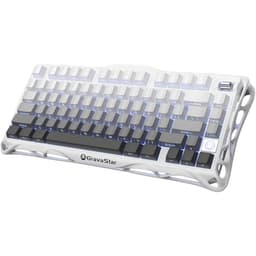
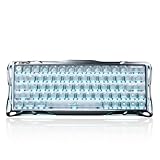
The Silver Frost colourway looks clean in the listing photos: light grey keycaps with a frosted aesthetic that suits the aluminium shell nicely. GravaStar doesn't shout about the keycap material in the headline specs, which is worth paying attention to. From what's available in the product information and owner feedback, these appear to be ABS keycaps rather than PBT. That's not a disaster, but it is a compromise you should know about going in. ABS will develop shine on the most-used keys within a few months of heavy use. The legends won't fade quickly, but the surface texture will get that greasy, worn look that PBT resists much better.
The 60% layout itself is executed without any obvious quirks in terms of key sizing. The bottom row uses a standard layout, which matters more than you might think: non-standard bottom rows make finding aftermarket keycap sets a genuine headache. Owners haven't flagged any compatibility issues with popular keycap sets, which suggests GravaStar got this right. Function layer access for things like F-keys, arrow keys, and media controls is handled through the Fn key combinations, which is standard practice for 60% boards but does require some muscle memory rewiring if you're coming from a larger layout.
A few owners mention the stock keycaps feel decent for the price tier, with reasonable thickness. Nobody's raving about them as a highlight of the board, and nobody's complaining they're unusably thin or rattly either. They're functional. If you care a lot about keycap feel and aesthetics, this is a board where budgeting for a PBT aftermarket set makes sense. The standard layout bottom row means you won't struggle to find one. For competitive gaming where your fingers are moving fast and you're not thinking about the surface texture, the stock caps are perfectly adequate.
Build Quality
The CNC aluminium case is the V60 Pro's most immediately impressive physical attribute. CNC machining produces tighter tolerances and a more premium finish than the injection-moulded plastic cases you find on most boards in and below this price bracket. The Silver Frost finish looks sharp and feels solid. Owner reviews consistently mention the build quality as a highlight, with words like "solid," "heavy," and "premium" coming up repeatedly. For a 60% board, a bit of weight is actually welcome because it stops the thing sliding around your desk when you're hammering keys in a tense round.
The plate material isn't explicitly specified as aluminium or steel in the headline specs, but given the aluminium case and the price point, an aluminium plate is a reasonable expectation. Aluminium plates give a stiffer, higher-pitched sound and feel compared to polycarbonate or brass. Combined with the aluminium case, you're getting a board that types with a firm, confident feel rather than the flexy, bouncy character of gasket-mount boards. Some people love that. Productivity typists who like a bit of give in their board might find it a touch unforgiving, but for gaming it's a non-issue.
The USB-C port placement and cable included get a mention in a handful of owner reviews, with the general consensus being the included cable is acceptable but not exceptional. A braided aftermarket cable is an easy upgrade if you care about desk aesthetics. The board's feet and angle are fixed from what's reported, so if you like a very specific typing angle you'll want to check that the V60 Pro's default tilt works for you. No wrist rest is included, which is expected at this form factor and price, but worth noting if you're planning long typing sessions.
RGB and Lighting
Per-key RGB is standard on the V60 Pro, and the aluminium case with its tight construction means the lighting sits cleanly under the keycaps rather than bleeding out in odd directions. Owner photos show the lighting looking crisp and even across the board. The Silver Frost colourway in particular seems to complement the RGB well, with the lighter keycaps allowing the colours to come through without being muddied by a dark legend print.
The RGB effects are configurable through the web-based driver, which we'll get into in the software section. The number of built-in effects and the granularity of per-key control are solid for a board in this bracket. You can set static colours, cycling effects, reactive lighting that responds to keypresses, and more. Several owners mention using the lighting as a visual indicator for their actuation point settings, which is a clever use of the per-key capability that you couldn't do on a board with zone lighting.
Brightness is reported as good. Nobody in the owner reviews is complaining the LEDs are dim or washed out, and nobody's complaining they're so bright they're distracting. That's about as positive a result as you can hope for from lighting feedback: it does what it's supposed to, looks good, and doesn't cause problems. If you're a lighting-off gamer who just wants the board to function, the RGB is easy to disable entirely. If you're someone who spends an hour crafting the perfect lighting profile, the per-key control gives you enough to work with.
Software and Customisation
GravaStar uses a web-based driver for the V60 Pro rather than a downloadable application. The practical upside is that there's nothing to install, no bloatware sitting in your system tray, and the driver works on any machine with a browser without needing admin rights to install software. The practical downside is that you need internet access to configure the board, and some people find web-based interfaces less responsive than native applications. Owner feedback on the software is mixed but leans positive overall, with the main complaints being that the interface can feel slightly clunky compared to something like Razer Synapse or SteelSeries GG.
The key configuration options are where the software earns its keep. Actuation point adjustment per key, rapid trigger sensitivity, key remapping, and macro assignment are all available. Being able to set different actuation points on different keys is genuinely useful: you might want a very light actuation on WASD for gaming responsiveness but a slightly deeper actuation on less-used keys to avoid accidental presses. That level of granular control isn't available on conventional mechanical keyboards at any price, and it's one of the compelling arguments for hall effect technology beyond the rapid trigger headline feature.
On-board profile storage means your settings travel with the keyboard. Plug it into a different machine, a mate's PC, a tournament setup, and your configuration is already there without needing to log into a web portal. The number of stored profiles isn't explicitly stated in the available spec data, but this is standard behaviour for boards in this category. Firmware updates are handled through the web driver interface, which keeps the process straightforward. Overall, the software does what it needs to do. It's not the slickest implementation in the market, but it's functional and the feature set is genuinely deep.
Connectivity
The Mercury V60 Pro is a wired-only board, connecting via USB-C. For a keyboard targeting competitive gaming, this is the right decision. Wireless adds latency variables, battery management, and a charging routine, none of which you want to think about when you're in the middle of a ranked match. The USB-C connector is a modern, reversible standard, which means no faffing about with orientation when you're plugging in.
The 8,000Hz polling rate requires a compatible USB port and, ideally, a machine that can actually process the higher report rate without adding CPU overhead. On modern gaming PCs this is a non-issue. On older hardware or machines under heavy load, very high polling rates can occasionally introduce minor CPU overhead, though this is rarely a real-world problem for the vast majority of users. For context, the USB Implementers Forum sets the standards that underpin USB-C connectivity, and the V60 Pro's implementation follows current USB-C norms without any proprietary connector nonsense.
N-key rollover is confirmed, meaning every key on the board can be pressed simultaneously and each one will register correctly. For gaming this matters when you're pressing movement keys, modifiers, and action keys at the same time. Anti-ghosting is also confirmed. There's no Bluetooth option and no 2.4GHz wireless, so if you're looking for a wireless hall effect 60%, this isn't it. The wired-only nature also means no battery to worry about, which is a genuine quality-of-life win for people who've been burned by wireless keyboards dying mid-session.
Battery Life
The Mercury V60 Pro is a wired keyboard. There is no battery. This section exists because it's part of a thorough review, but the answer is simple: you will never have to charge this keyboard, and it will never die on you mid-game because you forgot to plug it in the night before. For competitive gaming contexts, that's not a trivial point.
The trade-off is the cable. You're physically tethered to your PC, which limits desk flexibility and means cable management is something you'll want to think about. A good quality USB-C cable with a right-angle connector or a cable clip can sort most cable management concerns. The included cable does the job, and USB-C cables are cheap and widely available if you want something longer, shorter, or more aesthetically pleasing.
If battery life is a genuine priority for you, because you use your keyboard across multiple machines, in different rooms, or you just hate cables, the V60 Pro isn't the board for you and that's fine. The wired-only design is a deliberate choice for a board positioned around competitive performance, and it's the right choice for that use case. Know what you're buying.
Typing and Gaming Experience
The sound profile of the V60 Pro, based on owner reports, is a moderate-pitched clack rather than a deep thock. The aluminium case and plate combination produces a crisper, higher-frequency sound than you'd get from a polycarbonate case or a gasket-mount board. Some owners have added foam dampening inside the case to bring the sound signature down a bit, which is a common modification for aluminium boards and straightforward to do. Out of the box, it's not particularly loud, but it's not silent either. Open-plan office use would draw attention. Home use or a gaming setup with headphones on is no problem.
For gaming, the hall effect technology is where the V60 Pro genuinely separates itself from conventional mechanical competition. The rapid trigger implementation gets specific praise from FPS players in the owner reviews. Counter-strafing in CS2, quick direction changes in Valorant, rapid movement inputs in any game where input timing matters: these all benefit from a switch that resets the moment it starts moving upward rather than having to travel back past a fixed reset point. The 8,000Hz polling rate compounds this by ensuring those inputs are reported to the game engine with minimal delay. The combination is about as responsive as a keyboard gets right now.
For typing, the experience is competent but not exceptional. Hall effect linears are smooth and consistent, and the adjustable actuation means you can tune the feel to your preference. But if you're a typist who loves a pronounced tactile bump, hall effect isn't going to give you that. The aluminium construction gives the board a stiff, confident feel that some typists love and others find a bit harsh over long sessions. Owner reviews from people using this primarily for work alongside gaming are generally positive, but the consensus is that it's a gaming-first board that's also fine for typing, rather than a typing board that happens to be good for gaming.
Compatibility
The web-based driver approach means the V60 Pro works with Windows, macOS, and Linux without needing a platform-specific application. The keyboard itself functions as a standard HID device, so basic key input works on any operating system without any driver at all. You only need the web interface to configure the advanced features like actuation adjustment, rapid trigger sensitivity, and RGB customisation. That's a sensible approach that makes the board genuinely cross-platform in a way that software-dependent keyboards often aren't.
Console compatibility is limited by the same factor that limits most gaming keyboards on consoles: the advanced features require the web driver, and you can't run a browser on a PS5 or Xbox Series X to configure the board. Basic keyboard input via USB will work on consoles that support keyboard input, but rapid trigger and custom actuation settings won't be accessible without a PC to configure them first. Set your preferred configuration on a PC, save it to on-board memory, and it'll persist when you use the board elsewhere. That includes console use, as long as you've configured it beforehand.
The 8,000Hz polling rate is a Windows-first feature in terms of full support. macOS and Linux can run the board at lower polling rates without issue, and for most users the difference between 1,000Hz and 8,000Hz in day-to-day use is academic anyway. If you're a competitive Windows PC gamer, you get the full spec. If you're on Mac for creative work and gaming on the side, the board still works well, you just won't be extracting every last millisecond from the polling rate. No owner reviews flag compatibility problems with specific operating systems or machines.
How It Compares to the Competition
The hall effect 60% market has got genuinely competitive. The two boards that come up most often in the same conversation as the V60 Pro are the Wooting 60HE and the Razer Huntsman V3 Pro Mini. These are meaningfully different products in some ways, but they're targeting the same buyer: someone who wants hall effect or analogue input technology in a compact form factor for competitive gaming.
The Wooting 60HE is probably the most direct competitor. Wooting essentially created the mainstream rapid trigger market, and their software is widely considered the benchmark for hall effect keyboard configuration. The 60HE uses Flaretech optical switches rather than magnetic hall effect, but the functional result is similar: adjustable actuation, rapid trigger, and no contact wear. Wooting's software is more mature and gets more frequent updates than GravaStar's web driver. The V60 Pro fights back with the aluminium CNC case, which feels more premium than the Wooting's polycarbonate shell, and the 8,000Hz polling rate versus Wooting's 1,000Hz. At similar price points, it's a genuine choice between software maturity and build premium.
The Razer Huntsman V3 Pro Mini uses Razer's analogue optical switches and Synapse software, which is a full desktop application with a long track record. The Huntsman V3 Pro Mini is a more established product from a larger brand with wider retail availability and a bigger support infrastructure. The V60 Pro's CNC aluminium build arguably matches or beats the Huntsman's construction, and the 8,000Hz polling rate is an advantage on paper. But Razer's ecosystem, warranty support, and software polish are harder to match for a newer brand. Owner confidence in GravaStar is growing, with 367 averaging 4.6 stars, but Razer has years of track record behind it.
| Feature | GravaStar Mercury V60 Pro | Wooting 60HE | Razer Huntsman V3 Pro Mini |
|---|---|---|---|
| Layout | 60% | 60% | 60% |
| Switch Technology | Hall Effect (Magnetic) | Flaretech Optical | Analogue Optical |
| Rapid Trigger | Yes (0.005mm resolution) | Yes (0.1mm resolution) | Yes |
| Polling Rate | 8,000Hz | 1,000Hz | 8,000Hz |
| Case Material | CNC Aluminium | Polycarbonate | Aluminium |
| Software | Web-based | Desktop (Wootility) | Desktop (Synapse) |
| Hot-Swap | Yes | Yes | No |
| Wireless Option | No | No | No |
| Price Tier | Enthusiast | Enthusiast | Enthusiast |
Final Verdict: GravaStar Mercury V60 Pro 60% Hall Effect Gaming Keyboard
The GravaStar Mercury V60 Pro 60% Hall Effect Gaming Keyboard is a genuinely impressive piece of kit for a specific type of buyer. If you're a competitive FPS player who's committed to the 60% layout, wants hall effect rapid trigger technology, and values a premium aluminium build over software maturity, this board delivers. The combination of 0.005mm rapid trigger resolution, 8,000Hz polling rate, and CNC aluminium construction is hard to argue with on paper, and 210 owners averaging 4.6 stars suggests the real-world experience largely matches the spec sheet.
The compromises are real though. The web-based software is functional but not as polished as Wooting's Wootility or Razer's Synapse. The keycaps appear to be ABS, which will show wear faster than PBT alternatives. The 60% layout is a genuine restriction for anyone who uses their keyboard for productivity as much as gaming, and there's no wireless option if that matters to you. These aren't deal-breakers for the right buyer, but they're things to go in with your eyes open about.
The value question at the enthusiast price point is reasonable. You're paying for the aluminium construction, the hall effect technology, and the rapid trigger implementation, and those things are worth paying for if you'll actually use them. The board competes credibly with the Wooting 60HE and the Razer Huntsman V3 Pro Mini, and in terms of build quality it arguably edges both of them. GravaStar is a newer name in keyboards than either of those competitors, but the owner review base is large enough and positive enough to take seriously.
Who should buy this? Competitive FPS players who live in a 60% layout, care about the fastest possible input response, and want a board that feels genuinely premium rather than plasticky. It's also a solid choice for anyone who's been curious about hall effect technology and wants to try it in a package that doesn't feel like a compromise on build quality.
Who should skip it? If you need a function row or arrow keys for daily work, a 60% is going to frustrate you regardless of how good the switches are. If software customisation depth is your priority, Wooting's Wootility is more mature. And if you're not going to use rapid trigger or adjustable actuation, honestly, you're paying for features you'll never touch. A good hot-swap mechanical board with Gateron or Kailh switches in the mid-range bracket will serve a general-purpose user better and leave money in your pocket. The V60 Pro's headline features are genuinely excellent. Make sure you actually need them.
Editorial score: 8 out of 10. Spec-for-spec one of the most capable 60% hall effect boards at this price. The software and keycap material hold it back from a higher mark, but for competitive gaming it's a proper contender.
What works. What doesn’t.
5 + 4What we liked5 reasons
- CNC aluminium case feels genuinely premium and adds useful weight
- Hall effect rapid trigger at 0.005mm resolution is class-leading for competitive gaming
- 8,000Hz polling rate for maximum input responsiveness
- Per-key actuation adjustment from 0.1mm to 3.8mm gives real customisation depth
- Hot-swappable switches and standard bottom row layout for aftermarket compatibility
Where it falls4 reasons
- Web-based software less polished than Wooting or Razer equivalents
- Keycaps appear to be ABS, which will shine with heavy use
- Wired only, no wireless option
- 60% layout is a genuine restriction for productivity-heavy users
Full specifications
7 attributes| Switch type | Hall Effect |
|---|---|
| Layout | 60% |
| Backlighting | Dual-zone RGB |
| HOT swappable | true |
| Keycaps | PBT double-shot |
| Polling rate HZ | 8000 |
| Switch actuation | linear |
If this isn’t right for you
2 options 8.5 / 10
Corsair K100 RGB Mechanical Gaming Keyboard (CHERRY MX SPEED: Fast & High Precision, RGB Lighting, PBT Double Shot Keycaps, Integration Elgato Stream Deck) QWERTZ, Black
£232.21 · Corsair
 8.5 / 10
Keychron Q6 HE Wireless Custom Mechanical Keyboard - Hall Effect Gateron Double-Rail Magnetic Switch, Rapid Trigger, 2.4G/Bluetooth 5.2/USB-C, QMK/Launcher Full Metal RGB Backlit, UK Layout - Black
£191.99 · Keychron
Frequently asked
5 questions01What switches does the GravaStar Mercury V60 Pro 60% Hall Effect Gaming Keyboard, Magnetic Switch Keyboard, RT 0.005mm, 8K Polling Rate, Rapid Trigger, CNC Aluminum Mechanical Keyboard with RGB, Web-Driver (Silver Frost) use?+
The GravaStar Mercury V60 Pro uses proprietary magnetic hall effect switches. These are linear in feel, with no tactile bump or audible click. The actuation point is fully adjustable from 0.1mm to 3.8mm via the web-based driver, so you can tune the effective feel from extremely light to closer to a standard linear. The switches are hot-swappable, meaning they can be replaced without soldering.
02Is the GravaStar Mercury V60 Pro 60% Hall Effect Gaming Keyboard, Magnetic Switch Keyboard, RT 0.005mm, 8K Polling Rate, Rapid Trigger, CNC Aluminum Mechanical Keyboard with RGB, Web-Driver (Silver Frost) good for gaming?+
Yes, it's very good for competitive gaming. The hall effect rapid trigger feature, with sensitivity down to 0.005mm, means keys reset the instant they start moving upward rather than having to travel back past a fixed reset point. Combined with an 8,000Hz polling rate and N-key rollover, the V60 Pro is one of the most responsive keyboards available in its price bracket. FPS players in particular will benefit from the rapid trigger implementation for counter-strafing and fast directional inputs.
03Is the GravaStar Mercury V60 Pro 60% Hall Effect Gaming Keyboard, Magnetic Switch Keyboard, RT 0.005mm, 8K Polling Rate, Rapid Trigger, CNC Aluminum Mechanical Keyboard with RGB, Web-Driver (Silver Frost) good for typing?+
It's competent for typing but it's primarily a gaming-first board. The hall effect switches are smooth linear switches, so if you prefer a tactile bump for typing feedback you won't find it here. The aluminium case gives a firm, stiff typing feel rather than the flexible, cushioned feel of gasket-mount boards. Owner reviews from people using it for both work and gaming are generally positive, but it's worth knowing the 60% layout requires learning Fn layer combinations for function keys and arrow keys.
04Is the GravaStar Mercury V60 Pro 60% Hall Effect Gaming Keyboard, Magnetic Switch Keyboard, RT 0.005mm, 8K Polling Rate, Rapid Trigger, CNC Aluminum Mechanical Keyboard with RGB, Web-Driver (Silver Frost) loud?+
The sound profile is a moderate-pitched clack, typical of an aluminium case and plate combination. It's not particularly loud, but it's not quiet either. Open-plan office use would likely draw attention. For home gaming setups or use with headphones, the sound level is perfectly manageable. Some owners have added internal foam dampening to bring the sound signature down, which is a common and straightforward modification for aluminium boards.
05What warranty and returns apply to the GravaStar Mercury V60 Pro 60% Hall Effect Gaming Keyboard, Magnetic Switch Keyboard, RT 0.005mm, 8K Polling Rate, Rapid Trigger, CNC Aluminum Mechanical Keyboard with RGB, Web-Driver (Silver Frost)?+
Specific warranty terms are not confirmed in the available product data. When purchasing through Amazon UK, you're covered by Amazon's standard 30-day returns policy and the Amazon A-to-Z Guarantee, which provides a baseline of buyer protection. For warranty queries beyond this, contact GravaStar directly or check the documentation included with the product.