Streaming puts unique demands on a keyboard that pure gaming alone does not. You need reliable macro support for scene switching, media controls for managing audio on the fly, satisfying tactile feedback that sounds good on a microphone without overwhelming it, and enough RGB flexibility to look great on camera. Whether you are running a full desk setup for Twitch, going portable for event streaming, or building a budget-friendly rig to get started, the keyboard you choose shapes both your workflow and your on-screen aesthetic. Since last year, the market has shifted noticeably: Hall Effect magnetic switches have moved from niche to mainstream at mid-range prices, gasket-mount builds are now available well under £80, and wireless reliability has improved to the point where cable-free streaming setups are genuinely viable. This comparison covers six keyboards from the catalogue that genuinely suit streamers at different budget levels, cutting out products that are clearly built for other use cases.
Quick Verdict
Best Overall: Razer Huntsman V3 Pro, for its analog optical switches, deep software integration, and professional-grade build quality that holds up during long streaming sessions.
Best Value: AULA WIN60 HE, which brings Hall Effect magnetic switches and rapid-trigger functionality to a price point that leaves budget for the rest of your streaming setup.
The Razer Huntsman V3 Pro is the keyboard for streamers who treat their setup as a professional broadcast environment and refuse to compromise. Its analog optical switches are the headline feature: each keypress is registered across a continuous actuation range rather than a binary on/off point, which means you can assign different actions to different press depths on the same key. For streaming, that translates into genuinely useful workflow options, such as a light press to mute your microphone and a deeper press to cut your stream entirely, all from a single key without fumbling for a separate button.
The full-size layout gives you a dedicated numpad, which many streamers use as a macro pad for scene transitions, alert triggers, or quick chat commands. Razer's Synapse software, while occasionally bloated, is one of the most mature macro-programming ecosystems available, and the per-key Chroma RGB responds to in-game and streaming events through integrations with OBS, Streamlabs, and a range of game titles. On camera, the lighting is vivid and even across the board, which matters when your keyboard is visible in frame.
Build quality is substantial. The aluminium top plate resists flex during energetic gaming sessions, and the stabilisers are pre-lubed from the factory, producing a consistent, controlled sound profile that does not spike aggressively on condenser microphones. The wired connection via USB eliminates any latency concern during competitive moments in your stream content.
The main trade-off is price: this sits at the premium end of the market, and the full-size footprint demands desk space. If you are streaming from a smaller setup or need portability for events, it may not be the right fit. For those who can accommodate it, however, the Huntsman V3 Pro is the most capable streaming keyboard in this comparison.
Pros
- Analog optical switches allow multi-depth key assignments for streaming macros
- Deep Synapse software integration with OBS and Streamlabs for event-driven lighting
- Pre-lubed stabilisers produce a controlled sound profile suitable for microphone-sensitive setups
- Per-key Chroma RGB is vivid and even, looking excellent on camera
Cons
- Premium price makes it a significant investment compared to other picks here
- Full-size layout requires substantial desk space and is not portable-friendly
The EPOMAKER X AULA F75 MAX is the most feature-dense keyboard in this comparison relative to its price, and it is particularly well suited to streamers who want a visually interesting setup without spending premium money. The standout addition over a standard 75% board is the built-in TFT screen, which can display system information, animated artwork, or custom images. On stream, this is a genuine talking point: viewers notice it, and it adds personality to a desk setup without requiring a separate display accessory.
The physical knob is equally useful for streaming workflows. Mapped to system volume by default, it can be reassigned in software to control any parameter you choose, including microphone gain, music playback, or OBS scene transitions. Having a physical rotary control on the keyboard itself reduces the need to reach for a separate audio interface or stream deck during live sessions.
The tri-mode wireless connectivity covers 2.4 GHz for low-latency use at the desk, Bluetooth 5.0 for connecting to a secondary device such as a tablet used for chat monitoring, and wired USB-C for charging or direct connection. The hot-swap PCB accepts both 3-pin and 5-pin switches, so you can install virtually any aftermarket switch to dial in your preferred sound and feel. The gasket-mount construction absorbs typing vibration, producing a softer, more muffled sound profile that is kinder to microphones than hard-plate alternatives.
The software ecosystem is less mature than Razer or Logitech, and the TFT screen configuration requires some patience to set up. For streamers willing to invest that time, the result is a keyboard that genuinely stands out on camera and in workflow.
Pros
- Built-in TFT screen displays custom artwork or system stats, adding visual interest on camera
- Physical knob provides instant hands-on control of volume, gain, or OBS parameters during live sessions
- Gasket-mount construction produces a softer sound profile that reduces microphone bleed
- Tri-mode wireless covers 2.4 GHz, Bluetooth 5.0, and USB-C wired simultaneously
Cons
- Software for configuring the TFT screen is less polished than Razer Synapse or Logitech G HUB
- 75% layout omits the function row as dedicated keys, requiring Fn-layer access for some streaming shortcuts
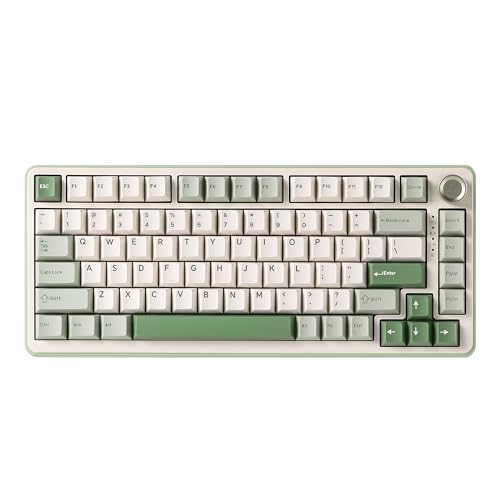
The AULA F75 Wireless is the straightforward, no-frills entry into the 75% wireless category for streamers who want reliable tri-mode connectivity and a clean aesthetic without paying for features they will not use. It covers the same 2.4 GHz, Bluetooth 5.0, and USB-C wired connectivity as the EPOMAKER X AULA F75 MAX but strips away the TFT screen and dedicated knob, bringing the price down accordingly.
The 75% layout is arguably the best form factor for streaming desks. It retains dedicated arrow keys and a function row, which are both used constantly during streaming sessions for shortcuts and navigation, while removing the numpad to reduce desk footprint. The hot-swap PCB means you can change switches to suit your microphone sensitivity: quieter linear switches for microphone-heavy setups, or tactile switches for more feedback during long sessions.
RGB lighting is per-key and covers the standard range of effects and colour customisation. It looks clean on camera without the complexity of the TFT screen, which suits streamers who prefer a minimalist aesthetic. The Bluetooth multi-device pairing allows you to connect to a secondary device without unplugging, which is useful if you monitor chat on a tablet or phone while streaming from your main PC.
Battery life is competitive in this category, and the build quality feels solid for the price. The stabilisers benefit from aftermarket lubing if you want the cleanest possible sound, but they are acceptable out of the box for most streaming environments. This is a sensible, dependable choice for streamers who prioritise function over showmanship.
Pros
- Tri-mode wireless with Bluetooth multi-device pairing suits streamers monitoring chat on a secondary device
- Hot-swap PCB allows switch changes to tune sound profile for microphone-sensitive setups
- 75% layout keeps dedicated arrow keys and function row while reducing desk footprint
Cons
- No dedicated volume knob or media keys require Fn-layer shortcuts during live sessions
- Stabilisers benefit from aftermarket lubing for the cleanest on-microphone sound profile
The AULA WIN60 HE is the best-value pick in this comparison and the keyboard that most clearly demonstrates how much the mid-range market has improved over the past year. Hall Effect magnetic switches, previously found only in keyboards costing significantly more, are the core technology here. Unlike traditional mechanical switches that use metal contacts, Hall Effect switches detect keypress position using a magnetic field, which eliminates contact bounce, extends switch longevity dramatically, and enables rapid-trigger functionality where the actuation and reset points can be set independently and extremely close together.
For streaming, rapid-trigger is particularly useful during fast-paced gaming content where input precision matters on screen. The adjustable actuation point also means you can set keys used for streaming macros to actuate with a very light touch, reducing fatigue during long sessions. The 60% layout is the most compact in this comparison, making it ideal for streaming setups where desk space is limited or where the keyboard needs to be moved out of the way when not in use.
Per-key RGB lighting is present and looks vivid, performing well on camera despite the compact footprint. The wired USB-C connection is the only connectivity option, which is a trade-off for the price: there is no wireless mode. For a desk-based streaming setup where the keyboard stays plugged in, this is rarely a problem in practice.
The software for configuring rapid-trigger and actuation points is functional but basic compared to Razer or Logitech equivalents. The 60% layout also means that media controls and function keys require Fn-layer combinations, which takes some adjustment if you are used to a larger board. At this price, however, the technology on offer is remarkable value.
Pros
- Hall Effect magnetic switches with rapid-trigger at a price point well below comparable boards
- Adjustable actuation points allow macro keys to be set for minimal-effort activation during long streams
- Compact 60% layout frees up significant desk space for microphone arms and other streaming peripherals
Cons
- Wired-only connectivity with no wireless mode limits desk cable management options
- 60% layout requires Fn-layer combinations for media controls and function keys, adding friction during live streaming
- Configuration software is basic compared to Razer Synapse or Logitech G HUB
The YUNZII B75 PRO occupies the gasket-mount, hot-swap 75% category alongside the AULA F75 and EPOMAKER X AULA F75 MAX, but it brings a distinct character that suits streamers who prioritise typing feel and acoustic quality above all else. The gasket-mount construction is the defining feature: the PCB and plate assembly is suspended on silicone gaskets rather than screwed directly to the case, which absorbs typing vibration and produces a noticeably softer, more cushioned sound profile. For streamers using condenser microphones in close proximity to the keyboard, this is a meaningful advantage.
The tri-mode wireless covers 2.4 GHz, Bluetooth 5.0, and USB-C wired, matching the connectivity options of the other 75% boards in this comparison. The hot-swap PCB accepts both 3-pin and 5-pin switches, and the south-facing RGB LEDs are compatible with a wide range of aftermarket switches, avoiding the shine-through interference that north-facing LEDs can cause with certain keycap profiles.
The 75% layout retains dedicated arrow keys and a compact function row, which is the right balance for a streaming desk. The board ships with a knob on some regional variants, though availability varies, so check the specific listing. Per-key RGB is present and performs well on camera, with smooth animations and good colour accuracy across the board.
Build quality feels premium for the price, with a weight and rigidity that belies the cost. The YUNZII software is less feature-rich than the major brands, and macro programming is more limited, which is worth considering if complex streaming macros are central to your workflow. For streamers who value acoustic quality and typing feel as primary criteria, the B75 PRO is a strong contender.
Pros
- Gasket-mount construction produces a soft, cushioned sound profile that reduces microphone bleed during streams
- South-facing RGB LEDs are compatible with a wider range of aftermarket keycap profiles
- Tri-mode wireless with Bluetooth 5.0 multi-device pairing for secondary device monitoring
Cons
- Macro programming software is more limited than Razer Synapse or Logitech G HUB, restricting complex streaming workflow automation
- Knob availability varies by regional listing, so confirm before purchasing if this feature is important
Buying Guide
Layout: How Much Keyboard Do You Actually Need?
The layout you choose has a direct impact on your streaming desk setup. Full-size keyboards with a numpad give you the most physical keys to assign macros to, which is valuable if you are managing complex scene transitions, alert sounds, and chat commands without a separate stream deck. The trade-off is desk footprint: a full-size board takes up significantly more space, which can crowd out a microphone arm, camera, or other peripherals.
Tenkeyless (TKL or 80%) boards remove the numpad but keep the function row and navigation cluster, striking a balance that suits most streamers. The 75% layout goes a step further, compressing the right side of the board while keeping dedicated arrow keys and a function row, which are both used constantly during streaming. The 60% layout is the most compact option and works well for streamers with limited desk space, but it requires Fn-layer combinations for media controls and function keys, which takes adjustment during live sessions.
Switch Type and Sound Profile
Your switch choice affects not just how the keyboard feels but how it sounds on microphone. Clicky switches such as Cherry MX Blues or Razer Green equivalents produce a sharp, audible click that can be entertaining on stream but will bleed heavily into a condenser microphone. Tactile switches give feedback without the click, producing a softer thud that is more microphone-friendly. Linear switches are the quietest option, with a smooth keystroke that minimises acoustic interference.
Hall Effect magnetic switches, found in the AULA WIN60 HE, are a newer category that offers adjustable actuation points and rapid-trigger functionality. These are particularly useful for streamers who also play competitive games on stream, as the precision input can be a genuine performance advantage.
Wireless Versus Wired
For a fixed streaming desk, wired connectivity is perfectly adequate and eliminates battery management from your pre-stream checklist. Wireless becomes valuable if you move the keyboard between setups, use it at events, or simply prefer a cleaner desk aesthetic on camera. When choosing a wireless board, prioritise 2.4 GHz options over Bluetooth-only: 2.4 GHz delivers lower and more consistent latency, which matters during competitive gaming content. Bluetooth is useful as a secondary connection for monitoring chat on a tablet or phone.
Software and Macro Support
Streaming keyboards live and die by their software. Look for applications that allow per-key macro assignment, profile switching triggered by application focus, and event-driven RGB lighting that responds to streaming software states. Razer Synapse and Logitech G HUB are the most mature ecosystems, with direct integrations for OBS, Streamlabs, and a wide range of games. Budget boards typically offer basic configuration utilities that cover the essentials but lack the depth of the major brands.
RGB and On-Camera Appearance
If your keyboard is visible in frame, RGB quality matters more than it would for a hidden peripheral. Per-key RGB allows precise control over which keys are lit and how, enabling you to highlight macro keys, create animated effects that match your stream branding, or simply maintain a consistent colour scheme. Boards with TFT screens, such as the EPOMAKER X AULA F75 MAX, add a further visual element that can become a talking point with viewers.
The Razer Huntsman V3 Pro is the overall winner for streaming. Its analog optical switches provide a level of input customisation that no other keyboard in this comparison can match, the Synapse software ecosystem is the deepest available for streaming integrations, and the build quality justifies the investment for anyone treating streaming as a serious pursuit. The per-key Chroma RGB looks exceptional on camera, and the full-size layout gives you the maximum number of physical keys for macro assignment.
For streamers working within a tighter budget, the AULA WIN60 HE is the clear best-value choice. Hall Effect switches with rapid-trigger at this price point represent a genuine technological step forward for the budget category, and the compact 60% form factor suits desk setups where space is at a premium. The EPOMAKER X AULA F75 MAX is the pick for those who want a visually distinctive mid-range board, with its TFT screen and physical knob adding streaming-specific functionality that punches above its price. Whichever board you choose, prioritise switch sound profile relative to your microphone setup, and ensure the software supports the macro depth your streaming workflow requires.