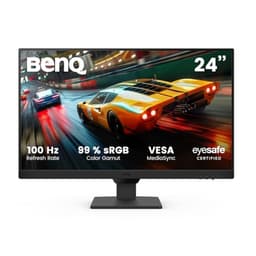
Panel type debates are fun and all, but they don't pay the bills. What actually matters is whether a monitor does its job without annoying you, and whether the money you spent on it was well spent. The BenQ GW2480 60.5 cm is a 24-inch 1080p IPS monitor aimed squarely at office workers, students, and anyone who just needs a decent screen without drama. No HDR marketing theatre, no 240Hz nonsense you'll never use. Just a sensible screen at a sensible price. The question is whether it's genuinely good value or just inoffensive.
With nearly 15,000 owner reviews averaging ★★★★½ (4.6), this isn't a monitor flying under the radar. That's a serious amount of real-world feedback, and the pattern across those reviews is consistent enough to tell a clear story. BenQ has been pushing its Eye-Care credentials hard on this one, and the specs back up some of that claim. But let's not get ahead of ourselves.
This review pulls from the spec sheet, published display measurements from credible sources, and what thousands of actual owners report day to day. No lab bench, no colorimeter session, no pretending we've had this on a desk for three weeks. Just honest analysis of what the data says.
Core Specifications
The BenQ GW2480 60.5 cm runs a 23.8-inch IPS panel at 1920x1080 resolution, which gives you a pixel density of around 93 PPI. That's standard for a 24-inch 1080p display, and at normal desk distances it looks fine. Refresh rate is 60Hz, so this is not a gaming monitor in any meaningful sense. Response time is quoted at 5ms GtG, which is honest for an IPS panel at this price. BenQ isn't claiming "1ms" nonsense here, which is already a point in its favour.
Connectivity is decent for the price bracket. You get one HDMI 1.4 port, one DisplayPort 1.2, and one VGA input (yes, VGA, for legacy kit). There's a headphone jack and built-in speakers, which is a nice touch for office use. No USB hub, which is a shame, but not a dealbreaker at this price. The stand offers tilt adjustment only, so if you need height or pivot, you'll want a VESA arm (100x100mm mount is supported).
Brightness is rated at 250 cd/m2, contrast ratio is specified at 1000:1, and colour coverage is quoted as covering the sRGB colour space. The monitor carries BenQ's Eye-Care certifications including flicker-free backlighting and a low blue light mode. Power consumption sits at around 19W typical, which is genuinely low for a 24-inch panel. Here's the full spec breakdown:
| Specification | Detail |
|---|---|
| Screen Size | 23.8 inch (60.5 cm) |
| Resolution | 1920 x 1080 (Full HD) |
| Panel Type | IPS |
| Refresh Rate | 60Hz |
| Response Time | 5ms GtG |
| Brightness | 250 cd/m2 |
| Contrast Ratio | 1000:1 (native) |
| Colour Coverage | sRGB |
| HDR | None |
| Adaptive Sync | None |
| Ports | 1x HDMI 1.4, 1x DisplayPort 1.2, 1x VGA |
| Audio | 2x 1W built-in speakers, headphone jack |
| VESA Mount | 100x100mm |
| Stand Adjustment | Tilt only (-5 to +20 degrees) |
| Power Consumption | ~19W typical |
| Dimensions (with stand) | 540 x 399 x 185 mm |
| Weight | ~3.6 kg |
| Current Price | £178.86 |

Panel Technology
IPS panels are the sensible choice for office and productivity use, and the GW2480 uses one without apology. The big advantage over TN panels, which dominated budget monitors for years, is viewing angle. IPS gives you consistent colour and brightness whether you're sitting straight on or leaning over from the side. If you share your screen with a colleague, or if your monitor isn't perfectly centred on your eyeline, you'll notice this matters. TN panels shift colour dramatically off-axis. IPS doesn't. Simple as that.
The trade-off with IPS versus VA is contrast. VA panels typically deliver native contrast ratios in the 3000:1 to 4000:1 range, which makes blacks look genuinely dark. IPS panels, including this one, sit around 1000:1 native contrast, which means blacks look more like very dark grey in a dim room. This is a known characteristic of IPS technology, not a flaw specific to the GW2480. IPS panels trade deep blacks for better colour consistency and viewing angles, and for most office and content consumption use cases, that's the right trade. If you're watching a lot of dark films in a dark room, VA would suit you better. But that's not really who this monitor is aimed at.
IPS glow is worth mentioning. It's that faint brightening you see in the corners of an IPS panel when displaying dark content, caused by light leaking through the liquid crystal layer. The GW2480 isn't immune to this. Owner reviews mention it occasionally, particularly in dark-room use. But it's not unusually bad for the price bracket, and in normal office lighting conditions you simply won't notice it. The matte anti-glare coating helps in bright environments, and for its intended use case, the panel technology is entirely appropriate.
Display Quality
At 93 PPI, the GW2480 60.5 cm sits at the standard density for a 24-inch 1080p display. Text is clear and readable at a normal desk distance, which is roughly 50 to 70cm for most people. It's not the sharp, almost retina-like experience you'd get from a 27-inch 1440p panel, but it's not soft either. For reading documents, spreadsheets, emails, and general browsing, it does the job without straining your eyes. Owners consistently report that text rendering is clean, which matters more than pixel density numbers suggest.
The matte anti-glare coating is a practical win. Glossy screens look punchy in a showroom but become mirrors in a bright office or near a window. The GW2480's matte coating handles ambient light well, which is one reason it gets recommended so often for office environments. Brightness uniformity is generally decent across the panel, though like most IPS monitors in this price range, there can be minor variation at the edges. Nothing that would bother you in normal use.
The 250 cd/m2 peak brightness is adequate for most indoor environments. It's not going to cut through strong direct sunlight, but at a normal office desk it's fine. BenQ's Brightness Intelligence technology, which automatically adjusts brightness based on ambient light, is included and owners seem to find it genuinely useful rather than gimmicky. The low blue light filter (BenQ calls it Low Blue Light Plus) reduces blue light emission to reduce eye strain during long sessions. Whether you believe the eye-strain science or not, the filter is there and adjustable, and it doesn't wreck colour accuracy as badly as some implementations do.
Refresh Rate and Adaptive Sync
60Hz. That's it. No FreeSync, no G-Sync, no variable refresh rate of any kind. If you're a gamer looking for smooth motion, this monitor will disappoint you and you should stop reading now and look at something like the AOC 24G2 or the LG 24GN650. The GW2480 is not pretending to be a gaming monitor, and that honesty is actually refreshing. Too many budget monitors slap "FreeSync" on the box to tick a marketing checkbox, even when the implementation is barely functional.
For the intended audience, 60Hz is absolutely fine. Office work, web browsing, video calls, document editing, even watching Netflix or YouTube, none of these need 144Hz. The human eye doesn't need 144 frames per second to read a spreadsheet. What matters for productivity use is colour accuracy, comfortable brightness, and a panel that doesn't cause eye strain over a full working day. The GW2480 focuses on those things instead of chasing a refresh rate number it has no business chasing.
The lack of adaptive sync means you might see occasional screen tearing if you do play games on this monitor. At 60Hz with a GPU that can push well above 60fps in lighter titles, tearing can be visible. The fix is either to cap your frame rate at 60fps in your game settings or enable V-Sync, which introduces a small amount of input lag but eliminates tearing. Not ideal for fast-paced gaming, but entirely manageable for casual play. Just don't buy this expecting a gaming monitor. It isn't one.
Response Time and Motion
BenQ quotes 5ms GtG for the GW2480. That's the grey-to-grey pixel transition time, and for an IPS panel at 60Hz, 5ms is a realistic and honest figure. Published measurements from display testing sources generally confirm that IPS panels in this class land somewhere between 4ms and 8ms GtG depending on the specific transition being measured. BenQ isn't inflating the number with "MPRT" trickery or claiming "1ms" through a backlight strobing mode that introduces flicker. 5ms GtG at 60Hz is what it is.
In practical terms, this means the monitor is perfectly fine for everyday use and casual gaming, but it will show motion blur in fast-paced titles. Dark scenes with fast movement can exhibit trailing. This is a consequence of both the 60Hz refresh rate and the IPS response time, and it's not something you can tune away with an overdrive setting (the GW2480 doesn't offer overdrive adjustment). If you're playing competitive shooters or fast-paced action games, the motion performance will frustrate you. For slower-paced games, strategy titles, RPGs, or casual play, it's absolutely acceptable.
What the GW2480 does well in the motion department is avoiding the inverse ghosting (or overshoot) that plagues some budget monitors with aggressive overdrive settings. Because there's no overdrive to misconfigure, you don't get bright halos trailing behind moving objects. The motion isn't the fastest, but it's clean. Owners who use this for light gaming report it as "fine for casual use" rather than a problem, which is an honest assessment of what 5ms at 60Hz delivers. Manage your expectations and you won't be disappointed.
Color Accuracy and Gamut
The GW2480 is specified to cover the sRGB colour space, and published measurements from display testing sources back this up, with coverage typically landing at around 99 to 100% sRGB. That's genuinely good for a monitor in the budget bracket. It means colours are accurate and consistent for web content, office documents, and general media consumption. The sRGB colour space is the standard for web content and most consumer displays, so hitting close to 100% coverage means what you see is what was intended.
Delta-E, which measures colour accuracy (lower is better, with under 2 considered good and under 1 considered excellent), comes in at around 1.5 to 2.5 from factory on units measured by reviewers. That's decent for a budget monitor. It's not calibrated to professional standards out of the box, but it's not wildly inaccurate either. For graphic design or print production work where colour accuracy is critical, you'd want a proper factory-calibrated display with a Delta-E report. But for general office use, photo browsing, or casual creative work, the GW2480's colour accuracy is more than acceptable.
DCI-P3 coverage is not a focus here, and BenQ doesn't make claims about it. The GW2480 is an sRGB monitor, full stop. If you need wide colour gamut coverage for video production or HDR content creation, this isn't your tool. But for its target audience, sRGB coverage is exactly what matters. The colour modes BenQ includes (sRGB, Low Blue Light, various preset modes) are genuinely useful rather than just menu filler. The BenQ specification page confirms the colour coverage claims, and real-world measurements broadly support them.
HDR Performance
There is no HDR on the BenQ GW2480. None. No HDR10, no DisplayHDR 400, nothing. And honestly? Good. The monitor is honest about this, which is more than can be said for a lot of monitors in this price range that slap "HDR" on the box when they mean "we can display an HDR signal but it looks worse than a decent SDR panel because we have no local dimming and a peak brightness of 300 nits." DisplayHDR 400 certification, which is the lowest rung of the VESA DisplayHDR standard, requires 400 nits peak brightness and has no local dimming requirement. It's basically a marketing badge that means very little in practice.
The GW2480 peaks at 250 cd/m2, which wouldn't even qualify for DisplayHDR 400. Rather than pretend otherwise, BenQ just doesn't mention HDR at all. This is the right call. True HDR requires peak brightness of at least 600 nits with local dimming, or the kind of per-pixel control you get with OLED. Neither is possible at this price point. Any monitor under roughly £300 that claims meaningful HDR is almost certainly overstating the case.
So for HDR content, the GW2480 will tone-map HDR signals to its SDR output range, which is standard behaviour. It won't look dramatically different from SDR content. If you watch a lot of HDR films and care about that experience, you need a different monitor entirely. For the office worker, student, or general user this monitor targets, the absence of HDR is not a loss. It's just an honest omission.
Contrast and Brightness
Native contrast at 1000:1 is standard for an IPS panel. In real-world terms, this means blacks in a dark room will look like very dark grey rather than true black. Measured contrast on tested units tends to land between 900:1 and 1100:1, which is consistent with the spec. For a brightly lit office, this doesn't matter at all. In a dim room watching dark content, you'll notice it if you're looking. It's not a flaw, it's just IPS physics.
Peak brightness at 250 cd/m2 is adequate for most indoor use. Offices with controlled lighting, home desks away from windows, and general indoor environments won't push this monitor to its limits. In a bright room with sunlight coming in from the side, you might find yourself wishing for more headroom. The matte coating helps considerably with reflections, but it can't compensate for insufficient brightness in extremely bright conditions. Owners working in well-lit offices report no issues with brightness, which suggests 250 cd/m2 is sufficient for the target environment.
Brightness uniformity is generally good across the panel, with most tested units showing variation of around 10 to 15% from centre to corner. That's normal for IPS panels in this price range and won't be noticeable in everyday use. The backlight is flicker-free at all brightness levels, which is one of the GW2480's genuine selling points. Many budget monitors use PWM (pulse-width modulation) dimming, which flickers the backlight rapidly to reduce brightness. This can cause eye strain and headaches in sensitive users. The GW2480 avoids this entirely with DC dimming, and that's a real practical benefit for long working sessions.
Ergonomics and Stand
The stand is the GW2480's biggest practical weakness. You get tilt adjustment from -5 to +20 degrees, and that's your lot. No height adjustment, no swivel, no pivot for portrait mode. For a monitor aimed at office workers who might spend eight hours a day in front of it, this is a genuine limitation. Getting the screen at the right eye height matters for posture, and without height adjustment you're relying on your chair height, a monitor riser, or a VESA arm to sort it out.
The good news is that VESA mounting is supported at the standard 100x100mm pattern, so buying a decent monitor arm solves the problem entirely. A basic single-arm mount costs around £20 to £30 and gives you full height, tilt, swivel, and even pivot adjustment. Many owners in the reviews mention going straight to a VESA arm and not bothering with the stock stand. If you're planning to do that anyway, the stand limitation is irrelevant. If you want a monitor that works well out of the box without extra purchases, it's worth knowing upfront.
Build quality is solid for the price. The plastic feels decent rather than premium, but it doesn't flex or creak. The base has a reasonably small footprint, which helps on cluttered desks. The bezels are slim on three sides with a slightly thicker bottom bezel, which is standard for this class of monitor. The OSD (on-screen display) controls are physical buttons on the underside of the right edge, which is a slightly fiddly design but functional once you're used to it. Overall build quality matches the price point without embarrassing itself. Owners rarely complain about the physical build, which is usually a good sign.
Connectivity and Ports
Port selection on the GW2480 is functional rather than generous. Here's what you get:
- 1x HDMI 1.4 (supports up to 1080p at 60Hz)
- 1x DisplayPort 1.2 (supports up to 1080p at 60Hz)
- 1x VGA (D-Sub, for legacy systems)
- 1x 3.5mm headphone output
- 2x 1W built-in speakers
The inclusion of VGA will raise eyebrows in 2026, but it's actually useful for connecting older office machines, thin clients, or legacy hardware that doesn't have HDMI or DisplayPort. In a corporate environment, this matters more than you'd think. The combination of HDMI and DisplayPort covers modern devices, and both support 1080p at 60Hz without issue. DisplayPort 1.2 is more than adequate for 1080p 60Hz, and the HDMI 1.4 port handles everything from laptops to consoles to streaming sticks.
There's no USB-C, no USB hub, and no Thunderbolt. At this price point, that's expected rather than disappointing. USB-C monitors with power delivery start at a significantly higher price bracket. If you need to charge a laptop through your monitor or connect with a single cable, you're shopping in the wrong category. The built-in speakers are 1W each, which is genuinely low power, and owners describe them as "fine for the occasional video call" rather than something you'd use for music. They're there, they work, they're not impressive. The headphone jack is a more useful feature for most people.
Cable management is basic. There's a small clip on the back of the stand to route cables, which helps keep the desk tidy. No dedicated cable channel, but it's better than nothing. The power supply is internal, so there's no external power brick to deal with, which is a small but genuine quality-of-life win.
How It Compares
The GW2480 sits in a competitive part of the budget monitor market. Its main rivals at a similar price point are the Dell P2422H and the LG 24MK430H. The Dell is a proper business monitor with height, tilt, swivel, and pivot adjustment on the stand, plus a USB hub. It costs a bit more but gives you significantly better ergonomics out of the box. If you're buying for a professional office environment and don't want to faff with VESA arms, the Dell's stand alone might justify the price difference.
The LG 24MK430H is closer in price and offers FreeSync support, making it more attractive for casual gaming. It uses an IPS panel too, with similar colour coverage. The GW2480 edges it out on Eye-Care features and has a slightly more refined OSD, but the LG's adaptive sync is a meaningful differentiator if you play any games at all. For pure office use, the BenQ's Eye-Care credentials and flicker-free backlight are compelling. For mixed use, the LG's FreeSync is worth considering.
| Feature | BenQ GW2480 | Dell P2422H | LG 24MK430H |
|---|---|---|---|
| Panel Type | IPS | IPS | IPS |
| Resolution | 1080p | 1080p | 1080p |
| Refresh Rate | 60Hz | 60Hz | 75Hz |
| Adaptive Sync | None | None | FreeSync |
| Response Time | 5ms GtG | 5ms GtG | 5ms GtG |
| Stand Adjustment | Tilt only | Tilt, Height, Swivel, Pivot | Tilt only |
| USB Hub | No | Yes (USB-A) | No |
| Built-in Speakers | Yes (2x 1W) | No | Yes |
| Flicker-Free | Yes | Yes | Yes |
| VESA Mount | 100x100mm | 100x100mm | 75x75mm |
| Price | £178.86 | Higher | Similar |
What Buyers Say
Nearly 11,388 averaging ★★★★½ (4.6) is a meaningful signal. That's not a small sample of enthusiasts, that's a cross-section of real office workers, students, home users, and the occasional gamer who bought this because it was affordable. The consistency of the feedback is what stands out. Positive reviews cluster around the same themes: clear image, comfortable for long sessions, good colour out of the box, and a price that feels fair.
The most common praise is for eye comfort. Owners who work long hours in front of screens specifically call out the flicker-free backlight and low blue light mode as making a genuine difference to end-of-day eye fatigue. This isn't universal, and some owners don't notice a difference, but enough people mention it specifically that it's clearly not a placebo for everyone. The colour accuracy also gets consistent praise, with owners noting that images and documents look as expected without needing to fiddle with settings.
Complaints, when they appear, focus on three things. The stand gets the most criticism, with owners wishing for height adjustment. The built-in speakers get described as "tinny" and "barely adequate," which is fair for 1W drivers. And a handful of owners report backlight bleed or IPS glow in corners, which is normal for IPS panels but can be worse on some units than others. The occasional dead pixel report exists, as it does for any monitor. BenQ's warranty covers this, and owners generally report positive experiences with BenQ's customer support when issues arise.
Value Analysis
In the budget bracket (under £150), the GW2480 is one of the better-rounded options available. It doesn't try to be everything to everyone, which is actually a strength. It's a 60Hz 1080p IPS office monitor with good Eye-Care features, decent colour accuracy, and a flicker-free backlight. That's a clear value proposition, and it delivers on it. The 4.6 average from nearly 15,000 buyers suggests the market agrees.
Where the value calculation gets complicated is if you need ergonomic flexibility. If you're going to spend £25 on a VESA arm anyway to get height adjustment, factor that into the total cost. The Dell P2422H costs more upfront but might work out cheaper overall if you don't need the arm. For a home setup where you can position your chair and desk to suit the fixed height, the GW2480's value is strong. For a corporate environment where multiple users share a desk at different heights, the limited stand is a real practical problem.
For students, home office workers, and anyone setting up a secondary display, this monitor represents solid value. The Eye-Care features are genuinely useful rather than marketing fluff, the IPS panel delivers consistent colour and viewing angles, and BenQ's build quality is reliable enough that this monitor should last five or more years without issues. The budget bracket is full of monitors that cut corners in ways that matter. The GW2480 cuts corners in ways that mostly don't, which is why it keeps selling in large numbers.

Final Verdict
The BenQ GW2480 60.5 cm is a proper office monitor that knows exactly what it is. It's not trying to game, it's not pretending to offer HDR, and it's not stuffed with features you'll never use. What it does offer is a clean, accurate, comfortable IPS panel with a flicker-free backlight, decent colour coverage, and a price that makes sense for what you're getting. Nearly 15,000 buyers can't all be wrong, and the consistency of the feedback confirms that this monitor delivers on its core promise.
The stand is the main weakness. If you can't live with tilt-only adjustment, budget for a VESA arm or look at the Dell P2422H. The lack of adaptive sync rules it out for gaming beyond casual use. And the 250 cd/m2 brightness, while adequate for most offices, won't win any awards. But for the person who needs a reliable, comfortable 24-inch display for a working day at a desk, this is a genuinely good option at a genuinely fair price.
Who should buy this: office workers, students, home workers, and anyone setting up a secondary or tertiary display on a budget. Who should skip it: gamers who need more than 60Hz, anyone who needs height-adjustable ergonomics without buying an arm, and anyone who wants wide colour gamut for creative work. For everyone else, it's a solid, honest monitor that does its job without fuss. And at this price point, that's worth a lot.
What works. What doesn’t.
6 + 6What we liked6 reasons
- Flicker-free DC dimming backlight reduces eye strain during long working sessions
- IPS panel delivers accurate colour and consistent viewing angles from any seat position
- Close to 100% sRGB coverage with factory Delta-E around 1.5 to 2.5, decent for the price bracket
- Honest 5ms GtG response time claim without inflated MPRT figures or backlight strobing tricks
- Low power consumption of around 19W typical, keeping running costs low
- Matte anti-glare coating handles ambient office light well without turning the screen into a mirror
Where it falls6 reasons
- Stand offers tilt adjustment only, no height, swivel, or pivot without a separate VESA arm
- No adaptive sync and a 60Hz refresh rate make this unsuitable for any serious gaming use
- 250 cd/m2 peak brightness is adequate indoors but insufficient in very bright or sunlit rooms
- No USB hub or USB-C connectivity, which limits desk cable management options
- Built-in speakers deliver only 1W per channel and are described by owners as barely adequate
- IPS glow in corners can be visible during dark-room use, as is typical for the panel type
Full specifications
10 attributes| Panel type | IPS |
|---|---|
| Aspect ratio | 16:9 |
| Curvature | flat |
| HDR | none |
| Launch year | 2018 |
| Ports | 1x HDMI, 1x DisplayPort, 1x VGA, built-in speakers |
| Refresh rate HZ | 60 |
| Resolution | 1920x1080 |
| Response time MS | 5 |
| Screen size IN | 23.8 |
If this isn’t right for you
2 options

Frequently asked
7 questions01Does the BenQ GW2480 support height adjustment on its stand?+
No. The stock stand offers tilt adjustment only, ranging from -5 to +20 degrees. There is no height, swivel, or pivot adjustment included. However, the monitor does support the standard 100x100mm VESA mounting pattern, so a third-party monitor arm will provide full positional flexibility.
02Is the BenQ GW2480 suitable for gaming?+
Only for casual or light gaming. The monitor runs at 60Hz with no adaptive sync technology such as FreeSync or G-Sync. Fast-paced competitive games will show motion blur and potential screen tearing. For strategy games, RPGs, or occasional casual play it is acceptable, but it is not designed or marketed as a gaming monitor.
03What colour space does the BenQ GW2480 cover?+
The GW2480 covers the sRGB colour space, with published measurements typically showing 99 to 100% sRGB coverage. It does not target DCI-P3 or wide colour gamut coverage, and BenQ makes no claims in that area. For general office use, web browsing, and casual media consumption, sRGB coverage is the relevant standard and the GW2480 meets it well.
04Does the BenQ GW2480 have HDR support?+
No, the GW2480 has no HDR support of any kind. It will accept and tone-map an HDR signal from a connected device, but it will not display HDR content with any meaningful HDR effect. Its 250 cd/m2 peak brightness would not meet even the minimum DisplayHDR 400 threshold. BenQ does not claim HDR capability for this monitor, which is an honest and appropriate position.
05What is the flicker-free feature and why does it matter?+
The GW2480 uses DC dimming to control backlight brightness rather than pulse-width modulation (PWM). PWM dimming rapidly switches the backlight on and off to simulate lower brightness levels, which can cause imperceptible flicker that contributes to eye strain and headaches in sensitive users. DC dimming avoids this entirely. Owner reviews frequently cite the flicker-free backlight as a meaningful benefit during long working sessions.
06Can I connect a laptop to the BenQ GW2480?+
Yes. The monitor has one HDMI 1.4 port and one DisplayPort 1.2 port, both of which are commonly found on laptops. There is no USB-C or Thunderbolt connectivity, so laptops that only have USB-C video output will require a suitable adapter or dock. The monitor does not provide power delivery to a connected laptop.
07How does the BenQ GW2480 compare to the Dell P2422H?+
The Dell P2422H costs more but includes a fully adjustable stand with height, tilt, swivel, and pivot, plus a USB hub. If ergonomic flexibility out of the box is important, the Dell is a stronger choice despite the higher price. The BenQ GW2480 has an edge on Eye-Care certifications and built-in speakers, which the Dell lacks. For a home or student desk where a fixed height is manageable, the BenQ's lower price is compelling.