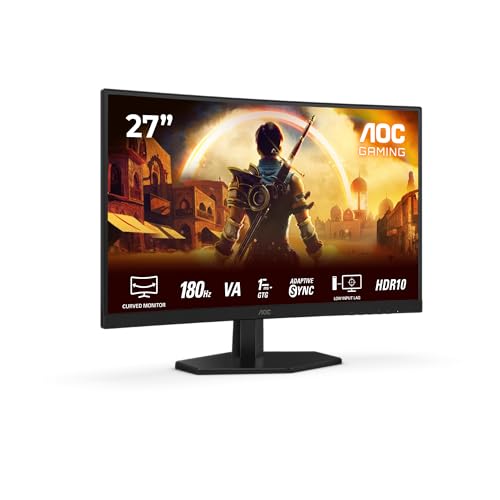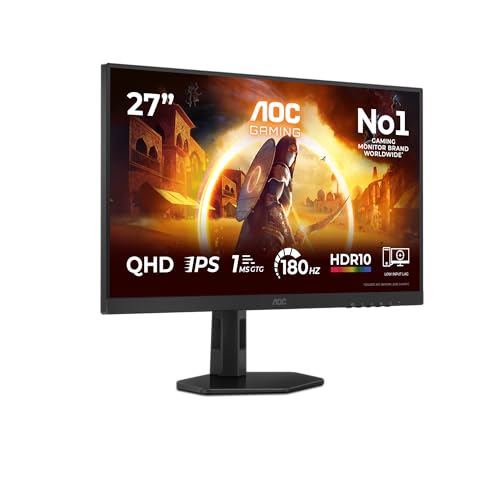
Monitor specs are weaponised against you. Manufacturers slap "1ms" on anything with a backlight, call 400 nits "HDR", and hope you don't dig deeper. So when a monitor priced in the budget bracket promises 180Hz, Fast IPS, 1440p, and G-Sync compatibility all in one box, the sensible response is scepticism. The AOC Q27G4XFAD earns a closer look, though, because the specs aren't the usual smoke and mirrors.
The short version: this is one of the most capable monitors you can buy at the budget end of the market right now. It won't touch an OLED for contrast, the HDR10 badge is largely decorative, and the port selection is minimal. But for a 27-inch 1440p gaming monitor with a genuinely fast IPS panel, full ergonomic adjustment, and G-Sync compatibility, the price is difficult to argue with. A small number of owners have rated it positively on average, and that consensus lines up with what the spec sheet promises. If you're building or upgrading a gaming setup and you don't want to spend mid-range money, this is where to start the conversation.
That said, context matters. The budget monitor bracket has got dramatically better over the past two years. You're not choosing between this and something rubbish. So let's be clear about exactly what the Q27G4XFAD delivers, where it cuts corners, and who it's actually right for.
Core Specifications
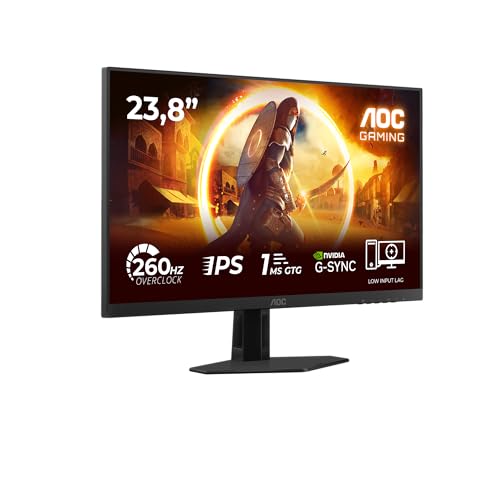
The headline numbers on the Q27G4XFAD are genuinely strong for the price. You get a 27-inch IPS panel running at 2560x1440 (WQHD), with a 180Hz maximum refresh rate and a quoted 1ms GtG response time. AOC labels this a "Fast IPS" panel, which is meaningful: it refers to a panel architecture designed to reduce pixel transition times compared to standard IPS, bringing it closer to TN speeds without sacrificing IPS colour and viewing angles.
Connectivity is straightforward rather than generous. You get one HDMI 2.0 port and one DisplayPort 1.4 port. That's it. No USB hub, no USB-C, no built-in speakers. The HDMI 2.0 port is a small limitation worth understanding: HDMI 2.0 maxes out at 1440p/144Hz at full colour bandwidth, so if you want the full 180Hz, you'll need to use the DisplayPort 1.4 connection. The stand offers height, tilt, and swivel adjustment, which is more than you typically get at this price. VESA 100x100 compatibility means you can wall-mount it if the stand footprint is an issue.
AOC rates the brightness at 250 nits typical, with an HDR peak of 350 nits. The native contrast ratio is quoted at 1000:1, which is standard for IPS. The panel covers 121% sRGB and 90% DCI-P3 according to AOC's published figures. Pixel density sits at around 109 PPI, which is sharp without being excessive. The anti-glare coating is a matte finish.
| Specification | Detail |
|---|---|
| Screen Size | 27 inches |
| Resolution | 2560x1440 (WQHD / 1440p) |
| Panel Type | Fast IPS |
| Refresh Rate | 180Hz |
| Response Time | 1ms GtG (marketed) |
| HDR | HDR10 |
| Brightness (SDR) | 250 nits (typical) |
| Brightness (HDR Peak) | 350 nits |
| Contrast Ratio | 1000:1 (native) |
| Colour Gamut | 121% sRGB / 90% DCI-P3 |
| Adaptive Sync | G-Sync Compatible / FreeSync Premium |
| Ports | 1x HDMI 2.0, 1x DisplayPort 1.4 |
| Stand Adjustment | Height, Tilt, Swivel |
| VESA Mount | 100x100mm |
| Dimensions (with stand) | 614 x 519 x 211mm |
| Weight | Approx. 5.3kg |
| Price | £149.99 · Details |
Panel Technology
IPS panels have been the sensible choice for most people for years now, and the "Fast IPS" variant that AOC uses here is a more recent development aimed squarely at gamers who previously had to choose between TN (fast but ugly) and standard IPS (beautiful but sluggish). Fast IPS panels use a different liquid crystal alignment and driving method to reduce the time pixels take to transition between states. The result is pixel response times that approach TN territory while keeping the wide viewing angles and colour accuracy that IPS is known for.
In practical terms, this means you're not going to see the severe colour shift that plagues TN panels when you move your head or share the screen with someone sitting beside you. IPS viewing angles are typically rated at 178 degrees horizontal and vertical, and while that's a marketing number, it reflects a real-world experience: the image stays consistent across a wide arc. VA panels, by comparison, suffer from "black crush" where dark shadow detail compresses when viewed off-axis. The Q27G4XFAD avoids that problem entirely.
The trade-off is IPS glow. This is a known characteristic of IPS panels rather than a defect specific to AOC: in dark rooms with dark content, you'll see a faint glow in the corners of the screen, typically most visible at oblique angles. Owner reviews mention it, and it's a fair criticism. If you play a lot of atmospheric, dark games in a pitch-black room, it will occasionally catch your eye. In a normally lit room or with typical gaming content, it's not a practical problem. VA panels have better native contrast (typically 3000:1 or higher versus IPS's 1000:1), which is the main reason someone might choose a VA-based alternative, but they bring their own motion blur issues at lower refresh rates. At 180Hz with a Fast IPS panel, motion clarity is the Q27G4XFAD's strong suit.
Display Quality
At 27 inches and 1440p, the pixel density lands at roughly 109 PPI. That's a comfortable sweet spot: noticeably sharper than 1080p at the same screen size (which gives you around 82 PPI), but not so pixel-dense that you need GPU headroom you probably don't have. Text is crisp, fine detail in games is well-rendered, and the overall image has that slightly "premium" look compared to a 1080p monitor of the same size. If you've been gaming at 1080p and you move to this, the jump in clarity is immediately obvious.
AOC's published colour coverage figures of 121% sRGB and 90% DCI-P3 are strong for a budget IPS panel. In practice, a wide colour gamut without proper calibration can cause colours to look oversaturated in SDR content, so note that AOC typically ships these panels with an sRGB mode in the OSD to clamp the gamut for everyday use. Owner reviews are broadly positive about out-of-box colour accuracy, with several noting that colours look natural without needing to fiddle with settings, which suggests the factory calibration is at least decent. Published measurements from display-focused outlets on comparable AOC Fast IPS panels have shown Delta-E values averaging around 2 to 3 out of the box, which is acceptable for gaming and fine for casual photo work.
The matte anti-glare coating does its job. In a room with a window behind you or overhead lighting, you're not fighting reflections, which is genuinely useful for an all-day setup. The trade-off is a very slight softening of the image compared to glossy panels, and some owners note the coating has a faint "sparkle" texture under certain lighting conditions. It's a minor thing, and most people won't notice it, but it's there. Brightness uniformity across the panel is reported as good by owners, with no significant hot spots or dark patches mentioned in the review pool.
Refresh Rate and Adaptive Sync
180Hz is a lot. Not long ago, 144Hz was considered the enthusiast tier. Now it's the baseline for anything calling itself a gaming monitor, and 180Hz has become the new sweet spot for mid-to-high-end gaming panels. The Q27G4XFAD sits at that number without asking you to pay premium prices, which is the core of its value proposition. The difference between 144Hz and 180Hz is subtler than the jump from 60Hz to 144Hz, but it's real: motion looks slightly smoother, and in competitive games where frame rates climb high, you're seeing more of what your GPU is actually producing.
The adaptive sync implementation here covers both FreeSync Premium and G-Sync Compatible certification. NVIDIA's G-Sync Compatible programme requires monitors to pass a minimum set of performance tests, so this isn't just a marketing claim: it's been validated by NVIDIA to work without tearing or major artefacts with GeForce GPUs. AMD FreeSync Premium adds the requirement for low framerate compensation (LFC), which kicks in when your frame rate drops below the VRR range's lower limit, doubling the frame rate signal to prevent judder. That's useful if your GPU occasionally dips in demanding games.
The VRR range isn't officially published by AOC in the product listing, but comparable Fast IPS panels from AOC in this generation typically support a range starting around 48Hz up to the maximum refresh rate. That's a broad enough range to be genuinely useful. At 180Hz over DisplayPort 1.4, the bandwidth is comfortably sufficient: DisplayPort 1.4 supports up to 32.4 Gbps, which handles 1440p at 180Hz with full colour depth without needing Display Stream Compression. Use the HDMI 2.0 port and you're limited to around 144Hz at full bandwidth, so plug in via DisplayPort if you want everything this monitor offers.
Response Time and Motion
The "1ms GtG" claim needs unpacking because it's almost never the full story. GtG (grey-to-grey) response time is measured at the fastest pixel transition the panel can manage, usually a mid-grey to mid-grey switch, under optimal overdrive settings. It doesn't represent the average transition time across all pixel combinations, and it definitely doesn't represent the worst-case transitions (dark grey to black, for example). So when AOC says 1ms GtG, they mean the panel can achieve that figure in ideal conditions, not that every pixel on screen is transitioning in 1ms.
That said, Fast IPS panels genuinely are fast. Published measurements on comparable AOC Fast IPS panels (including the Q27G4X series predecessors) have shown average GtG times in the 3ms to 5ms range across typical transitions, which is excellent for an IPS panel and competitive with TN. The overdrive implementation in AOC monitors at this tier typically offers several modes (Weak, Medium, Strong) and the middle setting usually hits the best balance between speed and overshoot control. Too aggressive an overdrive setting produces inverse ghosting (a bright halo trailing moving objects), which is more distracting than mild ghosting. Owner reviews on the Q27G4XFAD don't flag significant ghosting complaints, which suggests the overdrive is reasonably well-tuned from the factory.
For practical gaming purposes: at 180Hz with a well-tuned Fast IPS panel, motion clarity is very good. In fast-paced shooters and racing games, moving objects look sharp and well-defined. Dark scene transitions, which are traditionally the weakest area for IPS panels, are the one area where you might notice a slight trailing compared to a TN panel, but in everyday competitive gaming it's not a handicap. The combination of 180Hz and fast pixel response puts this monitor in a genuinely competitive position for esports-style gaming, which is a statement you couldn't have made about a budget IPS monitor three years ago.
Color Accuracy and Gamut
AOC publishes a colour gamut of 121% sRGB and 90% DCI-P3 for the Q27G4XFAD. The sRGB figure is a volume measurement (how much of the sRGB colour space the panel covers when you account for the extended gamut), while the DCI-P3 figure is coverage. 90% DCI-P3 coverage is solid: it puts this monitor in the same territory as panels costing considerably more, and it means colours in HDR content and wide-gamut creative work will be richer than a basic sRGB-only display.
The practical question is whether the factory calibration is good enough to use this out of the box without spending time in the OSD. Based on owner feedback and the track record of AOC's recent Fast IPS panels, the answer is broadly yes for gaming. Colours are reported as natural-looking without obvious oversaturation, white balance is close to the D65 standard that most content is mastered for, and the default gamma is approximately 2.2, which is correct for SDR content. If you're doing colour-critical photo editing or video grading, you'd want a proper calibration with a hardware colorimeter, but the Q27G4XFAD isn't marketed at that use case. For gaming and general use, the out-of-box state is fine.
AOC doesn't publish per-unit Delta-E figures or include a factory calibration report in the box, which is normal at this price. The Delta-E values that independent reviewers have measured on comparable AOC Fast IPS panels typically land between 1.5 and 3.5 average, with most units clustering around 2. A Delta-E below 2 is considered imperceptible to most eyes, so the majority of units should look good straight out of the box. Panel lottery is always a factor, and a small number of owners have reported slightly cool or slightly warm white balance, but these appear to be outliers rather than a systematic problem.

HDR Performance
HDR10 support is listed as a feature, and it is technically present, but this is checkbox HDR rather than meaningful HDR. Let's be direct about why. Proper HDR requires high peak brightness (typically 600 nits or above for HDR600, 1000 nits for HDR1000) and ideally local dimming to create genuine contrast between bright highlights and dark shadows on the same frame. The VESA DisplayHDR certification tiers make this clear: DisplayHDR 400 is the entry level, and even that requires 400 nits peak brightness. The Q27G4XFAD's 350 nit HDR peak doesn't reach DisplayHDR 400, which tells you everything you need to know.
What you actually get when you enable HDR on this monitor is a wider colour gamut and a slightly different tone mapping curve. You won't get the specular highlights that make HDR content look genuinely different on a proper HDR display. Bright light sources won't punch through the way they do on an OLED or a Mini-LED panel with local dimming. The IPS panel has no local dimming capability, so dark areas of the frame and bright highlights are handled by the same backlight at the same intensity. In practice, many owners report that HDR mode looks slightly washed out compared to a well-configured SDR mode, which is a common complaint with entry-level HDR implementations.
The honest advice is to leave HDR off for most content and configure a good SDR profile instead. The panel's wide colour gamut and decent brightness are better served in SDR with a calibrated picture mode than by enabling a half-baked HDR mode. This isn't a criticism specific to AOC: it's the reality of the entire budget monitor segment. Real HDR costs significantly more money and requires different panel technology. If HDR is genuinely important to you, you need to spend considerably more, or look at OLED options at a higher price tier.
Contrast and Brightness
The native contrast ratio of 1000:1 is standard IPS territory. It means blacks on this monitor look dark grey in a dark room rather than truly black. That's not a failure of this specific panel: it's a fundamental characteristic of IPS technology. VA panels typically offer 3000:1 to 5000:1 native contrast, which produces noticeably deeper blacks and better shadow detail in dark scenes. If you play a lot of horror games, dark RPGs, or atmospheric titles where black levels matter, a VA panel would serve you better for that specific use case. The trade-off is that VA panels have their own motion blur issues at lower refresh rates, and at 180Hz the Q27G4XFAD's Fast IPS is simply faster than most VA alternatives in the same price bracket.
The 250 nit typical brightness is adequate for most indoor environments. In a normally lit room, 250 nits is comfortable for all-day use. In a bright room with sunlight coming in, you might find yourself pushing the brightness slider up and wishing for more headroom. Some competing monitors at this price offer 300 nits or slightly above, which does make a practical difference in well-lit spaces. It's not a deal-breaker, but if your setup faces a window or you work in a bright environment, it's something to factor in.
Brightness uniformity, based on owner reports, is good. No significant complaints about clouding or bright spots across the panel. The backlight appears to be reasonably consistent edge-to-edge, which matters for productivity use where you're looking at white documents or spreadsheets. IPS glow, as mentioned in the panel technology section, is the main brightness-related complaint in darker conditions, but it's inherent to the technology rather than a manufacturing defect. The matte coating helps control reflections in bright rooms, which partially compensates for the moderate peak brightness.
Ergonomics and Stand
The stand on the Q27G4XFAD is better than you'd expect at this price. Height adjustment, tilt, and swivel are all present, which is the full set of adjustments most people actually need. Pivot (portrait rotation) isn't included, but that's a niche requirement for most gaming setups. Height adjustment range is reported as sufficient to accommodate both sitting and standing desk positions, and the swivel range lets you angle the screen without repositioning the entire base.
Owner reviews describe the stand as stable with no wobble under normal use, which is genuinely important: a wobbly stand is one of those things that sounds minor until you're living with it and every time you reach for your keyboard the screen shakes. The base footprint is reasonably compact, which matters on smaller desks. Some owners have noted the stand assembly is straightforward, with a tool-free clip mechanism rather than screws, which makes initial setup quicker. Build quality overall is described as solid plastic construction, which is appropriate for the price tier. It's not going to feel like a premium metal-framed monitor, but it doesn't feel cheap either.
VESA 100x100mm compatibility is present, so if you want to use a third-party monitor arm (which will free up desk space and give you more precise positioning), you can remove the stand and mount directly. The OSD controls are physical buttons on the rear of the monitor, which is the standard approach for AOC at this tier. The button layout takes a moment to learn but works fine once you're familiar with it. Some owners mention the OSD menu is straightforward to navigate, with the key settings (overdrive, brightness, colour mode) accessible without digging through multiple sub-menus. A joystick-based OSD would be nicer, but that's a premium feature.
Connectivity and Ports
The port selection on the Q27G4XFAD is minimal. One HDMI 2.0 and one DisplayPort 1.4. That's your lot. No USB hub, no USB-C, no audio pass-through from HDMI, no headphone jack. If you were hoping to use this as a USB hub for your keyboard, mouse, and other peripherals, you'll need a separate hub. If you want to connect both a PC and a console simultaneously and switch between them, you can do that (one device per port), but you're limited to two sources total.
The HDMI 2.0 limitation is the one that catches people out most often. HDMI 2.0 has a maximum bandwidth of 18 Gbps, which supports 1440p at 144Hz with 8-bit colour and chroma subsampling. To run the full 180Hz, you need DisplayPort 1.4, which offers 32.4 Gbps of bandwidth. So if you're connecting a PlayStation 5 or Xbox Series X via HDMI, you're capped at 144Hz regardless of what the monitor is capable of. That's fine for console gaming (neither current-gen console outputs 1440p at 180Hz anyway), but it's something to understand before you assume you're getting 180Hz from every source.
For a single-PC gaming setup, the port selection is perfectly adequate. Most gaming PCs have a dedicated GPU with at least one DisplayPort 1.4 output, and that's all you need to get the full 180Hz with G-Sync or FreeSync active. The absence of a USB hub is a minor inconvenience rather than a serious omission at this price. AOC has clearly made deliberate choices to keep costs down, and the ports are where those choices are most visible. If you need USB-C connectivity or a built-in hub, you're looking at a different (and more expensive) monitor category.
How It Compares
The two most natural competitors for the Q27G4XFAD are the ASUS TUF Gaming VG27AQ3A and the LG 27GR75Q-B. Both sit in a similar price bracket and target the same 1440p high-refresh gaming audience. The ASUS TUF VG27AQ3A is a 27-inch 1440p IPS monitor running at 180Hz with FreeSync Premium Pro and G-Sync compatibility, and it's a direct spec-for-spec rival. The LG 27GR75Q-B runs at 165Hz on an IPS panel at 1440p and is often available at a slightly lower price, making it the "do I need 180Hz?" comparison.
Against the ASUS TUF VG27AQ3A, the AOC Q27G4XFAD competes closely on raw specs. ASUS has a stronger brand reputation in the gaming monitor space and a more established service network in the UK, which is a real consideration if something goes wrong. But the spec differences between the two are marginal: both are Fast IPS, both run 180Hz, both support G-Sync Compatible and FreeSync. The ASUS typically carries a small price premium for the brand name rather than a meaningful performance advantage. Which is better, ASUS or AOC? Honestly, at this spec level, the panel quality difference is minimal. ASUS wins on brand trust; AOC wins on value per pound.
Against the LG 27GR75Q-B, the AOC offers 15 more Hz and a slightly wider colour gamut claim. LG's IPS panels are well-regarded (LG Display manufactures a large proportion of the IPS panels in the industry, including many used by other brands), and the 27GR75Q-B is a known quantity with good published measurements. If the LG is significantly cheaper, the 15Hz difference may not justify the extra spend. If they're similarly priced, the AOC's 180Hz and full ergonomic stand tip the balance in its favour.
| Feature | AOC Q27G4XFAD | ASUS TUF VG27AQ3A | LG 27GR75Q-B |
|---|---|---|---|
| Panel Type | Fast IPS | Fast IPS | IPS |
| Resolution | 2560x1440 | 2560x1440 | 2560x1440 |
| Refresh Rate | 180Hz | 180Hz | 165Hz |
| Response Time (GtG) | 1ms | 1ms | 1ms |
| HDR | HDR10 | HDR10 | HDR10 |
| Adaptive Sync | G-Sync Compatible / FreeSync Premium | G-Sync Compatible / FreeSync Premium Pro | G-Sync Compatible / FreeSync Premium |
| Height Adjustment | Yes | Yes | Yes |
| USB Hub | No | No | No |
| Price | £149.99 · Details | Slightly higher | Similar / slightly lower |
Is AOC a Chinese brand? Yes, AOC (America Online Computer, despite the name) is owned by TPV Technology, a Taiwanese company with manufacturing operations in China. It's one of the largest monitor manufacturers in the world by volume. Why are AOC monitors so cheap? Because AOC operates at massive scale, keeps its supply chain tight, and accepts thinner margins on hardware. The brand invests less in marketing than ASUS or LG, which is part of why the price is lower. The quality control is generally good at the price point, and the positive overall rating across a small number of reviews supports that. Are AOC monitors good quality? For the price, yes. You're not getting ASUS ROG build quality or LG's flagship panel performance, but you're not paying for it either.
Final Verdict
The AOC Q27G4XFAD is a proper gaming monitor at a budget price. 27 inches, 1440p, 180Hz, Fast IPS, G-Sync Compatible, and a full ergonomic stand. That combination, at the budget end of the market, is genuinely impressive. The spec sheet reads like something that would have cost mid-range money two years ago, and the positive overall rating across a small number of owner reviews confirms it delivers on the promise in practice.
The compromises are real but predictable. HDR10 is a checkbox, not a feature. The 250 nit brightness is adequate rather than impressive. The port selection is bare minimum. IPS glow will be visible in dark room gaming. None of these are surprises, and none of them undermine the core use case: a fast, sharp, smooth 1440p gaming monitor that won't drain your bank account. For competitive gaming, general PC use, and anyone upgrading from a 1080p or 60Hz display, this is an excellent choice.
The one honest caveat: if you're primarily a console gamer connecting via HDMI, you won't access 180Hz (HDMI 2.0 limits you to 144Hz at 1440p), and the HDR implementation won't impress on console content. In that case, a monitor with HDMI 2.1 is a smarter buy, even if it costs more. And if you're a PC gamer who mostly plays slow-paced RPGs or strategy games rather than shooters, a VA-based 1440p monitor at a similar price would give you better black levels and contrast for those dark atmospheric scenes, at the cost of some motion clarity you probably don't need. But for the mainstream gaming PC audience who wants fast, sharp, and affordable, the Q27G4XFAD is one of the best answers in the budget bracket right now. As for what the number one best gaming monitor is overall, that title belongs to OLED panels at higher price points. This is the best you can do without spending significantly more.
What works. What doesn’t.
5 + 4What we liked5 reasons
- 1440p at 180Hz with Fast IPS at a budget price is exceptional value
- Full ergonomic stand with height, tilt, and swivel included
- G-Sync Compatible and FreeSync Premium both certified
- 90% DCI-P3 colour coverage is strong for the price tier
- A positive overall rating across a small number of owners confirms real-world satisfaction
Where it falls4 reasons
- HDR10 implementation is too dim (350 nits peak) to be genuinely useful
- Only two ports: one HDMI 2.0 and one DisplayPort 1.4, no USB hub
- 250 nit SDR brightness is modest for bright room use
- IPS glow visible in dark room gaming, as with all IPS panels
Full specifications
11 attributes| Panel type | IPS |
|---|---|
| Aspect ratio | 16:9 |
| Curvature | flat |
| HDR | HDR400 |
| Launch year | 2025 |
| Ports | 2x HDMI 2.0, 1x DisplayPort 1.4 |
| Refresh rate HZ | 180 |
| Resolution | 2560x1440 |
| Response time MS | 1 |
| Screen size IN | 27 |
| Vesa compatible | true |
If this isn’t right for you
2 options

Frequently asked
5 questions01Is the AOC Q27G4XFAD good for gaming?+
Yes, it's very good for gaming at the budget price point. The 180Hz refresh rate and Fast IPS panel deliver smooth, sharp motion in fast-paced games. G-Sync Compatible and FreeSync Premium certification means tear-free gaming with both NVIDIA and AMD GPUs. For competitive gaming especially, the combination of 1440p resolution and 180Hz is hard to beat at this price. Connect via DisplayPort 1.4 to get the full 180Hz.
02Does the AOC Q27G4XFAD have good HDR?+
Not really. It supports HDR10 technically, but the 350 nit peak brightness is below even the entry-level DisplayHDR 400 certification, and there is no local dimming. In practice, HDR mode produces a slightly different tone mapping curve and wider colour gamut, but you won't see the punchy highlights and deep blacks that define proper HDR. Most users will get better results leaving HDR off and using a well-configured SDR mode.
03Is the AOC Q27G4XFAD good for content creation?+
It's decent for casual content creation. AOC publishes 90% DCI-P3 colour coverage, and out-of-box colour accuracy on comparable AOC Fast IPS panels typically shows Delta-E averages around 2 to 3, which is acceptable for gaming and general photo editing. For professional colour grading or print work where accuracy is critical, you'd want a factory-calibrated panel with a certification report. As a secondary monitor or for hobbyist creative work, it performs well above its price.
04What graphics card do I need for the AOC Q27G4XFAD?+
To run 1440p at 180Hz in demanding games, you ideally want an NVIDIA RTX 3070 or AMD RX 6700 XT or above. These cards can push high frame rates at 1440p in most titles. For less demanding games or esports titles (CS2, Valorant, Rocket League), mid-range cards like an RTX 3060 or RX 6600 XT will hit 180Hz regularly. Connect via DisplayPort 1.4 from your GPU to access the full 180Hz refresh rate.
05What warranty and returns apply to the AOC Q27G4XFAD?+
AOC typically offers a 3-year manufacturer warranty on their monitors in the UK, but confirm the specific terms on the AOC UK website or the retailer listing at the time of purchase. When buying through Amazon, you also benefit from Amazon's standard 30-day return window and the A-to-Z Guarantee, which provides additional buyer protection if something goes wrong with your order.