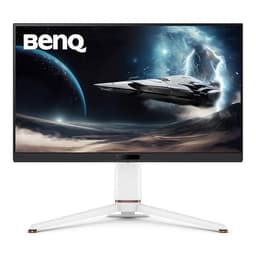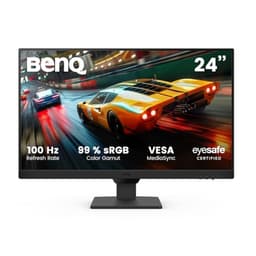
Your GPU renders the frame. Your CPU feeds it. But if your monitor is the weak link, none of that matters. You're staring at a panel that's lying to you about colour, smearing motion, or just making everything look a bit flat and lifeless. For anyone doing actual creative work on a Mac, or even just tired of squinting at a 1080p screen from 2019, that's a real problem. The BenQ PD2705Q is built specifically to fix it.
The verdict, briefly: this is one of the best-value professional monitors you can buy in the mid-range bracket right now, especially if you're on a Mac or working with colour-sensitive material. It's not perfect. The HDR is basically a checkbox. The refresh rate won't excite anyone who games seriously. But for design work, video editing, or just having a monitor that shows you accurate colours without spending a fortune, the PD2705Q is genuinely excellent. Over 822 owners have left it a 4.3-star average on Amazon, which for a monitor in this price range is hard to dismiss.
So let's talk about what makes it good, where it falls short, and whether it's actually the right buy for you specifically.
Core Specifications
The PD2705Q is a 27-inch IPS monitor running at 2560x1440 (QHD, or what BenQ calls 2K). Pixel density lands at roughly 109 PPI, which is noticeably sharper than 1080p at this size without demanding the GPU grunt that 4K requires. If you're coming from a 1080p screen, the jump in clarity is immediately obvious. Text is crisp, UI elements stop looking fuzzy, and you get meaningfully more screen real estate for your applications.
Refresh rate is 60Hz, which BenQ pairs with Adaptive Sync support. Response time is rated at 5ms GtG. The panel covers 100% sRGB and 100% Rec.709, and BenQ ships each unit with an individual factory calibration report targeting a Delta-E of less than 2. Brightness is rated at 350 nits peak. The stand offers tilt, swivel, pivot, and height adjustment, which is more than you'd expect in this bracket. USB-C with 65W Power Delivery is included, as is a KVM switch and BenQ's Display Pilot software for Mac.
One thing to flag on the connectivity side: you get USB-C (65W PD), DisplayPort 1.4, HDMI 2.0, and a USB hub with two downstream USB-A ports plus one USB-C downstream port. That's a genuinely useful port selection for a professional monitor. The KVM means you can switch keyboard and mouse between two machines through the monitor, which is a surprisingly useful feature for anyone running a Mac alongside a Windows PC or a laptop.
| Specification | Detail |
|---|---|
| Screen Size | 27 inches |
| Resolution | 2560x1440 (QHD / 2K) |
| Panel Type | IPS |
| Refresh Rate | 60Hz |
| Response Time | 5ms GtG |
| Brightness | 350 cd/m² (rated) |
| Colour Coverage | 100% sRGB, 100% Rec.709 |
| Colour Accuracy | Factory calibrated, Delta-E <2 |
| HDR | HDR10 (no local dimming) |
| Adaptive Sync | Adaptive Sync (FreeSync compatible) |
| USB-C | Yes, 65W Power Delivery |
| DisplayPort | DisplayPort 1.4 |
| HDMI | HDMI 2.0 x1 |
| USB Hub | 2x USB-A, 1x USB-C downstream |
| KVM | Yes |
| Stand Adjustments | Tilt, swivel, pivot, height |
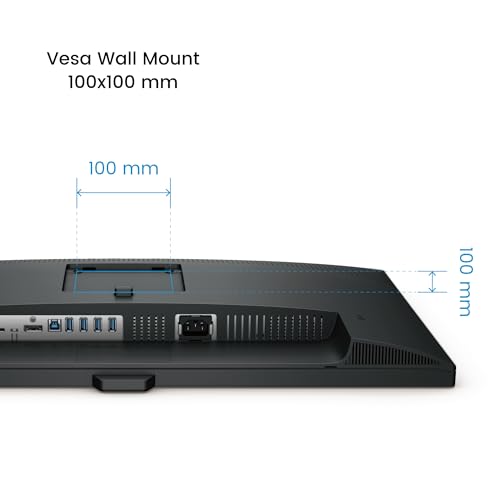
| VESA Mount | 100x100mm |
| Dimensions (with stand) | 614 x 415-535 x 218mm (approx) |
| Price | £268.99 |

Panel Technology
IPS is the right panel type for what the PD2705Q is trying to do. If you're doing colour work, IPS is the sensible choice. VA panels have better native contrast (typically 3000:1 versus IPS's 1000:1), which looks great in dark scenes, but they have a well-documented issue with colour shift at off-axis viewing angles and can exhibit smearing in dark transitions. TN panels are fast but have the worst colour accuracy and viewing angles of the three. OLED would give you perfect blacks and incredible contrast, but you're looking at two to three times the price and burn-in risk with static UI elements. For a design monitor meant to sit on your desk all day, IPS is the correct call.
BenQ's implementation here is solid. The manufacturer's own spec page rates viewing angles at 178 degrees horizontal and vertical, which is standard for IPS and accurate in practice according to owner reports. Colours don't shift noticeably when you move your head, which matters if you're reviewing work with someone standing next to you. The anti-glare coating is matte, which keeps reflections manageable in normal office lighting without the haze you get on some cheaper matte panels.
IPS glow is a factor, as it is on every IPS panel. In very dark rooms with dark content, you'll see some light bleed from the corners. Most owners don't find it intrusive for their workflows, and given this monitor is aimed at creative professionals rather than midnight gamers, it's unlikely to bother you in practice. Native contrast is around 1000:1, which is typical for IPS and fine for most work. If you're editing video with a lot of dark scenes and you care deeply about black levels, a VA panel or an OLED would serve you better. But you'd be giving up colour accuracy and uniformity to get there.
Display Quality
At 109 PPI, the PD2705Q sits in a comfortable spot for a 27-inch screen. It's not Retina-level sharpness, so if you're coming from a MacBook Pro with a high-DPI display, the jump to this external monitor will be noticeable. That's not a criticism specific to this monitor. It applies to every non-4K 27-inch screen. But 1440p at 27 inches is genuinely sharp for most work. Text is clean, fine detail in photos is visible, and you're not running into the scaling headaches that 4K on macOS can sometimes cause.
The matte anti-glare surface does its job without introducing excessive grain. Some cheaper matte coatings look almost foggy, reducing perceived sharpness and making colours look washed out. BenQ's coating on the PD2705Q avoids that. Owner reviews consistently mention that colours look punchy and accurate out of the box, which lines up with the factory calibration report that ships with each unit. The calibration targets Delta-E below 2, meaning colour deviation from the reference is invisible to the human eye in normal use.
Brightness uniformity is generally good across the panel. A few owners have reported very minor backlight bleed in corners, but this is common across IPS monitors and BenQ's quality control appears consistent based on the review volume. At 350 nits peak brightness, the screen holds up fine in a normally lit office or home workspace. It won't win in direct sunlight, but that's not what this monitor is for. The Low Blue Light certification and flicker-free backlight are genuinely useful for long working sessions, and multiple owners specifically mention eye comfort over extended use as a highlight.
Refresh Rate and Adaptive Sync
60Hz. That's the refresh rate, and there's no getting around it. For creative work, document editing, browsing, and video playback, 60Hz is perfectly fine. Most video content is 24fps or 30fps anyway, and design applications don't benefit from higher refresh rates. But if you're planning to use this monitor for gaming as well as work, 60Hz will feel limiting compared to the 144Hz and 165Hz options available at similar prices. That's a genuine trade-off you need to make consciously before buying.
Adaptive Sync support is present and FreeSync compatible, which means tearing is eliminated within the supported range when your GPU output is below 60fps. For the occasional game or video work, this is fine. For competitive gaming where you want 144fps and buttery smooth motion, this monitor was not designed for you. BenQ makes gaming monitors for that. The PD2705Q is a professional display that happens to support Adaptive Sync, not the other way around.
The 60Hz cap also means that Mac users running macOS at 60Hz won't notice any difference from what they're used to on an external display. The USB-C connection supports full 2560x1440 at 60Hz, so you're not losing anything through the cable. ICCsync, BenQ's colour profile management software, automatically applies the correct ICC profile when you switch inputs or connect a different machine, which is a small but genuinely useful feature if you're working across multiple devices and need consistent colour.
Response Time and Motion
BenQ rates the PD2705Q at 5ms GtG. For a professional IPS monitor at 60Hz, that's an honest and appropriate number. It's not the sub-1ms marketing figure you see plastered across gaming monitors, and BenQ isn't pretending otherwise. The 5ms GtG figure means visible ghosting in fast-paced gaming is possible, particularly in dark scenes where IPS panels already struggle slightly with pixel transitions.
For the actual target audience, this is a non-issue. Video editing, Photoshop, Illustrator, web design, spreadsheets: none of these put any stress on response time. The motion looks smooth and clean at 60Hz for the work this monitor is designed for. Owners who mention response time in reviews are almost exclusively those who tried to use it for gaming, and their feedback is consistent: it's fine for casual gaming, but not for anything competitive or fast-paced.
There's no MPRT (Moving Picture Response Time) figure published, which is typical for professional monitors. MPRT involves backlight strobing to reduce perceived blur, a technique that's useful for gaming but irrelevant for creative work and can introduce flicker. The absence of it here is appropriate. If you're evaluating this monitor specifically for motion performance in gaming, the honest answer is that you should be looking elsewhere. If you're evaluating it for everything else, response time simply isn't the metric that should be driving your decision.
Color Accuracy and Gamut
This is where the PD2705Q earns its price. 100% sRGB and 100% Rec.709 coverage, factory calibrated to Delta-E below 2, with an individual calibration report included in the box. That's a proper professional specification. Delta-E below 2 is the standard threshold for colour-critical work: below that level, colour differences between what's on screen and the reference are not distinguishable by eye. Below 1 is considered excellent. BenQ targets below 2, which is the right commitment for a monitor in this bracket.
The BenQ specifications page confirms the sRGB and Rec.709 coverage. Rec.709 is the standard colour space for HD video production, so if you're editing footage for broadcast or YouTube, this monitor will show you colours that translate accurately to how your audience will see them. sRGB covers web design, digital photography, and most consumer content creation. What the PD2705Q doesn't cover is DCI-P3 or Adobe RGB to any meaningful degree. If your workflow specifically requires wide-gamut coverage for print or cinema, you'd need to step up to something like the BenQ PD2725U or a dedicated wide-gamut professional display.
ICCsync is a software feature that automatically switches ICC colour profiles when you change inputs or connect a new device. In practice, this means your Mac and your Windows machine can both get the correct colour profile applied automatically without you having to manually manage profiles in system settings. For a dual-machine setup, that's genuinely useful. Display Pilot 2, BenQ's companion software for Mac, also lets you control monitor settings from the operating system rather than fighting with the OSD buttons, which owners consistently praise. The KVM switch ties into this: one monitor, two machines, one set of peripherals, all with correct colour profiles. For a freelancer or small studio setup, that's a properly thought-through workflow.

HDR Performance
The PD2705Q supports HDR10. It does not have local dimming. Peak brightness is 350 nits. If you're doing the maths, you already know where this is going: the HDR implementation here is what the industry calls "checkbox HDR". It accepts an HDR10 signal and applies a tone mapping curve, but without local dimming and with a brightness ceiling of 350 nits, it cannot produce the highlights and shadow detail separation that makes HDR actually look good.
For reference, VESA's DisplayHDR standard requires 400 nits minimum for DisplayHDR 400 certification, the lowest tier. The PD2705Q doesn't carry a DisplayHDR badge. This isn't a knock specific to BenQ: most monitors in this price range with IPS panels are in the same position. Real HDR requires either Mini-LED local dimming or OLED, and both push the price significantly higher. The honest position is that HDR on the PD2705Q is best left disabled. SDR content on a well-calibrated panel looks better than fake HDR on an underpowered one.
BenQ doesn't lean heavily on HDR in the marketing for this monitor, which is the right call. The focus is colour accuracy in SDR, and that's where the PD2705Q genuinely delivers. If HDR performance is a priority for your workflow (colour grading for HDR delivery, for example), you need a monitor with proper local dimming or OLED, and you need to budget accordingly. The PD2705Q is not that monitor. It's honest about what it is, which is more than can be said for some of the competition.
Contrast and Brightness
Native contrast is rated at 1000:1, which is standard for IPS. In a normally lit room, this is perfectly adequate. Whites look clean, blacks look dark enough for most content, and the overall image has good punch. The 350 nit peak brightness means the screen is comfortable in office lighting and holds up reasonably well next to a window, though it won't compete with 500-nit or 600-nit panels in very bright environments.
For the target use case, the brightness level is appropriate. Photo editing and design work typically happens in controlled lighting anyway, and calibrated displays are usually set to 120 nits or lower for accurate colour work. Running a calibrated display at full brightness defeats the purpose of the calibration. So the 350-nit ceiling is genuinely fine for professional use, even if it looks modest on a spec sheet next to gaming monitors claiming 500 nits.
Where the contrast shows its limits is in very dark content. IPS black levels are not as deep as VA panels, and in a dark room with dark content, the difference is visible. Greys that should be near-black can look slightly elevated. Again, for the target audience doing design and video work in a lit workspace, this is not a day-to-day issue. It becomes relevant if you're doing a lot of dark-room video grading or you're sensitive to IPS glow. A few owners mention noticing it in very dark scenes, but the majority report it doesn't affect their normal workflow. That split in the owner feedback is consistent with what you'd expect from IPS at this contrast ratio.
Ergonomics and Stand
BenQ has put a proper stand on this monitor. Height adjustment, tilt, swivel, and pivot are all present. That's the full set, and it's not guaranteed in this price bracket. Many monitors at similar prices ship with stands that only tilt, leaving you to either buy a VESA arm or live with whatever height the fixed stand gives you. The PD2705Q's stand lets you set the screen at the right eye level, rotate it portrait for long-form document work or coding, and angle it to share with someone sitting beside you.
Build quality is solid. The stand feels stable, the plastics are decent quality, and the overall aesthetic is clean and professional without being flashy. It's a black monitor that looks like it belongs in an office or studio. The cable management channel in the stand is a small detail that owners appreciate. Routing cables through the stand keeps the desk tidy, which matters more than it sounds when you've got USB-C, DisplayPort, and USB hub cables all running to the same spot.
VESA compatibility is 100x100mm, so if you want to mount it on an arm (and many professional users do), the option is there. The monitor's weight without the stand is manageable for standard VESA arms. A handful of owners mention that the stand has a slight wobble if the desk vibrates, which is a minor complaint and common across most monitors in this class. The pivot function works smoothly according to owner reports, and the auto-pivot feature in Display Pilot rotates the macOS display automatically when you physically rotate the monitor, which is a genuinely nice touch.
Connectivity and Ports
The port selection is one of the PD2705Q's genuine strengths. USB-C with 65W Power Delivery means you can connect a MacBook Pro or a Windows laptop with a single cable and charge it at the same time. 65W is enough for most 13-inch and 14-inch laptops at moderate load. Heavier 16-inch laptops doing intensive work might draw the charger down, but for most users it covers the cable-reduction goal. The single-cable connection is the main reason Mac users specifically seek this monitor out.
- USB-C (65W Power Delivery, DisplayPort Alt Mode, upstream)
- DisplayPort 1.4
- HDMI 2.0 x1
- USB-A 3.0 x2 (downstream hub)
- USB-C x1 (downstream hub)
- 3.5mm audio out
The KVM switch is a feature that sounds niche until you actually need it. If you run a Mac for creative work and a Windows machine for anything else (or vice versa), being able to switch your keyboard and mouse between the two machines through the monitor without physically unplugging anything is a proper quality-of-life improvement. It's not a feature you'd find on a generic office monitor at this price. BenQ has clearly thought about who actually buys this thing and what their desk setup looks like.
DisplayPort 1.4 supports the full 2560x1440 at 60Hz with headroom to spare. HDMI 2.0 does the same. The USB hub's downstream ports are USB 3.0 speed on the USB-A ports, which is fast enough for external drives, peripherals, and most accessories. The 3.5mm audio out passes audio from whatever source is active, useful if you're using desktop speakers rather than monitor speakers (the PD2705Q has no built-in speakers, which is the right call for a professional display). The USB Power Delivery standard governs the 65W charging behaviour, and BenQ's implementation is consistent with the specification.
How It Compares
The two most obvious alternatives to the PD2705Q are the Dell UltraSharp U2722D and the LG 27UK850-W (or its successors). Both target a similar professional audience with USB-C connectivity and colour accuracy as selling points. The comparison is instructive.
The Dell UltraSharp U2722D is a strong competitor. It also covers 100% sRGB, has a full ergonomic stand, and Dell's factory calibration is well-regarded. Dell's build quality is consistently excellent, and the UltraSharp line has a long track record. The U2722D typically costs more than the PD2705Q, and it doesn't include a KVM or the Display Pilot software integration for Mac. If you're in a corporate environment where Dell's support infrastructure matters, the U2722D makes sense. For a home studio or freelancer, the PD2705Q's KVM and Mac software integration tip the balance.
The LG 27UK850-W is a 4K option at a similar price point, which sounds immediately appealing. But 4K at 60Hz via USB-C can run into bandwidth limitations depending on your laptop, and LG's factory calibration is not as rigorous as BenQ's. The PD2705Q's Delta-E below 2 guarantee is a more concrete commitment than LG's typical out-of-box accuracy. For pure pixel density, the LG wins. For colour accuracy and workflow integration on Mac, the PD2705Q is the better tool.
| Feature | BenQ PD2705Q | Dell UltraSharp U2722D | LG 27UK850-W |
|---|---|---|---|
| Resolution | 2560x1440 (QHD) | 2560x1440 (QHD) | 3840x2160 (4K) |
| Panel | IPS | IPS | IPS |
| Refresh Rate | 60Hz | 60Hz | 60Hz |
| Colour Coverage | 100% sRGB, 100% Rec.709 | 100% sRGB | 95% DCI-P3 |
| Factory Calibration | Yes, Delta-E <2 | Yes | No |
| USB-C PD | 65W | 90W | 60W |
| KVM | Yes | No | No |
| Mac Software | Display Pilot 2, ICCsync | Dell Display Manager | OnScreen Control |
| HDR | HDR10 (no local dimming) | No | HDR10 (no local dimming) |
| Price | £268.99 | Higher | Similar |
Final Verdict
The BenQ PD2705Q review conclusion is straightforward: if you're a Mac user, a freelance designer, a video editor, or anyone who needs accurate colour in their daily work without spending serious money on a wide-gamut professional display, this monitor is a very good buy. The 100% sRGB coverage, factory calibration with a Delta-E below 2 guarantee, USB-C single-cable connection with 65W charging, KVM switch, and full ergonomic stand add up to a package that's genuinely hard to beat at this price point. Over 822 owners giving it a 4.3-star average isn't a fluke.
The limitations are real but specific. 60Hz rules out serious gaming. No local dimming means HDR is decorative at best. No DCI-P3 or Adobe RGB coverage means wide-gamut workflows (print, cinema) need a different tool. IPS contrast means deep blacks in dark rooms aren't this monitor's strength. If any of those limitations apply to your primary use case, you should know before buying.
On the question of whether BenQ monitors are good: yes, consistently. BenQ's professional line has a long track record of delivering accurate panels with honest specifications, and the PD2705Q continues that. On whether BenQ is better than Dell: in this specific comparison, the PD2705Q's KVM and Mac integration give it an edge for the target audience, though Dell's UltraSharp line is equally well-regarded for build quality and support. On why BenQ can seem expensive: you're paying for factory calibration, professional software integration, and a full ergonomic stand. Cheaper monitors skip at least one of those. On whether BenQ is high quality: the 822-review average and the consistent owner feedback say yes.
One honest note: if colour accuracy isn't a priority for your work and you mainly want a sharp 1440p screen for general use, a cheaper 27-inch IPS monitor from AOC or Philips will save you money and give you a perfectly decent screen. The PD2705Q's premium is justified by its calibration and professional features. If you don't need those, you don't need to pay for them.
For everyone else, the BenQ PD2705Q is the right answer.
What works. What doesn’t.
5 + 4What we liked5 reasons
- Factory calibrated to Delta-E below 2 with individual calibration report
- 100% sRGB and 100% Rec.709 coverage for accurate creative work
- USB-C with 65W Power Delivery for single-cable Mac connection
- KVM switch included for dual-machine setups
- Full ergonomic stand with height, tilt, swivel, and pivot
Where it falls4 reasons
- 60Hz only, not suitable for serious gaming
- HDR10 without local dimming is effectively decorative
- No DCI-P3 or Adobe RGB for wide-gamut professional workflows
- IPS contrast limits black depth in dark environments
Full specifications
11 attributes| Panel type | IPS |
|---|---|
| Aspect ratio | 16:9 |
| Curvature | flat |
| HDR | HDR10 |
| Launch year | 2020 |
| Ports | 1x HDMI 2.0, 1x DisplayPort 1.4, 1x DisplayPort out, 1x USB-C, 1x USB-B, 4x USB-A, 1x 3.5mm audio out |
| Refresh rate HZ | 60 |
| Resolution | 2560x1440 |
| Response time MS | 5 |
| Screen size IN | 27 |
| Vesa compatible | true |
If this isn’t right for you
2 options 8.5 / 10
ASUS ROG Strix XG27AQ HDR Gaming Monitor – 27 inch WQHD (2560 x 1440), Fast IPS, Overclockable 170Hz (Above 144Hz), 1ms (GTG), ELMB SYNC, G-SYNC Compatible, DisplayHDR 400
£289.74 · ASUS
 8.5 / 10
Dell U2424H UltraSharp 24 Inch FHD (1920x1080) Monitor, 120Hz, IPS, 5ms, 98% DCI-P3, 2x USB-C, 2x DisplayPort, HDMI, 3x USB, 3 Year Warranty, Silver
£186.00 · Dell
Frequently asked
5 questions01Is the BenQ PD2705Q good for gaming?+
Casually, yes. Competitively, no. The 60Hz refresh rate and 5ms GtG response time are fine for single-player games and casual play, but anyone used to 144Hz or higher will notice the difference immediately. There's no high-refresh gaming mode, and the Adaptive Sync implementation is basic. If gaming is your primary use case, BenQ's own gaming-focused EX or EW series would serve you much better. The PD2705Q is a professional creative monitor that tolerates gaming, not a gaming monitor.
02Does the BenQ PD2705Q have good HDR?+
Honestly, no. It accepts an HDR10 signal and applies tone mapping, but with a 350-nit brightness ceiling and no local dimming, it cannot produce the highlight punch or shadow separation that makes HDR content look genuinely better. VESA's DisplayHDR 400 certification requires 400 nits minimum, and the PD2705Q doesn't carry that badge. For HDR content, you're better off leaving the monitor in SDR mode where its factory calibration actually shines. Real HDR requires local dimming or OLED, both of which cost significantly more.
03Is the BenQ PD2705Q good for content creation?+
Yes, it's very good for most content creation workflows. The 100% sRGB and 100% Rec.709 coverage with factory calibration to Delta-E below 2 means colours are accurate for web design, digital photography, video editing for online platforms, and graphic design. The ICCsync feature automatically applies the correct colour profile when switching between machines. The limitation is wide-gamut work: if your workflow requires DCI-P3 for cinema or Adobe RGB for print, you'll need a wide-gamut monitor like the BenQ PD2725U instead.
04What graphics card do I need for the BenQ PD2705Q?+
For the 2560x1440 resolution at 60Hz, almost any modern GPU is sufficient. An Nvidia GTX 1060 or AMD RX 580 and above will drive this monitor comfortably for creative work. If you're connecting via USB-C from a MacBook or Windows laptop, the laptop's integrated or discrete GPU handles the output through the USB-C connection, so no separate graphics card is needed. The 60Hz cap means you're not pushing GPU resources hard even in games.
05What warranty and returns apply to the BenQ PD2705Q?+
BenQ typically offers a 3-year warranty on their professional monitors in the UK, but you should confirm the specific terms on BenQ's UK website or the retailer listing at the time of purchase, as warranty terms can vary by seller. When buying through Amazon UK, you're covered by Amazon's standard 30-day returns policy and the A-to-Z Guarantee regardless of the manufacturer warranty.