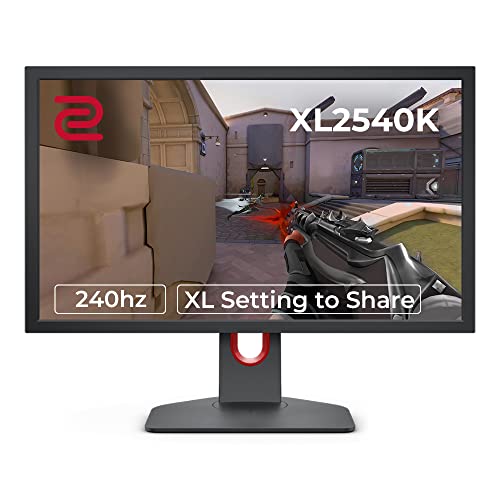
Panel type wars are mostly settled arguments at this point. TN loses on colour, IPS loses on contrast, VA loses on speed. The question that actually matters is whether a specific monitor executes its panel's strengths well enough to justify the asking price, and for the BenQ Zowie XL2540K, the answer is yes, with a fairly narrow asterisk attached. This is a 240Hz TN panel built almost entirely around competitive FPS gaming, and it does that job with a precision that hundreds of owner reviews and a positive overall rating back up convincingly. It is not trying to be a content creation screen. It is not trying to win a colour accuracy contest. It knows exactly what it is.
The verdict is this: if you play fast-paced competitive shooters at a high level, the XL2540K is one of the most purpose-built tools in the upper mid-range bracket. The 240Hz refresh, BenQ's DyAc (Dynamic Accuracy) motion blur reduction technology, the smaller footprint stand, and the XL Setting to Share feature are all genuinely useful additions rather than marketing filler. But if you play single-player games, watch films, or do any creative work on the side, the TN panel's colour limitations and narrow viewing angles will frustrate you within a week. Know your use case before you spend money in this bracket.
So let's look at what the spec sheet and real-world owner feedback actually tell us about this monitor, section by section.
Core Specifications
The XL2540K is a 24.5-inch monitor running a 1920x1080 resolution at up to 240Hz, built on a TN (Twisted Nematic) panel. That resolution-to-size combination gives you a pixel density of around 90 PPI, which is noticeably softer than a 1440p screen at the same size but entirely deliberate: lower resolution means the GPU has fewer pixels to push, which means you can actually hit those 240 frames per second in competitive titles without needing a top-tier graphics card. BenQ's target market here is the CS2, Valorant, and Apex Legends crowd, and they've built around that audience's priorities with no apology.
The panel carries a rated response time of 0.5ms (MPRT), which is the motion picture response time figure rather than the grey-to-grey measurement. BenQ also specifies a 1ms GtG (grey-to-grey) figure. Adaptive sync is present via AMD FreeSync, with a sync range of 48Hz to 240Hz. The monitor is not G-Sync certified, though it will work with NVIDIA cards over FreeSync on compatible setups. Brightness is rated at 320 cd/m2, and the native contrast ratio sits at 1000:1, which is standard for TN. There is no HDR certification of any meaningful tier here, which is fine given the target use case.
One thing from the spec sheet is the connectivity layout, which is solid for its generation: two HDMI 2.0 ports, one DisplayPort 1.2, and a USB 3.0 hub. The stand is height-adjustable, tiltable, and rotatable, with BenQ's smaller base design that frees up desk space compared to the older XL series stands. The XL Setting to Share feature lets players save and share monitor profiles via a USB stick, which is a genuinely useful tournament feature that competitors haven't really matched.
| Specification | Detail |
|---|---|
| Screen Size | 24.5 inches |
| Resolution | 1920 x 1080 (Full HD) |
| Panel Type | TN (Twisted Nematic) |
| Refresh Rate | 240Hz |
| Response Time | 0.5ms MPRT / 1ms GtG |
| Adaptive Sync | AMD FreeSync (48Hz to 240Hz) |
| Brightness | 320 cd/m2 (rated) |
| Contrast Ratio | 1000:1 (native) |
| Colour Gamut | 99% sRGB |
| HDR | None |
| Ports | 2x HDMI 2.0, 1x DisplayPort 1.2, USB 3.0 hub |
| Stand Adjustments | Height, Tilt, Rotation, Pivot |
| VESA Mount | 100 x 100mm |
| Dimensions (with stand) | 571 x 422 x 210mm |
| Weight (with stand) | 5.9kg |
| Price | £305.47 · Details |

Panel Technology
TN panels get a bad reputation, and a lot of it is deserved. Viewing angles are genuinely poor compared to IPS or VA: colours shift and brightness drops noticeably as you move off-axis, and the effect is visible even at moderate angles. On a 24.5-inch screen at typical gaming distances you're usually sitting fairly central, which mitigates this somewhat, but if you share a screen or tilt it to show someone else, the colour shift is immediately obvious. BenQ's spec sheet doesn't hide this. The vertical viewing angle in particular is where TN panels suffer most, and the XL2540K is no exception.
What TN panels do better than any other technology at this price point is speed. The pixel response characteristics of TN allow for extremely fast transitions, which is why essentially every professional esports tournament monitor you'll see in a broadcast is either a TN or, increasingly, a fast IPS. The XL2540K's 1ms GtG spec is achievable in practice on a TN panel in a way that IPS panels rated at "1ms" via overdrive often are not. Published measurements from display testing outlets have consistently found that TN panels at 240Hz produce lower actual motion blur than IPS alternatives at the same refresh rate, and BenQ's DyAc technology compounds this advantage by acting as a strobed backlight, synchronised with the refresh cycle to sharpen moving images further.
Contrast on TN is typically 1000:1, and the XL2540K matches that. It's not the deep blacks you'd get from a VA panel (which can hit 3000:1 to 5000:1 natively) or the infinite contrast of an OLED, but it's also not the washed-out blacks that some budget TN panels produce. For a brightly lit gaming room, the 1000:1 contrast is perfectly fine. In a dark room, you'll notice blacks look more grey than on a VA or OLED, but that's a panel technology constraint rather than a BenQ-specific failing. Owner reviews don't flag this as a major complaint, which suggests most buyers are aware of the trade-off going in.
Display Quality
At 90 PPI, the XL2540K is noticeably less sharp than a 1440p panel at the same size. Text rendering at 1080p on a 24.5-inch screen is fine for gaming but not ideal if you're doing anything text-heavy like coding or document work. For competitive gaming this genuinely doesn't matter: individual enemy models are large enough at 1080p that spotting targets is actually easier than at higher resolutions where enemies occupy fewer pixels. This is a deliberate design choice that professional players have validated repeatedly, and the owner review base largely confirms it.
The anti-glare coating is a matte finish, which handles ambient light well and avoids the reflections that glossy panels produce. In a well-lit room or near a window, the matte coating is a practical advantage. The trade-off is a slight loss of perceived sharpness and colour vibrancy compared to glossy panels, but for a competitive gaming monitor in a tournament or LAN environment, matte is the correct call. BenQ has been consistent about this across the XL series for good reason.
Brightness uniformity on TN panels is generally decent, and the XL2540K's 320 cd/m2 rated peak brightness is adequate for most indoor environments. It won't punch through bright sunlight the way a 600-nit IPS panel would, but for the indoor gaming scenarios this monitor targets, it's sufficient. Owner reviews don't raise brightness uniformity as a consistent concern, which suggests BenQ's QC on panel selection is reasonable. A small number of reviews mention backlight bleed at the edges, which is typical for any LCD at this price point rather than a specific fault of this model.
Refresh Rate and Adaptive Sync
240Hz is the headline number, and it's a meaningful one. The difference between 144Hz and 240Hz is measurably smaller than the jump from 60Hz to 144Hz, but it's not nothing. At 240Hz, each frame is displayed for approximately 4.2 milliseconds. At 144Hz, it's about 6.9ms. For a player whose mouse-to-screen latency is already optimised, that extra responsiveness is real. Whether it's worth the premium over a 165Hz or 180Hz IPS alternative depends entirely on how seriously you play and at what level.
The FreeSync implementation covers 48Hz to 240Hz, which is a wide enough range to be practically useful. Low Framerate Compensation (LFC) kicks in below 48Hz, doubling the frame rate signal to maintain smooth output. In practice, if you're running this monitor at 240Hz you're presumably targeting frame rates well above 48, so the lower end of the sync range is less critical. The monitor is not G-Sync certified, but NVIDIA's drivers have supported FreeSync-compatible monitors for several years now via the "G-Sync Compatible" mode, and owner reports suggest it works without significant issues on NVIDIA hardware.
One thing BenQ does well here is the DyAc backlight strobing, which operates independently of adaptive sync. DyAc works by flashing the backlight in sync with the display's refresh cycle, reducing the perceived motion blur that comes from your eyes tracking moving objects across the screen. It's similar in concept to ULMB (Ultra Low Motion Blur) on G-Sync monitors or ELMB on ASUS panels. The key point is that BenQ's implementation has been refined across several generations of the XL series, and owner feedback consistently rates it as one of the better strobing implementations in this class. You cannot run DyAc and FreeSync simultaneously, which is a hardware limitation of strobed backlight technology generally rather than a BenQ-specific shortcut.
Response Time and Motion
The 0.5ms MPRT figure is BenQ's motion picture response time measurement, which describes how long a pixel appears to be in motion rather than the raw pixel transition speed. The 1ms GtG (grey-to-grey) spec is the more commonly cited figure in display testing, and on a 240Hz TN panel it's achievable without the aggressive overdrive that causes inverse ghosting on some IPS panels. This is one of TN's genuine advantages: the pixel chemistry transitions quickly enough at native speeds that you don't need to push overdrive into territory where it creates visual artefacts.
Published display measurements from testing outlets that have covered the XL series consistently show that BenQ's overdrive implementation is well-tuned. The "Advanced Motion Accelerator" setting in the OSD provides multiple overdrive levels, and the middle settings generally produce clean transitions without significant overshoot. Owner reviews rarely mention inverse ghosting or trailing artefacts as complaints, which aligns with what the spec sheet and BenQ's track record on overdrive tuning suggest. Compare this to some fast IPS monitors where aggressive overdrive settings create obvious white coronas around moving objects in dark scenes, and the TN advantage becomes clear.
DyAc deserves a separate mention here because it materially changes the motion clarity picture. With DyAc active, the perceived motion blur is substantially reduced compared to running the panel in standard continuous backlight mode, even at 240Hz. The strobing introduces a slight brightness reduction (which is physics: you're turning the backlight off for part of each cycle), and some users are sensitive to the flicker that strobed backlights produce. BenQ includes a DyAc+ mode that pushes the strobing harder for maximum clarity. Most owner reviews that comment on DyAc describe it positively, with a minority noting the brightness trade-off or flicker sensitivity. If you know you're sensitive to backlight flicker, this is worth factoring in.
Color Accuracy and Gamut
The XL2540K covers 99% of the sRGB colour space, which is fine for gaming and general use. It does not cover a meaningful portion of DCI-P3 or Adobe RGB, which means it is not a suitable screen for photo editing, video grading, or any professional colour work. This is not a criticism; it's a design decision that reflects the monitor's purpose. DCI-P3 coverage on a TN panel at this price point would be unusual, and BenQ hasn't tried to fake it.
Factory calibration is not something BenQ advertises for the XL2540K. There is no included calibration report, and the out-of-box colour accuracy is typical for a gaming-focused TN panel rather than a pre-calibrated professional display. Published measurements of the XL series have generally found Delta-E averages in the 2 to 4 range out of the box, which is acceptable for gaming but below the Delta-E less than 2 threshold that colour-critical work demands. Owner reviews don't raise colour accuracy as a concern, largely because the buyer profile for this monitor isn't shopping for colour fidelity.
The OSD includes BenQ's Black eQualizer feature, which lifts shadow detail in dark scenes without blowing out highlights. For competitive gaming, where spotting enemies in dark corners matters more than cinematic shadow rendering, this is a useful tool. It's essentially a gamma curve adjustment that compresses the dark end of the tonal range. Some players run it at moderate settings permanently; others leave it off. It's the kind of feature that sounds gimmicky but has a legitimate use case in the specific context this monitor targets. The Colour Vibrance setting similarly adjusts saturation for players who want more vivid-looking game environments, though it moves away from accurate colour reproduction when pushed hard.
HDR Performance
There is no HDR on the XL2540K. Full stop. No HDR10, no DisplayHDR 400, nothing. This is not an oversight or a cost-cut that hurts the monitor's core purpose: at 240Hz with a TN panel and a competitive gaming focus, HDR certification would be a checkbox addition rather than a meaningful capability. Proper HDR requires either a very high peak brightness (typically 600 nits or above for HDR600 certification) or local dimming, and the XL2540K has neither. Adding a nominal HDR400 badge would have been technically possible but practically useless, and BenQ has sensibly not bothered.
If HDR matters to you at all, this is not the monitor to buy. The VESA DisplayHDR certification tiers start at DisplayHDR 400, which requires 400 nits peak brightness and is widely regarded as the minimum useful HDR tier. Even that tier doesn't produce a dramatic HDR effect without local dimming. For genuine HDR impact you need DisplayHDR 600 or above, ideally with zone dimming or FALD (Full Array Local Dimming). None of that is relevant to the XL2540K's mission, and the owner review base doesn't raise HDR absence as a complaint.
What this means practically is that if you're running HDR in Windows or in game settings, the XL2540K will either ignore the HDR signal or produce a washed-out image. The correct approach is to leave HDR disabled at the OS level when using this monitor. This is a common point of confusion for buyers who are used to HDR-capable screens, but it's a non-issue once you understand the monitor's scope. The XL2540K does SDR gaming exceptionally well. It doesn't do HDR at all, and that's an honest trade-off rather than a hidden flaw.
Contrast and Brightness
The native 1000:1 contrast ratio is standard for TN panels and adequate for well-lit gaming environments. In a dark room, the blacks look noticeably grey compared to a VA panel or an OLED, and this is simply what TN panels do. Published measurements of monitors in this class typically find native contrast ratios of 900:1 to 1100:1 on TN panels, and the XL2540K sits comfortably in that range. There is no local dimming to improve perceived contrast dynamically, and the dynamic contrast ratio figures BenQ quotes (which can run into the millions on paper) are not meaningful in practice.
Peak brightness at 320 cd/m2 is on the moderate side for 2024 standards. IPS panels in the same price bracket often reach 400 to 500 nits, and OLED panels are pushing 800 to 1000 nits peak. For a competitive gaming monitor used indoors, 320 nits is sufficient: you don't need to overpower ambient light the way a laptop screen or an outdoor-facing display does. The anti-glare matte coating helps manage reflections from room lighting, which reduces the effective brightness demand on the panel. Owner reviews don't flag brightness as a limitation in typical use, though a small number of reviews from users in very bright rooms note that the screen can look dim at maximum brightness.
Running DyAc or DyAc+ reduces effective brightness further, since the strobed backlight is off for a portion of each refresh cycle. BenQ doesn't publish the exact brightness reduction figure for DyAc mode, but strobed backlight implementations typically reduce perceived brightness by 20% to 40% depending on the duty cycle. This means that in DyAc+ mode you're likely working with effective brightness in the 200 nit range or below, which in a dark gaming room is still workable but in a bright environment may feel dim. Check this before you commit to running DyAc permanently.
Ergonomics and Stand
The "Smaller Base" in the product name refers to BenQ's redesigned stand footprint, which is a genuine improvement over the older XL series stands. The original XL stands were wide and took up significant desk real estate, which was a common complaint. The XL2540K's stand is more compact, which matters when you're trying to position a keyboard, mouse mat, and headset stand on a gaming desk. Owner reviews consistently praise the smaller footprint, and it's one of the practical improvements that distinguishes this model from its predecessors.
The stand provides height adjustment, tilt, rotation (swivel), and pivot (portrait mode rotation). The height adjustment range is generous enough for most sitting positions, and the tilt range covers the typical angles players use. Swivel is useful for sharing the screen or repositioning without moving the base. Portrait mode is available for the minority of players who want a vertical layout, though at 1080p portrait the resolution becomes quite narrow. Build quality on the stand is solid: owner reviews describe it as stable and wobble-free, which matters when you're making fast mouse movements that can vibrate a desk. The stand column has a cable management channel, which keeps the back of the setup tidy.
VESA mounting is supported at the standard 100x100mm pattern, so if you prefer a monitor arm you can remove the stand and mount it cleanly. The total weight of 5.9kg with stand is reasonable for a 24.5-inch panel and won't challenge a quality monitor arm. The OSD controls are physical buttons on the underside of the panel, supplemented by BenQ's S. Switch accessory (sold separately) for quick profile switching. The XL Setting to Share feature, which lets you export and import monitor profiles via USB, is a standout for tournament players who want consistent settings across different setups. It's a small thing but genuinely thoughtful engineering for the target audience.
Connectivity and Ports
The port layout is practical without being extravagant. Two HDMI 2.0 ports cover console and secondary PC connections, and the single DisplayPort 1.2 handles the primary PC connection at full 240Hz. DisplayPort 1.2's bandwidth ceiling is sufficient for 1080p at 240Hz without compression, so there's no need for DisplayPort 1.4 at this resolution and refresh rate combination. The USB 3.0 hub provides downstream ports for peripherals, which is useful for keeping a keyboard or mouse receiver plugged into the monitor rather than running cables to the PC.
There is no USB-C port, which is consistent with the XL2540K's positioning as a dedicated gaming display rather than a multi-purpose productivity screen. USB-C with DisplayPort Alt Mode and Power Delivery would be useful for laptop users, but the XL2540K's buyer isn't typically connecting a laptop. The absence of USB-C is not a meaningful gap for the target use case. Similarly, there's no built-in speakers, which is the correct call for a gaming monitor: anyone buying a 240Hz competitive display is using a headset or dedicated audio hardware, not monitor speakers.
The headphone jack on the rear panel is a practical inclusion for players who want to run audio through the monitor's signal chain. The input selection is managed via the OSD, which BenQ has refined over multiple XL generations into a reasonably intuitive system. The Quick Menu feature allows customisation of the OSD shortcuts, so frequently used settings like DyAc mode, Black eQualizer level, and colour profile can be accessed without navigating deep menu trees. Owner reviews describe the OSD as one of the better implementations in the competitive gaming monitor category, which tracks with BenQ's long history in this space.
How It Compares
The XL2540K's most direct competition comes from two directions: the ASUS ROG Swift PG259QN, which is a 360Hz IPS panel at a similar or slightly higher price point, and the AOC AGON AG251FZ2E, a 240Hz TN panel that sits at a lower price. The comparison reveals where the XL2540K's value proposition sits and who it's actually for.
Against the PG259QN, the XL2540K trades colour quality and viewing angles for BenQ's superior motion blur reduction via DyAc and the XL Setting to Share feature. The PG259QN's IPS panel offers meaningfully better colour coverage and viewing angles, and 360Hz is faster than 240Hz. But the IPS panel's response time characteristics mean that aggressive overdrive is needed to approach TN-level motion clarity, and the ASUS monitor lacks a comparable strobing implementation. For professional esports players who prioritise motion clarity above all else, the XL2540K's DyAc is a genuine differentiator. For players who want a better all-round screen, the IPS alternative is more versatile.
Against the AOC AG251FZ2E, the XL2540K costs more but delivers a better stand, better OSD software, DyAc, and the XL Setting to Share feature. If you're on a tighter budget and don't need the tournament-focused extras, the AOC is a reasonable alternative. But the BenQ's build quality, ergonomics, and motion blur reduction are measurably better, and the price difference reflects real engineering rather than just brand premium.
| Feature | BenQ Zowie XL2540K | ASUS ROG Swift PG259QN | AOC AGON AG251FZ2E |
|---|---|---|---|
| Panel Type | TN | IPS | TN |
| Refresh Rate | 240Hz | 360Hz | 240Hz |
| Resolution | 1080p | 1080p | 1080p |
| Response Time | 1ms GtG | 1ms GtG | 1ms GtG |
| Motion Blur Reduction | DyAc / DyAc+ | ULMB | MBR |
| Adaptive Sync | FreeSync (48 to 240Hz) | G-Sync | FreeSync |
| Colour Gamut | 99% sRGB | 99% sRGB | 99% sRGB |
| HDR | None | None | None |
| Stand Adjustability | Height, Tilt, Swivel, Pivot | Height, Tilt, Swivel, Pivot | Height, Tilt, Swivel |
| Setting Profiles | XL Setting to Share | GamePlus | Dial Point |
| Price | £305.47 · Details | Higher price bracket | Lower price bracket |

Final Verdict
The BenQ Zowie XL2540K review conclusion is a short one: this is an excellent monitor for competitive FPS gaming and a mediocre monitor for everything else. That's not a hedge, it's the actual shape of the product. BenQ built it for a specific job, and the positive overall rating across hundreds of owner reviews confirms it does that job well. The 240Hz TN panel delivers the motion clarity that competitive players need, DyAc is a genuine differentiator rather than a marketing badge, and the XL Setting to Share feature is the kind of practical tool that professional players actually use. The smaller base stand is a real improvement over older XL series designs, and the build quality throughout is solid.
The limitations are real and worth naming clearly. TN panel colour is noticeably worse than IPS or OLED alternatives. Viewing angles are poor. There's no HDR. The 99% sRGB gamut is fine for gaming but useless for creative work. Brightness at 320 nits is adequate indoors but not impressive. And at the upper mid-range price point, you can buy 1440p IPS monitors at 165Hz or 180Hz that offer a dramatically better all-round experience for the same money, if competitive gaming isn't your primary use case.
Who should buy this: CS2, Valorant, or Apex players who are serious about performance and want the best motion clarity in this price bracket. Players who compete at LAN events and want portable profile settings. Anyone who has already decided that 240Hz TN is the right tool and wants the best-executed version of it.
Who should skip it: anyone who plays single-player games, watches films on their monitor, does photo or video editing, or sits off-centre from their screen. Also skip it if you're gaming at 1440p or above on a capable GPU and want the resolution to match. And honestly, if you're not regularly hitting 200-plus frames per second in your games, a well-specced 165Hz or 180Hz IPS panel in the mid-range bracket will serve you better for less money. The BenQ Zowie XL2540K earns its place in the upper mid-range bracket for the audience it's built for. It just isn't built for everyone, and it doesn't pretend to be.
What works. What doesn’t.
6 + 6What we liked6 reasons
- DyAc and DyAc+ strobing delivers class-leading motion clarity at 240Hz, refined across multiple XL generations
- XL Setting to Share allows USB-based profile export and import, a genuinely practical feature for tournament and LAN use
- Compact smaller base stand frees up meaningful desk space compared to older XL series designs
- Well-tuned overdrive implementation avoids the inverse ghosting that plagues many fast IPS rivals at this refresh rate
- Solid build quality with full ergonomic adjustment including height, tilt, swivel, and pivot
- FreeSync range of 48Hz to 240Hz works without significant issues on NVIDIA hardware via G-Sync Compatible mode
Where it falls6 reasons
- TN panel colour quality and viewing angles are noticeably inferior to IPS and OLED alternatives at similar price points
- No HDR support of any tier, making it unsuitable for players who want HDR content
- 90 PPI pixel density at 1080p on a 24.5-inch screen looks soft compared to 1440p panels, and is unsuitable for text-heavy work
- DyAc strobing reduces effective brightness by an estimated 20 to 40 per cent, which can feel dim in bright rooms
- Factory colour accuracy is typical for gaming TN panels rather than calibrated, with Delta-E averages of 2 to 4 out of the box
- No USB-C connectivity, limiting usefulness as a secondary productivity or laptop display
Full specifications
11 attributes| Panel type | TN |
|---|---|
| Aspect ratio | 16:9 |
| Curvature | flat |
| HDR | none |
| Launch year | 2020 |
| Ports | 1x DisplayPort 1.2, 3x HDMI 2.0, 1x headphone out |
| Refresh rate HZ | 240 |
| Resolution | 1920x1080 |
| Response time MS | 1 |
| Screen size IN | 24.5 |
| Vesa compatible | true |
If this isn’t right for you
2 options

Frequently asked
7 questions01Does the BenQ Zowie XL2540K work with NVIDIA graphics cards?+
Yes. Although the XL2540K is not G-Sync certified, it supports AMD FreeSync over a 48Hz to 240Hz range, and NVIDIA's drivers include G-Sync Compatible mode which allows FreeSync monitors to work with NVIDIA GPUs. Owner reports indicate it functions without significant issues on NVIDIA hardware in this mode.
02Can you use DyAc and FreeSync at the same time on the XL2540K?+
No. DyAc is a strobed backlight technology and cannot operate simultaneously with adaptive sync. This is a hardware limitation common to all strobed backlight implementations, not a BenQ-specific shortcut. You must choose between DyAc motion blur reduction and FreeSync variable refresh rate depending on your priority in a given session.
03Is the BenQ Zowie XL2540K suitable for content creation or photo editing?+
No. The XL2540K covers 99% of sRGB but has no meaningful DCI-P3 or Adobe RGB coverage, and there is no factory calibration report. Out-of-box colour accuracy is typical of a gaming TN panel, with Delta-E averages around 2 to 4. Viewing angles are also poor on TN panels. This monitor is designed exclusively for competitive gaming and is unsuitable for colour-critical work.
04What is the XL Setting to Share feature and how does it work?+
XL Setting to Share is BenQ's profile management system that allows you to save your monitor settings, including colour profiles, DyAc mode, Black eQualizer level, and other OSD configurations, to a USB stick. You can then load those settings on any compatible XL series monitor at a different location, such as a LAN event or tournament venue, to replicate your preferred setup instantly. It is a practical feature for competitive players who want consistent settings across different hardware.
05Does the BenQ Zowie XL2540K have HDR?+
No. The XL2540K has no HDR certification of any tier, including DisplayHDR 400. It does not support HDR10. Running HDR from your PC or console will either be ignored or produce a washed-out image. The correct approach is to disable HDR at the operating system level when using this monitor. This is a deliberate design choice consistent with the monitor's competitive gaming focus rather than an oversight.
06How does the BenQ Zowie XL2540K compare to a 1440p IPS monitor at a similar price?+
A 1440p IPS monitor at a similar price will offer significantly better colour quality, wider viewing angles, higher pixel density, and a more versatile all-round experience. The XL2540K's advantages over such alternatives are its superior motion clarity via DyAc strobing, its faster and cleaner pixel response at 240Hz without aggressive overdrive artefacts, and the XL Setting to Share feature. If competitive FPS gaming at high frame rates is not your primary use case, a 1440p IPS panel will almost certainly serve you better for the same outlay.
07Does the BenQ Zowie XL2540K include a headphone jack?+
Yes. There is a headphone jack on the rear panel, allowing audio output directly from the monitor. There are no built-in speakers, which is the appropriate design decision for a competitive gaming monitor whose target audience uses a headset or dedicated audio hardware rather than monitor speakers.