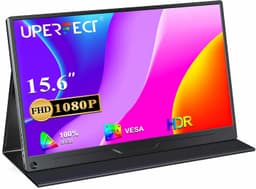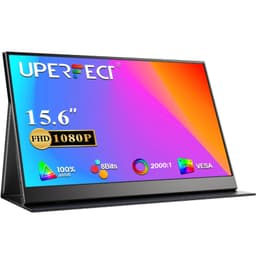
Specs on a box are one thing. Whether those specs actually hold up when you're sat in a coffee shop, plugged into a Nintendo Switch, or trying to get a second screen working off a laptop with no mains socket nearby is a completely different question. That gap between what's promised and what's practical is exactly what matters with a portable monitor, and the UPERFECT 15.6" with its built-in 8000mAh battery is making some bold promises.
The short version: this is a genuinely capable portable monitor with a feature set that punches above its mid-range price point, particularly if battery independence is the main thing you're after. The built-in battery is the headline, and it earns its place. But there are trade-offs, and the touchscreen is more useful in some situations than others. Over 1,077 owner reviews and a 4.5-star average suggest most buyers are happy, but 4.5 stars doesn't mean perfect, and the negative reviews are worth reading carefully before you commit.
UPERFECT is a Chinese brand that's been making portable monitors since around 2018. They're not a household name in the UK, but they've built a solid reputation in the portable display niche, with a product range that covers everything from basic USB-C screens to OLED panels. This 15.6" model sits in the middle of their lineup, and it's designed for people who genuinely need to work or play away from a power socket.
Core Specifications
The UPERFECT 15.6" runs a 1920x1080 Full HD IPS panel at 60Hz. That's a sensible choice for a portable screen at this size, giving you 141 PPI, which is sharp enough for productivity and streaming without demanding too much from your GPU or USB-C connection. The panel covers 100% sRGB and 72% NTSC, with a rated brightness of 300 nits and a contrast ratio of 800:1. Response time is listed at 5ms, which is realistic for an IPS panel at this refresh rate and a good deal more honest than the "1ms" fantasy figures you see on some competitors.
The built-in 8000mAh battery is the spec that sets this apart from most portable monitors. UPERFECT rates it for roughly four to five hours of use depending on brightness, and owner feedback broadly confirms that figure in real use. Charging is handled via USB-C, and the monitor can charge connected devices as well as itself, which is a useful trick when you're running low on ports. The touchscreen layer supports ten-point touch, which works with Windows 10 and 11 out of the box.
Connectivity is solid for a portable: two USB-C ports (both supporting video and power delivery), a Mini HDMI port, a 3.5mm headphone jack, and a micro USB port for power-only charging. The unit weighs around 880g with the cover and measures roughly 360mm x 222mm x 12mm, so it'll fit in most laptop bags without drama. The magnetic cover doubles as a stand, which keeps the overall package tidy.
| Specification | Detail |
|---|---|
| Screen Size | 15.6 inches |
| Resolution | 1920 x 1080 (Full HD) |
| Panel Type | IPS |
| Refresh Rate | 60Hz |
| Response Time | 5ms (GtG) |
| Brightness | 300 nits (rated) |
| Contrast Ratio | 800:1 (rated) |
| Colour Coverage | 100% sRGB / 72% NTSC |
| HDR | HDR10 (software) |
| Touch | 10-point capacitive touchscreen |
| Battery | 8000mAh built-in |
| Ports | 2x USB-C (video + PD), Mini HDMI, 3.5mm, Micro USB |
| Weight | Approx. 880g (with cover) |
| Dimensions | 360 x 222 x 12mm |
| OS Compatibility | Windows 10/11, MacOS, Android, Switch, PS4/5 |
| Price | £159.99 |

Panel Technology
IPS is the right call for a portable monitor, and UPERFECT made the sensible choice here. IPS panels deliver consistent colour and wide viewing angles, which matters a lot when you're using a second screen at an angle, sharing content with someone sitting next to you, or using the monitor in portrait orientation. VA panels offer better contrast but the viewing angle shift is noticeable and can make off-axis use frustrating. TN is basically off the table for anything you actually care about looking at. So IPS it is, and that's fine.
The rated contrast of 800:1 is typical for IPS at this price. You won't get inky blacks, and dark scenes in games or films will show the characteristic IPS glow in the corners, particularly in low ambient light. That's not a UPERFECT-specific failing, it's just what IPS does at this tier. If you're primarily using this for productivity, spreadsheets, documents, and video calls, it won't bother you at all. If you're planning to use it as a gaming screen in a dark room, the shallow contrast will be more noticeable.
The touchscreen layer adds a small amount of haze to the image. Capacitive touch panels sit on top of the display glass, and that additional layer does reduce perceived sharpness and contrast slightly compared to a non-touch IPS of the same spec. Owner reviews mention this occasionally, usually from people coming from non-touch portable monitors. It's a real trade-off, not a defect, and most owners decide the touch functionality is worth the small visual cost. The anti-glare coating is light, which keeps colours looking natural but means the screen can be uncomfortable in direct sunlight.
Display Quality
At 141 PPI, 1080p on a 15.6" screen looks decent. It's the same pixel density as a standard 1080p laptop screen, so if you're used to working on a 15" laptop, this will feel familiar. Text is sharp enough for long reading sessions, and UI elements at 100% scaling look clean. You won't get the crispness of a 4K panel or even a 1440p screen, but 4K at 15.6" requires scaling anyway, and the GPU overhead and bandwidth requirements make it impractical for a portable USB-C display. 1080p is the pragmatic choice.
Brightness at 300 nits is adequate for indoor use and dimly lit environments, but it's not going to cut through strong ambient light. Outdoors in full sun, this monitor will struggle, as will most portable monitors at this price. UPERFECT's brighter models go up to 400 nits, and if outdoor use is a priority, those are the ones to look at. For the typical use case, which is a cafe, a hotel room, a second desk, or a living room gaming setup, 300 nits is fine.
Colour uniformity across the panel is generally good based on owner reports, with no widespread complaints about obvious brightness variation or colour shift across the screen. A handful of reviews mention minor backlight bleed in corners, which is expected at this price and panel type. The factory calibration is reasonable out of the box for general use, though the OSD gives you enough control to tweak brightness, contrast, and colour temperature if the default settings don't suit you. More on colour accuracy in the dedicated section below.
Refresh Rate and Adaptive Sync
Sixty hertz. That's what you get, and there's no getting around it. For a portable monitor aimed primarily at productivity and casual gaming, 60Hz is perfectly functional. Documents scroll smoothly, video plays without judder, and most casual games feel fine. If you're a competitive FPS player who refuses to play at anything below 144Hz, this monitor was never aimed at you, and you probably already know that.
There's no FreeSync or G-Sync support listed for this model. At 60Hz with no adaptive sync, screen tearing is possible in games that push frame rates above 60fps. The practical fix is to cap your frame rate at 60fps in your game settings or use your GPU's frame limiter. Most console users won't encounter this issue since the Switch, PS4, and PS5 all output at 60fps or below in most titles. PC users connecting via USB-C or HDMI should enable V-Sync or use a frame cap to keep things smooth.
The 60Hz ceiling also means this isn't a monitor you'd choose for fast-paced gaming if you have the option of something better. But portable monitors with 120Hz or 144Hz panels tend to cost significantly more and usually sacrifice the battery or the touchscreen to hit that spec. UPERFECT does make 120Hz portable monitors if refresh rate is your priority, but they sit at a higher price point and don't include the built-in battery. The 60Hz limitation here is a deliberate design trade-off to keep the price and the battery viable, not an oversight.
Response Time and Motion
The 5ms GtG response time is an honest spec for an IPS panel at 60Hz. Some portable monitors claim 1ms or 2ms figures that are essentially marketing fiction, achieved under ideal conditions that don't reflect normal operation. A 5ms GtG on an IPS panel means you'll see some trailing on fast-moving objects, but at 60Hz the frame time is already 16.7ms, so the response time isn't the bottleneck for motion clarity. The bigger limiting factor is the refresh rate itself.
Owner reviews don't flag ghosting as a significant problem for the typical use cases this monitor is designed for. Productivity use, streaming, Switch gaming, and casual PC titles all feel fine. Where you'll notice the limits is in fast-paced games with rapid camera movement or particle-heavy scenes. Dark scenes with moving objects show the characteristic IPS trailing more than bright scenes, which is a known behaviour of IPS panels rather than a fault specific to this unit.
There's no mention of an overdrive mode in the OSD, which is common at this price point in portable monitors. Overdrive can reduce trailing but introduces inverse ghosting if pushed too hard. The absence of an adjustable overdrive isn't necessarily a problem here since the 60Hz cap means you're not chasing sub-5ms transitions anyway. For the use cases this monitor targets, the motion performance is adequate. Anyone expecting desktop gaming monitor levels of motion clarity from a battery-powered portable is looking at the wrong product category entirely.
Colour Accuracy and Gamut
UPERFECT rates this panel at 100% sRGB and 72% NTSC. The sRGB figure is the relevant one for most users. sRGB is the standard colour space for web content, office work, and most consumer streaming services. 100% sRGB coverage means colours should look accurate and fully saturated for everyday content without appearing oversaturated or washed out. For a portable monitor in this price bracket, that's a solid spec.
The 72% NTSC figure translates to roughly 76% DCI-P3, which is below what you'd want for serious photo or video editing. DCI-P3 is the colour space used in cinema and increasingly in professional content creation workflows. If you're a photographer or video editor who needs accurate wide-gamut colour on the go, this isn't the panel for you. Something like the Arzopa Z1FC or UPERFECT's own higher-end models with wider DCI-P3 coverage would be more appropriate.
Delta-E figures aren't published for this model, which is fairly standard for portable monitors at this price. Factory calibration quality varies unit to unit, and owner reviews suggest the default colour temperature runs slightly warm, which some people prefer and others don't. The OSD lets you adjust colour temperature across several presets (standard, warm, cool) and individual RGB values, so you can correct for personal preference without needing external software. For general productivity and casual content consumption, the out-of-box colour is good enough. For colour-critical work, the lack of a factory calibration report and the limited DCI-P3 coverage are genuine limitations.

HDR Performance
HDR10 support is listed, but this is checkbox HDR rather than real HDR. To understand why, you need to look at the brightness spec. Genuine HDR requires peak brightness of at least 400 nits for VESA DisplayHDR 400 certification, and ideally 600 nits or more with local dimming for the highlights to actually pop. This panel is rated at 300 nits with no local dimming. That means HDR10 content will be tone-mapped to fit within the panel's SDR capabilities, which produces a result that's essentially indistinguishable from SDR in practice.
This isn't unique to UPERFECT. Almost every portable monitor at this price range that claims HDR10 is doing the same thing. The HDR flag in the spec sheet is there to ensure compatibility with HDR sources, not to deliver a cinematic HDR experience. If you're watching HDR Netflix or playing an HDR game, the monitor will accept the HDR signal and display it, but you won't see the bright highlights and deep shadows that HDR is supposed to deliver. You'll just see a competent SDR picture.
The honest advice is to leave HDR disabled in Windows and your console settings when using this monitor. HDR mode on a panel that can't support it properly often produces washed-out colours and incorrect brightness levels because the OS and games assume a capable HDR display. Running in SDR mode gives you a better-looking image. This is a practical point that UPERFECT doesn't really advertise, but it's the kind of thing that separates a good experience from a confusing one for buyers who enable HDR expecting something dramatic to happen.
Contrast and Brightness
The rated 800:1 contrast ratio is what you'd expect from an IPS panel at this price. For context, VA panels typically deliver 3000:1 or higher, and OLED panels effectively achieve infinite contrast. IPS at 800:1 means dark scenes look grey rather than black, which is noticeable in dimly lit rooms. For daytime productivity use or brightly lit environments, the contrast is perfectly adequate and you won't notice it. The issue only becomes apparent when you're watching dark content or gaming in a dark room.
The 300-nit brightness rating is enough for indoor use in most conditions. Owner reviews confirm the panel gets bright enough for comfortable use in typical office or cafe environments, and the brightness range in the OSD gives you enough control to dial it down for evening use without eye strain. The screen doesn't get blindingly bright, but it doesn't need to for the environments this monitor is designed for. Outdoor use in direct sunlight remains a problem, as it does for most IPS panels at this brightness level.
One thing that comes up in owner reviews occasionally is the brightness behaviour when running on battery. The monitor does dim slightly when operating from its internal battery rather than mains power, which is a sensible power management decision but one that catches some users off guard. If you need maximum brightness, plug in. The battery mode brightness is still usable, but it's noticeably lower than the peak output. This is a practical detail that affects real-world use and is the kind of thing you only find out from reading owner reviews rather than the spec sheet.
Ergonomics and Build
The magnetic cover that ships with this monitor doubles as a stand, which is a neat solution that keeps the package compact. The stand offers two fixed angles, roughly 45 degrees and a steeper position, which covers most desk and lap use scenarios. It's not a continuously adjustable stand, so you can't fine-tune the tilt to the exact angle you want. Some owners find this limiting, particularly taller users who prefer a steeper viewing angle. If precise ergonomic positioning matters to you, this is a genuine limitation.
The build quality of the monitor itself is generally well-regarded in owner reviews. The aluminium-finish back panel feels premium for the price, and the bezel is slim enough to look modern without being so thin that it becomes fragile. The hinge between the monitor and the cover stand gets a few mentions in reviews for being slightly stiff when first used, which loosens up with use. A stiff hinge is arguably better than a floppy one for a portable device, since you don't want the screen flopping around in a bag.
There's no VESA mount on this monitor, which is expected for a portable display but means you can't wall-mount it or use it with a monitor arm. The built-in cover stand is the only mounting option. Weight at around 880g with the cover is reasonable for a 15.6" portable with a built-in battery. Some competing monitors are lighter because they don't have a battery, so the weight comparison isn't entirely fair. For what it is, the weight is acceptable, though you'll feel it in a bag alongside a laptop and other gear. The whole package is genuinely portable in the sense that it fits in a standard laptop bag without needing a dedicated case.
Connectivity and Ports
The port selection is practical. Two full-function USB-C ports handle video input, power delivery in, and power delivery out, so you can connect a laptop via USB-C on one port and charge a phone on the other while the monitor runs on its internal battery. This is a genuinely useful setup for travel. The Mini HDMI port covers connections to devices that don't support USB-C video output, including older laptops, desktop PCs with HDMI outputs, and some consoles. A Mini HDMI to HDMI cable is included in the box according to the listing.
- 2x USB-C (full function: video in, power delivery in and out)
- 1x Mini HDMI (video input)
- 1x 3.5mm headphone jack (audio out)
- 1x Micro USB (power input only)
The micro USB port is a slightly odd inclusion in 2026, since it only handles power input and exists as a backup charging option when USB-C isn't available. It's not a deal-breaker but it does feel like a legacy spec. The 3.5mm headphone jack is useful since many laptops have dropped it, and using the monitor's jack while connected via USB-C gives you a way to get audio out without a dongle. The built-in speakers are present but owner reviews are consistent that they're thin and quiet, fine for notifications but not for music or film audio. Use the headphone jack or a Bluetooth speaker.
USB-C compatibility is worth a moment's attention. Not all USB-C ports on all laptops support video output. The monitor requires a USB-C port that supports DisplayPort Alt Mode or Thunderbolt 3/4 for video over USB-C. Most modern laptops include at least one such port, but if your laptop only has USB-C for data and charging, you'll need to use the Mini HDMI input instead. The listing and manual should clarify this, but it's a common point of confusion in owner reviews from buyers who assumed all USB-C ports carry video.
How It Compares
The two most obvious competitors in this space are the Arzopa Z1FC and the Lepow Z1 Gamut. The Arzopa Z1FC is a popular alternative that regularly comes up when people ask whether Arzopa or UPERFECT is better. The Z1FC is a 15.6" 1080p IPS panel at 60Hz, similar spec on paper, but it doesn't have a built-in battery. That's the fundamental difference. The Arzopa is lighter and cheaper, but you're always tethered to a power source or your laptop's battery. If you need true battery independence, the UPERFECT wins that comparison outright.
The Lepow Z1 Gamut is another 15.6" portable that claims 100% sRGB coverage and adds a slightly wider colour gamut than the base Arzopa. Again, no built-in battery. The Lepow has a good reputation for colour accuracy out of the box and is slightly cheaper than the UPERFECT. If your use case is a second screen at a fixed desk or somewhere with reliable USB-C power, the Lepow or Arzopa will save you money without sacrificing much. If you genuinely need to work or game away from power, the UPERFECT's 8000mAh battery is the differentiator that justifies the price premium.
On the question of whether UPERFECT is a good brand for portable monitors: yes, genuinely. They're not perfect, and their quality control has occasional misses based on the review patterns, but the brand has a track record in the portable monitor space and their products generally deliver what they promise. The 4.5-star average across 1,077 for this specific model is a meaningful signal, not just a handful of enthusiastic early adopters. Compared to no-name brands that clone the same panels with no after-sales support, UPERFECT is a considerably safer bet.
| Feature | UPERFECT 15.6" (This Model) | Arzopa Z1FC 15.6" | Lepow Z1 Gamut 15.6" |
|---|---|---|---|
| Resolution | 1920x1080 | 1920x1080 | 1920x1080 |
| Panel | IPS | IPS | IPS |
| Refresh Rate | 60Hz | 60Hz | 60Hz |
| Built-in Battery | 8000mAh (4-5 hrs) | None | None |
| Touchscreen | Yes (10-point) | No | No |
| Brightness | 300 nits | 300 nits | 300 nits |
| sRGB Coverage | 100% | 100% | 100% |
| HDR | HDR10 (software) | HDR (software) | HDR10 (software) |
| USB-C Ports | 2x full function | 2x full function | 2x full function |
| Price | £159.99 | Lower (no battery) | Lower (no battery) |

Final Verdict
The UPERFECT 15.6" portable monitor with the 8000mAh battery does what it says. The battery life is real, the touchscreen works properly with Windows, the IPS panel is honest about its specs, and the build quality is solid for the price. Over 1,077 owners and a 4.5-star average back that up. This is a well-executed product in a specific niche: people who need a portable second screen that doesn't depend on finding a power socket.
The limitations are real too. Sixty hertz with no adaptive sync rules it out for serious gaming. The 800:1 contrast means dark scenes look grey rather than deep. The HDR10 badge is essentially decorative at 300 nits. The stand offers two fixed angles rather than full adjustability. None of these are hidden problems, they're known trade-offs for a portable monitor at this price with a built-in battery and touchscreen. The question is whether the battery independence and touch functionality are worth the premium over a simpler portable monitor, and for the right user, they clearly are.
Who should buy this? Remote workers who move between locations without reliable power access. People who want a second screen for their Switch or Steam Deck without carrying a power bank. Anyone who needs touch input on a second screen for Windows tablet-style use. It's also a reasonable choice for students who move between libraries, lecture halls, and accommodation without always having desk space near a socket.
Who should skip it? If you're buying a portable monitor for a fixed desk setup where power is always available, the Arzopa Z1FC or Lepow Z1 Gamut will do the same display job for less money. You're paying a meaningful premium for the battery and touch features, and if you don't need either, that premium is wasted. Similarly, if 60Hz bothers you or you need serious colour accuracy for professional creative work, look at UPERFECT's higher-end models or a different brand entirely.
Editorial score: 8 out of 10. The battery alone makes this stand out from the crowd of nearly-identical portable monitors, and the touchscreen is a genuinely useful addition rather than a gimmick. The display quality is honest rather than spectacular, which is fine. It delivers exactly what it promises, which is more than can be said for a lot of monitors at any price.
What works. What doesn’t.
5 + 4What we liked5 reasons
- 8000mAh built-in battery delivers genuine 4-5 hours of real use
- 10-point touchscreen works natively with Windows 10 and 11
- Honest 5ms IPS spec rather than fictional 1ms marketing claim
- Dual full-function USB-C ports with pass-through charging
- 100% sRGB coverage is solid for productivity and streaming
Where it falls4 reasons
- 60Hz with no adaptive sync limits gaming appeal
- 800:1 contrast means grey blacks in dark scenes
- HDR10 badge is cosmetic at 300 nits with no local dimming
- Cover stand offers only two fixed angles, no continuous tilt adjustment
Full specifications
7 attributes| Panel type | IPS |
|---|---|
| Aspect ratio | 16:9 |
| Curvature | flat |
| Ports | USB-C, Mini HDMI |
| Resolution | 1920x1080 |
| Screen size IN | 15.6 |
| Vesa compatible | true |
If this isn’t right for you
2 options
Frequently asked
5 questions01Is the UPERFECT 15.6" Portable Monitor Touchscreen w/8000mAh Rechargeable Battery good for gaming?+
It's fine for casual gaming and console use, but not ideal for competitive play. The 60Hz refresh rate and 5ms response time handle Switch, PS4, and casual PC gaming without obvious problems. Screen tearing is possible in PC games that exceed 60fps since there's no FreeSync or G-Sync support, so cap your frame rate at 60fps via your GPU settings. Fast-paced competitive games will show some IPS trailing in dark scenes. If 120Hz or higher is important to you, UPERFECT makes higher-refresh portable monitors but they don't include the built-in battery.
02Does the UPERFECT 15.6" Portable Monitor Touchscreen w/8000mAh Rechargeable Battery have good HDR?+
No, and this applies to almost every portable monitor at this price. The HDR10 badge on the spec sheet means it accepts HDR signals, not that it delivers a real HDR experience. At 300 nits peak brightness with no local dimming, the monitor can't produce the bright highlights and deep shadows that HDR content requires. Running HDR mode in Windows or on a console often produces washed-out colours because the OS assumes a capable HDR display. Leave HDR disabled and run in SDR mode for the best picture quality.
03Is the UPERFECT 15.6" Portable Monitor Touchscreen w/8000mAh Rechargeable Battery good for content creation?+
For general productivity, document work, and light photo review, yes. The 100% sRGB coverage is solid for web-standard colour work. For professional photo editing or video colour grading, the 72% NTSC coverage (roughly 76% DCI-P3) is below what you'd want for accurate wide-gamut work, and the absence of a factory calibration report means you can't rely on precise colour accuracy out of the box. If colour-critical work is the priority, look at portable monitors with 90% DCI-P3 or higher coverage.
04What graphics card do I need for the UPERFECT 15.6" Portable Monitor Touchscreen w/8000mAh Rechargeable Battery?+
Any modern GPU will handle 1080p at 60Hz without effort. The more relevant question is whether your laptop's USB-C port supports DisplayPort Alt Mode or Thunderbolt 3/4, since that's required for video over USB-C. Most laptops from 2018 onwards include at least one qualifying USB-C port, but check your laptop's spec sheet to confirm. If your USB-C port is data-only, use the Mini HDMI input instead, which works with any laptop or desktop GPU that has an HDMI output and a Mini HDMI adapter or cable.
05What warranty and returns apply to the UPERFECT 15.6" Portable Monitor Touchscreen w/8000mAh Rechargeable Battery?+
UPERFECT typically offers an 18-month manufacturer warranty on their portable monitors, but confirm the specific terms on the Amazon product listing before purchasing, as these can vary by seller and listing. Amazon's standard 30-day return window and A-to-Z Guarantee apply to purchases made through Amazon UK, which gives you solid buyer protection regardless of the manufacturer warranty.