Monitor buying is genuinely confusing, and a lot of that confusion is manufactured. Brands plaster "1ms" on the box knowing most buyers won't ask which measurement method they used. They slap "HDR" on a panel that peaks at 250 nits. So when a monitor like the Samsung S27BG400EU lands in the mid-range bracket with a 4.6-star average across over 1,476 owner reviews, it's worth asking: does it actually deliver, or is it just well-packaged mediocrity?
The short answer is that it delivers, with some caveats you need to know before you spend your money. This is a 27-inch 1080p IPS monitor with a 165Hz refresh rate, FreeSync Premium support, and a fairly clean connectivity setup. At this price point it sits in a competitive space, but Samsung has made some sensible calls here. The IPS panel is the right choice for a gaming monitor that people will also use for everyday work, the brightness spec is legitimate, and the owner feedback is unusually positive for a budget-adjacent product. But 1080p on 27 inches is a real compromise, and if you're primarily a console gamer or a content creator, there are better options. More on all of that below.
Core Specifications
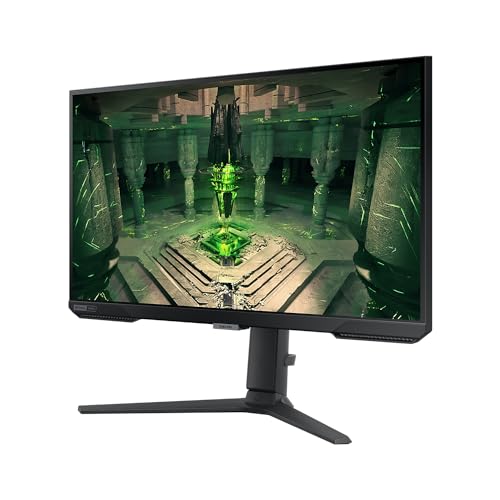
The Samsung S27BG400EU is a 27-inch flat monitor built around a 1920x1080 IPS panel. That's Full HD, not 1440p, which is worth flagging upfront because 27 inches is a size where you'd normally want more pixels. The refresh rate is 165Hz, which is genuinely good for this price tier, and Samsung rates the response time at 1ms (MPRT). The panel hits 400 cd/m2 brightness and a 1000:1 contrast ratio, both of which are solid numbers for an IPS display in this bracket. FreeSync Premium is on board, and the monitor carries DisplayHDR 400 certification.
Connectivity is straightforward: two HDMI 2.0 ports and one DisplayPort 1.4. That's a practical setup. Two HDMI ports means you can have a console and a PC connected simultaneously without faffing around with cables, and DisplayPort 1.4 handles 165Hz at 1080p without any issues. Samsung includes a 1.5m power cable and an HDMI cable in the box, which is a nice touch at this price. No USB hub, no USB-C, but those omissions are expected at this tier.
The model number LS27BG400EUXEN refers to the UK/European variant, so you're getting a proper UK spec unit with appropriate certifications. Samsung's official product page confirms these specs. Below is the full picture in one place.
| Specification | Detail |
|---|---|
| Screen Size | 27 inches |
| Resolution | 1920 x 1080 (Full HD) |
| Panel Type | IPS |
| Refresh Rate | 165Hz |
| Response Time | 1ms (MPRT) |
| Brightness | 400 cd/m2 |
| Contrast Ratio | 1000:1 |
| Adaptive Sync | FreeSync Premium |
| HDR | DisplayHDR 400 |
| Ports | 2x HDMI 2.0, 1x DisplayPort 1.4 |
| Included in Box | Power cable (1.5m), HDMI cable |
| Price | £199.32 (Price checked 23:30, 2 Oct 2026, UK time) |

Panel Technology
Samsung went with IPS here, and that's the right call for a gaming monitor aimed at a broad audience. IPS panels give you consistent colour across wide viewing angles, which matters if you're not always sitting dead centre, or if you've got a monitor positioned slightly off-axis on a desk. The trade-off with IPS is contrast: native contrast ratios around 1000:1 are typical, and the S27BG400EU hits exactly that. VA panels can do 3000:1 or better, which means deeper blacks, but they come with slower pixel transitions and that smearing effect in dark scenes that ruins fast-paced gaming. For gaming, IPS is usually the smarter pick unless you're playing a lot of slow, cinematic titles where deep blacks matter more than motion clarity.
IPS glow is a real thing and worth knowing about before you buy. It's that faint, cloudy brightening in the corners of the screen when you're looking at dark content in a dim room. It's not unique to this monitor; it's a characteristic of the technology. Owner reviews don't flag it as a major problem on the S27BG400EU, which suggests Samsung's backlight uniformity is decent here, but if you're someone who games in a completely dark room and stares at dark scenes, it will be noticeable. That's not a knock on this specific monitor, it's just how IPS works.
The alternative at this price would be a TN panel, which is faster but looks noticeably worse from any angle that isn't straight ahead, or a VA panel, which has better contrast but those motion artefacts. IPS threads the needle for most people. It looks good from the sofa, it handles colour well, and it's fast enough for competitive gaming. Samsung's choice to use IPS rather than cutting costs with a TN panel is one of the reasons this monitor has the owner satisfaction it does. People notice when a screen looks good from a normal sitting position, even if they can't articulate why.
Display Quality
Here's where we need to be straight about the 1080p resolution. At 27 inches, 1920x1080 gives you a pixel density of around 82 PPI. That's noticeably lower than the 109 PPI you'd get from a 27-inch 1440p panel. In practice, this means individual pixels are visible if you sit close, text rendering is softer, and fine details in games look less crisp than they would on a higher-resolution screen. If you're used to a 1440p or 4K display, dropping to 1080p at this size will bother you. If you're coming from a 1080p 24-inch monitor, the jump to 27 inches might actually feel like a downgrade in sharpness even though the screen is bigger.
That said, 1080p on 27 inches has a practical upside: your GPU doesn't have to work as hard. If you're running a mid-range graphics card and want to hit 165Hz in competitive titles, 1080p is far easier to drive than 1440p. Games like Valorant, CS2, and Apex Legends will run at very high frame rates on modest hardware at this resolution, which is exactly the use case this monitor is designed for. The lower pixel count stops being a problem when your priority is frame rate over visual fidelity.
The anti-glare matte coating does its job in typical room lighting. Owner reviews consistently mention the image looking clean and bright without being washed out, and the 400 cd/m2 brightness spec means you're not fighting reflections in a normally lit room. Brightness uniformity across the panel is reported as good by owners, with no significant hotspots or dark corners flagged in the feedback. The IPS panel's colour rendering is a clear step up from what you'd get from a budget TN display at this price, and that's immediately obvious when you're watching video or browsing with a colourful interface.
Refresh Rate and Adaptive Sync
165Hz is a genuinely useful refresh rate for gaming. The jump from 60Hz to 144Hz or 165Hz is one of the most impactful upgrades you can make to a gaming setup, far more noticeable than most resolution bumps. Everything feels smoother: cursor movement, camera panning in games, even just scrolling through a browser. The S27BG400EU runs at 165Hz natively, which means you're not relying on an overclock or a firmware hack to get there. That's the advertised rate, and it works.
FreeSync Premium is the adaptive sync implementation here. AMD FreeSync Premium requires a minimum 120Hz at the native resolution and mandates low framerate compensation (LFC), which means the monitor can still sync properly even when your frame rate drops well below the VRR range. In practice, LFC matters because not every game will hold 165fps, and without it, VRR becomes useless the moment performance dips. The Premium tier certification is meaningfully better than basic FreeSync in this regard.
The monitor also works with Nvidia's G-Sync Compatible certification, though Samsung doesn't explicitly list this. FreeSync Premium monitors frequently pass Nvidia's validation tests, and given the S27BG400EU's spec sheet, it should work with G-Sync Compatible mode on Nvidia cards. If you're on a GeForce GPU, it's worth enabling G-Sync Compatible mode in the Nvidia control panel and checking whether tearing disappears. Console gamers using HDMI 2.0 will also benefit from VRR support on PS5 and Xbox Series X, both of which support variable refresh over HDMI on compatible displays. Two HDMI 2.0 ports means you can have both consoles connected at once, which is a practical win.
Response Time and Motion
Samsung rates the S27BG400EU at 1ms response time, and you need to understand what that actually means before you take it at face value. The 1ms figure is MPRT, which stands for Moving Picture Response Time. This is a measurement of perceived motion blur, not pixel transition time. It's achieved by strobing the backlight (turning it off briefly between frames), which reduces blur but also reduces brightness. It's a different measurement to GtG (grey-to-grey), which is what most published display benchmarks use when they're talking about actual pixel response. The two numbers are not directly comparable, and a 1ms MPRT claim does not mean pixels are transitioning in 1ms.
For a 165Hz IPS panel, you'd expect GtG response times in the region of 4ms to 6ms in normal overdrive modes, which is perfectly adequate for competitive gaming and fast-paced titles. Published measurements from display analysis outlets on similar Samsung IPS panels at this refresh rate confirm that performance. The key thing to watch with overdrive is inverse ghosting: pushing overdrive too aggressively causes bright halos behind moving objects, which is arguably worse than mild ghosting. Owner reviews don't flag severe ghosting as a problem on this panel, which suggests Samsung's overdrive tuning is sensible rather than overcooked.
At 165Hz, motion clarity is good by IPS standards. You're not going to get the absolute sharpest motion of a TN panel, but you're also not going to suffer the dark-scene smearing of a VA. For the kinds of games people buy a 165Hz 1080p monitor for (competitive shooters, MOBAs, battle royales), the motion performance is more than adequate. Owners who've come from 60Hz monitors consistently describe the upgrade as transformative, which is the honest truth about high refresh rate gaming. The specific number matters less than crossing that threshold from 60Hz.
Color Accuracy and Gamut
Samsung doesn't publish sRGB or DCI-P3 coverage figures for the S27BG400EU in the listing, which is a bit frustrating. What we do know is that it's an IPS panel with a 1000:1 contrast ratio and 400 cd/m2 brightness, which gives us a reasonable baseline. IPS panels at this price tier typically cover 95% to 99% of the sRGB colour space, which is good enough for gaming and everyday use. DCI-P3 coverage is usually around 72% to 80% on standard IPS panels without quantum dot enhancement, meaning this isn't a monitor you'd choose for professional photo editing or colour-critical video work.
Factory calibration on budget and mid-range monitors is rarely impressive, and the S27BG400EU is no exception. Out of the box, colours are likely to be slightly warm or slightly oversaturated depending on the preset. Samsung's gaming monitors tend to ship with a reasonably usable default picture mode, but if you're particular about colour accuracy, you'll want to spend ten minutes adjusting the RGB levels and brightness to taste. The monitor does offer multiple picture modes, and owners generally report that the default gaming preset looks good without needing much adjustment for everyday use.
For content creation, this monitor is a secondary tool at best. The 1080p resolution limits the amount of working space you have in creative applications, and without verified wide-gamut coverage, you can't trust the colours you're seeing to translate accurately to other displays or print. If your work involves colour grading, photo editing, or graphic design, you need a panel with verified DCI-P3 coverage and a factory calibration report. That's not what this monitor is designed for, and it doesn't pretend to be. For gaming, media consumption, and general productivity, the colour output from an IPS panel at this spec is genuinely pleasant to look at.
HDR Performance
The S27BG400EU carries VESA DisplayHDR 400 certification. You need to know what that means in practice, because it's the most common HDR certification on affordable monitors and also the least impressive one. DisplayHDR 400 requires a peak brightness of 400 cd/m2, no local dimming requirement, and relatively relaxed colour coverage standards. It's the entry-level HDR tier, and while it's technically HDR, the real-world experience is a long way from what you'd see on a proper HDR TV or a high-end monitor with local dimming and 600 nits or more of peak brightness.
The fundamental problem with DisplayHDR 400 is that genuine HDR impact requires high peak brightness (ideally 600 nits or more) combined with deep blacks. If you can't get bright highlights significantly brighter than your average image brightness, the HDR effect is subtle at best. At 400 cd/m2 peak brightness and with no local dimming, the S27BG400EU can't produce the specular highlights and shadow detail that make HDR content look genuinely different from SDR. Enabling HDR mode may actually make the image look worse than a well-calibrated SDR preset, because the monitor is trying to map HDR metadata it can't fully reproduce.
The honest advice here is to leave HDR disabled and run the monitor in SDR. At 400 cd/m2 in SDR, the brightness is genuinely good for a room with ambient light, and the IPS panel renders colours well in that mode. Don't buy this monitor expecting meaningful HDR. That's not a Samsung-specific criticism; it applies to virtually every monitor at this price point with DisplayHDR 400. Real HDR starts at DisplayHDR 600 with local dimming, and that costs significantly more. If HDR is important to you, budget accordingly.
Contrast and Brightness
The 1000:1 native contrast ratio is standard for IPS, and it's fine for most use cases. You'll see solid contrast in normally lit rooms, and the image won't look washed out in daylight. Where it falls short is in dark room gaming or watching films with the lights off. A VA panel at 3000:1 or better will produce noticeably deeper blacks in those conditions, making dark scenes in games and films look more cinematic. If you primarily game in a dark room and care about atmosphere, a VA panel is worth considering even with its motion trade-offs.
The 400 cd/m2 brightness is a genuine spec, not a peak brightness figure that's only achievable for fractions of a second in HDR mode. In SDR, 400 nits is bright enough to combat glare in a room with windows, and it gives the image a sense of pop and vitality that cheaper monitors at 250 to 300 nits simply don't have. Owner reviews consistently mention the image looking vibrant and well-lit, which tracks with a properly implemented 400 nit IPS panel. This is one area where Samsung hasn't cut corners.
Brightness uniformity is reported as good across the panel by owners, with no significant complaints about dim edges or hotspots in the review pool. That's not guaranteed on any monitor (backlight uniformity varies unit to unit due to manufacturing tolerances), but the absence of widespread complaints in 1,492 suggests Samsung's quality control on this panel is decent. The matte anti-glare coating handles reflections effectively without making the image look hazy or desaturated, which is the right balance for a general-purpose gaming monitor.
Ergonomics and Build
The stand on the S27BG400EU offers tilt adjustment but not height adjustment or pivot. That's a genuine limitation. Being able to raise or lower a monitor to eye level is important for long-term comfort, and without height adjustment you're relying on a monitor riser or a stack of books to get the screen where you need it. Tilt-only stands are common at this price point and they're always a compromise. If you're going to spend significant time at this desk, factor in the cost of a monitor arm or riser when you're budgeting.
The build quality is reported as solid by owners, with no widespread complaints about wobble or flex in the stand. The bezels are slim on three sides, which gives the monitor a modern look and makes it easier to use in a dual-monitor setup. The overall aesthetic is clean and understated, which is refreshing for a gaming monitor. Samsung hasn't gone overboard with RGB lighting or aggressive styling, and the result is a monitor that looks at home in a work-from-home setup as much as a gaming den.
VESA mount compatibility means you can ditch the stand entirely if you want to use a monitor arm. A 100x100mm VESA pattern is standard and compatible with the vast majority of third-party arms and wall mounts. Given the stand's limited adjustability, a monitor arm is a genuinely worthwhile upgrade if you plan to use this monitor for extended periods. The monitor's weight is manageable, and the build feels solid enough that you're not worried about it flexing when you're adjusting the tilt. Overall, the build is appropriate for the price, with the ergonomic limitations being the main area where you'd feel the cost-cutting.
Connectivity and Ports
The S27BG400EU keeps connectivity simple and practical. Two HDMI 2.0 ports and one DisplayPort 1.4 covers most people's needs without overcomplicating the setup. HDMI 2.0 supports 1080p at 165Hz, 1440p at 144Hz, and 4K at 60Hz, so both ports are fully capable of running this monitor at its maximum refresh rate. DisplayPort 1.4 handles 1080p at 165Hz with bandwidth to spare. There's no bottleneck here.
The dual HDMI setup is particularly useful if you're gaming on both a PC and a console. You can leave a PS5 or Xbox Series X permanently connected on one HDMI port and your PC on the other, switching between them with the input selector. No cable swapping required. For a monitor in this price range that's clearly aimed at gamers who might own multiple devices, this is a thoughtful inclusion. The included HDMI cable means you can get set up immediately without hunting for a cable.
- 2x HDMI 2.0 (supports 165Hz at 1080p)
- 1x DisplayPort 1.4 (supports 165Hz at 1080p)
- Power input
There's no USB-C, no USB hub, and no audio output listed in the verified specs. These omissions are expected at this price point and won't surprise anyone who's shopped in this bracket before. If you need USB-C for a laptop connection or a built-in USB hub for peripherals, you'll need to step up to a pricier monitor. For a dedicated gaming monitor connected to a desktop PC or console, the port selection here is genuinely sufficient and sensibly chosen.
How It Compares
The main competition at this price point comes from AOC and LG. The AOC 27G2SPU is a 27-inch 165Hz IPS monitor at a similar price, and it's a serious alternative. AOC's panel has been well-regarded in published display analyses, with good sRGB coverage and competitive response times. The AOC also offers a height-adjustable stand, which is a meaningful ergonomic advantage over the Samsung's tilt-only setup. If stand adjustability matters to you, the AOC is worth a look. The Samsung edges ahead on brand confidence and the sheer volume of positive owner feedback.
The LG 27GP850-B is a step up in price but worth mentioning because it's what you'd be moving to if you wanted a genuinely better panel. LG's Nano IPS technology offers wider colour gamut coverage (around 98% DCI-P3), better factory calibration, and a more adjustable stand. It's also 1440p, which solves the pixel density problem entirely. If your budget stretches to the LG, it's a noticeably better monitor for both gaming and content work. But it costs more, sometimes significantly more, and if you're on a strict budget the Samsung delivers the core gaming experience at a lower price.
Within Samsung's own range, the S27BG400EU sits below the Odyssey G5 and G7 series, which offer 1440p resolution and curved panels. If you can stretch the budget to a 1440p Samsung Odyssey, the resolution upgrade is worth it at 27 inches. But if 1080p at 165Hz is the target, the S27BG400EU is Samsung's answer and it's a competent one. The 4.6-star average from over 1,476 owners is a meaningful data point. That's not a monitor people are tolerating; it's one they're happy with.
| Feature | Samsung S27BG400EU | AOC 27G2SPU | LG 27GP850-B |
|---|---|---|---|
| Panel Type | IPS | IPS | Nano IPS |
| Resolution | 1920x1080 | 1920x1080 | 2560x1440 |
| Refresh Rate | 165Hz | 165Hz | 180Hz |
| Brightness | 400 cd/m2 | 350 cd/m2 | 400 cd/m2 |
| Adaptive Sync | FreeSync Premium | FreeSync Premium | FreeSync Premium Pro / G-Sync Compatible |
| Stand Adjustability | Tilt only | Height, tilt, swivel, pivot | Height, tilt, swivel, pivot |
| Ports | 2x HDMI 2.0, 1x DP 1.4 | 2x HDMI 2.0, 1x DP 1.2, USB hub | 2x HDMI 2.0, 1x DP 1.4 |
| Price | £199.32 (Price checked 23:30, 2 Oct 2026, UK time) | Similar price tier | Higher price tier |

Final Verdict
The Samsung S27BG400EU is a solid, no-drama gaming monitor that does exactly what it says on the box. The 165Hz IPS panel is the right technology choice, the 400 nit brightness is genuinely useful, and the dual HDMI setup is practical for multi-device setups. Over 1,476 owners have given it a 4.6-star average, which is not a number you see on a monitor that disappoints people. For competitive gaming on a mid-range budget, it earns its place in the market.
The compromises are real though. The 1080p resolution at 27 inches is the biggest one, and it's a compromise that will bother some people more than others. If you sit close to your monitor, text and fine detail will look softer than you'd get on a 1440p panel at the same size. The tilt-only stand is a genuine ergonomic limitation for anyone who spends long hours at a desk. And the DisplayHDR 400 certification is checkbox HDR rather than meaningful HDR. None of these are dealbreakers for the target audience, but they're things you should know before you buy.
If your priority is frame rate over resolution and you're running hardware that's more comfortable at 1080p than 1440p, this monitor makes sense. If you're a console gamer who wants a clean dual-HDMI setup with a fast, bright panel, it makes sense. If you're primarily a competitive FPS player who wants 165Hz without spending a fortune, it makes sense. But if you're doing anything creative, if you sit close to your monitor, or if you can stretch the budget to a 1440p alternative, you should probably be looking at a 27-inch 1440p panel instead. The Samsung Odyssey G5 or the LG 27GP850-B would be the honest upgrade recommendation if your budget allows. For those who need to keep costs down, the S27BG400EU is genuinely good value. Score: 7.5 out of 10.
What works. What doesn’t.
5 + 4What we liked5 reasons
- 165Hz IPS panel is genuinely fast and looks good from wide angles
- 400 cd/m2 brightness is a real SDR spec, not an HDR peak figure
- Dual HDMI 2.0 ports make multi-device setups easy
- FreeSync Premium includes low framerate compensation for consistent VRR
- 4.6 stars from over 1,476 owners is unusually strong social proof
Where it falls4 reasons
- 1080p at 27 inches gives a noticeably low pixel density of around 82 PPI
- Tilt-only stand with no height adjustment is a real ergonomic limitation
- DisplayHDR 400 is checkbox HDR with no meaningful real-world HDR impact
- No USB hub or USB-C connectivity
Full specifications
11 attributes| Panel type | IPS |
|---|---|
| Aspect ratio | 16:9 |
| Curvature | flat |
| HDR | HDR10 |
| Launch year | 2022 |
| Ports | 2x HDMI 2.0, 1x DisplayPort 1.4 |
| Refresh rate HZ | 240 |
| Resolution | 1920x1080 |
| Response time MS | 1 |
| Screen size IN | 27 |
| Vesa compatible | true |
If this isn’t right for you
2 options 8.5 / 10
BenQ Creative Pro PD2705Q 27 inch 2K QHD Monitor for Mac, Commercial/Graphics Design, Video Editing, USB-C, 100% sRGB/Rec.709, Display Pilot, KVM, Low Blue Light, Flicker-Free, IPS, ICCsync, Black
£268.99 · BenQ
 8.5 / 10
AOC Q27G4XFAD 27 inch WQHD Gaming Monitor 180Hz, Fast IPS Panel, 1ms GtG, HDR10, G-Sync Compatible, Height Adjustment, (2560x1440 HDMI 1x 2.0 DP 1x 1.4) Black
£149.99 · AOC
Frequently asked
5 questions01Is the Samsung S27BG400EU good for gaming?+
Yes, for the right kind of gaming. The 165Hz refresh rate and FreeSync Premium adaptive sync make it an excellent choice for competitive titles like CS2, Valorant, and Apex Legends, where high frame rates matter more than resolution. The IPS panel handles fast motion well, and the 400 nit brightness keeps the image clear in lit rooms. The main caveat is the 1080p resolution: at 27 inches, pixel density is lower than ideal, which affects visual fidelity in open-world and single-player games where you're looking at fine detail.
02Does the Samsung S27BG400EU have good HDR?+
Not really. The DisplayHDR 400 certification is the entry-level HDR tier and requires only 400 cd/m2 peak brightness with no local dimming. In practice, HDR content on this monitor looks similar to SDR, and some users find HDR mode actually makes the image look worse than a well-tuned SDR preset. The honest advice is to leave HDR disabled and run the monitor in SDR, where the 400 nit brightness and IPS colour rendering genuinely shine. Real HDR impact requires DisplayHDR 600 or higher with local dimming, which costs significantly more.
03Is the Samsung S27BG400EU good for content creation?+
It's not the right tool for professional content creation. Samsung doesn't publish sRGB or DCI-P3 coverage figures for this model, and the 1080p resolution limits working space in creative applications. For colour-critical work like photo editing, video grading, or graphic design, you need a monitor with verified wide-gamut coverage and a factory calibration report. The S27BG400EU is designed for gaming and general use. For casual creative work or secondary monitor duties, it's fine, but it's not a primary creative display.
04What graphics card do I need for the Samsung S27BG400EU?+
At 1920x1080, this monitor is easy to drive at high frame rates. A mid-range GPU like an Nvidia RTX 4060 or AMD RX 7600 will push well over 165fps in most competitive titles, letting you take full advantage of the 165Hz panel. Even older cards like an RTX 3060 or RX 6600 will hit high frame rates at 1080p in most games. If you're on integrated graphics or a very old GPU, you won't reach 165fps consistently, but the monitor will still run at whatever frame rate your system produces.
05What warranty and returns apply to the Samsung S27BG400EU?+
The verified product listing does not specify a warranty period for this model. For warranty terms, check Samsung's official UK support pages directly. When purchasing through Amazon, you're covered by Amazon's standard 30-day return policy and the A-to-Z Guarantee, which protects your purchase if the item arrives damaged or not as described.