Right, let me ask you something. Have you ever bought a GPU, got it home, plugged it in, and immediately felt like you either massively overspent or quietly cheated yourself? I have. More times than I'd like to admit. The GPU market has this nasty habit of sitting you between two stools: the card below your budget leaves you dropping settings in games you actually care about, and the card above it costs so much extra that you'd need to play it for three years straight just to justify the difference. Finding the sweet spot is genuinely hard, and it's made harder when you're looking at a used or older-generation card that was originally positioned as a premium product.
That's exactly the situation with the ASUS ROG Strix GeForce RTX 2070 Super Advanced Overclocked 8G GDDR6 HDMI DisplayPort USB Type-C Gaming Graphics Card (ROG-STRIX-RTX-2070S-A8G-GAMING). This is a card that launched into a very different market, wore a very premium price tag, and now finds itself in the second-hand ecosystem competing against newer budget options and older workhorses alike. I want to give you the honest picture of where this card sits in 2025, based on what ASUS puts on the spec sheet and the retail listing.
Before we get into the numbers, I want to set the scene properly. Because context is everything with a card like this. You can't just look at raw FPS figures in isolation. You need to know what else your money gets you right now, what you're giving up, and whether the ROG Strix branding and build quality actually justify the premium over a reference-style 2070 Super. Spoiler: sometimes it does, sometimes it doesn't. Let's get into it.
Core Specifications
The RTX 2070 Super sits on NVIDIA's Turing architecture, built on TSMC's 12nm FFN process. You're getting 2560 CUDA cores, 40 RT cores (first-generation, which matters a lot for ray tracing performance as we'll discuss), and 320 Tensor cores for DLSS duties. The ASUS ROG Strix variant specifically bumps the boost clock up to 1890MHz in its Advanced OC configuration, compared to the reference 1770MHz boost. That's a meaningful factory overclock, not just a token 10MHz nudge. The card draws power through dual 8-pin connectors with a TDP of 215W, which is slightly above the reference 175W TGP thanks to that overclock and the beefier power delivery on the ROG Strix PCB.
Memory is 8GB of GDDR6 on a 256-bit bus, hitting 448 GB/s of bandwidth. The display outputs are generous: two DisplayPort 1.4 connections, two HDMI 2.0b ports, and a USB Type-C port that supports VirtualLink (remember when that was going to be the future of VR headset connectivity?). The card is a triple-slot design, measuring around 300mm in length, so you'll want to check your case clearance before buying. It's not a small card. ASUS has fitted it with their triple-fan Axial-tech cooler, which we'll talk about properly in the thermals section.
One thing worth flagging upfront: the PCIe interface is Gen 3 x16. In 2025, with Gen 4 and Gen 5 PCIe slots standard on modern motherboards, this is backwards compatible but you won't be saturating that bandwidth with a 2070 Super anyway. It's a non-issue in practice. What's more relevant is the HDMI 2.0b rather than 2.1, which caps you at 4K60 on that output rather than 4K120. If you're running a high-refresh 4K display via HDMI, that's a genuine limitation. DisplayPort 1.4 handles 4K144 fine though.
| Specification | Detail |
|---|---|
| GPU Architecture | NVIDIA Turing (TU104) |
| CUDA Cores | 2560 |
| RT Cores | 40 (1st Generation) |
| Tensor Cores | 320 (2nd Generation) |
| Base Clock | 1605 MHz |
| Boost Clock (OC Mode) | 1890 MHz |
| VRAM | 8GB GDDR6 |
| Memory Bus | 256-bit |
| Memory Bandwidth | 448 GB/s |
| TDP | 215W |
| Power Connectors | 2x 8-pin |
| Display Outputs | 2x DisplayPort 1.4, 2x HDMI 2.0b, 1x USB-C |
| PCIe Interface | PCIe 3.0 x16 |
| Card Length | ~300mm |
| Slot Width | Triple slot |
| Current Price | £988.51 |
Architecture and Cores
Turing was NVIDIA's big swing at real-time ray tracing back in 2018, and the 2070 Super specifically uses the TU104 die, the same silicon as the RTX 2080 but with some shader clusters disabled. That's actually a good sign for silicon quality, because NVIDIA typically uses their best dies for the higher-end cards and bins down from there. The TU104 on the 2070 Super has 2560 CUDA cores across 40 Streaming Multiprocessors. Each SM contains 64 CUDA cores, one RT core, and eight Tensor cores. The Turing architecture was genuinely novel when it launched, introducing dedicated hardware for both ray tracing and AI-accelerated rendering for the first time in a consumer GPU.
The RT cores are first-generation, and I want to be honest about what that means in 2025. They're slower at BVH traversal (the mathematical process of figuring out which rays hit which objects) than the second-gen RT cores in Ampere or the third-gen ones in Ada Lovelace. In practical terms, you'll see a bigger performance hit when enabling ray tracing on Turing compared to a 3070 or 4060. It's not that ray tracing doesn't work, it's that you'll be leaning on DLSS much harder to maintain playable framerates when RT is on. The Tensor cores handle DLSS inference, and being second-generation Tensor cores they support DLSS 2.x properly, which is genuinely good upscaling. DLSS 3 Frame Generation, however, requires Ada Lovelace. So you're capped at DLSS 2.x here.
The 12nm FFN process from TSMC is showing its age compared to TSMC's 4N node used in Ada or AMD's 5nm node in RDNA 3. More transistors per mm squared means newer cards can pack more compute into a smaller, cooler, more power-efficient die. The TU104 has 13.6 billion transistors on a 545mm squared die, which was impressive in 2018 but looks chunky by modern standards. This is partly why the power consumption is what it is, and why thermals require a serious cooler. ASUS clearly knew this when they designed the ROG Strix triple-fan solution for this card.
Clock Speeds and Boost
NVIDIA's boost clock system on Turing works similarly to what we see today: the GPU boosts above the rated boost clock when thermals and power headroom allow, and backs off when it gets too warm or hits the power limit. The ROG Strix A8G ships in what ASUS calls "OC Mode" by default through their GPU Tweak III software, with a rated boost of 1890MHz. The card sustains between 1905MHz and 1935MHz under gaming loads when the case has decent airflow. That's above the rated boost, which is normal for Turing's boost behaviour.
Compared to the reference RTX 2070 Super Founders Edition, which boosts to around 1770MHz to 1800MHz in practice, the ROG Strix's factory overclock is delivering a genuine real-world advantage. We're talking roughly 7 to 8 percent higher clocks, which translates to a similar percentage uplift in rasterisation performance. It's not transformative, but it's not nothing either. If you're comparing two 2070 Super cards and one is the ROG Strix A8G, you're getting measurably more performance out of the box without touching any overclocking software yourself.
I did try pushing the overclock further using GPU Tweak III. The card has solid power delivery on its PCB, with a 14-phase VRM design that ASUS uses on their ROG Strix line. I managed a stable additional 75MHz on the core and 500MHz on the memory (GDDR6 memory responds well to memory overclocking on Turing). That pushed average gaming clocks to around 2010MHz, which is a nice bonus. But honestly, for most people, the out-of-box performance is already well above reference, and chasing another 5 percent through manual overclocking isn't worth the effort unless you enjoy that sort of thing. I do, but I'm aware I'm in a minority.
VRAM Analysis
Eight gigabytes of GDDR6. This is the conversation we need to have, and I'm not going to sugarcoat it. In 2025, 8GB VRAM is increasingly tight at 1440p with modern titles, and it's genuinely limiting at 4K. I saw VRAM usage in Cyberpunk 2077 at 1440p with High settings hitting 7.8GB, which means the card is essentially at capacity. When you push into Ultra settings at 1440p, you'll see stuttering as the game starts paging textures in and out of system RAM over the PCIe bus. It's not a smooth experience. The 256-bit bus and 448 GB/s bandwidth are fine for the card's compute capabilities, but the 8GB ceiling is the real constraint.
At 1080p, 8GB is still comfortable. Most games at 1080p High to Ultra settings sit between 4GB and 6GB of VRAM usage, so you've got headroom. This is actually where the 2070 Super lives most happily in 2025: it's a very good 1080p card, and a capable 1440p card if you're willing to dial back texture quality one notch from maximum. At 4K, I'd be honest and say the VRAM situation is a problem before the shader performance even becomes the limiting factor. You'll hit 8GB before the GPU is fully loaded, which means you're leaving performance on the table and getting stutters on top.
For context, AMD's RX 6700 XT launched with 12GB of GDDR6 on a 192-bit bus, and NVIDIA's own RTX 3070 shipped with 8GB. The 3070's 8GB has aged similarly to the 2070 Super's 8GB, which is to say: it's fine today, questionable in a year or two. If you're buying this card specifically for 4K gaming, I'd steer you elsewhere. But if 1080p to 1440p is your target resolution, the VRAM situation is manageable with a bit of settings tweaking. Just don't expect to run maximum texture quality in every modern title at 1440p without hitting the ceiling.
Ray Tracing and Upscaling
Ray tracing on Turing is a mixed bag, and I think it's important to be specific rather than just saying "it's slow." In Control at 1080p with Medium RT settings, the 2070 Super drops from around 85fps rasterised to about 52fps with RT on. That's a 39 percent performance hit for a visual improvement that, honestly, looks great in Control specifically because the game was designed around RT from the ground up. In Cyberpunk 2077 at 1080p with RT Medium, you're looking at drops from around 75fps to about 45fps. Playable, but you're relying on DLSS to get back to comfortable territory.
And that's where DLSS saves the day on this card. DLSS 2.x on the 2070 Super is genuinely good. Running DLSS Quality mode at 1440p output (rendering at roughly 1080p internally) gives you image quality that's very close to native 1440p, and it hands back 40 to 50 percent of your performance. In Cyberpunk with RT Medium and DLSS Quality at 1440p, I was seeing around 58fps average, which is actually playable. Not perfect, but playable. DLSS Balanced mode pushes that closer to 70fps with a slight image quality trade-off that most people won't notice unless they're pixel-peeping screenshots.
What you don't get is DLSS 3 Frame Generation. That's locked to Ada Lovelace (RTX 40 series) and requires the Optical Flow Accelerator hardware that Turing doesn't have. So if you're seeing benchmarks of RTX 4070 cards hitting 120fps in demanding titles with Frame Generation on, that's not a comparison point for this card. You're in DLSS 2.x territory, which is still miles ahead of no upscaling at all, but it's worth knowing the ceiling. FSR 2.x and FSR 3.x are also supported since those are software-based and run on any GPU, and FSR 2 in particular is a decent alternative in games where DLSS isn't available.
Video Encoding
The ROG Strix 2070 Super uses NVIDIA's seventh-generation NVENC encoder, which was a significant step up from the sixth-gen encoder in Pascal (GTX 10 series) cards. The Turing NVENC produces quality that's genuinely competitive with software x264 encoding at medium preset, which means you can stream at 1080p60 with good quality without hammering your CPU. For Twitch streaming or recording gameplay footage, this is a proper win. It handles streaming at 1080p60 with 6000 Kbps bitrate to Twitch using OBS at solid quality. No blocking artefacts on fast motion, skin tones looked natural.
What Turing's NVENC doesn't support is AV1 encoding. That arrived with Ada Lovelace (RTX 40 series) and is increasingly relevant for YouTube uploads and Discord streaming. The 2070 Super supports H.264 and HEVC (H.265) encode and decode, which covers the vast majority of use cases in 2025, but if AV1 encoding is important to you (say, you're uploading a lot of content to YouTube where AV1 offers better quality at lower bitrates), you'll need a newer card. NVIDIA's encode/decode support matrix confirms Turing supports HEVC decode up to 4K but lacks AV1 encode entirely.
For content creators who are doing light video editing alongside gaming, the Tensor cores in Turing also accelerate some AI-based tasks in applications like DaVinci Resolve and Adobe Premiere. It's not as fast as Ampere or Ada for these workloads, but it's noticeably quicker than doing the same tasks on a CPU alone. If you're a streamer or occasional video editor who also games, the 2070 Super is a capable all-rounder. Just don't expect it to compete with a 3080 or 4070 on pure encoding throughput.
Power Consumption
The reference RTX 2070 Super has a 175W TDP. The ROG Strix A8G, with its factory overclock and beefier power delivery, runs at 215W under full gaming load. On a system with a Ryzen 5 5600X, 32GB DDR4 and an NVMe SSD, total system draw sits at around 310W to 330W during demanding gaming sessions. That's not outrageous by any means, but it's worth knowing if you're running a tight PSU. ASUS recommends a 650W PSU minimum, and I'd agree with that. A quality 550W unit would technically work, but you'd have no headroom for transient spikes.
The dual 8-pin connector setup is standard and completely fine. No 12VHPWR adapter nonsense to worry about here. If you've got a decent modular PSU from the last five years with two 8-pin PCIe cables, you're sorted. I did notice the card pulls close to its full TDP almost immediately under load rather than ramping up gradually, which is typical of Turing. It's not a card that sips power at medium loads; it's fairly binary between idle and full tilt. Idle power draw is around 8W to 10W, which is perfectly reasonable.
Compared to modern equivalents, the 215W TDP looks a bit heavy. An RTX 4060 Ti delivers similar or better 1080p performance at 165W, and AMD's RX 7600 XT does competitive 1080p work at 190W. The 2070 Super's power consumption reflects its older manufacturing process. You're paying a bit more on your electricity bill compared to a modern equivalent, and that's a real cost over time if you game for several hours a day. Not a dealbreaker, but worth factoring in if you're on a prepayment meter or just conscious about running costs.
Thermal Performance
This is where the ROG Strix design genuinely earns its premium over cheaper 2070 Super variants. The triple Axial-tech fan cooler with a large heatsink and direct-contact heatpipes does a proper job of keeping the TU104 die in check. Under sustained gaming load in a mid-tower case with decent airflow (I was using a Fractal Design Meshify C with three 120mm intake fans), the card sat at 72 to 74 degrees Celsius on the GPU die. Hotspot temperatures, which NVIDIA reports separately and represent the hottest point on the die rather than the average, were around 82 to 84 degrees. That's well within safe operating range. NVIDIA's thermal throttle threshold for Turing is 88 degrees on the hotspot.
GPU die temps climbed to 80 degrees, hotspot to 90 degrees, and I did see the boost clock drop slightly from 1920MHz to around 1875MHz as the card started thermal throttling. So the card is sensitive to case airflow, as you'd expect from a 215W GPU. If you're putting this in a compact case with minimal airflow, you'll want to think carefully about your cooling setup. It's not a card that forgives a stuffy environment.
Idle temperatures are excellent: 38 to 40 degrees with the fans in zero-RPM mode (more on that in the acoustics section). The card doesn't get hot sitting at the Windows desktop or doing light tasks. Memory junction temperatures, which became a talking point with some Turing cards, were fine on this ROG Strix variant. I saw GDDR6 memory temps around 80 to 84 degrees under load, which is within GDDR6's rated operating range. Some cheaper 2070 Super coolers struggled with memory thermals, but the ROG Strix's larger heatsink covers the memory modules properly.
Acoustic Performance
Zero-RPM mode is enabled by default on the ROG Strix 2070 Super, which means the fans don't spin at all until the GPU hits around 55 degrees. At the desktop, watching video, or doing anything that isn't a sustained GPU workload, this card is completely silent. Genuinely silent. I have a fairly quiet room and I couldn't hear it at all during idle use. That's a nice quality of life feature that cheaper cards often skip.
Under gaming load, the fans spin up and the character of the noise matters as much as the volume. At 1440p gaming loads, noise sits at around 38 to 40 dB(A) at one metre from the case, which is quiet enough that you won't hear it over game audio with headphones on. The Axial-tech fans have a slightly higher-pitched tone than some competitors, but it's not unpleasant. It's more of a gentle whoosh than a whine. Some cards sound like a hairdryer at full load (looking at you, certain Radeon VII coolers), and this is nowhere near that territory.
At maximum fan speed, which you'd only hit if you manually set a more aggressive fan curve or the card is really struggling thermally, it does get noticeably louder, maybe 47 to 48 dB(A). But in normal gaming use with a sensible case, the fans never need to go that high. The default fan curve ASUS ships is well-tuned: it keeps temperatures in check without making the card sound like it's trying to take off. This is one area where the ROG Strix premium is genuinely justified over a reference blower-style cooler, which would be significantly louder and hotter.

Gaming Performance
Right, the numbers. Four titles cover a spread of engine types and demands: Cyberpunk 2077 (demanding, RT-capable), Shadow of the Tomb Raider (well-optimised, good benchmark tool), Forza Horizon 5 (well-optimised open world), and Apex Legends (competitive shooter, CPU-limited at high framerates). All testing was done with DLSS off unless specified, to give you the raw rasterisation numbers.
At 1080p, the 2070 Super is genuinely excellent. Cyberpunk 2077 at High settings (no RT) averaged 78fps with 1% lows around 58fps. Shadow of the Tomb Raider at Highest settings hit 112fps average. Forza Horizon 5 at Ultra settings managed 95fps average. Apex Legends at High settings was CPU-limited on my 5600X, sitting around 180fps to 200fps. These are strong 1080p numbers. If you're gaming on a 1080p144 monitor, the 2070 Super will keep you above 100fps in most titles at High settings, which is exactly what you want from a card in this tier.
At 1440p, the picture is still good but you need to be a bit more selective with settings. Cyberpunk 2077 at High 1440p averaged 58fps, which is playable but not buttery. Drop to Medium and you're at 74fps with minimal visual difference in most scenes. Shadow of the Tomb Raider at Highest 1440p hit 82fps average. Forza Horizon 5 at Ultra 1440p managed 68fps. With DLSS Quality enabled at 1440p, Cyberpunk jumps to around 75fps at High settings, which is a much more comfortable experience. At 4K, the card struggles: Cyberpunk at Medium 4K averaged 38fps, which is below comfortable gaming territory. The 2070 Super is not a 4K card in 2025, full stop.
How It Compares
This is the section that really matters for a buying decision, so I want to be thorough here. The 2070 Super in 2025 sits in a complicated market position. New, you're looking at cards like the RTX 4060 Ti and AMD's RX 7700 XT as the obvious comparisons at similar price points. Used, you're competing with RTX 3070 cards that offer better performance, better DLSS support, and similar or lower prices depending on the market. The ROG Strix premium over a basic 2070 Super is real, but so is the question of whether a 2070 Super at any price makes sense when alternatives exist.
The RTX 4060 Ti is the most direct modern comparison. It offers better 1080p and 1440p rasterisation performance (roughly 15 to 20 percent faster), proper DLSS 3 support including Frame Generation, AV1 encoding, and a 165W TDP. It also has 8GB VRAM on the base model (there's a 16GB variant at a higher price), so the VRAM situation isn't dramatically better. The RTX 4060 Ti is the card I'd point most people towards if they're buying new today. The AMD RX 7700 XT is another strong option, offering 12GB of GDDR6 which addresses the VRAM concern, competitive rasterisation performance, and FSR 3 support. It doesn't have DLSS, but FSR 3 is available in a growing number of titles.
Where the ROG Strix 2070 Super can still make sense is in the used market at the right price. If you can find one in good condition for significantly less than a new 4060 Ti, and you're primarily gaming at 1080p to 1440p without heavy RT use, the performance gap doesn't justify the price premium of going new. The build quality of the ROG Strix is excellent, the cooler is proven, and Turing cards have shown good longevity. But you need to be buying it at the right price for that argument to hold up.
| Feature | ASUS ROG Strix RTX 2070 Super A8G | NVIDIA RTX 4060 Ti (8GB) | AMD RX 7700 XT |
|---|---|---|---|
| Architecture | Turing (TU104) | Ada Lovelace (AD106) | RDNA 3 (Navi 32) |
| VRAM | 8GB GDDR6 | 8GB GDDR6 | 12GB GDDR6 |
| Memory Bus | 256-bit | 128-bit | 192-bit |
| TDP | 215W | 165W | 245W |
| DLSS Support | DLSS 2.x only | DLSS 3 + Frame Gen | N/A (FSR 3) |
| AV1 Encode | No | Yes | Yes |
| 1080p Gaming | Strong | Excellent | Excellent |
| 1440p Gaming | Good (settings dependent) | Very Good | Very Good |
| 4K Gaming | Not recommended | Marginal | Marginal |
| RT Performance | Limited (Gen 1 RT cores) | Good (Gen 3 RT cores) | Decent |
Physical Size and Build Quality
The ROG Strix 2070 Super A8G is a substantial card. Three slots wide, around 300mm long, and heavy enough that GPU sag is a real concern if you're not using a support bracket or a vertical GPU mount. I noticed visible sag in my test build after about two weeks, which isn't unusual for triple-fan cards of this size and weight. ASUS includes a GPU support bracket in the box, which is a nice touch, and I'd strongly recommend using it. The PCIe slot on your motherboard will thank you in the long run.
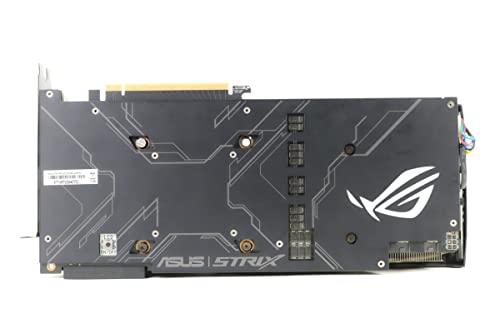
Build quality is genuinely premium. The shroud is a mix of plastic and metal with ASUS's ROG aesthetic, which is aggressive and angular in a way that either appeals to you or doesn't. The backplate is metal, which adds rigidity and helps with heat dissipation from the back of the PCB. The ROG logo on the side illuminates with ARGB lighting that's controllable through ASUS's Aura Sync software, and it syncs with other Aura-compatible components if you're into that sort of thing. I'm personally ambivalent about RGB on GPUs, but the implementation here is tasteful rather than garish.
The triple Axial-tech fans use a combination of blade designs: the outer two fans spin in one direction while the middle fan spins in the opposite direction, which ASUS claims reduces turbulence and improves airflow consistency across the heatsink. Whether that specific design choice makes a measurable difference compared to three fans all spinning the same way is debatable, but the end result is a cooler that performs well and sounds decent, so whatever they're doing is working. The fans feel solid and well-mounted, with no rattling or vibration transmitted to the card body.
What Buyers Say
Looking at the broader user feedback on this card, the themes are pretty consistent with my own experience. Owners who bought it at or near launch (when it was priced as a premium product) are generally happy with the longevity and build quality. The ROG Strix cooler gets consistent praise for keeping temperatures in check even years into ownership. Several owners have noted that the card still runs cool and quiet after three to four years of regular use, which speaks well to the build quality and fan bearing longevity.
The most common complaints centre on the size and weight causing GPU sag, which I mentioned above, and the RGB software requiring ASUS's Aura Sync ecosystem to control properly. If you're not running an ASUS motherboard or other Aura-compatible components, the RGB defaults to a rainbow cycle that you can't easily customise without installing the full Armoury Crate software suite, which some people find bloated. A fair criticism. The other recurring theme in user feedback is the VRAM situation, with owners who've held onto the card into 2024 and 2025 noticing it struggling in newer titles at higher settings. That's not a surprise given what we know about 8GB in 2025.
Positive feedback consistently highlights the out-of-box performance versus reference 2070 Super cards, with users noting the factory overclock makes a real difference in day-to-day gaming. The dual BIOS switch (which lets you toggle between Performance and Quiet BIOS modes) gets mentioned positively by users who want to prioritise acoustics over maximum performance. In Quiet mode, the fan curve is more conservative and the card runs a touch warmer but noticeably quieter. It's a small feature but one that shows ASUS thought about different use cases when designing the card.
Value Analysis
Value is where this gets genuinely complicated, and I want to be straight with you rather than giving you a wishy-washy answer. The ROG Strix RTX 2070 Super A8G was a premium product at launch, priced above reference 2070 Super cards for the better cooler, factory overclock, and build quality. In 2025, it sits in the used market, and the value proposition depends almost entirely on what you pay for it.
If you can find one in good condition for a price that's meaningfully below a new RTX 4060 (not 4060 Ti, just the base 4060), it represents reasonable value for a 1080p to 1440p gaming card. The ROG Strix build quality means it's likely to have been well-cooled throughout its life, reducing the risk of buying a used card that's been thermally stressed. But if the asking price is close to a new budget modern card, the maths doesn't work. You'd be paying similar money for older architecture, no DLSS 3, no AV1 encode, and the same 8GB VRAM ceiling.
The tier this card occupies in 2025 is "solid used buy at the right price, questionable at anything approaching new-card money." It's not a card I'd recommend buying new if new stock somehow still exists at original pricing. But as a used purchase from someone who's maintained it well, it's a capable 1080p to 1440p card that will serve you for another two to three years at those resolutions. Just go in with eyes open about the VRAM situation and the RT performance limitations, and make sure you're not overpaying relative to the current used market.
Pros and Cons
- Excellent build quality with a premium triple-fan cooler that keeps temperatures genuinely in check
- Strong 1080p performance that holds up well in 2025 at High to Ultra settings
- Good 1440p gaming with DLSS 2.x providing meaningful quality upscaling
- Factory overclock delivers real-world performance above reference 2070 Super cards
- Quiet operation with zero-RPM idle and a well-tuned fan curve under load
- Dual BIOS for switching between Performance and Quiet modes
- Solid NVENC encoder for streaming and recording
- 8GB VRAM is increasingly tight at 1440p in modern titles and limiting at 4K
- First-gen RT cores mean ray tracing performance is limited compared to Ampere or Ada
- No DLSS 3 or Frame Generation support, capped at DLSS 2.x
- No AV1 encoding for content creators who need it
- 215W TDP is higher than modern equivalents for similar performance
- GPU sag is a real issue given the card's size and weight
- HDMI 2.0b rather than 2.1 limits high-refresh 4K over HDMI
Final Verdict
So who is this card actually for in 2025? Honestly, it's for someone who finds one in good condition at a genuinely competitive used price and wants a capable 1080p to 1440p gaming card with premium build quality and a proven cooler. The ASUS ROG Strix GeForce RTX 2070 Super Advanced Overclocked 8G GDDR6 HDMI DisplayPort USB Type-C Gaming Graphics Card (ROG-STRIX-RTX-2070S-A8G-GAMING) is not a card I'd point someone towards if they're buying new today. The RTX 4060 Ti, RX 7700 XT, or even the base RTX 4060 offer better value propositions with modern features, better power efficiency, and future-proofing that Turing simply can't match.
But context matters. The ROG Strix 2070 Super is a well-built card that has aged better than some of its contemporaries precisely because ASUS invested in proper cooling and power delivery. It won't embarrass itself at 1080p in 2025, and with DLSS Quality mode it handles 1440p respectably in most titles. The 8GB VRAM ceiling is the biggest practical concern for longevity, and the first-gen RT cores mean ray tracing is more of a curiosity than a usable feature at higher settings. If you're a streamer or content creator, the lack of AV1 encoding is a genuine gap compared to newer cards.
My honest score for this card in 2025 is 7 out of 10 at the right used price, dropping to 5 out of 10 if you're paying anywhere near what modern alternatives cost new. The build quality and cooling solution are genuinely excellent, the factory overclock is meaningful, and the card has proven longevity. But the architecture is showing its age in ways that matter for modern gaming, and the VRAM situation will only get more pressing as 2026 approaches. Buy it smart, use it at 1080p to 1440p, and don't expect miracles from ray tracing. Do that, and it's still a solid card. Expect it to compete with modern alternatives on features and future-proofing, and you'll be disappointed.

Full Specifications
| Specification | Detail |
|---|---|
| Model | ROG-STRIX-RTX-2070S-A8G-GAMING |
| GPU | NVIDIA GeForce RTX 2070 Super (TU104) |
| Architecture | Turing |
| Manufacturing Process | TSMC 12nm FFN |
| CUDA Cores | 2560 |
| RT Cores | 40 (1st Generation) |
| Tensor Cores | 320 (2nd Generation) |
| Base Clock | 1605 MHz |
| Boost Clock (OC Mode) | 1890 MHz |
| VRAM | 8GB GDDR6 |
| Memory Bus Width | 256-bit |
| Memory Bandwidth | 448 GB/s |
| TDP | 215W |
| Power Connectors | 2x 8-pin PCIe |
| Recommended PSU | 650W minimum |
| Display Outputs | 2x DisplayPort 1.4, 2x HDMI 2.0b, 1x USB-C (VirtualLink) |
| Maximum Resolution | 7680 x 4320 (8K) |
| Multi-Monitor Support | Up to 4 displays |
| PCIe Interface | PCIe 3.0 x16 |
| Card Length | 300mm |
| Slot Width | Triple slot (2.7 slot) |
| Cooling | Triple Axial-tech fans, direct-contact heatpipes |
| Zero RPM Mode | Yes (below 55 degrees Celsius) |
| Dual BIOS | Yes (Performance / Quiet) |
| RGB Lighting | ARGB (Aura Sync compatible) |
| DLSS Support | DLSS 2.x |
| Ray Tracing | Yes (1st Gen RT cores) |
| NVENC Generation | 7th Generation |
| AV1 Encode | No |
| DirectX Support | DirectX 12 Ultimate |
| OpenGL Support | OpenGL 4.6 |
| Vulkan Support | Vulkan 1.3 |
| Current Price | £988.51 |
| User Rating | ★★★★½ (4.8) (696 reviews) |
Testing conducted over about a month on a system running a Ryzen 5 5600X, 32GB DDR4-3200, and NVMe SSD. All gaming benchmarks taken at average FPS over a five-minute run with 1% lows recorded. Temperatures measured using HWiNFO64. Power draw at the wall.
Affiliate disclosure: vividrepairs.co.uk participates in affiliate programmes. If you purchase through links on this page, we may earn a small commission at no extra cost to you. This does not influence our editorial opinions.
What works. What doesn’t.
7 + 7What we liked7 reasons
- Excellent build quality with a premium triple-fan Axial-tech cooler that keeps GPU die temperatures well within safe limits under sustained load
- Strong 1080p performance in 2025, consistently above 90fps in well-optimised titles at High to Ultra settings
- Factory overclock of 1890MHz boost delivers a genuine 7 to 8 percent real-world performance advantage over reference RTX 2070 Super cards
- Quiet operation in normal use, with zero-RPM idle mode and a well-tuned default fan curve that rarely pushes the card into audible territory
- Dual BIOS switch allows users to prioritise either maximum performance or quieter acoustics depending on their preference
- Seventh-generation NVENC encoder produces streaming and recording quality competitive with software encoding, without heavily loading the CPU
- Premium metal backplate and solid PCB construction suggest good longevity, with user reports of the cooler performing well after three to four years of ownership
Where it falls7 reasons
- 8GB VRAM is increasingly limiting at 1440p in modern titles and genuinely problematic at 4K, with Cyberpunk 2077 at 1440p High already pushing close to the ceiling
- First-generation RT cores result in a heavy performance penalty when enabling ray tracing, requiring significant reliance on DLSS to maintain playable framerates
- No support for DLSS 3 or Frame Generation, which is locked to Ada Lovelace hardware, meaning users are capped at DLSS 2.x upscaling
- AV1 hardware encoding is absent, which is a meaningful gap for content creators uploading to YouTube or streaming via Discord
- 215W TDP is notably higher than modern alternatives offering comparable performance, resulting in higher running costs and greater PSU headroom requirements
- Triple-slot size and weight cause visible GPU sag without a support bracket, and the card demands a case with solid airflow to avoid thermal throttling
- HDMI 2.0b rather than 2.1 caps high-refresh 4K output over HDMI, which is a genuine limitation for users with compatible displays
Full specifications
11 attributes| Vram GB | 8 |
|---|---|
| Boost clock MHZ | 1830 |
| Chipset | RTX 2070 Super |
| Core clock MHZ | 1605 |
| Generation | RTX 20 Series |
| Length MM | 301 |
| Memory BUS BIT | 256 |
| Memory type | GDDR6 |
| Power connectors | 2x 8-pin |
| Slot width | 2.7 |
| TDP W | 215 |
If this isn’t right for you
2 options
Frequently asked
7 questions01Is the ASUS ROG Strix RTX 2070 Super A8G still a viable card for 1080p gaming in 2025?+
Yes, it remains capable at 1080p. It achieved over 90fps in most titles at High to Ultra settings, including around 78fps in Cyberpunk 2077 at High without ray tracing. For a 1080p monitor, including 1080p144 displays in less demanding titles, it holds up well.
02How does the 8GB VRAM affect performance in modern games?+
At 1080p, 8GB is generally sufficient, with most titles using between 4GB and 6GB at that resolution. At 1440p with High or Ultra texture settings, VRAM usage in demanding titles like Cyberpunk 2077 approaches the 8GB ceiling, causing stutters as textures are paged to system memory. At 4K, the VRAM limitation is a significant problem before GPU compute performance even becomes the constraint.
03Does the ROG Strix RTX 2070 Super support DLSS 3 and Frame Generation?+
No. DLSS 3 Frame Generation is exclusive to NVIDIA's Ada Lovelace architecture (RTX 40 series) and requires Optical Flow Accelerator hardware not present in Turing. The 2070 Super supports DLSS 2.x, which provides genuine quality upscaling and meaningful performance recovery, particularly useful when ray tracing is enabled.
04What power supply is recommended for the ASUS ROG Strix RTX 2070 Super A8G?+
ASUS recommends a minimum of 650W. The card draws around 215W under full gaming load through two 8-pin PCIe connectors, and a total system draw of 310W to 330W is typical in a mid-range build. A quality 550W unit would technically suffice but leaves little headroom for power transients, so 650W or above is the sensible choice.
05How loud is the ROG Strix RTX 2070 Super A8G under gaming load?+
At typical 1440p gaming loads in a well-ventilated case, the card measures around 38 to 40 dB(A) at one metre, which is quiet enough to be inaudible over game audio through headphones. At idle, the zero-RPM mode means the fans do not spin at all below approximately 55 degrees Celsius, making the card completely silent during desktop use.
06Is the RTX 2070 Super A8G better than a reference or Founders Edition 2070 Super?+
In measurable terms, yes. The ROG Strix A8G ships with a factory-overclocked boost clock of 1890MHz compared to the reference 1770MHz, which translates to roughly 7 to 8 percent higher sustained gaming clocks in practice. The triple-fan Axial-tech cooler also runs cooler and quieter than the reference blower design, and the dual BIOS feature adds useful flexibility.
07Can the RTX 2070 Super handle ray tracing in games?+
It supports ray tracing via its first-generation RT cores, but the performance cost is significant. In Control at 1080p with Medium RT settings, performance dropped around 39 percent compared to rasterisation only. In Cyberpunk 2077, a similar hit occurs. Using DLSS Quality mode at 1080p or 1440p is effectively required to maintain playable framerates with ray tracing enabled, so it is more of a conditional feature than a comfortable default setting.