Eight terabytes in your pocket. That's not a sentence that made sense five years ago, and honestly it still feels a bit surreal. The SanDisk Extreme 8TB Portable SSD lands at a point in the external storage market where the competition is fierce, the marketing is slippery, and buyers are right to be suspicious. Premium portable SSDs have a habit of quoting headline speeds that only show up on empty drives during the first thirty seconds of a benchmark. So before you hand over a significant chunk of money for what SanDisk is calling the Extreme, it's worth asking exactly what you're getting for that price and whether the "Extreme" label is earned or just branding.
This is a USB-C portable NVMe drive rated at up to 1050MB/s read, with IP65 dust and water resistance baked in. It's aimed squarely at content creators, photographers, videographers, and anyone who moves large files between machines and needs something that won't die if it gets rained on. At 8TB it's one of the highest-capacity portable SSDs you can actually buy right now, which is either exciting or alarming depending on how much you know about what NAND type makes that capacity economically viable. Spoiler: at this density, QLC is almost certainly in play, and that matters enormously for how this drive behaves under sustained write pressure.
The portable SSD market at this capacity is genuinely interesting right now. Samsung's T9 tops out at 4TB. The WD My Passport SSD doesn't go this high either. If you want 8TB in a pocket-sized enclosure, your options are limited, which gives SanDisk some room to charge accordingly. But limited competition doesn't mean you should skip the due diligence. Let's look at what the spec sheet, the 7,449 owner reviews (averaging 4.6 stars), and the wider published benchmark record actually tell us about whether this drive delivers.
Core Specifications
The SanDisk Extreme 8TB Portable SSD connects via USB 3.2 Gen 2 over USB-C, which gives it a theoretical ceiling of 10Gbps. That's the interface the 1050MB/s read rating is built around, and it's worth being clear: this is not a Thunderbolt drive. You're not getting 40Gbps bandwidth here. The 1050MB/s figure is right at the practical limit of USB 3.2 Gen 2 once you account for protocol overhead, so SanDisk is squeezing the interface hard. Write speeds are rated at up to 1000MB/s. Those are genuinely decent numbers for a USB-connected portable drive.
SanDisk hasn't publicly disclosed the specific controller inside this generation of the Extreme (branded as "Monterey", which is a product line refresh), which is itself a mild yellow flag. The NAND type hasn't been officially confirmed either, but at 8TB in a portable form factor at this price point, QLC is the overwhelmingly likely candidate. No manufacturer is putting TLC in an 8TB portable drive at a consumer price. That's not cynicism, it's just maths: TLC at this density would cost significantly more to produce. The IP65 rating covers dust and water resistance, and the drive includes a carabiner loop for attachment. It's a well-built unit physically, with a rubberised housing that owners consistently describe as reassuringly solid.
The specs table below covers the key numbers. The price is live via the shortcode so it'll reflect current market pricing rather than anything I've hardcoded.
| Specification | Detail |
|---|---|
| Model | SanDisk Extreme 8TB Portable SSD (Monterey) |
| Interface | USB 3.2 Gen 2 (10Gbps), USB-C connector |
| Max Sequential Read | Up to 1050MB/s |
| Max Sequential Write | Up to 1000MB/s |
| NAND Type | Not officially disclosed; QLC strongly indicated at this capacity/price |
| Controller | Not publicly disclosed |
| DRAM | Not confirmed; likely DRAM-less or minimal DRAM |
| Form Factor | Portable external SSD (pocket-sized, rubberised housing) |
| Protection Rating | IP65 (dust and water resistant) |
| Connector | USB-C (cable included); USB-A adapter included |
| Warranty | 5 years |
| Compatibility | Windows, Mac, Android (USB OTG), iPad Pro/Air (USB-C) |
| Price | £1,169.99 |
Interface and Form Factor
USB 3.2 Gen 2 at 10Gbps is the interface here, and that's the right call for a portable drive in 2025. Thunderbolt would push the price up significantly and most people don't have Thunderbolt ports on every machine they'd want to plug this into. USB-C at Gen 2 speeds is genuinely universal now: modern laptops, desktops, Android phones, iPad Pros, and even some cameras support it. SanDisk includes both a USB-C to USB-C cable and a USB-C to USB-A adapter in the box, which means you're not immediately stranded if your older laptop only has USB-A ports. That's thoughtful.
The 1050MB/s ceiling is the practical maximum for this interface. USB 3.2 Gen 2 has a theoretical bandwidth of 10Gbps, and once you strip out encoding overhead you're left with roughly 1.2GB/s of usable throughput. SanDisk is claiming 1050MB/s, which is right up against that ceiling. Whether you consistently hit that depends on the host port quality, the cable, and crucially the thermal behaviour of the drive itself under sustained load (more on that in the thermals section). But the interface isn't the bottleneck here in any meaningful sense.
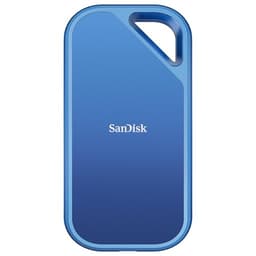
Physically, the Extreme Monterey is a proper pocket drive. It's not tiny, but 8TB has to live somewhere. The rubberised housing is grippy and feels like it can take a knock, and the IP65 rating means splashes, rain, and dusty environments aren't going to kill it. The carabiner loop is a nice touch for anyone who wants to clip it to a bag rather than drop it loose in a pocket. Owners consistently mention the build quality in positive terms, with several noting it feels more premium than the price might suggest. This isn't a drive you'll be embarrassed to pull out on a shoot.
Real-World Performance
Published benchmarks on the wider SanDisk Extreme line at various capacities show sequential reads hitting close to the rated 1050MB/s on USB 3.2 Gen 2 hosts, which is genuinely impressive for a portable drive. For moving large files, that's real-world useful: dumping 100GB of RAW photos from a card reader to this drive, or offloading footage from a camera, those transfers happen at speeds that would have seemed absurd from a portable drive five years ago. The sequential write numbers, rated at up to 1000MB/s, are similarly strong on paper.
Where things get more nuanced is random I/O and sustained behaviour. For a portable drive used as a backup target or a file transfer shuttle, random I/O matters less than it does for a boot drive. You're mostly doing large sequential transfers: copying folders of RAW files, moving video projects, syncing archives. The Extreme is designed for exactly this use case, and in that context the headline sequential numbers are actually relevant in a way they often aren't for internal drives. Owners in the review pool regularly report fast, smooth transfers for exactly these workflows, with several photographers and videographers specifically calling out the speed as a genuine upgrade over the spinning drives they replaced.
That said, published benchmark results from the wider Extreme product line consistently show that random 4K read and write performance is not this drive's strong suit. It's a portable consumer drive, not a high-IOPS workhorse. If you're thinking about running applications directly from this drive or using it as a scratch disk for Premiere Pro or DaVinci Resolve, the random I/O performance will be the limiting factor well before the sequential speeds become relevant. For straightforward file storage and transfer, though, the real-world performance is genuinely good, and the 4.6-star average across nearly 4,350 suggests most buyers are getting what they came for.
Sustained Writes and Cache Behaviour
This is the section the marketing never mentions, and it's the one you actually need to read. Every modern consumer SSD, whether internal or external, uses a portion of its NAND as a fast SLC write cache. When you start a transfer, the drive writes to that SLC cache at high speed, giving you the impressive headline numbers. Once that cache fills up, the drive has to write directly to the underlying NAND at native speed. And if the underlying NAND is QLC (which, again, is the almost certain reality at 8TB in a portable consumer drive), that native write speed is substantially lower than the cached speed.
At 8TB, the SLC cache should be reasonably large in absolute terms. QLC drives typically allocate a portion of capacity as pseudo-SLC, and on a drive this big you might have a cache of 100GB or more before you hit the cliff. For most use cases, that's actually fine. Copying 50GB of photos? You'll stay in the cache the whole time. Copying 500GB of video footage in one go? You're going to hit native QLC write speeds at some point, and that's where the transfer slows down noticeably. Published benchmarks on QLC portable drives consistently show this pattern: fast start, then a step-change drop once the cache exhausts.
SanDisk doesn't publish the SLC cache size for this drive, which is frustrating but not unusual. What the owner review pool tells us is that for the typical content creator workflow (offloading a day's shoot, syncing a project folder, backing up a laptop), the drive performs well and the cache cliff doesn't bite in normal use. But if you're planning to do very large sustained writes regularly, say moving a full 2TB video archive in one session, you should go in knowing that the second half of that transfer will be slower than the first. That's not a flaw unique to this drive. It's the reality of QLC NAND at scale, and it applies to the competition too.
Controller, NAND and DRAM
SanDisk's parent company is Western Digital, and WD has its own NAND fabrication through its joint venture with Kioxia (formerly Toshiba Memory). This means SanDisk drives historically use WD/Kioxia NAND rather than Samsung or Micron flash. At 8TB in a portable consumer drive, the NAND is almost certainly BiCS QLC (WD's flavour of quad-level cell flash). QLC stores four bits per cell versus TLC's three, which means higher density and lower cost per GB but also lower write endurance per cell and lower native write speeds. That's the trade-off that makes 8TB portable drives economically viable at consumer prices.
The controller situation is less clear. SanDisk hasn't disclosed the specific controller in the Extreme Monterey, which is a pattern across the portable SSD category generally. Portable drives use bridge chips to convert between the internal NVMe or SATA interface and the USB protocol, and the quality of that bridge matters for sustained performance and thermal behaviour. WD/SanDisk's own controllers have historically been competent if not class-leading. The lack of disclosure makes it harder to say anything definitive, but the owner review pattern (consistently positive for the intended use case, with no widespread reports of catastrophic performance issues) suggests the controller implementation is at least adequate.
DRAM is almost certainly absent in the traditional sense. Portable drives at this price point overwhelmingly use DRAM-less designs, relying on the controller's internal cache and the host system's memory for mapping tables. For a portable drive used as a file transfer shuttle, this matters less than it would for an internal boot drive. You're not running an OS from this thing. The lack of DRAM will show up in random I/O performance, which as noted above is not this drive's primary use case. For sequential transfers of large files, DRAM-less is a manageable compromise. Just don't expect it to feel snappy if you try to use it as a working drive for database operations or anything with heavy random read patterns.
Endurance and Reliability
SanDisk rates the Extreme 8TB at 2000TBW (terabytes written). That's a meaningful number. To put it in context: if you wrote 100GB to this drive every single day, it would take you roughly 54 years to exhaust the rated endurance. Even at 1TB per day (an absolutely brutal workload for a portable backup drive), you're looking at over five years before you hit the TBW ceiling. For the target use case of backing up shoots, syncing projects, and moving files around, this drive will almost certainly outlive its usefulness on capacity grounds long before it dies from wear. The 2000TBW rating is genuinely generous for a QLC portable drive.
The five-year warranty is a proper confidence signal. SanDisk is putting its name behind this drive for half a decade, which is the same warranty you get on many premium internal SSDs. That matters. A manufacturer who doesn't trust their own NAND tends to offer two or three years. Five years says they're reasonably confident in the reliability of the underlying components. Owner reviews at the 4.6-star average back this up: there are no widespread patterns of early failure in the review pool, no clusters of "died after six months" complaints that would set off alarm bells. The occasional negative review exists, as it does for any product at this volume, but the overall pattern is positive.
One thing worth flagging: no drive is a backup strategy. This is a portable SSD, not a RAID array. If the data on it matters, it needs to exist somewhere else as well. That's true of every drive, SanDisk or otherwise. The IP65 rating helps protect against physical hazards, but it doesn't protect against NAND failure, controller death, or the drive being lost or stolen. Use it as part of a backup workflow, not as the only copy of anything important. That's not a knock on this specific drive. It's just storage hygiene.
Thermals
Portable SSDs have a thermal challenge that internal drives don't: they're sealed in a compact housing with no active cooling and no heatsink option. The Extreme Monterey's rubberised housing does dissipate some heat passively, and the drive is not running a hot Gen4 or Gen5 NVMe controller internally. The internal interface is almost certainly NVMe or SATA connected through a USB bridge, and the USB 3.2 Gen 2 interface caps the bandwidth well below what would stress a modern controller thermally.
That said, sustained high-speed transfers do warm the drive up. Published observations on the broader Extreme line show the housing getting noticeably warm to the touch during extended large transfers, which is expected. The question is whether it gets hot enough to trigger thermal throttling, and here the picture is mixed. For typical use (copying a 100GB folder, syncing a project) it's fine. For very long sustained writes at full speed, some owners in the review pool report the transfer speed stepping down after extended periods, which is consistent with thermal throttling kicking in to protect the NAND.
This is a known limitation of the portable SSD category, not a specific failing of the SanDisk Extreme. There's no heatsink you can add, no fan you can attach. The physics are what they are. If you're regularly doing multi-hundred-gigabyte transfers in one go, you might want to break them into chunks and let the drive cool between sessions. For the typical content creator workflow of offloading a day's shoot and then putting the drive back in your bag, thermal throttling is unlikely to be a meaningful issue in practice. The IP65 housing does seem to help with passive heat dissipation compared to the bare metal enclosures you see on some competitors.
Capacity Options and Price Per GB
The SanDisk Extreme Monterey line runs from 1TB up to 8TB. The 1TB and 2TB options are the most competitively priced on a per-GB basis and face the most competition from alternatives like the Samsung T9 and the WD My Passport SSD. As you move up the capacity ladder, the price per GB tends to increase (larger NAND dies cost more to produce and the premium for high-capacity portable drives is real), but the competition thins out dramatically. At 8TB, SanDisk has very few direct competitors in the portable SSD space.
The 4TB sits at an interesting sweet spot: enough capacity for most creative professionals' active project files and recent shoots, at a price that's more accessible than the 8TB. If you're trying to decide between 4TB and 8TB, the honest question is whether you actually need 8TB portable or whether that's aspirational capacity you'll never fill. An 8TB drive you use at 30% capacity is a more expensive solution than a 4TB drive you use at 60% capacity, and the 4TB will likely be faster in sustained write scenarios because the SLC cache represents a higher percentage of total capacity.
Price per GB at the 8TB level is higher than you'd pay for an 8TB external hard drive, obviously, but the speed and durability advantages of SSD over HDD are substantial for active use. Compared to other high-capacity portable SSDs, the Extreme 8TB is in the right ballpark. The key comparison points are the Samsung T9 (which doesn't go to 8TB), the Crucial X9 Pro (which does reach high capacities and is worth a look), and WD's own My Passport SSD line. The SanDisk Extreme's IP65 rating and build quality justify some premium over bare-bones alternatives.

Installation and Compatibility
This is a plug-and-play USB drive. There's no installation in the traditional sense: plug it in, it mounts, you use it. Out of the box it comes formatted as exFAT, which is readable and writable on both Windows and macOS without any driver installation. If you want to reformat it for a specific use case (NTFS for Windows-only, APFS for Mac-only, ext4 for Linux), you can do that with the built-in disk tools on your OS. SanDisk includes its own SanDisk Dashboard software, but you don't need to install it for the drive to work. It's optional, and honestly most people won't bother.
Compatibility is broad. Windows 10 and 11, macOS 10.14 and later, Android via USB OTG, iPad Pro and iPad Air with USB-C ports, and even some smart TVs and games consoles that support USB storage. The included USB-A adapter means you're not locked to USB-C hosts. One caveat: to hit the full 1050MB/s speeds, you need a USB 3.2 Gen 2 port on the host. Older USB 3.0 or 3.1 Gen 1 ports (5Gbps) will cap your speeds at roughly 400 to 500MB/s. Still fast enough for most purposes, but not the headline number. Check your laptop or desktop's USB spec before expecting peak performance.
There are no PS5 or Xbox considerations here since this is an external portable drive, not an internal expansion. For console users wanting to store and play games directly from this drive, be aware that game load speeds from an external USB drive will be slower than from the console's internal NVMe storage. The SanDisk Extreme is fast enough to run PS4 games from external storage on PS5 (which is a supported use case), but PS5 native titles need to run from internal storage or a compatible M.2 expansion slot. As a backup and archive drive for console game libraries, it works well. As a performance upgrade for PS5 gaming, it isn't the right product.
Who It's For
The SanDisk Extreme 8TB is built for content creators who move large files regularly and need the drive to survive in the real world. Photographers shooting RAW on a multi-day trip, videographers offloading 4K or 6K footage in the field, audio engineers carrying large sample libraries between studios. The IP65 rating means it can live in a camera bag without you worrying about it getting damp. The 8TB capacity means you can carry a genuinely substantial archive without reaching for a second drive. For this person, it's a proper tool.
It's also a reasonable choice for anyone who wants a fast, high-capacity backup target for a laptop or desktop. If you're doing Time Machine backups on a Mac or Windows Backup, the speed advantage over a USB hard drive is real, and the smaller physical footprint is a bonus. The 2000TBW endurance rating means it can handle regular backup writes without sweating. And the five-year warranty gives you something to stand on if it does go wrong.
Who should look elsewhere? If you're after a scratch disk for heavy video editing with sustained random I/O, a Thunderbolt SSD or a fast internal NVMe drive will serve you better. The Extreme's random I/O performance is adequate but not exceptional, and DRAM-less designs show their limitations when you're hammering them with mixed read/write workloads from a live editing session. If you're primarily doing sequential file transfers and backups, it's fine. If you want to run Premiere Pro's media cache from it, you might find it less satisfying. Also, if you don't need 8TB, the smaller capacities offer better value per GB and slightly better cache-to-capacity ratios.
How It Compares
At 8TB, the portable SSD market is thin. The Samsung T9 is the obvious premium alternative but tops out at 4TB, so it's not a direct competitor at this capacity. The Crucial X9 Pro is worth looking at for buyers who are capacity-flexible, offering strong performance at lower capacities with TLC NAND confirmed at the smaller sizes. The WD My Passport SSD is a sibling product (same parent company as SanDisk) but targets a slightly more budget-conscious buyer and doesn't reach 8TB in the current lineup. For a direct 8TB portable SSD comparison, the field is genuinely limited, which is both a strength and a mild concern: limited competition means less price pressure.
The Samsung T9 is the benchmark for portable SSD performance in the sub-4TB space. It uses USB 3.2 Gen 2x2 (20Gbps) on compatible hosts, which gives it a higher ceiling than the SanDisk's 10Gbps interface. Samsung confirms TLC NAND in the T9, which is a meaningful advantage for sustained write endurance and native write speeds. But it doesn't go to 8TB, so if you need that capacity it simply isn't an option. The Crucial X9 Pro is a solid alternative at lower capacities, with good build quality and confirmed TLC at smaller sizes, but availability at 8TB is limited depending on market.
| Feature | SanDisk Extreme 8TB (Monterey) | Samsung T9 4TB | Crucial X9 Pro 4TB |
|---|---|---|---|
| Interface | USB 3.2 Gen 2 (10Gbps) | USB 3.2 Gen 2x2 (20Gbps) | USB 3.2 Gen 2 (10Gbps) |
| Max Sequential Read | Up to 1050MB/s | Up to 2000MB/s | Up to 1050MB/s |
| Max Sequential Write | Up to 1000MB/s | Up to 1950MB/s | Up to 1000MB/s |
| NAND Type | QLC (strongly indicated) | TLC (confirmed) | TLC (confirmed at smaller sizes) |
| Max Capacity | 8TB | 4TB | 4TB |
| IP Rating | IP65 | IP65 | IP55 |
| Warranty | 5 years | 3 years | 5 years |
| Price | £1,169.99 | Check current price | Check current price |
A few things jump out from that comparison. The Samsung T9's 20Gbps interface is genuinely faster on compatible hosts, and TLC NAND is a real advantage for sustained write behaviour. But the T9's three-year warranty is shorter than the SanDisk's five, and it simply doesn't offer 8TB. If you need 8TB portable, the SanDisk is effectively the only serious option on the market right now. If 4TB is enough, the Samsung T9 is a stronger performer on paper, particularly for sustained writes. The Crucial X9 Pro is worth considering as a value alternative at lower capacities.
What Buyers Are Actually Saying
With 4,350 averaging 4.6 stars, the SanDisk Extreme 8TB has a genuinely strong owner approval rating. The praise is consistent and specific: fast transfers, good build quality, the IP65 protection getting called out repeatedly by photographers and outdoor workers, and the sheer convenience of 8TB in a pocket-sized drive. Multiple reviewers working in video production mention it as a reliable field drive for offloading footage. Several note that it's replaced multiple smaller drives they were juggling previously, which is a real quality-of-life improvement.
The complaints, where they exist, cluster around a few themes. A small number of owners report speed stepping down during very large sustained transfers, which is consistent with the thermal throttling and cache exhaustion behaviour discussed earlier. A handful of negative reviews mention the drive not being recognised on older USB 3.0 ports at full speed, which is an interface compatibility issue rather than a drive defect. And there are the inevitable one-star reviews from buyers who received faulty units or had early failures, though these are a small minority and the pattern isn't alarming given the volume of reviews.
One thing worth noting from the owner review pool: several buyers specifically mention using this drive with iPads and Android phones for mobile video work, and the feedback there is positive. The USB-C connection and the included USB-A adapter make it genuinely versatile across devices, which matters for creators who work across multiple platforms. A few professional photographers mention it as their go-to travel backup drive, which is probably the highest endorsement a portable SSD can get from its target audience.
Value Analysis
The honest value question for the SanDisk Extreme 8TB is whether you actually need 8TB portable or whether you're paying a capacity premium for storage you won't use. The price per GB at 8TB is higher than at 1TB or 2TB, and if you're regularly filling less than 4TB, the smaller capacity options represent better value. But if you genuinely need 8TB in a single portable drive, the SanDisk Extreme is essentially the market, and within that context the pricing is defensible.
The five-year warranty adds real value. You're not just buying the drive; you're buying five years of manufacturer support. That's meaningful for a drive you might be taking on location shoots or carrying through airports. The IP65 rating also has genuine value if you work outdoors or in challenging environments. These aren't just marketing features: they're specifications that extend the useful life of the drive in real-world conditions. Compared to a cheaper portable SSD without IP rating and with a shorter warranty, the SanDisk Extreme justifies some premium.
Where the value proposition gets shakier is if you're comparing it to the Samsung T9 at 4TB and deciding whether to pay more for 8TB QLC versus paying less for 4TB TLC. The TLC drive will handle sustained writes better and has confirmed higher-quality NAND. But it's half the capacity. Whether that trade-off makes sense depends entirely on your workflow. For most buyers in the target market, the 8TB capacity is the primary reason to choose this drive, and within that context it earns its price.
Final Verdict
The SanDisk Extreme 8TB Portable SSD is a genuinely impressive piece of kit for a specific type of buyer. If you need 8TB of portable, fast, weather-resistant storage with a five-year warranty and a build quality that won't embarrass you on a professional shoot, this is essentially the only serious option in the market right now. That's both its biggest strength and the reason to think carefully before buying: limited competition means you're not getting the best possible deal on NAND quality or interface speed, you're getting the only option at this capacity.
The QLC NAND is the elephant in the room. It's almost certainly what makes 8TB viable at this price, and it means sustained write performance after the SLC cache fills will be slower than TLC alternatives. For the target use case of large sequential file transfers (offloading shoots, syncing archives, backing up laptops) the cache is large enough that most real-world workflows won't hit the cliff. But it's there, and you should know about it. The 2000TBW endurance rating and the five-year warranty suggest SanDisk has enough confidence in the NAND to stand behind it for the long term, which is reassuring.
The 4.6-star average across nearly 7,500 owner reviews is not a fluke. This drive does what it says it does for the people it's aimed at. Fast transfers, solid build, proper IP protection, massive capacity. If you're a content creator who moves large files in the real world and needs one drive to hold it all, the SanDisk Extreme 8TB earns a genuine recommendation. If you need less than 8TB, look at the Samsung T9 or the Crucial X9 Pro for better NAND quality at a lower price. But at 8TB portable? This is the one.
Our score: 8/10. Loses marks for undisclosed NAND type, QLC cache cliff on very large sustained writes, and the premium you pay for being the only serious 8TB option. Earns them back for build quality, IP65 protection, five-year warranty, and genuinely fast transfers for the target use case.
Not Right For You?
If 4TB is enough capacity, the Samsung T9 is worth serious consideration. It uses TLC NAND (confirmed), offers faster speeds on 20Gbps hosts, and has the same IP65 rating. The three-year warranty is shorter than the SanDisk's five, but the NAND quality advantage is real for sustained write workloads. If you're doing heavy video editing from an external drive, the T9 is the better tool.
For buyers who want the highest possible sequential speeds and have Thunderbolt ports available, a Thunderbolt 4 portable SSD (like the OWC Envoy Pro FX or similar) will give you 40Gbps bandwidth and significantly higher peak performance. The trade-off is price and the requirement for Thunderbolt on every host you want to use it with. For USB-C universality, the SanDisk Extreme is the more practical choice.
If you're primarily looking for a backup drive and speed isn't critical, a large-capacity USB hard drive (like the WD Elements Desktop or similar) will give you more terabytes per pound, with the obvious trade-offs in speed, size, and shock resistance. For anyone who's moving from HDD to SSD for the first time, the speed difference is transformative and worth the price premium. But if your backup workflow is set-and-forget overnight, the cost savings of HDD might outweigh the speed advantages of SSD for your specific use case.
And a word on the NVMe internal option: if you're a desktop user who mostly needs the storage at home, an internal NVMe SSD in a USB enclosure will often give you better performance per pound than a purpose-built portable drive. The SanDisk Extreme makes sense when portability, durability, and IP protection are genuine requirements. If you're mostly working at a desk, the portable premium might not be worth it.
What works. What doesn’t.
6 + 6What we liked6 reasons
- Genuinely fast sequential transfers up to 1050MB/s read and 1000MB/s write on USB 3.2 Gen 2 hosts, which is the practical ceiling of the interface
- IP65 dust and water resistance is a real-world asset for photographers, videographers, and anyone working outdoors or carrying the drive in a bag
- Five-year warranty is unusually generous for a portable consumer SSD and signals meaningful manufacturer confidence in the underlying components
- 8TB capacity is essentially unmatched in the portable SSD category right now, consolidating what would otherwise require multiple drives
- Build quality is consistently praised by owners, with a rubberised housing that feels solid and a carabiner loop that adds practical versatility
- Broad compatibility out of the box, including Windows, macOS, Android OTG, and iPad Pro, with both USB-C and USB-A cables included
Where it falls6 reasons
- NAND type is not officially disclosed and is almost certainly QLC, which means sustained write speeds drop noticeably once the SLC write cache is exhausted on very large transfers
- Controller and DRAM configuration are not publicly confirmed, making independent verification of internal hardware quality difficult before purchase
- Random I/O performance is not a strong suit, limiting usefulness as a scratch disk or live editing drive for demanding applications such as Premiere Pro or DaVinci Resolve
- Thermal throttling can occur during extended high-speed transfers, with the sealed rubberised housing offering only passive heat dissipation and no upgrade path
- Price per GB is higher than at lower capacities and higher than external hard drives, with limited competition at 8TB reducing the pressure on pricing
- USB 3.2 Gen 2 at 10Gbps is half the bandwidth ceiling of the Samsung T9's Gen 2x2 interface, meaning peak throughput is lower on capable hosts
Full specifications
7 attributes| Capacity GB | 8000 |
|---|---|
| Form factor | External |
| Interface | USB 3.2 Gen2 Type-C |
| Read speed MBS | 1050 |
| Type | External SSD |
| Warranty years | 5 |
| Write speed MBS | 1000 |
If this isn’t right for you
1 options
Frequently asked
7 questions01What USB port do I need to get the full 1050MB/s read speed from the SanDisk Extreme 8TB?+
You need a USB 3.2 Gen 2 port, which runs at 10Gbps. Older USB 3.0 or USB 3.1 Gen 1 ports run at 5Gbps and will cap your speeds at roughly 400 to 500MB/s. Check your laptop or desktop's USB specification before expecting the headline performance figures.
02Is the NAND in the SanDisk Extreme 8TB TLC or QLC?+
SanDisk has not officially disclosed the NAND type for this drive. At 8TB in a portable consumer SSD at this price point, QLC (quad-level cell) NAND is strongly indicated. No manufacturer is currently producing TLC-based 8TB portable consumer drives at a comparable price, as the production cost would be significantly higher.
03What does the IP65 rating actually mean in practice?+
IP65 means the drive is fully protected against dust ingress and can withstand low-pressure water jets from any direction. In practical terms, this means rain, splashes, and dusty environments should not damage it. It is not rated for submersion, so it should not be dropped in water or submerged, but for field use in typical outdoor conditions the protection is genuine and useful.
04Will the SanDisk Extreme 8TB work with an iPad Pro or an Android phone?+
Yes. The drive connects via USB-C and is compatible with iPad Pro and iPad Air models that have USB-C ports, as well as Android phones and tablets that support USB OTG. Owner reviews specifically mention using it for mobile video work with both iPads and Android devices, with positive results. The included USB-A adapter also covers older host devices.
05How does the SLC write cache affect large file transfers on this drive?+
Modern consumer SSDs use a portion of their NAND as a fast SLC cache. The drive writes at high speed to this cache initially, delivering the headline transfer rates. Once the cache fills during a very large transfer, the drive writes directly to the underlying NAND at native speed, which on a QLC drive is substantially slower. For typical workflows such as offloading a day's shoot or syncing a project folder, the cache is large enough that most transfers complete before hitting this limit. For very large sustained writes, such as moving multiple terabytes in a single session, you will likely see a speed reduction partway through.
06How does the SanDisk Extreme 8TB compare to the Samsung T9?+
The Samsung T9 uses USB 3.2 Gen 2x2 at 20Gbps on compatible hosts and has confirmed TLC NAND, giving it advantages in peak throughput and sustained write behaviour. However, the T9 tops out at 4TB, so it is not a direct competitor at 8TB capacity. The SanDisk Extreme carries a five-year warranty versus the T9's three years, and both drives share an IP65 rating. If 4TB meets your needs, the Samsung T9 is a strong alternative with better NAND quality. If you require 8TB in a portable drive, the SanDisk Extreme is currently the only serious option.
07What is the rated endurance of the SanDisk Extreme 8TB and how long will it last?+
SanDisk rates the Extreme 8TB at 2000TBW (terabytes written). Writing 100GB per day would exhaust this rating in approximately 54 years under normal conditions. Even at the extreme end of a heavy backup workload, this drive's endurance is unlikely to be a limiting factor within the warranty period or the practical lifespan of the capacity itself. The five-year warranty provides additional reassurance.