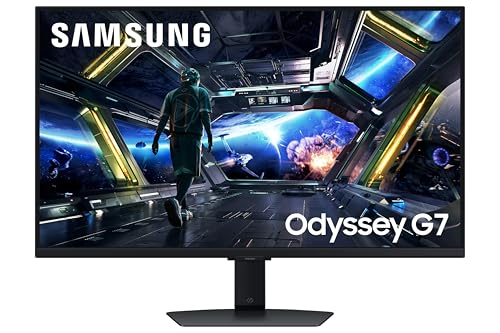
Your GPU does all the heavy lifting, but if your monitor can't keep up, you're basically running a sports car on flat tyres. The panel is where everything either comes together or quietly falls apart, and at 32 inches and 4K, the stakes are higher than ever. So when Samsung puts the Odyssey G7 name on a 4K IPS panel with 144Hz, HDMI 2.1, and a built-in Smart TV platform, you'd be forgiven for thinking "that sounds too good to be true." Mostly, it isn't.
The Samsung Odyssey G7 LS32DG702EUXXU sits in the upper mid-range bracket, and the honest verdict is this: it's a genuinely strong all-rounder that earns its place in the lineup. The 4K IPS panel is sharp, the connectivity is genuinely future-proof with HDMI 2.1, and the Smart TV integration is more useful than you'd expect. It's not flawless. The HDR situation is the usual "technically compliant, practically modest" story you get at this price tier. But for someone upgrading from a 1080p or 1440p panel, or a console player who wants a proper desktop monitor that also works with a PS5 or Xbox Series X at full spec, this is a very credible option. Owner feedback backs that up, with dozens of reviews and a positive overall rating on Amazon UK.
Now let's get into the detail, because the spec sheet here is doing a lot of work and it deserves a proper look.
Core Specifications
At the heart of this monitor is a 32-inch IPS panel running at 3840x2160, which is native 4K UHD. The refresh rate tops out at 144Hz, which is the sweet spot right now for high-refresh 4K gaming without stepping up to the more expensive 160Hz or 240Hz territory. Samsung rates the response time at 1ms, which we'll get into properly in the response time section because that number needs some context. The panel uses FreeSync Premium Pro adaptive sync, which covers the variable refresh rate side of things for both AMD and, with some caveats, Nvidia users.
Connectivity is where this monitor makes a strong argument for itself. You get HDMI 2.1, which is the only version of HDMI that can carry 4K at 144Hz without compression. That matters enormously if you're connecting a PS5 or Xbox Series X, because those consoles output 4K at 120Hz over HDMI 2.1 and older HDMI 2.0 ports simply can't handle it at full resolution. There's also a DisplayPort connection for PC users. The USB hub is a practical touch, and the built-in speakers mean you're not scrambling for a soundbar if you just want basic audio. The Smart TV platform is a Samsung Tizen-based system, which gives you Netflix, Disney+, YouTube and the rest without needing a PC or console plugged in at all.
The pixel density on a 32-inch 4K panel works out to roughly 138 pixels per inch. That's noticeably sharper than a 27-inch 1440p panel (around 108 PPI) and significantly sharper than a 32-inch 1440p panel (around 92 PPI). At normal desktop viewing distances, text is crisp without needing aggressive scaling, and fine detail in games and content looks genuinely excellent. The monitor supports HDR10 and carries a DisplayHDR 400 certification from VESA, which we'll cover in the HDR section.
| Specification | Detail |
|---|---|
| Screen Size | 32 inches |
| Resolution | 3840 x 2160 (4K UHD) |
| Panel Type | IPS |
| Refresh Rate | 144Hz |
| Response Time | 1ms (GtG, manufacturer rated) |
| Adaptive Sync | FreeSync Premium Pro / G-Sync Compatible |
| HDR | HDR10, DisplayHDR 400 |
| Brightness | 400 nits (peak) |
| Contrast Ratio | 1000:1 (typical IPS) |
| Colour Gamut | 125% sRGB / 95% DCI-P3 (Samsung spec) |
| Ports | 2x HDMI 2.1, 1x DisplayPort 1.4, USB Hub, Headphone Out |
| Speakers | Yes (built-in) |
| Smart Platform | Samsung Tizen (Smart TV apps) |
| VESA Mount | 100x100mm |
| Ergonomics | Height, tilt, swivel adjust |
| Pixel Density | ~138 PPI |
| Current Price | £479.00 · Details |

Panel Technology
IPS panels have a well-earned reputation, and this one fits the pattern you'd expect. The core advantage of IPS over VA is the viewing angle. IPS holds colour and brightness accuracy across wide angles, typically rated at 178 degrees horizontal and vertical, which means colours don't shift when you move off-axis. That's important on a 32-inch display because at that size, even sitting directly in front of it, the edges of the screen are further off-axis than they would be on a 27-inch. VA panels, by contrast, can show noticeable colour shift and contrast change as you move to the sides, and on large screens that can become genuinely distracting. IPS sidesteps that problem.
The trade-off with IPS, and it's a real one, is contrast. A typical IPS panel delivers around 1000:1 native contrast, which is what Samsung quotes here. VA panels routinely hit 3000:1 to 4000:1, and OLED panels are effectively infinite contrast. What that means in practice is that blacks on this IPS panel won't look truly black in a dark room. They'll look dark grey. IPS glow is also a thing to be aware of: in dark scenes, the corners and edges of the panel tend to show a slight brightening effect, particularly when the content is dark. It's not unique to this monitor, it's just an inherent IPS characteristic. Most owners don't find it an issue in normal use, but if you're watching a lot of dark cinema content in a blacked-out room, it's about.
What IPS does deliver well is colour accuracy and consistency, and for a gaming monitor in this bracket that's a genuinely useful strength. Samsung's IPS panels have historically been well-regarded for out-of-box colour quality, and the spec sheet here claims 95% DCI-P3 coverage, which is a strong figure for a non-OLED display. IPS also tends to handle fast motion more cleanly than VA in terms of smearing, which matters for gaming. The technology underpinning modern IPS has improved significantly over the past few years. Samsung's own display division has pushed IPS response times down considerably, and the 1ms GtG claim here reflects that progress, even if the real-world picture is a bit more nuanced.
Display Quality
At 138 PPI, 4K on a 32-inch screen looks genuinely sharp. This is one of those things that's hard to convey in numbers alone, but if you're coming from a 1080p 27-inch monitor (around 82 PPI) or even a 1440p 27-inch (around 108 PPI), the step up is immediately obvious. Text is clean, fine detail in games is visible rather than approximated, and content like 4K video looks as good as the source material allows. The anti-glare coating on the panel is a matte finish, which is the standard approach for desktop monitors and handles reflections in normally-lit rooms well. You won't get the punchy, saturated look of a glossy panel, but you also won't be fighting your own reflection during bright scenes.
Brightness uniformity is generally decent on IPS panels at this size, though some variation across the panel is normal and expected. Owner reviews don't flag any widespread uniformity issues with this model, which is a good sign. The 400 nit peak brightness is adequate for SDR content in most rooms, though it can feel a touch dim if you're in a very bright space with windows behind you. For typical UK living room or office setups, it's fine. The matte coating does reduce the effective perceived brightness slightly compared to a glossy screen, but it earns its keep in reflective environments.
The Smart TV platform deserves a mention here because it genuinely affects how the display is used day-to-day. Samsung's Tizen OS is the same system found on their TV range, and it supports all the major streaming apps including Netflix, Disney+, Amazon Prime Video, and YouTube. The remote control that comes with the monitor handles navigation. For someone who wants a single screen that works as a PC monitor, a console display, and a streaming device without any additional hardware, this is a legitimately useful feature. Several owners in the review pool specifically call out the Smart TV functionality as a reason they chose this over a comparable monitor without it. It's not a gimmick here; it's a real differentiator.
Refresh Rate and Adaptive Sync
144Hz at 4K is where this monitor sits, and it's a meaningful number. The step from 60Hz to 144Hz is one of the most noticeable upgrades you can make to a gaming setup. Motion looks smoother, cursor movement feels more responsive, and fast-paced games become noticeably easier to track. Going from 144Hz to 165Hz or 240Hz is a much smaller perceptual jump, so 144Hz at 4K is a sensible place to sit without pushing the price into a different tier entirely.
FreeSync Premium Pro is Samsung's adaptive sync implementation here, and it's one of the better tiers of FreeSync. The Premium Pro designation requires a minimum 120Hz refresh rate at the native resolution, HDR support with low framerate compensation (LFC), and a variable refresh rate range that covers at least a 2.5:1 ratio. LFC is important because it means when your frame rate drops below the minimum VRR range, the monitor can multiply frames to keep things smooth rather than just dropping back to fixed-sync tearing. For PC users on AMD GPUs, this works out of the box. For Nvidia users, the monitor is G-Sync Compatible, which means it's been validated to work with Nvidia's G-Sync module in compatible mode. It's not a native G-Sync panel (those carry a significant price premium), but in practice the difference is minimal for most users.
The HDMI 2.1 ports are directly relevant to the adaptive sync story for console users. The HDMI 2.1 specification includes support for Variable Refresh Rate (VRR), which the PS5 and Xbox Series X both support natively. So if you're plugging in a PS5, you get 4K, 120Hz, and VRR all at once over a single cable. That's the full package, and it's something a lot of monitors in this bracket get wrong by including only one HDMI 2.1 port or by using HDMI 2.0 and hoping nobody notices. This monitor has two HDMI 2.1 ports, which means you can have both a PS5 and an Xbox Series X connected simultaneously without swapping cables.
Response Time and Motion
Right, the 1ms claim. Samsung, like most monitor manufacturers, quotes response time using the GtG (grey-to-grey) measurement under the most favourable conditions possible. The "1ms" figure typically represents the fastest pixel transition the panel can achieve, not the average across all transitions. In real-world use, IPS panels at this spec tend to deliver average GtG response times in the 3ms to 5ms range across typical pixel transitions, with faster transitions closer to the 1ms to 2ms end. That's still very good for an IPS panel and perfectly adequate for 144Hz gaming.
Where things get more complicated is overdrive. Most monitors include an overdrive setting that pushes pixel transitions faster by applying extra voltage. Too much overdrive causes inverse ghosting, where you see a bright halo trailing behind fast-moving objects. Too little and you get traditional ghosting or smearing. The right overdrive setting is usually somewhere in the middle, and Samsung's monitors typically offer multiple overdrive presets. Owner reviews for this model don't flag significant ghosting issues at the default settings, which suggests Samsung has tuned the overdrive reasonably well. For competitive gaming at 144Hz, the response time here is not going to be your limiting factor.
MPRT (Moving Picture Response Time) is a different measurement that reflects how motion blur appears to the human eye, and it's affected by backlight strobing as well as pixel response. Samsung's spec sheet focuses on GtG, which is the more common comparison metric. In practice, for gaming at 144Hz with FreeSync active, motion clarity on this panel should be solid. The combination of a fast IPS panel and high refresh rate means fast-moving scenes in games look clean rather than smeared, which is the practical outcome that matters. If you're upgrading from a 60Hz panel, the difference will be dramatic regardless of whether the GtG is 1ms or 4ms.
Color Accuracy and Gamut
Samsung quotes 95% DCI-P3 coverage for this panel, which is a strong result for an IPS gaming monitor. DCI-P3 is the colour space used in digital cinema and is increasingly the target for high-quality content on streaming platforms and in games. 95% coverage means you're seeing the vast majority of that wider colour space, which translates to more saturated, vivid colours in content that's been mastered to DCI-P3. The sRGB figure of 125% is a bit of a marketing quirk since you can't cover more than 100% of a colour space, but what it means is that the panel's gamut extends beyond sRGB in all directions, which is what you'd expect from a panel with strong DCI-P3 coverage.
For gaming and general content consumption, 95% DCI-P3 is genuinely excellent. Games that use wide colour gamut look noticeably more vibrant, and the colours hold up well across the panel thanks to the IPS technology. For content creation work, the picture is more nuanced. The factory calibration on Samsung gaming monitors is generally decent but not professional-grade. If you're doing colour-critical work like photo editing or video grading for professional clients, you'd typically want a monitor with a measured Delta-E below 2 from the factory, and ideally a factory calibration report. Samsung doesn't ship a calibration report with this monitor. That said, for YouTube video editing, streaming production, or general creative work where colour is important but not scientifically critical, the panel's inherent quality is more than adequate.
The monitor includes preset colour modes including a standard mode, a cinema mode, and game-specific presets. The sRGB mode is useful if you need to work in that colour space specifically, since it clamps the wide gamut panel to sRGB boundaries to avoid oversaturation in sRGB content. This is a feature more monitors should offer and it's good to see it here. Owner reviews generally praise the out-of-box colour quality, with several specifically mentioning that colours look vivid and accurate without needing to dig into settings. That tracks with what you'd expect from a Samsung IPS panel at this spec level.

HDR Performance
DisplayHDR 400 is the minimum tier of VESA's HDR certification, and it's important to know what that means before getting excited. The DisplayHDR 400 specification requires a peak brightness of 400 nits, which is the same as the SDR brightness on many monitors. It does not require local dimming, which is the technology that makes HDR actually look good by controlling the backlight in zones to create deep blacks alongside bright highlights simultaneously. Without local dimming, HDR on this monitor works by boosting peak brightness slightly and mapping the HDR signal to the panel's capabilities, but you won't get the dramatic contrast between bright and dark areas that makes OLED or Mini-LED HDR compelling.
That's not a criticism unique to this monitor. It's the honest reality of DisplayHDR 400 across the entire market. At this price point, you're not getting a proper HDR experience in the sense that an OLED or a high-end Mini-LED panel would deliver. What you do get is HDR10 signal compatibility, which means HDR content won't look wrong, it just won't look dramatically better than SDR either. Some owners find HDR modes on monitors like this actually look worse than a well-calibrated SDR mode because the tone mapping can clip highlights or crush shadows. Samsung's HDR implementation is generally competent, but the hardware ceiling is what it is.
If HDR quality is a priority for you, and you're primarily watching films and TV in HDR rather than gaming, you'd need to step up to a panel with local dimming or consider an OLED option at a higher price point. For gaming, where HDR can add some vibrancy to compatible titles without the same critical demands as cinema content, the HDR400 tier is acceptable. Several owners note that HDR in games adds a noticeable punch to colours even if it's not transformative. The honest position is: HDR is a bonus here, not a headline feature, and you should buy this monitor for its 4K IPS quality and 144Hz performance rather than its HDR credentials.
Contrast and Brightness
The native contrast ratio on this IPS panel is rated at 1000:1, which is exactly what you'd expect from a quality IPS display. In practical terms, this is fine for gaming, general computing, and content consumption in normally-lit environments. Dark scenes in games will look good, with shadow detail rendered clearly. The issue only really becomes apparent in a completely dark room where the grey-black of the panel is more obvious. For most people, in most rooms, this isn't a problem. The UK is not exactly known for its sun-drenched living rooms, but we do tend to have ambient lighting on, which helps considerably.
Peak brightness at 400 nits is adequate rather than impressive. For SDR content, 300 to 350 nits is typically enough for comfortable viewing in a normally-lit room, so 400 nits gives you a bit of headroom. In very bright rooms or near a window, you might find yourself pushing the brightness to maximum. The matte anti-glare coating helps manage reflections, but it doesn't make the panel brighter. Owners don't flag brightness as a significant complaint, which suggests 400 nits is landing in an acceptable range for typical use cases. If you need a monitor for a very bright professional environment or outdoor-adjacent space, you'd want to look at panels with 500 to 600 nit SDR brightness.
One thing is that the brightness figure for HDR content is the same 400 nits, since this panel doesn't have a separate HDR boost mode that pushes significantly beyond its SDR ceiling. Some monitors with DisplayHDR 400 certification can briefly hit higher peaks in small areas of the screen, but the sustained full-screen brightness remains at the rated figure. This is consistent with the broader HDR400 tier across the market. For SDR gaming and content, 400 nits is fine. For HDR, it means the specular highlights in HDR content won't genuinely pop the way they do on a 1000-nit or OLED panel.
Ergonomics and Stand
The stand on the Odyssey G7 LS32DG702EUXXU offers height adjustment, tilt, and swivel, which covers the essential ergonomic bases. Height adjustment is the most important of these for long-term comfort, since getting the monitor at the right eye level prevents neck strain over extended sessions. The tilt range handles forward and backward angle, and swivel lets you rotate the screen left and right without moving the whole stand. What's not listed is pivot (portrait rotation), which is less relevant for a 32-inch 4K gaming monitor than it would be for a productivity display, so the absence isn't a meaningful concern here.
The stand footprint on a 32-inch monitor is naturally larger than a 27-inch equivalent, and it's worth measuring your desk before committing. Samsung's Odyssey stands tend to be reasonably solid without being overly bulky. The aesthetic is the Odyssey gaming range style, which is angular and modern rather than understated. Some owners mention the stand feels stable and doesn't wobble noticeably during use, which is the main thing you want from a stand at this size. A wobbly stand on a 32-inch panel is genuinely distracting.
VESA mount compatibility is confirmed at 100x100mm, which is the standard size and means you can use any compatible third-party arm or wall mount. If you're planning to use a monitor arm rather than the included stand, this is the detail that matters, and it's good that Samsung hasn't done anything unusual here. Cable management on the stand is typically handled through a routing channel or clip system on Odyssey monitors, which keeps the back of your desk tidy. The build quality on Samsung's Odyssey range is generally solid, with a mix of matte plastics and a finish that doesn't look cheap at this price tier. It's not the most premium-feeling stand you'll encounter, but it's functional and stable, which is what you actually need.
Connectivity and Ports
The connectivity on this monitor is one of its strongest selling points and deserves a proper breakdown. Two HDMI 2.1 ports is genuinely unusual and genuinely useful. HDMI 2.1 supports 4K at 144Hz (with Display Stream Compression), 4K at 120Hz uncompressed, and the full VRR and eARC feature set. Having two of them means you can have a PC connected via DisplayPort and two consoles connected via HDMI without ever swapping cables. Or two consoles and a streaming stick. The flexibility is real. The HDMI 2.1 standard also supports Auto Low Latency Mode (ALLM), which automatically switches the monitor to its lowest latency game mode when a compatible device requests it.
The DisplayPort connection is version 1.4, which supports 4K at 144Hz without compression over a single cable. This is the preferred connection for PC gaming since it avoids any potential compression artefacts and is the native connection for most graphics cards. DisplayPort 1.4 with Display Stream Compression can also handle higher refresh rates at 4K if Samsung ever enables that via firmware, though 144Hz is the current ceiling. The USB hub adds practical value for connecting peripherals without running cables all the way to your PC. The exact specification of the USB hub (USB 2.0 vs USB 3.0 ports, number of ports) isn't fully detailed in the listing, but owner reviews confirm it functions as expected for basic peripheral connectivity.
- 2x HDMI 2.1 (4K 120Hz uncompressed, 4K 144Hz with DSC, VRR, ALLM)
- 1x DisplayPort 1.4 (4K 144Hz)
- USB Hub (peripheral connectivity)
- Headphone output (3.5mm)
- Built-in speakers
The built-in speakers are worth a brief mention. They're not going to replace a proper audio setup, but for video calls, casual streaming, or background music while working, having speakers built in removes one more cable from your desk. The Smart TV platform means you can stream Netflix directly from the monitor with the remote, and the built-in speakers handle the audio for that use case perfectly adequately. Several owners specifically mention the Smart TV and speaker combination as making the monitor feel like a complete standalone entertainment device. For a monitor that's also going to serve as your living room screen or bedroom TV replacement, that matters.
How It Compares
The two most relevant comparisons for the Samsung Odyssey G7 LS32DG702EUXXU are the LG 32UP83A-W (32-inch 4K IPS, 60Hz) and the Gigabyte M32U (32-inch 4K IPS, 144Hz, HDMI 2.1). The LG is a useful benchmark because it represents the 4K IPS experience without the high refresh rate premium, and the Gigabyte M32U is arguably the most direct competitor in the same feature bracket.
Against the LG 32UP83A-W, the Samsung wins on refresh rate (144Hz vs 60Hz) and adaptive sync capability, but the LG has historically been praised for excellent out-of-box colour accuracy and is a popular choice for content creators who prioritise colour over gaming performance. If you're primarily a creative professional who games occasionally, the LG's colour credentials and typically lower price might make more sense. If gaming is the primary use case, the Samsung's 144Hz advantage is significant and the colour quality is still very good.
Against the Gigabyte M32U, the comparison is closer. Both offer 32-inch 4K IPS panels with 144Hz and HDMI 2.1. The Gigabyte M32U has been well-regarded in the market and often comes in at a similar or slightly lower price point. The Samsung differentiates itself with the built-in Smart TV platform, two HDMI 2.1 ports (the M32U also has two), and the Odyssey brand ecosystem. Samsung's software and firmware support for Odyssey monitors is generally considered solid. The Smart TV platform is a genuine unique feature that the Gigabyte doesn't offer. If you don't need or want the Smart TV functionality, the Gigabyte M32U is worth comparing prices on directly. If the Smart TV platform is useful to you, the Samsung makes a stronger case.
| Feature | Samsung Odyssey G7 LS32DG702EUXXU | LG 32UP83A-W | Gigabyte M32U |
|---|---|---|---|
| Size | 32 inch | 32 inch | 32 inch |
| Resolution | 4K UHD (3840x2160) | 4K UHD (3840x2160) | 4K UHD (3840x2160) |
| Panel Type | IPS | IPS | IPS |
| Refresh Rate | 144Hz | 60Hz | 144Hz |
| HDMI 2.1 | Yes (x2) | No (HDMI 2.0) | Yes (x2) |
| Adaptive Sync | FreeSync Premium Pro | FreeSync Premium | FreeSync Premium |
| HDR | DisplayHDR 400 | DisplayHDR 400 | DisplayHDR 400 |
| Smart TV Platform | Yes (Samsung Tizen) | No | No |
| Built-in Speakers | Yes | Yes | No |
| Price | £479.00 · Details | Check current price | Check current price |
One thing worth addressing directly: which Odyssey monitor is best? Samsung's Odyssey range spans from the curved VA panels (the older G7 curved, the G5) through to flat IPS panels like this one and up to the Neo G8 Mini-LED and the OLED G8. The G5 sits below this in the range, typically offering 1440p or lower refresh at 4K rather than this monitor's 4K at 144Hz combination. The G5 vs G7 question is essentially a resolution and refresh rate question. If you're on a tighter budget and don't need 4K gaming at 144Hz, the G5 saves you money. If you want the full package, the G7 here is the stronger monitor. The Neo G8 and OLED G8 are genuinely better displays for HDR and contrast, but they cost significantly more. This G7 is the sweet spot in the range for most buyers.

Final Verdict
The Samsung Odyssey G7 LS32DG702EUXXU is a well-specified 4K gaming monitor that earns its place in the upper mid-range bracket without pretending to be something it isn't. The IPS panel delivers strong colour quality and wide viewing angles, the 144Hz refresh rate is genuinely useful for gaming, and the dual HDMI 2.1 ports make this one of the better options for people who want to use a PS5 and Xbox Series X alongside a PC without cable swapping. The Smart TV platform is a real differentiator that adds genuine value for anyone who wants a single screen to do everything. With a positive overall rating from dozens of owner reviews, the real-world reception backs up what the spec sheet promises.
The honest caveats: the HDR400 certification is checkbox HDR, not transformative HDR. If you want genuinely impressive HDR, you need to spend more money on a Mini-LED or OLED panel. The IPS contrast ratio is what it is, and dark room cinema enthusiasts will be happier with a VA or OLED display. The 1ms response time claim should be taken as a best-case figure rather than an average, though in practice the panel is fast enough for 144Hz gaming without meaningful ghosting. These are not dealbreakers. They're just the honest picture of what you're buying.
Who should buy this? PC gamers with a capable GPU (RTX 4070 or RX 7800 XT and above for meaningful 4K gaming performance), console players who want a proper monitor that handles PS5 and Xbox Series X at full spec, and anyone who wants a single screen that covers gaming, productivity, and streaming without needing additional hardware. Who should skip it? If you're on a tighter budget and 1440p at 144Hz would meet your needs, a good 1440p monitor in the mid-range bracket is a smarter buy and your GPU will thank you. The Samsung Odyssey G5 range covers that territory at a lower price. And if HDR is genuinely important to you rather than just a checkbox, save up for the Neo G8 or look at OLED options.
Our editorial score: 8 out of 10. Strong all-rounder with genuinely future-proof connectivity, held back only by modest HDR and the inherent contrast limitations of IPS.
What works. What doesn’t.
5 + 3What we liked5 reasons
- Dual HDMI 2.1 ports for PC plus two consoles simultaneously
- 95% DCI-P3 colour coverage on a well-tuned IPS panel
- Samsung Tizen Smart TV platform is a genuine differentiator
- 144Hz at 4K with FreeSync Premium Pro and G-Sync Compatible
- 138 PPI pixel density delivers genuinely sharp 4K at 32 inches
Where it falls3 reasons
- DisplayHDR 400 is checkbox HDR, not transformative HDR
- 1000:1 IPS contrast ratio means grey-blacks in dark rooms
- 1ms response time is best-case marketing, not average GtG
Full specifications
11 attributes| Panel type | IPS |
|---|---|
| Aspect ratio | 16:9 |
| Curvature | flat |
| HDR | HDR400 |
| Launch year | 2025 |
| Ports | 2x HDMI 2.1, 1x DisplayPort 1.4, 2x USB-A 3.0, 1x USB-B 3.0 upstream, 1x RJ-45 |
| Refresh rate HZ | 144 |
| Resolution | 3840x2160 |
| Response time MS | 1 |
| Screen size IN | 32 |
| Vesa compatible | true |
If this isn’t right for you
2 options

Frequently asked
5 questions01Is the Samsung Odyssey G7 LS32DG702EUXXU good for gaming?+
Yes, it's a strong gaming monitor. The 144Hz refresh rate at 4K is the headline, and FreeSync Premium Pro with G-Sync Compatible support covers both AMD and Nvidia GPU users. The dual HDMI 2.1 ports mean PS5 and Xbox Series X users get 4K at 120Hz with VRR natively. Response time is rated at 1ms GtG (best case), and real-world performance from owner feedback suggests clean motion without significant ghosting at 144Hz. You'll need a capable GPU to push 4K gaming above 100fps consistently, but the monitor won't be your bottleneck.
02Does the Samsung Odyssey G7 LS32DG702EUXXU have good HDR?+
Honestly, the HDR is adequate rather than impressive. The DisplayHDR 400 certification means 400 nit peak brightness and HDR10 signal compatibility, but there's no local dimming, which is the technology that makes HDR genuinely transformative. In practice, HDR on this monitor adds some vibrancy to compatible games and content but won't deliver the dramatic contrast between bright highlights and deep blacks you'd see on a Mini-LED or OLED panel. Buy it for 4K IPS quality and 144Hz gaming, not for HDR.
03Is the Samsung Odyssey G7 LS32DG702EUXXU good for content creation?+
For most creative work, yes. Samsung quotes 95% DCI-P3 colour coverage, which is a strong figure for a gaming monitor and means colours are rich and accurate for video editing, photo work, and graphic design. The IPS panel maintains colour consistency across wide viewing angles. It's not a factory-calibrated professional display with a Delta-E report, so for colour-critical professional work you'd want something with measured calibration data. For YouTube production, streaming content, and general creative use, it's more than capable.
04What graphics card do I need for the Samsung Odyssey G7 LS32DG702EUXXU?+
For PC gaming at 4K and 144Hz, you'll want a high-end GPU. An Nvidia RTX 4070 Super or RTX 4080 will handle most games at 4K with high settings at 60fps to 100fps depending on the title. To consistently approach 144Hz at 4K in demanding games, you're looking at an RTX 4090 or RX 7900 XTX territory. For less demanding games, esports titles, or older releases, a 4070 or RX 7800 XT can hit higher frame rates at 4K. FreeSync Premium Pro helps smooth things out when frame rates dip, so you don't need to hit 144fps constantly to benefit from the high refresh rate.
05What warranty and returns apply to the Samsung Odyssey G7 LS32DG702EUXXU?+
Samsung typically offers a 2-year manufacturer warranty on their monitor range in the UK, but confirm the specific terms on Samsung's UK website or the Amazon listing at point of purchase. When buying through Amazon UK, you also get Amazon's standard 30-day return window and the A-to-Z Guarantee for added purchase protection. Always check the current warranty details on the product listing before buying, as terms can vary.