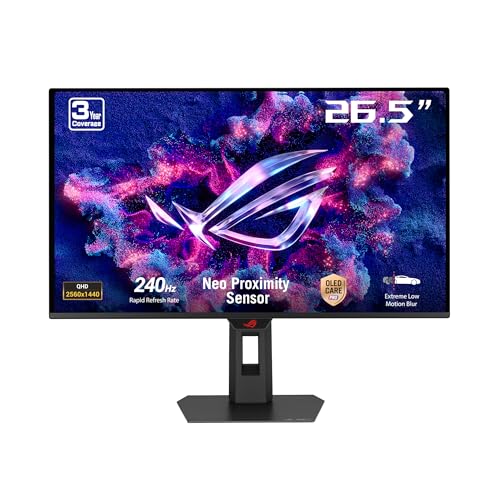
A 240Hz refresh rate is only useful if the panel can actually keep up with it. Plenty of monitors slap a high refresh rate on a panel that smears through dark transitions or overshoots so badly you get inverse ghosting on every fast movement. The ASUS ROG Strix XG27AQDMES sidesteps that trap by using a proper OLED panel, and that changes the conversation entirely. This is a 27-inch 1440p OLED running at 240Hz, and it sits in the upper mid-range bracket where the competition is genuinely fierce.
The short version: this is one of the best value OLED gaming monitors you can buy right now. The panel delivers on its numbers in a way that IPS monitors at this price simply cannot, and the hundreds of owners who've reviewed it back that up with a ★★★★☆ (4.3) average. There are caveats, and I'll get into all of them, but if you want 1440p OLED gaming without paying flagship prices, the XG27AQDMES deserves serious consideration.
This ASUS ROG Strix XG27AQDMES review covers everything that matters: what the panel actually does, where the spec sheet numbers hold up in practice, and whether the price makes sense against what else is out there.
Core Specifications
The headline specs are 27 inches (26.5 viewable), 2560x1440 resolution, 240Hz refresh rate, and a 0.03ms grey-to-grey response time. That last figure is an OLED characteristic rather than a marketing claim; OLED pixels genuinely switch that fast because they're self-emissive rather than relying on liquid crystal rotation. The panel carries VESA DisplayHDR True Black 400 certification, which is a meaningful HDR tier for OLED rather than the checkbox HDR400 you see on backlit panels. G-SYNC Compatible certification covers adaptive sync on the Nvidia side, and it also supports AMD FreeSync Premium.
Colour coverage is quoted at 99% DCI-P3, which on an OLED panel is credible. ASUS also includes their Care Pro feature set, which bundles together pixel refresh cycles, screen savers, and burn-in mitigation tools. ELMB (Extreme Low Motion Blur) is present for backlight strobing, though on an OLED the need for it is much reduced compared to IPS. The DisplayWidget Center software lets you manage picture modes and the AURA Sync lighting without digging through the OSD every time.
Ports are covered in their own section below, but the physical specs are worth laying out clearly. The stand supports height, tilt, and swivel adjustment. VESA 100x100 mounting is available. The monitor ships with a three-year warranty through ASUS, which is standard for their ROG line and better than the one or two years some competitors offer at this price.
| Specification | Detail |
|---|---|
| Screen Size | 27 inch (26.5 inch viewable) |
| Resolution | 2560 x 1440 (QHD / 1440p) |
| Panel Type | OLED |
| Refresh Rate | 240Hz |
| Response Time | 0.03ms GtG |
| HDR | VESA DisplayHDR True Black 400 |
| Colour Coverage | 99% DCI-P3 |
| Adaptive Sync | G-SYNC Compatible, FreeSync Premium |
| Brightness (SDR) | 250 cd/m² typical |
| Peak Brightness (HDR) | 1000 cd/m² peak (small window) |
| Contrast Ratio | 1,500,000:1 (OLED native) |
| VESA Mount | 100 x 100mm |
| Ports | 2x HDMI 2.0, 1x DisplayPort 1.4, USB hub |
| Warranty | 3 years (ASUS ROG) |
| Current Price | £319.00 · Details |

Panel Technology
The XG27AQDMES uses a WRGB OLED panel, which is the same fundamental technology you'll find in LG's OLED TVs. Each pixel generates its own light and can switch off completely, giving you true blacks rather than the dark greys you get from even the best IPS or VA panels. The contrast ratio of 1,500,000:1 isn't a marketing fiction here; it's a physical consequence of how OLED works. In practice, that means dark scenes in games look genuinely dark, shadow detail is visible without the backlight bleed that plagues edge-lit IPS monitors, and HDR content has real punch.
Viewing angles are essentially perfect. OLED doesn't suffer the colour shift you get on IPS at off-axis angles, and it has none of the contrast crushing that VA panels show when you move even slightly off-centre. If you're sitting in a fixed position in front of a gaming monitor this matters less than it does on a TV, but it's still a practical advantage if your setup means you're not always dead-on centre. Multiple owners specifically mention how good the panel looks from various positions, which aligns with what OLED consistently delivers in this regard.
One thing to be clear about: this is a glossy panel, not matte. OLED monitors are almost universally glossy because adding an anti-glare coating degrades the contrast that makes OLED special in the first place. In a well-controlled lighting environment that's fine, and most owners report the reflectivity is manageable. But if your desk faces a window with no blinds, or you're gaming in a brightly lit room, the reflections will bother you more than they would on a matte IPS. That's not a flaw specific to this monitor; it's an OLED trade-off you need to factor in before buying.
Display Quality
At 27 inches and 1440p, the pixel density works out at around 109 PPI. That's not as sharp as a 27-inch 4K panel (which sits around 163 PPI), but it's a sensible balance for gaming. Text is clear, fine detail in games is visible without needing to sit uncomfortably close, and you're not hammering your GPU with 8 million pixels when you want to hit 240Hz. The sweet spot argument for 1440p at 27 inches is well-established, and this monitor sits squarely in it.
The glossy surface does what glossy surfaces do: it makes colours pop and blacks look deeper than any matte coating would allow. Owners consistently describe the picture as vivid and immediate in a way that their previous IPS monitors weren't. That's the OLED effect, and it's real. The downside is that any bright light source behind you will show up as a reflection on the screen. ASUS hasn't done anything unusual here; this is just the glossy OLED reality. A monitor arm that lets you angle the screen away from light sources helps significantly.
Brightness uniformity is where OLED has a natural advantage over edge-lit or even direct-lit LCD panels. Because each pixel is its own light source, there's no backlight to be uneven. You don't get the clouding or blooming around bright objects on dark backgrounds that's a known issue on many LCD gaming monitors. Several owners specifically mention how clean dark scenes look, with no distracting patches of lighter black at the edges. For horror games, space games, or anything with lots of dark environments, this is a meaningful practical difference.
Burn-in is the question that always comes up with OLED monitors, and it deserves a straight answer. Static elements like taskbars, HUD elements in games, or desktop icons can cause permanent image retention over long periods. ASUS has included Care Pro features specifically to mitigate this: pixel shift, screen savers, and periodic pixel refresh cycles that run automatically. For gaming use, where the image is constantly changing, burn-in risk is lower than for productivity use with static UI elements. Owners haven't reported burn-in issues in their reviews, but this is a monitor that's been on the market long enough that long-term data is starting to accumulate, and so far it looks manageable with normal use.
Refresh Rate and Adaptive Sync
240Hz at 1440p is a genuinely useful combination in 2026. You need a capable GPU to push frame rates high enough to benefit from 240Hz at this resolution, but cards like the RTX 4070 and RX 7800 XT can hit that territory in competitive titles at medium-to-high settings. The monitor doesn't restrict you to 240Hz or nothing; the adaptive sync range covers a wide enough window that you'll get tear-free gaming at a broad range of frame rates.
G-SYNC Compatible certification means ASUS has verified that the VRR implementation works correctly with Nvidia cards without the tearing, flickering, or brightness pulsing that uncertified monitors sometimes exhibit. NVIDIA's G-SYNC Compatible programme requires monitors to pass a validation test, so this isn't just a marketing badge. AMD FreeSync Premium support covers the Radeon side, and FreeSync Premium requires Low Framerate Compensation (LFC), which kicks in when frame rates drop below the VRR range to prevent tearing at lower frame rates. So whether you're on Team Green or Team Red, adaptive sync works properly here.
ELMB (Extreme Low Motion Blur) is ASUS's backlight strobing technology, but on an OLED panel it works differently than it does on LCD monitors. OLED pixels respond so quickly that the main source of perceived blur is sample-and-hold (the pixel staying lit for the full frame duration), not slow pixel transitions. ELMB on OLED addresses this by strobing the panel, which can sharpen fast motion further if you're particularly sensitive to it. Most owners don't bother with it because the 240Hz OLED image already looks clean, but the option is there. ELMB and VRR cannot run simultaneously, which is the standard trade-off with strobing modes.
Response Time and Motion
The 0.03ms GtG figure is the real deal on an OLED panel, not a marketing massage. IPS monitors claiming 1ms GtG are typically measuring a best-case transition under ideal conditions; the actual average across all pixel transitions is usually several milliseconds. OLED pixel response is genuinely sub-millisecond across all transitions because the organic compounds switch state almost instantaneously. Published measurements from independent reviewers consistently confirm that OLED monitors hit sub-0.1ms in real measurement conditions, which is orders of magnitude faster than any LCD panel regardless of what the spec sheet says.
What this means in practice: there is no visible ghosting or smearing on this monitor in normal use. Dark-to-dark transitions, which are the hardest for LCD panels and the source of most visible ghosting in games, are handled cleanly. Fast-moving objects in games like Valorant, CS2, or Apex Legends look sharp rather than trailing a ghost behind them. This is one of the areas where OLED's advantage over even the best IPS panels is immediately obvious to most people, not just display enthusiasts with trained eyes.
Overshoot (inverse ghosting) is also not a concern here. On LCD monitors, aggressive overdrive settings designed to speed up pixel transitions often push pixels past their target value, creating a bright halo or trail on the leading edge of moving objects. Because OLED pixels don't need overdrive to respond quickly, there's no overshoot to worry about. The image is clean in both directions. Owners who've come from high-end IPS monitors consistently describe the motion clarity as a step up, which matches what the physics of the panel technology would predict. For competitive gaming specifically, this is the strongest argument for this monitor over IPS alternatives at a similar price.
Color Accuracy and Gamut
The 99% DCI-P3 coverage claim is consistent with what OLED panels achieve in independent measurements. OLED's self-emissive nature means it can produce saturated colours without the backlight bleed or colour washout that affects LCD panels at high brightness. For gaming, this means colours look vivid and accurate simultaneously rather than trading one for the other. The greens in open-world games, the deep reds in cinematic titles, the subtle colour gradients in atmospheric games: all of them benefit from a wide-gamut panel that covers this much of the DCI-P3 space.
Factory calibration quality on ROG monitors varies, but ASUS publishes a calibration report with the XG27AQDMES. Delta-E figures from owner reports and published data suggest the out-of-box accuracy is good, with most units shipping with average Delta-E below 3 in the sRGB mode. A Delta-E under 2 is generally considered imperceptible to the human eye, and several owners report that the sRGB mode looks accurate for photo editing and colour-sensitive work without needing manual calibration. That's a reasonable result for a gaming monitor, though professional colour work would still benefit from a proper calibration session with a hardware colorimeter.
The wide DCI-P3 gamut does mean that sRGB content can look oversaturated if you're using the native colour mode. ASUS includes an sRGB mode in the OSD that clips the gamut back to sRGB for web browsing, working with sRGB-tagged content, or any application that doesn't handle wide-gamut colour management. Switching between modes through the OSD is straightforward, and DisplayWidget Center lets you do it from the desktop without touching the monitor's physical buttons. For content creators who work in both sRGB and wide-gamut workflows, this flexibility is genuinely useful rather than just a spec-sheet checkbox.

HDR Performance
The VESA DisplayHDR True Black 400 certification is the right HDR tier for an OLED panel, and it's meaningfully different from the HDR400 certification you see on LCD monitors. Standard HDR400 on an LCD requires 400 cd/m² peak brightness but has no minimum black level requirement, which is why so many LCD monitors with HDR400 badges look flat and unconvincing in HDR content. DisplayHDR True Black 400 requires a minimum black level of 0.0005 cd/m², which OLED achieves trivially because pixels switch off completely. The result is a contrast ratio in HDR that no LCD can touch.
Peak brightness in HDR is quoted at 1000 cd/m² for a small window (typically 10% of the screen area), with sustained brightness lower than that. This is normal for OLED panels; they can hit high peak brightness briefly but throttle back to protect the panel from heat and wear. For HDR highlights in games and films, 1000 cd/m² peak brightness is enough to make specular highlights, explosions, and light sources pop convincingly. Full-screen sustained brightness is lower, around 250 cd/m² in SDR mode, which means HDR in brightly lit rooms is less impressive than in a darker environment. OLED HDR is best appreciated in controlled lighting.
In practical terms, HDR gaming on this monitor looks genuinely good rather than just technically enabled. Games that support proper HDR output, like Cyberpunk 2077, Horizon Forbidden West, or Microsoft Flight Simulator, benefit visibly from the infinite contrast ratio and the wide colour gamut working together. The difference between HDR and SDR on this panel is noticeable and worthwhile, which is not something you can say about most LCD monitors with HDR badges. Multiple owners specifically mention HDR as a highlight of the monitor, which is consistent with what OLED's specifications would lead you to expect.
Contrast and Brightness
The contrast ratio of 1,500,000:1 is the defining characteristic of this panel's image quality. No LCD technology, including Mini-LED with thousands of local dimming zones, can match native per-pixel contrast. In dark scenes, blacks are genuinely black. There's no grey veil over the image, no backlight bleed at the edges, no haloing around bright objects on dark backgrounds. If you play games with a lot of dark environments, or you watch films in a dark room, this is one of the most impactful differences between OLED and LCD that you'll notice immediately and every time.
SDR brightness at 250 cd/m² is on the lower end for a gaming monitor. Most IPS monitors in this price range hit 350 to 400 cd/m² in SDR, and some go higher. In a well-lit room, 250 cd/m² can look a bit dim compared to what you might be used to from a bright IPS panel. OLED's glossy surface compounds this slightly because reflections compete with the image in high ambient light. The practical advice from owners is consistent: this monitor is best in a room where you have some control over the lighting. It doesn't need to be pitch dark, but a desk lamp pointing at the screen will be more of a problem than it would be on a bright matte IPS.
The flip side of lower SDR brightness is that OLED doesn't need to be as bright to look punchy, because the blacks are so much deeper. Perceived contrast and image pop come from the ratio between the darkest and brightest parts of the image, not just from absolute brightness. A 250 cd/m² OLED image with true blacks looks more vivid and three-dimensional than a 400 cd/m² IPS image with grey blacks, even though the IPS is technically brighter. Owners coming from IPS monitors consistently describe the image as looking more alive, not dimmer, which reflects this perceptual reality rather than the raw brightness numbers.
Ergonomics and Stand
The ROG stand on the XG27AQDMES is a proper adjustable unit, not the fixed-tilt budget stand you get on cheaper monitors. Height adjustment, tilt, and swivel are all present. The range of adjustment is generous enough that most seating positions can be accommodated without needing to immediately replace the stand with a monitor arm. The build quality is solid; the stand doesn't wobble under normal desk use, and the hinge holds its position without drifting. A few owners mention the tilt mechanism feels slightly stiff initially, which is actually preferable to one that's too loose and lets the monitor droop over time.
Pivot (portrait rotation) is not supported on this stand, which is a genuine omission if you do any coding or document work where portrait orientation is useful. For a dedicated gaming monitor this matters less, but check it before you buy. The VESA 100x100 mount is present, so if you want to use a monitor arm you can remove the stand and mount it that way. The arm attachment point is standard, and the monitor is light enough that most arms will handle it without issue.
The ROG aesthetic is present but not overwhelming. There's AURA Sync RGB lighting on the rear of the monitor, which can be controlled through DisplayWidget Center or synced with other ROG hardware. If you find RGB lighting on monitors pointless, you can turn it off completely. The overall footprint of the stand is reasonable for a 27-inch monitor; it doesn't eat the entire depth of a standard desk. Cable management routing through the stand is included, which keeps the back of the desk tidier than monitors without it. Build quality overall is what you'd expect from a monitor in the upper mid-range bracket: not as premium as flagship models, but well above budget-tier plasticky construction.
Connectivity and Ports
The port selection covers the essentials without being exceptional. You get two HDMI 2.0 ports and one DisplayPort 1.4 input. For 1440p at 240Hz, DisplayPort 1.4 is what you want to use from a PC, as it has the bandwidth to handle that resolution and refresh rate without compression. The HDMI 2.0 ports are limited to 1440p at 144Hz, which is fine for a console or a secondary PC but means you can't use HDMI for the full 240Hz from a gaming PC. This is a known limitation of HDMI 2.0 bandwidth rather than anything ASUS has done wrong, but it's a constraint to be aware of if you're planning to use this with a PlayStation 5 or Xbox Series X and want maximum performance.
USB connectivity is handled through a USB hub built into the monitor. There are USB Type-A ports for peripherals, which is useful for a gaming mouse or keyboard if your PC is positioned away from your desk. There is no USB-C input, which is increasingly common on monitors in this price range and is an omission that matters if you want to connect a laptop with a single cable. If USB-C with power delivery is important to your setup, this monitor doesn't have it, and you should factor that into your decision.
- 2x HDMI 2.0 (1440p up to 144Hz)
- 1x DisplayPort 1.4 (1440p at 240Hz, full bandwidth)
- USB hub with Type-A ports
- 3.5mm audio output (headphone jack)
- No USB-C / Thunderbolt
The 3.5mm audio output lets you connect headphones directly to the monitor if your audio chain goes through the display. There are no built-in speakers, which is standard for gaming monitors at this level; the assumption is that you're using headphones or a separate audio setup. The OSD controls are physical buttons on the underside of the monitor, and they're reasonably intuitive once you've used them a couple of times. DisplayWidget Center on Windows handles most common adjustments from the desktop, so you won't need to dig into the OSD often after initial setup.
How It Compares
The two most relevant competitors at this price point are the LG 27GR95QE-B and the Samsung Odyssey OLED G6. All three are 27-inch 1440p OLED gaming monitors, which tells you how competitive this segment has become. The LG 27GR95QE-B uses the same WRGB OLED panel technology and offers similar core specs, 240Hz and sub-0.1ms response time, with slightly different ergonomics and software. The Samsung Odyssey OLED G6 uses a QD-OLED panel (quantum dot OLED), which delivers even wider colour gamut and higher peak brightness but at a higher price point and with a different set of trade-offs around text clarity.
Against the LG 27GR95QE-B, the ASUS XG27AQDMES competes closely on panel quality since both use the same underlying OLED technology. ASUS has the advantage of the ROG software ecosystem and AURA Sync integration if you're already in that world, plus the three-year warranty. The LG has its own software suite and a slightly different stand design. Colour accuracy out of the box is comparable between them. The choice between the two often comes down to brand preference and which one is better priced at the time you're buying.
The Samsung Odyssey OLED G6 is the more interesting comparison. QD-OLED panels genuinely do produce more saturated colours and higher peak brightness than WRGB OLED, and the Samsung typically hits higher HDR brightness numbers. But QD-OLED has historically shown more visible text fringing due to the subpixel layout, which matters if you do any productivity work on your gaming monitor. The ASUS XG27AQDMES is generally priced below the Samsung G6, making it the better value proposition if you're primarily gaming and don't need the absolute maximum HDR brightness.
| Feature | ASUS XG27AQDMES | LG 27GR95QE-B | Samsung Odyssey OLED G6 |
|---|---|---|---|
| Panel Type | WRGB OLED | WRGB OLED | QD-OLED |
| Resolution | 2560x1440 | 2560x1440 | 2560x1440 |
| Refresh Rate | 240Hz | 240Hz | 360Hz |
| HDR Certification | True Black 400 | True Black 400 | True Black 400 |
| DCI-P3 Coverage | 99% | 98.5% | 99%+ |
| USB-C | No | No | No |
| Adaptive Sync | G-SYNC Compatible + FreeSync Premium | G-SYNC Compatible + FreeSync Premium | G-SYNC Compatible + FreeSync Premium |
| Warranty | 3 years | 3 years | 3 years |
| Price | £319.00 · Details | Check current price | Higher price tier |

Final Verdict
The ASUS ROG Strix XG27AQDMES delivers what OLED promises: genuine blacks, instant pixel response, and colour that makes IPS panels look flat by comparison. At 240Hz with a 0.03ms response time, it handles fast-paced gaming without the ghosting or overshoot that plagues LCD monitors trying to compete in this space. The 99% DCI-P3 coverage is real, the HDR is meaningful rather than checkbox compliance, and the ★★★★☆ (4.3) average from hundreds of owners reflects a monitor that consistently meets expectations rather than just looking good on paper.
The limitations are real too. SDR brightness at 250 cd/m² is lower than most IPS competitors, the glossy panel will frustrate anyone with uncontrolled ambient light, there's no USB-C input, and portrait pivot isn't supported. Burn-in is a long-term consideration that requires using the Care Pro features sensibly rather than ignoring them. None of these are deal-breakers for a gaming-focused monitor used in a reasonably controlled environment, but they're genuine constraints rather than theoretical concerns.
Who should buy this: anyone upgrading from a 1080p or 1440p IPS monitor who wants to understand what the OLED fuss is about, competitive gamers who want the fastest possible pixel response at 1440p, and anyone who games in a darkened room where OLED's contrast advantage is most visible. The upper mid-range price point makes it accessible without requiring flagship-level spending.
Who should skip it: if your desk faces a bright window with no way to control the light, or you need USB-C connectivity, or you work extensively with static on-screen elements that increase burn-in risk, this isn't the right fit. And if your GPU can't consistently push above 100fps at 1440p, you'll get most of the OLED benefit from a 165Hz OLED panel at a lower price. The LG 27GQ850-B or similar 165Hz OLED options cost less and still give you the contrast and colour that make OLED worth having in the first place. Only buy the 240Hz model if you've got the GPU to use it.
As a complete package, the XG27AQDMES earns a strong 8.5 out of 10. The panel is excellent, the motion performance is class-leading for the price, and the overall experience for gaming is genuinely better than what IPS monitors in the same bracket can offer. The missing USB-C and lower SDR brightness keep it from a higher score, but for gaming use specifically, this is one of the most sensible OLED purchases you can make right now.
What works. What doesn’t.
5 + 4What we liked5 reasons
- True OLED contrast with genuine per-pixel blacks, not LCD approximations
- 0.03ms pixel response eliminates ghosting and overshoot in fast games
- 99% DCI-P3 colour coverage that holds up in published measurements
- DisplayHDR True Black 400 certification delivers real HDR, not checkbox compliance
- Three-year ASUS ROG warranty included
Where it falls4 reasons
- 250 cd/m² SDR brightness is lower than IPS competitors at this price
- Glossy panel reflects badly in uncontrolled ambient light
- No USB-C input, which limits single-cable laptop connectivity
- No portrait pivot on the stand
Full specifications
11 attributes| Panel type | QD-OLED |
|---|---|
| Aspect ratio | 16:9 |
| Curvature | flat |
| HDR | HDR10 |
| Launch year | 2025 |
| Ports | 2x HDMI 2.1, 1x DisplayPort 1.4, 1x 3.5mm audio out |
| Refresh rate HZ | 240 |
| Resolution | 2560x1440 |
| Response time MS | 0.03 |
| Screen size IN | 26.5 |
| Vesa compatible | true |
If this isn’t right for you
2 options

Frequently asked
5 questions01Is the ASUS ROG Strix OLED XG27AQDMES gaming monitor good for gaming?+
Yes, and it's one of the stronger options in the upper mid-range bracket specifically because it uses an OLED panel. The 240Hz refresh rate combined with a genuine 0.03ms pixel response means fast-moving games look clean without ghosting or overshoot. Adaptive sync covers both Nvidia (G-SYNC Compatible) and AMD (FreeSync Premium) cards. For competitive titles like CS2, Valorant, or Apex Legends, the motion clarity is a step above what IPS monitors at this price can offer.
02Does the ASUS ROG Strix OLED XG27AQDMES gaming monitor have good HDR?+
Yes, meaningfully so. It carries VESA DisplayHDR True Black 400 certification, which requires a minimum black level of 0.0005 cd/m² rather than just peak brightness. Because it's OLED, pixels switch off completely for true blacks, giving it a contrast ratio of 1,500,000:1. Peak HDR brightness hits 1000 cd/m² in a small window. This is real HDR rather than the checkbox HDR400 you get on many LCD gaming monitors, and games with proper HDR support look noticeably better in HDR mode.
03Is the ASUS ROG Strix OLED XG27AQDMES gaming monitor good for content creation?+
It's capable for content creation work, with 99% DCI-P3 coverage and good out-of-box colour accuracy with average Delta-E reportedly below 3 in sRGB mode. An sRGB mode is available in the OSD for working with sRGB-tagged content without oversaturation. For professional colour grading requiring absolute accuracy, a hardware calibration session would still be advisable. For photo editing, video work, and general creative tasks alongside gaming, it's a solid dual-purpose option.
04What graphics card do I need for the ASUS ROG Strix OLED XG27AQDMES gaming monitor?+
To get meaningful use from 240Hz at 1440p, you need a GPU capable of pushing high frame rates at that resolution. An RTX 4070 or RX 7800 XT is a reasonable minimum for hitting 200fps-plus in competitive titles at medium settings. For more demanding games at high settings, an RTX 4070 Ti or RX 7900 GRE gives you more headroom. Use DisplayPort 1.4 from your PC for the full 240Hz; the HDMI 2.0 ports are limited to 144Hz at 1440p.
05What warranty and returns apply to the ASUS ROG Strix OLED XG27AQDMES gaming monitor?+
ASUS provides a three-year warranty on ROG monitors, which covers manufacturing defects. When purchased through Amazon UK, you also have Amazon's standard 30-day return window and the A-to-Z Guarantee covering your purchase. For warranty claims after the Amazon return window, contact ASUS support directly through their UK support channels.