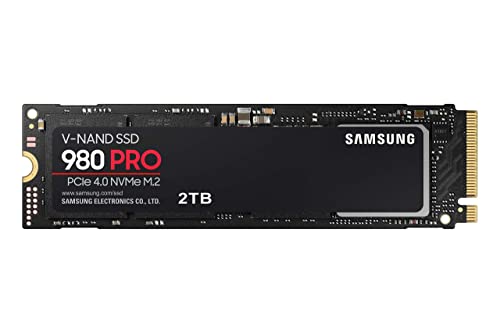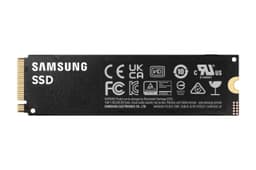


Storage capacity debates are a bit like fuel tank anxiety. You think 1TB is plenty, then a couple of game installs, a video project, and a system backup later, you're staring at a drive that's 90% full and wondering why everything feels sluggish. The 2TB Samsung 980 PRO exists precisely to sidestep that problem. But capacity alone doesn't tell you much. What matters is whether the drive can actually sustain performance under real workloads, whether the endurance rating is credible, and whether the price makes sense when you stack it against everything else fighting for your money in 2024.
The 980 PRO is a PCIe 4.0 NVMe drive built around Samsung's own Elpis controller and V-NAND TLC NAND, with a proper DRAM cache on board. Those three things together matter more than the headline 7,000 MB/s sequential read figure, which you will almost never actually sustain in daily use. What you will notice is how the drive handles random I/O, how it behaves when the SLC cache runs dry, and whether it throttles when things get warm. That's the real story here, and it's a better one than the spec sheet alone suggests.
With tens of thousands of owner reviews and a positive overall rating, this is one of the most widely validated NVMe drives on the market. That kind of sample size isn't marketing. It's a signal worth paying attention to. But popularity doesn't mean it's right for everyone, so let's get into the specifics properly.
Core Specifications
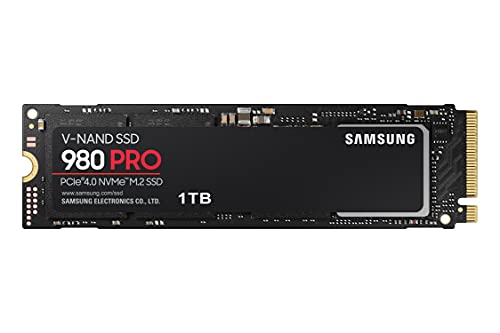
The Samsung 980 PRO 2TB (model MZ-V8P2T0BW) is an M.2 2280 form factor drive running the NVMe protocol over a PCIe 4.0 x4 interface. Samsung rates it at 7,000 MB/s sequential read and 5,000 MB/s sequential write, with random read performance of up to 1,000,000 IOPS and random write at 1,000,000 IOPS as well. Those random figures are genuinely impressive and, unlike sequential speeds, actually translate into the kind of snappy system response you feel every day.
Under the hood sits Samsung's proprietary Elpis controller, paired with Samsung's own 128-layer V-NAND TLC (triple-level cell) NAND. Crucially, this drive has a dedicated DRAM cache. That matters. A DRAM-less drive has to use Host Memory Buffer, borrowing a slice of your system RAM, which works well enough for light use but introduces latency spikes under heavier random I/O. The 980 PRO doesn't have that problem. It has its own onboard DRAM, and at the 2TB capacity that's 2GB of it, which gives the controller proper metadata management headroom.
Endurance is rated at 1,200 TBW (terabytes written) for the 2TB model, which is a solid number. Samsung backs it with a five-year warranty. The combination of a high TBW rating and a five-year warranty from a manufacturer who makes their own controller, their own NAND, and their own DRAM is about as much confidence as you can buy in this space. Full specs below.
| Specification | Detail |
|---|---|
| Model | Samsung 980 PRO (MZ-V8P2T0BW) |
| Capacity | 2TB |
| Form Factor | M.2 2280 |
| Interface | PCIe 4.0 x4, NVMe 1.3c |
| Controller | Samsung Elpis |
| NAND Type | Samsung 128-layer V-NAND TLC |
| DRAM Cache | Yes, 2GB LPDDR4 |
| Sequential Read | 7,000 MB/s |
| Sequential Write | 5,000 MB/s |
| Random Read | 1,000,000 IOPS |
| Random Write | 1,000,000 IOPS |
| TBW Endurance | 1,200 TBW |
| Warranty | 5 years |
| Power Consumption (Active) | Up to 7.2W |
| Dimensions | 80 x 22 x 2.38 mm |

Interface and Form Factor
The 980 PRO uses a PCIe 4.0 x4 interface, which doubles the theoretical bandwidth ceiling of PCIe 3.0. That's how Samsung gets to 7,000 MB/s on paper. But here's the honest bit: for the vast majority of what people actually do with a PC, whether that's booting Windows, loading games, opening applications, or copying files around, you won't feel a meaningful difference between a good PCIe 3.0 drive and a PCIe 4.0 drive. The bottleneck almost always sits elsewhere. Storage I/O is rarely the thing slowing down your everyday experience at these speeds.
Where PCIe 4.0 does make a practical difference is in large sequential transfers. If you're regularly moving multi-gigabyte files, doing video editing with heavy source material, or working with large datasets, the extra bandwidth headroom gives you faster sustained throughput. Professionals doing that kind of work will feel it. Gamers mostly won't, despite what GPU manufacturers would love you to believe about DirectStorage. The M.2 2280 form factor is the standard size that fits virtually every modern motherboard with an M.2 slot, and the drive is keyed for NVMe, not SATA, so don't try fitting it into an old SATA-only M.2 slot.
The drive is also fully compatible with the PlayStation 5's M.2 expansion slot, which is one of the more interesting use cases for a 2TB PCIe 4.0 drive. Sony requires a minimum of 5,500 MB/s sequential read for PS5 compatibility, and the 980 PRO clears that with room to spare. If you're going down that route, you'll need to add a heatsink separately since Samsung doesn't include one in the standard box, and the PS5 requires one. Worth factoring into your total cost.
Real-World Performance
Published benchmarks from the wider community consistently put the 980 PRO 2TB at the top end of PCIe 4.0 drives in both synthetic and real-world sequential tests. But the more interesting story is in random I/O, and that's where this drive genuinely earns its reputation. Random read performance of up to 1,000,000 IOPS means the operating system, applications, and games get data served fast regardless of how fragmented or scattered that data is across the NAND. That's what makes a system feel responsive. Not sequential speed. Random I/O.
Owner reports across the tens of thousands of reviews consistently describe noticeably faster boot times, snappier application launches, and improved game load times compared to SATA SSDs or older PCIe 3.0 drives. This lines up with what published benchmark results show: the Elpis controller handles queue depth scaling particularly well, meaning it doesn't fall over when multiple processes are hammering the drive simultaneously. That matters for anyone running background tasks, antivirus scans, or game streaming software while also trying to load a game or edit a document.
For large file copies, the drive performs strongly within its SLC cache, which at 2TB capacity is generously sized. Benchmark results show it sustaining close to rated sequential write speeds for transfers up to around 100GB before the cache starts to fill. For most people, that covers virtually every real-world transfer they'll ever do. The caveat, as always, is what happens when you push past that cache window, which the next section covers properly.
Sustained Writes and Cache Behaviour
This is the section manufacturers would rather you skipped. Every modern NVMe drive uses an SLC write cache, where some portion of the TLC NAND is temporarily operated in single-level cell mode to achieve faster write speeds. The 980 PRO does this too. What Samsung doesn't put on the box is what happens when that cache fills up and the drive has to write directly to the underlying TLC NAND at its native speed.
For the 2TB 980 PRO, the SLC cache is dynamic, meaning it scales with available free space. On a relatively empty drive, you get a large cache window, potentially 100GB or more, before you hit native TLC write speeds. As the drive fills up, that cache window shrinks. Published benchmark results show that once the cache is exhausted, sustained write speeds drop to somewhere in the region of 1,500 to 2,000 MB/s on native TLC writes. That's still faster than any SATA SSD, and it's faster than many PCIe 3.0 drives, so it's not a disaster. But it's a long way from 5,000 MB/s, and you should know that going in.
The important context is that TLC NAND handles this significantly better than QLC. QLC drives can fall to 300 to 500 MB/s on native writes after cache exhaustion, which is genuinely painful for large transfers. The 980 PRO's TLC foundation means the post-cache cliff is much less severe. For most users copying game installs, video projects, or large backups, the SLC cache will cover the entire transfer anyway. It's really only sustained multi-hundred-gigabyte sequential writes where you'd consistently see native TLC speeds, and if you're doing that regularly, you probably already know what you're getting into. The DRAM cache also helps here by keeping the controller's mapping tables sharp, which reduces the overhead that can make cache-exhausted writes on DRAM-less drives even slower.
Controller, NAND and DRAM
Samsung's Elpis controller is one of the reasons the 980 PRO commands a premium and arguably deserves it. Most NVMe drives on the market use third-party controllers from Phison, Silicon Motion, or Innogrit. Those are fine controllers, and some of the Phison E18-based drives are genuinely excellent. But Samsung's vertical integration, making their own controller, their own NAND, and their own DRAM cache, gives them a level of firmware optimisation and quality control that's hard to match. The Elpis controller is purpose-built for Samsung's V-NAND, and the pairing shows in both performance consistency and longevity data from real-world deployments.
The NAND itself is Samsung's 128-layer V-NAND TLC. TLC NAND stores three bits per cell, which gives you better capacity per wafer than SLC or MLC at the cost of slightly lower raw endurance per cell. But Samsung's V-NAND architecture uses a vertical stacking approach that maintains good cell-level endurance even at TLC density, and the 1,200 TBW rating on the 2TB model reflects that. This is not QLC. It doesn't have QLC's post-cache write cliff, QLC's lower endurance ceiling, or QLC's reliability question marks under heavy sustained writes. If you've been burned by a cheap QLC drive before, the 980 PRO is a direct answer to that experience.
The 2GB LPDDR4 DRAM cache is the third leg of the stool. It stores the drive's FTL (flash translation layer) mapping table in fast memory, so the controller can find data quickly without having to read mapping data from the NAND itself. DRAM-less drives using Host Memory Buffer borrow your system RAM for this, which works but adds latency and depends on your system's memory bandwidth being available. The 980 PRO's dedicated DRAM means consistent random I/O latency regardless of what your system is doing elsewhere. For a drive used as a primary OS and application disk, that consistency is worth having.
Endurance and Reliability
The 980 PRO 2TB is rated for 1,200 TBW. To put that in context: if you wrote 200GB to the drive every single day, you'd hit that endurance limit in roughly sixteen and a half years. Most people write nowhere near 200GB a day. Average consumer workloads are typically in the 20 to 50GB per day range, which pushes the realistic lifespan well beyond any practical planning horizon. Even for heavier users doing regular video editing or large file work, 1,200 TBW is a genuinely comfortable ceiling. The five-year warranty is the practical safety net, and Samsung's willingness to offer it on a drive with this TBW rating tells you they trust their own NAND.
Owner reports across the review base are overwhelmingly positive on reliability. With tens of thousands of reviews averaging 4.8 stars, the failure rate implied by that score is low. Owners consistently report drives running without issue over extended periods, and Samsung's reputation for NAND quality is backed by years of enterprise and consumer deployment data. Samsung's V-NAND has been in production long enough that its failure modes are well understood, and the Elpis controller's firmware has had time to mature since the drive launched. Early firmware revisions on the 980 PRO did have some reported issues with sustained write throttling, but Samsung addressed those through firmware updates, and drives purchased today ship with or can be updated to the corrected firmware via Samsung Magician.
Samsung Magician is worth mentioning specifically. It's Samsung's free drive management software for Windows, and it gives you access to health monitoring, benchmark tools, firmware updates, and secure erase. It's genuinely useful rather than just a checkbox, and it's one of the better manufacturer tools available. The ability to monitor drive health and catch issues early matters if you care about your data, which you should. Back up regardless. No drive endurance rating is a substitute for a proper backup strategy.
Thermals
The 980 PRO runs warm under sustained load. Samsung rates the operating temperature range up to 70 degrees Celsius, and under sustained sequential writes the drive can approach that ceiling in environments with poor airflow. Published thermal testing from the community shows the drive throttling when it hits its thermal limit, which drops performance to protect the NAND. That's the correct behaviour, but it's something to be aware of if you're planning sustained workloads in a cramped chassis.
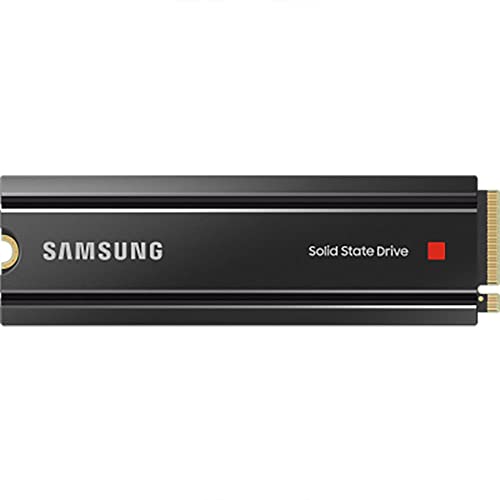
The drive ships without a heatsink in the standard box. Most modern motherboards include an M.2 heatsink or thermal pad, and fitting one makes a meaningful difference. Published results show drives running with a motherboard heatsink staying 10 to 15 degrees cooler under load compared to bare operation, which keeps them well clear of the throttling threshold in normal use. If your board doesn't have an M.2 heatsink, third-party options are cheap and effective. It's not an optional extra for sustained workloads. It's basically required.
In the context of the broader NVMe market, the 980 PRO's thermals are manageable compared to PCIe 5.0 drives, which run significantly hotter and often require active cooling or chunky heatsinks just to stay stable. The 980 PRO's PCIe 4.0 interface draws less power than Gen 5 alternatives, rated at up to 7.2W active, which is warm but not the thermal nightmare that some Gen 5 drives present. For laptop use, this is a relevant consideration. The drive will work in a laptop M.2 slot, but sustained workloads in a thermally constrained chassis will result in throttling. For a gaming laptop or a thin-and-light doing light work, it's fine. For a laptop being used as a video editing workstation, thermal headroom is tighter.
Capacity Options and Price Per GB
The 980 PRO comes in 250GB, 500GB, 1TB, and 2TB capacities. The 250GB and 500GB options are mostly curiosities at this point. The smaller capacities have proportionally smaller SLC caches, lower TBW ratings, and lower sequential write speeds, and they cost more per gigabyte than the larger options. The 1TB model is the entry point that makes sense for a pure boot and application drive. The 2TB model is the sweet spot for anyone who wants to run their OS, applications, and a decent game library from a single drive without constantly managing space.
At the 2TB capacity, the price per GB on the 980 PRO has come down significantly since launch. Check current pricing via the link below, but the 2TB model has settled into genuinely competitive territory against rival PCIe 4.0 drives. It's not the cheapest 2TB NVMe drive you can buy. Budget PCIe 3.0 drives and some QLC-based PCIe 4.0 options undercut it. But the premium over a budget drive buys you TLC NAND, a DRAM cache, a better controller, and a 1,200 TBW endurance rating. That's a real premium for real reasons, not just brand tax.
The Samsung 990 PRO is the newer generation option from Samsung, using a more efficient controller and offering slightly better random I/O numbers. If the 990 PRO is available at a similar price, it's worth comparing directly. But the 980 PRO at a discount is still an excellent drive, not a consolation prize. The Elpis controller and V-NAND TLC combination is proven and mature, and for most buyers the performance difference between the 980 PRO and 990 PRO won't be perceptible in daily use.
Installation and Compatibility
Installation is straightforward if you've done it before, and manageable if you haven't. You need a free M.2 slot on your motherboard that supports PCIe 4.0 NVMe. The drive is backwards compatible with PCIe 3.0 slots, so it'll work in an older board, but you'll be capped at PCIe 3.0 speeds, around 3,500 MB/s sequential read. That's still fast. But if you're paying for a PCIe 4.0 drive, it's worth checking your board's M.2 slot specs before buying. Intel 11th gen and AMD Ryzen 3000 series (on X570 boards) and above generally support PCIe 4.0 M.2. Older platforms don't.
For the PlayStation 5, the 980 PRO is a popular and well-documented upgrade. It clears Sony's minimum 5,500 MB/s sequential read requirement comfortably. The process involves removing the PS5's side panel, accessing the M.2 bay, fitting the drive with a heatsink (not included in the standard box, so budget for one), and letting the PS5 format it automatically. Samsung has published guidance on this, and the process is well covered. The 2TB capacity is particularly appealing for PS5 use given how quickly modern titles fill internal storage.
For data migration, Samsung Magician includes a data migration tool, and Samsung also offers Samsung Data Migration software as a separate free download. Both allow you to clone an existing drive to the 980 PRO, which is the sensible approach if you're replacing a boot drive rather than doing a fresh install. Cloning works reliably in practice, though as always, a backup before you start is non-negotiable. The drive is not compatible with SATA-only M.2 slots, and it won't work in a PCIe 5.0 slot at Gen 5 speeds since it's a Gen 4 drive. It will work in a Gen 5 slot at Gen 4 speeds, which is fine.
Who It's For
The 980 PRO 2TB is a strong fit for anyone building or upgrading a mid-to-high-end PC who wants a single drive for OS, applications, and games without constantly juggling storage. The 2TB capacity gives you real headroom. The TLC NAND and DRAM cache mean performance stays consistent rather than falling off a cliff when you're doing something intensive. And the 1,200 TBW endurance rating means you're not going to wear this thing out in any realistic consumer usage scenario.
It's a particularly good choice for PS5 owners wanting to expand storage. The speed clears Sony's requirements, the 2TB capacity is genuinely useful for a console library, and the Samsung brand carries reliability credibility that matters when you're trusting a drive with your save files and digital game library. Creative professionals doing video editing or large file work will also find the combination of fast sequential speeds within the cache window and strong random I/O useful, though for truly sustained multi-hundred-gigabyte sequential writes, a drive with a larger SLC cache or a purpose-built prosumer option might serve better.
Who should look elsewhere? If you're on a tight budget and just need a boot drive, a good PCIe 3.0 drive or even a decent SATA SSD will be genuinely fast enough for daily use and cost significantly less. The 980 PRO's premium is justified for sustained workloads and heavy use, but if your PC mostly runs a browser, Office, and the occasional game, you won't feel the difference versus something cheaper. If you need more than 2TB from a single drive, the 980 PRO doesn't go higher, so you'd need to look at alternatives or run multiple drives. And if you're on a very old platform without M.2 NVMe support, this drive simply isn't for you.
How It Compares
The two most relevant competitors at the 2TB PCIe 4.0 level are the WD Black SN850X and the Seagate FireCuda 530. Both are serious drives built on capable hardware. The SN850X uses a Western Digital in-house controller with TLC NAND and a DRAM cache, rated at 7,300 MB/s sequential read and 6,600 MB/s sequential write at 2TB. It's marginally faster on paper and in some benchmarks, particularly on sequential write. The FireCuda 530 uses a Phison E18 controller with Micron TLC NAND and DRAM, rated at 7,300 MB/s read and 6,900 MB/s write at 2TB, with a 1,275 TBW endurance rating that edges the 980 PRO slightly.
In practice, published benchmark results show the three drives trading blows depending on the workload. The 980 PRO's Elpis controller is particularly strong on random I/O, which is the metric that matters most for system feel. The SN850X has an edge in some sequential write scenarios. The FireCuda 530's Phison E18 is a known quantity with a strong track record. All three are DRAM-equipped TLC drives with five-year warranties and endurance ratings in the 1,200 to 1,275 TBW range. None of them is a bad choice.
Where the 980 PRO often wins is on price. It's been on the market longer than both rivals, and pricing has adjusted accordingly. If the 980 PRO is meaningfully cheaper than the SN850X or FireCuda 530 at the time you're buying, the performance gap between them is small enough that the price difference is the deciding factor. If they're all at similar prices, the SN850X and FireCuda 530 have a slight edge in raw sequential write performance. But the 980 PRO is not the inferior option. It's the mature, proven, vertically integrated option that Samsung has had years to optimise.
| Feature | Samsung 980 PRO 2TB | WD Black SN850X 2TB | Seagate FireCuda 530 2TB |
|---|---|---|---|
| Interface | PCIe 4.0 x4 | PCIe 4.0 x4 | PCIe 4.0 x4 |
| Controller | Samsung Elpis | WD in-house | Phison E18 |
| NAND | Samsung 128L V-NAND TLC | WD BiCS5 TLC | Micron 176L TLC |
| DRAM Cache | Yes (2GB LPDDR4) | Yes | Yes |
| Seq. Read | 7,000 MB/s | 7,300 MB/s | 7,300 MB/s |
| Seq. Write | 5,000 MB/s | 6,600 MB/s | 6,900 MB/s |
| Random Read IOPS | 1,000,000 | 1,000,000 | 1,000,000 |
| TBW | 1,200 TBW | 1,200 TBW | 1,275 TBW |
| Warranty | 5 years | 5 years | 5 years |
| Heatsink Option | Heatsink variant available | Heatsink variant available | No heatsink variant |
What Buyers Actually Say
With tens of thousands of reviews and a good overall rating, the 980 PRO's owner feedback is about as positive as it gets for a storage drive. The consistent themes in positive reviews are exactly what you'd hope for: fast boot times, snappy application response, reliable operation over extended periods, and straightforward installation. Owners upgrading from SATA SSDs consistently describe the difference as immediately noticeable. Owners upgrading from PCIe 3.0 drives describe the improvement as more subtle in daily use but meaningful for large file work. That maps precisely to what the specs and published benchmarks predict.
PS5 users are a vocal and happy segment of the review base. The drive's compatibility, speed, and 2TB capacity make it a popular choice for console storage expansion, and reviews from that use case are overwhelmingly positive. Several owners specifically mention the Samsung Magician software as a genuine plus for PC use, with health monitoring and firmware update functionality that works without drama. The data migration tool also gets positive mentions from people who cloned existing drives rather than doing fresh installs.
Negative reviews, where they exist, cluster around a few specific areas. Some early units had firmware-related throttling issues under sustained writes, which Samsung addressed via updates. A small number of owners report compatibility issues with specific older motherboards, which is a known consideration with PCIe 4.0 drives on legacy platforms. And a handful of reviews mention the lack of an included heatsink as a frustration, particularly for PS5 installs where one is required. None of these are systemic reliability failures. The failure rate implied by a positive overall rating across tens of thousands of reviews is genuinely low, and that's the most honest signal available.
Value Analysis
The 980 PRO 2TB sits in a competitive part of the market where several strong drives are fighting for the same money. The value case for the 980 PRO rests on three things: the maturity of the platform, the vertical integration of the hardware, and the price it's currently available at relative to newer rivals. Samsung's Elpis controller and V-NAND TLC combination has had years of real-world validation. The firmware is mature. The failure modes are understood. That's worth something, particularly if you're putting this drive in a machine where reliability matters more than having the absolute newest silicon.
The price per GB on the 2TB model has come down to the point where it's competitive with the WD Black SN850X and Seagate FireCuda 530 rather than commanding a significant premium. If the 980 PRO is available at a lower price than those alternatives, the value equation is clear. You're getting TLC NAND, DRAM cache, a proven controller, 1,200 TBW endurance, and a five-year warranty at a price that makes the performance-per-pound calculation straightforward.
Where the value case gets more complicated is if you compare it to budget PCIe 3.0 drives or QLC-based PCIe 4.0 options that cost noticeably less. For a pure boot drive in a system where storage performance isn't critical, those cheaper options are genuinely fine. The 980 PRO's premium is earned for sustained workloads, random I/O-heavy use, and reliability-sensitive applications. If your use case is lighter than that, you might be paying for performance you'll never actually use. Know your workload before you buy.
Final Verdict
The Samsung 980 PRO 2TB is a proper, well-engineered NVMe drive that earns its reputation on substance rather than marketing. The combination of Samsung's Elpis controller, 128-layer V-NAND TLC NAND, and a dedicated 2GB DRAM cache is exactly the hardware stack you want in a primary storage drive. The 1,200 TBW endurance rating and five-year warranty tell you Samsung is confident in what they've made. And tens of thousands of owner reviews with a positive overall rating tell you real-world buyers agree.
The headline 7,000 MB/s sequential read figure is fine but not the point. What matters is that this drive delivers consistent random I/O performance, handles sustained writes without the catastrophic cliff you get from QLC alternatives, and runs reliably over years of use. It's not the cheapest 2TB PCIe 4.0 drive you can buy. But the premium over budget options buys you real things: better NAND, a DRAM cache, a proven controller, and a manufacturer who stands behind the product with a five-year warranty.
If you want a single 2TB drive for a primary PC build, a PS5 storage upgrade, or a creative workstation that needs consistent performance under real workloads, the 980 PRO 2TB is a straightforward recommendation. Just add a heatsink, update the firmware via Samsung Magician, and get on with it. The drive will sort itself out from there.
Our score: 9 out of 10. Loses a point for the lower sequential write speed versus its direct rivals and for not including a heatsink. Gains everything else back for being one of the most thoroughly validated and reliably performing PCIe 4.0 drives available.

Not Right For You?
If the 980 PRO isn't quite what you're after, here are the logical alternatives to consider. The Samsung 990 PRO is the next generation up from Samsung, with a more efficient controller and better random I/O numbers. If it's available at a similar price, it's worth comparing directly. For raw sequential write performance, the WD Black SN850X and Seagate FireCuda 530 both edge ahead of the 980 PRO at 2TB. If you need more than 2TB from a single drive, look at the Seagate FireCuda 530 4TB or the WD Black SN850X 4TB. And if your budget is tight and your workload is light, a Samsung 980 (non-PRO, PCIe 3.0) or a Crucial P3 Plus will get you a fast boot drive for considerably less money. The 980 PRO 2TB is the right answer for a specific kind of buyer. Make sure that buyer is you before you spend the money.
Always check current pricing before purchasing. Vivid Repairs participates in affiliate programmes. Purchasing via links on this page may earn us a small commission at no extra cost to you.
What works. What doesn’t.
7 + 4What we liked7 reasons
- Fully vertically integrated hardware: Samsung manufactures the controller, NAND, and DRAM cache, allowing tight firmware optimisation
- TLC NAND rather than QLC means the post-cache write cliff drops to roughly 1,500 to 2,000 MB/s rather than the 300 to 500 MB/s seen on QLC drives
- 2GB LPDDR4 DRAM cache delivers consistent random I/O latency regardless of system load, avoiding the variable latency of Host Memory Buffer solutions
- 1,200 TBW endurance rating paired with a five-year manufacturer warranty provides genuine long-term confidence
- 1,000,000 IOPS random read and write performance translates directly into responsive system feel for everyday workloads
- Comfortably exceeds Sony's 5,500 MB/s PS5 minimum requirement, making it a strong console storage upgrade
- Samsung Magician software provides health monitoring, firmware updates, and data migration tools that are genuinely useful in practice
Where it falls4 reasons
- Sequential write speed of 5,000 MB/s at 2TB trails both the WD Black SN850X (6,600 MB/s) and Seagate FireCuda 530 (6,900 MB/s) meaningfully
- No heatsink is included in the standard box, yet one is effectively required for PS5 installs and recommended for sustained PC workloads
- Early firmware revisions had documented sustained-write throttling issues; buyers should verify or apply firmware updates via Samsung Magician
- The Samsung 990 PRO offers improved controller efficiency and better random I/O figures and is worth comparing directly if available at a similar price
Full specifications
9 attributes| Capacity GB | 2000 |
|---|---|
| Dram cache | true |
| Form factor | M.2 2280 |
| Interface | PCIe 4.0 x4 |
| Read speed MBS | 7000 |
| TBW | 1200 |
| Type | NVMe SSD |
| Warranty years | 5 |
| Write speed MBS | 5000 |
Frequently asked
7 questions01Is the Samsung 980 PRO 2TB compatible with the PlayStation 5?+
Yes. Sony requires a minimum sequential read speed of 5,500 MB/s for M.2 drives used in the PS5 expansion slot, and the 980 PRO 2TB is rated at 7,000 MB/s, comfortably clearing that threshold. You will need to fit a heatsink before installation, as Sony requires one and Samsung does not include one in the standard box. The PS5 formats the drive automatically once installed.
02Does the Samsung 980 PRO 2TB include a heatsink?+
No. The standard retail version of the 980 PRO does not include a heatsink. Samsung offers a separate heatsink variant of the drive in some markets. If you are installing the drive in a PS5, a heatsink is required by Sony. For PC use, most modern motherboards include an M.2 heatsink or thermal pad, and fitting one is strongly recommended for sustained workloads to prevent thermal throttling.
03What happens to write performance when the SLC cache is exhausted on the 980 PRO 2TB?+
Once the dynamic SLC write cache is full, the drive writes directly to the underlying TLC NAND at native speeds, which published benchmark results show falling to roughly 1,500 to 2,000 MB/s. This is significantly lower than the rated 5,000 MB/s but still faster than SATA SSDs and most PCIe 3.0 drives. For typical consumer workloads, the cache window on the 2TB model is large enough, potentially over 100GB on an empty drive, that most transfers complete before native TLC speeds are reached.
04Is the Samsung 980 PRO 2TB backwards compatible with PCIe 3.0 motherboards?+
Yes. The drive will operate in a PCIe 3.0 M.2 slot, but performance will be capped at PCIe 3.0 bandwidth, giving sequential read speeds of around 3,500 MB/s rather than the rated 7,000 MB/s. Full PCIe 4.0 speeds require a compatible slot, generally available on Intel 11th generation platforms and above, or AMD Ryzen 3000 series on X570 boards and above. The drive will also fit and function in a PCIe 5.0 slot at PCIe 4.0 speeds.
05How does the Samsung 980 PRO 2TB compare to the Samsung 990 PRO?+
The 990 PRO uses a more efficient controller and delivers improved random I/O numbers compared to the 980 PRO. For most users, the performance difference in daily use will not be perceptible. If the 990 PRO is available at a similar or only slightly higher price, it is worth comparing directly. If the 980 PRO is meaningfully cheaper, its Elpis controller and V-NAND TLC combination is a proven and mature platform that represents strong value.
06What is the endurance rating of the Samsung 980 PRO 2TB and how long will it realistically last?+
The 2TB model is rated at 1,200 TBW (terabytes written) and is covered by a five-year warranty. At an average consumer write rate of 20 to 50GB per day, the drive would take well over 65 years to reach its rated endurance limit. Even at a demanding 200GB per day, the TBW ceiling would not be reached for roughly sixteen years. For the overwhelming majority of buyers, the five-year warranty is the practical reliability guarantee rather than the TBW rating.
07Do I need to update the firmware on the Samsung 980 PRO?+
It is advisable to check and update the firmware using Samsung Magician software after installation. Early firmware revisions on the 980 PRO had documented issues with sustained write throttling that Samsung addressed through updates. Drives purchased today may already ship with corrected firmware, but running Samsung Magician to confirm you are on the latest version is a straightforward step that eliminates any risk from older firmware behaviour.