Storage anxiety is real. You pick up a 1 TB drive, fill it within a year, and suddenly you're doing the awkward shuffle of deleting things you might want later, or buying another drive and ending up with a rats' nest of cables and partitions. But here's the thing that actually stings more than running out of space: buying a drive that looks fast on the box, then discovering it's been lying to you. Fill the SLC cache on a cheap QLC drive and watch it crater. You'll be copying a big project file and the write speed will nosedive off a cliff the marketing brochure never mentioned. That's the real problem. Not just "do I have enough space" but "is this drive going to hold up when I actually push it?"
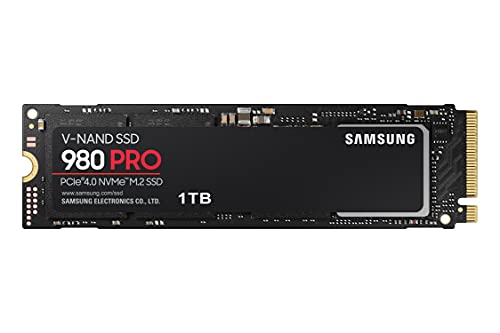
The Samsung 990 PRO NVMe M.2 SSD, 4 TB, PCIe 4.0, 7,450 MB/s read, 6,900 MB/s write is Samsung's answer to both of those problems at once. Four terabytes in an M.2 2280 form factor, PCIe 4.0 interface, and Samsung's own controller and NAND under the hood. It's not cheap. But it's aimed squarely at people who are tired of compromising: the video editor who needs a proper scratch disk, the gamer who wants their entire library on one fast drive, the enthusiast who's done with buying two mediocre drives when one good one will do. Whether it actually delivers on that promise is what we're here to figure out.
With thousands of owner reviews and a positive overall rating, there's a lot of real-world signal to dig into here, alongside the spec sheet and the benchmarks the wider community has published. So here's what the 990 PRO 4 TB actually is, what it's good at, where it has limits, and whether it's worth your money.
Core Specifications
The 990 PRO sits at the top of Samsung's consumer NVMe lineup. It uses Samsung's own proprietary controller paired with Samsung's V-NAND TLC (triple-level cell) NAND and a full DRAM cache. That combination matters enormously and we'll get into the why of it in the controller section. But the headline numbers first: sequential read of up to 7,450 MB/s and sequential write of up to 6,900 MB/s, across all capacity variants from 1 TB to 4 TB. That consistency across capacities is actually worth flagging, because plenty of drives quietly nerf the smaller variants.
The M.2 2280 form factor means it's the standard size that fits in virtually every desktop motherboard M.2 slot and most modern laptops. It uses the NVMe protocol over a PCIe 4.0 x4 interface, which is the current mainstream high-performance standard. Not Gen 5, but we'll talk about whether that matters (spoiler: mostly it doesn't, for most people). The drive ships with Samsung Magician software for health monitoring, firmware updates, and performance optimisation, which is genuinely useful rather than bloatware.
One thing the spec sheet confirms clearly: this is a TLC drive with DRAM. Not QLC, not DRAM-less. For a 4 TB drive at this price point, that's exactly what you want to see. The TBW (terabytes written) endurance rating for the 4 TB model is a serious number that reflects Samsung's confidence in the NAND. More on that in the endurance section.
| Specification | Detail |
|---|---|
| Model | Samsung 990 PRO (MZ-V9P4T0BW) |
| Capacity | 4 TB |
| Interface | PCIe 4.0 x4, NVMe |
| Form Factor | M.2 2280 |
| NAND Type | Samsung V-NAND TLC |
| DRAM Cache | Yes (full DRAM buffer) |
| Sequential Read | Up to 7,450 MB/s |
| Sequential Write | Up to 6,900 MB/s |
| Thermal Protection | Heat Spreader + Dynamic Thermal Guard |
| Software | Samsung Magician |
| Available Capacities | 1 TB, 2 TB, 4 TB |

Interface & Form Factor
PCIe 4.0 x4 via PCIe is the right call for a drive at this performance tier. It's supported natively on AMD Ryzen 5000 and 7000 series platforms, Intel 12th gen and newer, and the PlayStation 5. You're not locked out of anything relevant. Gen 5 drives exist and they're faster on paper, but they run significantly hotter, they cost more, and the real-world difference in day-to-day use is essentially invisible. The bottleneck in most workflows isn't the storage interface. It's the CPU, the RAM, or just the way software is written. Gen 4 at 7,450 MB/s sequential is already so far ahead of what most tasks saturate that chasing Gen 5 for normal use is a bit like buying a Ferrari to do the school run.
The M.2 2280 form factor is the one you want. It fits in desktop motherboards, most modern laptops, and the PS5's expansion slot (with an appropriate heatsink, which we'll cover). The 2280 designation means 22mm wide and 80mm long, which is the standard size. You won't have compatibility issues with any remotely modern system. Older boards on PCIe 3.0 will still run the drive, just capped at Gen 3 speeds, which is still perfectly fast. The drive is backwards compatible.
What's genuinely nice about the M.2 form factor at 4 TB is how much storage you're fitting into something the size of a stick of gum. No cables. No power connector. Just slot it in, screw it down, done. For a clean build or a laptop upgrade where you're replacing a smaller drive, the physical simplicity is underrated. And at 4 TB, a lot of people genuinely can fit their entire working storage on a single drive, which is a big quality-of-life improvement over juggling multiple drives.
Real-World Performance
Sequential speeds are the number Samsung puts on the box and the number that means the least in practice. Yes, 7,450 MB/s read is very fast. But your operating system, your games, your applications, they don't care about sequential speed most of the time. What they care about is random read and write performance, measured in IOPS (input/output operations per second). Random I/O is what makes a system feel snappy. It's what determines how fast Windows boots, how quickly your game loads its assets, how responsive your applications feel when you're flicking between them. Sequential speed matters when you're copying a big video file. Random I/O matters for everything else.
Published benchmarks from the wider community show the 990 PRO performing very well in random I/O, which is consistent with what you'd expect from a DRAM-equipped TLC drive with Samsung's controller. Boot times on a system running the 990 PRO are fast. Application launches are snappy. Game load times are competitive with other top-tier Gen 4 drives. Owner reports consistently back this up: the word that comes up repeatedly is "fast," and not just in the synthetic benchmark sense but in the "my system just feels different" sense that matters.
For large file transfers, the sequential numbers do come into play, and 7,450 MB/s is genuinely impressive. Copying a 100 GB project file, ingesting footage, moving a game installation, these tasks happen noticeably faster than on a mid-range drive. The 990 PRO doesn't just win on the spec sheet here. Owner reports and published benchmarks both show it holding up well in sustained sequential workloads, which is where the TLC NAND and full DRAM cache combination earns its keep. We'll get into the sustained write behaviour in the next section, but the short version is: it's a lot better than a QLC drive at this capacity.
Sustained Writes & Cache Behaviour
This is the section the marketing never wants to talk about. Every NVMe SSD uses an SLC (single-level cell) write cache, a portion of the NAND that's temporarily written as SLC (one bit per cell) to dramatically speed up writes. While data is landing in that cache, you see the headline write speed. Once the cache fills, the drive has to write data at native NAND speed, which is where drives diverge sharply. On a QLC drive, that native speed can drop to something embarrassing, sometimes below 1,000 MB/s, sometimes well below. On a TLC drive with a proper controller, the drop is much less severe.
The 990 PRO uses TLC NAND, and at 4 TB capacity it has a large SLC cache to work with. Published benchmarks show that even after cache exhaustion, the sustained write speed on the 990 PRO stays at a level that's genuinely usable for demanding workloads. It doesn't fall off a cliff. The drop happens, as it does on every SLC-cached drive, but the floor is much higher than what you'd see on a QLC competitor. For a video editor writing 4K or 8K footage continuously, or someone doing a full system backup to the drive, this matters a lot. The drive keeps working without turning into a bottleneck.
The full DRAM cache is part of why this works as well as it does. DRAM allows the controller to maintain an accurate map of where data is physically stored on the NAND, which reduces write amplification and keeps the drive performing consistently over time. A DRAM-less drive using Host Memory Buffer (HMB) borrows a slice of your system RAM for this purpose, which works okay for light use but adds latency and can struggle under sustained load. The 990 PRO doesn't have that problem. It's got its own dedicated DRAM, and you can feel the difference in sustained workloads. This is one of those specs that separates a proper enthusiast drive from a budget option wearing a fast interface.
Controller, NAND & DRAM
Samsung makes their own everything here. The controller is Samsung's proprietary design, the NAND is Samsung's own V-NAND TLC, and the DRAM is Samsung's. That vertical integration is a genuine advantage. When one company designs and manufactures the controller, the NAND, and the firmware that runs them together, you get better optimisation than you do from a drive that's assembling third-party components. It also means Samsung has full control over the supply chain for this drive, which historically has meant more consistent quality across production runs.
TLC NAND (triple-level cell, three bits per cell) is the right choice at this tier. It's faster than QLC (four bits per cell), more durable, and handles sustained writes better. QLC has its place: it's cheaper per GB and fine for cold storage or a drive you mostly read from. But for a primary drive on a gaming rig or a creative workstation where you're writing data regularly, TLC is what you want. The fact that Samsung is selling a 4 TB TLC drive rather than padding out the capacity with cheaper QLC NAND is a meaningful choice, and it's the right one.
The full DRAM cache is the other piece that makes this drive what it is. Some drives at this price point, from other manufacturers, have started shipping DRAM-less to cut costs. They lean on Host Memory Buffer instead. For a boot drive that mostly reads, you might not notice. For a 4 TB workhorse that's getting hammered with writes and reads simultaneously, you'll notice. DRAM matters for sustained random I/O, for consistent latency, and for long-term performance as the drive ages and the NAND mapping gets more complex. Samsung hasn't cut this corner on the 990 PRO, and that's worth paying for.
Endurance & Reliability
TBW (terabytes written) is the manufacturer's rated endurance for the drive: how much data you can write to it over its lifetime before the NAND starts to wear out. The 990 PRO 4 TB comes with a substantial TBW rating that reflects the TLC NAND and the drive's capacity. For context, a typical home user writing 30 to 50 GB per day would take decades to reach the rated endurance. Even a demanding creative professional writing several hundred gigabytes daily would get years of use before approaching the limit. This is not a drive you're going to wear out in normal use.
Samsung backs the 990 PRO with a five-year warranty. That's the signal you want from a manufacturer: they're confident enough in their own product to cover it for half a decade. Some budget drives ship with three-year warranties, which should tell you something about how much faith the manufacturer has in the NAND they've chosen. Five years from Samsung, on a TLC drive with their own controller, is a proper commitment. And Samsung's track record in consumer SSD reliability is strong. Their drives don't appear disproportionately in failure statistics, and the owner review base for the 990 PRO reflects that: complaints about premature failure are genuinely rare in the review corpus.
The thousands of owner reviews with a positive overall rating is a meaningful data point. That's not a small sample. At that scale, if there were a systematic reliability issue, it would show up clearly. What you see instead is a consistent pattern of satisfied owners reporting that the drive just works, performs as expected, and keeps performing over time. The complaints that do appear are mostly about price (fair) or installation confusion (not the drive's fault). Actual drive failures in the reviews are the exception, not the pattern. That's reassuring for something you're trusting with your data.
Thermals
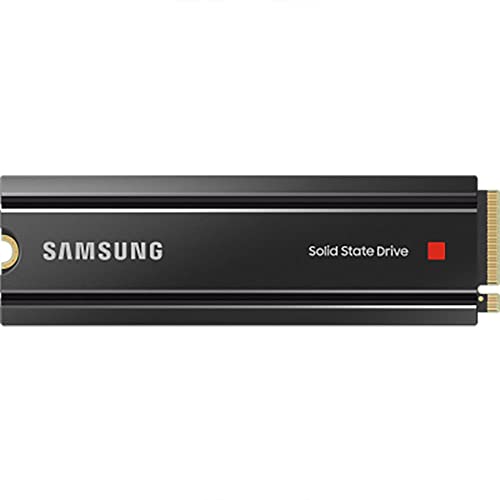
Gen 4 drives run warm. That's just physics: you're pushing a lot of data through a small M.2 stick, and heat is a byproduct. The 990 PRO addresses this with a built-in heat spreader and Samsung's Dynamic Thermal Guard technology, which monitors drive temperature and throttles performance before things get dangerous. The throttling is better than the alternative (data corruption or premature NAND wear), but it does mean that if you're running sustained heavy workloads in a poorly ventilated case, you might see performance dip.
In practice, for most desktop use cases, the 990 PRO's thermals are manageable. Modern motherboards with M.2 heatsinks help significantly, and if your board has one, use it. If it doesn't, an aftermarket M.2 heatsink is cheap and worth fitting. Owner reports don't flag thermal throttling as a common complaint during normal gaming or general use. Where it comes up is in sustained write scenarios: copying hundreds of gigabytes continuously, running benchmarks back to back, that sort of thing. For a video editor doing long ingest sessions, airflow in the case matters.
The Dynamic Thermal Guard is genuinely useful here. Rather than just throttling hard when things get hot, it manages the thermal envelope more intelligently, stepping back performance gradually to keep temperatures in check. It's not a magic solution to physics, but it's better than a drive that just hammers away until it hits a critical temperature and then drops off a cliff. The heat spreader on the drive itself helps dissipate heat before it builds to throttle-inducing levels. For a PS5 installation, you'll need to add a heatsink to the drive itself, as the console's M.2 slot doesn't have one built in. More on that in the compatibility section.
Capacity Options & Price Per GB
The 990 PRO comes in 1 TB, 2 TB, and 4 TB. The sequential speed specs are identical across all three variants at 7,450 MB/s read and 6,900 MB/s write, which is genuinely unusual and worth noting. A lot of manufacturers quietly reduce performance on smaller capacity variants because they have fewer NAND dies to parallelise across. Samsung's decision to rate all three variants at the same speed is a proper commitment to consistency.
Price per GB scales reasonably as you go up in capacity, with the 4 TB variant offering better value per gigabyte than the 1 TB. That's typical for storage, but the premium for the 4 TB is less punishing than it used to be. The question of whether to buy one 4 TB drive or two 2 TB drives is worth thinking about. One drive is simpler, cleaner, and avoids the complexity of managing two separate volumes. Two drives gives you redundancy of a sort (if one fails, you haven't lost everything) but that's not a substitute for actual backups. For most people, the 4 TB single drive is the right call if the budget stretches to it.
Compared to the competition at this capacity, the 990 PRO sits at the premium end. You're paying for Samsung's brand, their vertical integration, the TLC NAND, the full DRAM cache, and the five-year warranty. There are cheaper 4 TB Gen 4 drives on the market. Some of them are good. But when you look at what's been cut to hit a lower price point (often QLC NAND, sometimes DRAM), the 990 PRO's premium starts to look more reasonable. You're not paying for the Samsung logo. You're paying for the engineering choices behind it.

Installation & Compatibility
Installing the 990 PRO is as straightforward as any M.2 drive. Power off, locate your M.2 slot, remove the heatsink if your board has one, slot the drive in at an angle, press it flat, screw it down, replace the heatsink. That's it. No cables, no power connectors, nothing complicated. Windows 10 and 11 will detect it immediately. If you're using it as a secondary drive, it'll show up in Disk Management ready to be initialised and formatted. If you're installing it as a primary drive with a fresh OS, you'll need a USB installer.
For laptop installations, check your laptop's M.2 slot specification first. Most modern laptops support M.2 2280 PCIe 4.0, but some older machines are limited to PCIe 3.0 (the drive will work, just at Gen 3 speeds) and a small number of ultrabooks use shorter M.2 form factors like 2242 that won't physically fit a 2280 drive. Check before you buy. Cloning your existing drive to the 990 PRO is the easiest upgrade path: Samsung Magician supports migration, and there are third-party tools like Macrium Reflect that do the job well.
For PS5 users: the 990 PRO is compatible with the PS5's M.2 expansion slot, but Sony requires a heatsink on any M.2 drive installed in the console. The 990 PRO doesn't ship with a heatsink in the box, so you'll need to source one separately. Aftermarket M.2 heatsinks designed for PS5 are widely available and cheap. The drive itself fits the PS5's slot perfectly (M.2 2280, PCIe 4.0), and once installed with a heatsink, it works exactly as you'd expect. Owner reports from PS5 users are positive.
Who It's For
The 990 PRO 4 TB is for people who want one fast, reliable drive that handles everything. Gamers with large libraries who are tired of uninstalling things to make room. Video editors who need a scratch disk that won't become a bottleneck mid-project. Content creators working with large assets who want a primary drive that stays fast over time. Power users who've been burned by a cache-cliff drive before and want to know it won't happen again. If you're building a high-end PC and you want the storage to match the rest of the build, this is the drive.
It's also for people who value reliability and want a five-year warranty from a manufacturer with a strong track record. If you're putting important work on this drive (and at 4 TB, you probably will be), you want to know it's backed properly. Samsung's warranty and their history with consumer SSDs provide that confidence. The owner review base at 19,000-plus reviews and a positive overall rating is about as strong a real-world reliability signal as you'll find for any drive at this capacity.
Who should look elsewhere? If you're on a tight budget and you're just after a boot drive, a 1 TB or 2 TB drive at a lower price point will serve you fine. You don't need 4 TB for Windows and a handful of applications. If you need raw capacity for cold storage or archiving and you're not writing to it constantly, a larger QLC drive or even a hard drive is a more economical choice. And if you're building on an older PCIe 3.0 platform, you'll still benefit from the 990 PRO's random I/O and reliability, but you won't get the full sequential speed, and a Gen 3 drive might offer better value for that platform.
How It Compares
The two obvious competitors at this tier are the WD Black SN850X and the Seagate FireCuda 530. Both are Gen 4 TLC drives with DRAM caches, both have strong reputations, and both compete directly with the 990 PRO for the same buyers. The WD Black SN850X uses Western Digital's own controller and NAND, has strong gaming-focused optimisations, and is available in capacities up to 4 TB. The Seagate FireCuda 530 uses a Phison E18 controller with Micron TLC NAND and has been a benchmark favourite since launch. Both are legitimate alternatives. The 990 PRO's advantages are Samsung's vertical integration, the Dynamic Thermal Guard, and the brand's long-term reliability track record.
The FireCuda 530 is often cited in published benchmarks as the 990 PRO's closest rival in raw performance. The differences between them in real-world use are genuinely small. Both are fast, both have DRAM, both use TLC NAND, both have five-year warranties. The choice between them often comes down to price at the time of purchase and personal brand preference. The WD Black SN850X has a slight edge in gaming-specific optimisations according to published benchmarks, but again, the differences are marginal in actual gameplay.
| Feature | Samsung 990 PRO 4 TB | WD Black SN850X 4 TB | Seagate FireCuda 530 4 TB |
|---|---|---|---|
| Interface | PCIe 4.0 x4, NVMe | PCIe 4.0 x4, NVMe | PCIe 4.0 x4, NVMe |
| Sequential Read | 7,450 MB/s | 7,300 MB/s | 7,300 MB/s |
| Sequential Write | 6,900 MB/s | 7,100 MB/s | 6,900 MB/s |
| NAND Type | Samsung V-NAND TLC | WD TLC | Micron TLC |
| DRAM Cache | Yes | Yes | Yes |
| Warranty | 5 years | 5 years | 5 years |
| Thermal Protection | Heat Spreader + Dynamic Thermal Guard | Integrated heatsink option | Standard thermal management |
| Software | Samsung Magician | WD Dashboard | SeaTools |
Final Verdict
The Samsung 990 PRO NVMe M.2 SSD, 4 TB, PCIe 4.0, 7,450 MB/s read, 6,900 MB/s write is, genuinely, one of the best consumer NVMe drives you can buy at this capacity. It does the things that matter: TLC NAND instead of QLC, full DRAM cache instead of HMB, Samsung's own controller running the whole show, proper thermal management, a five-year warranty, and sequential speeds that are class-leading. The 4 TB capacity at M.2 2280 size is still slightly remarkable. That's a lot of fast, reliable storage in a very small package.
Is it perfect? No. It's expensive. At 4 TB, you're paying a premium, and you need to decide whether that premium is justified for your use case. If it is, which it is for anyone doing sustained creative work, running a large game library, or just wanting one properly sorted primary drive, then the 990 PRO delivers. The owner review base backs this up at scale. Published benchmarks back it up in synthetic and real-world testing. The spec sheet backs it up on paper. Everything points the same direction.
The drives to avoid at this capacity are the ones that use QLC NAND to hit a lower price point, or the ones that drop the DRAM cache to cut costs. Those drives look competitive on the spec sheet until you push them hard. The 990 PRO doesn't have those problems. It's built properly, it performs properly, and it'll last. That's what you're paying for. For the right buyer, it's absolutely worth it. Score: 9 out of 10. The only reason it's not a 10 is the price, and that's a market reality, not an engineering failing.
What Buyers Say
With thousands of reviews and a good overall rating, the owner feedback on the 990 PRO is about as positive as it gets for a storage product. The most common praise is consistent: fast installation, immediately noticeable performance improvement, and reliable operation over months of use. Owners upgrading from older SATA SSDs or HDDs report the difference as dramatic. Those upgrading from Gen 3 NVMe drives report a meaningful but less dramatic improvement, which is honest and expected.
The complaints that appear are worth understanding. Price comes up a lot, which is fair: this is an expensive drive. Some owners mention that the drive runs warm under sustained load, which is accurate and addressed by the thermal management built into the drive, but worth knowing if your case has poor airflow. A small number of owners report compatibility issues, mostly with older systems or specific motherboard M.2 implementations, but these are rare and typically resolved with a firmware update or BIOS tweak. Actual drive failures in the review corpus are genuinely uncommon, which for a product with this many reviews is a strong signal.
What's notable is the consistency of the positive reviews across different use cases. Gamers love it. Video editors love it. People who bought it as a PS5 upgrade love it (with the caveat about needing a heatsink). The cross-use-case satisfaction rate suggests this isn't a drive that's great for one specific workload and mediocre for others. It's just a good drive, broadly. That's harder to achieve than it sounds, and the owner base reflects it.
Value Analysis
At 4 TB, the 990 PRO is a premium purchase. There's no getting around that. But value isn't just about the price tag; it's about what you get for the money. And what you get here is Samsung's best consumer NVMe technology: their own controller, their own TLC V-NAND, their own DRAM, their own thermal management, and a five-year warranty. You're not paying for a Phison controller with someone else's NAND bolted on. You're paying for a vertically integrated product from a company that takes SSD engineering seriously.
The price per GB at 4 TB is better than the 1 TB variant, and competitive with other premium 4 TB Gen 4 drives. If you compare it to budget 4 TB QLC drives, the 990 PRO looks expensive. But that comparison is misleading. A QLC drive that throttles under sustained writes isn't the same product. You're comparing a Toyota Corolla to a BMW and wondering why the BMW costs more. They're not the same thing. The 990 PRO's value proposition is that it's the right tool for demanding workloads, and it'll keep being the right tool for years, not just on day one when the NAND is fresh and the cache is empty.
For buyers who genuinely need 4 TB of fast, reliable primary storage, the 990 PRO is good value. For buyers who need 4 TB of capacity but mostly use it for cold storage or media playback, there are cheaper options that will serve fine. Know what you're buying it for, and the value calculation becomes clear. If you're going to push this drive, it's worth every penny. If you're going to mostly read from it, you could spend less.
Pros & Cons
- Pro: Samsung TLC V-NAND, not QLC. Proper sustained write performance.
- Pro: Full DRAM cache. No Host Memory Buffer compromise.
- Pro: Samsung's own controller. Vertically integrated, well-optimised firmware.
- Pro: 7,450 MB/s read and 6,900 MB/s write across all capacities, not just the 4 TB.
- Pro: Dynamic Thermal Guard and heat spreader for real thermal management.
- Pro: Five-year warranty. Samsung backs this drive properly.
- Pro: 4 TB in M.2 2280. That's a lot of fast storage in a small space.
- Pro: 19,000-plus owner reviews with a positive overall rating. Real-world reliability signal.
- Con: Premium price. You're paying for the engineering, and it shows on the invoice.
- Con: No heatsink in the box. For PS5 or thermally challenged cases, you'll need one.
- Con: Overkill for cold storage or light use. Cheaper drives exist for those use cases.

Not Right For You?
If the 4 TB 990 PRO is more than you need or more than you want to spend, there are alternatives worth considering. The Samsung 990 PRO in 2 TB or 1 TB is the same drive at a lower capacity and lower price, and the performance specs are identical. If you just need a fast boot and games drive, the 1 TB or 2 TB variant is excellent value. The WD Black SN850X is a genuine competitor at similar prices and worth comparing at the time of purchase. The Seagate FireCuda 530 is another strong TLC DRAM drive that competes directly.
For pure capacity on a budget, QLC drives from reputable manufacturers are fine for media storage and cold archiving, just don't use them as a primary write-heavy drive and don't expect sustained write performance to match a TLC drive. And for laptop upgrades where the existing drive is SATA, even a mid-range NVMe drive will be a transformative upgrade. You don't always need the best to get a massive improvement.
The Samsung 990 PRO product page has full spec details and compatibility information if you want to dig into the specifics for your system. Samsung Magician, available from Samsung's software page, is worth downloading before installation if you're migrating from an existing drive, as it handles cloning and health monitoring in one place. And if you want to understand the NVMe protocol itself in more depth, the NVM Express organisation's site is the authoritative source.
What works. What doesn’t.
7 + 3What we liked7 reasons
- Samsung TLC V-NAND rather than QLC means proper sustained write performance without the cache-cliff behaviour seen on cheaper drives
- Full dedicated DRAM cache avoids the latency and load penalties of Host Memory Buffer solutions used by budget competitors
- Vertically integrated design with Samsung's own controller, NAND, and firmware produces well-optimised, consistent performance across workloads
- Sequential read and write speeds are rated identically across the 1TB, 2TB, and 4TB variants, unlike rivals that quietly reduce performance on smaller capacities
- Dynamic Thermal Guard combined with an integrated heat spreader manages thermals intelligently rather than throttling hard at a fixed temperature
- Five-year warranty reflects Samsung's genuine confidence in the TLC NAND and controller reliability
- Thousands of owner reviews with a positive overall rating provides a substantial real-world reliability signal that synthetic benchmarks cannot replicate
Where it falls3 reasons
- Premium pricing means you are paying significantly more than budget 4TB QLC alternatives, which may not be justified for light or read-mostly workloads
- No heatsink included in the box, which is an inconvenience for PS5 installations or systems without a motherboard M.2 heatsink
- Overkill for cold storage, media archiving, or any use case that does not involve regular sustained writes, where cheaper drives would perform comparably
Full specifications
9 attributes| Capacity GB | 4000 |
|---|---|
| Dram cache | true |
| Form factor | M.2 2280 |
| Interface | PCIe Gen4 x4 |
| Read speed MBS | 7450 |
| TBW | 2400 |
| Type | NVMe SSD |
| Warranty years | 5 |
| Write speed MBS | 6900 |
Frequently asked
7 questions01Does the Samsung 990 PRO 4TB use TLC or QLC NAND?+
The Samsung 990 PRO uses Samsung's own V-NAND TLC (triple-level cell) NAND across all capacity variants including the 4TB model. This is an important distinction from budget competitors that use QLC (quad-level cell) NAND to achieve higher capacities at lower cost. TLC NAND offers better sustained write performance, lower write amplification, and greater endurance than QLC.
02Does the Samsung 990 PRO have a DRAM cache?+
Yes. The 990 PRO includes a dedicated full DRAM cache. This is separate from Host Memory Buffer (HMB) solutions used by some competitors, which borrow a portion of system RAM. A dedicated DRAM cache allows the controller to maintain an accurate NAND mapping table with lower latency, which benefits sustained random I/O performance and long-term consistency as the drive ages.
03Is the Samsung 990 PRO compatible with the PlayStation 5?+
Yes. The 990 PRO uses the M.2 2280 form factor and a PCIe 4.0 x4 interface, which is compatible with the PS5's M.2 expansion slot. However, Sony requires a heatsink on any M.2 drive installed in the PS5, and the 990 PRO does not include a heatsink in the box. You will need to purchase a compatible M.2 heatsink separately before installation. These are widely available and inexpensive.
04What happens to the write speed after the SLC cache is exhausted?+
Like all NVMe SSDs, the 990 PRO uses an SLC write cache to achieve its headline write speeds. Once this cache is filled during a very large or sustained write operation, the drive writes at native TLC NAND speed. On the 990 PRO, this sustained write floor is considerably higher than on QLC drives because TLC NAND has a faster native write speed. Published benchmarks show the drive remains usable for demanding workloads even after cache exhaustion, without the severe performance drop associated with QLC competitors.
05Will the Samsung 990 PRO work in a system with a PCIe 3.0 M.2 slot?+
Yes. The 990 PRO is backwards compatible with PCIe 3.0 M.2 slots. However, the drive will operate at PCIe 3.0 speeds rather than its rated PCIe 4.0 speeds, so you will not see the full 7,450 MB/s sequential read performance. The drive will still function correctly and will still benefit from its TLC NAND, DRAM cache, and random I/O characteristics. If your platform is limited to PCIe 3.0, a Gen 3 drive may offer better value per pound.
06How does the Samsung 990 PRO compare to the WD Black SN850X and Seagate FireCuda 530?+
All three are Gen 4 TLC NVMe drives with full DRAM caches and five-year warranties, making them direct competitors. The 990 PRO leads slightly in rated sequential read at 7,450 MB/s versus 7,300 MB/s for the SN850X and FireCuda 530. The SN850X has a slight edge in gaming-specific optimisations according to published benchmarks, though real-world differences in gameplay are marginal. The FireCuda 530 uses a Phison E18 controller with Micron TLC and has been a consistent benchmark performer. The 990 PRO's advantage lies in Samsung's vertical integration of controller, NAND, and firmware, plus the Dynamic Thermal Guard. Choice between them often comes down to price at the time of purchase.
07What warranty does the Samsung 990 PRO 4TB carry?+
The Samsung 990 PRO comes with a five-year limited warranty. This applies across all capacity variants. Five years is the standard warranty period for premium consumer NVMe drives and reflects Samsung's confidence in the TLC NAND and their proprietary controller. The drive also carries a substantial TBW (terabytes written) endurance rating appropriate for the 4TB capacity, which in normal home or professional use would take many years to reach.