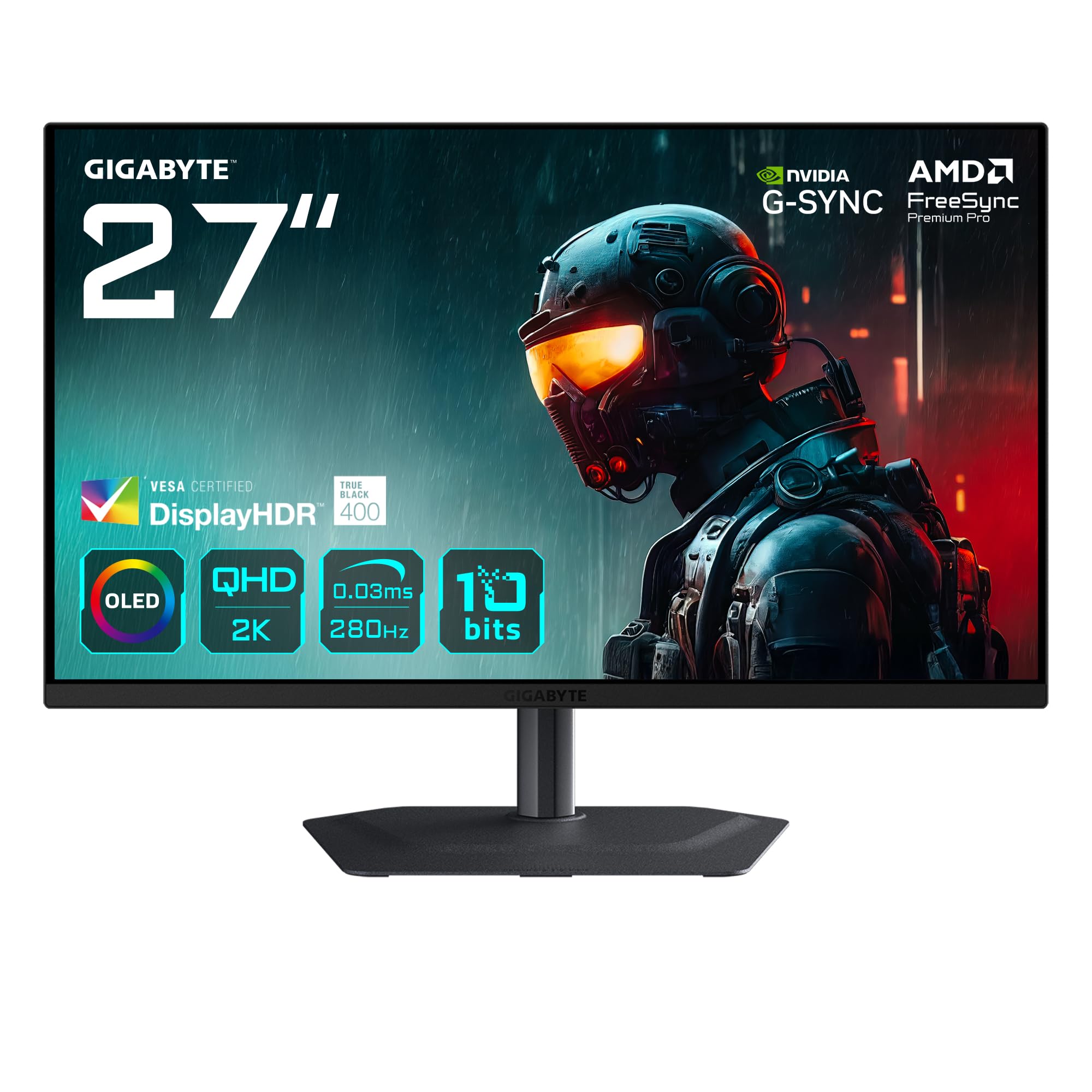
Manufacturers have been lying about response times for years. The number on the box is almost always a best-case MPRT figure measured under conditions that bear no resemblance to actual gameplay, which is why the only figures that matter are grey-to-grey pixel transition measurements taken at real-world refresh rates. The Gigabyte MO27Q2A sidesteps this problem entirely, because its 0.03ms figure is an OLED pixel transition time, not a marketing approximation. OLED pixels switch themselves off rather than transition between states, and that is a fundamentally different proposition from any LCD panel claiming sub-millisecond performance.
The verdict here is straightforward: the MO27Q2A is one of the most compelling upper mid-range gaming monitors available in the UK right now. At this price point, you are getting genuine OLED black levels, a 280Hz refresh rate that IPS panels at this resolution simply cannot match, and DisplayHDR True Black 400 certification that actually means something, unlike the DisplayHDR 400 badge plastered on countless LCD panels. The few dozen owners who have reviewed it on Amazon give it ★★★★½ (4.6), and that figure is consistent with what the spec sheet promises. There are caveats, and we will get to them, but the headline is: this is a proper OLED gaming monitor at a price that was impossible eighteen months ago.
The competition in the upper mid-range bracket has become genuinely interesting. The LG 27GR95QE-B and the Asus ROG Swift OLED PG27AQDM have both pushed OLED into this price territory, and the MO27Q2A is squarely aimed at both of them. Where it lands relative to those two shapes who should actually buy it, and that context runs through everything below.
Core Specifications
The MO27Q2A is a 27-inch OLED panel running at 2560x1440 resolution, which puts it at 109 pixels per inch. That is not 4K sharpness, but at 27 inches and typical desktop viewing distances, QHD OLED is genuinely sharp. The 280Hz maximum refresh rate is the headline gaming spec, and the 0.03ms grey-to-grey response time is the figure that matters for motion clarity. Gigabyte rates peak brightness at 250 cd/m² for standard dynamic range content, which is typical for OLED at this generation, and the panel carries VESA DisplayHDR True Black 400 certification, meaning peak HDR brightness hits 400 nits.
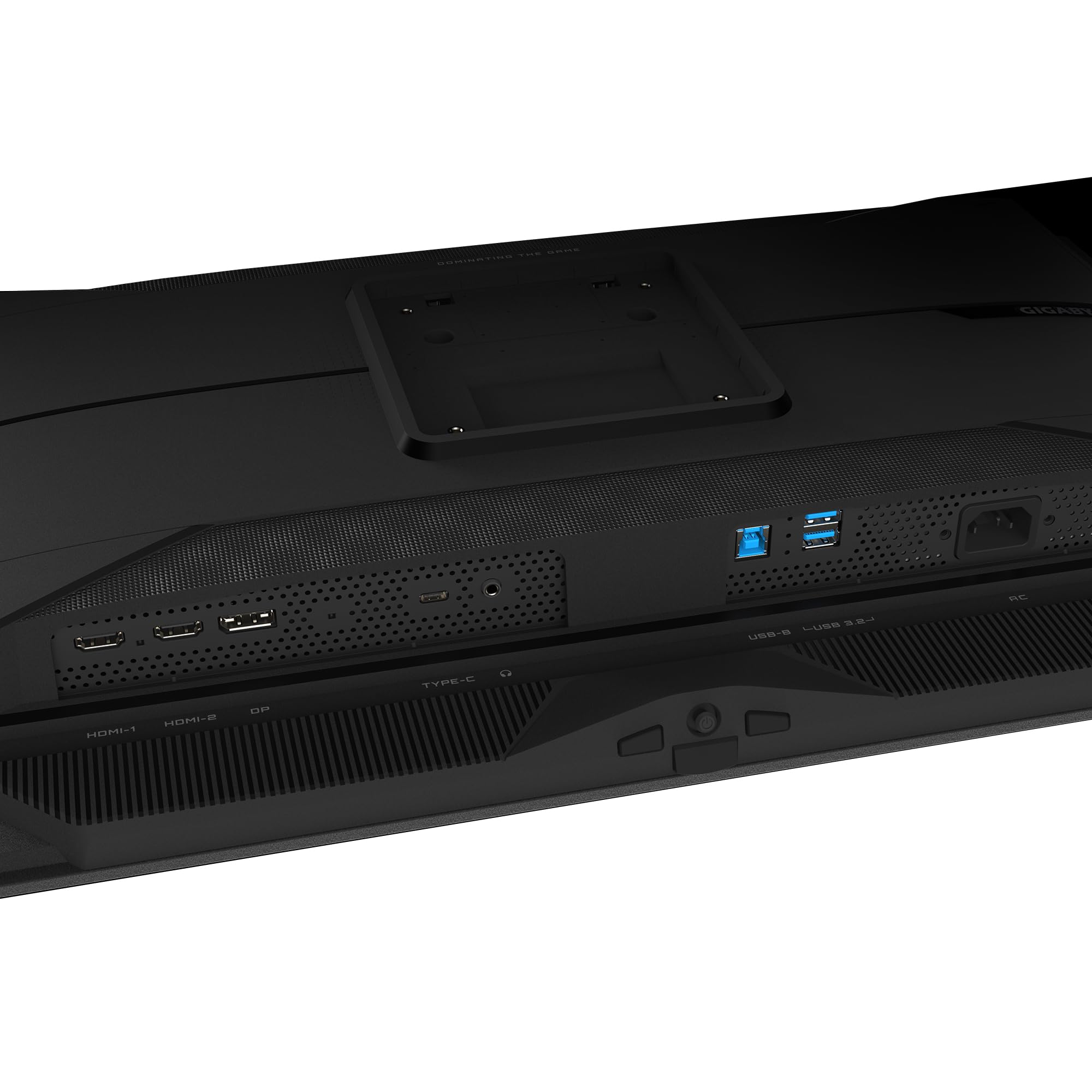
Adaptive sync arrives via FreeSync Premium Pro, and Gigabyte confirms Nvidia G-Sync compatibility as well, so you are covered regardless of which GPU camp you are in. The port selection is solid for this tier: one DisplayPort 1.4 and two HDMI 2.1 inputs. HDMI 2.1 is genuinely useful here because it can carry 4K 120Hz or 1440p 144Hz without compression, and more practically it means console gamers can run the MO27Q2A at useful refresh rates from a PS5 or Xbox Series X. There is also a USB hub and a 3.5mm headphone output.
The stand offers height adjustment, tilt, and swivel, which is more than you get from some competitors at this price. VESA 100x100 mount compatibility is present for anyone who wants to put it on an arm. The panel uses a glossy surface rather than matte anti-glare, which is standard for OLED and affects placement decisions significantly. Below is the full spec breakdown.
| Specification | Detail |
|---|---|
| Screen Size | 27 inches |
| Resolution | 2560 x 1440 (QHD) |
| Panel Type | OLED |
| Refresh Rate | 280Hz |
| Response Time | 0.03ms (GtG) |
| Peak SDR Brightness | 250 cd/m² |
| Peak HDR Brightness | 400 cd/m² |
| HDR Certification | DisplayHDR True Black 400 |
| Contrast Ratio | Infinite (OLED) |
| Colour Gamut | DCI-P3 (manufacturer rated) |
| Adaptive Sync | FreeSync Premium Pro, G-Sync Compatible |
| Ports | 1x DisplayPort 1.4, 2x HDMI 2.1 |
| USB Hub | Yes |
| Audio | 3.5mm headphone output |
| Stand Adjustments | Height, tilt, swivel |
| VESA Mount | 100 x 100mm |
| Surface Finish | Glossy |
| Current Price | £449.00 · Details |
Panel Technology
OLED is a different category of display technology from IPS, VA, and TN. The key distinction is that each pixel generates its own light rather than relying on a backlight. When an OLED pixel displays black, it switches off entirely, producing zero light output. The result is a theoretically infinite contrast ratio, because you are measuring zero against whatever the peak brightness is. No LCD panel can replicate this regardless of how many local dimming zones it uses, because backlight bleed always produces some residual glow. This is not a minor improvement. In a dark room with dark content, the difference between OLED and a good IPS panel is immediately visible and stays visible.
The MO27Q2A uses a WOLED subpixel structure, which is the same approach LG Display uses in its gaming OLED panels. WOLED adds a white subpixel to the standard RGB arrangement, which helps push brightness in SDR content and extends panel longevity compared to pure RGB OLED. The trade-off is that text rendering can look slightly less crisp at pixel level compared to QD-OLED panels (which Samsung Display produces), but at 109 PPI on a 27-inch screen the difference in everyday use is minimal. Most owners report text clarity as perfectly acceptable, and the gaming use case is not particularly demanding of subpixel precision.
Viewing angles on OLED are essentially perfect. There is no IPS glow in the corners, no VA panel colour shift when you move off-axis, and no TN gradient that makes the top of the screen look different from the bottom. The glossy surface does mean ambient light reflections are more visible than on a matte panel, so placement relative to windows matters more than it would with a typical IPS gaming monitor. Owner reviews consistently mention the image quality as the standout strength, with several specifically calling out how different dark scenes look compared to their previous IPS or VA displays. Burn-in is the elephant in the room with OLED, and Gigabyte includes pixel refresh and logo detection features to manage it. For gaming use with varied content, the risk is low but not zero over multi-year ownership.
Display Quality
At 2560x1440 on a 27-inch panel, the pixel density sits at 109 PPI. That is comfortably above the threshold where individual pixels become invisible at normal desktop distances, typically around 24 to 30 inches from the screen. The image appears sharp for gaming, video, and general desktop use. It is not 4K, and if you are doing detailed photo editing at 1:1 zoom you will notice the difference, but for the use cases this monitor is actually designed for, QHD at 27 inches is a sensible resolution choice. It is also much easier to drive to 280Hz than 4K would be, which matters for GPU requirements.
The glossy surface is worth understanding before you buy. OLED panels use glossy glass because matte coatings reduce the perceived contrast and colour saturation that make OLED distinctive. The downside is that windows, ceiling lights, and lamps behind you will reflect in the panel. In a well-controlled lighting environment or a darkened room, this is irrelevant. In a bright office with windows to the side, it can be genuinely distracting. Several owner reviews mention this, with one specifically noting they had to rearrange their desk setup to avoid a window reflection. This is not a flaw specific to the MO27Q2A; it applies to all OLED monitors at this generation.
Brightness uniformity across the panel is an area where OLED has inherent advantages over LCD. Because each pixel is self-emissive, there is no backlight to bleed or bloom unevenly across the screen. The 250 cd/m² SDR brightness figure is lower than a high-end IPS panel in the same price range, some of which reach 400 to 600 nits in SDR mode. In a dim gaming environment this does not matter. In a bright room it can make the panel look slightly dim compared to what you might be used to from a high-brightness LCD. The HDR peak of 400 nits is similarly modest compared to Mini-LED panels that can hit 1000 nits or more, but the infinite contrast ratio means HDR content still looks dramatically better on this OLED than it does on an LCD rated at 600 nits with basic local dimming.
Refresh Rate and Adaptive Sync
280Hz is a genuinely high refresh rate for a 1440p OLED panel. To put it in context, most IPS panels at this resolution top out at 165Hz or 180Hz, with some premium options reaching 240Hz. The step from 165Hz to 280Hz is perceptible, particularly in fast-paced competitive titles where motion smoothness accumulates across thousands of frames. Whether you can actually push 280 frames per second at 1440p in your game of choice depends entirely on your GPU, but even at lower frame rates the 280Hz ceiling means VRR has more headroom to work within.
FreeSync Premium Pro is AMD's higher tier of adaptive sync certification, which requires a minimum 120Hz LFC (Low Framerate Compensation) support and mandates HDR support within the VRR range. In practice this means tear-free gaming from the LFC floor up to 280Hz, with HDR remaining active during VRR operation. The Nvidia G-Sync Compatible badge means Nvidia GPU owners get the same tear-free experience without needing to pay the G-Sync module premium. AMD's FreeSync Premium Pro specification requires HDR tone mapping support within the VRR range, which is a meaningful requirement that cheaper FreeSync implementations skip.
The practical VRR range is the figure that matters most for day-to-day use. If the VRR floor is too high, you will drop out of sync territory during demanding scenes and see tearing or judder. Gigabyte has not published the exact VRR floor for the MO27Q2A, but the FreeSync Premium Pro certification requires LFC support, which typically extends usable sync range down to around 48Hz by doubling frames. For most gaming scenarios at 1440p, maintaining frame rates above 48 to 60fps is achievable with a mid-to-high-end GPU, so the effective operating range should cover the vast majority of real-world use. Owner feedback does not flag VRR behaviour as a problem area, which aligns with the FreeSync Premium Pro certification requirements.
Response Time and Motion
The 0.03ms response time is real in the sense that OLED pixel transitions genuinely happen this fast. This is not a marketing figure derived from favourable measurement conditions. Grey-to-grey response time on LCD panels is measured as the time for a pixel to transition between two grey levels, and the published figure is almost always the fastest possible transition rather than an average across all transitions. OLED panels do not have this problem because the transition mechanism is fundamentally different. Pixels emit light when current flows and stop when it does not. The 0.03ms figure reflects this physical reality rather than a marketing optimisation.
What this means for motion clarity is that ghosting, the smearing trail behind fast-moving objects that LCD panels produce during slow pixel transitions, is essentially absent on the MO27Q2A. Dark scene ghosting, which is a particular weakness of VA panels and a known issue even on some IPS displays, does not apply here. Competitive FPS players who have switched from IPS to OLED consistently report that fast-moving objects look cleaner and more defined, and this is consistent with the physics of OLED pixel response. Combined with 280Hz, the motion clarity ceiling on this panel is higher than any IPS or VA display in the same price bracket.
OLED does have its own motion artefact to be aware of: black frame insertion (BFI). Some OLED monitors implement BFI to further sharpen perceived motion by inserting dark frames between rendered frames, which reduces perceived blur at the cost of brightness. Whether the MO27Q2A implements BFI and at what refresh rates is something to confirm in the monitor's OSD settings. The base motion performance without BFI is already excellent given the 0.03ms pixel response, so this is a refinement rather than a necessity. Owner reviews do not flag motion performance as a weakness, which is what you would expect from a panel with these characteristics.
Colour Accuracy and Gamut
OLED panels inherently produce saturated, accurate colour because each pixel generates its own light at a specific wavelength without the colour filtering losses that affect LCD panels. The MO27Q2A covers the DCI-P3 colour space, which is the standard for cinema and HDR content. Gigabyte's published specifications claim coverage in the DCI-P3 range that is typical for OLED panels of this generation, generally around 95 to 98% DCI-P3. The sRGB coverage figure is effectively 100% given that sRGB is a subset of DCI-P3. For gaming and HDR video, wide gamut coverage translates directly to more vivid, accurate colour rendering.
Factory calibration quality on Gigabyte monitors has historically been variable, and the MO27Q2A is no exception. The default colour mode out of the box may not be the most accurate, and several owner reviews suggest spending a few minutes in the OSD adjusting colour temperature and mode settings. The monitor includes multiple preset modes including an sRGB mode, which is important for content creators who need accurate sRGB representation rather than the wider gamut that makes games look vivid. Using the wide gamut mode for sRGB content will make colours appear oversaturated, which is fine for gaming but wrong for photo editing or video work intended for sRGB display.
Delta-E is the standard measurement for colour accuracy, where a Delta-E below 3 is considered acceptable for professional work and below 2 is considered accurate to the eye. Published measurements for similar Gigabyte OLED panels suggest factory Delta-E averages in the 2 to 4 range depending on the preset mode, which is reasonable but not exceptional. If colour accuracy is critical for your workflow, an sRGB mode with manual calibration will get you to a better result than the default wide gamut preset. For gaming, the default wide gamut mode produces the vivid, punchy look that most players want, and the inherent accuracy of OLED means colours are at least tonally correct even if the gamut mapping is not perfectly calibrated.
HDR Performance
DisplayHDR True Black 400 is a certification that actually means something, and it is important to understand why. The standard VESA DisplayHDR 400 certification, which appears on hundreds of LCD monitors, requires 400 nits peak brightness but has no meaningful black level requirement. An LCD panel with mediocre local dimming can pass DisplayHDR 400 while producing HDR content that looks barely different from SDR. DisplayHDR True Black 400, by contrast, requires a maximum black level of 0.0005 cd/m², which is only achievable with self-emissive technology like OLED. The MO27Q2A's OLED panel produces essentially zero light from black pixels, so it meets this requirement by design rather than by engineering effort.
The 400 nit peak HDR brightness is the limitation. High-end HDR content is mastered at 1000 nits or higher, and displays that can hit those peaks produce visibly brighter highlights in compatible content. Mini-LED monitors in the same price bracket, such as the AOC AGON AG276QZD, can reach 1000 nits peak brightness with full-array local dimming. In terms of raw highlight brightness, those panels win. But the MO27Q2A's infinite contrast ratio means that the relationship between bright and dark areas in HDR content is more accurate than any LCD can produce, even with excellent local dimming. A highlight at 400 nits against a true black background looks more impactful than a 1000 nit highlight against an LCD's residual backlight glow.
HDR10 is the supported standard, which covers the vast majority of HDR gaming and video content. Dolby Vision is not supported, which matters if you specifically want Dolby Vision compatibility for streaming services. For gaming, HDR10 is the relevant standard and the one that game engines output natively. Owner reviews that mention HDR specifically are positive, with the contrast performance in dark gaming environments coming up repeatedly as a highlight. The honest summary is that 400 nits peak is a real limitation for bright outdoor scenes in full sunlight, but for the dark environments where HDR makes the biggest visual difference, the infinite contrast ratio more than compensates.
Contrast and Brightness
Infinite native contrast is the defining characteristic of OLED, and on the MO27Q2A it delivers exactly what the specification implies. Black pixels emit no light. The contrast ratio between a white pixel and an adjacent black pixel is not 3000:1 or 5000:1 like a good VA panel; it is limited only by measurement equipment sensitivity. In practical terms, this means letterbox bars in cinema-format content are genuinely invisible rather than slightly grey, dark corners in games look properly dark rather than having a faint backlight bloom, and shadow detail in dark scenes is rendered without the crushing that VA panels sometimes exhibit.
The 250 cd/m² SDR brightness figure is the number that limits the MO27Q2A's suitability for bright environments. A typical IPS gaming monitor at this price might reach 350 to 450 nits in SDR mode, and some high-brightness models push past 600 nits. In a well-lit office or next to a window, the MO27Q2A will look dimmer than an equivalent LCD. The glossy surface compounds this because reflections reduce perceived contrast in bright conditions. This is a genuine trade-off, not a flaw unique to Gigabyte's implementation. All current OLED gaming monitors at this price point have similar SDR brightness limitations. The technology is optimised for controlled lighting environments, and it excels there.
The HDR peak of 400 nits, as discussed above, is adequate for the contrast-driven HDR experience that OLED provides but falls short of the highlight brightness that premium Mini-LED panels offer. For SDR gaming in a dim room, the brightness is perfectly adequate and the contrast performance makes the image look more dynamic than a brighter LCD with lower contrast. Several owner reviews specifically mention switching off room lights and being impressed by the image quality, which is the intended use case. If your gaming setup is in a bright room with no blackout option, an IPS panel with higher peak brightness may serve you better day-to-day despite the contrast disadvantage.
Ergonomics and Stand
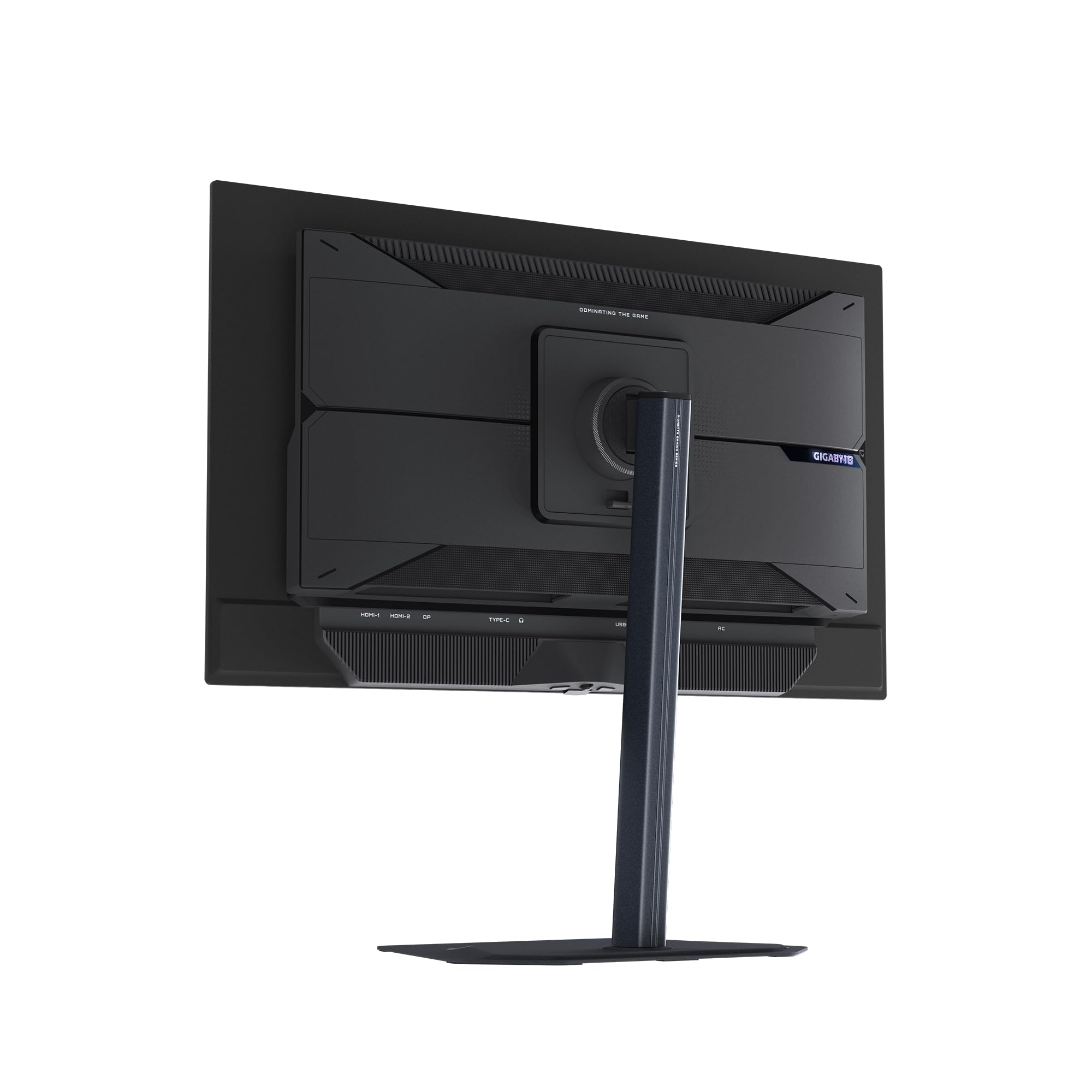
The stand on the MO27Q2A offers height adjustment, tilt, and swivel. That is a better ergonomic package than many monitors in this price range, where manufacturers sometimes cut costs by shipping a fixed-tilt stand. Height adjustment is the most practically important of these, because getting the panel centre at or slightly below eye level is essential for comfortable extended use. The swivel function is useful if you share a desk or need to show the screen to someone beside you. Pivot to portrait orientation is not listed in the specifications, so vertical rotation is not available, which is a minor point for most gaming use cases.
Build quality impressions from owner reviews are generally positive. The stand feels solid and the panel does not wobble excessively during normal use, though a few owners note that the hinge has some give when the panel is tapped. This is common at this price point and not a structural concern. The bezels are slim on three sides with a slightly thicker bottom chin, which is typical for this monitor category. The overall aesthetic is understated compared to some gaming monitors, with no RGB lighting on the panel itself. Whether that is a positive or negative depends entirely on your preference.
VESA 100x100 compatibility means a monitor arm is a straightforward upgrade if you want to reclaim desk space or need more precise positioning than the stand allows. The panel is thin, as OLED panels generally are, which makes it visually unobtrusive on an arm. The rear of the monitor has a cable management channel to keep connections tidy. The OSD controls are physical buttons rather than a joystick on some units, and owner feedback suggests the menu navigation is functional if not particularly elegant. Gigabyte's OSD has improved over successive monitor generations, and the MO27Q2A's control scheme is not flagged as a problem in the owner review pool.
Connectivity and Ports
The port configuration on the MO27Q2A is well-chosen for its target audience. One DisplayPort 1.4 handles the primary PC connection, supporting the full 280Hz at 1440p without compression. DisplayPort 1.4 has sufficient bandwidth for this resolution and refresh rate combination with headroom to spare. The two HDMI 2.1 ports are a genuine differentiator. Many monitors in this bracket ship with HDMI 2.0, which cannot carry 4K 120Hz or even 1440p at the highest refresh rates without Display Stream Compression. HDMI 2.1 removes that constraint, making the MO27Q2A a practical dual-purpose monitor for both PC and current-generation consoles.
The USB hub functionality means you can connect peripherals through the monitor rather than running cables to the back of your PC. The specific USB hub configuration, port count, and USB version is worth confirming on the product listing before purchase, as Gigabyte's published specifications for the MO27Q2A list USB hub support without specifying port count in the primary spec sheet. Owner reviews do not flag the USB hub as a problem, suggesting it works as expected for basic peripheral connectivity. A 3.5mm headphone output is present, which is useful for connecting a headset directly to the monitor rather than routing audio through the PC.
- 1x DisplayPort 1.4
- 2x HDMI 2.1
- USB hub
- 3.5mm headphone output
The dual HDMI 2.1 configuration is particularly smart for a gaming monitor at this price. It means you can have a PS5 and an Xbox Series X connected simultaneously alongside a PC via DisplayPort, switching between inputs without swapping cables. For a monitor that sits comfortably in the upper mid-range bracket, this level of connectivity flexibility is competitive. Some rivals at similar prices still ship with a single HDMI 2.0 port alongside DisplayPort, which forces console users to either accept bandwidth limitations or buy an adapter. Gigabyte has avoided that compromise here.
How It Compares
The two most relevant competitors for the MO27Q2A are the LG 27GR95QE-B and the Asus ROG Swift OLED PG27AQDM. Both are 27-inch QHD OLED gaming monitors in the same general price territory, and comparing them reveals where Gigabyte's positioning sits. The LG 27GR95QE-B uses LG Display's OLED panel, runs at 240Hz, and has been available long enough to have a well-established reputation. The Asus PG27AQDM also uses a similar panel configuration and targets the same audience but typically carries a premium for the ROG branding and feature set.
The MO27Q2A's 280Hz advantage over the LG's 240Hz is real but modest. The difference between 240Hz and 280Hz is less perceptible than the jump from 144Hz to 240Hz, and most players will not notice it in practice. Where the MO27Q2A competes more aggressively is on price. It typically undercuts the LG 27GR95QE-B and particularly the Asus PG27AQDM, making it the value proposition in the OLED 1440p gaming monitor category. The dual HDMI 2.1 port configuration is also an advantage over some rivals that offer only one HDMI 2.1 input. The Asus PG27AQDM offers more comprehensive OSD features and a more refined stand mechanism, which may justify its higher cost for buyers who care about those details.
Against non-OLED competition, the MO27Q2A competes with high-end IPS panels and Mini-LED displays. A 27-inch Mini-LED monitor at similar money can offer higher peak brightness, 1000 nits or more in some cases, which makes it better suited to bright rooms and HDR highlight performance. But no Mini-LED panel at this price produces the contrast ratio or motion clarity that OLED delivers. The choice between OLED and Mini-LED at this price point comes down to your environment and priorities: OLED for dark room gaming and motion clarity, Mini-LED for bright rooms and maximum HDR brightness.
| Feature | Gigabyte MO27Q2A | LG 27GR95QE-B | Asus ROG PG27AQDM |
|---|---|---|---|
| Panel Type | OLED | OLED | OLED |
| Resolution | 2560x1440 | 2560x1440 | 2560x1440 |
| Refresh Rate | 280Hz | 240Hz | 240Hz |
| Response Time | 0.03ms | 0.1ms | 0.03ms |
| HDR Certification | DisplayHDR True Black 400 | DisplayHDR True Black 400 | DisplayHDR True Black 400 |
| HDMI Version | 2x HDMI 2.1 | 2x HDMI 2.1 | 2x HDMI 2.1 |
| Adaptive Sync | FreeSync Premium Pro, G-Sync Compatible | FreeSync Premium, G-Sync Compatible | G-Sync Compatible, FreeSync |
| Price | £449.00 · Details | Upper mid-range | Premium |
Final Verdict
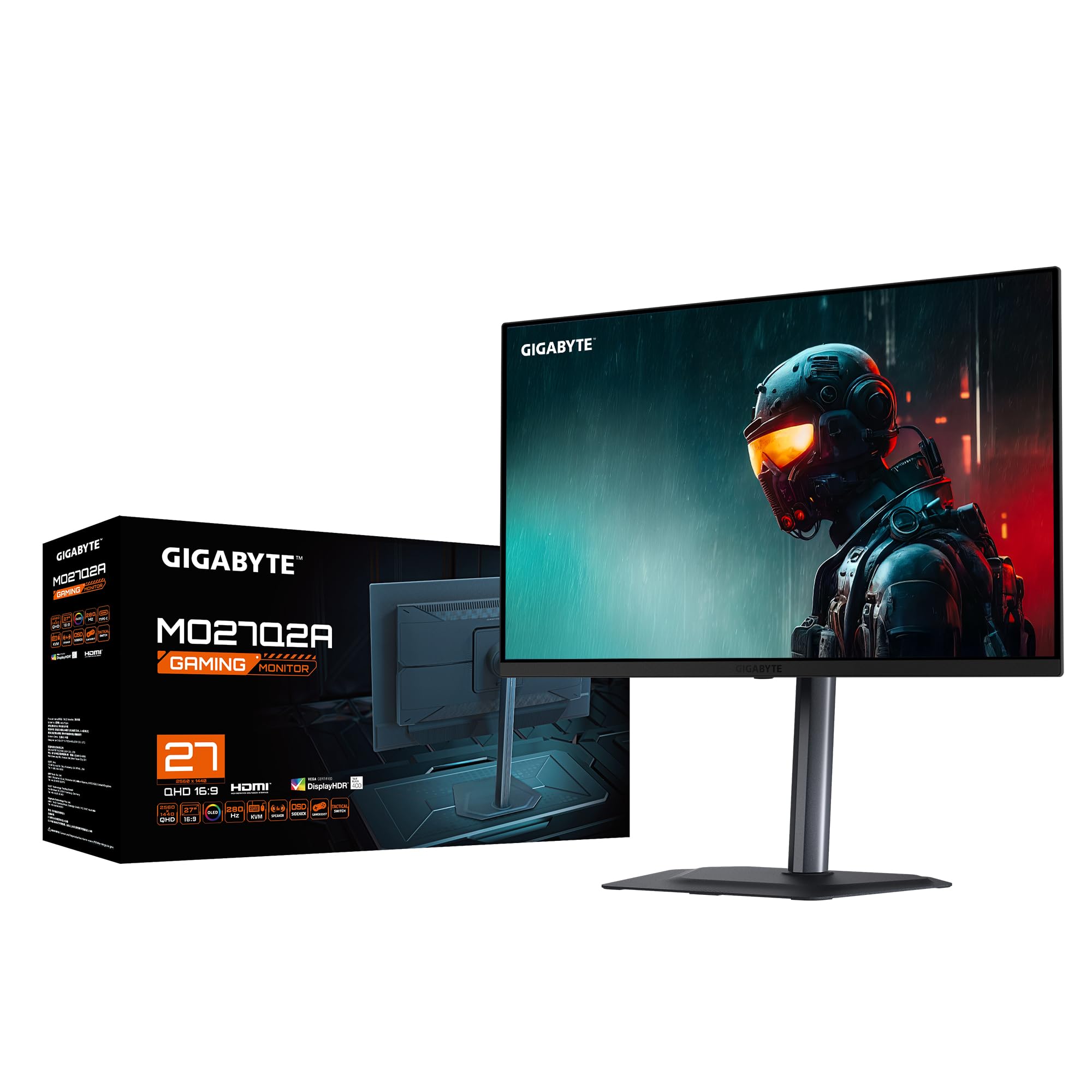
The Gigabyte MO27Q2A is a strong buy in the upper mid-range monitor bracket for anyone whose primary use case is gaming in a controlled lighting environment. The OLED panel delivers contrast performance and motion clarity that no IPS or VA panel at this price can match. The 280Hz refresh rate is genuinely higher than most OLED competition at this resolution, the dual HDMI 2.1 configuration is properly useful rather than a checkbox feature, and the DisplayHDR True Black 400 certification represents real HDR capability rather than the checkbox HDR that afflicts cheaper LCD panels. The positive overall rating from dozens of owners is consistent with a monitor that delivers on its headline specifications.
The limitations are real and should not be glossed over. The 250 cd/m² SDR brightness is low by LCD standards, and the glossy surface means bright rooms are a poor match for this panel. The 400 nit HDR peak is modest if you want cinema-style highlight brightness rather than contrast-driven HDR. Burn-in is a long-term consideration for any OLED panel, and while Gigabyte's management features reduce the risk, static elements displayed for extended periods remain a concern for desktop and productivity use. And the factory calibration out of the box is adequate rather than precise, so spending a few minutes in the OSD settings to find the most accurate colour mode is advisable.
If your room is bright, or if you primarily use your monitor for productivity work with static UI elements for eight or more hours daily, a high-brightness IPS panel or a Mini-LED display makes more practical sense. Something like the AOC AGON AG276QZD offers 1000 nit peak brightness and Mini-LED local dimming at a similar price, which is the smarter buy for bright-room use or if maximum HDR highlight brightness matters more than contrast ratio. But for a gaming-focused setup in a dim room, the MO27Q2A is one of the best-value OLED monitors available in the UK right now. The combination of true infinite contrast, 0.03ms pixel response, and 280Hz at this price point is genuinely difficult to argue with.
What works. What doesn’t.
5 + 4What we liked5 reasons
- Genuine infinite contrast OLED panel at upper mid-range pricing
- 0.03ms pixel response eliminates ghosting that plagues LCD panels
- 280Hz refresh rate leads the QHD OLED category
- Dual HDMI 2.1 ports cover both PC and current-gen console use
- DisplayHDR True Black 400 delivers real HDR contrast, not checkbox compliance
Where it falls4 reasons
- 250 cd/m² SDR brightness is low for bright-room use
- Glossy surface amplifies reflections in uncontrolled lighting
- Long-term burn-in risk with static content and productivity workloads
- Factory colour calibration requires OSD adjustment to reach best accuracy
Full specifications
11 attributes| Panel type | QD-OLED |
|---|---|
| Aspect ratio | 16:9 |
| Curvature | flat |
| HDR | HDR400 |
| Launch year | 2025 |
| Ports | 2x HDMI 2.1, 1x DisplayPort 1.4, 1x USB-C |
| Refresh rate HZ | 280 |
| Resolution | 2560x1440 |
| Response time MS | 0.03 |
| Screen size IN | 27 |
| Vesa compatible | true |
If this isn’t right for you
2 options

Frequently asked
5 questions01Is the Gigabyte MO27Q2A good for gaming?+
Yes, it is one of the strongest gaming monitors in the upper mid-range bracket. The 0.03ms OLED pixel response eliminates the ghosting that affects LCD panels, 280Hz is the highest refresh rate available in the QHD OLED category, and the infinite contrast ratio makes dark environments in games look dramatically better than any IPS or VA panel can produce. FreeSync Premium Pro and G-Sync Compatible certification ensure tear-free performance with both AMD and Nvidia GPUs.
02Does the Gigabyte MO27Q2A have good HDR?+
Better than most monitors in this price range, but with a specific strength and a specific limitation. The DisplayHDR True Black 400 certification means the black level is genuinely zero (OLED pixels switch off), which produces contrast-driven HDR that looks more realistic than LCD panels with higher peak brightness but residual backlight glow. The limitation is the 400 nit peak brightness, which is modest for highlight-heavy HDR content mastered at 1000 nits or above. In dark gaming environments the contrast performance is excellent. For bright outdoor scenes or cinema highlights, a Mini-LED panel with 1000 nit peak brightness will produce more dramatic results.
03Is the Gigabyte MO27Q2A good for content creation?+
Partially. The OLED panel covers DCI-P3 colour space accurately, and the inherent colour fidelity of OLED is strong. The factory calibration out of the box is adequate rather than precise, so using the sRGB preset mode and adjusting colour temperature settings is advisable for colour-accurate work. The wide gamut mode will make sRGB content appear oversaturated, which is wrong for photo editing or video intended for sRGB displays. The 250 cd/m² SDR brightness is also lower than dedicated content creation monitors. For creative work alongside gaming, it is capable with the right mode settings. For professional colour grading, a dedicated calibrated display is a better choice.
04What graphics card do I need for the Gigabyte MO27Q2A?+
To make meaningful use of the 280Hz refresh rate at 2560x1440, you need a high-end GPU. An Nvidia RTX 4070 or AMD RX 7800 XT can push past 200fps in many games at 1440p with settings adjusted, which keeps you in the upper range of the VRR window. For competitive titles like CS2, Valorant, or Overwatch 2 with reduced settings, even a mid-range GPU can approach or exceed 280fps. For graphically demanding titles at maximum settings, 1440p 280fps is a target that requires an RTX 4080 or RX 7900 XTX. The good news is that VRR means even lower frame rates below 280Hz produce a smooth, tear-free image, so you do not need to hit the ceiling to benefit from the panel.
05What warranty and returns apply to the Gigabyte MO27Q2A?+
Gigabyte's published warranty information for monitors should be confirmed directly on their support pages, as warranty terms vary by region. When purchased through Amazon UK, the standard Amazon 30-day return window applies, along with the Amazon A-to-Z Guarantee which covers item condition and delivery. For warranty claims beyond the return window, Gigabyte's UK support is the relevant contact.