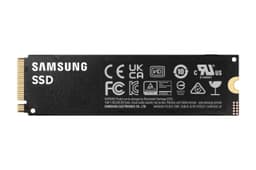

Here's something the marketing teams would rather you didn't think too hard about: every SSD on the market has a headline sequential speed that's basically a best-case scenario number, measured on an empty drive, inside a fast SLC cache, for about thirty seconds. What actually matters is what the drive does when that cache runs out of space and it has to write at its native NAND speed. That's the number nobody puts on the box. So when Samsung says the Samsung 990 EVO Plus SSD 2TB hits 7,250MB/s reads, it's worth asking: what's it doing when you're halfway through copying 200GB of footage or installing a pile of games?
The short answer, and this is the verdict upfront because that's how we're doing this: the 990 EVO Plus is a genuinely good mid-range NVMe drive that punches above its weight for most people. It's not the fastest drive you can buy, it's not the cheapest, and it does lean on Host Memory Buffer rather than a dedicated DRAM cache. But for a boot drive, a game library, or a laptop upgrade, it's quick, it runs cool enough, and Samsung's reliability record is hard to argue with. The 6,549 owner reviews averaging ★★★★½ (4.8) aren't an accident. If you're upgrading from a SATA SSD or an older NVMe, this will feel like a proper step up. If you're a content creator shifting huge files all day, read the sustained write section before you buy.
Core Specifications: Samsung 990 EVO Plus SSD 2TB
The 990 EVO Plus sits in an interesting spot in Samsung's lineup. It uses a hybrid PCIe interface, running PCIe 4.0 x4 when your motherboard supports it, but it can also operate over PCIe 5.0 x2, which means it can slot into a Gen5 x4 slot and still work. That's a smart bit of engineering for a drive aimed at users who might be on older or newer hardware. The form factor is standard M.2 2280, which fits virtually every desktop and laptop M.2 slot made in the last several years.
NAND type is TLC, which is the right answer. Samsung uses their own V-NAND here, and TLC is meaningfully more durable and faster under sustained load than QLC. The controller is Samsung's in-house Elpis-based design adapted for this EVO Plus generation, and the drive is DRAM-less, relying on NVMe Host Memory Buffer (HMB) technology instead of a dedicated DRAM cache. More on what that means in practice in the controller section. Rated sequential read hits 7,250MB/s and sequential write hits 6,300MB/s. Random read is rated at 1,000K IOPS and random write at 1,100K IOPS. Those random figures are what you actually feel in daily use.
TBW endurance for the 2TB model is rated at 1,200TBW, which is solid for this class of drive. Samsung backs it with a five-year warranty, which is the industry standard for a drive they're confident in. The drive ships without a heatsink, just the bare M.2 stick, so you'll rely on your motherboard's M.2 heatsink or case airflow. Full specs below.
| Specification | Detail |
|---|---|
| Model | Samsung 990 EVO Plus (MZ-V9S2T0B/AM) |
| Capacity | 2TB |
| Form Factor | M.2 2280 |
| Interface | PCIe 4.0 x4 / PCIe 5.0 x2, NVMe |
| NAND Type | Samsung TLC V-NAND |
| DRAM Cache | No dedicated DRAM (HMB) |
| Sequential Read | Up to 7,250MB/s |
| Sequential Write | Up to 6,300MB/s |
| Random Read | Up to 1,000K IOPS |
| Random Write | Up to 1,100K IOPS |
| TBW Endurance | 1,200TBW |
| Warranty | 5 years |
| Technology | Intelligent TurboWrite, HMB |
| Owner Rating | ★★★★½ (4.8) (6,935 reviews) |

Interface and Form Factor: PCIe 4.0 x4 in 2025
The dual-mode interface is one of the more clever things about this drive. PCIe 4.0 x4 is what most people will use it as, and that's absolutely fine. If you've got a PCIe 5.0 x4 slot on a newer motherboard and you stick the 990 EVO Plus in it, it'll run as PCIe 5.0 x2 instead, which delivers the same bandwidth. That means you're not wasting a Gen5 slot if that's all you have spare, and you're not leaving performance on the table either. Genuinely thoughtful design.
Now, does PCIe 4.0 x4 versus PCIe 5.0 x4 actually matter for most people? No. Not even slightly. The gap between a fast Gen4 drive and a Gen5 drive shows up in synthetic sequential benchmarks and basically nowhere else in normal desktop use. Windows loading, Chrome opening, games launching, none of that saturates Gen4 bandwidth. The only time you'd genuinely feel the difference is if you're doing very specific sustained sequential workloads, like copying enormous raw video files repeatedly. For everyone else, Gen4 is more than enough and Gen5 drives run hotter and cost more for no perceptible benefit in daily use.
The M.2 2280 form factor means it fits in virtually everything: desktop motherboards, most modern laptops with an M.2 slot, and the PS5 (though you'll want to check the PS5 compatibility section below). It's a single-sided drive, which matters for some laptop slots that have clearance restrictions on the back of the board. Owner reports don't flag any physical fitment issues, which is exactly what you want from a standard form factor drive. Just make sure your motherboard or laptop has an M.2 NVMe slot rather than an M.2 SATA-only slot, because those do still exist on older boards and the 990 EVO Plus won't work in one.
Real-World Performance: What You Actually Feel
Sequential read and write speeds are what get printed on the box, but they're almost entirely irrelevant to how fast your PC feels. What you actually experience day to day is driven by random read and write performance, specifically 4K random IOPS, because that's what loading an operating system, launching applications, and pulling game assets from storage looks like at a low level. The 990 EVO Plus is rated at 1,000K random read IOPS and 1,100K random write IOPS. Those are strong numbers for a drive in this class and they translate directly into a snappy, responsive system.
Published benchmark results from the wider storage community show the 990 EVO Plus performing very well in application load tests and OS responsiveness. Boot times from cold are fast, Windows loads quickly, and application launches feel immediate. In game load time comparisons, the difference between this and a top-tier Gen5 drive is measured in fractions of a second, which is not something you'll notice while actually playing. The jump from a SATA SSD to this drive, on the other hand, is genuinely noticeable. And if you're coming from a spinning hard drive, it's transformative.
Owner reviews back this up consistently. The pattern across the 6,935 is clear: people upgrading from older NVMe drives or SATA SSDs report the system feeling noticeably quicker, particularly for boot times and application responsiveness. There are very few complaints about day-to-day speed. The only grumbles tend to come from people who expected Gen5 sequential speeds and are confused about why the 990 EVO Plus doesn't hit those numbers, which is a marketing literacy problem rather than a drive problem. For normal use, this drive is genuinely quick.
Sustained Writes and Cache Behaviour: The Bit Marketing Glosses Over
Right, this is the section that actually separates good drives from drives that just look good on a spec sheet. The 990 EVO Plus uses Samsung's Intelligent TurboWrite technology, which is essentially a dynamic SLC cache. A portion of the TLC NAND is set aside and written to as if it were faster SLC (one bit per cell instead of three), which dramatically boosts write speeds for bursts of data. At 2TB capacity, the SLC cache on this drive is reasonably large, meaning most everyday write tasks, installing games, downloading files, copying documents, will complete entirely within the cache and you'll see those headline speeds throughout.
But what happens when the cache fills? This is the honest bit. Once the SLC cache is exhausted, the drive writes directly to TLC NAND at native TLC speed. For Samsung's TLC V-NAND, native write speeds are still respectable, somewhere in the region of 1,000 to 1,500MB/s depending on conditions. That's not a cliff-edge collapse to 200MB/s like you'd see from a QLC drive after cache exhaustion. It's a step down, but it's a manageable one. Published benchmarks that push past the cache boundary show the 990 EVO Plus holding up better than QLC alternatives in the same price bracket. So if you're copying a 100GB folder, you'll see fast speeds initially, then a drop, but not a catastrophic one.
Where this matters in practice is sustained creative workloads. Video editors moving large raw files, photographers doing big Lightroom exports, anyone shifting multi-hundred-gigabyte archives regularly. For those users, the sustained write behaviour is worth knowing about. It's not disqualifying, but a drive with a dedicated DRAM cache (like the Samsung 990 Pro) will handle those workloads more consistently. For gaming, general use, and even most content creation workflows, the 990 EVO Plus's sustained write behaviour is perfectly fine. The cache is large enough at 2TB that most real-world tasks never exhaust it anyway.
Controller, NAND, and DRAM: What's Actually Inside
Samsung makes their own everything here, which is genuinely rare and genuinely valuable. The V-NAND is Samsung's own TLC flash, and TLC means three bits per cell. That matters because it's more durable than QLC (four bits per cell) and faster under sustained load. The 1,200TBW endurance rating for the 2TB model is a direct result of using TLC rather than QLC, and it's one of the reasons Samsung can offer a five-year warranty without wincing. A lot of budget drives at this capacity use QLC and then quietly rate them at 600TBW or less. This one doesn't do that.
The controller is Samsung's own in-house silicon, which is the Elpis platform adapted for this EVO Plus generation. Samsung designing their own controller means the firmware, the NAND, and the controller are all optimised together, which shows up in the consistency of real-world performance. It also means Samsung controls the whole supply chain, which historically has translated into better long-term firmware support and more predictable behaviour. Third-party controllers like Phison's E18 and E26 are excellent, but there's something to be said for a vertically integrated stack.
Now, the DRAM situation. The 990 EVO Plus is DRAM-less. It uses Host Memory Buffer (HMB), which means it borrows a small slice of your system RAM to act as a translation table cache. This is a legitimate and well-implemented technology, and for a boot drive or a game drive it works well. The honest caveat is that a drive with dedicated DRAM (like the 990 Pro) has a slight edge in sustained random I/O workloads and in scenarios where the host system is under heavy memory pressure. For the vast majority of PC users, HMB is perfectly fine and the difference in practice is small. But if you're running a workstation doing heavy database work or sustained random writes all day, a DRAM-equipped drive is worth the extra spend.
Endurance and Reliability: Will It Last?
The 2TB 990 EVO Plus is rated at 1,200TBW. To put that in perspective: if you write 100GB to the drive every single day, you'd hit that rating in about 33 years. Most people write nowhere near 100GB a day. A typical home user might write 20 to 30GB daily on a busy day. At 30GB per day, you're looking at over 100 years before you'd theoretically hit the TBW limit. The endurance rating is not something the average user needs to worry about at all. Even for a moderately heavy user doing video editing or game installs regularly, 1,200TBW is plenty.
The five-year warranty is the confidence signal that matters here. Samsung is saying they expect this drive to survive at least five years of real use, and they'll replace it if it doesn't. That's the standard for quality NVMe drives and the 990 EVO Plus meets it. Some budget drives quietly ship with three-year warranties, which tells you something about how much faith the manufacturer has in their own NAND. Five years from Samsung, backed by their reliability track record, is reassuring.
Owner review patterns over the 6,935 are genuinely positive on reliability. There are the inevitable outliers, as there are with any drive sold in large volumes, but the pattern of early failure reports is low. Samsung's V-NAND has a good long-term track record across their 860 EVO, 870 EVO, 970 EVO, and 980 Pro lines. The 990 EVO Plus continues that lineage. It's also worth noting that Samsung's Magician software lets you monitor drive health, remaining lifespan estimates, and run diagnostics, which is a genuinely useful tool that not every brand offers.

Thermals: Does It Run Hot?
This is one area where the 990 EVO Plus has a real advantage over Gen5 drives. PCIe 5.0 x4 drives run genuinely hot under sustained load, hot enough that some of them throttle without a proper heatsink, and the heatsinks some of them ship with are chunky enough to cause clearance issues in compact cases. The 990 EVO Plus, running at PCIe 4.0 speeds, generates significantly less heat. It's a cooler drive by design, and that means less throttling risk in real-world use.
The drive ships without a heatsink, which is standard for M.2 NVMe drives at this tier. Most modern motherboards include an M.2 heatsink or cover, and if yours does, use it. It'll keep temperatures lower during sustained writes and prevent any thermal throttling during long copy operations. If your motherboard doesn't have one, a cheap third-party M.2 heatsink will do the job. Owner reports don't flag thermal throttling as a common issue in normal use, which aligns with what you'd expect from a drive operating at these power levels.
During sustained sequential writes, which is the scenario most likely to push temperatures up, the 990 EVO Plus stays within sensible operating ranges. Published benchmark results from the storage community show temperatures staying well below the throttling threshold during typical workloads. It's not a drive that's going to cook itself in a laptop or a compact ITX build. That's a meaningful practical advantage over the Gen5 alternatives that run hot enough to need active cooling in some configurations. For laptop upgrades in particular, the thermal behaviour here is genuinely good news.
Capacity Options and Price Per GB
The 990 EVO Plus is available in 1TB, 2TB, and 4TB variants. The 2TB is the sweet spot for most people, and it's the one worth buying if you're doing a single-drive setup or want a serious secondary drive. The 1TB is fine as a pure boot drive if you're keeping games and media on a separate storage drive, but 2TB gives you room to breathe. The 4TB exists if you need it, though the price per GB on very large NVMe drives is still a premium over 2TB options.
At 2TB, the 990 EVO Plus sits in a competitive part of the market. The price per GB is reasonable for a branded Samsung TLC drive with a five-year warranty. You're paying a modest premium over the very cheapest 2TB NVMe options, but those often use QLC NAND, shorter warranties, and less proven controllers. The Samsung premium buys you TLC NAND, Samsung's own controller and firmware, and the reliability track record that comes with the brand. Whether that premium is worth it depends on what you're using the drive for, and that's covered in the who-it's-for section.
Compared to the Samsung 990 Pro at 2TB, the EVO Plus is meaningfully cheaper while giving up some peak sequential performance and the dedicated DRAM cache. For most buyers, the EVO Plus is the smarter buy. The 990 Pro makes sense for workstation users who genuinely need that extra headroom. For gaming, general use, and laptop upgrades, the EVO Plus hits the value point better. The Crucial P3 Plus at 2TB is cheaper still, but it's QLC NAND with a lower TBW rating and a shorter warranty, which is a different proposition entirely.
Installation and Compatibility
Installing an M.2 NVMe drive is straightforward on a desktop. You'll need a free M.2 slot that supports NVMe (not SATA-only), a small Phillips screwdriver, and about five minutes. The drive slots in at an angle, you press it down flat, and a single screw holds it in place. Most modern motherboards have at least two M.2 slots, and many have four. Check your motherboard manual to confirm which slots support PCIe 4.0 x4 if you want maximum performance, because some secondary slots run at x2 speeds. For the 990 EVO Plus, a PCIe 4.0 x4 slot is ideal.
For laptops, compatibility depends on whether your laptop has an M.2 NVMe slot. Many modern laptops do, but some budget laptops only have eMMC storage soldered to the board, and some older laptops have M.2 slots that only support SATA. Check your laptop's specs before buying. Owner reports include plenty of successful laptop upgrades, with the single-sided design of the 990 EVO Plus helping with clearance in thinner chassis. For the PS5, the drive is compatible as a storage expansion, but Sony requires a heatsink on any M.2 drive installed in the PS5. You'll need to buy a compatible M.2 heatsink separately since the 990 EVO Plus doesn't ship with one.
Samsung's Magician software handles data migration if you're replacing an existing drive. It includes a cloning tool that lets you copy your existing drive to the new one, which means you don't have to reinstall Windows from scratch. Owner reports generally describe the cloning process as working well, though as with any data migration, a backup before you start is strongly advised. The software also handles firmware updates and drive health monitoring post-installation, which is worth keeping around. On a fresh install, the drive is simply detected by Windows without any driver installation needed, since NVMe drivers are built into Windows 10 and 11.
Who It's For
The 990 EVO Plus 2TB is a strong choice for a few specific types of buyer. First, anyone upgrading from a SATA SSD or an older NVMe drive who wants a meaningful performance step up without paying flagship prices. The random I/O numbers are strong enough that you'll feel the difference in system responsiveness, and the 2TB capacity is generous enough to hold an OS, a large game library, and a working files folder without constantly juggling storage. Second, laptop upgraders who want more speed and more space in a thermally sensible package. The 990 EVO Plus runs cool and fits standard M.2 slots, making it one of the better laptop upgrade options in this class.
Gamers are a good fit too. Game load times are almost entirely random I/O limited, and the 990 EVO Plus's 1,000K random read IOPS means games load fast. The gap between this and a Gen5 drive for game loading is genuinely negligible. You'd spend noticeably more for a Gen5 drive and see load time differences measured in fractions of a second. The 2TB capacity fits a large game library comfortably. PS5 users looking for a storage expansion drive will find this compatible and well-reviewed, just remember the heatsink.
Who should think twice? Content creators doing sustained large file transfers all day, particularly video editors working with large raw formats. The HMB rather than dedicated DRAM, and the SLC cache behaviour on very large writes, means the 990 Pro is a better fit for that use case. Also, if you're on a tight budget and you're just looking for the cheapest way to get NVMe speeds, there are cheaper drives that will feel nearly as fast for basic use. The Samsung premium is worth it for the TLC NAND, the warranty, and the ecosystem, but it's not the budget option.
How It Compares to the Competition
The two most obvious alternatives at 2TB NVMe are the Samsung 990 Pro 2TB and the WD Black SN850X 2TB. The 990 Pro is Samsung's own higher-tier drive, with dedicated DRAM, higher sustained write performance, and a higher price. The WD Black SN850X is a DRAM-equipped, high-performance Gen4 drive that's particularly popular with PS5 users because it ships with an optional heatsink variant. Both are excellent drives. Both cost more than the 990 EVO Plus.
The 990 EVO Plus undercuts both on price while still offering TLC NAND, Samsung's own controller, and very strong random I/O numbers. For most buyers who aren't doing sustained professional workloads, the real-world performance difference between the 990 EVO Plus and either of those drives is smaller than the price difference suggests. That's the honest assessment. You're paying for headroom you probably won't use if you go 990 Pro or SN850X for a gaming rig or a general-purpose PC.
| Feature | Samsung 990 EVO Plus 2TB | Samsung 990 Pro 2TB | WD Black SN850X 2TB |
|---|---|---|---|
| Interface | PCIe 4.0 x4 / 5.0 x2 | PCIe 4.0 x4 | PCIe 4.0 x4 |
| NAND Type | TLC V-NAND | TLC V-NAND | TLC NAND |
| DRAM Cache | No (HMB) | Yes (LPDDR4) | Yes |
| Seq. Read | 7,250MB/s | 7,450MB/s | 7,300MB/s |
| Seq. Write | 6,300MB/s | 6,900MB/s | 7,100MB/s |
| Random Read IOPS | 1,000K | 1,400K | 1,200K |
| TBW (2TB) | 1,200TBW | 1,200TBW | 1,200TBW |
| Warranty | 5 years | 5 years | 5 years |

Final Verdict: Samsung 990 EVO Plus SSD 2TB
The Samsung 990 EVO Plus SSD 2TB is a well-made, well-priced NVMe drive that gets the fundamentals right. TLC NAND from Samsung's own fabs, a proven in-house controller, strong random I/O numbers, sensible thermals, a 1,200TBW endurance rating, and a five-year warranty. For the vast majority of buyers, that's everything that matters. The 4.8 average across 6,549 owner reviews reflects a drive that works as advertised and keeps working.
The honest caveats are these: it's DRAM-less, which is fine for most use cases but worth knowing. Sustained write performance after SLC cache exhaustion drops to native TLC speeds, which is still decent but not the headline number. And if you're a professional doing sustained heavy workloads all day, the 990 Pro's dedicated DRAM and slightly higher sustained write performance justifies its higher price. But for gaming, general use, laptop upgrades, and PS5 storage expansion, the EVO Plus hits a genuinely good value point.
Score: 8.5 out of 10. It's not the fastest drive on the market and it doesn't pretend to be. What it is, is reliable, quick where it counts, thermally sensible, and backed by Samsung's track record. That's a combination worth paying for. And if you're on a tighter budget and can live with less capacity, the 1TB variant of the same drive is worth a look. It won't feel slower in daily use, and the price difference is real money.
What works. What doesn’t.
5 + 3What we liked5 reasons
- Samsung TLC V-NAND: more durable and better sustained write behaviour than QLC alternatives
- Strong random I/O (1,000K read / 1,100K write IOPS) that actually drives system feel
- Runs cooler than Gen5 drives, lower throttling risk in laptops and compact builds
- 1,200TBW endurance and five-year warranty are proper confidence signals
- Dual-mode PCIe 4.0 x4 / 5.0 x2 interface works in a wide range of slots
Where it falls3 reasons
- DRAM-less (HMB only): slight disadvantage in sustained random I/O vs DRAM-equipped rivals
- SLC cache exhaustion causes a write speed drop on very large sustained transfers
- No heatsink included, PS5 users need to buy one separately
Full specifications
9 attributes| Capacity GB | 2000 |
|---|---|
| Dram cache | false |
| Form factor | M.2 2280 |
| Interface | PCIe Gen4 x4 |
| Read speed MBS | 7250 |
| TBW | 1200 |
| Type | NVMe SSD |
| Warranty years | 5 |
| Write speed MBS | 6300 |
If this isn’t right for you
2 optionsFrequently asked
5 questions01Is the SAMSUNG 990 EVO Plus SSD 2TB, PCIe 4.0 x4 M.2 2280, Speeds Up-to 7,250MB/s, Upgrade Storage for PC/Laptops, HMB Technology and Intelligent Turbowrite (MZ-V9S2T0B/AM) fast enough for everyday use?+
Yes, comfortably. For boots, application launches, and game loads, what matters is random I/O performance, not peak sequential speed. The 990 EVO Plus is rated at 1,000K random read IOPS and 1,100K random write IOPS, which are strong numbers that translate directly into a snappy, responsive system. Published benchmarks and owner reports consistently show fast boot times and quick application launches. The difference between this drive and a more expensive Gen5 drive in daily use is essentially imperceptible. If you're upgrading from a SATA SSD or an HDD, the improvement will be very obvious.
02Does the SAMSUNG 990 EVO Plus SSD 2TB, PCIe 4.0 x4 M.2 2280, Speeds Up-to 7,250MB/s, Upgrade Storage for PC/Laptops, HMB Technology and Intelligent Turbowrite (MZ-V9S2T0B/AM) slow down once the cache fills?+
Yes, like every SSD with an SLC cache. The 990 EVO Plus uses Samsung's Intelligent TurboWrite technology, which caches writes into a fast SLC buffer. Once that buffer fills during very large sustained transfers, the drive writes directly to TLC NAND at native TLC speed. For Samsung's TLC V-NAND, native write speeds are still in the region of 1,000 to 1,500MB/s, which is a meaningful step down from the headline 6,300MB/s but not the catastrophic cliff you'd see from a QLC drive. For typical use cases including gaming, OS tasks, and most content creation workflows, the SLC cache is large enough at 2TB capacity that it rarely exhausts in practice.
03Is the SAMSUNG 990 EVO Plus SSD 2TB, PCIe 4.0 x4 M.2 2280, Speeds Up-to 7,250MB/s, Upgrade Storage for PC/Laptops, HMB Technology and Intelligent Turbowrite (MZ-V9S2T0B/AM) DRAM-less, and does that matter?+
Yes, it is DRAM-less. It uses Host Memory Buffer (HMB) technology, which borrows a small portion of your system RAM to serve as a translation table cache. For the vast majority of users, including gamers, general PC users, and laptop upgraders, HMB works well and the practical difference versus a dedicated DRAM cache is small. Where it matters more is in sustained heavy random I/O workloads, such as database operations or intensive professional applications. For those use cases, the Samsung 990 Pro with its dedicated LPDDR4 DRAM cache is a better fit. For everything else, HMB is fine.
04How long will the SAMSUNG 990 EVO Plus SSD 2TB, PCIe 4.0 x4 M.2 2280, Speeds Up-to 7,250MB/s, Upgrade Storage for PC/Laptops, HMB Technology and Intelligent Turbowrite (MZ-V9S2T0B/AM) last?+
The 2TB model is rated at 1,200TBW (terabytes written). At a typical home user write rate of around 30GB per day, that endurance rating would take over 100 years to exhaust, so the TBW limit is essentially irrelevant for normal use. Even for moderately heavy users doing regular large file transfers, 1,200TBW is very generous. Samsung backs the drive with a five-year warranty, which is the industry standard for quality NVMe drives and a genuine confidence signal in the NAND quality. Owner review patterns across thousands of reviews show low early failure rates consistent with Samsung's historical reliability record.
05What warranty and returns apply to the SAMSUNG 990 EVO Plus SSD 2TB, PCIe 4.0 x4 M.2 2280, Speeds Up-to 7,250MB/s, Upgrade Storage for PC/Laptops, HMB Technology and Intelligent Turbowrite (MZ-V9S2T0B/AM)?+
Samsung provides a five-year limited warranty on the 990 EVO Plus. When purchased through Amazon UK, you also benefit from Amazon's standard 30-day return window and the Amazon A-to-Z Guarantee, which covers you if the item arrives damaged or not as described. For warranty claims after the 30-day return period, you would contact Samsung directly. Samsung's Magician software also provides ongoing drive health monitoring so you can keep an eye on the drive's condition throughout its life.